· Digital Footprint Check · Content Marketing · 20 min read
How to Remove Personal Information From Google
A complete guide on how to remove personal information from Google search. Learn practical steps to protect your privacy and clean up your digital footprint.

Finding your own phone number, address, or an old comment on a random website is unsettling. The question that follows is how to remove personal information from Google and regain control. It’s about protecting yourself from identity theft, harassment, and tracking, not just privacy.
Your Digital Footprint and Why It Matters
Your digital footprint is the trail you leave every time you go online: social posts, forum comments, public records, and data from tracking cookies. It’s your online shadow.
The trail isn’t always bad, but when it holds sensitive details, the risks grow. Unwanted exposure can affect your safety and reputation.
The Real Risks of an Exposed Digital Footprint
A public home address puts your family at risk. An exposed phone number invites spam or harassment. A comment you made as a teenager can resurface and cost you a job.
These risks are real. People deal with them every day:
- Identity Theft: Data brokers scrape and sell your personal info, making it easy for criminals to piece together your identity and open accounts in your name.
- Doxxing and Harassment: Someone can publish your private information online (doxxing), leading to threats and real-world confrontations.
- Reputational Damage: Employers, clients, and new friends search for you. What they find, or misinterpret, shapes their opinion.
- Financial Scams: Scammers use details they find online to craft convincing and personalized phishing attacks that are way harder to spot than generic spam.
Taking Back Control
Managing your online presence is possible. You can’t erase your footprint, but you can shrink your exposure and reduce the risks.
Searches for ‘how to delete Google history’ have risen 47% in recent years, a sign of growing demand for privacy. The problem is, most people don’t know where to start.
Taking control starts with understanding what’s out there. The first step in any cleanup effort is a thorough audit of your online presence to identify exactly where your information appears and what needs to be addressed.
With AI becoming a bigger part of our lives, it’s also crucial to understand how your data is being used to train new models. You can check your digital footprint in the age of AI to get a handle on these new challenges.
Running a personal online audit is the essential first step. It gives you a clear, targeted plan. For more specific guidance, our guide on https://www.digitalfootprintcheck.com/digital-cleanse-how-to-conduct-a-personal-online-audit walks you through it. This process is all about moving from a place of anxiety to one of proactive defense.
Using Google’s ‘Results About You’ Tool

Google gets that finding your personal info floating around online is stressful. To help, they created the ‘Results About You’ dashboard—your first line of defense for getting a handle on what pops up in a search.
Think of it as your own personal command center. Instead of wading through endless forms, this tool gives you one central place to see which of your personal details have been found online, request their removal, and track the status of those requests. It flips the script from you having to constantly hunt for your data to simply reviewing and approving removal requests when Google finds them for you.
How the Dashboard Works
Getting started is surprisingly simple. You can find the ‘Results About You’ tool right in your Google Account settings, or just by searching for it. Once you’re in, you just need to tell Google what specific bits of information you want it to look for.
This usually includes details like:
- Your full name
- Home or mailing address
- Phone number(s)
- Email address(es)
When the system spots a search result with this data, it flags it on your dashboard. From there, you can check out the link and, with a couple of clicks, fire off a removal request. The dashboard keeps a running tab on everything—pending, approved, or denied—so you’re never left wondering where things stand.
What You Can Actually Get Removed
Google’s policy is pretty specific about what kind of personally identifiable information (PII) it will remove. They focus on data that poses a direct risk of identity theft, financial fraud, or other real-world harm.
Information that’s typically eligible for removal includes:
- Confidential IDs: Things like your Social Security number or other national ID numbers.
- Financial Details: Bank account and credit card numbers are at the top of the list.
- Personal Contact Info: Your home address, phone numbers, and private email addresses.
- Login Credentials: Any exposed usernames and passwords you find.
- Sensitive Images: This covers non-consensual explicit photos or images of minors.
It’s crucial to have realistic expectations here. Google reviews every request. They’re far more likely to approve removing a webpage that lists your private phone number than a news article that just happens to mention your name.
One critical thing to remember: This tool only removes the link from Google’s search results. It does not delete the information from the original website. The data is still out there on the source page; it’s just much harder for people to find through a Google search.
Knowing the Tool’s Limits
The ‘Results About You’ dashboard is a huge step forward for personal privacy, but it only works within Google’s world. It can’t touch the thousands of data brokers that collect, package, and sell your information on the open market.
That data broker industry is projected to hit a staggering $441.4 billion by 2032, which shows just how big this problem really is. For anyone with a more complicated online history, Google’s tool is just one piece of the puzzle. This is exactly why professional data removal services exist—they go after the problem at the source. You can dig deeper into this challenge at Cloaked.com.
Ultimately, learning how to scrub your personal information from Google starts with the tools they give you. The ‘Results About You’ dashboard is an excellent, user-friendly starting point for anyone looking to shrink their digital footprint and feel a bit safer online.
Getting Your Info Taken Down from the Source
Using Google’s own tools to get a search result de-indexed is a solid first move, but it’s really important to know what that actually does. Think of it as hiding the path to the information, not destroying the information itself. Your data—whether it’s your phone number, an old cringey forum comment, or your home address—is still alive and well on the original website.
To scrub your personal info from the web, you have to go straight to the source. It’s like this: Google is just the map. The website is the destination. You’ve convinced the mapmaker to erase a road, but the house at the end of that road is still standing. The real goal is to get the house torn down.
First, Play Detective: Find the Source and a Contact
Your first job is to figure out who actually owns the website where your data is posted. This could be anything from a personal blog, a community forum, a local news outlet, or one of those shady data broker sites. Your approach will change depending on what you’re up against.
Start by hunting for a “Contact Us,” “About Us,” or “Privacy Policy” page. You’ll usually find these tucked away in the website’s footer. The prize you’re looking for is an email address for the webmaster, site administrator, or editorial team. If you can’t find a direct email, a contact form is your next best bet.
But sometimes, especially with smaller or older sites, it’s not that easy. If you hit a dead end, you can try a WHOIS lookup tool. These services can sometimes pull up the registered owner of a domain and their contact info, though be warned—many people use privacy services to keep these details hidden.
How to Write a Removal Request That Actually Works
Once you’ve got a contact, how you phrase your request is everything. A polite, clear, and direct email is always going to get a better response than an angry or demanding one. It’s easy to forget, but in many cases, you’re just asking another person to take time out of their day to help you out.
Here’s a simple structure that I’ve found works really well:
- Write a Clear Subject Line: Use something direct like “Request to Remove Personal Information” or “Privacy Concern Regarding Your Content.”
- Be Polite and Direct: Briefly introduce yourself and get straight to the point of your email.
- Give Them the Exact Details: Provide the exact URL of the page where your information appears. Don’t make them search for it. Pinpoint the specific data you want removed (e.g., “my full name and home address listed in the third paragraph”).
- Explain Why (Optional, but helps): You can add a brief, non-dramatic reason. Simple phrases like “This is causing me personal distress” or “This was posted when I was a minor” can add some powerful context without getting overly emotional.
- End on a Courteous Note: Always thank them for their time and consideration.
Keep your request professional and to the point. Avoid emotional language or threats. The person reading it likely had nothing to do with posting the information and is much more likely to help someone who is respectful.
A classic real-world example is finding an old comment you left on some now-abandoned blog when you were a teenager. These can be maddening, because the blog owner might be impossible to track down. Persistence is your best friend here. Document every attempt you make to contact the owner, as this paper trail can be valuable if you need to escalate the issue later.
Tailoring Your Approach for Different Websites
Not all websites play by the same rules, so you’ll need to adapt your strategy. A personal blogger might be understanding, while a big data broker will likely make you jump through a series of hoops designed to make you give up.
It’s helpful to have a game plan based on who you’re dealing with.
Information Removal Approach by Website Type
| Website Type | Primary Action | Key Challenge | Success Tip |
|---|---|---|---|
| Personal Blogs & Forums | Direct email request to the site owner or moderator. | The site may be old or unmaintained, making contact difficult. | Be polite and persistent. Frame your request around personal safety. |
| News & Media Outlets | Contact the editorial department or use a formal correction/removal form. | They often have strict policies against removing published articles. | Focus on factual inaccuracies or extreme personal hardship. An update or redaction is more likely than a full removal. |
| Data Brokers | Use their official opt-out forms and procedures. | These processes are often intentionally confusing and multi-stepped. | Follow their instructions to the letter and be prepared to verify your identity. Check back to ensure the removal sticks. |
| Social Media | Use the platform’s built-in reporting and privacy tools. | Content may be reposted by others, requiring multiple requests. | For a deep dive, consider a guide on a thorough social media clean-up to curate a positive image. |
Successfully getting your information removed from a source website is a huge victory. Once it’s gone for good from the site, you can circle back to Google and use their “Remove outdated content” tool to request a refresh. This final step tells Google to update its index, making sure the old search result disappears for good.
Taming Your Google Activity Data
It’s easy to focus on what third-party websites have on you, but let’s be honest: a huge chunk of the personal data Google has comes directly from us. Every search query, every YouTube rabbit hole, and every location you’ve visited with your phone in your pocket adds another entry to a massive, personalized logbook.
This part of the process is all about proactive privacy hygiene. We’re going to dive into your Google Account to manage, delete, and control this data right at the source. Think of it less as hiding from Google and more about minimizing the data trail that could one day be exposed or misused. It’s about stopping the data leak before it even starts.
This visual guide is a great starting point for figuring out where to begin, whether you need to contact a site directly or find a specific opt-out page.
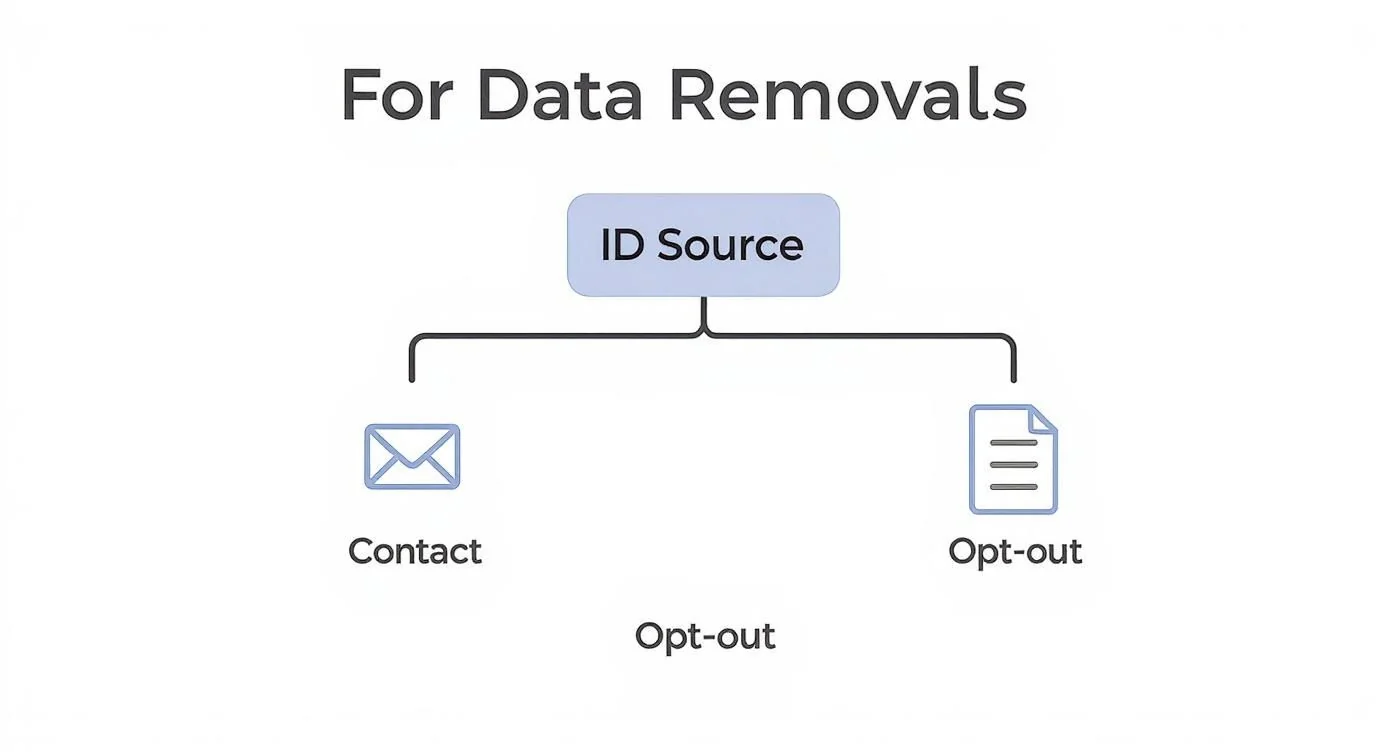
The decision tree above helps you make that first move. It simplifies your plan of attack based on where the information is coming from, pointing you down the most effective path right away.
Getting a Handle on Your Activity Controls
Your Google Account has a command center for this data, primarily within the “My Ad Center” and “My Activity” sections. This is ground zero. Here, you can see a running timeline of pretty much everything you’ve done while logged in.
Your activity is sorted into three main buckets:
- Web & App Activity: This is the big one. It logs your Google searches, the websites you visit in Chrome, the apps you use on Android, and other little interactions across Google’s services.
- Location History: If this is turned on, Google creates a private map of everywhere you go with your devices. It logs your location even when you aren’t actively using Google Maps.
- YouTube History: Pretty straightforward—this keeps a record of every video you’ve watched and everything you’ve searched for on YouTube.
Each of these categories is a rich source of personal information. Your search history alone can paint a startlingly accurate picture of your health issues, political views, or financial worries. Your location history can easily map out your home address, your daily commute, and your favorite coffee shop.
Manually Wiping Your Past Activity
Alright, let’s get our hands dirty and clear out this backlog of data. You can find all these settings by heading to your Google Account and clicking on the “Data & privacy” tab in the sidebar.
Once you’re there, find the “History settings” box. You’ll see the three main categories we just talked about: Web & App Activity, Location History, and YouTube History. You have to manage each one individually.
Click into one, and you’ll find options to view and delete your past activity. You can get granular and delete things one by one, wipe out specific date ranges, or just nuke the entire history at once.
Hitting that “delete all time” button is like a powerful privacy reset. It instantly erases years of accumulated digital breadcrumbs, giving you a clean slate to work from.
The scale of the data we’re talking about is mind-boggling. Google processes over 99,000 search queries every second. Its index of the web is larger than 100,000,000 gigabytes. These numbers, highlighted in Google search statistics on Semrush.com, show just how fast our personal data can pile up and why regular cleanups are so crucial.
Set It and Forget It with Auto-Delete
Deleting your history manually is a great first step, but who has time to do that every few months? This is where the real magic happens: setting up auto-delete. This feature turns privacy management from a reactive chore into an automated defense system that works for you 24/7.
Inside the settings for each activity category, look for the auto-delete option. You can tell Google to automatically and permanently delete any activity older than:
- 3 months
- 18 months
- 36 months
Choosing 3 months is the best move for your privacy. It strikes the perfect balance. Google gets to keep just enough recent data to make its services useful (like remembering recent searches or navigating to your mom’s house), but it automatically purges the older, more sensitive stuff without you lifting a finger.
This simple “set it and forget it” action is one of the most impactful things you can do to shrink your digital footprint within Google’s world. It ensures your data history stays short, relevant, and far less revealing over the long haul.
Advanced Strategies for Ongoing Privacy Protection
Getting your personal information scrubbed from Google is a huge win, but I have to be honest—it’s not the finish line. The internet is a living thing, constantly changing with new data brokers and websites popping up out of nowhere. True digital privacy isn’t a one-and-done project. It’s an ongoing practice of vigilance and proactive defense.
The key is to shift your mindset from a reactive cleanup to a proactive strategy. This means setting up systems to keep an eye on your digital footprint automatically and just being smarter about the data you share from this point forward. It’s all about building a more private, resilient online presence for the long haul.
Set Up Your Own Digital Alarms
One of the simplest yet most powerful tools for this is Google Alerts. It’s a free service that acts as your personal watchdog, scanning the web for mentions of specific keywords and shooting you an email when it finds something new.
Think of it as your own early warning system. By creating alerts for your personal info, you can catch new data exposures almost as soon as Google indexes them. This lets you jump on a removal request before that information has a chance to spread.
I recommend setting up alerts for these key pieces of data:
- Your full name: Use quotation marks (e.g., “Jane Doe”) to get exact matches.
- Your name plus your city: For instance, “Jane Doe” “New York” helps narrow things down.
- Your phone number: Create alerts for different formats, both with and without dashes.
- Your home address: Again, use quotes for an exact match to reduce noise.
- Your email address(es): Don’t forget to monitor all personal and professional emails you use.
When an alert hits your inbox, you can quickly see the source. Is it a new data broker profile? A comment you left on a public forum years ago? Knowing right away gives you the power to act fast.
Should You Hire a Professional Data Removal Service?
While you can do this yourself with manual requests and Google Alerts, it can become a serious time sink. For many people, the sheer volume of data splattered across hundreds of data broker sites is just plain overwhelming. This is where professional data removal services enter the picture.
These companies are specialists in hunting down and removing your personal info from the web. They already have established processes for dealing with the biggest data brokers and know all the tricks to navigate those intentionally confusing opt-out pages.
Professional services automate the tedious, frustrating process of sending removal requests to dozens, or even hundreds, of data brokers. Their real value is in their persistence and ongoing monitoring—they keep re-scanning for your data to make sure it stays gone.
But a word of caution: not all services are created equal. A reputable service will be transparent about its process, pricing, and what it can realistically do. Be very wary of any company promising to erase you from the internet; that’s an impossible claim. Before you sign up for anything, do your research. You can find a detailed breakdown of the top personal information removal services and how they stack up.
Creating a More Private Online Persona
Honestly, the best defense is a good offense. The final piece of your long-term privacy strategy is to change how you interact online to minimize the data you create in the first place. It’s all about building better privacy habits.
A great place to start is with email aliases. Instead of using your main email address for every newsletter, online store, or new account, use a dedicated alias service. This masks your real email, making it much harder for companies to track you across different platforms and protecting your primary inbox from spam and data breaches.
Start thinking critically about your digital sharing habits. Before posting a photo, check if it contains location data (EXIF data). When signing up for a new app, only provide the absolute minimum information required. The less you share voluntarily, the less you have to worry about protecting later. For a more holistic look at safeguarding your information, you can explore comprehensive guides on data privacy compliance.
Ultimately, learning how to remove personal information from Google is just the beginning. The real goal is to build a sustainable privacy framework that protects you today and can adapt to whatever challenges come next.
Common Questions Answered
When you start digging into the world of online privacy, a lot of questions pop up. It’s a confusing space, but I’ve been helping people navigate it for years. Here are some straightforward answers to the questions I hear most often.
How Long Does It Take for Information to Be Removed?
This is the big one, and honestly, the answer is “it depends.” If you’re using Google’s own “Results About You” tool for something straightforward, you could see a decision in just a few days. Once Google approves it, the link can vanish from search results almost instantly.
But if you’re reaching out to a website owner directly, the timeline gets a lot murkier. Some webmasters are fantastic and will remove the content within 24 hours. Others might take weeks to get back to you, and a frustrating number will simply never reply. Patience and polite, persistent follow-ups are your best friends here.
What if the Website Owner Ignores My Request?
It’s frustrating, but it happens all the time. You’ll often run into this with old, unmaintained blogs or ancient forum posts. If your emails and contact forms are met with silence, don’t give up just yet.
First, document every attempt you make to contact them. Keep a log of dates, times, and the methods you used. This paper trail can be valuable down the line. Second, if the content is especially harmful or involves information posted when you were a minor, you might have a stronger case for removal. Some states have specific digital privacy laws designed to protect minors.
A classic scenario is finding an old, embarrassing comment you left on a blog that’s now abandoned. The owner is MIA, and Google will likely require a court order to step in. In these cases, your best move is to focus on getting the link de-indexed from search results, even if you can’t get the source content taken down.
Can I Completely Erase Myself from Google?
The short answer is no. Complete digital invisibility just isn’t realistic in this day and age. The real purpose of learning how to remove personal information from Google isn’t total erasure—it’s about regaining control and drastically reducing your public exposure.
Your goal should be to scrub the most sensitive and damaging information first. Think home addresses, phone numbers, and financial details. By minimizing your overall digital footprint, you can make it harder for the average person to find out anything about you. That’s a huge win for your personal privacy and safety.
What Is the Difference Between De-Indexing and Deletion?
Understanding this distinction is critical. They sound similar, but they are worlds apart.
- De-indexing is when Google removes a specific URL from its search results. The actual webpage still exists on the original website, but people won’t be able to find it through a Google search anymore. This is what Google’s “Results About You” tool accomplishes.
- Deletion is when the information is permanently wiped from the source website. The page is gone forever. Only the website’s owner or administrator can do this.
True, permanent removal is a two-step process: you get the data deleted from the source website, and then you make sure the now-dead link gets de-indexed from Google. Always, always aim for deletion first—it’s the only permanent solution.
Ready to take control of your digital footprint? The first step is understanding what’s out there. Digital Footprint Check provides a comprehensive report of your online presence, flagging risks and giving you actionable steps to protect your privacy. Start your free scan today at https://www.digitalfootprintcheck.com.


