· Digital Footprint Check · Content Marketing · 19 min read
Clean Up Social Media for Job Search: Protect Your Career
Learn how to clean up social media for job search by auditing profiles, removing red flags, and building a professional online presence that attracts recruiters.
Before you even think about hitting "apply" on a job application, you need to take a hard look at your social media. It's time to clean up your social media for job search success. This means auditing your public profiles, getting rid of any questionable content, and locking down your privacy settings to make sure you're the one telling your story to recruiters. A polished online presence can be the thing that tips the scales in your favor, protecting your job prospects from the real-world impact of a negative digital footprint.
Your Digital Footprint Is a Recruiter's First Impression
Think of your social media profiles as the digital handshake you make with a hiring manager long before you ever meet them. It's often their first real look at who you are, shaping their opinion before they even get to the second page of your resume. One bad post from your college days can easily overshadow a decade of solid professional experience, a real-world example of how your online identity can affect your career.
This isn't just some made-up scare tactic. It's a reality of modern hiring. Highly qualified people get passed over all the time because of a forgotten photo album, an old argument in a comment section, or a polarizing opinion they shared without thinking. The key is to see this not as a chore but as essential online reputation management. A clean digital footprint isn't just about dodging rejection; it's about actively building an online story that backs up your career goals and protects your professional identity.
Why Your Online Presence Matters More Than Ever
The numbers don't lie. In today's competitive job market, a staggering 94% of recruiters regularly check social media profiles to find and vet candidates. A 2020 CareerBuilder survey found that 7 out of 10 employers use social networking sites to research job candidates, and 57% have found content that caused them not to hire someone.
This means what you do online has a direct, measurable impact on whether you get hired. If you let your digital presence run wild, you're leaving your professional reputation up to whatever a quick Google search digs up. To really get a handle on how recruiters think, it's worth diving into the talent acquisition best practices that guide their entire evaluation process.
Taking Control of Your Narrative
The goal here is to present a professional and consistent version of yourself across any platform a recruiter might find. This doesn't mean you have to erase your personality—it just means you need to curate it. If you want to know more about what employers are actually looking for, check out our guide on the impact of your digital footprint on job opportunities.
A proactive approach to your online reputation management transforms you from a passive candidate into a strategic professional. You're not just hiding the negative; you're highlighting the positive, ensuring recruiters see the best version of you.
Here’s a quick look at what a free, initial check might dig up about your public data.
A report like this is your starting point. It shows you exactly what a recruiter or an OSINT (Open-Source Intelligence) tool can find, often revealing exposed accounts and bits of data you forgot existed. Ready to see your own report? Get a free scan at www.digitalfootprintcheck.com/free-checker.
How to Conduct a Thorough Social Media Audit
Before you can start cleaning house, you need to know exactly what's in it. A real social media audit isn't just a quick scroll through your recent posts; it's about putting on a detective hat and systematically digging up every piece of your digital history a recruiter could possibly find. This is a practical first step in digital identity protection.
It’s not just your main profiles. We’re talking about the digital ghosts—the forgotten accounts, old forum comments, and tagged photos that could unexpectedly sabotage your job search. Many people are shocked to find traces of their digital lives on platforms they haven't touched in a decade, a common pitfall in personal cybersecurity.
Building Your Digital Inventory
The first move is to create a simple inventory. A basic spreadsheet is perfect for this.
Start by listing every social media account you can remember. Then, it's time to go digging for the ones you’ve forgotten. This methodical approach is the only way to make sure nothing slips through the cracks.
Your audit needs to cover:
- Major Social Networks: Think Facebook, X (formerly Twitter), Instagram, LinkedIn, TikTok, and Pinterest.
- Older or Niche Platforms: What about that old Myspace or Tumblr? Any industry-specific forums or even gaming profiles on platforms like Steam or Discord you joined years ago?
- Public Comments: Comments you've left on news sites, blogs, YouTube videos, or public Reddit threads are often easily searchable.
- Tagged Content: This is a big one. Photos and posts where friends have tagged you can show up in searches, even if your own profile is locked down tight.
The goal here is to create a complete map of your public-facing data. While you can do this manually, it's a huge time sink. Automated tools can give you a massive head start.
Think Like a Recruiter
Recruiters don’t just glance at your feed; they're trying to build a picture of your entire digital persona. They're looking for professionalism, good judgment, and cultural fit.
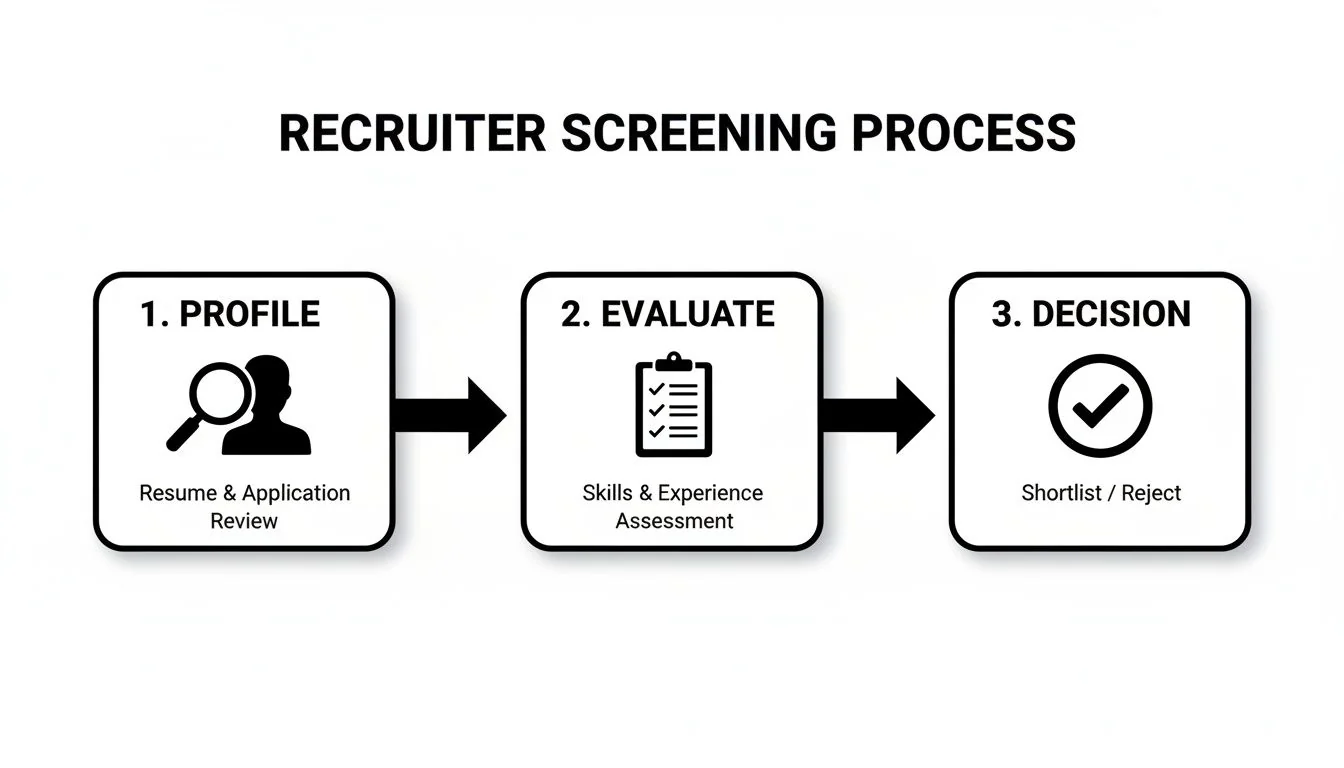
This is the typical screening flow they follow, moving from a high-level profile review to a more detailed evaluation before making a call.
As you can see, every public element—from your profile picture to the accounts you follow—plays a role in the impression you make.
To see what a hiring manager sees, you have to search for yourself the way they would. Open an incognito or private browser window. This stops your personal search history from skewing the results and gives you a raw, unfiltered look at your public reputation.
Search for a few different variations:
"Firstname Lastname""Firstname Lastname" + your city"Firstname Lastname" + your industry or a former company- Any old usernames or online handles you've used
Use this quick-reference guide to pinpoint what to look for when auditing your main social media profiles for job-search readiness.
Social Media Audit Checklist By Platform
| Platform | Key Areas to Review | Recommended Action | Real-World Impact |
|---|---|---|---|
| Profile photo, headline, summary, work history, skills, endorsements, public posts, and comments. | Optimize for professionalism. Ensure photo is a clear headshot. Headline should reflect your career goal. Check for consistency with your resume. Remove any unprofessional or controversial activity. | A strong profile directly boosts job prospects by attracting recruiters. | |
| Profile picture, cover photo, "About" section, public posts, tagged photos, group memberships, and page likes. | Lock down privacy. Review your public information and limit visibility. Untag yourself from unprofessional photos. Audit liked pages and groups for anything that could be misinterpreted. | Prevents personal life details from negatively impacting a professional evaluation. | |
| X (Twitter) | Profile picture, bio, tweets, retweets, replies, and liked tweets. The "Likes" tab is public by default. | Cleanse your feed. Search your own tweets for keywords related to controversial topics. Unlike any tweets that don't align with your professional brand. Ensure your bio is professional. | Avoids disqualification due to polarizing opinions or poor judgment. |
| Profile photo, bio, public posts, tagged photos, and followed accounts. | Curate your visual brand. Consider setting your profile to private during a job search. If public, remove any inappropriate photos or videos. Review who you're following. | Manages visual first impressions, crucial for roles in creative or public-facing fields. | |
| TikTok | Public videos, liked videos, bio, and profile picture. | Assess for risk. Remove any videos that show poor judgment or unprofessional behavior. Remember that your "liked" videos can sometimes be visible to others. A private profile is safest. | Protects against viral content that could permanently damage your reputation. |
| Public comments, post history, and subreddit subscriptions. | Check for anonymity breaks. Review your entire comment and post history. Delete anything that links your anonymous handle to your real name or contains unprofessional, offensive, or controversial opinions. | Prevents de-anonymization that could link controversial views to your professional identity. |
Remember, this audit is the foundation of your entire online reputation strategy. Without a complete inventory, you're flying blind and leaving your professional image up to chance.
This deep dive can be an eye-opening experience. For a more detailed walkthrough, check out our complete guide on how to conduct a personal online audit. Once you have your full inventory, you’ll be ready to move on to analyzing the content and starting the cleanup.
Finding and Removing Red Flag Content
Okay, you’ve done the audit. Now you're staring at a raw inventory of your entire online life, and it’s time to shift from investigator to curator. The next phase of your mission to clean up social media for your job search involves looking at everything through a recruiter’s skeptical eyes.
What you see as a harmless inside joke, a hiring manager might see as a lapse in judgment. It’s a harsh reality, but a single questionable post can easily overshadow a perfect resume. With over 70% of employers using social media to screen candidates, what they find has a direct and immediate impact on their decisions. You need a simple, effective framework for deciding what gets deleted, what gets locked down, and what can stay.
Identifying Recruiter Red Flags
Some content is just universally toxic to a job search. These are the posts, photos, and comments that can get your application tossed in seconds. You have to think like a recruiter whose primary job is to mitigate risk for their company.
Here’s exactly what to hunt for and get rid of—no questions asked:
- Unprofessional Photos or Videos: This is the obvious one. We're talking about images showing excessive partying, any hint of illegal activities, or anything that just screams poor decision-making. That photo from a college party ten years ago? Yeah, it can still sink you today.
- Polarizing or Offensive Opinions: Posts with discriminatory language, aggressive political tirades, or "edgy" jokes are massive red flags. To a recruiter, this suggests you might be a nightmare to work with in a diverse team.
- Complaints About Past Employers: Nothing gets you disqualified faster than seeing you vent about a former boss, coworker, or company. It immediately signals that you could be a liability and might do the same thing to them down the road.
- Evidence of Poor Communication Skills: Your social media doesn't need to be perfectly curated, but posts riddled with typos, bad grammar, or overly aggressive language can seriously undermine the professional image you're trying to project.
Here's a simple test: If a hiring manager pulled up a specific post in an interview and asked you to explain it, would you feel comfortable? If you'd cringe or stumble, it needs to go. This practical mindset is key to effective reputation management.
The Cleanup Framework: Action vs. Archive
Once you've flagged all the problematic content, you've got a few ways to handle it. Not everything needs to be nuked from orbit, but it needs to be managed before a single application goes out.
1. Delete Permanently: This is your go-to for any high-risk content. If a post is offensive, unprofessional, or just plain negative, don’t just hide it—get rid of it for good. This applies to your own posts and any comments you've left on other people's pages or articles.
2. Untag and Request Removal: You can't always control what other people post, but you can control your association with it. Go through and untag yourself from any unflattering or inappropriate photos and posts. If the content is especially damaging, it’s worth politely reaching out to the person who posted it and asking them to take it down.
3. Adjust Privacy Settings: For content that isn't necessarily bad but is purely personal—like family vacation albums or photos with friends—the key is adjusting the audience. On Facebook, you can easily change a post’s visibility to "Friends Only" or even "Only Me." For Instagram, a smart defensive move is just to switch your account to private while you're actively job hunting.
Sometimes, the problem isn’t on your profiles but in Google search results from third-party sites you don't control. In those tougher cases, you’ll need a more advanced strategy. For a deeper dive, check out our guide on how to remove negative search results from the web. This cleanup phase is a critical investment in your career.
Turning Your Profiles into Career Assets
Okay, you’ve done the hard work of scrubbing the red flags. Now it’s time to switch from playing defense to playing offense. A effective social media cleanup for your job search doesn't stop at just deleting cringe-worthy posts from a decade ago. The real magic happens when you start turning your public profiles into powerful tools that actually attract recruiters and scream "hire me."
This is all about moving beyond a bland, neutral presence. You're building a personal brand that shows off your expertise and genuine passion for your industry. Think of your LinkedIn, X (formerly Twitter), or even a public-facing Instagram account as a living, breathing portfolio. Each one is a unique chance to highlight your skills, share what you know, and connect with the very people you want to work for.
Crafting a Compelling Professional Narrative
Your LinkedIn profile is ground zero for this whole operation. It’s no longer just a digital resume gathering dust; it's the professional story you’re telling the world. First thing's first: rewrite your headline and summary. Pack them with relevant keywords and focus on the value you bring to a company.
Here’s a real-world example of a strong, benefit-driven LinkedIn summary:
"As a certified Project Manager with over 8 years of experience in the SaaS industry, I specialize in streamlining complex development cycles to deliver projects on time and 15% under budget. I'm passionate about leveraging Agile methodologies to build efficient, collaborative teams and drive product innovation."
See what makes this work? It’s effective because it:
- Speaks the language: It uses key industry terms like "Project Manager," "SaaS," and "Agile methodologies."
- Shows real results: That "15% under budget" is a concrete, quantifiable achievement. It proves value, it doesn't just claim it.
- Reveals personality and fit: It communicates genuine enthusiasm for building teams and pushing for innovation, giving a peek into who you are as a colleague.
Transforming your profiles into career assets is a strategic move. A well-thought-out social media strategy planning process makes sure every thing you post is pulling its weight and serving your career goals.
Building Your Brand Beyond LinkedIn
While LinkedIn is the heavyweight champ, don't sleep on other platforms. They can support your job search when you use them smartly. On a platform like X, for instance, you can curate a feed that positions you as someone who’s plugged into your field.
Here are a few simple actions you can take:
- Share Industry Articles: Don't just retweet. Post links to insightful articles and add your own two cents—a quick comment or a key takeaway.
- Engage with Influencers: Find the thought leaders and companies you admire and leave thoughtful replies on their posts. Get on their radar.
- Showcase Your Work: If it makes sense for your field, use a visual platform like Instagram to document projects or professional interests. A picture is worth a thousand words, after all.
A polished, professional social media presence can seriously cut down the time it takes to land a new role. With 98% of companies using social media for their branding and 65% running channels specifically for recruitment, these platforms have become major hiring hubs. Take it from experience—professionals who actively build and maintain their profiles see a real difference. For a deeper dive, you can explore this guide on how to improve your online reputation for a complete strategy.
Maintaining a Professional Online Presence
Getting your social media cleaned up for a job search is a massive first step, but the work doesn't stop there. Think of it like spring cleaning your house—it looks great for a while, but if you don't keep up with it, the mess always finds a way back.
Maintaining a professional digital footprint is all about building simple, sustainable habits. It’s a shift from a one-time project to ongoing reputation management. This way, you’re always job-search-ready, not just when you’re actively sending out applications. A single ill-advised future post or a surprise change in a platform's privacy policy won't undo all your hard work. This is the essence of digital privacy hygiene.
Automate Your Monitoring
You can't be everywhere online at once, but you can set up a simple alert system to be your eyes and ears. This is your first line of defense against new or unexpected mentions of your name popping up online, a basic cybersecurity practice for your identity.
The easiest way to get started is by setting up Google Alerts for your name and any common variations. It’s free, takes just a couple of minutes, and it’ll shoot you an email whenever new search results matching your name appear.
Think of ongoing monitoring as a personal security system for your reputation. It alerts you to potential issues—like a new tagged photo or a mention on a public forum—before a recruiter ever sees them, giving you the chance to act fast.
This simple step ensures you're immediately aware when new public information about you surfaces, so you can manage it before it ever becomes an issue.
Adopt Mindful Posting Habits
Honestly, the best way to keep your online presence clean is to avoid making a mess in the first place.
Before you post, share, or comment on anything, just pause for a second. Run it through a quick professional filter by asking yourself one simple question: "If a hiring manager brought this up in an interview, would I be comfortable explaining it?"
If the answer is anything less than a confident "yes," it's probably best to just leave it in your drafts. This doesn’t mean you have to strip all the personality from your profiles. It's about making conscious choices that align with the professional image you want to project. This single habit can prevent 99% of future problems.
For more ideas on how to keep an eye on your online self, you can explore some of the top tools for monitoring your digital footprint and protecting your data. Using a dedicated service like Digital Footprint Check provides continuous scans and alerts, acting as a safety net that catches what manual checks might miss.
Questions We Hear All the Time About Social Media and Job Hunting
Even when you have a solid plan, cleaning up your social media for a job search can feel… murky. You start wondering what to delete versus what to hide, and what recruiters actually think when they’re scrolling through your life.
Let's clear up some of the most common questions and concerns that come up.
How Far Back Do Recruiters Really Look on Social Media?
Honestly, there’s no single answer, but the only safe assumption is that anything public is fair game.
Most recruiters aren't going to spend hours digging through your history from 2012. They'll likely do a quick scan of the last year or two. But here’s the catch: it's easy for a deep dive to uncover posts from five, seven, or even ten years ago if something catches their eye.
The age of a post doesn't erase its potential to cause problems. A controversial comment you forgot you made or an unprofessional photo from a decade ago can be screenshotted and resurface in a heartbeat. The smartest strategy is to audit your entire public history on the big platforms. If it's risky, remove it or lock it down, no matter how old it is. You never know what a thorough background check might turn up.
Is It Enough to Just Make All My Profiles Private?
Going private is a fantastic first step for your personal accounts, but it's not a complete fix. For some recruiters, a locked-down online presence can be a minor red flag—it might make them wonder if you have something to hide.
More importantly, it doesn’t actually erase your digital footprint. Your name can still pop up in public places you don’t control, like:
- Tagged photos on a friend's public profile.
- Comments you left years ago in a public Facebook group.
- Mentions on a public forum or an old blog.
The best approach is a hybrid one: lock down your purely personal accounts like your main Facebook or Instagram, but keep a polished, professional, and public-facing profile on LinkedIn. This lets you control your professional story while protecting your private life.
What if Someone Else Posted Something Damaging About Me?
This is a tough spot to be in, but you're not helpless. The first and most direct step is to politely reach out to the person who posted the content. Just explain that you're in the middle of a job search and ask if they'd be willing to take it down. Most people are reasonable.
If it's a photo on a platform like Facebook or Instagram, you can almost always untag yourself immediately. This breaks the direct link to your profile, which is a quick and effective fix.
And if the content crosses a line and violates the platform's terms of service (think harassment or hate speech), don't hesitate to report it directly to the platform for review.
Will Deleting My Social Media Accounts Help My Job Search?
Wiping yourself off the social media map entirely can be just as suspicious to a hiring manager as having a messy profile. In most professional fields today, having zero online presence can suggest you're out of touch with modern communication or, even worse, that you're actively hiding something big.
A much better use of your energy is to curate a positive presence. A professional LinkedIn profile isn’t just nice to have anymore; it’s practically essential. Instead of trying to become a ghost online, focus on building a digital footprint that actually helps your career and shows off your expertise.
Your online presence is a critical piece of your professional brand. Take control of what recruiters see with Digital Footprint Check. Our tools scan hundreds of sources to give you a complete picture of your public data, helping you find and remove red flags before they hurt your job search. This is a crucial step in modern online identity protection.
Get your free, instant scan today and see what your digital footprint reveals about you at www.digitalfootprintcheck.com/free-checker.