· Digital Footprint Check · Content Marketing · 14 min read
Employment Background Check on Myself: Your 2026 Guide
Run an employment background check on myself before employers do. Our 2026 guide helps you check records, social media, & fix errors for job success.

You’re probably in the part of the job search nobody enjoys. The interview went well. The recruiter sounded positive. Then the next message mentions screening, verification, or a background check.
That moment makes a lot of people feel powerless. It shouldn’t.
Running an employment background check on yourself is one of the most practical things you can do before an employer reviews your file. It lets you inspect the same broad picture they may see, including official records, resume consistency, old online accounts, and exposed personal data. It also gives you time to fix errors, add context, and clean up avoidable problems before they turn into hiring friction.
A modern self-check isn’t just about court databases or credit history. Employers, recruiters, and screeners often form impressions from your digital footprint too. A stale forum profile, a breached email, or a public post tied to your name can shape how “trustworthy” or “professional” your profile looks, even when the underlying data is incomplete or misleading.
Why You Should Run a Background Check on Yourself
The hardest part of screening is uncertainty. Most candidates don’t know exactly what an employer will check, how far they’ll look, or whether a simple data mismatch will slow everything down.
That’s why a self-audit works so well. In the U.S., 74% of employers reported conducting background checks after a conditional job offer, while 16% screened candidates after an interview but before any offer was made, according to VeriFirst’s hiring background check statistics. That tells you something useful. The best time to check yourself is before the employer starts.

What employers may piece together
An employment background check on yourself should include two buckets of information.
The first is official data. That usually means identity details, address history, employment verification, education verification, criminal records, driving records for vehicle-related roles, and sometimes credit information for jobs involving money or sensitive access.
The second is your digital footprint. That includes what appears when someone searches your name, old social profiles, public comments, cached pages, breach exposure, usernames reused across platforms, and records attached to older email addresses. If you’ve never looked at what employers see when they Google you, you may be assuming your online presence is much smaller than it is.
Practical rule: If you wouldn’t want to discover it for the first time in a recruiter’s rejection email, check it now.
A self-check gives you leverage
People often treat screening as a pass-fail event. In practice, it’s often a data quality event.
A wrong middle initial, an old address linked to someone else’s record, inconsistent employment dates, or a long-forgotten account can all create confusion. None of that means you’ve done anything wrong. It means your identity is being assembled from fragmented sources, and fragmented sources make mistakes.
Running your own check changes your role from passive subject to active reviewer. You can correct records, tighten privacy settings, prepare a brief explanation for anything that needs context, and walk into the hiring process with fewer surprises.
This is reputation management, not paranoia
Most job seekers who do this once immediately understand the value. They stop asking, “What if something bad appears?” and start asking, “What exactly appears, is it accurate, and what can I do about it?”
That’s a healthier frame. It’s also the one that leads to better outcomes.
How to Check Your Official Criminal and Financial History
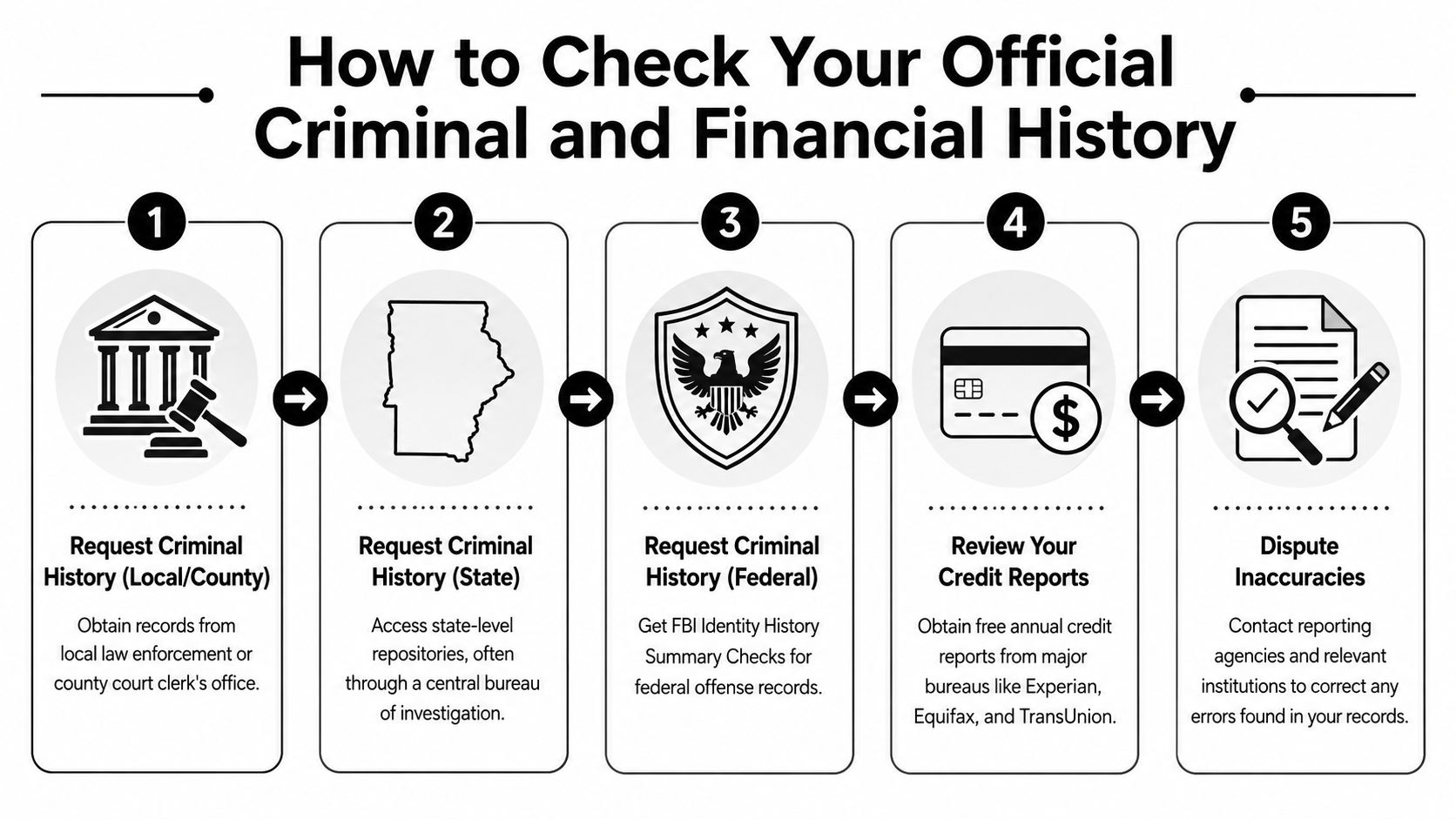
The official side of your background is slower to review, but it’s also where errors can be the most disruptive. If you want to mirror an employer’s process, think in layers rather than in one giant search.
Start with the jurisdictions that matter
A practical self-check workflow is to mirror the employer’s likely search path: county court dockets, state criminal repositories, and federal court records. The catch is coverage. As explained in this guide to self background checks, manual searches can miss records across jurisdictions, while professional services may return a more complete multi-state picture in under 24 hours instead of taking weeks.
That’s why address history matters so much. If you’ve lived, studied, or worked in multiple places, list every location you can remember before you search. A record tied to an old county often gets missed because people search where they live now, not where the event or filing occurred.
The practical order to follow
Use this order because it reduces blind spots.
- Pull county court records first. County and municipal courts often hold the detail that statewide indexes summarize poorly.
- Check your state repository. This can reveal criminal history data attached to your identifying information inside that state.
- Request federal court information. Federal matters won’t reliably appear in local-only searches.
- Review your driving record when the role involves vehicles or safety-sensitive duties.
- Review your credit reports if the role involves financial trust, fiduciary work, or regulated access.
If your manual results look “clean” too quickly, be careful. Fast and incomplete often look the same.
DIY versus consolidated screening
Here’s the trade-off what many experience is:
| Method | What it does well | What it misses |
|---|---|---|
| Manual county and state searches | More direct, often closer to the originating record | Easy to miss counties, variants of your name, and older addresses |
| Federal and agency requests | More authoritative for certain records | Slower, more paperwork, less convenient |
| OSINT discovery pass | Surfaces public mentions, court references, and identity clues across the open web | Doesn’t replace official source documents |
If you want a first-pass discovery layer before requesting records, public-records OSINT can help you spot where to dig deeper. A tool like Digital Footprint Check can surface publicly accessible records and online references tied to your identifiers, which helps you decide which official repositories to verify next. It’s useful as a map, not as the final authority. For a better sense of how public records connect to your online identity, this article on how public records shape your digital footprint is worth reading.
Don’t ignore the privacy terms
Before you use any screening or lookup service, read how it handles your data. Many people are so focused on finding records that they forget they’re handing over personal identifiers in the process. If you want a plain-language reference point, it helps to review data privacy details so you know what to look for around processing, storage, and third-party access.
What actually works
The method that works is boring but effective. Gather your names, prior addresses, graduation details, employers, and date ranges first. Then search source by source.
What doesn’t work is relying on a single people-search site or assuming one “background report” covers every county and court. It usually doesn’t. If your goal is accuracy, you need both breadth and verification.
Finding Your Hidden Social Media and Online Accounts
The official record search is only half the story. The messier half lives online, usually under old usernames, old email addresses, and profiles you forgot existed.
I’ve seen this derail otherwise careful candidates. Not because the content was criminal or dramatic, but because it felt inconsistent with the professional image they were presenting now. An abandoned account with an edgy bio. A photo-sharing profile from years ago. A forum login tied to the same username they still use elsewhere. None of it showed up in a quick name search, but it was still discoverable.
Your identifiers tell the real story
The reason hidden accounts surface is simple. People reuse identifiers.
That includes:
- Old email addresses tied to dormant signups, forum profiles, and legacy apps
- Usernames reused across gaming, social, dating, and niche communities
- Phone numbers attached to account recovery pages, messaging apps, or cached directories
- Name variants including middle initials, maiden names, and shortened first names
A simple Google search won’t map those relationships well. That’s why a proper digital self-check feels more like investigation than browsing.
The need for accuracy here is real. HR TruCheck cites surveys showing 53% of job applications contain inaccurate information, and notes that roughly 70 to 100 million Americans have some form of criminal record, which is one reason mismatches and outdated data can surface during screening. You can review that context in their employment screening statistics roundup.
A better way to search your footprint
Use a layered process instead of one broad search.
Search by name first
Look up your full name, common variations, and combinations with city, school, employer, and username. This catches obvious public pages and image results.
Search by old email and username next
Forgotten accounts often come to light. Search quoted usernames, old handles, and old email prefixes. If you ever used one handle across multiple platforms, assume someone else can connect those dots too.
Review platform settings and profile visibility
Some accounts still exist even when you never use them. Check whether they’re public, indexed, or recoverable. Old bios and profile photos can remain visible long after you stop posting.
For a deeper pass, find hidden social media accounts using identifier-based searches rather than relying on your name alone.
Here’s a useful walkthrough that shows how this kind of discovery works in practice:
What to flag and what to ignore
Not every old account is a problem. Some are harmless digital leftovers.
Focus on these:
- Profiles with public personal details such as phone number, location, or employer
- Accounts showing inconsistent identity data like wrong job titles, dates, or names
- Content that invites bad assumptions even if it’s old or out of context
- Login traces on platforms you no longer control
A hidden account doesn’t have to be embarrassing to matter. It only has to create confusion.
What usually doesn’t matter: a dormant profile with no public content, a dead link with no identifiable data, or a cached mention that doesn’t clearly point to you. You don’t need a spotless internet history. You need an understandable one.
Checking If Your Data Has Been Exposed in Breaches
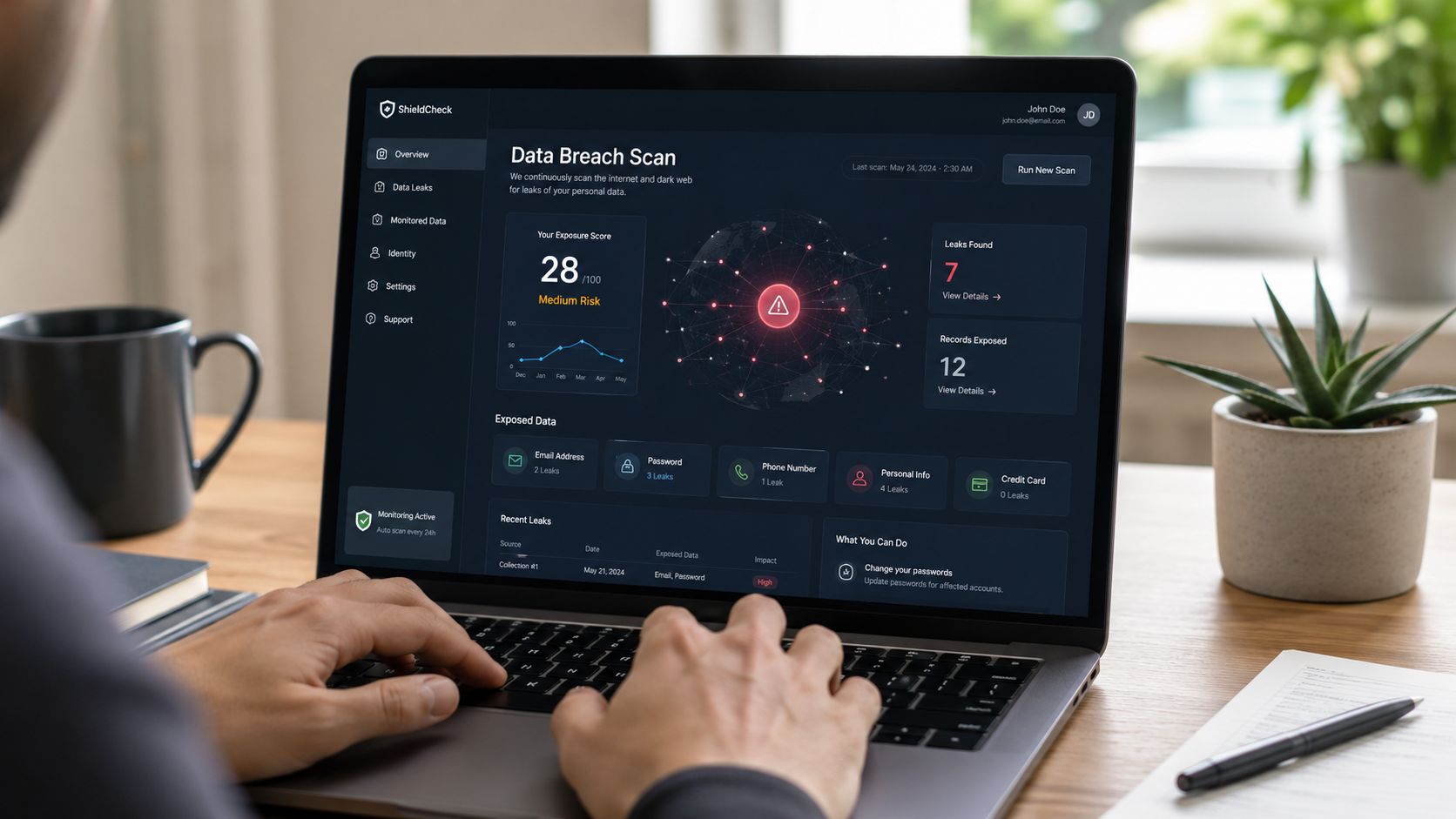
A breach check belongs in an employment background check on yourself because exposed credentials can create risk beyond embarrassment. If your email, passwords, phone number, or other identifiers are circulating, that can lead to impersonation, account takeover, or suspicious digital activity tied back to you.
For some roles, especially those involving security, finance, privileged access, or sensitive customer data, poor personal account hygiene can raise questions. Fair or not, employers may see a breached identity as a sign that you’re easier to impersonate or socially engineer.
What to check
Start with the identifiers you’ve used over time:
- Primary and old email addresses
- Common usernames
- Phone numbers
- Professional logins tied to your own domain, portfolio, or side projects
Then look for signs those identifiers appear in breach databases, paste sites, public leak discussions, or account-enumeration results. The point isn’t to panic if your email appears somewhere. The point is to understand exposure and respond to it.
What to do if you find exposure
A breach result doesn’t mean someone is using your accounts right now. It means you should act like your old credentials are no longer private.
Use this response order:
- Change passwords on affected accounts
- Replace reused passwords everywhere else
- Turn on multi-factor authentication
- Update recovery email and phone settings
- Review login history where available
- Close accounts you no longer need
Treat old credentials like leaked keys. Even if nobody has tried the door yet, replace them.
If you want a quick first look, run a free data breach checker and use the results as a cleanup list. That won’t replace ongoing vigilance, but it does show whether your personal data is already circulating in places you didn’t expect.
Why this matters in hiring
Most candidates think only public posts affect their reputation. In reality, exposed data affects how stable and secure your professional identity looks. If your accounts are easy to compromise, someone else can post, message, or impersonate you using your credentials. That’s not just a privacy issue. It’s a reputation issue.
What to Do with What You Find and How to Fix Errors
Finding a problem is workable. Misreading it is what causes stress.
Some findings need immediate correction. Others need context. Some aren’t problems at all. The skill is separating error, risk, and history.
Sort each finding into the right bucket
Use this simple framework:
| Category | What it means | What to do |
|---|---|---|
| Clear error | Wrong record, wrong date, wrong identity match | Dispute it and save documentation |
| Accurate but outdated | Old employer, old address, dormant profile | Update, remove, or add context where possible |
| Accurate and sensitive | Real legal, financial, or reputational issue | Prepare a concise explanation and evidence of resolution |
| Low-value noise | Weak search results, irrelevant mentions, dead profiles | Monitor, but don’t overreact |
Background data often contains matching mistakes. GoodHire notes that more than 50% of background checks may contain at least one false-positive error, and also notes that an FBI Identity History Summary check costs $18 and can take weeks, which can be useful when you need stronger documentation to dispute a serious issue. Their discussion of self-screening and disputes is in this background check on yourself guide.
Fixing official record errors
If a court record, screening report, or identity match is wrong, document everything before you contact anyone.
Keep:
- Screenshots and downloaded reports
- Case numbers and filing details
- Copies of ID
- Proof of address history
- Employment and education documents
Then contact the reporting agency or source that produced the error. Be specific. “This record is inaccurate” is weaker than “This case belongs to a different individual with a similar name. My address history and date-of-birth records don’t match the filing.”
If the problem touches credit data, it helps to understand the formal dispute workflow before you start. This guide to the DIY credit repair process is a useful practical reference for organizing documents, disputing entries, and following up consistently.
The most effective disputes are narrow, documented, and easy for a reviewer to verify.
Cleaning up your digital footprint
Digital cleanup is less formal, but it still needs structure.
Remove what you control
Delete old posts, bios, images, and comments where possible. If the account is worth keeping, rewrite the profile and tighten visibility settings.
Lock down what you keep
Change privacy settings, remove public contact details, and review tagged photos, old followers, and searchable profile fields.
Close what you forgot
Dormant accounts are risk magnets. If you don’t use them and can still access them, close them.
Prepare context for what won’t disappear
Sometimes content is old, indexed, or reposted elsewhere. In that case, your goal shifts from removal to explanation. Keep it brief, factual, and non-defensive if an employer asks.
The hiring context is changing
At this juncture, self-checking transcends mere cleanup. It evolves into preparation for automated filtering.
Recent policy developments, including New York City’s Local Law 144, have pushed more attention toward how automated hiring tools are audited and how candidates are notified when such tools are used. The practical takeaway, reflected in EEOC guidance on background checks and related hiring issues, is that the question isn’t only what data exists. It’s also how systems score, sort, or suppress that data.
That makes clean, accurate inputs more valuable than ever.
Taking Control of Your Professional Narrative
A self-background check isn’t a one-time defensive move. It’s a career habit.
When you know what’s in your official records, what accounts are still tied to you, and whether your data has leaked into breach ecosystems, you stop reacting blindly to the hiring process. You start managing it. That shift matters because employers don’t just review information anymore. In some settings, systems evaluate patterns, rank candidates, and shape who gets closer review.
That’s part of why newer rules around automated employment tools matter. As noted earlier, recent regulation has increased scrutiny around how hiring systems are used and how candidates are notified. The practical lesson is simple. Your professional reputation now includes the data that feeds screening systems, not just the résumé you submit.
Build a repeatable habit
A good routine looks like this:
- Before job searching: check official records and core digital accounts
- Before final interviews: review public search results and unresolved issues
- After any breach or identity event: rotate credentials and inspect account exposure
- Every few months: audit dormant profiles, privacy settings, and public mentions
If you also go through personality or behavioral hiring assessments, it helps to understand how those results may be interpreted alongside your broader candidate profile. This overview of interpreting personality test results gives useful context on how employers may read assessment outputs.
Your goal isn’t to manufacture a perfect image. It’s to create a profile that is accurate, current, and easy to understand. That’s what lowers friction in hiring.
For long-term upkeep, treat online cleanup and visibility management as part of reputation management online, not as a last-minute scramble after a recruiter raises a concern.
A practical first step is to run a scan and see what’s already visible. Digital Footprint Check offers a free checker that helps you review public exposure tied to your identity, so you can catch issues early, clean up what you control, and move into hiring conversations with more confidence.