
· Digital Footprint Check · Content Marketing · 13 min read
How to Manage Digital Footprint: a Step-by-Step Audit
Learn how to manage digital footprint in six steps: audit exposed data, remove what is risky, lock down accounts and keep monitoring.

The 2023 Pew Research Center survey of 5,101 U.S. adults found that 67% of respondents said they understand little or nothing about what companies do with their personal data. That's the problem with your digital footprint. You can't control exposure you can't see.
Learning how to manage your digital footprint starts with visibility, then ruthless prioritization. You'll audit what strangers can find, rank each item by how it can be misused, and assign it one job: remove, hide, replace or keep. Do that on a schedule and you stop chasing random privacy tips.
Why Your Digital Footprint Is a Security Risk
The U.S. Federal Trade Commission's Consumer Sentinel Network data book for 2024 recorded more than 6.47 million consumer reports in 2024, and identity theft accounted for approximately 1.1 million reports, or 18% of all reports. That's not an abstract privacy issue. It's a pipeline built from identifiers people leave lying around.
Your footprint has two parts. Active traces are what you post on purpose, such as social profiles, forum comments, reviews and dating or gaming profiles. Passive traces collect without a deliberate post, such as location history, cached pages, public records and data broker listings you never created.
What a Stranger Can Build From Scraps
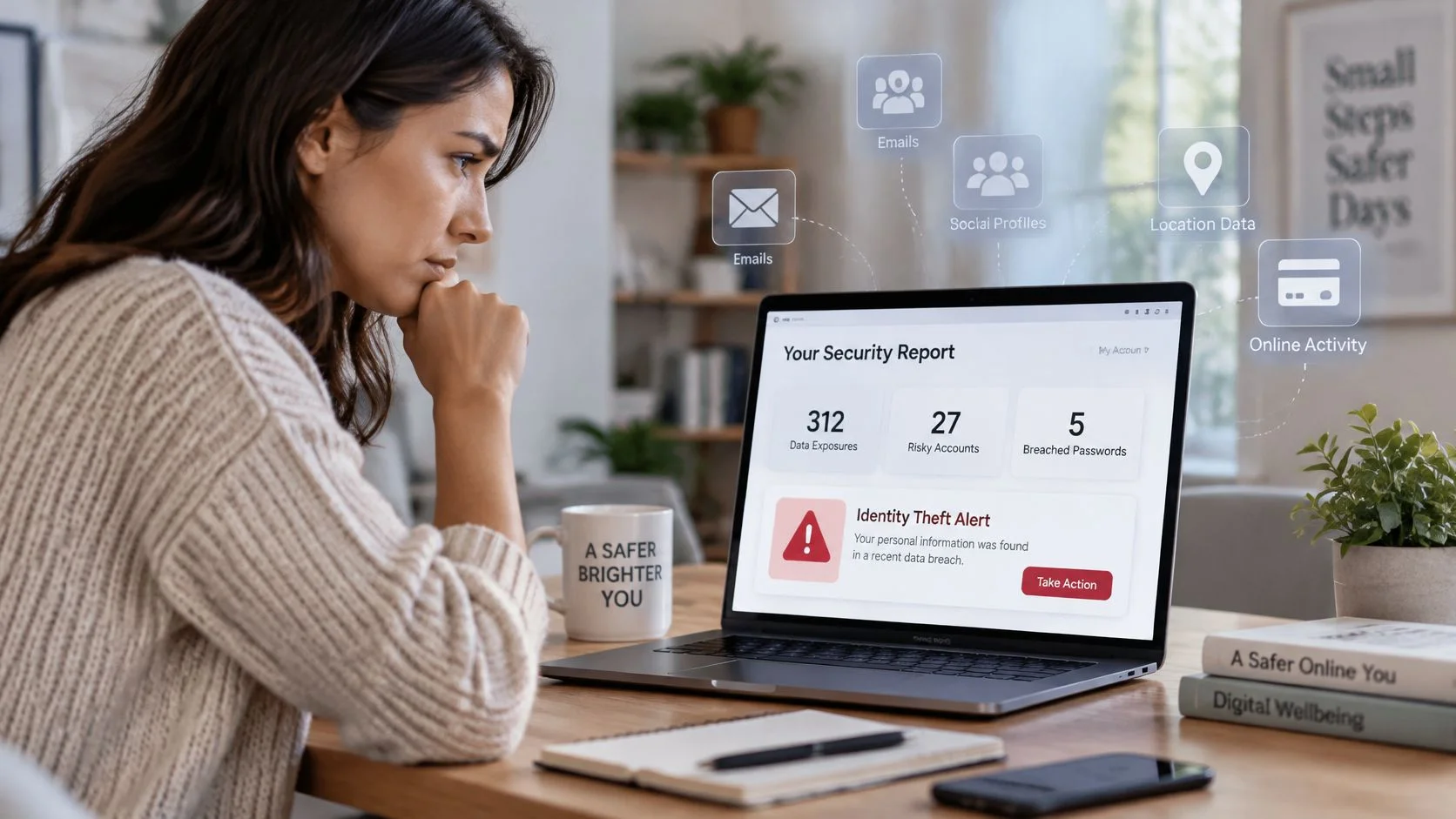
A name plus a city helps someone guess where you live. Add a public phone number and an old email address, and they have material for account takeover, password resets and impersonation. Add a profile photo and a friend list, and they can build a fake account that contacts people who trust you.
Consider three ordinary outcomes:
- Impersonation: A scammer copies your photo and username, messages your contacts and asks for money or codes.
- Reputation damage: A recruiter finds an old post or inaccurate job history that conflicts with your resume.
- Verification fraud: A caller uses your leaked phone number, birthday and employer details to sound convincing to a support agent.
The same FTC data recorded 2.6 million fraud reports, representing 40% of the total. Fraud and identity theft are different stages of the same risk. Prevention means removing identifiers before they're combined. Recovery means proving you're you after someone else has used them.
Practical rule: If a detail helps someone reset a password, locate you physically or impersonate you convincingly, treat it as high risk even if it looks harmless on its own.
Social platforms create many of these exposures through default visibility, tagging and contact syncing. The SuperX guide to online privacy threats is useful background on how those platform choices widen your exposure. For a structured view of the harms to rank first, use this overview of common digital footprint risks before you start deleting anything.
Stop after any stage of this process and you're still safer than before. Audit first, then decide, remove, lock down and monitor.
Audit What Strangers Can Find About You
Don't audit from your logged in feed. It shows you what platforms want you to see, not what a stranger, employer, scammer or dating match can find.
Run the Logged Out Audit
- Open a private window: Log out of every account and use at least two search engines.
- Search your full name in quotation marks: Then search your name with your city, employer, school and past usernames.
- Search each identifier separately: Try every email address, phone number and username you've used, including old gaming tags.
- Check breach exposure: Run your email addresses through a breach checker and note every service that appears.
- Mine your inbox: Search for welcome, verify your account and confirmation emails to surface forgotten sign ups.
- Log every result: Record the URL, public visibility, accuracy, date and a risk category such as identity, financial, employment or harassment.
That log is your baseline. Without it, you'll fix whatever annoys you today and miss the dormant account that still holds your home address and an old password pattern.
An employer screening guide from the University of Arizona reported that 91% of employers used social platforms for screening, while 86% said a positive online reputation influenced hiring decisions. Treat those older figures as directional, not universal. They still make the point clearly. Search visibility affects job prospects, not just privacy.
For photos, upload your main profile picture to a reverse image search tool and see where else it appears. That's how you spot catfishing copies, fake dating profiles and old accounts using a photo you've forgotten. Pair that manual work with basic open source intelligence techniques so you're searching like an outsider, not guessing.
Identifiers to Search and What Each Exposes
| Identifier | How to search it | What exposure enables |
|---|---|---|
| Full name in quotes | Private window, logged out, two search engines | Employer screening, location guessing, impersonation |
| Email address | Search plus a breach checker | Phishing, password reuse attacks, account recovery abuse |
| Phone number | Search, then people-search sites | Spam, SIM-swap social engineering, scam calls |
| Username | Search the same username across platforms | Linking accounts, tracing gaming and forum profiles |
| Profile photo | Reverse image search | Catfishing, fake profiles built from your pictures |
| Home address or property records | Public records and people-search sites | Physical targeting, doxxing |
| Dormant accounts | Search inbox for welcome and confirmation emails | Old personal data held by services you forgot |
If you want a faster first sweep, we work in three steps: search a username or email, review the potential matches, then take action using step-by-step guides. Start with the free checker, then verify each match yourself before you act. A match is a lead, not proof.
Don't delete everything in a panic. Inconsistent dates, exaggerated credentials and unprofessional usernames create credibility problems. An accurate professional profile can reduce ambiguity for legitimate reviewers.
Repeat this audit quarterly if you're in a high risk role, after major career changes and immediately after any breach notice.
Decide What to Remove, Hide or Replace
The smallest footprint isn't the goal. An intentional footprint is. A job seeker who vanishes completely can look unverifiable. A small business owner who hides every professional trace loses clients. A gamer or activist may need the opposite approach.
Ireland's 2025 household internet security survey found that seven in ten internet users restricted access to location data, and 67% restricted use of personal data for advertising, yet users became less likely to read privacy policies or check whether websites requesting data were secure. Toggling settings without a decision framework doesn't produce informed control.
Rank by How the Data Can Be Misused
Start with anything that opens access to other accounts. Then work down to physical safety, then reputation, then low-risk history.
| Exposure | Harm if misused | Priority | Action |
|---|---|---|---|
| Reused password on several sites | Takeover of linked accounts | Act now | Change it and use a unique password for each account |
| Recovery email or phone number | Locks you out of accounts | Act now | Replace on key accounts, then hide it publicly |
| Dormant account holding personal data | Old data stays usable by attackers | This week | Delete or deactivate |
| Home address in people-search results | Physical targeting | This week | Opt out and request removal |
| Public phone number on a profile | Scam calls and impersonation | This week | Hide from public view |
| Inaccurate job history online | Hiring bias and credibility gaps | This month | Correct at the source and publish an accurate profile |
| Old but accurate professional posts | Low, may support credibility | Keep | Keep, and review tags and audience settings |
Hide and replace aren't the same. You hide a phone number by removing it from public view. You replace a recovery email or number when attackers may already know it, because hiding it afterward doesn't undo that knowledge. Change it on your email, bank and password manager first.
If a detail is used for account recovery, hiding it is not enough once it's been exposed. Replace it.
Match Visibility to Audience
Say you're a freelance designer. Keep your portfolio and professional profile public and accurate, because clients need to verify you. If you present work professionally, a polished electronic press kit can hold the public version of your credentials in one controlled place. Hide personal social accounts from search, remove your home address from broker sites, and replace the recovery number on your bank account.
A gamer needs a different split. Keep the gaming tag pseudonymous, don't link it to a real name photo, and never reuse that username on a resume profile. An activist needs even stricter separation between legal identity, location clues and public organizing accounts.
Watch for context collapse. A joke that's harmless in a gaming community can be misread by a recruiter, school or automated filter that sees it without context. Tightening social media privacy settings helps, but audience separation matters more than one toggle.
Never make these public: recovery details, home address, children's schools, daily routines and real time location. Before you delete or rename a professional account, document that you own it with screenshots and account IDs. You may need that record for a dispute or verification request later.
How to Remove Data From Sites and Brokers
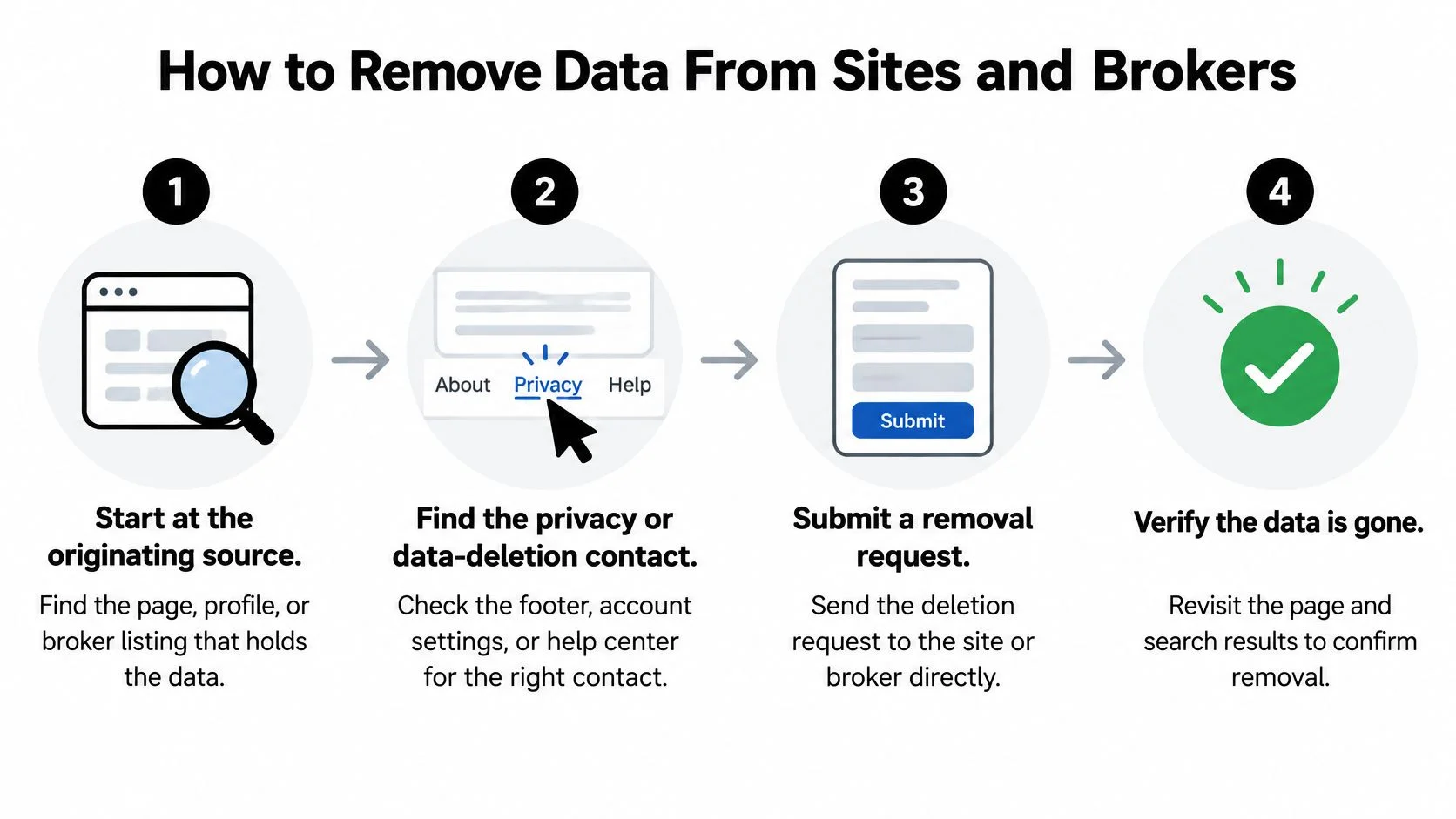
Removal fails when people attack the search result instead of the source. The search result is a signpost. The page, profile or broker listing behind it holds the data.
The NIST Privacy Framework guide recommends data flow mapping across the complete lifecycle, from collection through disposal, followed by privacy risk assessment. In plain terms: inventory what exists, map where it flows, classify harm, apply controls in priority order, then monitor and document.
Work the Removal Cycle
- Start at the originating source: Open the actual page, profile or broker listing. Common slip: reporting only the search link while the source page stays live.
- Find the privacy or deletion contact: Check the footer, account settings, help center and privacy policy. If you're logged in, look for delete account, not just deactivate.
- Submit a specific request: Include the exact URL, the data in question and the reason, such as inaccurate or unnecessary personal information. Vague requests get vague replies.
- Use broker opt out pages exactly as listed: Enter your name and address exactly as they appear in the listing. A middle initial mismatch can stall the match.
- Clean up search results after the source changes: Ask search engines to remove cached or outdated links once the underlying page is gone or corrected.
- Document everything: Save screenshots, confirmation emails, ticket numbers and dates in one folder.
- Recheck after 30 days: Caches, mirrors, screenshots and secondary profiles can remain even when the original page is gone.
Be honest about tool limits. Digital Footprint Check does not remove information for the user; its guides explain how to contact a site or request changes yourself. That's how you should judge any tool in this step. Discovery can be automated. Removal usually requires your request to the holder of the data.
For broker listings specifically, follow a structured data broker removal sequence and work in batches. Do the listings that expose your home address and phone number first.
Removal Route by Source Type
| Source | Removal route | What to expect |
|---|---|---|
| Website or forum post | Privacy or deletion contact in footer or account settings | Page can be removed, but screenshots and caches may remain |
| Data broker or people-search listing | Opt-out page, using name and address exactly as listed | Listing can reappear, so recheck at 30 days |
| Search engine result | Removal request after the source has changed | Link disappears, but the underlying data may remain |
| Breached dataset | No direct removal; rotate credentials and monitor | Copies can keep circulating |
Warning: A disappearing search result is not deletion. Verify the source, then verify again later.
Protect the audit itself. Don't create a master spreadsheet full of passwords, recovery codes and sensitive IDs. Use data minimization, access controls, encryption and retention limits for your notes. Store evidence, not secrets.
If a site refuses or ignores you, escalate in writing, keep the timeline and focus your energy on the next highest risk item. Perfection isn't available. Reduction is.
Lock Down Accounts and Keep Monitoring
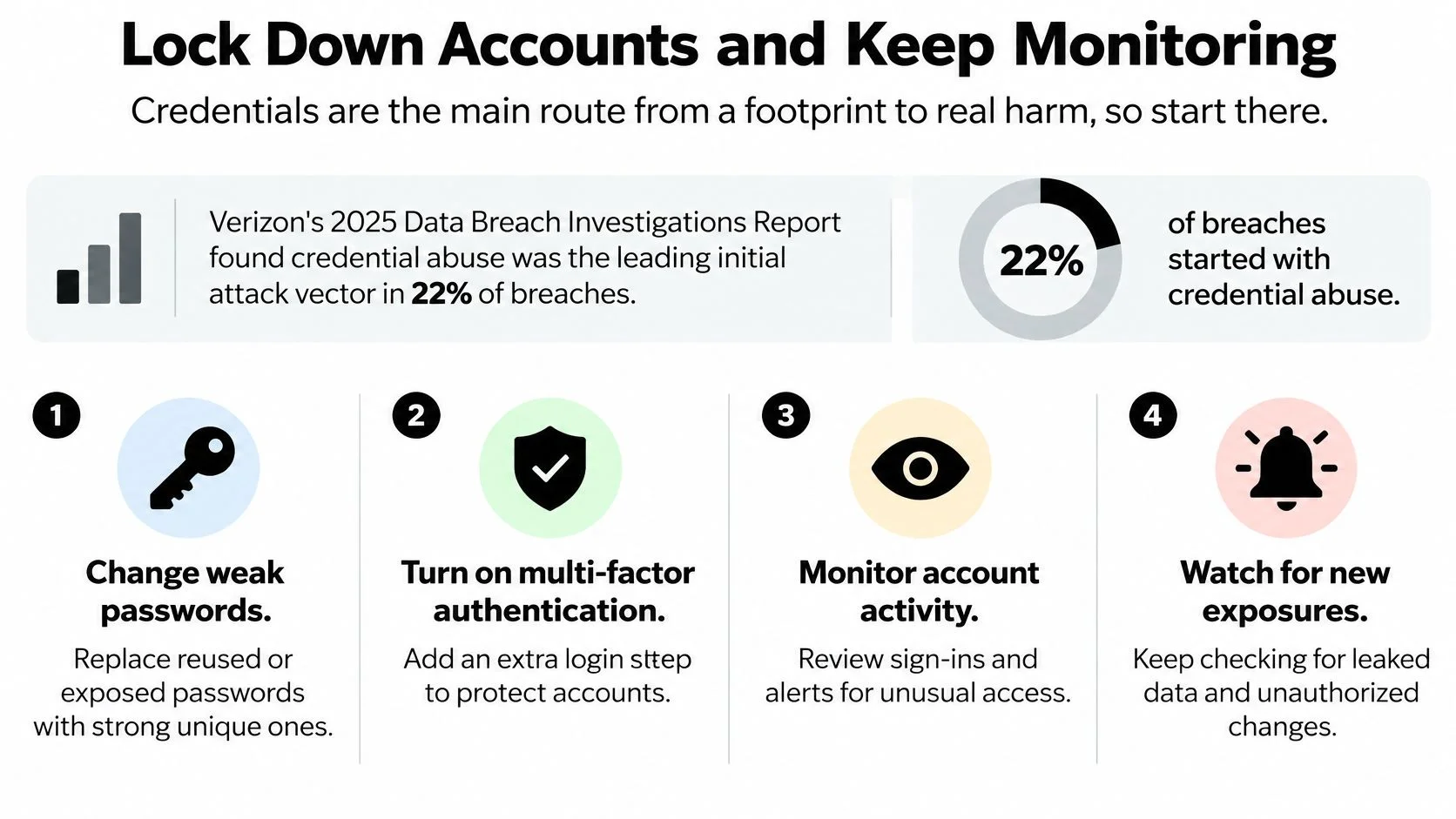
Credentials turn a public footprint into real harm. A stranger who only knows your name can annoy you. A stranger with a reused password can become you.
Verizon's 2025 Data Breach Investigations Report analyzed 22,052 real-world security incidents, including 12,195 confirmed breaches, involving organizations across 139 countries. Credential abuse was identified as the leading initial attack vector in 22% of breaches, and third-party involvement doubled to 30%. Your exposure includes vendors and connected services, not just your own posts.
Lock Down in This Order
First, install a password manager and generate a unique password for each account. Start with your main email, because it resets everything else. Then do banking, cloud storage and social accounts. Change any password that appears in a breach or shares a pattern with another one. Strong variations of the same word don't count as unique.
Second, enable multifactor authentication on email and banking before anywhere else. Prefer an authenticator app or security key where offered, since those are harder to phish than text codes. Save recovery codes offline, not in a notes app synced to the account they protect.
Third, reduce visibility on the accounts you keep. Restrict friend lists, tagged photos and birthdays. Make recovery phone numbers hidden, remove your phone from public profiles and review who can look you up by email or number. Our guide to password security best practices covers the credential side in more depth.
This short walkthrough shows the lockdown sequence in practice:
Ongoing Maintenance Schedule
| Task | How often | What to check |
|---|---|---|
| Search your name and email | Quarterly, or every 6 months if low risk | New results, cached copies, new broker listings |
| Review breach alerts | Within 24 hours of any notice | Which passwords and data were exposed |
| Check app and account permissions | Twice a year | Old apps, third-party sign-ins, shared access |
| Audit dormant accounts | Twice a year | Accounts to delete or deactivate |
| Review tagging and privacy settings | After each major platform update | Post, photo and friend list visibility |
| Recheck removal requests | 30 days after each request | Whether pages are gone or have reappeared |
Keep these habits between audits:
- Use a separate email for sign ups: Keep your main inbox for banking, work and recovery.
- Remove third party app access: Revoke tools you no longer use, especially old games and quizzes.
- Never approve unexpected login requests: Stop, open the app yourself and check recent activity.
- Treat breach notices as action items: Change that password everywhere it was reused, not just on the breached site.
Here's your first week. Day one, run the logged out searches. Day two, change reused passwords and replace recovery contacts. Day three, submit your first two removal requests. Day four, close dormant accounts. Day five, turn on multifactor authentication for email and banking. Then put the quarterly search and 30 day recheck on your calendar.
If you want a starting list of matches to review, the free checker tool can help you begin without guessing where to look first.
Run your first audit today, rank what you find by real world harm, and fix the exposures that expose accounts or reveal where you live before you worry about old posts. We help you discover what employers, clients, scammers and strangers can see, then give you step by step guides to act on it yourself. Visit Digital Footprint Check to start your free check and turn a scattered cleanup into a repeatable routine.