· Digital Footprint Check · Content Marketing · 14 min read
Personal Security Assessment: a Practical 2026 Framework
Run a personal security assessment in 2026 with proven OSINT methods, risk prioritization, remediation steps, and tailored checklists

In the first half of 2026, 1,969 distinct breach events affected at least 343 million people, according to the 2026 Midyear Data Breach Report. That scale changes the question. Personal security assessment isn’t about whether you’re “interesting enough” to target. It’s about whether scattered information about you can be found, connected, and misused.
A practical assessment maps your exposure across search engines, breach records, social platforms, public records, devices, accounts, and relationships. It then ranks what matters, fixes the most dangerous findings, and checks again when your circumstances change. A quick Google search can reveal a few pages, but it won’t show how an old username connects to a gaming profile, a professional bio, a phone number, and a forgotten account in a breach.
Why Personal Security Assessment Matters in 2026
The Bureau of Justice Statistics found that 12% of people in the United States age 16 or older were notified in 2021 that an organization holding their personal information had experienced a breach during the previous 12 months. Identity-theft victims were twice as likely as non-victims to receive such a notice, 24% compared with 11%, as reported in the same Bureau of Justice Statistics findings. Exposure is therefore not an abstract privacy concern. It can become an account-recovery problem, a fraud signal, a phishing pretext, or a safety issue.
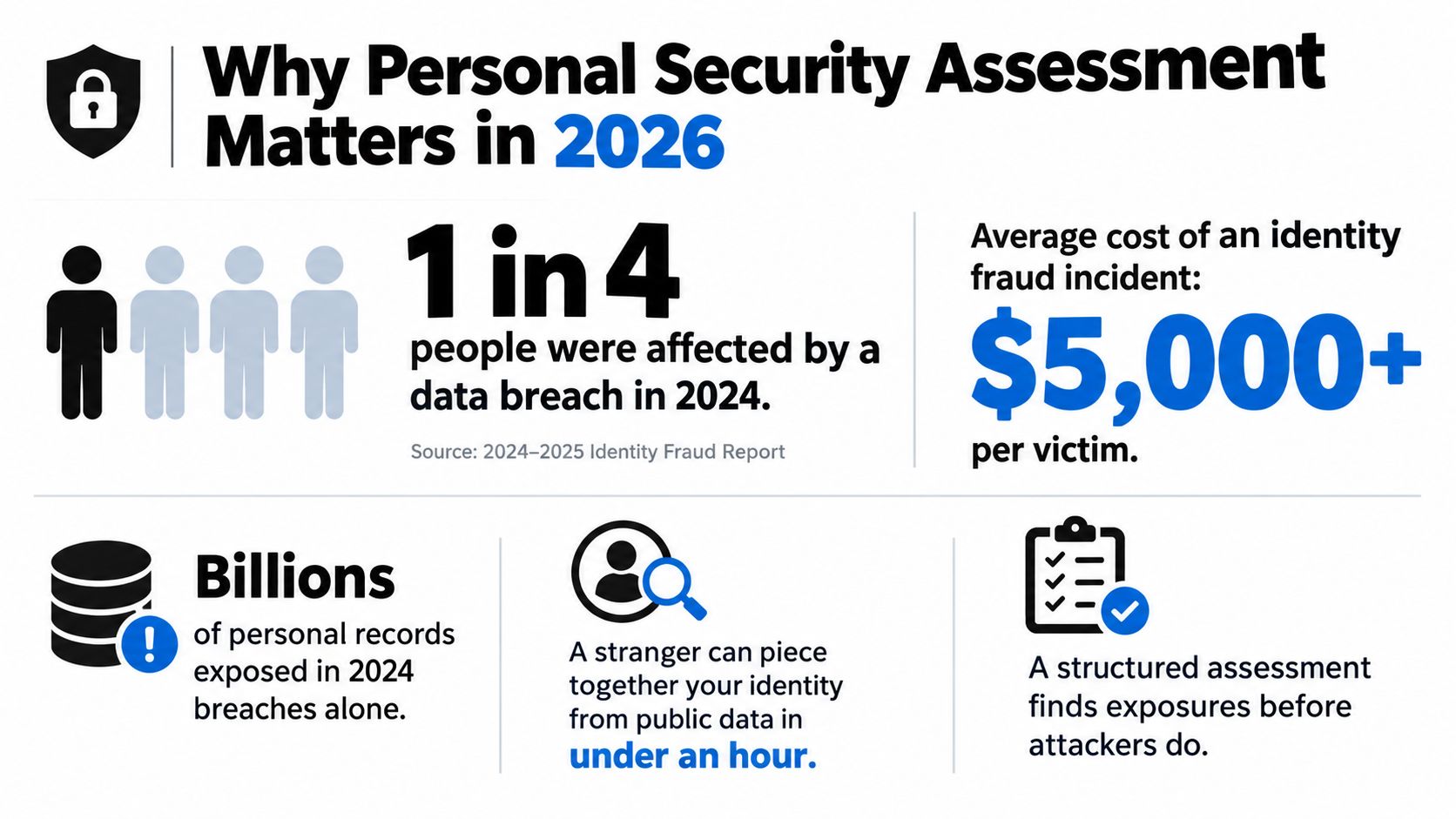
Breach tracking has also moved from exceptional incident reporting to continuous exposure analysis. The Identity Theft Resource Center breach chronology spans nearly 100,000 reported breaches since 2005, while its older archive recorded 11,762 breaches and 1,664,977,418 exposed records between January 1, 2005 and May 31, 2020. More recent Australian reporting found that 91% of notifiable breaches in the July to December 2023 period involved personal information affecting 5,000 or fewer people worldwide. Smaller incidents still matter to the people whose details appear in them.
Aggregation creates the real danger
Attackers rarely need one perfect record. They can combine a public profile, a reused handle, a breached email, a workplace announcement, and a family reference. That combined picture can support credential stuffing, synthetic identity fraud, impersonation, or targeted social engineering.
An ad-hoc search usually fails in three ways:
- It searches too narrowly: A name search misses usernames, old email addresses, gaming handles, and image reuse.
- It records too little: Without an inventory, you forget where a finding appeared or whether it remains active.
- It reacts too late: Removing one page doesn’t address the breach, account, or public record that supplied the information.
A personal security assessment separates what is merely visible from what is actionable. It asks which data can identify you, which data can authenticate you, which exposure could affect your physical or professional safety, and which countermeasure offers the greatest reduction for the least disruption. The digital footprint risk overview is useful for framing that wider surface before you begin collecting findings.
The OPSEC-Inspired Assessment Workflow
A sound assessment follows five stages: identify sensitive information, identify threats, analyze vulnerabilities, assess risk, and apply countermeasures. This structure reflects the OSINT OPSEC workflow, but it works just as well for a private individual as for a security team.
Start with scope, not curiosity
Identify critical information. List the assets that would cause real harm if exposed: primary email, recovery email, phone number, home address, identity documents, financial details, children’s information, work systems, relationship history, and high-value gaming accounts. The common mistake is treating a personal email as harmless. It may be the recovery key for everything else.
Analyze threats. Consider who might act on the information and why. A criminal seeking account access, a harasser seeking location data, a scammer building trust, an employer reviewing public material, and a jealous partner have different objectives. Your output is a short threat profile, not a dramatic list of imaginary adversaries.
Analyze vulnerabilities. Search the surfaces where information leaks. Look for reused usernames, public contact details, unprotected social posts, exposed files, breach notifications, image metadata, and account-recovery clues. The usual error is collecting without boundaries. Use separate browser profiles, dedicated accounts, or a virtual machine where appropriate, and document the scope so your research activity doesn’t contaminate your personal identity.
Turn observations into decisions
Assess risk. Score each finding by impact and likelihood rather than instinct. A home address visible beside a workplace and daily routine deserves different treatment from an old forum alias with no identifying link. Produce a risk register with the finding, source, evidence, impact, likelihood, owner, and target action.
Apply countermeasures. Fix, remove, restrict, rotate, or monitor the exposure. Stopping after the first cleanup pass is a frequent failure. New posts, breaches, accounts, and data-broker copies will reintroduce risk, so countermeasures must feed the next review.
Practical rule: A good audit produces an asset list, threat profile, exposure inventory, risk register, and remediation backlog. If it only produces a score, it hasn’t finished the job.
For broader organizational context, a data risk assessment guide can help teams think about information classification and handling. A practical OSINT guide for beginners can help non-specialists apply the same discipline without turning an assessment into uncontrolled collection.
OSINT Methods for Discovering Exposed Data
The objective isn’t to collect everything. It’s to discover enough to understand how separate clues connect. Work from low-risk, publicly available sources, record each result, and don’t attempt to access private accounts or bypass controls.
Search engines provide the first layer. Use exact-name searches, quoted email addresses, usernames, and combinations such as "username" city, "full name" employer, or "email@example.com". For publicly indexed documents, carefully scoped searches such as site:example.com "Full Name" or filetype:pdf "Full Name" may reveal conference programs, staff documents, resumes, or old newsletters. Archived pages can matter because a current profile may have been cleaned while an older snapshot still exposes contact details.
Breach checks should use reputable notification services and the affected organization’s own guidance. Don’t rely on one database. A missing result can mean the service lacks a particular incident, not that your details were never exposed. Treat paste sites and leaked-data communities as hazardous environments. Avoid downloading or redistributing personal records, and preserve only the minimum evidence needed to support remediation.
Social platforms and people-search services reveal the aggregation layer. Search a username across sites with tools such as Sherlock or WhatsMyName, then manually verify matches because common handles create false positives. Review people-finder listings, professional biographies, public comments, and profile photos. Reverse image search can expose old profiles or copied dating images, while photo metadata may reveal more than the visible picture.
A fictional aggregation example
Suppose “MayaRivers” is a fictional username used on a craft forum. The forum profile links to a public portfolio that names an employer. The same handle appears on a gaming profile, where an old post includes a phone number. A people-search result then associates that number with a home address. None of the individual pages proves the full identity on its own. Together, they create an actionable map.
| Data Surface | OSINT Method or Tool | Typical Exposure Found |
|---|---|---|
| Search engines and archives | Exact searches, site: queries, archived snapshots | Names, documents, old contact details |
| Breach records | Reputable breach notification services | Compromised emails, passwords, account history |
| Social platforms | Sherlock, WhatsMyName, manual profile verification | Reused handles, interests, employers, routines |
| Images | Reverse image search and metadata review | Copied dating photos, old profiles, location clues |
| Public records | Official registries and lawful people-search review | Property, business, court, or address associations |
The final product is an exposure inventory, not a dossier. Include the URL, account or identifier, data exposed, confidence level, date checked, and suggested action. The OSINT tools for beginners resource can help organize tool selection while keeping the work focused on ethical, publicly accessible information.
Scoring and Prioritizing Exposure Risk
A useful score has two axes: impact and likelihood. Impact asks what could happen if someone used the information. Consider identity theft, financial loss, reputational harm, account takeover, and physical safety. Likelihood asks how easily a stranger can locate, verify, and act on the exposure.
Score both from 1 to 5, then multiply or plot them. The exact arithmetic matters less than consistency. A Social Security number in a breached marketing database is Critical because the potential identity impact is severe, even if the record isn’t indexed by a normal search. An old forum username tied to your real name may be Medium if it exposes interests but no recovery or location data.
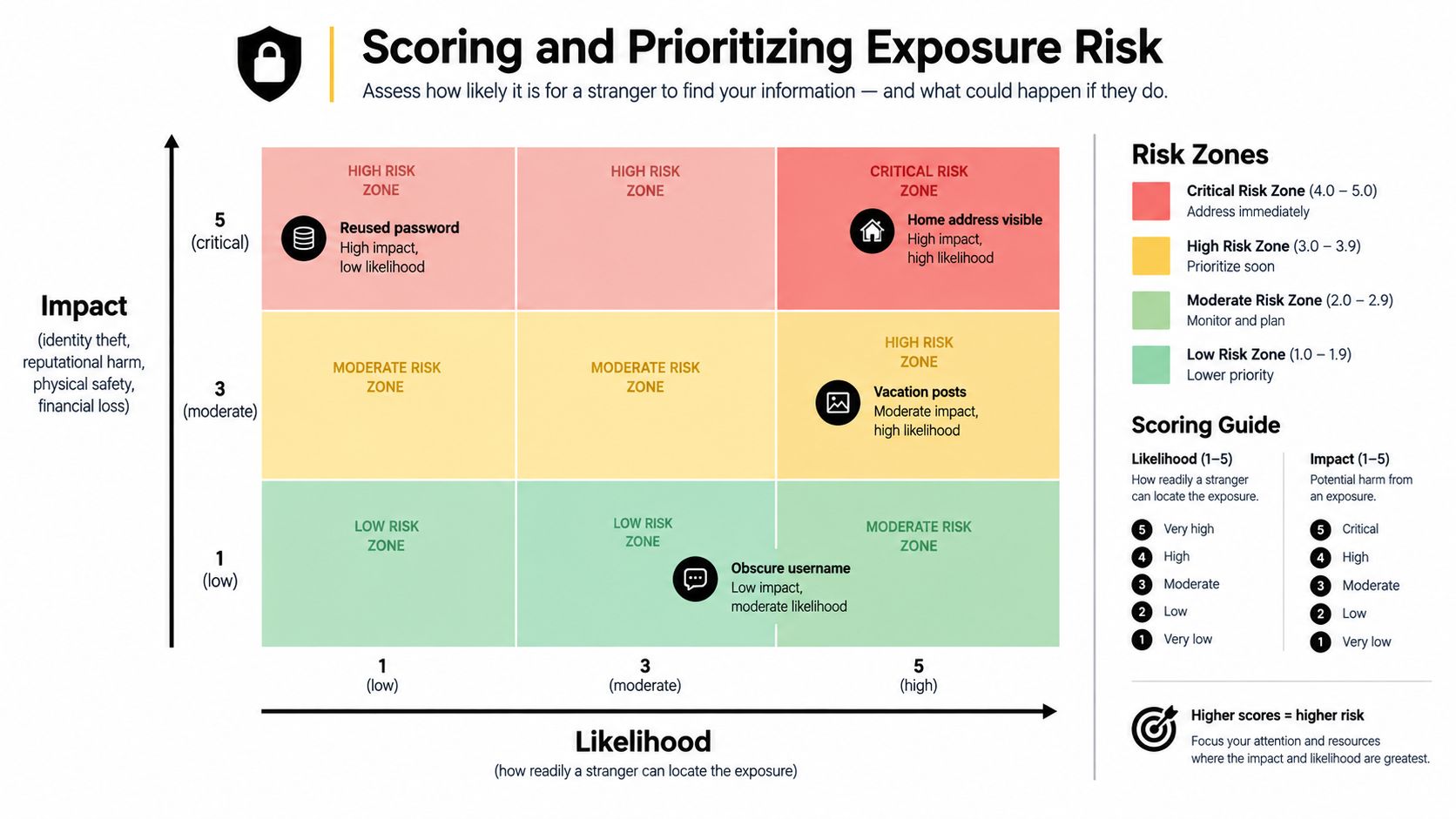
| Impact / Likelihood | Low likelihood | Moderate likelihood | High likelihood |
|---|---|---|---|
| Low impact | Low | Medium | Medium |
| Moderate impact | Medium | High | High |
| High impact | High | Critical | Critical |
Apply a triage clock
Critical findings deserve action within 24 hours. That includes exposed identity numbers, active credentials, a home address paired with threatening context, or a compromised account with valuable recovery access.
High findings should be addressed within one week. Examples include a reused password, a public phone number connected to account recovery, or a professional profile that exposes predictable travel and routine.
Medium findings belong within 30 days. An obscure username, stale biography, or low-context image may not create immediate danger, but it can strengthen a later social-engineering attempt. Low findings should enter the monitoring queue rather than competing with urgent remediation.
Risk scores are decision aids, not measurements of destiny. Re-score when context changes, especially when separate findings become connected.
Remediation Moves That Actually Reduce Risk
Remediation works when it targets the exposure that creates the threat. Changing every password won’t remove a public home address. Deleting a social post won’t protect an account that still uses a breached password. Use the risk register to match each action to a specific weakness.
| Exposure Type | Primary Fix | Secondary Fix | Trade-off |
|---|---|---|---|
| Identity | Place credit freezes with all three major bureaus and monitor breach exposure | Remove data-broker listings and reduce public identifiers | A freeze can delay legitimate credit applications |
| Account | Use a password manager, unique passwords, passkeys, or hardware-key MFA | Replace recovery details and review active sessions | Stronger controls require setup and backup planning |
| Reputation | Request platform takedowns and search delisting where policy allows | Separate personal and professional profiles | Removing content can reduce useful visibility |
| Metadata and location | Strip metadata, limit geotagging, and delay routine-based posts | Review family and workplace spillover | Less real-time sharing can reduce convenience and reach |
Fix identity and account exposure first
A password manager such as Bitwarden, 1Password, or KeePassXC makes unique credentials realistic. Pair it with phishing-resistant authentication where services support it. Passkeys and hardware security keys generally provide stronger resistance to credential phishing than SMS codes, although they require careful recovery planning. Keep recovery codes offline and test the recovery process before you need it.
A credit freeze is powerful for identity-risk containment, but it isn’t invisible protection. You must temporarily lift it when applying for legitimate credit, renting housing, or completing another authorized check. Freeze files at all three major bureaus, keep the credentials in your password manager, and treat unexpected credit activity as a trigger for immediate review.
Reduce public and reputational exposure
Data-broker opt-outs can remove addresses, relatives, phone numbers, and inferred profiles. DIY removal costs time, and aggressive opt-outs require recurring maintenance because brokers republish or create new records. Paid services can save labor when you have many listings or are protecting several people, but they don’t replace account security or a credit freeze. A service that only sends removal requests won’t solve an exposed recovery email.
Search-engine delisting requests can help with certain personal information under the relevant policy, but delisting doesn’t delete the source page. For doxxing, harassment, or intimate material, contact the host, preserve evidence, and consider professional legal or safety support. Don’t engage the poster or announce your remediation publicly, since that can increase attention.
Personal devices create another overlooked leak. Before selling or trading a phone, create an encrypted backup, sign out of accounts, remove the device from account lists, and perform the platform’s full erase process. A practical guide to trading your phone safely is useful when device disposal is part of the audit.
Build monitoring around triggers
Run a 90-day baseline scan covering breach databases, searches for your name plus city, username reuse, and reverse image checks on profile photos. Digital Footprint Check is one option for reviewing public exposure across social, gaming, breach, professional, and public-record sources, while manual checks provide context that automated matching can miss. Use the digital footprint reduction guide for practical cleanup decisions.
Then add event-driven reviews:
- Within 48 hours of a breach notification: Change affected credentials, check reuse, review sessions, and inspect recovery settings.
- After changing jobs: Recheck employer pages, conference material, professional profiles, and old workplace accounts.
- After public speaking or publication: Search your name, presentation files, photos, and event pages.
- When creating a real-name account: Confirm privacy settings before posting and use a dedicated recovery path where appropriate.
Free inputs include provider breach notices, password-manager alerts, account security dashboards, search alerts, and manual reviews. Paid monitoring may consolidate identity, broker, and breach signals, but set an alert threshold first. A new credential exposure, a newly published address, an unfamiliar account, a threatening message, or a match connecting two previously separate identities should trigger an out-of-cycle assessment.
Log every finding in a simple tracker with the date, source, data type, confidence, score, action, status, and next review. Trends emerge when you can see whether the same email keeps appearing, whether broker records return, or whether new accounts repeatedly reuse an old handle.
Tailored Checklists by Reader Role
The right audit depends on what you need to protect. A job seeker has different priorities from a parent, and a gamer may face a different combination of account and doxxing risk than an HR professional.
| Role | Top Exposure | Immediate Action | Reassessment Trigger |
|---|---|---|---|
| Individual | Forgotten accounts, breached emails, public contact details | Build an account inventory and check breach exposure | New breach notice or unfamiliar login |
| Job seeker | Recruiter-visible posts, old usernames, unreviewed photos | Search your name and handles, then separate personal and professional profiles | New application, interview, or public work |
| Parent | Children’s names, school directories, photos, gaming accounts | Remove unnecessary identifiers and review consent before posting | New school, team, platform, or shared image |
| HR professional | Employee PII, vendor handling, insider-risk exposure | Review access, retention, screening practices, and public staff data | New vendor, employee departure, or incident |
| Gamer | Reused handles, voice exposure, marketplace accounts, doxxing clues | Secure the email, enable strong MFA, and separate public handles | New game, marketplace transaction, or harassment |
| Relationship investigator | Catfishing, copied images, location metadata, false identity claims | Reverse-search images, verify consistency, and avoid sending money | Contradictory identity details or financial requests |
Online dating deserves a safety-first approach. Among people who have used online dating, 52% say they’ve encountered someone they believed was a scammer, while a 2025 Norton Cyber Safety Insight Report found 55% of U.S. online daters had encountered catfishing, as summarized by Security.org’s romance-scam research. Verification should confirm consistency, not become an excuse to invade private accounts or obtain sensitive documents.
Romance fraud creates direct financial risk. Americans reported losing nearly $1.2 billion across more than 59,000 romance-scam reports in 2024, with a median loss of $2,000 per victim. During the first nine months of 2025, reported losses reached $1.16 billion across 55,604 reports, and complaints were up 22% year over year, according to CatfishFinder’s online dating statistics. Those figures support a simple rule: never send money, financial information, or account access to someone whose identity and relationship exist only online.
Turning Assessment Into an Ongoing Habit
A personal security assessment becomes useful when it runs as a loop:
- Discover: Find public, breached, reused, and forgotten information.
- Score: Rate impact and likelihood, then assign a priority.
- Remediate: Remove, rotate, restrict, freeze, or secure the exposure.
- Monitor: Watch for new listings, breaches, accounts, and changes in context.
Each phase should update the next. A new breach changes the score for an email and every account connected to it. A remediation action changes what you monitor. A newly discovered username may reveal that an earlier cleanup missed an old gaming or dating profile.
Use a practical cadence:
- Weekly: Scan security inboxes, provider alerts, unusual login notices, and recovery messages.
- Monthly: Compare your account inventory with the previous version and remove abandoned access.
- Quarterly: Run a full OSINT sweep across names, cities, usernames, breach exposure, images, and public profiles.
- Annually: Reset the baseline, review threat assumptions, and reconsider what information you still need to publish.
Don’t wait for the calendar when a trigger appears. Reassess immediately after a breach involving your email, a new job, a new device, a relationship change, or a move between jurisdictions. A data breach monitoring guide can help distinguish passive notification from an actionable monitoring process.
Start with a focused 30-minute baseline sweep today. List your critical information, search the identifiers you control, record findings without collecting unnecessary personal data, score the risks, and complete one high-value fix. Put the next review on your calendar before you close the tracker, because the assessment only protects you when it continues.
Digital Footprint Check helps you review publicly visible information, hidden accounts, breach exposure, social profiles, gaming identities, and other parts of your online footprint in one assessment. Run a focused check at Digital Footprint Check today, use the results to build your risk register, and schedule a follow-up after your first remediation pass.


