· Digital Footprint Check · Content Marketing · 14 min read
Find Fb With Phone Number Safely and Ethically in 2026
Learn how to find FB with phone number ethically using Facebook lookup, contact sync and safe OSINT checks. Protect your privacy too.
You get a call from an unfamiliar number, or a dating-app match gives you a number that doesn’t quite add up. You search Facebook expecting a profile to appear, but the search bar returns nothing. That result doesn’t necessarily prove the number is fake, and it doesn’t mean you’ve searched incorrectly. Facebook no longer functions as a public phone directory, so find FB with phone number searches now depend on contact syncing, account settings, and whether the number is attached to a discoverable profile.
Why Finding Facebook With a Phone Number Feels Harder Now
A phone number can feel like a strong identity clue. If someone contacts you about a marketplace purchase, approaches you on a dating app, or sends a message from an unfamiliar account, checking whether the number connects to a real social profile may seem like a sensible safety step. The difficulty is that Facebook’s public interface no longer treats the number as a universal lookup key.
The old expectation was simple: type a number into Facebook’s search bar, find a matching account, and compare the name and profile photo. That directory-style behavior changed after Facebook removed direct phone-number search in April 2018. The change was widely connected to the Cambridge Analytica scandal, which exposed how account-discovery features could be abused for large-scale data scraping. A historical guide to Facebook phone-number search describes that shift as a move away from broad public discovery.
What a result can and can’t prove
Today, Facebook discovery works more like a conditional match. The platform may connect a number to an account only when several conditions line up:
- You have the correct number: A mistyped digit, outdated number, or missing country code can prevent a match.
- Facebook can use the number: The number must be attached to an account and available through the relevant contact-discovery system.
- The account is discoverable: The person may have limited or disabled lookup by phone number.
- Your permissions are active: Facebook may need access to your device contacts before it can compare entries.
A successful match still requires judgment. A name or photograph can be copied, outdated, or misleading, while a missing result doesn’t prove that no Facebook account exists. It only tells you that Facebook didn’t expose a match through the available path.
Practical rule: Treat a Facebook result as one signal, not identity proof. Never use it to justify harassment, unwanted contact, or publishing someone’s personal information.
This guide focuses on the least invasive approach, using your own contacts and Facebook’s permitted discovery features. It also covers what a failed search means, how to evaluate other signals without overreaching, and how to set your Facebook account to private so your own number is harder to use for unwanted discovery.
How Facebook Phone Number Discovery Changed After 2018
Facebook’s April 2018 change created the boundary that confuses many people today. The platform removed the ability to find a person by typing their phone number directly into the public search bar. That decision followed concerns that phone-based account discovery could support automated harvesting and unsolicited identification, rather than only helping ordinary users reconnect with friends.
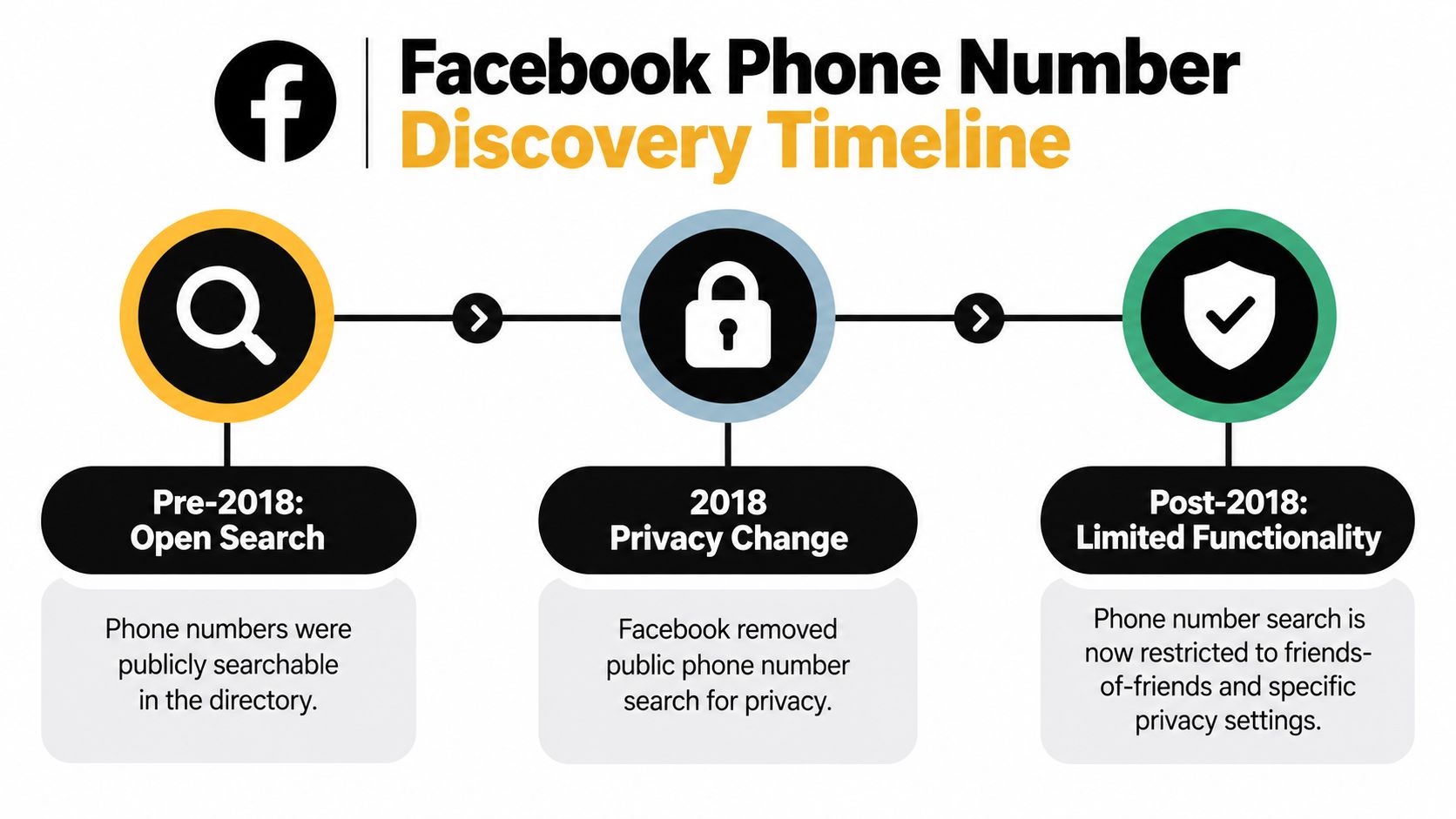
The important distinction is between direct search and conditional matching. Direct search treats a phone number like an indexed directory entry. Conditional matching checks whether the number exists in a permitted data relationship, whether Facebook can associate it with an account, and whether that account allows discovery through the number. Independent coverage of Facebook’s phone lookup restrictions explains why searches often return no profile when the number isn’t shared in the required way or when lookup permissions are limited.
The three layers behind a match
Think of the process as three gates rather than one search box.
Data possession means the number exists in your device contacts, normally in a consistent format. If you received the number in a text message but never saved it, Facebook’s contact-discovery tools may have nothing to compare.
Platform-side indexing means Facebook has an association between that number and an account. A person may use a different number for Facebook, remove an old number, or maintain an account without adding a phone number at all.
Discoverability settings determine whether Facebook will use that association to help others find the account. A user can restrict phone-based discovery, and privacy choices can prevent a visible result even when the number is attached to the profile.
This explains why two apparently similar numbers can behave differently. One may appear through contact suggestions, while another produces no result because the account owner disabled discovery, the number uses a different country format, or Facebook has no usable association.
A past security analysis also showed why unrestricted phone lookup created risk. It described a friend-discovery chain that could expose identity information through number enumeration, password-reset workflows, and contact-import processes. In one example, inferring a Belgian provider number reportedly took 15 to 35 minutes, while narrowing the final two digits through reset responses took about 2 minutes. The technical write-up on Facebook phone-number exposure illustrates why modern OSINT checks must respect rate limits and privacy controls rather than attempt bulk discovery.
The practical consequence is straightforward. A number can still be a linkage point, but it isn’t a reliable global search key. If you’re reducing your own exposure, review old numbers, connected accounts, and public records as part of a broader data broker removal process, not just a Facebook setting.
How to Try Ethical Facebook Lookup Using Your Contacts
The safest Facebook-native method uses a number you already possess and a contact entry you control. It doesn’t involve scraping, password-reset testing, fake accounts, or third-party services promising guaranteed results. The process may surface a suggestion, but Facebook’s privacy rules can still prevent a match.
Start with clean number formatting
Save the number in E.164 format, which includes the plus sign, country code, and national number without local formatting. For example, an international number might look like +1234567890. The example is only a formatting pattern. Use the actual country code and digits for the number you’re checking.
Country formatting matters because a local number can be interpreted differently across regions. A number saved with parentheses, spaces, or a missing country code may not compare cleanly with the version associated with a Facebook account.
Before proceeding, check:
- The digits: Compare the contact entry with the original message, call record, or business card.
- The country: Confirm that the country code matches where the number was issued.
- The label: Save the contact with a neutral name if you don’t know the person’s identity.
- The source: Record where you obtained the number so you don’t confuse it with another contact.
Add the number to your phone contacts
Create a normal contact entry on your iPhone or Android device. Facebook’s contact-discovery process relies on contact access, so an unsaved number won’t provide the same input as a saved one.
Then open Facebook and review the app’s contact-upload or contact-sync controls. The exact menu names can change, but the principle remains the same: you choose whether Facebook can access and compare your address book. Read the permission prompt carefully, because enabling contact syncing can share more than the one number you intended to check.
Enable syncing only if you accept the privacy trade-off
Contact syncing can make friend suggestions more relevant, but it also creates a data-sharing decision. Your address book may include relatives, coworkers, clients, and people who never agreed to upload their details to a social platform.
If you enable the feature, allow it temporarily and review what Facebook says it will do with your contacts. After checking, turn syncing off if you don’t want ongoing contact uploads. You can also remove previously uploaded contacts through Facebook’s account settings where that option is available.
Review suggestions without forcing a conclusion
Open Facebook’s Find Friends or suggested-friends area and look for a plausible match. Compare several non-sensitive signals, such as a voluntarily public name, a profile image, shared context, or information the person has already provided to you. Don’t treat a similar name or photograph as confirmation.
If no result appears, stop after checking the number format, contact entry, and permission status. Repeated attempts won’t override the other person’s privacy setting, and trying to bypass that setting crosses an important ethical line.
Consent matters. A safety check should help you decide whether to continue an interaction, not give you permission to expose or pursue someone who has chosen not to be discoverable.
For a wider framework covering usernames, images, public profiles, and evidence handling, use this ethical OSINT guide. The same discipline applies here: collect only what you need, verify context, and stop when the search becomes invasive.
What to Do When Facebook Shows No Match
A missing result is an ambiguous finding. It may reflect a private account, an unlinked number, a formatting error, an unsynced contact, or no Facebook account at all. Treating every blank result as evidence of deception can lead to unfair conclusions, especially in dating and personal disputes.
Start with the least invasive explanation. Recheck the country code and digits, confirm that the contact is saved, and verify whether contact access is enabled. If those details are correct, accept that Facebook may be intentionally withholding the match.
Compare the next reasonable checks
| Method | Best For | Key Limitation | Privacy Consideration |
|---|---|---|---|
| Facebook contact suggestions | Checking whether a known number connects to a discoverable Facebook account | A private or unlinked account may remain invisible | Requires careful handling of contact permissions |
| Direct conversation | Confirming identity with a person who has contacted you | A dishonest person can still provide false information | Ask for consent and avoid demanding unnecessary personal data |
| Public cross-platform review | Comparing a voluntarily public name, username, business page, or profile image | Similar names and copied images can create false matches | Review only information the person or organization has made public |
| Reverse phone search | Investigating a number associated with a business, scam message, or public listing | Databases can be incomplete, outdated, or inaccurate | Don’t use a result to publish or confront someone |
| Digital-footprint review | Auditing your own exposure across social, professional, gaming, and public profiles | It can’t prove who controls every account | Use it for self-protection and documented, lawful research |
A reverse search can be useful when the number appears in a public business listing or scam report, but it shouldn’t become a hunt for private details. If you want to assess an international number’s public associations, review the limitations described in this reverse international phone number guide.
Interpret partial signals carefully
Cross-platform identity resolution works best as a comparison exercise, not a single-query answer. A public username that appears alongside the same voluntarily shared website may strengthen context. A reused photograph, matching name, or similar location alone is weak evidence, because people share names and scammers copy legitimate images.
Don’t enumerate number blocks or test password-reset responses. Older discovery chains demonstrated how those techniques could infer identity information, but they also create privacy and account-security risks. Bulk normalization and automated requests can trigger platform protections and may violate terms of service.
If the search relates to a date or a financial request, use behavior as a stronger safety signal than profile discovery. Refusal to video chat, pressure to send money, inconsistent personal details, and urgent requests for secrecy should matter more than whether Facebook exposes an account.
Staying Safe and Legal While Searching by Phone Number
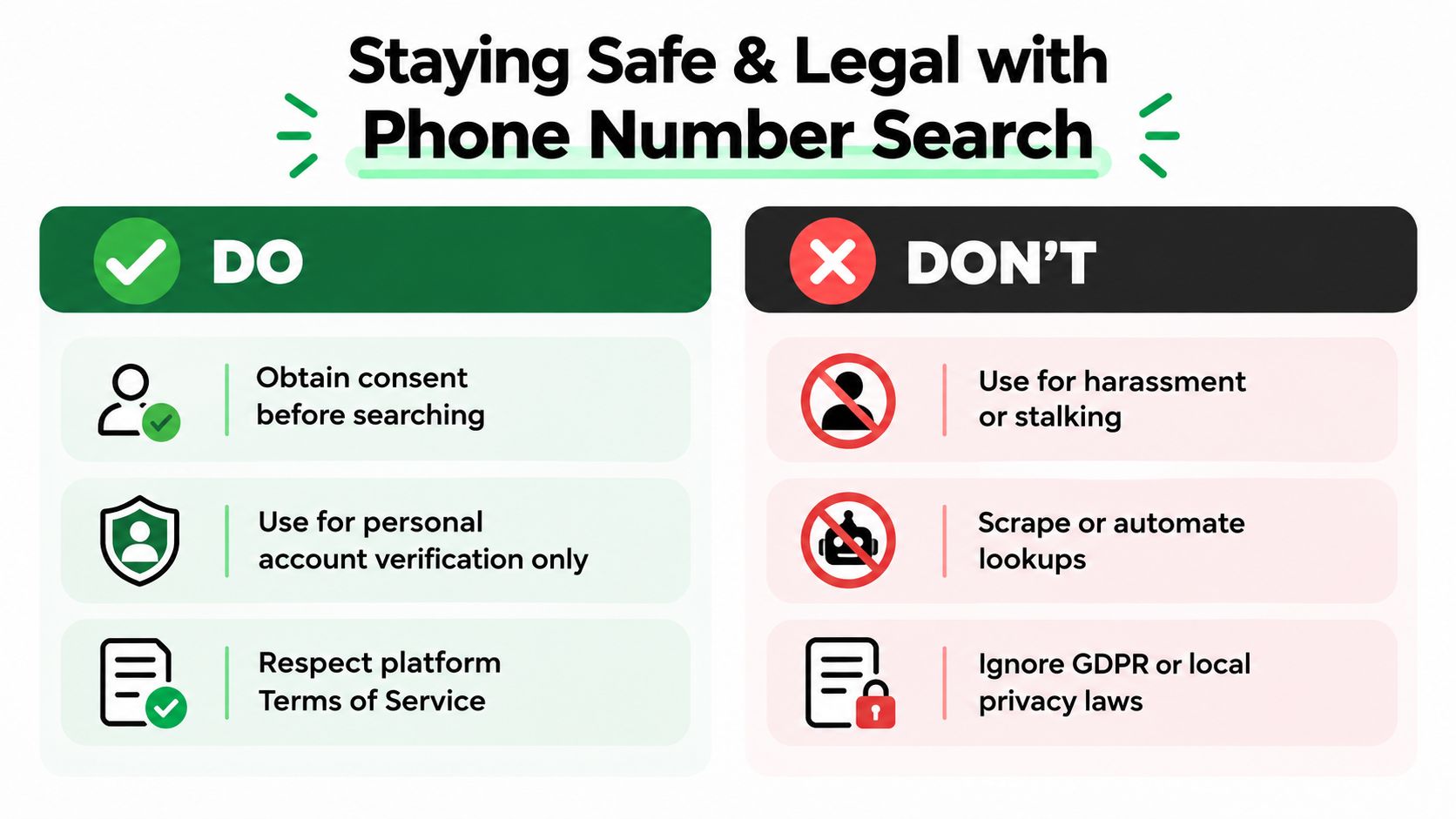
Phone-number verification has a legitimate place in personal safety, but the purpose should be risk assessment, not surveillance. Checking whether a contact has a public business presence or whether your own number is exposed is different from trying to identify, locate, or pressure a private individual who has opted out of discovery.
Romance scams show why people want better verification. The FTC reported that nearly 60% of people who said they lost money to a romance scam in 2025 said the fraud began on a social media platform. The FTC’s social-media romance-scam data supports caution, but it doesn’t make invasive searching acceptable.
The reported financial impact is also serious. The FTC said romance-scam losses increased by 22% to $1.48 million, with an average loss of $2,020 per person, in its consumer advice update. The FTC’s imposter-scam update makes a strong case for slowing down before sending money or personal documents.
Keep the search within clear boundaries
Use a simple decision test:
- Purpose: Are you protecting yourself, verifying your own exposure, or trying to satisfy curiosity about another person?
- Permission: Do you have a lawful reason to process the information, and are you using only permitted sources?
- Proportionality: Do you need this information to make a safety decision, or are you collecting more than necessary?
- Stopping point: Will you stop once you have enough information to decline contact or report a concern?
Don’t create fake accounts, impersonate someone, scrape profiles, automate requests, or use leaked databases. Don’t call repeatedly after a person declines contact, and don’t publish a suspected identity based on a weak match.
Social media was connected to nearly 30% of scam reports in 2025, while the FTC’s broader Consumer Sentinel data recorded $15.9 billion in reported fraud losses from about 3 million complaints. The FTC’s Consumer Sentinel data spotlight shows the scale of the threat, but safe action usually means preserving evidence and reporting it, not conducting your own investigation.
If someone asks for money, identity documents, gift cards, cryptocurrency, or secrecy, pause the interaction. Save messages and payment details, speak with someone you trust, and report the account through the relevant platform or authorities.
Rules differ by jurisdiction, particularly around personal data, automated collection, employment screening, and sharing information about identifiable people. Review whether OSINT is legal in your location before conducting research for work or another person.
How to Protect Your Own Number From Being Found on Facebook
The same number you use to check exposure can reveal more about you than you expect. It may connect to old social profiles, marketplace activity, gaming accounts, professional pages, or data-broker records. That can affect personal safety, dating boundaries, identity-theft risk, and the public reputation a recruiter or employer sees.
Start inside Facebook’s privacy and account settings. Review who can find you using the phone number associated with your account, and choose the most restrictive option that fits your needs. Remove phone numbers you no longer use, especially old numbers that might later belong to someone else.
Audit the contact pathway
Contact syncing deserves its own review. Check whether Facebook has access to your address book, whether previous contacts were uploaded, and whether you want that feature enabled. If you use multiple devices, review permissions on each one because turning off access on one phone may not change data already uploaded to your account.
Also inspect connected apps and services. A phone number shared with a dating app, gaming platform, messaging service, or public business page can create a path to your identity even when Facebook itself is private. Use different usernames where practical, avoid publishing your personal number on public profiles, and separate business contact details from private ones.
For a broader cleanup, follow this guide on removing personal information from the internet. Focus first on accounts you control, then contact websites that publish outdated or unwanted details.
Check the rest of your digital footprint
A privacy audit should include more than Facebook. Review old gaming profiles, dating accounts, professional pages, public posts, breached credentials, and usernames that connect different parts of your life. Digital Footprint Check can search across 500+ platforms for exposed information linked to identifiers such as phone numbers, email addresses, usernames, and social profiles.
Create a short maintenance routine:
- Review active numbers: Remove obsolete phone numbers from accounts and recovery settings.
- Test visibility: Ask what a stranger could learn from your public profiles without logging in.
- Separate identities: Keep personal, professional, gaming, and dating information from forming one obvious trail.
- Recheck after changes: Privacy settings and platform interfaces can change, so revisit important accounts periodically.
You don’t need to make yourself invisible online. You need to decide which parts of your identity are public, who can connect them, and what a stranger could do with that information.
Digital Footprint Check helps you review public exposure across social networks, professional profiles, gaming accounts, breach data, and other online sources, including phone-based discovery signals. Run the free Digital Footprint Check to see what your own number may reveal, then use the findings to tighten Facebook privacy settings and remove unnecessary exposure.