· Digital Footprint Check · Content Marketing · 12 min read
How to Check Digital Footprint - Quick Online Presence Guide
Discover how to check digital footprint and learn practical steps to review, manage, and safeguard your online presence today.

Here’s a quick overview of how to check your digital footprint: the main actions covered below, what you’re likely to find, and the tools you’ll need.
How to Check Your Digital Footprint At a Glance
| Action | What You Will Find | Tools Needed |
|---|---|---|
| Search Yourself | Publicly available info, social media, news, old forum posts. | Google, DuckDuckGo |
| Review Social Media | Tagged photos, past posts, public profile details. | Native social media platform settings |
| Check Data Breaches | Compromised accounts and exposed personal information. | Have I Been Pwned |
| Audit Online Accounts | Active subscriptions, old unused accounts, app permissions. | Your own records, email search |
| Use Specialized Tools | A consolidated view of your public and private data trail. | Digital Footprint Check |
This is just the starting point. Each step uncovers a different layer of your online identity, explored below.
What Is a Digital Footprint and Why It Matters
Your digital footprint is the data you leave behind whenever you use the internet. It’s a record of your online actions, with real-world consequences: a forgotten post can cost a job offer, and your browsing history might even influence a loan application.
This data trail breaks into two types:
- Active Footprint: What you share knowingly: an email, a social post, a blog comment.
- Passive Footprint: Data collected in the background, often without you doing anything: browsing history (cookies), your IP address, and location data tracked by apps.
The Lasting Impact of Your Online Trail
Every click, share, and login adds to a permanent record of who you are online. These trails are almost always larger and longer-lasting than we expect. Around 60% of Americans admit to having online content they regret, showing how easy it is to underestimate the permanence of our digital lives.
Your digital footprint is more than social media profiles. It’s your emails, metadata like login times and device types, and your purchases. Combined, they form a behavioral profile that shapes your reputation and security.
How Your Data Is Used
Knowing how to check your digital footprint really starts with understanding where your information is going. Data brokers and advertising networks are constantly collecting this information to build profiles for targeted ads. This is a massive industry, and it’s worth reading a strategic guide to third-party data to get a sense of the scale.
These profiles can feel invasive and have impacts far beyond the ads you see. To get the full picture, you can learn more about the broader implications of your digital footprint in our detailed guide. Figuring out what’s already out there is the first real step toward taking back control.
Your First Step: The Manual Investigation
Before you reach for any fancy tools, the most eye-opening first step is to see yourself the way the rest of the world does. A potential employer, a new client, or even a prospective date isn’t using sophisticated software; they’re just typing your name into a search bar.
And they are definitely looking. A CareerBuilder survey found that 70% of employers use social media to screen candidates before hiring. This simple manual check isn’t just a good idea—it’s essential.
Start by searching your full name on Google, but don’t stop there. Run the same search on Bing and DuckDuckGo, too. You’d be surprised how different the results can be across platforms.
Search Like an Investigator
To really get the full picture, you need to dig a little deeper than just your name. Think like a professional investigator and use search operators to filter the noise and find what’s actually about you.
Here are a few powerful combinations I always recommend trying:
"Your Full Name": Putting your name in quotes forces the search engine to look for that exact phrase. This is the fastest way to filter out people with similar names."Your Full Name" + "Your City": Adding your current or a former city can instantly surface local news mentions, public records, or old forum posts you forgot about."Your Full Name" + "Your Company": This query often pulls up work-related articles, conference speaker lists, or professional profiles you might not even know exist.
This process gives you a baseline—it’s what anyone can find out about you in five minutes. This is your public-facing digital identity.
Audit Your Social Media Profiles From the Outside In
Once you’ve scoured the open web, it’s time to turn your attention to your social media accounts. What you see when you’re logged in is a different world from what the public sees. The trick is to view your own profiles as if you were a stranger.
Most platforms have a “View As” or public view feature. Use it. It’s the quickest way to spot unintentionally public photos, old rants, or personal details on Facebook, Instagram, and LinkedIn.
Go through the privacy settings on every platform you use. Who can see your posts—“Friends,” “Friends of Friends,” or the entire “Public”? Who has permission to see the photos you’re tagged in?
It’s often an old, forgotten photo tagged by a friend that shows up in a search and paints a picture you never intended to share. This hands-on audit almost always uncovers settings you enabled years ago and forgot about, giving you a chance to clean up your visible footprint on the spot.
Using Specialized Tools to Uncover Hidden Data
While Googling yourself gives you a glimpse of your public-facing persona, it barely scratches the surface. To see what data brokers and people-search sites really know about you, you have to dig deeper with the right tools. These platforms vacuum up information from public records, social media, and countless other online sources, piecing it all together into surprisingly detailed profiles.
This isn’t just a small-scale operation. The global volume of digital data has exploded to an estimated 149 zettabytes and is on track to hit 181 zettabytes next year. This growth is fueled by everything from our smart devices to AI-generated content. You can learn more about this explosive data growth and what it means for your privacy. Locating your profiles on these sites is the critical first step toward getting back in the driver’s seat.
Finding Yourself on Data Broker Sites
There are plenty of services designed specifically to scan these databases for you. They do the work, consolidating your public records, online accounts, and social media mentions into a single, digestible report. Honestly, they can perform a deep dive in minutes that would take you weeks to do on your own.
Once you’ve found your profiles, the next hurdle is the opt-out process. Data brokers often make this intentionally confusing, but it’s an essential part of cleaning up your data trail. For a closer look at the techniques used to gather all this info, check out our guide to OSINT tools for digital footprint checking.
It’s not just about finding the data; it’s about seeing the connections. Finding an old address linked to your current phone number on a data broker profile is a real eye-opener. It shows you just how much these hidden networks know.
Checking for Data Breach Exposure
Another huge piece of your hidden footprint is your exposure in data breaches. Your security footprint is just as vital as your public one, and this is where services like Have I Been Pwned become indispensable.
With a quick search, you can see if your email addresses or passwords have been compromised in known breaches. This should be a non-negotiable part of any regular digital footprint audit.
Here are a few key services to keep on your radar:
- People-Search Engines: Actively search for your name on sites that compile and sell personal information. You might be surprised what you find.
- Data Breach Scanners: Make it a habit to check your email addresses against databases of known security breaches.
- Reputation Monitoring Services: If you want to automate the discovery and monitoring process, consider using a platform like Digital Footprint Check.
Auditing Your Mobile and Application Footprint
Let’s talk about the device that’s probably within arm’s reach right now: your smartphone. It’s our constant companion, but it’s also one of the biggest, and sneakiest, contributors to our digital footprint.
Consider this: there are roughly 6.04 billion internet users worldwide, and a staggering 96% of them get online using a mobile device. That tells you everything you need to know about how central these little glass rectangles are to the digital trails we leave behind. The sheer volume makes a mobile audit an absolute must.
The easiest place to start is with your app permissions. Think about that quirky photo editor or the game you downloaded to kill time. Does it really need access to your entire contact list or your location 24/7? So many apps quietly siphon up this data in the background, long after you’ve swiped them away.
Reviewing Your App Permissions
Thankfully, both iOS and Android make it pretty straightforward to see who has access to what. A quick dive into your phone’s privacy settings will lay it all out.
- On an iPhone (iOS): Head to
Settings > Privacy & Security. From there, you can see exactly which apps have asked for access to things like your Location Services, Contacts, Photos, Microphone, and Camera. - On an Android device: Go to
Settings > Security & privacy > Privacy > Permission manager. This gives you a clean dashboard showing which permissions are being used by which apps.
It can be a real eye-opener. Seriously, you might find an app you haven’t opened in years has been tracking your location this whole time. Be ruthless. Revoke any permission that isn’t essential for an app to do its job.
Digging into Your Digital Receipts and Backups
Beyond just permissions, your app store history is a story in itself. Go look at your download and purchase history in the Apple App Store or Google Play Store. It’s a great way to jog your memory about old apps and services you signed up for—many of which are likely still holding onto your data.
And don’t forget about your cloud backups. Services like iCloud and Google Drive often become digital attics, storing years of old device backups, photos, and files you’ve forgotten about. Sifting through these archives can uncover a surprising amount of old personal data that’s bloating your footprint.
This kind of cleanup is just one piece of the puzzle. To really get a handle on your online presence, it’s smart to regularly run through a comprehensive social media audit checklist to make sure all your public-facing profiles are locked down and reflect how you want to be seen.
A Practical Plan for Managing Your Online Presence
You’ve done the hard work of uncovering your digital footprint. Now comes the part where you take back control. The goal isn’t to erase your past completely—that’s a nearly impossible task—but to shape a digital identity that reflects who you are today. The best way to start is by tackling the easy wins first.
This means rolling up your sleeves and reviewing everything from old accounts and app permissions to online purchases and cloud storage. It’s all about finding and ditching outdated or unnecessary data.
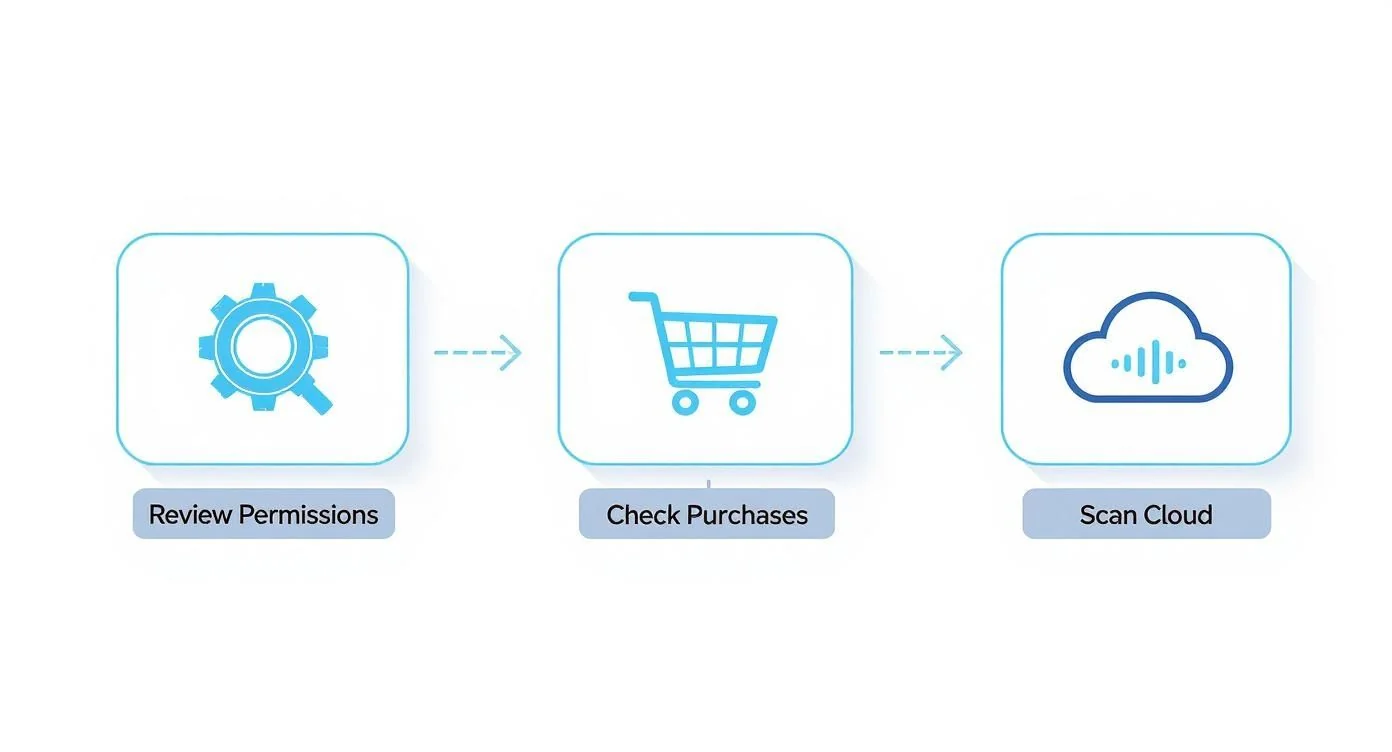
As you can see, your mobile footprint alone is a huge area that needs a serious audit. It’s a critical piece of the puzzle for a thorough cleanup.
Prioritize and Remove Unwanted Content
Your first target should be those old, forgotten accounts. Dig through your email archives for welcome messages from services you signed up for ages ago. Deactivate any profiles on forums, ancient social networks, or shopping sites you no longer touch.
What about content you can’t delete yourself, like a photo someone else posted? Just reach out and politely ask them to take it down.
If a simple request doesn’t do the trick, or if your info is plastered on data broker sites, you’ll need to file official takedown requests. Google and most people-search sites have formal processes for removing sensitive personal information. It can feel a bit tedious, but it’s a non-negotiable step in shrinking your footprint.
The real aim here is to reduce your digital attack surface. Every old account is a potential security risk and a puzzle piece that paints an outdated picture of you.
Build a Positive Presence and Monitor for Changes
For search results that you simply can’t remove, the best strategy is suppression. You can bury the old stuff by building a positive online presence. Create professional profiles on reputable sites like LinkedIn or even a simple personal portfolio website. Over time, this new, high-quality content will push the less relevant results further down the search rankings.
Finally, make monitoring a routine. Set up Google Alerts for your name and email addresses. These free notifications will ping you whenever you’re mentioned online, turning what feels like a one-time chore into a sustainable habit.
For a deeper dive, you can learn more about how to conduct a personal online audit and keep your digital presence clean for the long haul.
Your Digital Footprint Questions, Answered
As you start digging into your own digital footprint, a few questions almost always pop up. Getting a handle on these helps you set the right expectations for cleaning up and managing your online self.
How Often Should I Check My Digital Footprint?
Think of it like any other kind of check-up. For a quick pulse check, doing a simple search of your name once a month is a great habit to get into. It only takes a few minutes.
But for the real deep dive, you should block out some time at least every six months. It’s also a smart move to do a thorough audit before any big life events—like when you’re about to start hunting for a new job or applying for a mortgage.
Can a Digital Footprint Be Completely Erased?
Let’s be realistic: no. Wiping the slate clean is pretty much impossible. Between data backups on servers you’ve never heard of, third-party data brokers, and archived web pages on sites like the Wayback Machine, some things are just out there.
The goal isn’t total digital invisibility. It’s about smart, strategic management—minimizing your public exposure and taking control of the narrative.
A VPN is a fantastic tool for shrinking your passive footprint because it masks your IP address, making you harder to track. Just remember, it won’t do anything to hide your active footprint, like the comments you post on social media or anything you do while logged into an account.