· Digital Footprint Check · Content Marketing · 17 min read
Background Check Consent Forms: 2026 Legal Guide
Create compliant background check consent forms with our 2026 guide. Covers FCRA, e-signatures, state laws, and a checklist for HR & applicants.

You’re often handed this document at a tense moment. An HR manager is trying to move a hire through the funnel without creating compliance risk. A candidate has finally received a conditional offer and doesn’t want to sign away privacy rights without understanding the terms.
That’s why background check consent forms matter so much. They sit at the intersection of hiring, privacy, online identity, and legal risk. A weak form can disrupt a hiring decision, expose sensitive data, and create avoidable disputes. A strong one creates clarity. It tells the employer what they’re allowed to do, tells the applicant what they’re agreeing to, and puts both sides on firmer ground if the screening turns up something inaccurate or misleading.
The practical stakes go beyond paperwork. Modern screening often intersects with digital privacy, public records, reputation management, OSINT workflows, breached credentials, gaming account identity overlap, social media visibility, and even dating app traces that can confuse identity verification. That doesn’t mean employers can freely sweep the internet. It means candidates should understand what information about them is already exposed online, and employers should build a screening process that stays inside the law.
Why This Form Is More Than Just Paperwork
A candidate accepts a conditional offer on Friday, signs a rushed stack of onboarding documents, and gets a rejection call the next week after the background report comes back. Then the real problem surfaces. The disclosure and authorization were buried inside other hiring paperwork, so the employer now has a consent problem, and the candidate still does not know exactly what was checked or whether the report was even tied to the right person.
That is why this form carries real weight. It is the document that sets the rules before any screening starts. For HR teams, it creates the record that permission was requested and given before a report was ordered. For applicants, it is the first chance to see the scope of the check, ask questions, and catch language that is broader than the role requires.
Small drafting mistakes create expensive problems.
For employers, a weak form can undermine the hiring process before the report itself is reviewed. If the disclosure is mixed into an application packet, padded with extra releases, or written so vaguely that an applicant cannot tell what they are authorizing, the company is exposed on process alone. That can mean delayed start dates, repeat screenings, legal complaints, and hard conversations with hiring managers who thought the candidate was already cleared.
Applicants get hurt in more specific ways than many employers realize. A flawed form can leave someone agreeing to a wider search than expected, including checks that are irrelevant to the job or not clearly explained. It can also make it harder for the person to understand what triggered a denial, what records were pulled, or how to dispute a mistaken match. In practice, that can cost an applicant a start date, force them to resign from a current job too early, or leave them scrambling to correct a report tied to someone with a similar name.
The consent form also sets expectations around categories of information. It may cover criminal history, past employment, education, motor vehicle records, credit information where allowed, or an investigative consumer report. Applicants should read that scope carefully. HR should make sure each category has a legitimate business reason tied to the position, not a habit carried over from an old template.
A good process starts before the signature. Candidates should understand the broader pre-employment screening process so they know what questions to ask and what rights they may need to use if the report is wrong.
Practical rule: If the form is bundled with other policies, written in legal clutter, or asks for broad permission without clear limits, stop. HR should fix it before ordering the report, and applicants should ask for a clean copy before signing.
There is also a privacy and identity-matching issue behind the scenes. A person may have old usernames, stale contact details, public records tied to a prior address, or online profiles that make identity verification messier than it looks. Employers cannot treat that as permission to search everything they can find online. Applicants should know that a confusing digital trail can still contribute to mismatches, and employers should use a process that keeps the screening narrow, documented, and tied to lawful sources.
Anatomy of a Legally Sound Consent Form
A hiring manager sends an offer packet on Friday afternoon. The candidate signs everything over the weekend. On Monday, HR realizes the background check disclosure was buried inside a larger application bundle with a liability release. That form may be unusable, and the screening process may need to start over.
That is why consent form drafting matters. For employers, a bad form creates compliance exposure and delays. For applicants, a bad form can hide what is being checked, who is checking it, and what rights still apply.
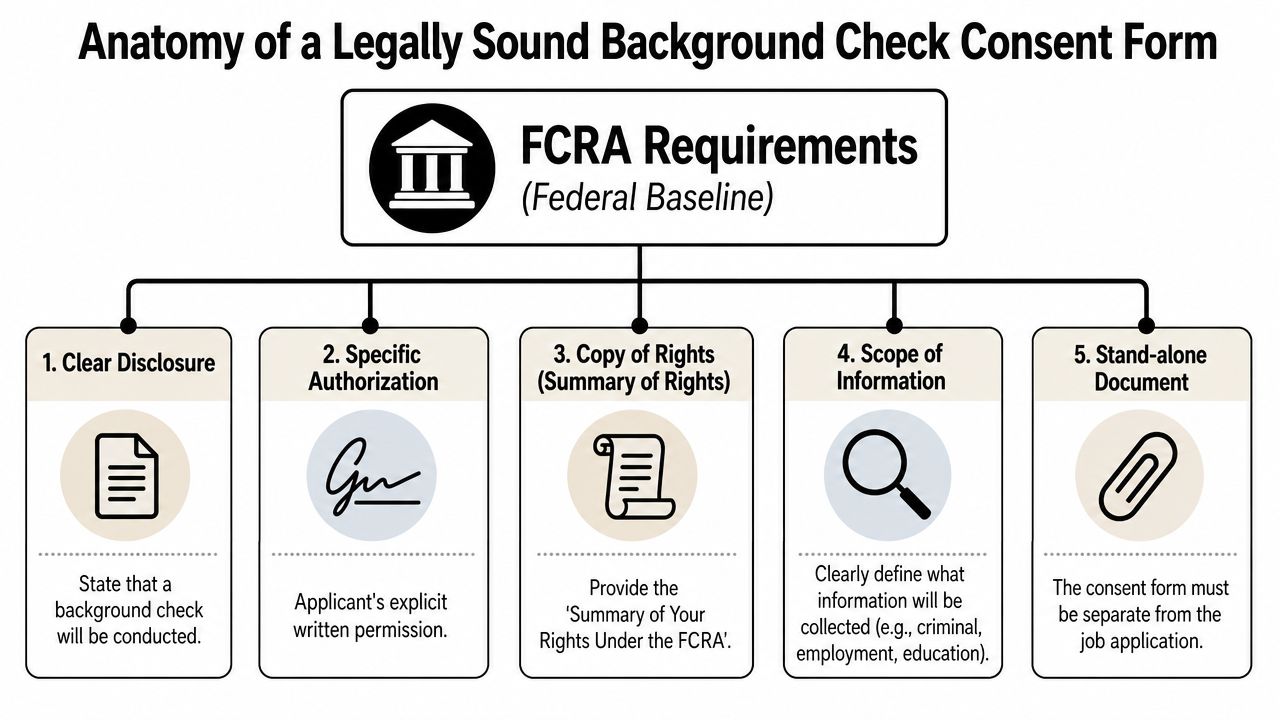
At a minimum, the form needs to do three jobs well. It must clearly disclose that a consumer report may be obtained for employment purposes. It must capture the individual’s written authorization. It must avoid extra language that weakens the disclosure, especially waivers of rights or unrelated acknowledgments.
The Required Structure
Start with separateness. The disclosure and authorization should stand on their own document, written clearly enough that an applicant can understand what is being requested without sorting through policy language, releases, or handbook terms.
That rule is where many employers get into trouble. I regularly see forms folded into job applications, onboarding packets, and multi-purpose signature pages. It saves a page. It also creates an avoidable legal problem.
Nolana’s analysis of background check consent form compliance highlights the same failure point. A compliant form should be separate from the job application and not mixed with unrelated material.
What the document should include
A sound form is narrow by design. It tells the person that the employer may obtain a background report for employment purposes, describes the categories being checked when appropriate, and provides a place to sign and date. If an investigative consumer report may be used, the form should also make that clear and preserve the person’s right to ask for more information about the nature and scope of that inquiry.
Both sides should read the scope closely. HR should confirm that every category on the form matches the screening package being ordered. Applicants should check whether the form reaches only records tied to the role or tries to sweep in more than the job justifies.
A legally sound form usually includes these core elements:
| Element | What it needs to do | What often goes wrong |
|---|---|---|
| Clear disclosure | Tell the person a background check may be obtained for employment purposes | Disclosure is buried in a larger packet |
| Authorization language | State that the applicant authorizes retrieval of specified information | Consent is implied rather than expressly signed |
| Scope of information | Describe categories such as criminal, employment, education, credit, or driving records when applicable | Scope is vague or overbroad |
| Rights notice | Preserve the individual’s rights to receive and dispute report information | Form includes rights waivers |
| Agency identity | Identify the consumer reporting agency when required in the form design | Vendor details are omitted or unclear |
What strong forms do differently
Strong forms use restraint. They say only what the law and the screening purpose require. They do not try to solve every HR paperwork need on one page.
Weak forms usually fail in predictable ways. They add liability releases, state law notices that should have been separate, broad consent to search anything online, or blanket language copied from an old template. That drafting style confuses applicants and gives HR less protection, not more.
The cleaner approach is operationally simple. Keep the consent form limited to disclosure and authorization, then place onboarding terms, handbook acknowledgments, and role-specific notices in separate documents. If your screening package includes a criminal record check for employers, the form should reflect that category accurately without drifting into unrelated permissions.
A good test is plain-English readability. If an applicant cannot explain what the form authorizes after one careful read, the form needs revision.
Obtaining and Documenting Consent the Right Way
A recruiter sends the background check packet at 4:57 p.m. The applicant signs on a phone, HR orders the report, and the hire moves forward. Two months later, the applicant disputes the process and asks a simple question. What exactly did I authorize, and when did I see it? If your team cannot answer that with records, timestamps, and the exact form version used, the problem is no longer administrative. It is a compliance problem.

Consent fails in practice for predictable reasons. The form is correct, but the timing is wrong. The signature is captured, but the system cannot prove which disclosure the applicant saw. The report is ordered before authorization is complete. Applicants also make mistakes on these forms, especially with prior names, dates of birth, and address history, then get blamed for record mismatches that a review step could have caught.
Timing deserves a policy, not guesswork. Many employers choose to present the form after a conditional offer because it limits unnecessary screening and keeps decisions easier to defend. Other employers screen earlier for operational reasons, but they need a clear legal basis, a consistent process, and a documented explanation for why that timing fits the role and jurisdiction.
A practical consent workflow
Use the same sequence every time. Consistency protects the employer and gives the applicant a fair chance to read before signing.
- Provide the disclosure before any report is ordered. The applicant should receive the standalone disclosure first, not buried inside a larger onboarding packet.
- Get signed authorization before the screening request is submitted. No exceptions for urgent hires.
- Use a delivery method you can prove. Paper works. Electronic workflows also work, but only if the system records affirmative consent to electronic delivery and keeps a usable audit trail.
- Verify identifying information before sending the order. A quick review of name, date of birth, and address history prevents avoidable disputes.
- Restrict access to results and related paperwork. Hiring managers do not need broad access to sensitive identifiers or reports outside the decision process.
- Store consent records where they can be retrieved later. If a regulator, applicant, or lawyer asks for proof, HR should be able to produce it quickly.
That list looks basic because the failure points are basic. I see the same ones repeatedly. Recruiters send a combined packet, candidates click through too fast, and the platform captures a checkbox without preserving the exact disclosure language on screen at the time of consent.
Electronic signatures and audit trails
Electronic signatures are usable if the system is built for evidence, not convenience alone. HR should be able to show four things without reconstructing the file by hand:
- Who signed
- When they signed
- What version of the form they saw
- How consent was captured
If one of those pieces is missing, your process is weaker than it appears. That matters to employers trying to defend the file, and it matters to applicants who may later question whether they were properly informed.
A walkthrough like this helps hiring teams standardize the handoff from recruiter to screening vendor:
Recordkeeping and privacy discipline
Consent forms are legal records with sensitive personal data. They should not sit in a general HR folder, ride along in email threads, or get attached to routine performance documents. Separate storage limits unnecessary access and makes retrieval easier if the process is challenged.
Applicants should protect themselves here too. Before signing, review every identifying field carefully and ask for a clean copy of what was presented if the workflow feels rushed or confusing. Employers that want fewer disputes should build that pause into the process and train staff on how to conduct background checks without collecting extra data that serves no screening purpose.
Good documentation does two jobs at once. It gives HR a defensible record of consent, and it gives the individual a clear, reviewable trail of what was requested, what was authorized, and when.
Navigating State Laws and Special Screening Cases
Federal law sets the floor. It doesn’t clear the whole field.
States can add restrictions on timing, disclosures, criminal history inquiries, and credit checks. Some jurisdictions layer fair chance or ban-the-box requirements onto the process. Others expect more specific notices when certain report types are used. That means a form that looks acceptable at the federal level can still miss the mark once state law enters the picture.
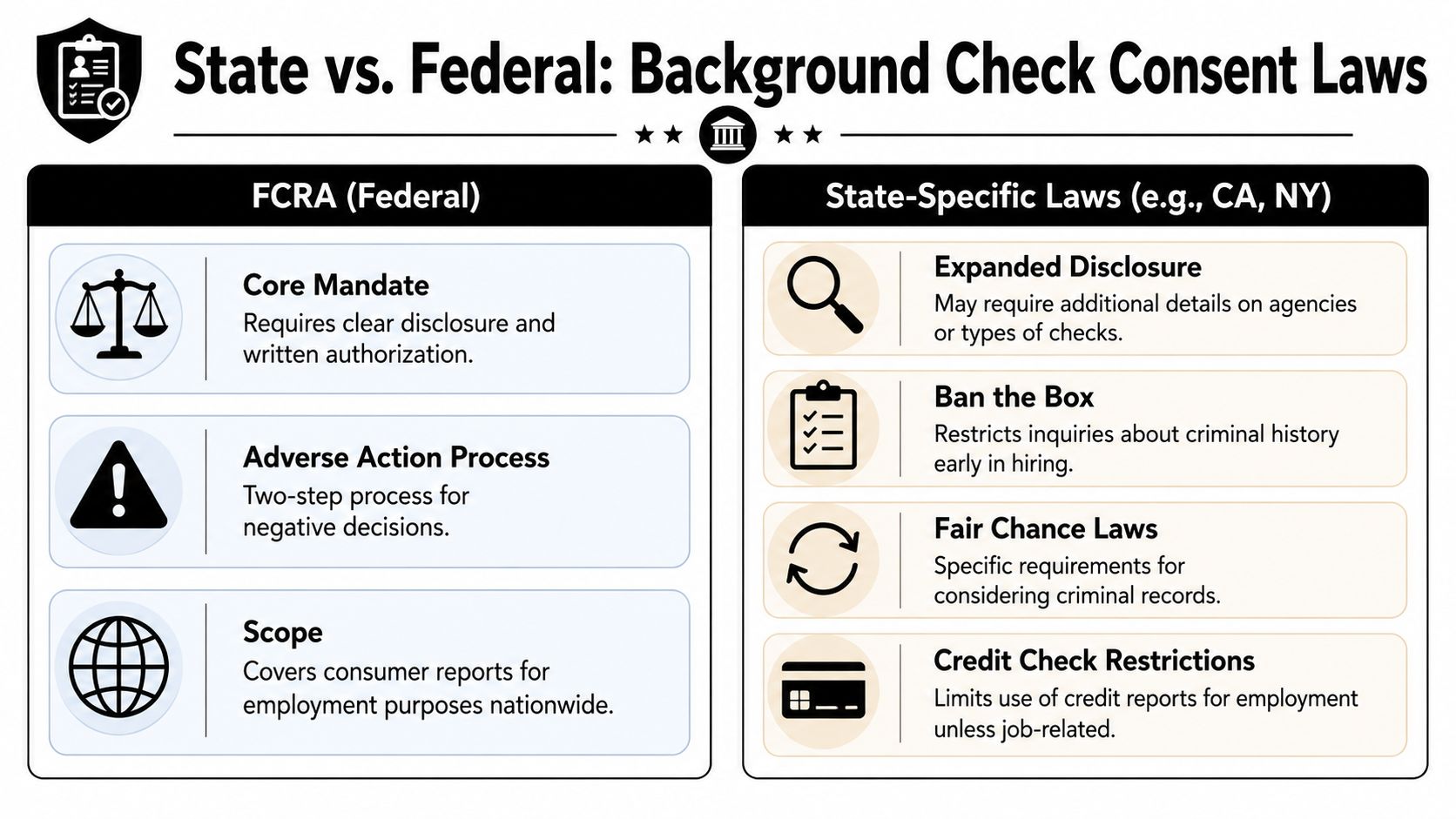
One important example comes from DocDraft’s discussion of authorization form requirements, which notes six core FCRA elements and says California and New York add state-specific disclosures, including ban-the-box related notices in some contexts. The article also emphasizes that forms omitting required elements raise litigation risk and that standardized, FCRA-aligned templates perform better than custom forms that haven’t been verified.
Investigative reports need extra attention
Not every background check is the same. A routine consumer report differs from an investigative consumer report. The second category can involve personal interviews about character, reputation, or lifestyle, which triggers a different disclosure issue many employers miss.
According to EEOC guidance on background checks, if an employer uses an investigative report based on personal interviews, applicants must be informed of their right to a description of the nature and scope of the report, and many generic consent forms fail to include that notice.
That omission creates a practical compliance gap. A company may think it has broad permission to “investigate background,” but if the process includes personal interviews and the form doesn’t notify the candidate correctly, the screening workflow is exposed.
If the screening goes beyond records and into interviews about reputation or character, the disclosure has to reflect that shift.
State rules change the timing and wording
A federal-first mindset causes problems because state law often changes the order of operations. In some places, employers can’t ask about criminal history early in the process. In others, the use of credit reports is restricted unless the role justifies it. Multi-state employers should stop trying to use one generic packet for every location.
Companies usually face a trade-off:
| Approach | Benefit | Risk |
|---|---|---|
| One national form for every state | Easier administration | Misses local disclosures or timing rules |
| State-specific form sets | Better alignment with local law | More version control and training needed |
| Vendor-managed compliance workflow | Stronger update discipline | Requires close review of vendor settings |
The safest operational choice is usually a controlled form library with state-specific variants and clear routing rules. That’s more work on the front end, but it reduces improvisation by recruiters and hiring managers.
Special populations and online data
Volunteers, minors, international candidates, and regulated roles often require modified handling. The reason isn’t that the consent concept changes. The reason is that the legal and practical context changes. Cross-border data, age-related permissions, and industry-specific rules can alter what should be collected, when it should be disclosed, and which notices need to accompany the authorization.
There’s also a modern OSINT issue worth separating from formal screening. Employers may be tempted to supplement reports with internet searching, social media review, gaming profile checks, breach lookups, or identity-research tools. Those practices raise fairness and consistency concerns if they aren’t tightly governed. A candidate’s old username, dating app presence, public forum history, or exposed credentials can reveal real security issues, but ad hoc searching also increases the risk of seeing irrelevant or protected information.
That’s why businesses need a documented policy before expanding into online reputation review or digital footprint research. Teams considering broader screening support should compare providers and workflows built for background check services for businesses, then align that work with counsel and internal policy instead of letting individual managers improvise.
Critical Mistakes That Invalidate Your Consent Form
Most broken background check consent forms don’t look broken at first glance. They look efficient. They look complete. They look like someone copied a template and added “extra protection.”
That instinct causes trouble.
Bundling ruins otherwise usable forms
The most common error is mixing the disclosure and authorization with other hiring documents. Employers often combine the form with the application, handbook acknowledgments, liability releases, or broad policy statements because they want a single signature event. That creates exactly the kind of confusion the standalone rule is meant to prevent.
A candidate should be able to look at the page and immediately understand one thing: this is the document authorizing a background check.
Vague language creates avoidable disputes
Another mistake is trying to authorize everything under the sun. Broad, foggy language invites questions about scope, especially when the actual check is much narrower. If the form says the employer may gather any information from any source for any purpose related to employment, that’s not practical drafting. It’s a warning sign.
Good consent language is specific enough to be understood. Weak language tries to preempt every possible issue and ends up making the form less defensible.
Hidden waivers are a serious red flag
One of the least discussed problems appears in boilerplate around former employers. The Village of Downers Grove background check consent form illustrates a neglected risk area. A major underserved angle in these forms is language requiring candidates to disclose and waive rights related to confidentiality provisions with former employers. Many templates include clauses where applicants waive rights to enforce prior confidentiality agreements, and that risk is often buried in legal jargon.
That matters for candidates who signed settlement agreements, separation agreements, non-disparagement provisions, or confidentiality terms in a prior role. A person may think they’re only consenting to a background check when they’re also agreeing not to enforce certain prior restrictions against a former employer that responds to the inquiry.
Read any release or waiver language directed at former employers line by line. That’s where the biggest surprises tend to sit.
What to do instead
For employers:
- Cut nonessential language: Keep the document focused on disclosure and authorization.
- Separate legal functions: If you need other acknowledgments, place them in different forms.
- Review old templates: Legacy packets often contain clauses no one has reexamined in years.
For applicants:
- Pause at waiver language: Especially any clause mentioning release, confidentiality, settlement, or prior employer communications.
- Ask for clarification in writing: If a sentence seems broader than the screening itself, get an explanation before signing.
- Keep a copy: You want the exact version you agreed to, not a summary after the fact.
The Ultimate Checklist for Employers and Applicants
The fastest way to reduce mistakes is to use a checklist that matches the actual workflow. One list should control the employer process. The other should help the applicant review the document before signing.
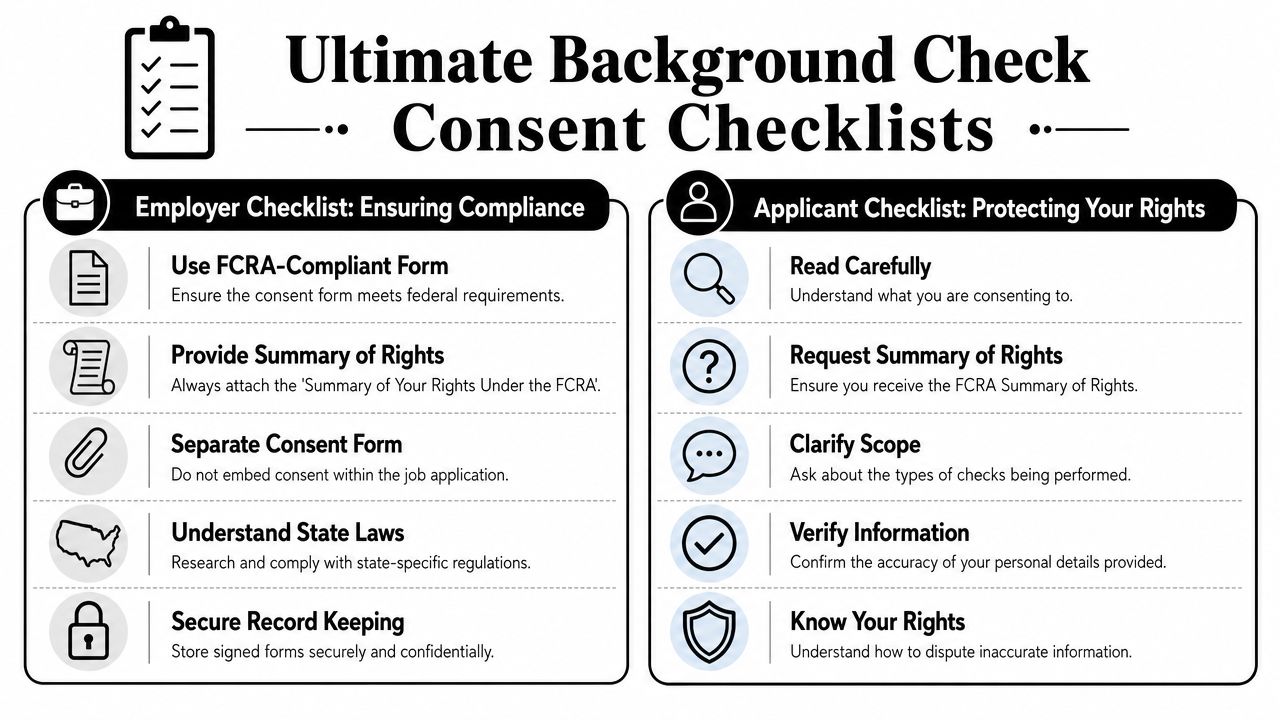
Employer checklist
- Use a standalone form: Don’t combine disclosure and consent with applications or handbook forms.
- Match the form to the screening package: If you’re verifying criminal history, employment, education, driving, or credit where allowed, the scope should reflect that.
- Check state overlays: Review whether local rules add timing restrictions, fair chance obligations, or extra notices.
- Validate digital execution: If using e-signature, confirm affirmative electronic consent and preserve the audit trail.
- Store records separately: Keep signed forms and related records in a secure location apart from personnel files.
- Plan the adverse action workflow: If a report affects the employment decision, the required notices must follow the report review process.
Applicant checklist
- Read the whole form: Look for the actual scope of the screening, not just the signature line.
- Confirm it’s separate: If consent language is bundled into a larger hiring packet, ask why.
- Check your identifying details: Names, addresses, and other personal details should be correct before you sign.
- Watch for extra waivers: Pay close attention to language involving former employers, confidentiality, or settlement agreements.
- Know your rights: You may request report information and dispute inaccuracies if the report contains errors.
A final practical note. Candidates who care about job prospects, identity theft, online reputation, scam prevention, dating app verification, and gaming profile security should treat background screening as one part of a larger digital self-audit. Employers should treat consent forms as controlled legal documents, not admin shortcuts. If you need a starting point for vendor comparisons, this roundup of the best background check sites for employers is worth reviewing alongside your compliance process.
Before you sign a consent form or send one to a candidate, get clear on what’s already visible online. Digital Footprint Check helps individuals and businesses review exposed personal data, public profiles, breach signals, gaming identities, professional reputation issues, and other OSINT traces that can affect privacy, hiring, safety, dating verification, and scam prevention. Start with the free checker at Digital Footprint Check to see what your digital footprint reveals before someone else does.