· Digital Footprint Check · Content Marketing · 14 min read
Employee Background Check Process: a Complete Hr Guide
Master the employee background check process with this actionable HR guide covering consent, checks, compliance, timelines, and red flags.

It’s Wednesday morning, the recruiter wants to move fast, and the candidate has already said the criminal issue “wasn’t a conviction.” Then the report lands, and it doesn’t match the verbal story. That’s the moment the employee background check process stops being paperwork and becomes an operational decision with legal, candidate-experience, and hiring-speed consequences.
The pain often surfaces only when something goes sideways. An offer sits in limbo, a hiring manager wants an answer, and someone in HR has to decide whether the discrepancy is a typo, a disclosure gap, or a real risk. The difference between a defensible workflow and a rushed one is usually not the vendor, it’s whether the process has clear ownership, clean consent, and a consistent way to read results.
The process is also much more common than many teams admit. A PBSA survey found that 96% of employers said their organization conducts one or more types of employment background screening, 90% screen full-time employees, and 73% report a documented background-screening policy, which tells you this is now a standard risk-control step, not a special-case HR task (PBSA survey data). For context on how screening can influence hiring decisions and public reputation, this overview on hiring decisions online reputation is worth a look, and the internal view of what employers see when they Google you makes the digital footprint side very concrete.
Why the Employee Background Check Process Matters Now
The reason this workflow matters is simple. Hiring teams are operating across more states, more remote locations, and more role types that carry different levels of risk. A one-size-fits-all check no longer holds up when the job might involve customer trust, financial access, a license, or a public-facing digital footprint.
The cost of improvising the workflow
A rushed screen can fail in both directions. It can miss material risk because the search was too shallow, or it can create a false alarm because the data source was incomplete or messy. In practice, that means the hiring team either overreacts to a bad report or underreacts to a real issue.
What gets overlooked is the quiet operational cost. Recruiters chase updates, hiring managers lose confidence in the process, and candidates feel like the company is disorganized. Once that happens, the background check starts shaping the employer brand just as much as it shapes the hiring decision.
Practical rule: If the screening step has no owner, no timeline, and no dispute path, it isn’t a process. It’s a delay with legal exposure.
The other reason this matters now is that hiring managers increasingly expect OSINT signals to surface early. That doesn’t mean treating public information as a shortcut to a decision. It means recognizing that digital footprint screening can help flag contradictions, duplicate identities, and reputational issues before the offer gets too far down the road.
The work is no longer just “run a check.” It’s define the sequence, decide which roles justify deeper screening, and make sure every step can be defended if challenged. That’s the standard teams need to build around.
Setting Up Policy, Consent, and Disclosure
A clean screening program starts before a single report is ordered. The written policy should define which roles get which checks, which jurisdictions are covered, who approves exceptions, and how long the records are kept. Without that, teams end up making one-off calls that look inconsistent later.
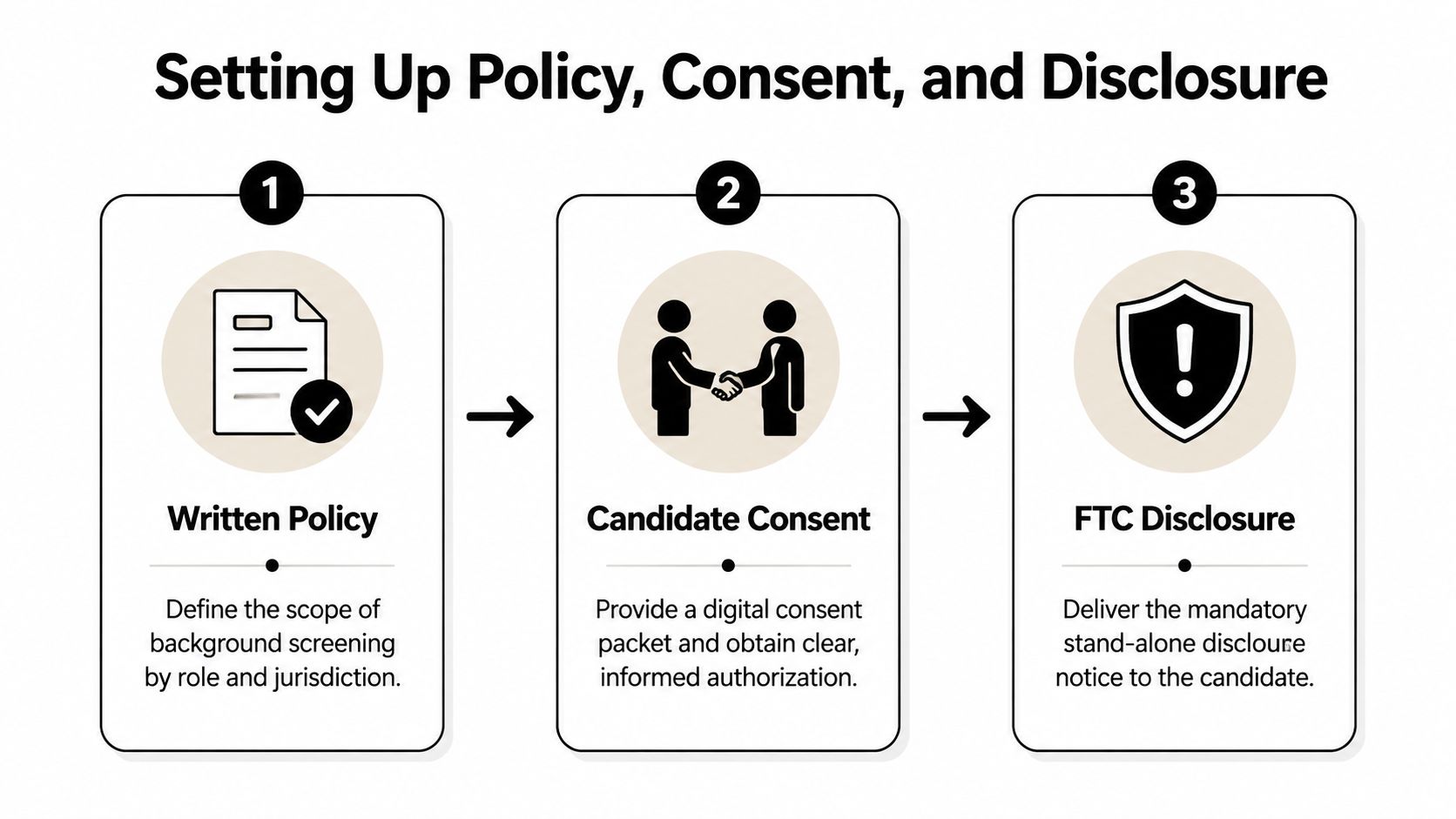
Build the policy first, not the packet
The policy has to answer practical questions. Does every full-time hire get the same baseline screen, or do checks vary by role? Are you using one provider for all locations, or do some states require addenda and extra handling? Who reviews disputes, and who signs off on adverse action?
This is also where candidate experience starts. If the policy is clear, the packet is easier to explain and the recruiter doesn’t have to improvise every time a candidate asks why a check is needed. The right internal reference point is the guide to background check consent forms, because the paperwork should match the workflow, not the other way around.
Use the FTC disclosure as the anchor
The FTC requires a clear, stand-alone written notice that a consumer report may be used for employment decisions, plus written permission from the applicant, and certification to the reporting company that the notice and permission rules were met (FTC background-check guidance). If the report is investigative, the applicant also gets a description of the nature and scope of the investigation.
That sequence matters. The disclosure cannot be buried inside a job application, and the authorization should not be presented before the disclosure lands. In practice, the cleanest packet is disclosure first, authorization second, then any state addenda tied to ban-the-box, salary thresholds, or record-sealing rules.
The best screening packets are boring. They use one disclosure, one authorization, and one clear routing path for exceptions.
Electronic signatures are fine if they’re tied to a reliable audit trail and the candidate can review what they’re signing. If a candidate revokes consent mid-process, stop the screen, document the pause, and decide whether the role can proceed without that check. Teams lose time when they keep pushing a partially completed packet instead of resetting the workflow cleanly.
Types of Background Checks HR Teams Actually Order
The right screen depends on the job, not on habit. A warehouse role, a finance role, a licensed clinician, and a remote contractor with no customer access do not need the same mix of checks. The practical mistake is ordering too much everywhere, or too little where the risk is real.
Match the check to the risk
Identity verification usually comes first, because every later step depends on matching the person to the record. Criminal searches, employment and education verification, credential checks, driving records, and credit reports each answer a different question. If you use them interchangeably, you’ll get noisy results and weak decisions.
OSINT belongs in that same selection logic. Public web search, social profiles, and digital footprint review can surface inconsistencies, hidden accounts, or public-facing behavior that affects trust. For a structured overview, the internal page on criminal record check for employers fits naturally alongside traditional criminal screening.
The outsourced version of this logic also appears in the right to work solution for HR teams, which is useful context if your team is separating eligibility verification from broader pre-hire screening.
| Check Type | What It Verifies | Data Source | Common Failure Mode |
|---|---|---|---|
| Identity verification | The person and the identifiers match | Identity databases and document checks | Mismatched names, duplicate identities |
| Criminal records | Relevant criminal history | County, state, federal, and database searches | Jurisdictional blind spots, stale data |
| Employment verification | Prior employers, titles, and dates | Former employers, payroll, or verification vendors | Unresponsive employers, bad dates |
| Education verification | Degree, attendance, and graduation | Institutions or education databases | Mill records, delayed registrar responses |
| License and credential checks | Active, valid professional credentials | Licensing boards and credential registries | Expired status, name changes |
| Credit reports | Financial history where permitted | Consumer reporting agencies | Overuse on roles with no financial access |
| Driving records | License status and driving history | Motor vehicle records | State-by-state differences |
| OSINT and digital footprint checks | Public online identity and reputation signals | Public web, social, and breach data | Context errors, identity mix-ups |
Select depth by role, not by preference
Entry-level roles usually need a leaner package than regulated roles. Customer-facing work may justify a stronger public-footprint review, while fiduciary roles justify deeper financial and identity controls. Remote hiring also raises the value of identity and location consistency checks because the hiring team can’t rely on in-person cues.
The failure mode to watch is false confidence. A clean report can still be incomplete if the search scope is too narrow, and a messy report can still be harmless if the issue is a data artifact rather than a real risk. Good screening is less about stacking checks and more about picking the checks that answer the right questions.
Running the Check From Order to Verified Result
The workflow should feel controlled from the moment the recruiter sends the packet. Once consent comes back, the vendor runs identity and database pulls, then routes anything that needs human verification into court or employer follow-up. The smoother the handoff, the less time the requisition spends waiting on a status update nobody can explain.
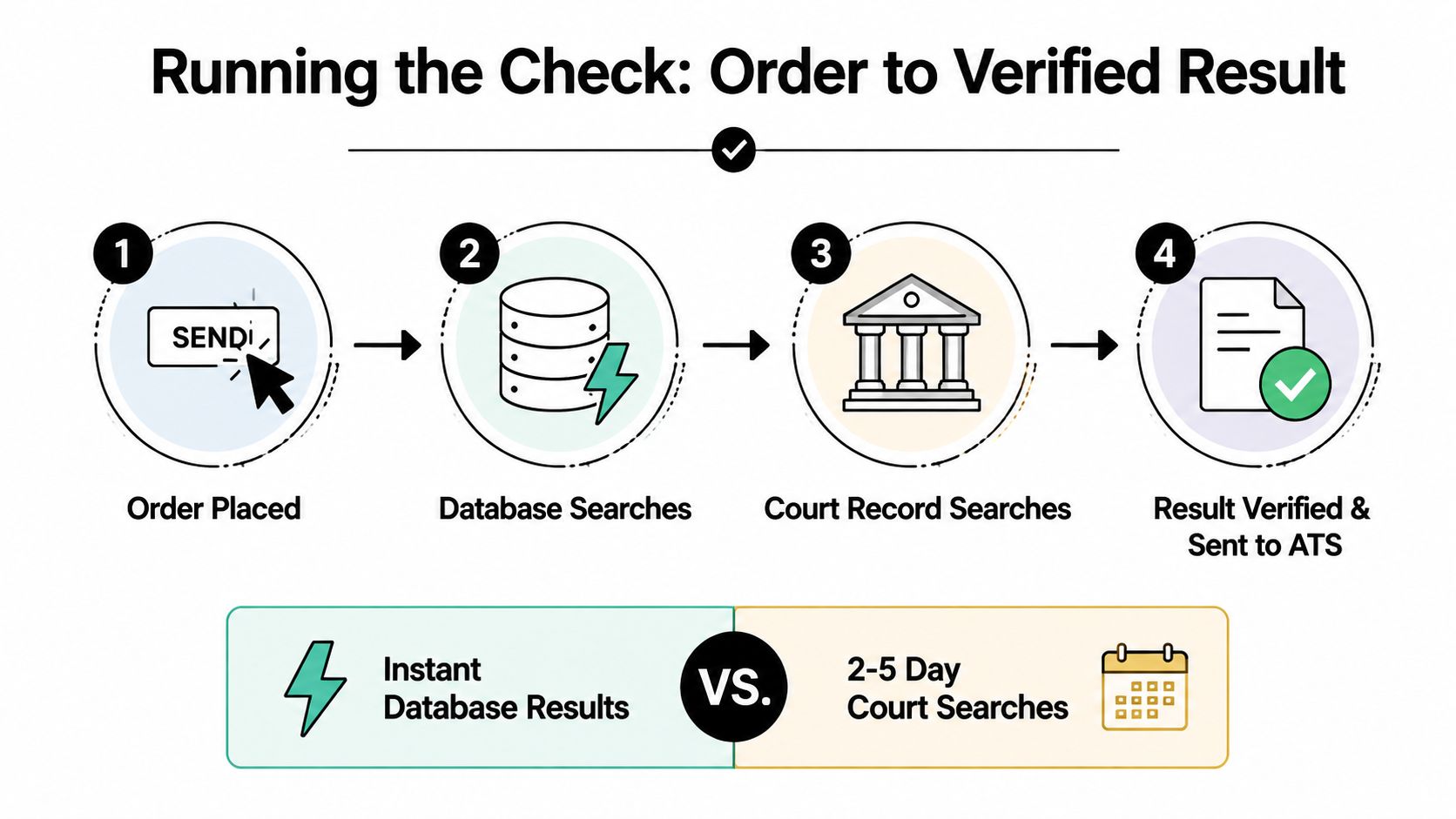
Instant hits and manual searches do different jobs
Instant database searches are useful for speed, especially for identity and broad criminal screening. Manual checks are slower, but they’re the only way to confirm details when the record needs courthouse validation or a former employer has to verify dates. The problem is not choosing one forever, it’s knowing when speed is enough and when a search needs primary-source verification.
The practical benchmark is that most U.S. packages complete in about 1 to 5 business days, with roughly 80% of standard checks returning within 5 business days and about half closing in under 3 (turnaround benchmark). Delays usually come from county-court access, unresponsive employers, or international records, while identity checks and instant database searches can finish much faster. That’s why front-loading clean consent and candidate data matters so much.
Where OSINT fits in the sequence
OSINT works best as a layer, not a replacement. It can be run after identity is confirmed so the reviewer knows the public footprint belongs to the right person. If the findings matter, the reviewer can send the issue back into the same adjudication path as any other discrepancy instead of treating it like an informal side note.
The internal reference on how to verify employment history is useful because employment checks and public-footprint review often fail for the same reason, bad source data or mismatched names. The more disciplined the handoff, the less likely the ATS fills up with half-verified results nobody trusts.
Operational insight: Fast is only useful when the result is still auditable. If you can’t explain where the data came from, the turnaround time doesn’t buy you much.
Reading Results and Handling Red Flags
Most screening reports are not black-and-white. They contain matched records, partial matches, “no record” responses, and items that need clarification before anyone acts. A good reviewer reads the report line by line, not as a verdict but as a set of signals that still need context.
Start with the match quality
A “no record found” response at the county level only means nothing was found in that search scope. It does not mean the candidate has no history anywhere. A “record found” result can also be incomplete if the search pulled a partial name match, an outdated address, or a record that still needs disposition review.
That’s why the reviewer should compare every candidate-disclosed date with the verified dates in the report. Employment dates, education completion, and prior addresses often drift slightly in candidate memory, but a large gap or a mismatch across multiple items deserves a pause. The question is not whether the candidate forgot a month, it’s whether the story still hangs together.
Use a simple decision rubric
| Red Flag | Severity | Recommended Response |
|---|---|---|
| Relevant felony conviction for the role | High | Pause, review job relevance, then consider adverse action path |
| Employment gap over six months | Medium | Ask for clarification and confirm whether the gap is explained |
| Education non-confirmation | Medium | Recheck source data and ask the candidate for documentation |
| Contradiction with OSINT findings | High | Pause and verify identity, dates, and context before deciding |
The cleanest response is usually not immediate disqualification. It’s a clarification step. A recruiter can say, “We found a mismatch between the information provided and the verification result. Please reply with any documents or context that help us confirm the timeline.” That keeps the process fair and gives the candidate a chance to explain before the record turns into a decision.
FCRA Compliance, Retention, and Adverse Action
The compliance traps in screening are usually procedural, not dramatic. Teams forget the reporting window, mix up record retention, or jump to a decision before the candidate gets the required notices. Those are the mistakes that turn a routine screen into a legal problem.
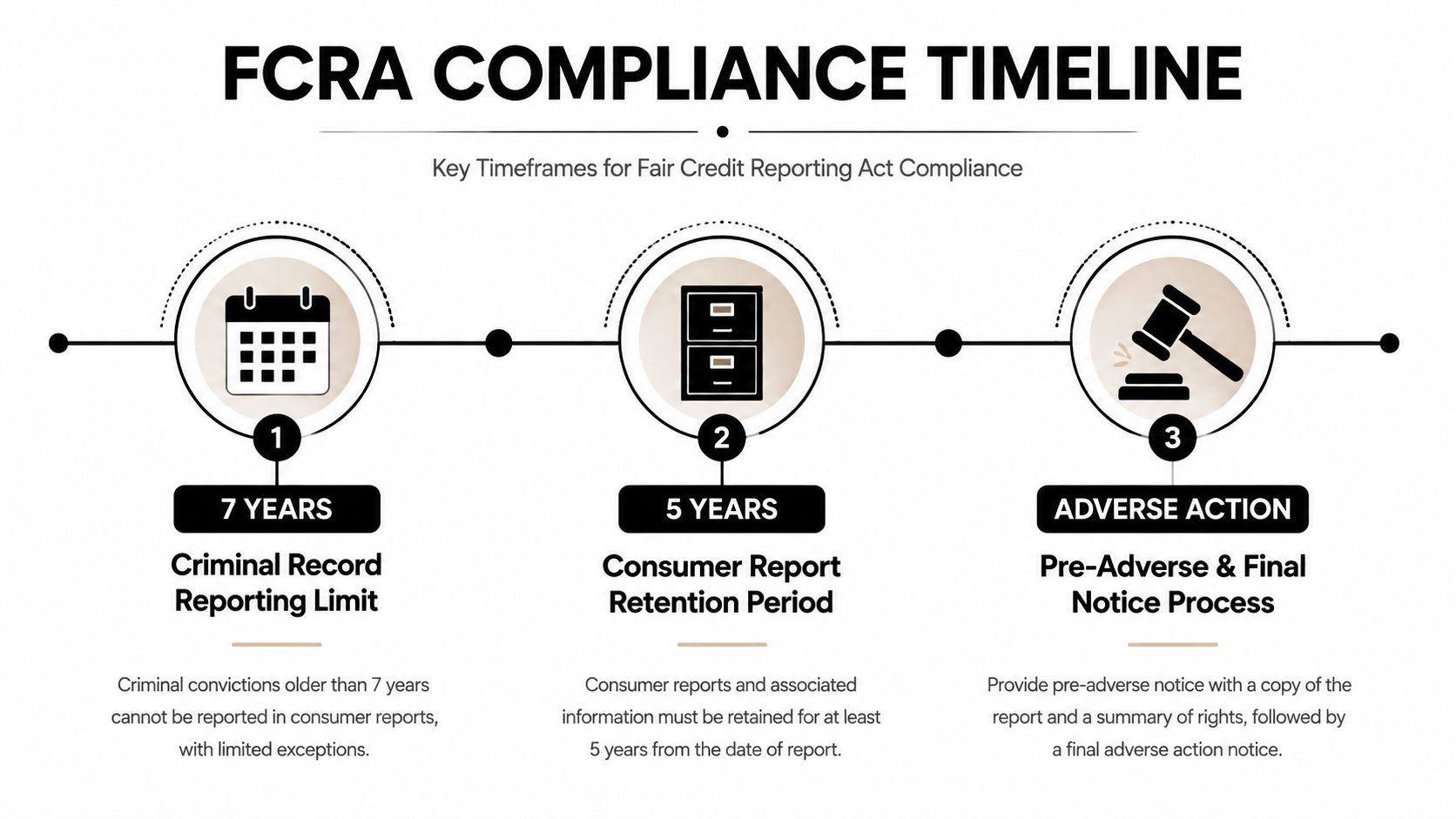
Know the timing rules that control the file
The FCRA’s seven-year reporting limit for certain adverse information is measured from the date of the event, not from the date the employer runs the check, and federal guidance also notes a salary exception for some higher-paid roles (SHRM summary of the seven-year window). On the retention side, the FTC says hiring records, including application forms whether or not the applicant is hired, must be kept for one year after they were made or after a personnel action was taken, whichever is later (FTC retention guidance).
That means consent, disclosure, and decision records need a real retention plan. You keep what proves the process was followed, and you purge what shouldn’t sit around indefinitely. If your team supports education institutions, state and local governments, or certain federal contractors, the retention period can be longer under the FTC guidance.
Adverse action has two steps
The first step is the pre-adverse action notice. Send the candidate the report and give them a reasonable chance to review and dispute it before any final decision. The second step is the final adverse action notice, which confirms the decision and includes the rights summary.
The cleanest candidate-facing language is plain. “We received information that may affect your application. Please review the report attached and let us know if there’s anything you’d like us to consider before we make a final decision.” That avoids legalese while preserving the candidate’s right to respond.
For teams needing a different industry lens, the landlord guide to FCRA 2026 shows how the same compliance mechanics are handled in another screening context. The rules are similar, but the operational risks change depending on whether you’re screening tenants or employees.
The internal page on background check services for businesses is a practical fit here because the provider has to support both retention and adverse-action workflows, not just data collection.
From One-Time Gate to Continuous Screening
A single pre-hire check is a snapshot. It tells you what was true at the time of screening, not what will be true six months later when the employee moves roles, crosses a border, or starts handling money. That’s why more teams are shifting toward lifecycle screening tied to concrete triggers instead of treating the hire date as the end of the process.
Trigger screening on real changes
The best triggers are operational, not theoretical. Promotion into financial access, a new license requirement, a regulated transfer, or a cross-border assignment can all justify a re-check if the consent model and state law support it. For some roles, ongoing monitoring also makes sense after hire because the risk is tied to continued trust, not just initial eligibility.
The core trade-off is signal volume. Annual manual re-screening is simpler to explain, but it creates lag and can miss changes between cycles. Automated annual re-checks produce a steadier workflow, while continuous monitoring gives the fastest alerts but can create false-positive fatigue if thresholds aren’t tuned well.
| Model | Trigger | Typical Cost per Employee/Year | Signal Volume | Best Fit |
|---|---|---|---|---|
| Annual manual re-screening | Calendar cycle | Varies by vendor and scope | Low | Small teams and lower-risk roles |
| Automated annual re-checks | Scheduled annual event | Varies by vendor and scope | Moderate | Mixed-role organizations |
| Continuous monitoring | Real-time or near-real-time events | Varies by vendor and scope | High | Safety, trust, and regulated roles |
Make the consent model durable
A defensible lifecycle program starts with one clearly written authorization that survives the hire, plus any separate notice required for ongoing monitoring or social media review where state law demands it. OSINT fits naturally right after hire as a baseline of the public footprint, then again when a trigger event occurs. That gives HR a way to compare what changed without pretending every change is relevant.
A sensible 90-day pilot should cover vendor selection, threshold tuning, and reviewer training. If the queue fills with low-value alerts, the program isn’t mature enough yet. If the alerts are so rare they never surface useful change, the thresholds are probably too strict.
Continuous screening should reduce uncertainty, not create a second job for HR. If the alerts are noisy, the workflow needs tuning before it scales.
If you’re building or tightening an employee screening workflow, Digital Footprint Check can help you surface public online identity signals, monitor exposed information, and see where OSINT fits alongside FCRA-compliant screening. Visit Digital Footprint Check to review the free checker and see how a digital footprint review can support cleaner hiring and ongoing risk control.