· Digital Footprint Check · Content Marketing · 13 min read
Online Personal Reputation Management Guide
Learn online personal reputation management: audit public profiles, fix what employers see, and monitor what deletion cannot erase.

In an interview-based study of human-resources professionals, approximately 70% reported some form of online screening, with LinkedIn the most frequently reviewed source, followed by Facebook and Google searches, according to research published in Socio-Economic Review. Your application isn't necessarily the only introduction an employer gets. Online personal reputation management means making the public version of your identity accurate, understandable, and less exposing, not trying to erase it.
Why Employers Judge You Before You Speak
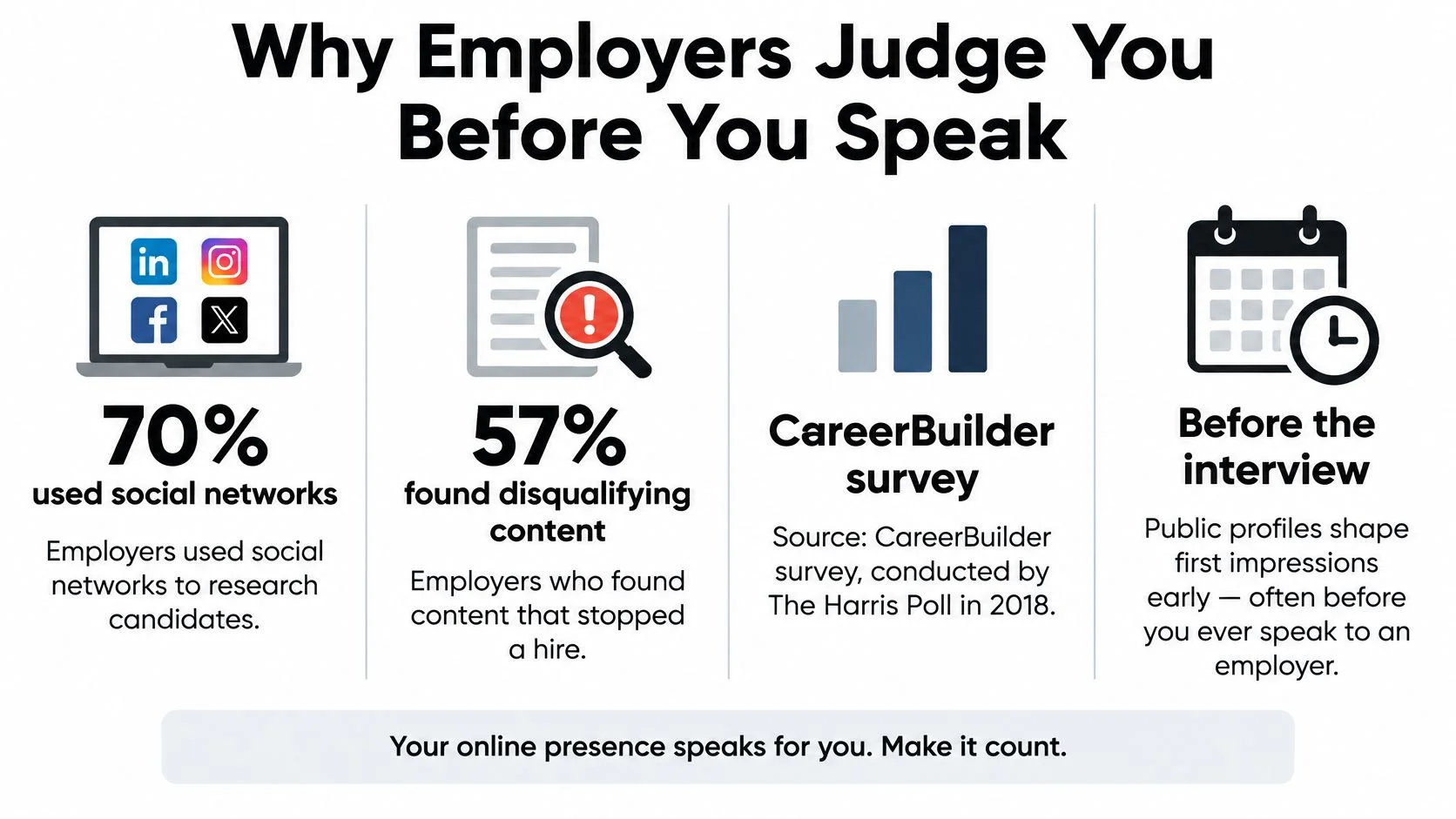
In the 2018 CareerBuilder survey conducted by The Harris Poll, 70% of employers used social networks to research candidates, and 57% of those screening employers had found content that caused them not to hire, as reported by CBIA's summary of the survey. The survey covered 1,012 hiring managers and human-resources professionals across private-sector organizations of different sizes and industries.
What Employers Look For and Reject
The remaining survey findings below distinguish general employer behavior from rejection triggers reported by employers who screened candidates. They're historical survey results, not a prediction about every hiring team.
| Signal employers reported | Share | What it means for you |
|---|---|---|
| Used social networks to research candidates | 70% of employers | Public profiles can become part of hiring |
| Found content that caused them not to hire | 57% of those who screened | Plan for potentially damaging discoveries |
| Looked for information supporting qualifications | 58% | Publish useful proof of your skills |
| Assessed a professional online persona | 50% | Keep professional profiles understandable |
| Considered what other people posted | 34% | Review tags and third-party mentions |
| Less likely to interview if nothing found online | 47% | Complete invisibility isn't necessarily helpful |
| Provocative or inappropriate photos or information | 40% | Review images alongside their context |
| Alcohol or drug-related content | 36% | Consider how public party posts may be interpreted |
| Discriminatory comments | 31% | Examine old comments, not just photographs |
| Links to criminal behavior | 30% | Check accuracy and distinguish allegations from outcomes |
| False claims about qualifications | 27% | Reconcile résumé and profile claims |
The visual summary highlights how early those judgments can happen.
Your Search Results Are a Shop Window
A name search is like a shop window. A passerby sees what's behind the glass before hearing the explanation from someone inside. A cropped photograph or outdated biography may therefore become an introduction you wouldn't have chosen.
That doesn't mean every unfavorable interpretation is fair. It means you should inspect what employers see when they Google you, correct misleading details, and offer credible professional evidence.
A useful portfolio, accurate biography, and genuine work samples give someone more to assess than an isolated post. The practical task is an audit, followed by verifiable fixes and monitoring for new copies before another recruiter, date, or other decision-maker searches.
What Online Personal Reputation Management Covers
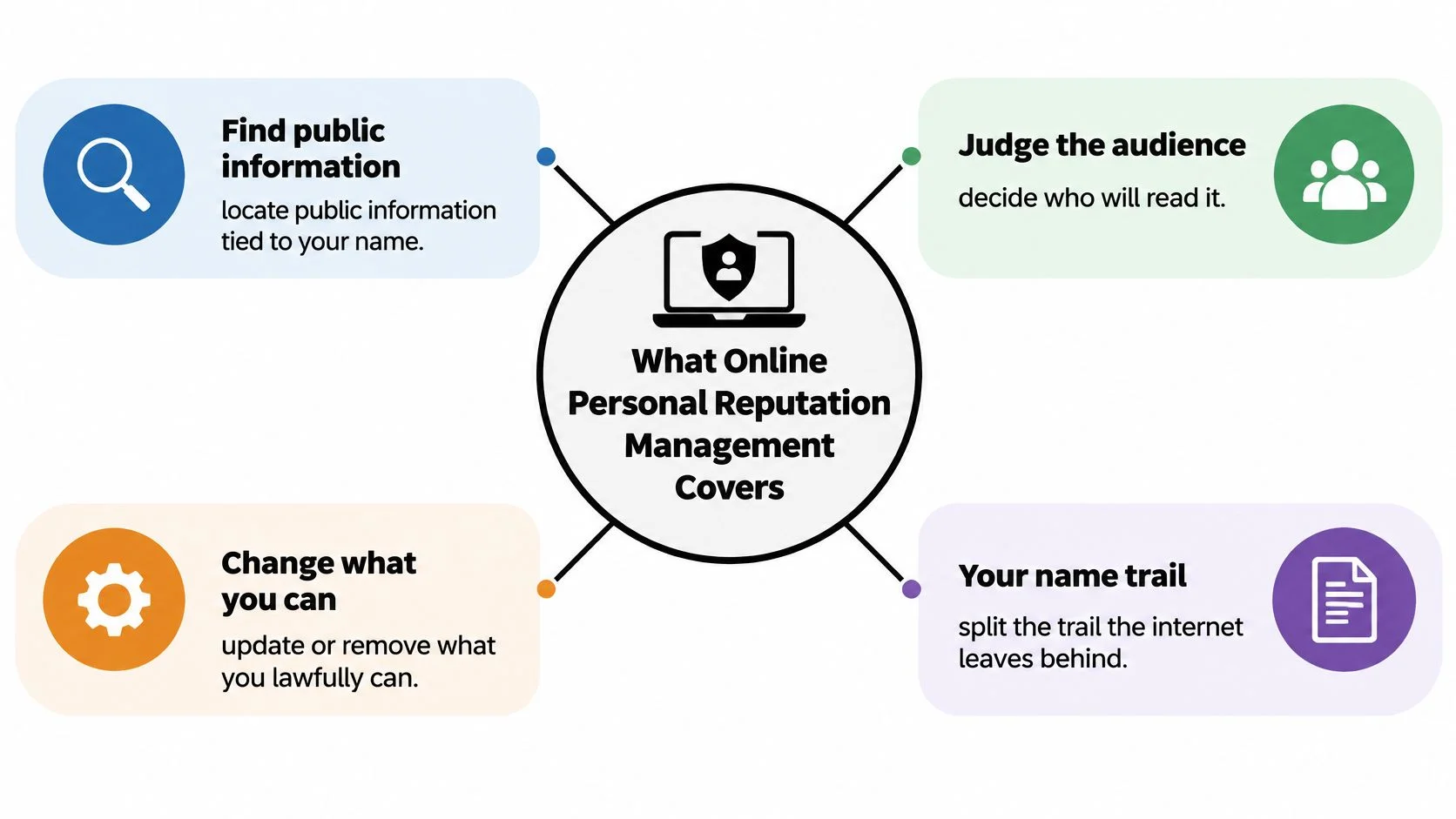
Online personal reputation management is the repeatable work of finding public information connected to you, judging who might read it, and changing what you lawfully can. It's closer to maintaining a public noticeboard than designing an advertisement.
This diagram separates discovery from judgment and action.
Your Footprint and Your Shadow
Say you're changing careers. Your digital footprint includes the posts, portfolio, gaming handle, and dating biography you've chosen to publish. Your digital shadow includes information other people or services assemble around you: broker listings, tags, cached pages, breach mentions, and reposts.
You can edit your own biography directly. You can't necessarily edit a former colleague's caption or a directory's copied entry. Treating both kinds of information as equally controllable leads to frustration.
A privacy change reduces exposure. It isn't a delete button for everything already collected.
The work falls into distinct jobs:
- Correct: Fix inaccurate biographies, outdated employers, and mismatched locations.
- Separate: Put professional evidence on LinkedIn or a portfolio while limiting personal-account exposure.
- Monitor: Schedule repeat checks for new mentions, copied records, and unexpected associations.
Keep the Method Ethical
Open-source intelligence, or OSINT, means working with information that's already publicly available. For a personal audit, review your own name variants, usernames, and published contact details as a recruiter might.
Covert access, fake accounts, and pretext calls fall outside this method. A tool's ability to connect identities doesn't give you permission to intrude into another person's private accounts.
This accompanying video offers another way to approach your online identity.
Start with a clear question: what can a stranger reasonably connect to your name? Answering that question is more useful than collecting tools without a plan for reviewing their results.
How to Audit Your Name Across the Open Web
Build a baseline before changing anything. Otherwise, you won't know whether a concerning result disappeared, moved, or stopped appearing in one search.
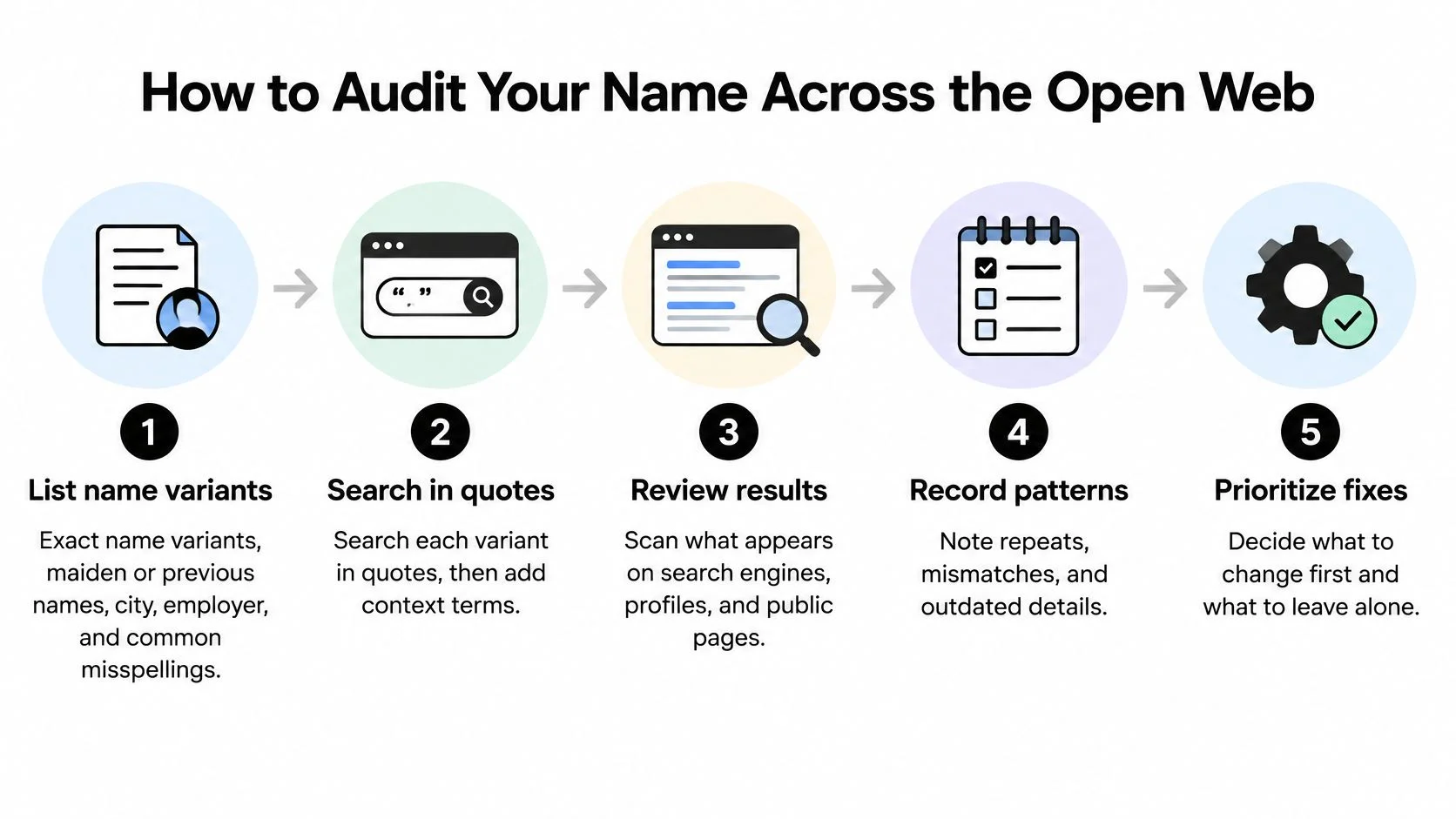
The workflow below keeps discovery separate from action.
Establish the Baseline
-
List identity variants. Include your exact name, previous or maiden names, common misspellings, city, and employer. A former surname may lead to a separate collection of results.
-
Search deliberately. Put each name variant in quotation marks, then add context such as an employer. Search usernames, email addresses, and phone numbers you've already made public, but don't paste passwords or sensitive documents into search tools.
-
Review profiles and images. Start with LinkedIn, then Facebook and general web results. As a practical starting boundary, inspect the first two results pages and image results, expanding when you find something relevant.
-
Record the identity match. Save the URL, date seen, intended audience, and whether the result concerns you. Similar names aren't enough to establish a match.
-
Prioritize before editing. Classify each result by exposure, severity, accuracy, and likely audience. A public home address needs a different response from an outdated job title.
Act With Evidence
-
Preserve the original. Save a screenshot and the page address before requesting a correction. Keep surrounding text so your evidence doesn't remove important context.
-
Secure accounts you control. Restrict contact details, enable multifactor authentication, and review tagged photographs. Archive or untag material where appropriate rather than assuming every uncomfortable post needs deletion.
-
Make specific third-party requests. Identify the exact error, explain the correction, and provide only the evidence needed. A short factual request is easier to assess than an angry demand to remove everything.
-
Set a review appointment. Put a recurring check on your calendar and assign unresolved items a next action. Cached pages, reposts, and screenshots may remain after an account edit.
Your response should fit the audience and the problem. In experiments involving employer-review responses, failing to respond produced the worst employer outcomes, while effective response styles differed between audiences, according to the Journal of Applied Psychology study. That finding concerns organizations, not individual job seekers, but it supports a useful principle: don't respond mechanically to every negative mention.
For example, an incorrect employment date calls for a factual correction. A lawful opinion you dislike may call for no public reply at all. Publishing repetitive praise about yourself isn't a substitute for correcting an authoritative record.
Practical rule: Preserve first, classify second, act third.
Keep the log simple enough that you'll maintain it:
Query | URL | Verdict | Next action | Review date
Why a One-Time Cleanup Rarely Stays Gone
An average successful removal rate of 48.2% per user is a warning against assuming that a removal subscription means disappearance: a 2025 study of personal-information removal services examined 10 major services and 2,024 data brokers, and found that 71.7% of encountered brokers weren't registered in government databases.
The same paper describes separate University of California, Irvine work in which valid California broker requests received responses from 57%, while 43% failed to respond. A response isn't itself proof of deletion, either.
What Each Reputation Action Actually Changes
| Action | What disappears | What can remain | How to verify |
|---|---|---|---|
| Delete the source record | Original profile or broker entry if the owner complies | Screenshots, caches, copied records | Revisit the exact URL and repeat the name query |
| Suppress a search result | Some prominence for selected queries | The page itself | Check relevant searches and the direct URL |
| Remove a syndicated copy | That reseller's entry or repost | The upstream record | Identify and check the original source |
| Change a privacy setting | Access through the changed setting | Previously indexed, tagged, or archived copies | Inspect the profile while logged out |
| Hire a removal service | Listings successfully removed through its requests | Unresolved listings and records outside its coverage | Require a per-broker status and supporting evidence |
An audit is an inventory. A removal request is an attempted intervention. Verification is a separate task. Confusing those stages can make an unresolved exposure look finished.
For example, schedule follow-up checks after 30 and 90 days as your own working routine, not as a legal deadline or guaranteed removal timetable. Repeat the original query, visit the saved URL, and record exactly what changed.
Verify Without Creating Another Exposure
A removal form may ask for identity documents. Before supplying them, verify the operator, understand why the information is needed, and check whether unnecessary fields can be redacted. Don't casually give a questionable site more sensitive information than it already displays.
If a broker stays silent, mark the entry unresolved, not removed. Send a second written request, then consider a regulator complaint or platform appeal where an applicable right or policy supports it.
For recurring discovery, compare saved manual searches, platform notifications, and public-profile reports. These help identify changes; they don't compel publishers to delete anything.
The distinction matters when assessing data broker removal options. Ask what was checked, what was requested, what was verified, and what remains outside coverage.
A one-time cleanup can create false confidence. Keep the evidence file open until the result has been checked.
What to Change When AI Screens Your Profile
Your public reputation also includes information that software may interpret. The practical concern isn't whether you can discover an algorithm's secret preferences. It's whether your records describe the same person consistently.
In July 2025, Gartner reported that 26% of job candidates trusted AI to evaluate them fairly, while 52% believed AI screened their application information; 32% worried AI could cause their application to fail, and 25% said AI evaluation reduced their trust in employers. These are candidate perceptions, not proof that every employer uses AI or that a particular inconsistency caused rejection.
This image illustrates the task: reviewing several representations of the same professional identity.

Choose Consistency Over Synthetic Polish
| Useful change | Risky alternative |
|---|---|
| Align employment dates and titles | Inflate seniority to match a vacancy |
| Describe demonstrable skills | Add keywords for abilities you don't have |
| Explain legitimate career transitions | Delete history until gaps become confusing |
| Document mistaken identity | Try to alter a namesake's records |
Say your résumé lists a promotion, but LinkedIn shows only your original title. Clarify the progression rather than choosing whichever title sounds more impressive.
If you use AIApply's AI resume builder to organize a draft, verify every generated statement against your actual experience. An AI-written biography that exaggerates achievements creates the same trust problem as a manually exaggerated title.
Preserve Context and a Correction Path
Before removing a post explaining a career break, save it and decide whether another accurate explanation belongs on your professional profile. You don't need to disclose private medical or family details to make employment dates understandable.
For a namesake's page, document distinguishing details such as a different employer or location. If an employer identifies a mismatch, ask which record needs clarification instead of assuming you know what its system collected.
Lawful management means correction and clarity. Fake reviews, purchased followers, impersonation, and invented work histories are manipulation, not reputation protection.
The relationship between online identities and artificial intelligence deserves scrutiny without unsupported claims about automatic penalties. Ask a concrete question: would a recruiter and an automated parser receive the same factual account from your public fields?
How Reputation Shows Up in Work Dating and Scams
Public details can serve very different purposes depending on who finds them. The following scenes are illustrative composites, not accounts of named people.
Ordinary Details With Different Stakes
Work, illustrative composite. A recruiter finds an old photograph with a careless caption and drops an interview invitation. The candidate hadn't reviewed images because the written LinkedIn profile looked fine. A photograph audit would have identified the issue, though it couldn't guarantee the hiring outcome.
Dating and family, illustrative composite. A match claims to live nearby, but a reused username leads to older posts from another city. That discrepancy warrants a question, not an immediate accusation of catfishing. Try Google Lens on profile photographs, compare public usernames and timelines, and remember that moves and reused images can have innocent explanations.
A request for cryptocurrency, wire transfers, gift cards, or emergency cash changes the decision. Stop rather than treating a convincing profile as permission to pay. Establish a calm family habit of saving messages and profile URLs before discussing suspicious relationships, without blaming the person targeted.
Internet crime, illustrative composite. An exposed email address and phone number help an impersonator make a message appear familiar. The recipient checks the supposed sender through an independently known contact channel rather than trusting the message's link.
Gaming, illustrative composite. A public handle connects a player's real name to an old email address. If the player reused a compromised password, an attacker has a possible account-takeover route. Replace reused passwords, protect the email account, and enable multifactor authentication; a new avatar doesn't address the weakness.
2024 Fraud and Scam Figures
These reported totals describe different complaint and victim groups. Don't add them together or interpret them as the full number of incidents.
| Category | Complaints or victims | Reported losses | Change |
|---|---|---|---|
| Internet crime overall | 859,532 complaints | Over $16 billion | Losses up 33% from 2023, according to the FBI's annual report announcement |
| Romance-related scams | About 59,000 victims | Over $672 million | Year-over-year change not stated in the Justice Department warning |
| Older adult fraud | 147,127 complaints | $4.885 billion | Losses up 43%, complaints up 46%, according to the FBI's elder-fraud announcement |
A public-profile check can reveal contradictions, but it can't certify someone's intentions. For suspicious relationships, use dating-app scam warning signs alongside direct safety precautions.
All these scenes begin with something you can put in the same audit log: a photograph, username, contact detail, or identity claim. The next action should match the risk, not merely make the profile look tidier.
Run a Footprint Check and Act on the Report
Start with a free footprint check, then read the results as an inventory of potentially connected public information. A report isn't a character judgment, and a matching username isn't sufficient proof that an account belongs to you.
An online reputation checker can complement manual searches by organizing public-profile and identity traces for review. Keep the distinction between a discovered association and a confirmed identity, especially when checking a common name or helping a teenager review their accounts.
Sort Every Confirmed Result
Use exactly these action piles:
- Correct it. Update inaccurate information in profiles you control.
- Lock the account. Tighten access, change reused passwords, and enable multifactor authentication.
- Request a factual fix. Ask another publisher to correct or remove a specific item through an appropriate channel.
- Watch it. Keep accurate, unresolved, or uncertain results under review without rushing into unnecessary action.
Assign each result a primary action so it doesn't sit indefinitely between categories. Don't pay a removal vendor to address everything visible on the opening search page; first establish whether the material is yours, inaccurate, sensitive, or realistically removable.
Choose the Next Useful Action
If you're job hunting, use the next hour to reconcile LinkedIn dates, skills, and contact details with your résumé. If you're facing a payment demand from a suspicious online contact, stop communicating, preserve evidence, and report the incident to the Internet Crime Complaint Center and local law enforcement. A profile tool doesn't replace reporting.
For family audits, agree on boundaries and review the results together rather than turning privacy protection into covert surveillance. Keep your working file secure, because the audit itself may gather sensitive details in one place.
Finish by maintaining a living record: query, URL, verdict, next action, review date. The useful outcome isn't an empty search page. It's knowing what is public, what you've changed, and what still requires attention.
Digital Footprint Check offers public-information discovery and reports that help you review identity traces across social, professional, gaming, and breach-related sources. Visit Digital Footprint Check to begin your audit, verify the results that belong to you, and turn them into a correction, security, and monitoring plan.