· Digital Footprint Check · Content Marketing · 15 min read
How to Spoof a Text Message and Stay Safe From It
Learn how to spoof a text message, why it is risky, and the defensive steps to detect, block, and report spoofed SMS before scammers strike.
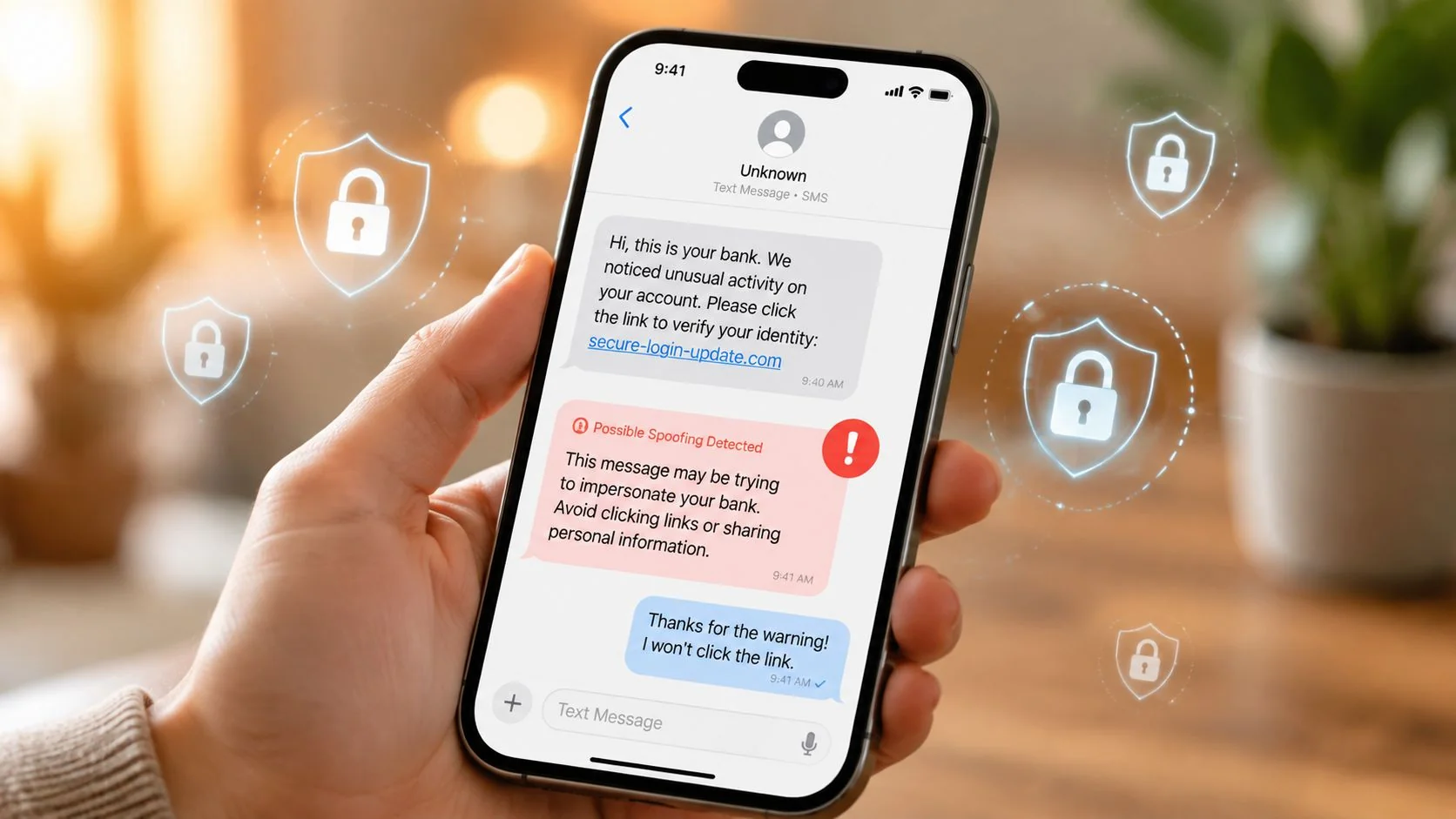
Consumers reported losing $470 million to scams that started with text messages in 2024, more than five times the amount reported in 2020. The practical answer to “how to spoof a text message” isn't learning to forge a sender, it's understanding how spoofing works well enough to detect, report, and prevent it.
That figure comes from the Federal Trade Commission's 2024 text-scam data, and it changes the question completely. SMS spoofing isn't a harmless technical trick when criminals use it to impersonate banks, government agencies, delivery companies, employers, or people you know. The defensive job is to identify the weak points, reduce the personal information attackers can exploit, and respond before a suspicious message becomes an account takeover or identity-theft incident.
Why People Search for How to Spoof a Text Message
Searchers usually want one of three things: a prank, a way to hide their number, or an explanation for a message that looked strangely familiar. Those motives aren't equivalent. Masking a business sender name through an authorized messaging service can be legitimate, while impersonating a bank or public agency to pressure someone into paying is fraud.
The scale of the harm makes this distinction urgent. The FTC said consumers reported $470 million in losses from text-message scams in 2024, and that amount was more than five times higher than in 2020. The agency also noted that reports didn't increase at the same pace as losses, which suggests that deceptive texts were becoming more financially effective while many victims still weren't reporting what happened.
Practical rule: Treat the phrase “spoofed text” as a fraud-investigation term, not a clever messaging feature.
Curiosity becomes a security problem
The same sender-ID mechanics can support ordinary business communication or a convincing smishing campaign. A fake toll-road notice may use an official-looking name, a bank alert may imitate a familiar short code, and a delivery message may push you toward a payment page. The recipient often sees only the polished front end, not the infrastructure behind it.
That's why an OSINT perspective matters. Attackers can use exposed phone numbers, breached credentials, employer information, family connections, and public metadata to make a forged message feel personal. A text that mentions a real service you use is more persuasive than a random lure, even when the sender identity is fabricated.
What you should learn instead
A defensive understanding of spoofing should answer practical questions:
- How does sender identity get manipulated? You need the basic SMS pipeline, not an offensive recipe.
- Where is the legal boundary? Authorized testing and business masking differ sharply from criminal impersonation.
- What visible clues matter? Links, urgency, sender formatting, thread behavior, and requests for codes all provide evidence.
- What should you do next? Device controls, carrier reporting, agency complaints, and account protection create a usable response.
- Why did you receive this specific lure? A personal digital-footprint audit can reveal the exposed phone numbers, credentials, and metadata that made targeting possible.
This article takes a firm position. Don't experiment with sender forgery against real people, services, or networks. Learn the mechanics to protect yourself, document incidents, and remove the information that helps attackers make deception look credible.
How SMS Spoofing Actually Works Behind the Scenes
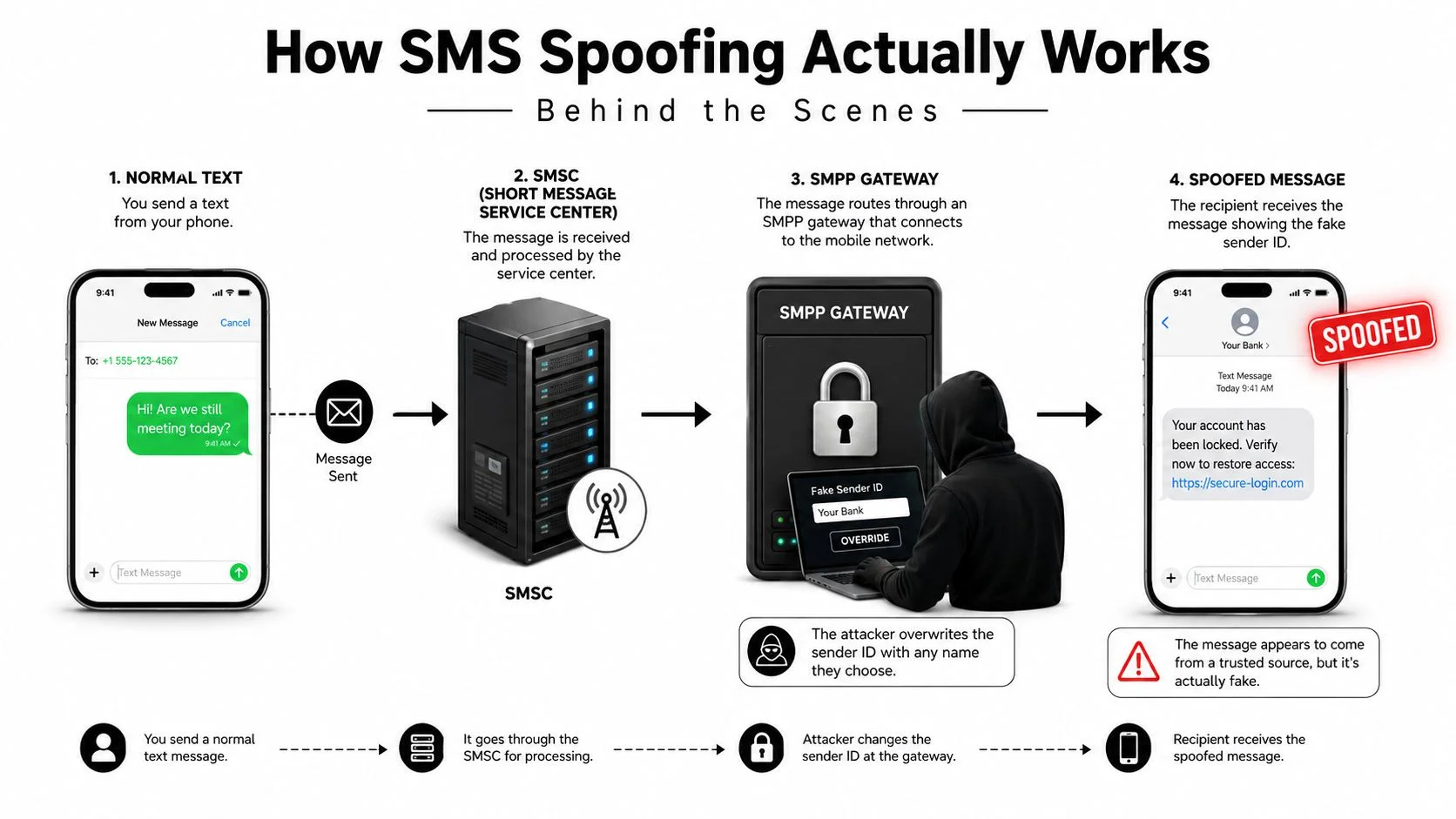
A normal SMS starts on a phone or application and travels through a mobile operator's messaging infrastructure. The SMS Center, commonly called an SMSC, stores and routes the message before delivering it to the recipient's handset. The phone then displays an originating number or sender label supplied by that upstream system.
The weakness appears when an intermediary is allowed to submit origin metadata without adequately proving that the sender controls it. A useful analogy is a postal return address. The delivery network may transport the letter correctly, but someone upstream can scribble a different return address on the envelope. The recipient sees the label and may trust it, even though the label doesn't prove who placed the letter in the mailbox.
Where sender identity enters the route
Many commercial messaging systems use SMPP, a protocol that lets applications and gateways exchange SMS traffic. A peer-reviewed ACM paper demonstrated that the originating number can be spoofed when SMS is sent over SMPP, which means sender identity may be controlled at the protocol or client layer rather than by the handset. The finding is a proof that the field can be manipulated, not a consumer app feature, and success still depends on access to a compliant gateway and permissive provider policies. The ACM research on SMS originating-address spoofing is useful because it separates protocol behavior from the myths surrounding phone-based tricks.
Attackers may also rely on grey-route providers, unauthorized aggregators, or SMS blasters that transmit large volumes of messages outside normal carrier paths. Recent reporting has described blaster-style infrastructure that can inject phishing texts into nearby phones and evade some conventional filtering. That's a different defensive problem from ordinary sender-ID manipulation because the message may bypass parts of the route where carriers normally inspect and block traffic.
Short codes, long codes, alphanumeric sender IDs, and branded messaging channels all create different expectations. A legitimate service might use a recognized short code or a registered brand name, but appearance alone is not proof of authenticity. Carriers use filtering, sender registration, anomaly detection, and other controls to reduce abuse. STIR/SHAKEN helps authenticate caller identity for voice traffic, but it isn't a universal certificate for SMS sender fields, so users still need to verify unexpected requests independently.
The important point is simple: the same APIs, gateways, and messaging concepts can support both legitimate marketing and fraud. That technical overlap is why consent, authorization, and truthful identity must determine whether a use is acceptable.
For authorized software teams, controlled testing belongs in an isolated environment with written permission and test numbers. If your goal is to evaluate a messaging system rather than impersonate a person, use clone SIM card security guidance as a defensive reference and coordinate with the provider instead of sending deceptive messages to live recipients.
Legitimate Uses vs Illegal Impersonation
Sender masking isn't automatically unlawful. A company may use a consistent alphanumeric sender name so customers recognize service alerts, or a quality-assurance lab may test how an application handles unusual sender metadata in a controlled environment. A cloud SMS API can also present a business identity when the account owner has authorization to use that identity and follows carrier rules.
The legal and ethical line is crossed when the sender label is used to mislead a recipient about who is communicating, obtain information or money, or create pressure without consent. The message's visual polish doesn't change that assessment. A fraudster who impersonates a toll authority, tax agency, bank, or delivery service is using identity deception as the core mechanism.
| Use Case | Consent | Sender ID Accuracy | Compliance Status |
|---|---|---|---|
| QA lab testing with designated test numbers | Written authorization and controlled recipients | Deliberately simulated for testing | Legitimate when isolated and documented |
| Two-factor alert from an authorized brand line | User initiated or account-required event | Identifies the actual service | Generally compliant when properly registered |
| Small business using a cloud SMS API | Customer consent and provider authorization | Consistent with the business identity | Legitimate when truthful and opt-in rules are followed |
| Fake toll-road or DMV payment notice | No meaningful consent | Pretends to be a public agency | Reportable fraud |
| IRS impersonation with arrest threats | No consent and deceptive pressure | Misrepresents government origin | Criminal impersonation and fraud risk |
| Delivery-failure message harvesting payment details | No consent | Mimics a carrier or retailer | Phishing and identity-theft risk |
The bright-line test
Ask two questions. Would a reasonable recipient be misled about who sent the message? And did the recipient consent to the communication or the relevant test? If the answer is yes to deception and no to consent, stop treating the activity as harmless masking.
Authorized testing should also be transparent to the people who own the systems and infrastructure. A security team can test sender validation, filtering, and alert handling without targeting unsuspecting users. Use fake data, documented scope, and provider-approved routes.
The recipient's risk deserves priority. Toll-road and government-themed lures work because they combine familiar institutions with urgent consequences. The goal isn't conversation. It's to make someone click, pay, disclose a code, or surrender personal details before they have time to verify the claim.
If a message claims to represent a public service, open the agency's official website manually or call a known number. Don't use the link or phone number supplied in the text. Deception thrives when the victim lets the message define the verification process.
Warning Signs That a Text Is Spoofed
A spoofed text often looks ordinary at first glance. That's the point. Don't judge authenticity by the familiar logo, the appearance of an existing conversation, or the fact that the message arrived on your normal phone.
Start with the sender. A brand name may appear where you expect a phone number, a long code may replace a short code, or the number may contain an unfamiliar country or area format. A message from a known contact can also be suspicious if the wording, timing, or request doesn't match that person's normal behavior.
Read the request, not the branding
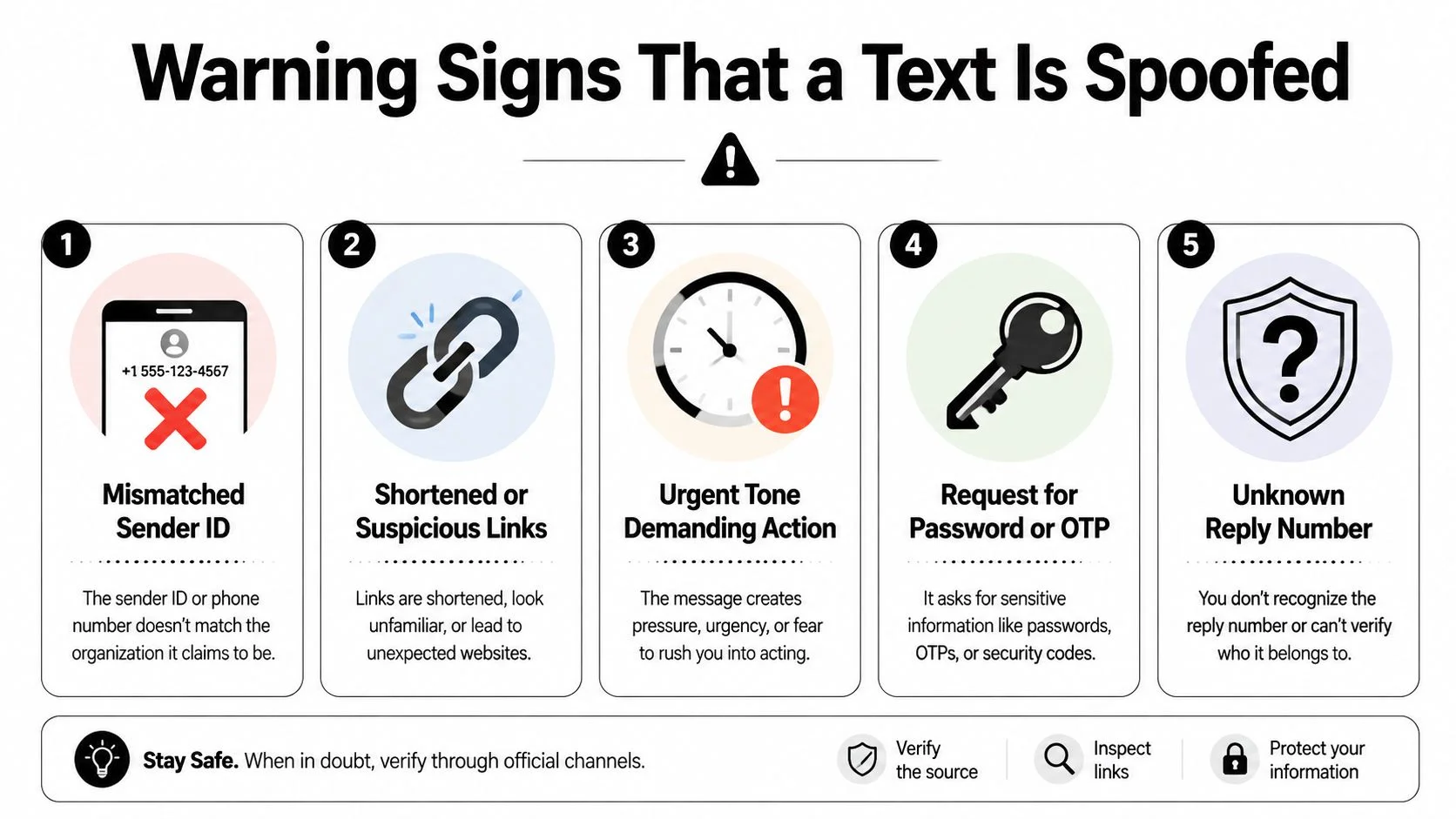
Look for these concrete indicators:
- Mismatched sender identity: The displayed name says “Bank Support,” but the number, reply path, or message context doesn't match the institution's established contact details.
- Suspicious destination: A shortened URL, misspelled domain, unexpected top-level domain, or lookalike brand address should be treated as hostile until verified.
- Artificial urgency: “Pay now,” “verify immediately,” or threats of suspension and arrest are designed to stop you from checking independently.
- Requests for secrets: No legitimate support process should need your password or a one-time passcode delivered through an unsolicited text.
- Unexpected reply behavior: A reply number can differ from the displayed sender, particularly when a campaign routes responses through disposable infrastructure.
Grammar and formatting provide useful clues, though polished scams can avoid obvious mistakes. Be wary of an unexpected brand name, a generic greeting, inconsistent punctuation, or a legal threat that sounds exaggerated. A government agency or delivery company may contact you through SMS, but you should still access its service through a known website or application rather than a text link.
Thread continuity is not proof
Researchers have shown that crafted messages sent through legacy email-to-SMS infrastructure can appear inside an existing SMS conversation thread on Android and iOS under specific carrier, device, and messaging-client conditions. The peer-reviewed thread-injection research matters because people often treat thread continuity as evidence that the sender is genuine.
iMessage and RCS can also create misleading context when a group or conversation contains an inserted message that appears to come from a known contact. Don't rely on the thread alone. Contact the person through a separate channel, such as a saved phone number, an established email address, or an in-person conversation.
For a concrete example of a gift-card lure and the signals to examine, review this guide to a fake Walmart gift-card text message. The safest default remains uncompromising: never click an unsolicited link or share a code until you verify the request through a trusted channel you found yourself.
Your Step-by-Step Defense Playbook Against Spoofed SMS
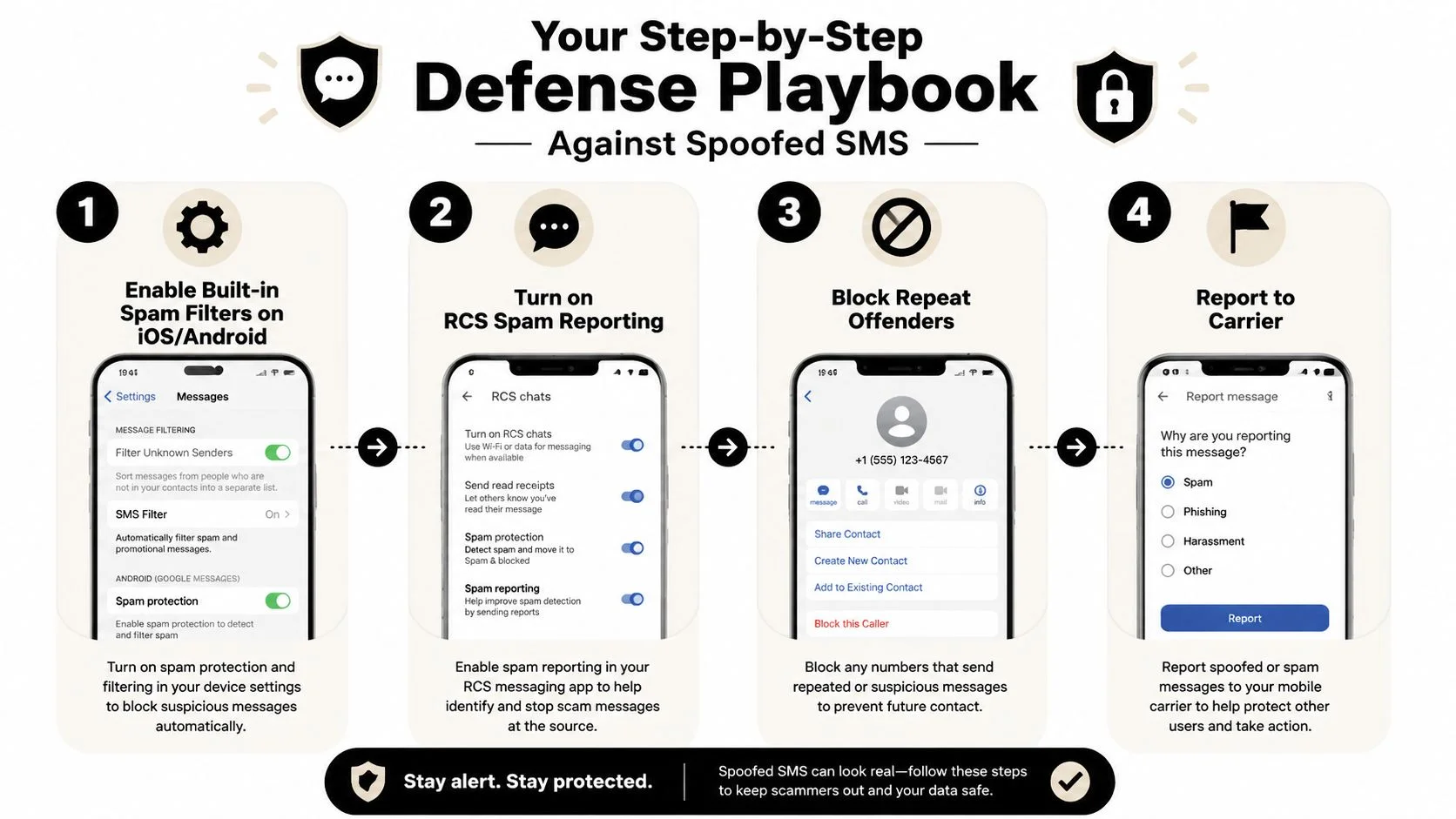
Your first response should preserve evidence and prevent interaction. Don't reply, don't click, and don't call the number in the message. Capture a screenshot that includes the sender, content, date, and destination details, then use the built-in reporting tools on your phone.
Start with the device
Enable spam filtering on your iPhone or Android device, turn on available RCS spam reporting, and block repeat offenders. Menus vary by operating system and carrier, so search the settings for “spam protection,” “unknown senders,” or “report junk.” Filtering won't catch everything, but it reduces the number of messages that reach your attention.
Forward suspicious messages to 7726, which spells SPAM, when your carrier supports that reporting route. Then report the incident through the carrier's spam process. Carrier call-filtering services can help with related voice impersonation, and a sudden loss of service, unexpected password reset, or unexplained account change should prompt a request for a number-change or SIM-swap review.
Verify before taking action
Use the company's official website or a phone number from a statement, card, or saved contact. Never use contact details supplied by the suspicious message. If the text claims your account has a problem, open the official application directly and check for an alert there.
Report suspected fraud to the FCC complaint system, the FTC's ReportFraud.ftc.gov, or IdentityTheft.gov when personal information may have been misused. Notify the impersonated brand through its verified support channel. If you entered payment details, contact the bank or payment provider immediately and ask what protective action applies.
Log the incident
Keep a simple record with the date, displayed sender, claimed organization, link domain, requested action, and what you did. Patterns emerge when you compare several messages, especially repeated brand impersonation or a sudden cluster after a data exposure.
Security teams evaluating their own messaging controls can use automated security testing solutions in an authorized environment to test filtering and validation without targeting real consumers. For personal device guidance, see this practical walkthrough on how to block spam.
How Your Digital Footprint Fuels Targeted Smishing
Attackers rarely need a complete identity file to make a text convincing. A phone number, an employer name, a delivery habit, or a public family connection can provide enough context to build a believable pretext. Data brokers, breached databases, social profiles, public records, gaming communities, and professional pages can all expose pieces of that context.
Your phone number is especially valuable because it connects accounts and recovery processes. If a carrier PIN, port-out detail, or other account-recovery signal becomes exposed, an attacker may attempt a SIM swap or number port. The purpose is often to intercept calls and two-factor codes, not merely to send a fake message. A spoofed SMS and a compromised number can therefore appear in the same incident even though they involve different technical paths.
Breached credentials add another layer. A reused password or exposed email can reveal which services you use, while public metadata can supply the language needed for a more credible lure. Tagged locations, employer titles, relatives, usernames, and recent purchases can turn a generic “verify your account” message into a targeted one.
| Exposed Data | Typical Source | Smishing Tactic Enabled |
|---|---|---|
| Phone number | Public profiles, old listings, data brokers | Brand impersonation or account-recovery bait |
| Carrier or port-out details | Phishing, exposed account records, social engineering | SIM-swap or number-porting pressure |
| Email and breached passwords | Credential leaks and reused logins | Fake security alerts and password-reset lures |
| Employer and job title | Professional profiles and public bios | Payroll, benefits, or executive impersonation |
| Family and location details | Social posts, tagged media, public records | Emergency, delivery, or travel pretexts |
| Usernames and gaming profiles | Forums, game communities, and profile pages | Prize, trade, or account-verification scams |
Treat exposure as raw material
This is why “I don't share sensitive information publicly” isn't enough. Separate harmless-looking details can form a useful targeting profile when combined. A number tied to an old forum account, an email found in a breach, and a public employer listing may give an attacker enough confidence to impersonate a service you use.
Run an OSINT audit with a specific objective. Find where your phone number appears, identify breached credentials, inspect recovery options, and remove unnecessary personal details from public profiles. The guide to how scammers get your information helps map the collection paths behind personalized smishing.
The defensive question isn't only “Is this text real?” It's also “What information made this text plausible?” Answering both questions reduces immediate risk and helps prevent the next campaign from using the same personal clues.
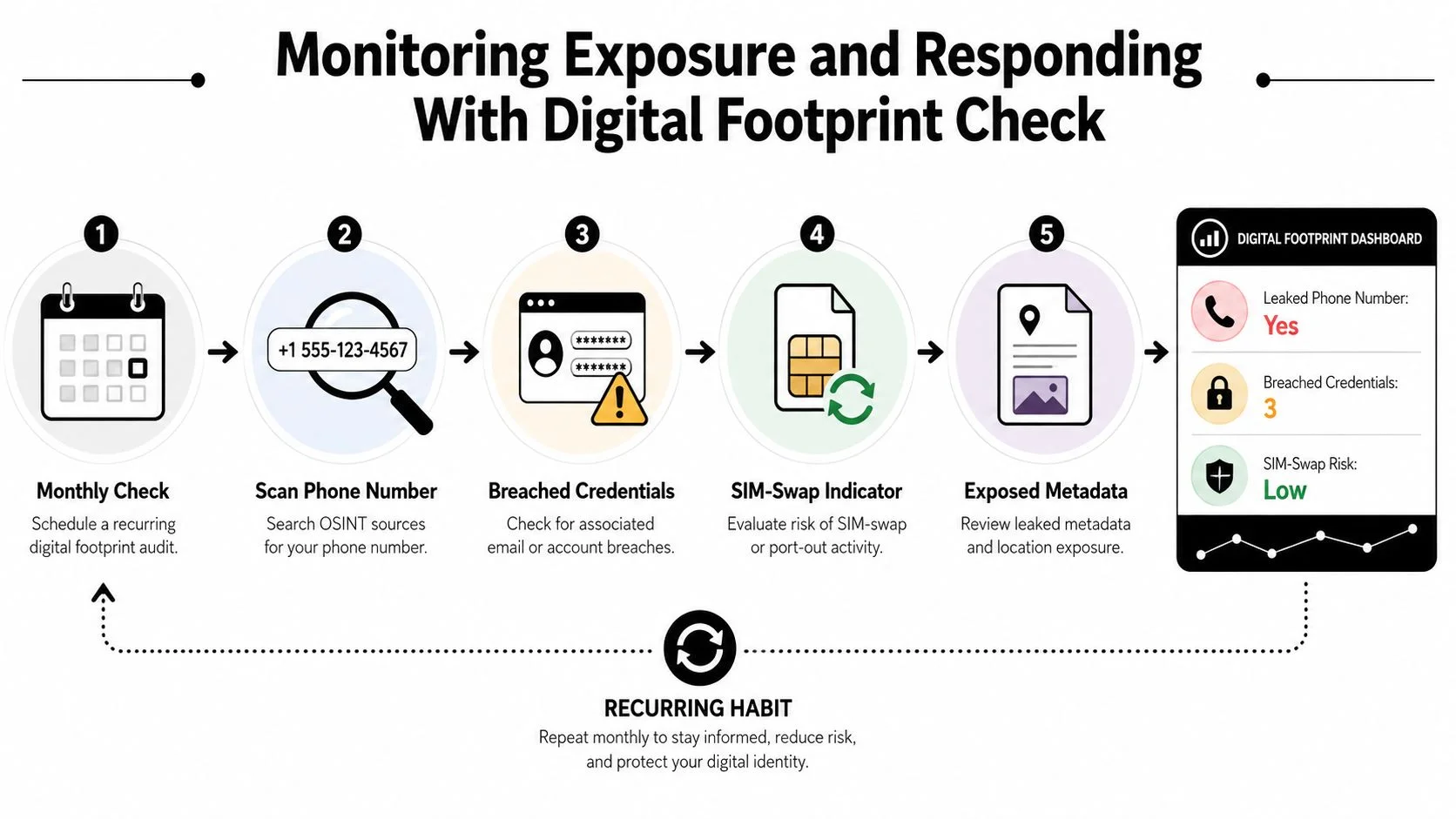
Monitoring Exposure and Responding With Digital Footprint Check
A one-time privacy cleanup won't protect a number forever. Phone numbers get recycled, credentials appear in new breaches, old profiles remain indexed, and public details change over time. A recurring OSINT audit turns exposure discovery into a maintenance habit rather than a panic response after a suspicious text arrives.
Digital Footprint Check fits that workflow by searching across social networks, breach databases, gaming profiles, professional platforms, and public records. Use the digital footprint checker to establish what's visible, then convert each finding into a concrete security action.
Use a four-step audit loop
Begin with a baseline scan. Search your current and previous phone numbers, primary and recovery email addresses, usernames, gaming handles, and public-facing names. Record which accounts and profiles connect those identifiers.
Prioritize the exposures that can affect other accounts. A carrier-linked email, a reused password, an old number still attached to recovery settings, or exposed SIM-swap information deserves attention before a low-risk public profile. The aim is to protect control points first.
Lock down every flagged account. Rotate unique passwords, remove stale recovery methods, add a carrier port-out PIN, and use a hardware security key for the email account tied to your phone number where the service supports it. Remove unnecessary personal information from data-aggregator sites and tighten social-profile visibility.
Re-scan on a recurring schedule. A monthly or quarterly review can reveal new listings, newly exposed credentials, or account connections you missed during the baseline check. Don't wait for a scammer to show you that your information is circulating.
Verify the response after each scan
Use a short checklist:
- Phone numbers: Is every old number removed from account recovery and public profiles?
- Credentials: Are breached passwords replaced everywhere, with no reuse?
- Carrier security: Is a port-out PIN enabled, and does the carrier recognize your account protections?
- Metadata: Have employer, family, location, and routine details been minimized?
- Account access: Are login alerts, authenticator-based 2FA, or hardware-key protection active?
- Incident history: Have suspicious texts, links, and carrier anomalies been logged?
That process closes the loop between detection and response. SMS spoofing succeeds when a recipient trusts an identity label and an attacker has enough context to make the request believable. Monitoring exposes the raw material, while disciplined verification prevents the message from controlling your next move.
Digital Footprint Check helps you discover exposed phone numbers, breached credentials, public profiles, and other identity signals that can support targeted SMS fraud. Visit Digital Footprint Check to run a free privacy check, review your exposure, and turn the findings into specific account and reputation-protection actions.