· Digital Footprint Check · Content Marketing · 21 min read
Reputation Management Online: a 2026 Playbook
Take control with our guide to reputation management online. Learn to audit your digital footprint, remove negative content, and build a positive presence.

93% of consumers say online reviews influence their purchasing decisions according to New Media’s roundup of reputation management statistics. That one number changes how individuals should think about reputation management online. This isn’t vanity. It isn’t just brand polish. It affects hiring, trust, family privacy, and whether a stranger sees you as credible or careless.
Most reputation advice stops at “Google yourself” and “clean up your social profiles.” That’s not enough anymore. The risk usually isn’t only what you posted on LinkedIn or Instagram. It’s the old gamer tag tied to your real email, the forgotten forum account indexed by search engines, the breached credential showing up in a leak, the public record aggregator that lists an address you thought was private, or the review response you never knew was visible.
A proper overhaul starts with discovery, then triage, then action. If you miss the discovery step, you’ll spend weeks polishing the wrong things.
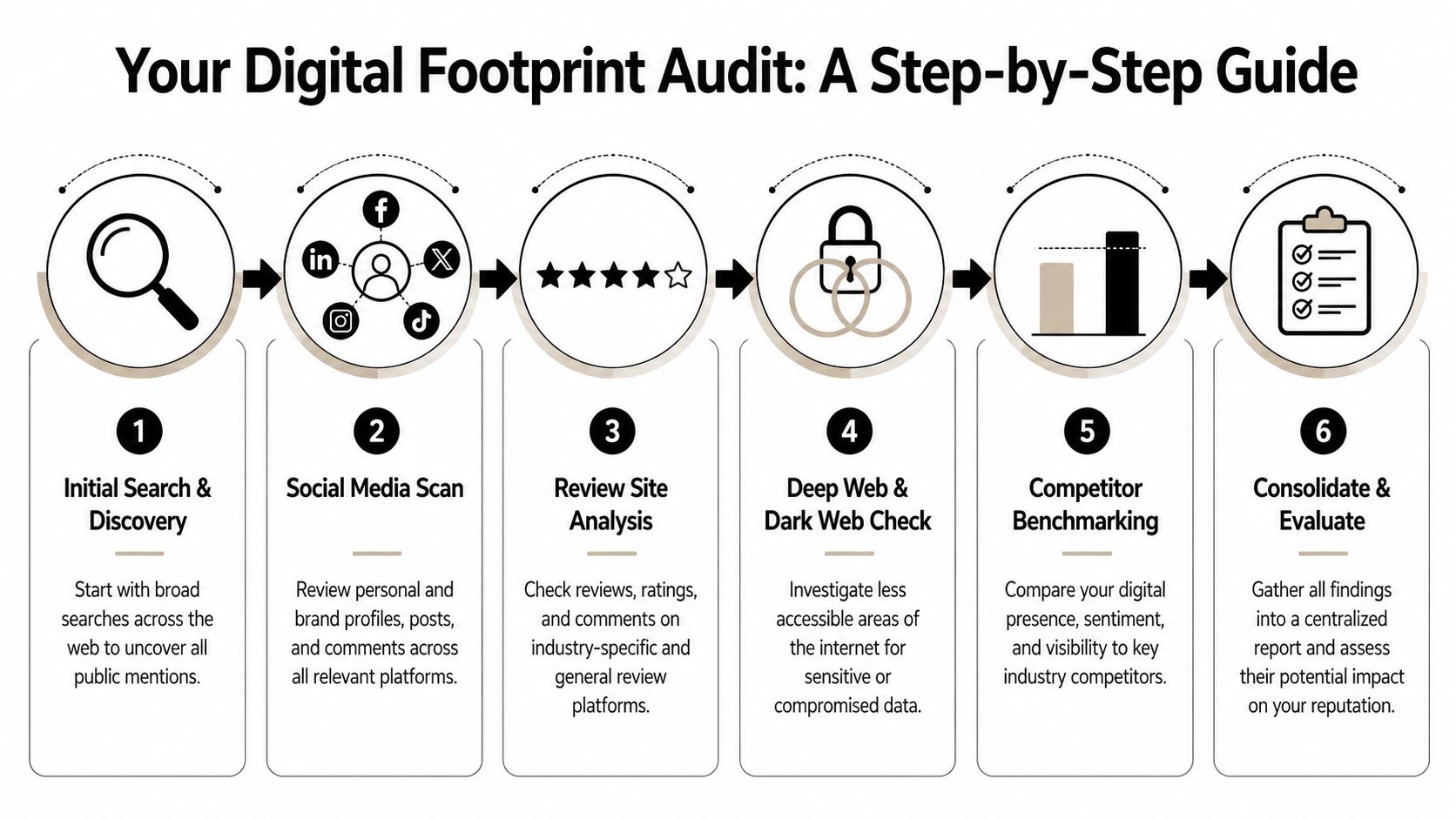
Your Complete Digital Footprint Audit
A real audit goes beyond a name search. You need to map both your active footprint and your digital shadow.
Your active footprint is what you knowingly control. Social profiles, bios, comments, portfolios, old usernames, review replies, public wishlists, club memberships, and any site where you created an account on purpose.
Your digital shadow is what others collected, copied, inferred, or exposed about you. Data broker listings, cached pages, old forum mirrors, breach records, scraped contact details, archived photos, and profile fragments left behind after you stopped using a platform.
Learn how to check your digital footprint thoroughly before you try to repair it. If you don’t inventory the entire scope first, you’ll miss the items that create the most damage.
Start with search the right way
Run searches in a browser where your history and logins won’t personalize results. Search your full name, common name variations, old usernames, email handles, phone number formats, and business name if relevant. Then search combinations such as your name plus city, employer, school, gaming handle, or profession.
Use search operators to surface what ordinary searches miss:
- Quoted searches like
"First Last"to find exact matches - Platform searches like
site:reddit.com "username"orsite:linkedin.com "First Last" - File searches when you suspect exposed documents
- Image searches for profile photos reused across platforms
Many individuals first encounter a problem in their online reputation. A result doesn’t need to be dramatic to matter. An outdated bio, an old complaint thread, or a public account with crude jokes can be enough to create doubt in an employer or client’s mind.
Practical rule: Search for identifiers, not just names. Usernames and old emails often reveal more than a full-name Google search.
Scan the obvious platforms, then the obscure ones
Start with mainstream platforms because they shape first impressions quickly. Check LinkedIn, Facebook, Instagram, X, TikTok, YouTube, Reddit, GitHub, Medium, Yelp, Google Business Profile, and industry-specific directories.
Then go where most guides stop.
A useful social media audit from Miles Marketing can help structure review of visible profiles, but reputation management online also requires hunting through less obvious places. That includes gaming networks, hobby forums, student groups, old marketplace accounts, discussion boards, fan communities, dating profiles, Q&A sites, comment sections, and archived communities that still rank in search.
That deeper search matters because Otter PR notes that over 70% of individuals have unintended online exposures in obscure profiles like old gaming accounts or forgotten forums, and OSINT-driven scans of over 500 platforms can reveal those hidden risks.
For different people, the hidden risks look different:
- Job seekers often find old usernames tied to public comments, forum arguments, or low-quality profile photos.
- Professionals often uncover stale bios, duplicate directories, public resumes with personal contact data, or old side projects that conflict with their current brand.
- Families often find children’s names, school details, sports rosters, geotagged images, and relatives’ posts that expose routines.
- Gamers often discover that a console or Steam-era username links back to an email used elsewhere, making social engineering easier.
Check reviews, mentions, and public interactions
If you own a business or work in a client-facing role, your reputation isn’t limited to your own profiles. Search your business on Google Business Profile, Yelp, Trustpilot, TripAdvisor, niche review sites, app stores, and local directories. Read both the reviews and your responses. A defensive or dismissive reply can do as much damage as the original complaint.
For individuals, review-like signals also exist outside review sites. Search endorsements, recommendations, tagged comments, public testimonials, old seller ratings, and employer review discussions where your name or role might appear.
Create a simple audit sheet with columns for:
| Item found | Where it appears | Who can see it | Why it matters | Action needed |
|---|---|---|---|---|
| Old profile | Forum or platform | Public | Tied to real name or email | Lock down, edit, or delete |
| Review or complaint | Review site or social post | Public | Affects trust | Respond or document |
| Personal data exposure | Broker, directory, public record | Public | Safety and identity risk | Removal request |
| Breach indicator | Leak database or related mention | Potentially searchable | Credential risk | Reset passwords, secure accounts |
Include breach checks and identity clues
A reputation audit is also a privacy audit. If your email, username, or phone number appears in breach-related contexts, the reputational problem may not be public today, but the security risk is immediate.
Look for reused handles across platforms. People often recycle the same identifier across gaming, social, shopping, and work accounts. That makes profile correlation easy. If someone can connect your professional identity to a throwaway account you used years ago, they can build a more complete picture of you than you intended.
Watch for these clues:
- Reused profile photos that tie personal and professional accounts together
- Repeated usernames across forums, gaming, and social apps
- Exposed contact details inside resumes, bios, PDFs, or cached pages
- Family associations through tagged posts or public relationship links
Audit by persona, not just by platform
The strongest audits reflect your goals.
A lawyer preparing for partnership review should audit media quotes, bar directory entries, professional bios, conference mentions, and legal forum activity. A graduate applying for jobs should focus on search results for their name, LinkedIn consistency, public comments, GitHub, and old campus-era social traces. A parent should prioritize address exposure, children’s school references, geotagged images, and the privacy settings of family members who post frequently.
The best audit question isn’t “What’s online about me?” It’s “What would a recruiter, scammer, angry customer, ex-partner, or school administrator find first?”
That framing changes what gets flagged. It turns a random cleanup into practical reputation management online.
Analyzing Your Findings and Prioritizing Risks
Once you’ve gathered everything, the next mistake is treating every item as equally urgent. It isn’t. Some findings are awkward but harmless. Others create direct financial, career, or safety risk.
Reputation has real weight. Juphy reports that a brand’s online reputation is estimated to account for 63% of a company’s market value. For individuals, the same principle applies in a less formal way. Search results, profile quality, and visible complaints become career capital. They affect who calls back, who trusts you, and who disengages.

Use a simple high, medium, low model
The most practical way to analyze findings is to sort them into high-priority, medium-priority, and low-priority categories.
High-priority risks
These are the items that can lead to identity theft, stalking, fraud, professional exclusion, or immediate reputational harm.
Examples include:
- Exposed personal identifiers such as home address, personal phone number, private email, names of children, or daily routine details
- Compromised credentials or breach signals tied to active accounts
- Public accusations or negative articles that rank well in search and connect clearly to your identity
- Impersonation accounts using your name, photo, or role
- Content that creates safety concerns such as doxxing, threats, or location-heavy posts
If you’re trying to answer the question “what information is public about me,” this guide on what information is online about me is a useful reference point because it helps distinguish normal visibility from exposure that needs action.
Medium-priority risks
These don’t usually create immediate danger, but they can affect trust, employability, or perceived judgment.
Think of:
- Old public posts that sound aggressive, offensive, or immature
- Unprofessional photos tied to a real name
- Outdated bios that conflict with your current role
- Public comments in polarizing arguments
- Neglected business listings with unanswered criticism
A medium-priority item becomes high-priority when visibility is strong. A bad post hidden on page six is not the same problem as a screenshot circulating on the first page of search results.
Low-priority risks
These are often cosmetic.
That includes abandoned profiles with little traffic, stale bios that don’t expose anything sensitive, mildly embarrassing but contextually harmless content, or duplicate directory listings with no search visibility. They still belong on the list, but they shouldn’t consume the first week of effort.
Score each finding by impact and visibility
I usually tell clients to stop debating whether something is “bad” and instead score it on two factors:
- How visible is it?
- How much damage could it cause if the wrong person sees it?
That approach keeps the process grounded. A harmless-seeming forum post can be high-priority if it ranks for your name. A nasty comment can be lower-priority if it’s buried behind a login wall and disconnected from your real identity.
Use this decision table:
| Priority | Typical signs | What to do first |
|---|---|---|
| High | Public, identifiable, sensitive, easy to exploit | Contain access, document, request removal, secure accounts |
| Medium | Public and brand-damaging, but not directly dangerous | Edit, hide, update, respond, or suppress |
| Low | Hard to find, weakly connected, low-stakes | Clean up later or monitor |
Look for patterns, not isolated messes
Clients often focus on one ugly search result and ignore the pattern around it. Recruiters, customers, and school administrators don’t read your footprint like investigators. They scan for coherence. If they see inconsistency, volatility, or neglected profiles everywhere, that pattern becomes the story.
A few common patterns matter more than any single post:
- Identity sprawl where one person appears to have too many unmanaged profiles
- Tone mismatch where a polished professional bio sits next to hostile public comments
- Privacy leakage where personal details appear repeatedly across unrelated sites
- Neglect where reviews, listings, and public-facing bios all look abandoned
If five separate pieces of content suggest you’re careless, people won’t wait for a sixth.
Separate emotional discomfort from actual risk
People often over-prioritize content because it feels embarrassing. That’s understandable, but not every embarrassing item damages reputation in practice.
A decade-old photo from a college event may matter less than a current public Facebook profile with family names, hometown, phone number, and visible friend graph. A sarcastic old tweet with no name attached may matter less than a live directory entry exposing your home address.
Practical judgment matters. The work is not to erase every trace of being human. The work is to reduce harm, improve first impressions, and remove easy opportunities for misuse.
Build a working action queue
After triage, turn the audit into a queue, not a pile.
A clean queue might look like this:
Today
Lock compromised accounts, change passwords, enable stronger authentication, document impersonation, capture screenshots of harmful pages.This week
Submit privacy removals, update major bios, clean public profile images, review top search results, handle visible review responses.This month
Deactivate old accounts, consolidate duplicate profiles, build positive assets, and monitor search changes.
That order matters. Don’t spend a weekend rewriting your bio while a public broker page shows your address and relatives.
Removing or Suppressing Negative Content
There are two ways to deal with harmful online material. Remove it if you can. Suppress it if you can’t.
People often waste months trying to force deletion when the better move is to build stronger pages that outrank the bad result. It’s like yard work. Sometimes you can pull the weed. Often, the smarter strategy is to plant a lot more healthy growth so the weed stops dominating the view.

When removal is realistic
Removal works best when the content breaks a rule, exposes private information, impersonates you, or contains material the platform already prohibits. It’s also the right first move for broker listings, non-consensual imagery, copied personal data, fake accounts, and obvious terms-of-service violations.
Your removal workflow should be disciplined:
- Capture evidence first with screenshots, URLs, timestamps, and search position.
- Identify the owner of the content or platform.
- Use the right channel such as a privacy form, impersonation report, or abuse report.
- Be specific about the violation. Don’t send emotional essays.
- Track submissions so you know what was filed, where, and when.
For broker-style data exposure, a structured data broker removal process is often more effective than ad hoc emailing because these sites usually respond better to formal privacy requests than informal complaints.
What usually fails
Some approaches sound satisfying but rarely work.
- Arguing in public comment threads often creates fresh content and gives the original post more attention.
- Threatening legal action too early can trigger the Streisand effect if the claim is weak or the publisher becomes defensive.
- Sending vague takedown requests without citing impersonation, privacy, or policy issues wastes time.
- Mass-deleting everything at once can break profile credibility if your visible web presence suddenly looks empty.
Negative reviews are a separate category. If they’re genuine, platforms usually won’t remove them just because they’re harsh. Your energy is better spent on a calm response, service recovery, and long-term content balance.
Know when legal review matters
Sometimes the issue isn’t just unfair. It may be false and defamatory. If a statement is presented as fact, harms your reputation, and can’t be resolved through normal platform channels, legal advice becomes appropriate.
If you need a grounding in how these claims are generally approached, this overview of defamation and libel laws is a useful starting point. The practical point is simple. Don’t call everything defamation. Reserve that route for false factual claims with real harm.
Removal is strongest when you can point to a rule, a policy, or a specific falsehood. It’s weakest when the content is ugly but lawful opinion.
Suppression is often the real win
Most clients hear “suppression” and assume it’s cosmetic. It isn’t. In reputation management online, suppression is often the most durable tactic because it replaces a weak digital profile with a stronger one.
You’re building assets that search engines and people both trust:
- Professional profiles such as LinkedIn, association pages, speaker bios, and staff directories
- Owned properties like a personal website, portfolio, or biography page
- Credible mentions including guest articles, interviews, podcast appearances, event pages, and author pages
- Positive review signals when relevant to your work or business
- Content that matches your real expertise so the web reflects your current identity, not your oldest one
According to Reputation X, it takes on average 12 positive pieces of content or reviews to offset the impact of a single negative review. That’s why one polished LinkedIn profile won’t fix a damaged footprint on its own. You need enough quality assets to change the balance of what shows up and what people remember.
What to create for different situations
Suppression works best when the content is relevant to your real-world goals.
| Persona | Strong suppression assets | Weak suppression assets |
|---|---|---|
| Job seeker | LinkedIn, portfolio site, conference bio, GitHub, author page | Random motivational posts |
| Consultant or executive | Media bio, company profile, thought leadership articles, podcast features | Thin social posts with no authority |
| Parent concerned about privacy | Private settings, reduced public family data, accurate basic profiles | Public oversharing followed by panic deletion |
| Gamer with crossover risk | Separate aliases, locked-down gaming profiles, cleaned bios | Keeping the same handle everywhere |
A job seeker who has an old forum result ranking for their name usually gets better results by publishing a strong LinkedIn profile, a clean portfolio, a speaker or alumni page, and a few credible mentions than by obsessing over the forum thread alone.
Here’s a useful explainer on the topic before you build your response plan:
Use response, not silence, on reviews
If the issue is a review and removal isn’t available, silence often reads as avoidance. A short public response is usually better.
The response should do four things:
- Acknowledge the concern without becoming defensive
- Signal standards by showing you take complaints seriously
- Move the conversation offline for specifics
- Avoid admitting facts you haven’t verified
Good review responses are brief, calm, and written for future readers. The person who left the review may never come back. The next customer will still read your reply.
Building a Positive and Resilient Online Presence
A strong online reputation is built on coverage. Search results should show enough accurate, current, credible material that one old post, stray mention, or mistaken profile does not control the narrative.
That requires more than polishing social media. A real rebuild uses the findings from your digital audit, including old usernames, forum posts, data broker listings, breached emails, gaming handles, and forgotten profiles that can still surface in search or be tied back to you through OSINT methods.
The job seeker
Job seekers usually have one of two problems. Their search results are empty, or they are scattered.
A candidate with thin results often looks less established than they really are. A candidate with scattered results looks inconsistent. Recruiters notice both. I usually fix this by tightening identity signals across a few assets that carry weight, then removing distractions that dilute them.
The base layer is simple:
- A complete LinkedIn profile with a clear headline, recent experience, and role-specific language
- A personal site or portfolio that ranks for their name and shows actual work
- Public proof of expertise such as conference bios, alumni pages, articles, GitHub activity, or quoted commentary
- Consistent naming and imagery across platforms that should be associated with the person professionally
A practical guide to social media clean up steps to curate a positive online image helps job seekers align older public accounts with the professional identity they want employers to find.
One warning matters here. If an OSINT audit shows an old Reddit handle, gaming alias, or forum username tied to the same photo, email, or bio language, fix that crossover before pushing out more public content. Publishing a polished LinkedIn page does not help much if a simple username search still connects it to argumentative posts from 2016.
You do not need a large personal brand. You need a search result page that makes sense.
The family
Families need a different standard. The goal is not visibility. The goal is selective visibility.
A healthy family footprint shows normal public signals without exposing routines, school ties, home details, or children’s identities in ways that strangers can map. In practice, that means checking much more than Instagram and Facebook. Public Venmo histories, old fundraiser pages, youth sports rosters, neighborhood group posts, genealogy sites, and tagged images from relatives often reveal more than parents expect.
One family I advised had done the obvious privacy work on their own accounts. Their primary exposure came from elsewhere. A grandparent’s public album showed the house number. A team website named the children. An old marketplace listing exposed the street. A breached email tied the parents to several usernames, which led to public wish lists and forum accounts.
The fix was specific:
- Reduce public identifiers in captions, bios, and photo albums
- Remove or edit old posts that show schedules, uniforms, addresses, and school names
- Ask relatives to change posting habits and lock down tagging
- Review secondary exposure points such as shopping profiles, donation pages, and archived directories
- Separate parent-facing public profiles from children’s information
For families, a positive presence is usually quiet, accurate, and hard to exploit.
The HR manager
HR leaders and employer-facing professionals have two reputation problems at once. Their personal credibility matters, and the company’s search results matter.
Candidates check leadership pages, Glassdoor responses, LinkedIn activity, and whether the company appears organized online. They also notice mismatch. If the head of people has an outdated profile, the company careers page is stale, and employee bios contradict each other, the employer brand looks sloppy before anyone applies.
A resilient setup usually includes:
- Accurate executive and team bios
- Consistent company descriptions across LinkedIn, the website, and directory listings
- Clear public response standards for reviews and complaints
- Documented rules for who handles impersonation, leaks, and false accusations
- Reasonable employee guidance on public-facing conduct, without intrusive monitoring of private life
This is also where OSINT matters. An employer can look polished on the surface while old subdomains, cached staff lists, exposed PDFs, and abandoned recruitment pages still circulate in search. Those hidden remnants create confusion and can expose names, direct emails, and internal details long after a page is supposed to be gone.
For a broader view of platform-specific tactics, this guide on social media and reputation management is a useful companion.
The gamer
Gamers often have the widest gap between public identity and intended identity. They assume a handle is separate. It often is not.
A reused username can connect Twitch, Discord, Reddit, Steam, YouTube, and an old forum account in minutes. Add one shared avatar, one recovery email, or one bio line, and the link becomes obvious. For students, job seekers, public-facing professionals, and families, that crossover can create reputational risk even when the content is not illegal or extreme.
A stronger setup includes:
- Different usernames for professional and gaming use
- Private or limited bios on gaming and community platforms
- Separate profile photos and contact emails
- Review of old tournament pages, clip channels, and community posts
- Removal of stale links that connect real-name profiles to entertainment accounts
The goal is not to hide legitimate interests. The goal is to stop unrelated identities from collapsing into one searchable trail.
What resilience looks like
A resilient online presence is current, consistent, and difficult to distort. It has enough credible surface area to outrank old noise, and it has few hidden trails that let strangers stitch together more than you intended.
| Strong presence | Fragile presence |
|---|---|
| Current bios that match across key platforms | Outdated or conflicting bios |
| Professional photos on professional profiles | Random public images pulled from old accounts |
| Distinct identities for work, family, and hobbies | One reused handle across everything |
| Third-party validation such as bios, articles, and profiles | Search results dominated by old threads or empty profiles |
| Limited exposure from old usernames, breach trails, and public metadata | Easy OSINT crossover between emails, aliases, and family details |
Perfection is not the target. Control is. A good rebuild gives employers, clients, and strangers a clear picture of who you are, while reducing the odds that an old account, breach artifact, or gaming profile becomes the first thing they find.
Ongoing Monitoring and Incident Response
Cleanup is a phase. Monitoring is a habit.
Most reputation problems don’t arrive as dramatic crises. They emerge subtly. A new review goes unanswered. A copied profile gets indexed. An old post resurfaces. A family member tags you publicly. A breach exposure starts circulating before anyone notices.

Build a monitoring routine you’ll actually keep
A simple monitoring stack is usually enough to catch most issues early:
- Google Alerts for your name, business name, product names, and key usernames
- Direct platform checks on LinkedIn, Google Business Profile, Yelp, Reddit, and any niche site that matters in your field
- Inbox rules or folders for platform notifications so review and mention alerts don’t get buried
- A monthly incognito search for your core identifiers
- A breach and exposure review for reused emails, usernames, and profile links
If you want a broader view of useful platforms and workflows, this roundup of top tools for monitoring your digital footprint and keeping your data safe is a solid place to compare options.
A broader perspective on social media and reputation management is also useful when you’re shaping a process that covers both search visibility and day-to-day platform behavior.
Track a few KPIs, not everything
When monitoring too much without deciding what matters, individuals can become overwhelmed by noise. A small set of indicators works better.
For practical reputation management online, focus on these:
Search result quality
What appears on page one for your name or business?Review response discipline
Are visible complaints being answered promptly and professionally?Profile consistency
Do your top public profiles match your current role and identity?Exposure count
Are new broker listings, copied bios, or public identifiers appearing?Sentiment trend
Not as a fancy dashboard metric, but as a grounded reading of whether mentions are becoming more positive, more hostile, or more confused
Fast, calm response beats perfect wording. The longer a visible complaint sits unanswered, the more observers assume it’s true or ignored.
Create a one-page incident response plan
When something bad appears, people get reactive. They argue, overexplain, delete evidence, or contact the wrong party first. A one-page response plan prevents that.
Keep it short. It should answer:
What happened?
Link, screenshot, timestamp, platform, and who discovered it.How severe is it?
Safety issue, privacy exposure, review problem, false accusation, impersonation, or ordinary criticism.Who owns the response?
Individual, manager, legal counsel, HR, family decision-maker, or agency.What is the first move?
Report, document, secure account, post a response, request removal, or stay silent while gathering facts.What should never happen?
No emotional replies, no public arguments, no deleting evidence, no speculative admissions.
For families, that plan may be as simple as “screenshot, report, lock account, message relatives, remove geotagged content.” For a business, it may include who approves review responses and who escalates legal or PR risks.
Set a rhythm
A sustainable rhythm is better than occasional panic.
- Daily for active businesses or public-facing professionals with reviews
- Weekly for freelancers, creators, and people with broad public exposure
- Monthly for most individuals and families
- Immediately after media coverage, breakups, job searches, school conflicts, account compromises, or public disputes
The point isn’t to become obsessive. It’s to stop being surprised.
If you want to see what’s out there before it becomes a bigger problem, run a check with Digital Footprint Check at www.digitalfootprintcheck.com/free-checker. It’s a practical starting point for finding exposed profiles, hidden accounts, breach-related risks, and the overlooked traces that shape your online reputation.