· Digital Footprint Check · Content Marketing · 15 min read
Hacking With an Iphone: a 2026 Security Guide
Curious about hacking with an iPhone? Learn what it really means, from OSINT tools to real exploits, and how to protect your digital life from these threats.
People often hear “hacking with an iPhone” and picture a movie scene. A few taps, a spinning progress bar, and someone instantly breaks into a bank account. Real life is less dramatic and more important.
A lot of iPhone-related risk has little to do with flashy hacker tools. It comes from exposed personal data, phishing, old software, weak account security, and specialized spyware that works in the background. That matters whether you’re a parent, a job seeker, someone using dating apps, or just a person trying to keep your photos, messages, and accounts private.
The Surprising Reality of Hacking with an iPhone
A useful reality check comes from a UK study reported by the Economic Times. It found that iPhone users were 167 times more likely to have their devices targeted by hackers than owners of other mobile brands, based on monthly search volumes for hacking-related terms. In Britain, iPhones generated 10,040 searches for hacking queries, compared with Samsung’s 700 in the same study, as described in this report on iPhone targeting trends.
That stat surprises people because iPhones have a reputation for being secure. Both things can be true at once. Apple builds strong protections, and attackers still focus on iPhones because so many people use them and because those devices often contain high-value information like email access, saved passwords, payment data, work accounts, and years of personal messages.
Why the myth persists
The phrase hacking with an iPhone confuses people because it can mean several very different things. Some people mean harmless tinkering. Some mean open source research. Others mean actual criminal intrusion. And in the most serious cases, it refers to advanced spyware attacks that ordinary users would never be able to launch themselves.
That confusion creates two bad outcomes. First, people underestimate ordinary threats like phishing texts and account takeovers. Second, they overestimate the chance that every stranger with an iPhone can magically break into any device nearby.
Practical rule: The biggest everyday iPhone risk usually isn’t a cinematic hack. It’s the combination of exposed personal information, social engineering, and weak security habits.
Why everyday users should care
Attackers don’t need to “hack your phone” in the dramatic sense if they can reset your accounts, impersonate you, or build a profile of your life from public traces. A phone number, old usernames, breached passwords, gaming profiles, dating app handles, and social media posts can give them enough context to target you more effectively.
If you want to understand why that matters, this guide to the hidden dangers of your digital footprint and what hackers can learn about you is a good companion read. Your visible data often tells an attacker where to aim.
Deconstructing What iPhone Hacking Really Means
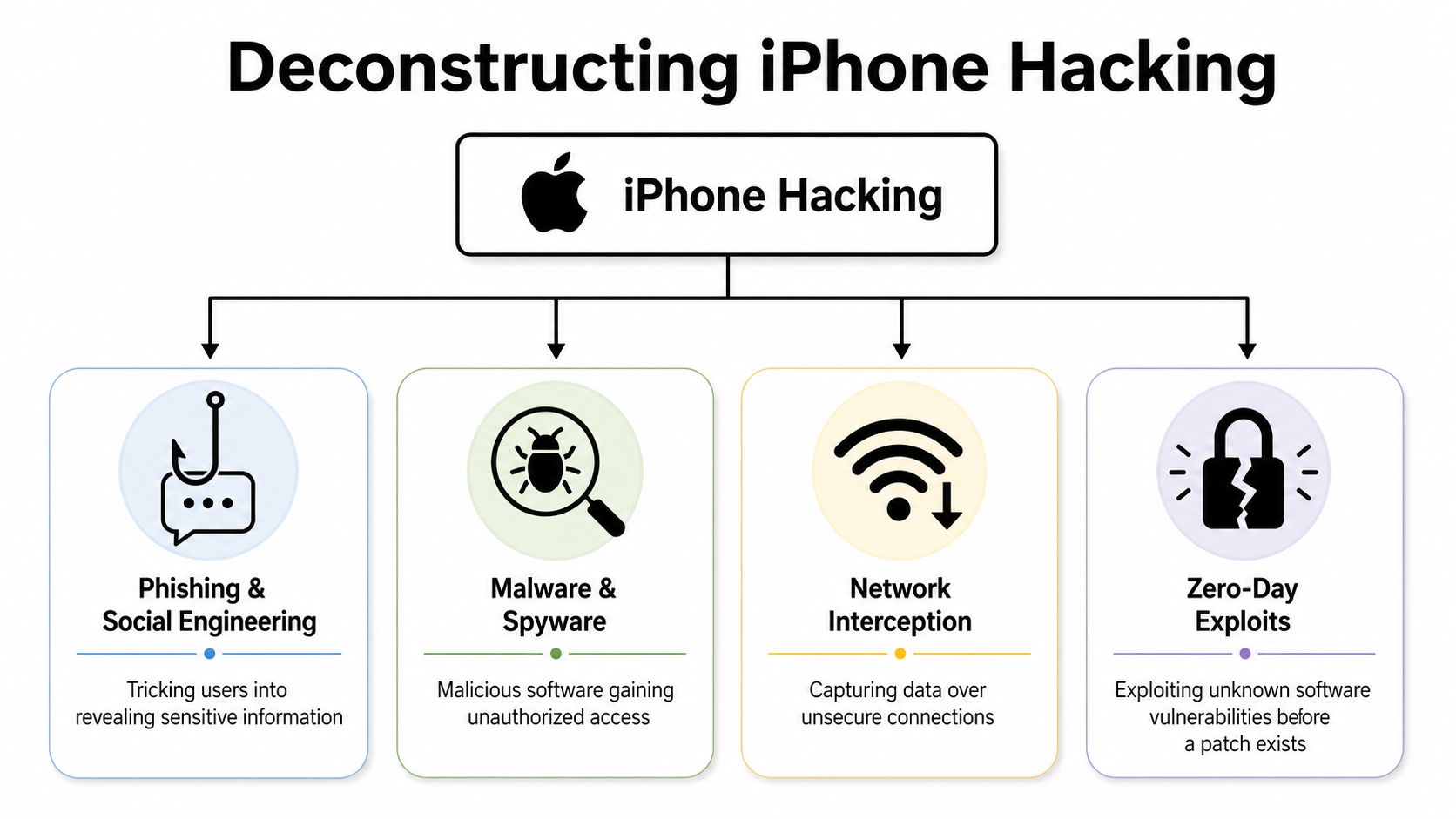
“Hacking” is one of the least precise words in cybersecurity. When people talk about hacking with an iPhone, they usually mean one of four things. Those categories matter because the intent, legality, and risk level are different.
Jailbreaking and device modification
Jailbreaking means altering iOS so the phone can run software Apple normally blocks. Some people do it for customization. Others want access to deeper system controls, unofficial app stores, or research tools.
This isn’t automatically the same as criminal hacking. But it does remove safety rails. It’s like taking the locks and guardrails off a machine because you want more access to its moving parts. You can learn more, but you also increase the chance of damage.
OSINT research from an iPhone
A second meaning is using an iPhone for OSINT, or open source intelligence. That sounds technical, but the idea is simple. You gather information that is already public or publicly exposed.
That can include:
- Username research: Checking whether the same handle appears on social platforms, gaming services, or forums.
- Phone-based verification: Looking at social profiles, marketplace accounts, and public traces to see whether a person seems real.
- Reputation checks: Reviewing what an employer, date, or scammer target could learn from public accounts.
People use phones for this because they’re convenient. If you’re new to that world, this primer on OSINT tools for beginners explains the basics in a responsible way.
Exploiting vulnerabilities for unauthorized access
This describes the common interpretation of the word “hack.” Someone finds or buys a software vulnerability, uses it to gain access, and then tries to steal data, spy on activity, or control part of the device.
This type of attack is far beyond what most casual users can do. It usually requires specialist knowledge, expensive tooling, or access to an exploit chain already developed by others.
Using a compromised iPhone as a platform
An iPhone can also become a stepping stone. If an attacker compromises the phone, they may use it to access email, cloud storage, work apps, messaging platforms, or other connected systems. In that case, the iPhone isn’t the final target. It’s the launch pad.
A quick comparison
| Type | What it is | Typical user | Main risk |
|---|---|---|---|
| Jailbreaking | Modifying iOS restrictions | Tinkerers, researchers | Reduced built-in protections |
| OSINT | Gathering public information | Researchers, recruiters, daters, investigators | Privacy invasion or misuse |
| Exploitation | Breaking into systems without permission | Criminals, advanced threat actors | Theft, surveillance, account takeover |
| Compromised platform use | Using the phone to reach other accounts | Attackers with device access | Wider breach across services |
Hacking with an iPhone isn’t one activity. It’s a spectrum that runs from public research to deep system compromise.
iPhone Attack Vectors Capabilities and Limitations
The easiest way to understand real risk is to separate what ordinary people can do from what elite attackers can do. Those are not the same universe.
Most iPhone owners are far more likely to deal with phishing, credential theft, fake login pages, and account recovery abuse than with an advanced zero-click spyware campaign. But advanced spyware still matters because it proves that even mature mobile platforms can be breached under the right conditions.

What a normal attacker can realistically do
A low-skill attacker often doesn’t touch your device directly. Instead, they go after the layers around it.
Common examples include:
- Phishing messages: Fake Apple alerts, delivery notices, or account warnings that lead to credential theft.
- Password reuse attacks: Trying leaked passwords on email, gaming, or social media accounts.
- Phone-number abuse: Using your number for impersonation, recovery attempts, or targeted scams.
- Public profile mapping: Studying your social posts, dating profiles, and usernames to build trust quickly.
These attacks work because they target people, not just software. If someone knows where you work, what game you play, who your friends are, and which email you use, they can write a much more convincing scam.
For a practical look at that piece of the puzzle, this article on what hackers can do with your phone number explains why one small data point can create bigger risks.
What app-based research can and can’t do
Phones are handy for lightweight investigation. You can check whether a dating profile uses reused photos, whether a username appears across multiple platforms, or whether a seller’s online history looks suspicious. That’s useful and often smart.
But there are real limits. iPhones are tightly controlled devices. App Store rules, sandboxing, and restricted background access mean most apps can’t perform deep forensic work or broad network attacks. In plain English, your iPhone is not a magic cyberweapon just because it runs a few security-related apps.
The DarkSword example
The strongest reality check comes from the high end of the threat environment. In March 2026, researchers uncovered DarkSword, an advanced spyware affecting an estimated 270 million iPhones running older iOS versions. It used a hit-and-run approach to extract sensitive data such as passwords and messages within seconds before self-deleting, according to this report on the DarkSword spyware campaign.
That example matters for two reasons. First, it shows that advanced iPhone compromise is real. Second, it shows what is often misunderstood. Tools like this are typically associated with highly capable groups and focused operations, not random teenagers pressing a button in a coffee shop.
Here’s a short explainer that helps visualize the broader mobile threat environment:
Risk by scenario
| Scenario | More likely threat | Less likely threat |
|---|---|---|
| Online dating | Impersonation, catfishing, extortion | Advanced spyware deployment |
| Gaming accounts | Credential stuffing, social engineering | Zero-click mobile exploit |
| Job seekers | Reputation harm, exposed old posts, account compromise | State-level mobile surveillance |
| Journalists, activists, executives | Spear phishing, targeted intrusion | Highly plausible advanced spyware |
Most people should spend more energy on phishing resistance and account security than on exotic exploit chains. But the existence of those chains is exactly why software updates matter.
How Advanced Exploits Bypass Apple’s Security
Apple’s security design is strong, but it isn’t magic. To understand how serious iPhone attacks happen, it helps to know two ideas: sandboxing and privilege escalation.
Sandboxing in plain language
A sandbox is like giving every app its own locked room. The app can do its job inside that room, but it shouldn’t be able to wander through the whole house. That limits the damage if one app is compromised.
The problem is that skilled attackers don’t stop at the first room. They look for a second weakness that opens the hallway, then a third one that reaches the control panel.

Privilege escalation and exploit chains
Apple’s iPhone security relies on sandboxing, but advanced attacks use privilege escalation to break out. The FORCEDENTRY exploit chained multiple steps to escape the sandbox and gain kernel-level access, bypassing defenses like Address Space Layout Randomization, as explained in this overview of zero-click iPhone exploits and FORCEDENTRY.
That sentence contains a lot of jargon, so here’s the simple version:
- Initial foothold: The attacker gets code to run in a limited part of the system.
- Escape: They break out of that limited area.
- Elevation: They gain higher permissions.
- Control: They reach more sensitive data and functions.
Imagine a burglar entering a lobby, finding a stairwell key, then locating the building management office. Each step alone is limited. Chained together, they become powerful.
Why older devices are harder to protect
Security protections improve over time, but not every iPhone can benefit from the newest architecture changes. That creates a split between newer devices with stronger mitigations and older phones still relying on earlier defenses.
For users, that means “I have an iPhone” isn’t enough information. The primary question is which model you’re using, which iOS version it’s running, and whether known protections apply to your device.
The overlooked issue of forensic access
Not every invasive data extraction looks like criminal hacking. Some of it sits in a legal gray area.
Research by Jonathan Zdziarski revealed undocumented iOS functions that allow data extraction without passwords and can bypass encrypted backups, according to this report on undocumented iOS access functions. That doesn’t mean every iPhone can be casually emptied by anyone. It does mean specialized tools may access data in ways users don’t expect, especially during device repair, law enforcement handling, corporate investigations, or disputes involving digital evidence.
Why breach monitoring matters after device compromise
If data is pulled from a compromised phone, the first visible sign may not appear on the device itself. You might notice it later as account misuse, leaked credentials, impersonation, or suspicious recovery attempts across unrelated services.
That’s one reason people use dark web monitoring services that watch for exposed credentials and leaked personal data. A phone breach often becomes an identity problem long before it feels like a device problem.
The scary part of advanced iPhone compromise isn’t only the initial access. It’s the quiet reuse of whatever data gets extracted afterward.
Navigating the Legal and Ethical Minefield
People sometimes talk about hacking with an iPhone as if the line between curiosity and misconduct is obvious. It often isn’t. The legal line is usually clearer than the ethical one, and both matter.
Public information isn’t a free pass
If you look up a public username or verify whether a dating profile seems genuine, you’re usually in ordinary OSINT territory. But intent and method matter. Collecting public information can still become harassment, stalking, discriminatory screening, or an invasion of privacy if you push too far or use the results irresponsibly.
That’s especially relevant for:
- Parents: Monitoring a child can slide into covert surveillance that damages trust.
- Daters: Investigating a new match can become obsessive or deceptive.
- Employers: Informal social screening can create fairness and compliance issues.
- Private individuals: “I only used public info” won’t protect you if your conduct crosses a legal line.
For a grounded approach, this guide to ethical OSINT and finding someone’s email responsibly is worth reading.
Forensic extraction changes the privacy conversation
The Jonathan Zdziarski research is a reminder that some iPhone data extraction doesn’t fit the simple “hack or no hack” model. Undocumented functions that allow extraction without passwords and bypass encrypted backups create a gray zone where a user may feel protected, but specialized tools can still expose private material in certain contexts.
That can affect:
- Employment disputes
- Family law cases
- Internal investigations
- Device inspections after an incident
Just because access is technically possible, or even legally authorized in a narrow context, doesn’t mean it’s ethically harmless.
Reputation damage can outlast the event
Misusing OSINT or attempting unauthorized access can damage your credibility even if no criminal case follows. A suspicious search trail, invasive messages, screenshots shared out of context, or evidence of covert monitoring can cost someone a job, a relationship, or professional standing.
A good rule is simple. If the person would reasonably feel violated learning how you gathered or used the information, stop and reassess. Security knowledge should increase judgment, not reduce it.
Practical Steps to Secure Your iPhone and Digital Life
Security works best when it becomes routine. You don’t need to think like an exploit developer. You need habits that reduce opportunity.
A useful example comes from the legacy-device problem. The DarkSword exploit kit leaked in March 2026 specifically targeted iPhones running older iOS versions, affecting approximately 200 million devices worldwide, as described in this video discussion of the leaked exploit kit and outdated iPhone risk. The lesson is straightforward. Old software gives attackers a bigger window.
Start with the device itself
Use this checklist as a baseline:
- Install iOS updates promptly: Many serious attacks depend on older versions remaining in use.
- Use a strong passcode: A longer alphanumeric code is harder to guess than a short numeric PIN.
- Turn on Find My: Remote location and wipe features matter if the phone is lost or stolen.
- Review app permissions: Check which apps can access photos, contacts, microphone, camera, and location.
- Be cautious with profiles and prompts: If a website or message asks you to install something unusual, pause.
Harden the accounts connected to the phone
Your phone is the front door to many other systems. Protect those accounts too.
| Area | Better habit | Why it helps |
|---|---|---|
| Use a unique password and strong sign-in protection | Email often controls password resets everywhere else | |
| Apple ID | Secure recovery methods and watch for alerts | It anchors your device, backups, and purchases |
| Messaging apps | Verify unusual requests out of band | Friends’ accounts get impersonated |
| Banking and shopping | Avoid login links from texts or emails | Phishing pages often mimic real brands closely |
Reduce the data attackers can use against you
A lot of successful attacks begin before any malware appears. They begin with research. Someone gathers your old usernames, work history, exposed contact details, relationship status, or gaming identity, then uses that context to craft a believable approach.
A few practical moves help:
- Audit old accounts: Delete or lock down accounts you no longer use.
- Separate identities where possible: Don’t reuse the same handle across every platform.
- Trim public details: Birthdays, phone numbers, workplace details, and family relationships help impersonators.
- Watch for breach fallout: If an old account was exposed, change reused passwords immediately.
Be careful on shared and managed devices
If you use an iPhone for work, or if you manage family or employee devices, personal habits aren’t enough. Organization-level controls matter. Businesses that need policy enforcement, app controls, and device oversight often look at Intune mobile management strategies to structure mobile security in a more formal way.
Pay attention to signs people ignore
People often expect a hacked phone to behave dramatically. Sometimes it doesn’t. The warning signs may show up elsewhere.
Watch for:
- Unexpected account recovery emails
- Login alerts from services you rarely use
- Friends receiving strange messages from you
- Passwords “mysteriously” failing across multiple apps
- Sensitive accounts getting targeted after a phone loss or repair event
Security habit: If one account looks odd, assume the issue may be wider than that single service.
Beyond Hacking A Proactive Approach to Digital Privacy
The lesson behind hacking with an iPhone is that the phone is only part of the story. The larger risk sits at the intersection of device security, account security, and public exposure.
Some threats are highly technical, like spyware and exploit chains. Others are more ordinary and more common, like phishing, impersonation, and privacy loss through exposed profiles. Then there’s the gray area many people never consider at all: data extraction by specialized forensic tools in legal, workplace, or investigative settings.
That broader view changes how you protect yourself. You stop asking only, “Can someone hack my iPhone?” and start asking better questions. What information about me is already visible? Which of my old accounts can still be tied together? If my device were lost, inspected, or compromised, what else would that expose?
For people dealing with formal investigations or service-related legal issues, context matters a lot. In military settings, for example, the rules around phone searches and cloud evidence can become complex quickly, which is why resources like this legal guidance for military digital evidence can be useful for understanding the stakes.
Good privacy practice isn’t fear. It’s maintenance. Update the phone, secure the accounts, limit the data trail, and treat your digital footprint as part of your personal safety.
Run a free scan with Digital Footprint Check to see what personal information, accounts, and exposed traces are already visible online. That’s one of the simplest ways to understand your real risk and take action before someone else uses that information against you.