· Digital Footprint Check · Content Marketing · 15 min read
Search Facebook From Email: Complete Osint Guide 2026
Learn how to search Facebook from email using OSINT techniques, reverse lookups, and privacy controls to find profiles safely.

You can still search Facebook from an email address in some cases, but it’s no longer something you should expect to work reliably. That matters because the FTC received 1,135,291 identity theft reports in 2024, and identity theft made up 18% of the 6.47 million total complaints in the Consumer Sentinel Network that year.
That number changes the frame. Searching Facebook from email isn’t just a curiosity for OSINT hobbyists. It’s part of real-world fraud prevention, dating safety, family protection, reputation management, and account security.
The old advice was simple: paste an email into Facebook and see what profile appears. In practice, that workflow has aged badly. Privacy settings, limited public visibility, and account recovery protections now block many of the direct paths people relied on years ago. Email is still a core identifier inside Facebook’s systems, but outside observers often only see fragments.
That’s the useful contrarian truth in 2026. If you want to search Facebook from email, the smart move isn’t to depend on one direct lookup. It’s to treat the email address as a starting point, then build an evidence trail across Facebook surfaces, public profile clues, search engine indexing, gaming usernames, dating app handles, and broader social identity patterns.
Why Email-Based Facebook Search Matters for Online Safety
In 2024, the FTC logged 1,135,291 identity theft reports, and identity theft made up 18% of the 6.47 million total complaints in the Consumer Sentinel Network, according to the FTC consumer data portal. That scale matters because an email address is often the first stable identifier a target, scammer, buyer, harasser, or impersonator exposes.
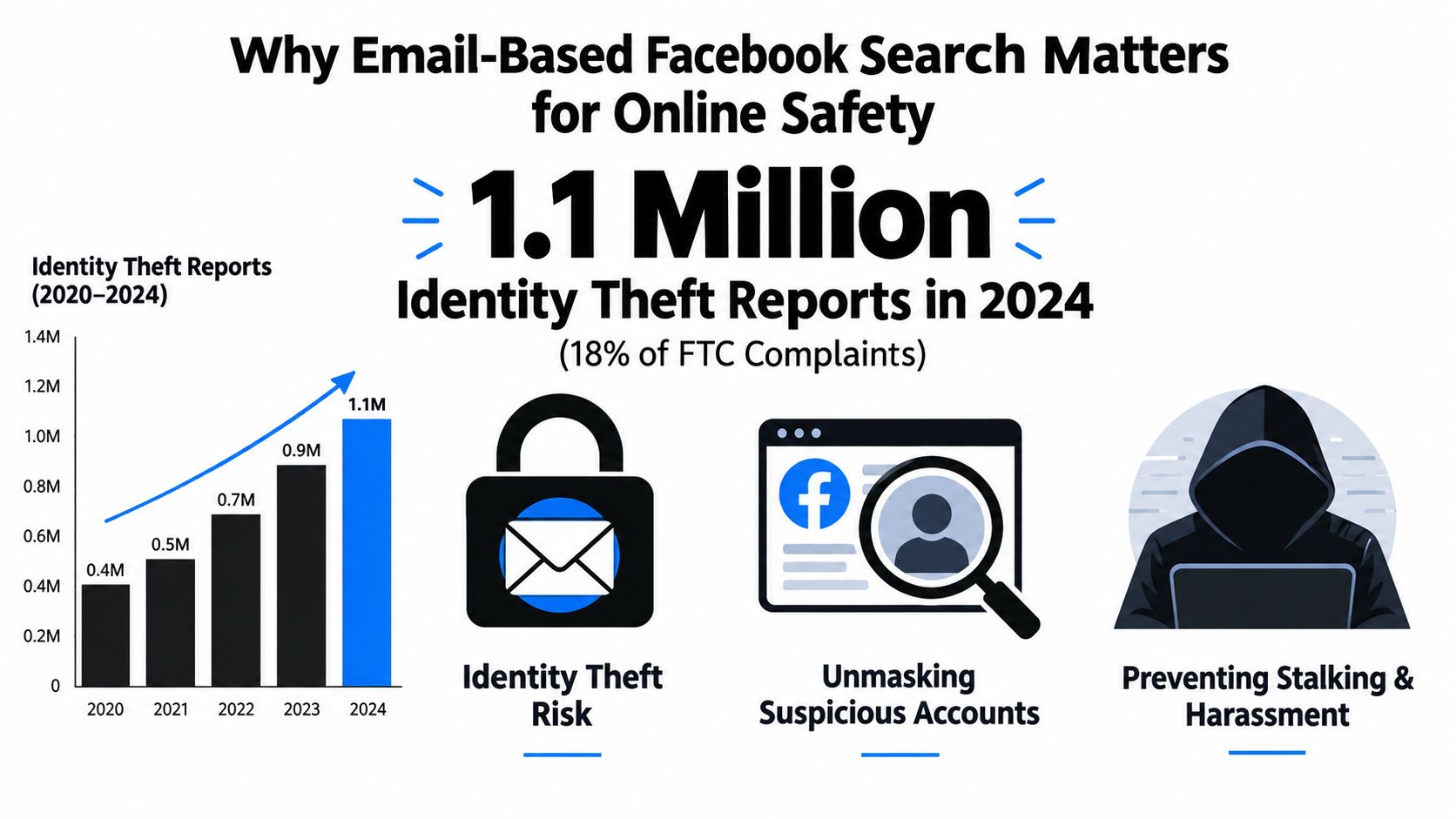
For online safety work, email-based Facebook search matters less as a direct lookup trick and more as an investigative pivot. That distinction is important in 2026. A single email rarely gives you a clean Facebook match anymore, but it can still help you test whether a person’s claimed identity holds up across platforms.
I use email addresses this way in basic OSINT triage. They show up early, before you have a full name, phone number, or confirmed profile. A suspicious dating conversation, a marketplace sale, a password reset warning, a gaming dispute, or repeated unwanted contact often starts with one mailbox and a story attached to it.
That story can be checked.
Where email lookup helps
The practical value is context, not certainty. If someone shares an email address, that identifier can support or weaken what they claim about who they are.
Common examples include:
- Dating app verification: An off-app email can be compared against public social traces to see whether the person has a consistent identity.
- Gaming account disputes: The local part of the address may match gamer tags, forum names, or social usernames tied to the same person.
- Reputation checks: A public-facing email sometimes connects to older profiles, side projects, or business pages that still appear in search results.
- Harassment investigations: Repeated messages from one address may line up with comments, aliases, or account names used elsewhere.
Pew Research reported that many dating app users have encountered people they suspected were scammers, according to Pew Research Center’s report on online dating and relationships. In practice, that is one reason email checks come up so often in personal safety reviews.
Practical rule: If someone pushes a conversation off-platform early, treat any email address they provide as a lead to verify before you share money, private images, documents, or travel plans.
What investigators actually get from an email
An email address can expose small but useful signals. The username portion may repeat a handle used on Facebook, Instagram, Reddit, Discord, Steam, or old forum accounts. The domain can hint at a workplace, school, region, or disposable provider. Even when Facebook itself reveals nothing directly, those fragments help narrow the field and reduce false matches.
That is the reason this type of search matters. It supports correlation.
| Situation | Why email matters | What a Facebook-related lead can help confirm |
|---|---|---|
| Online dating | Email is often the first off-platform identifier | Whether the identity looks consistent across social accounts |
| Identity theft concerns | A leaked email may be used in impersonation | Whether clone profiles or reused identity details exist |
| Gaming profile disputes | Email stem may match aliases | Whether the same handle appears on social profiles |
| Reputation management | Public email can expose old accounts | What clients, employers, or contacts might still find |
For self-checks, a broader workflow to find accounts linked to an email address usually produces better results than relying on Facebook alone. That is the contrarian reality now. Email still matters, but mostly as the first breadcrumb in a wider OSINT process, not as a dependable one-step Facebook search.
Using Facebook Native Search and Privacy Controls
Facebook still treats email as an important identity signal internally. The mistake is assuming that internal matching automatically translates into public search visibility. It doesn’t.
According to Facebook’s privacy help on profile suggestions and search log retention, Facebook’s privacy controls let people limit who Facebook can suggest their profile to based on an email address or phone number, and search history is stored for up to 6 months before deletion from the log. That single detail explains a lot. Email remains central to matching and discovery logic, but users can sharply reduce what other people can see.
What still works inside Facebook
Native Facebook investigation starts with the obvious surfaces:
Search bar testing
Sometimes an email-linked profile is still visible through native search, especially when the address is public or closely tied to a business presence.Account recovery surfaces
In some cases, Facebook’s recovery flow can indicate whether an email is recognized by the platform, even if the profile itself isn’t openly searchable.Accounts Center search history controls
Facebook now exposes a dedicated search history area in Accounts Center where users can review and delete previous searches, as described in Meta’s search history help documentation. That matters because it shows Facebook has formalized search data management rather than leaving it as an opaque background feature.
What older guides get wrong
Many legacy tutorials still imply a direct email lookup is straightforward. That advice is stale. Native search can fail for perfectly ordinary reasons:
- The profile isn’t publicly searchable
- The person has restricted discoverability by email
- The address exists in Facebook systems but isn’t exposed in profile fields
- Search engine indexing is disabled or limited
- The email is linked to the account but not visible to outsiders
The absence of a visible result is not proof that no Facebook account exists. It only proves you didn’t get a visible match through that route.
That distinction matters in cyber investigations. People often overstate confidence after a single failed search. Professionals don’t.
Native search versus privacy settings
The tension is easiest to see in a side-by-side comparison:
| Facebook surface | What it can reveal | Main limitation |
|---|---|---|
| Search bar | Publicly discoverable profile matches | Many profiles are hidden or restricted |
| Recovery flow | Whether Facebook recognizes the email in some form | Doesn’t equal confirmed attribution |
| Search history area | What the searcher queried and can later review/delete | Tells you about your own activity, not target identity |
| Profile suggestions by email | Possible discoverability path | User can limit suggestion behavior |
If your goal is privacy rather than investigation, Facebook’s own settings deserve a careful audit. A focused Facebook privacy lockdown checklist is worth using if you want to reduce discovery by email, trim public profile exposure, and limit what strangers can infer from search behavior.
Building a Practical OSINT Investigation Workflow
The right way to search Facebook from email today is to stop treating it as a one-click task. Think of it as a workflow with confidence levels.
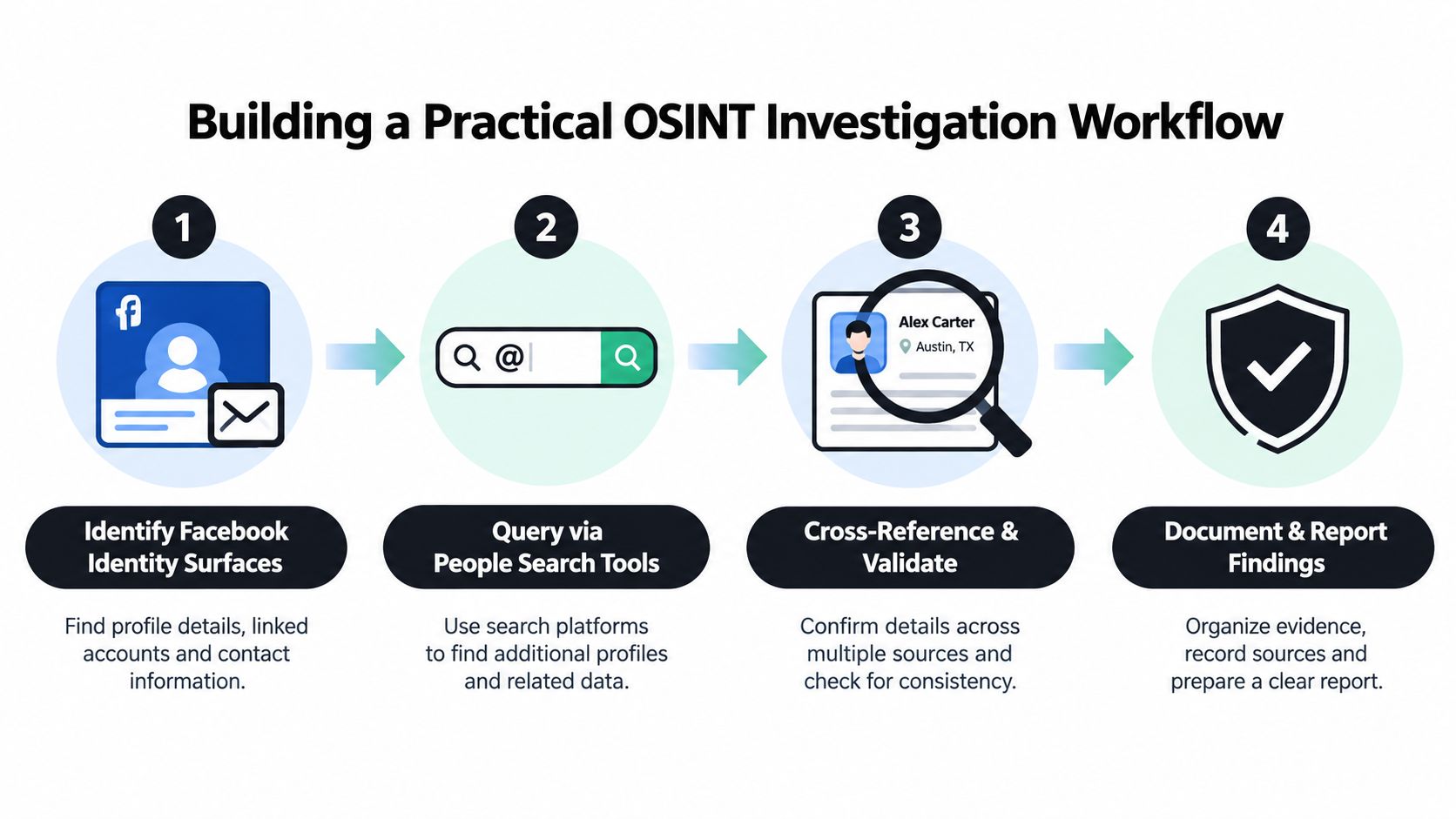
A practical OSINT method described by OSINT Support’s Facebook email reverse lookup guidance starts with Facebook’s own identity and recovery surfaces, then pivots to the email stem, public profile fields, comments, and Google queries limited to Facebook domains. The same guidance also stresses the key weakness: this works best for business accounts or public profiles that intentionally expose contact details, and it’s much weaker for private personal accounts.
Stage one: test Facebook’s own identity surfaces
Start where the platform has the most context. That means Facebook search, account recovery checks, and any visible public profile paths tied to the email.
What you’re really testing at this stage isn’t “Can I find the person?” It’s “Does Facebook appear to recognize this identifier in any meaningful way?”
Use this logic:
- Visible match appears: treat it as a lead, not a conclusion.
- No visible result: don’t assume the address is unused.
- Partial recognition through recovery flow: note it, but don’t attribute identity yet.
Stage two: pivot from the email itself
The email address often gives you better leads than the direct search does. Break it down:
- Username stem:
j.smith.art,mikegamer,sara.dev, and similar patterns often repeat across platforms. - Domain context: corporate, educational, privacy-focused, and throwaway domains each suggest different next steps.
- Formatting style: initials, birth-year fragments, profession tags, and location hints can all become search pivots.
At this stage, you’re searching for consistency. The strongest patterns usually come from repeated handle use across Facebook, Instagram, gaming profiles, discussion forums, professional networks, and public comments.
Here’s a practical decision matrix.
| Signal you have | Best next move | Confidence level |
|---|---|---|
| Full business email | Check public Facebook About fields and page contact details | Moderate |
| Personal email with unique stem | Search the stem across social and gaming platforms | Moderate |
| Generic mailbox name | Use broader cross-platform correlation | Low |
| Recovery flow recognition only | Wait for corroboration from another identifier | Low |
| Email plus matching profile photo or known username | Compare public posts, mutuals, and naming patterns | Higher |
A structured OSINT workflow reference can help keep that process disciplined, especially when you’re juggling multiple weak signals instead of one obvious public profile.
Here’s a walkthrough that captures the mindset behind the process:
Stage three: corroborate before attribution
Amateurs usually get sloppy here. One matching username is not enough. One familiar photo is not enough. One shared city is definitely not enough.
Look for overlapping indicators such as:
- Username consistency across multiple public platforms.
- Profile photo reuse or visually similar images.
- Mutual connections that make geographic or social sense.
- Public posts or comments that align with known interests, work, or timeline.
- Cross-platform bio details that repeat in natural ways.
Verification standard: Treat every email-to-profile match as provisional until at least one independent signal supports it.
Stage four: document carefully
If you’re investigating a scam, impersonation attempt, or harassment issue, save the evidence trail. Capture the visible URL, the public context, the date, and why you think the lead matters. Don’t embellish. Don’t fill gaps with assumptions.
That discipline matters for dating scams, employee screening, parental safety reviews, and gaming account disputes alike. The point of OSINT isn’t to feel certain. It’s to build supportable conclusions from open signals.
The Reality Check Why Direct Email Search Often Fails
The biggest misconception in this space is that Facebook search broke. It didn’t. The platform changed the balance between identity matching and public discoverability.
Recent practitioner coverage points in the same direction: direct email-based Facebook lookup has become less reliable, and successful searches now depend more on contact syncing, recovery-page analysis, and broader identifier matching. One piece of recent coverage also notes that many modern searches fail unless the email is linked to the account, and Facebook’s own help content emphasizes that profiles may be hidden from Facebook search and search engines, which means an account can exist without producing a visible result through a simple email query. That shift is summarized in this recent video discussion on why direct email search increasingly fails.
Why visible results are disappearing
Several changes pushed the old workflow into decline:
- More privacy controls: People can limit discoverability and profile suggestions tied to email.
- Less public profile data: Many users no longer expose contact details in About sections.
- Reduced indexing: Search engines don’t surface Facebook profile data the way they once did.
- Higher misuse risk: Platforms know email-based lookup can be abused for stalking, harassment, and fraud.
This isn’t a bug from an investigator’s perspective. It’s a privacy design choice.
What works better than direct lookup
When direct email search returns nothing, the useful question isn’t “How do I force Facebook to show me more?” It’s “What other public signals align with this identity?”
That usually means:
- searching the email stem as a username lead
- correlating with public dating, gaming, or forum identities
- checking whether profile photos or bios repeat elsewhere
- comparing time zones, language, employer references, or niche interests
- validating with at least one independent signal before drawing conclusions
Good investigators don’t treat a failed email search as a dead end. They treat it as a clue about the target’s privacy posture.
For people trying to map exposure more broadly, an email reverse lookup approach across multiple platforms usually produces a more realistic picture than Facebook-only searching. That matters because the modern OSINT question isn’t whether Facebook alone gives you the answer. It’s whether the wider identity graph does.
Protecting Your Own Digital Presence and Privacy
People who run romance scams, impersonation schemes, or basic background checks rarely need a perfect Facebook email match to identify someone. A single exposed address can still connect your name, photos, old usernames, and side accounts if you leave enough pieces public. As noted earlier, scam exposure on dating platforms is common enough that ordinary users should treat email privacy as a personal safety issue, not a niche OSINT concern.
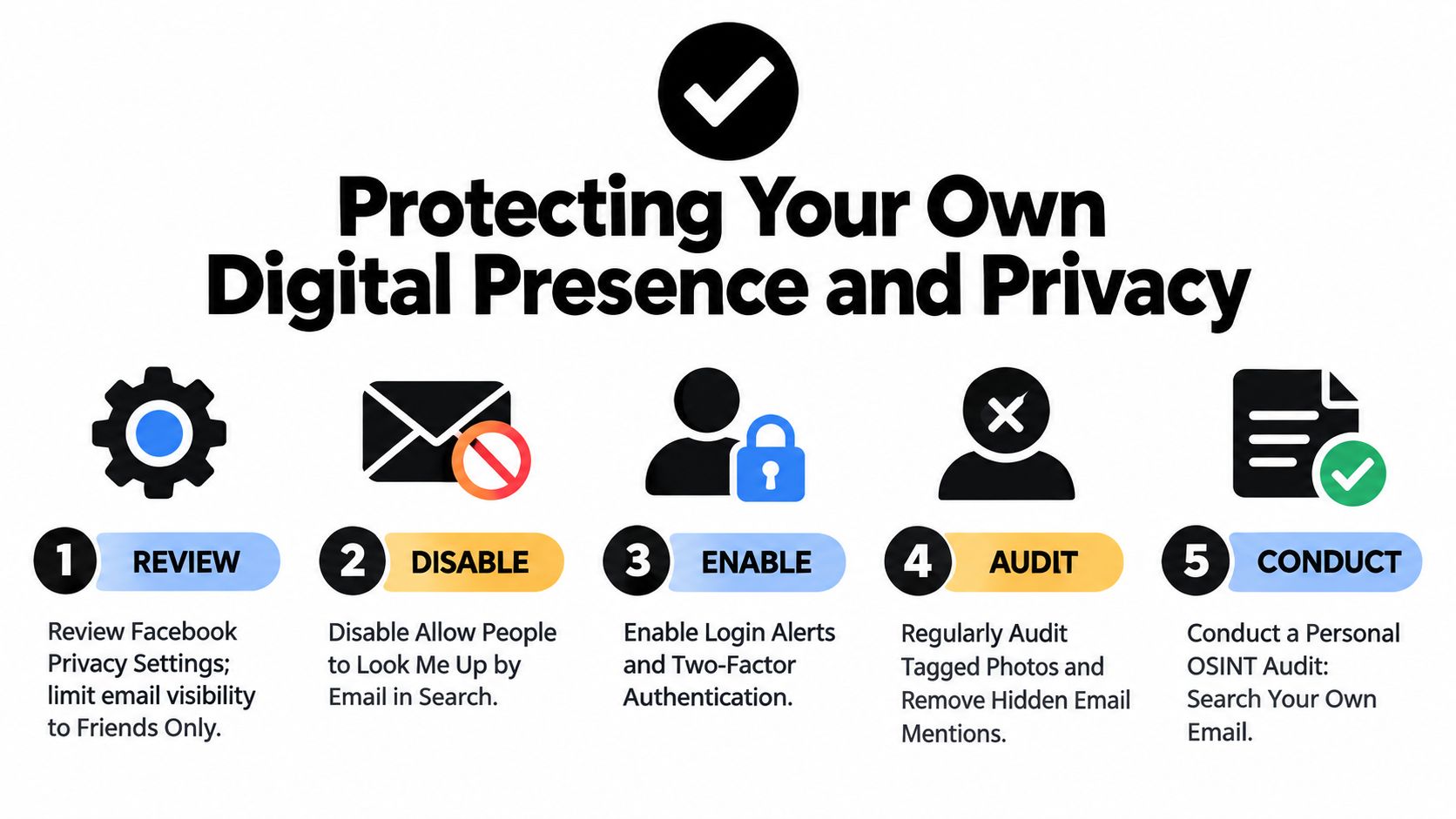
Tighten the Facebook settings that matter most
Facebook is no longer the easy reverse-lookup tool it once was in many cases. Your profile can still leak enough context for correlation if contact details, friend visibility, old posts, or tagged content remain exposed.
Start with the settings that reduce linkage:
- Limit discoverability: Restrict who can find your profile through email or phone number.
- Remove public contact data: Delete any email address showing in About fields, page roles, or visible profile details.
- Review audience settings: Reduce visibility on friend lists, older posts, and profile fields to the lowest level that still fits how you use the platform.
- Check outside search exposure: If Facebook offers a control for search engine indexing or profile visibility beyond the platform, review it.
Facebook settings only solve part of the problem. If your address appears in people-search sites, scraped directories, or old broker databases, investigators and scammers may identify you without touching Facebook at all. A targeted data broker removal process closes off one of the easiest external pivots.
Run your own OSINT against yourself
This is one of the highest-value privacy habits I recommend.
Search your current email, old email addresses, username variants, gamer tags, and profile photos. Use a private browser window. Check search engines, social platforms, forum archives, cached pages, and breach-notification services you trust. The goal is not paranoia. The goal is seeing what a stranger can correlate in thirty minutes.
Look for these problems:
- Forgotten accounts attached to an old mailbox.
- Forum or gaming profiles that connect a pseudonym to your real name, city, or employer.
- Dating profile remnants that still expose photos, age, or location patterns.
- Tagged photos and comments that reveal routines, relationships, or workplaces.
- Old business pages or side projects that still list contact details you no longer control.
For broader visibility mapping, Digital Footprint Check is one option for checking where an email appears across social media, breach data, gaming profiles, professional networks, and public records. Used ethically, tools like that help people audit their own exposure before someone else does.
A practical protection checklist
Different risks call for different cleanup priorities. A job seeker may care most about reputation. A parent may care more about family exposure. Someone active on dating apps may care about impersonation or stalking risk.
This baseline covers the common weak points:
| Area | Protective action | Why it matters |
|---|---|---|
| Facebook profile | Remove public email and reduce discoverability | Lowers easy identity correlation from contact data |
| Dating apps | Avoid sharing your primary email early | Makes cross-platform tracing harder for scammers |
| Gaming accounts | Separate gamer tags from real-name email patterns | Reduces doxxing and account-linkage risk |
| Professional presence | Audit what a recruiter or client can tie to your email | Prevents old accounts from shaping first impressions |
| Data brokers | Submit removal requests where possible | Shrinks passive exposure outside social platforms |
Search your own email the way a stranger would. What turns up first is usually your highest-priority cleanup item.
Making Smart Choices for Your Specific Situation
The right move depends on why you’re trying to search Facebook from email.
If you’re vetting a potential romantic interest, stay skeptical of clean stories with thin public evidence. The FBI Internet Crime Complaint Center reported 17,910 romance-confidence fraud complaints in 2024 with $672 million in losses, which works out to about $37,500 per complaint, according to this romance scam statistics summary citing FBI IC3 data. In that context, a failed direct Facebook search shouldn’t reassure you. It should push you toward corroboration across multiple platforms before trust or money enters the picture.
If you’re protecting your professional reputation, focus less on finding others and more on what your own email exposes. Recruiters, clients, and coworkers may connect an email address to old side projects, gaming accounts, public comments, or neglected social profiles long before they ever see your résumé.
If you’re a parent or family member, use email-linked searching carefully and ethically. The goal should be safety, not surveillance theater. Look for obvious risk signals, public oversharing, impersonation, or signs that someone is using a loved one’s identity in places they shouldn’t.
For general privacy, the key lesson is simple. Direct Facebook lookup is now the least dependable part of the process. Cross-platform correlation, cautious interpretation, and routine self-audits are what work.
If you need to investigate, document evidence and verify before attributing. If you need to protect yourself, reduce discoverability before someone else starts connecting the dots.
If you want to see what your own email already reveals across social platforms, public records, breach exposure, and related accounts, start with Digital Footprint Check. It’s a practical way to assess the same kinds of signals discussed here, so you can spot privacy risks, dating-safety concerns, reputation issues, and exposed accounts before they become bigger problems.