· Digital Footprint Check · Content Marketing · 13 min read
How Do I Delete a Facebook Account Permanently in 2026?
Discover how do i delete a facebook account permanently (or deactivate it). This 2026 guide covers data backup, recovery window, and finding residual data.

You’re probably here because you’ve reached the same point many people do with Facebook. You want less noise, less tracking, less exposure, or just fewer old posts hanging around your name. Maybe you’re job hunting. Maybe you’re dealing with harassment. Maybe you’re tired of having one account connected to too many parts of your life.
The button to delete your account exists. The hard part is understanding what that button does, what it doesn’t do, and what you need to clean up before and after you click it. If you’ve been asking how do i delete a facebook account, the safest answer isn’t just a menu path. It’s a process.
Why Deleting Facebook Is More Than Clicking a Button
Deleting Facebook feels like a clean break. In practice, it usually isn’t.
Most tutorials stop at the account menu. They tell you where to click, confirm your password, and wait. That’s useful, but it ignores the bigger privacy problem. Your Facebook presence often extends into app logins, copied posts, search results, old forum accounts, public data collections, and information other people uploaded about you.
That gap matters. A Be Connected guide discussing Facebook deletion and lingering data notes that 81% of former Facebook users in a 2025 Pew Research study were unaware their data lingers on partner sites, and that Meta’s 2025 EU DSA compliance updates still allow 40% of user behavioral data to be used in inferred profiles for AI training.
Practical rule: If your goal is privacy, deleting the account is only the first move. The follow-up work is where most of the risk sits.
That’s why reputation and privacy work always starts with scope. You need to know what’s attached to your identity, not just what’s visible on your profile. If your concern includes employer screening, stale search results, or copied personal details on people-search sites, this PeopleFinder resource for digital identity is a useful companion read because it looks at online reputation as a broader exposure problem, not just a social media setting.
A Facebook profile can affect more than social visibility. Old public comments can surface during hiring. Tagged photos can remain elsewhere. Contact details tied to reused usernames can support phishing or impersonation attempts. If you want a broader view of what your online presence looks like, reviewing your digital footprint exposure helps frame the work more realistically.
What most deletion guides miss
They usually miss three things:
- Third-party persistence because data shared with outside apps or sites may still exist after your Facebook profile goes away.
- Residual visibility because copies, reposts, and archives can outlast the account itself.
- Inferred identity data because some information about you may sit outside your direct control.
The practical takeaway is simple. Don’t treat deletion as a single event. Treat it like a privacy offboarding process.
Deactivation vs Deletion Which Is Right for You
Before you remove anything, choose the right exit.
Some people shouldn’t delete their account immediately. If you still need access to a Page, Marketplace history, or an old Facebook login tied to another service, deactivation buys you time. If your goal is to leave permanently and reduce future exposure, deletion is the stronger move.
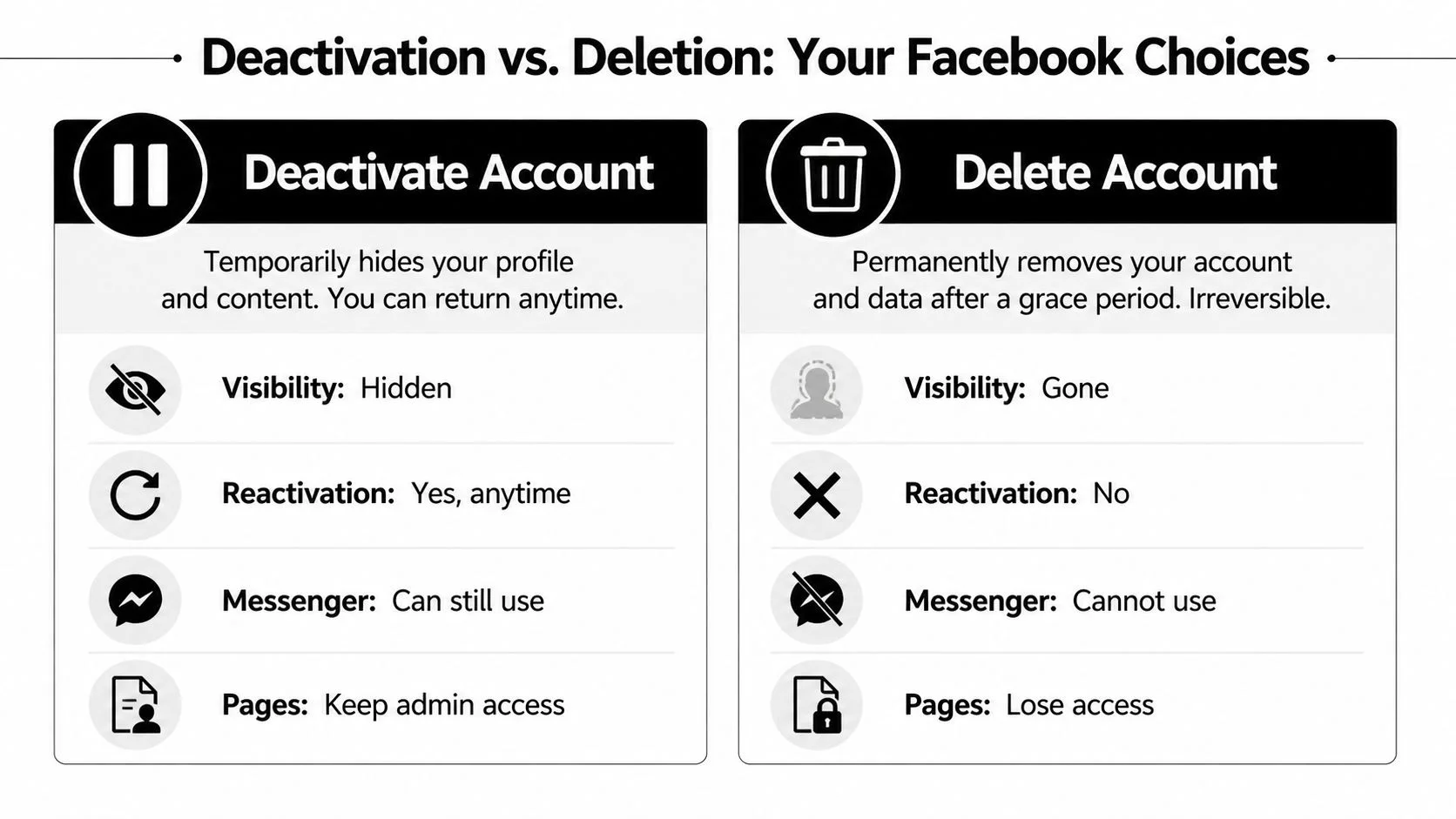
The practical difference
Deactivation hides your profile from normal view, but it doesn’t function like an exit. It’s more like putting the account in storage. This can make sense if you’re taking a break, cleaning up your profile, or temporarily lowering your visibility during a job search.
Deletion is the route for people who want out. It ends account access after the deletion process completes, and it’s the option to choose if you don’t want the account available for future use.
That choice gets more complicated because deletion is not immediate. A McAfee walkthrough of Facebook account deletion explains that Facebook uses a 30-day grace period where the account is effectively deactivated first. If you log back in during that window, the deletion process resets. The same source also notes the security issue many people miss: if someone else has your credentials, they could reverse your deletion request without your knowledge.
If you’re deleting for safety reasons, change your password and review your active sessions before you submit the request.
Facebook Deactivation vs. Deletion
| Feature | Deactivation (Temporary) | Deletion (Permanent) |
|---|---|---|
| Profile visibility | Hidden from normal view | Removed after the deletion process completes |
| Account recovery | You can come back by logging in | Available only during the grace period |
| Messenger use | Often retained | Lost with the account |
| Best for | A break, temporary privacy, profile cleanup | Permanent exit, stronger privacy reset |
| Risk to manage | False sense of removal | Grace-period reactivation if someone logs in |
Which option fits your situation
- Choose deactivation if you need time to untangle Facebook logins, transfer Page access, or step away without losing the account.
- Choose deletion if you’re leaving for privacy, harassment concerns, reputation cleanup, or account minimization.
- Pause first if you’re unsure what else depends on Facebook. A rushed deletion can lock you out of other services.
For people trying to reduce overall exposure, not just hide one profile, this guide on how to erase online presence more completely is useful because Facebook is rarely the only public-facing account that matters.
Your Pre-Deletion Checklist What to Do First
Most deletion mistakes happen before the actual deletion.
People click too fast, then realize they’ve lost old photos, forgotten a Page they manage, or broken access to another service that used Facebook Login. Good account removal starts with a short audit.

Download your information first
If your account has years of photos, messages, event history, or posts, export it before you do anything else.
Facebook gives you a built-in option to download your information. Use it even if you think you won’t need it. People regularly underestimate what was only stored there, especially old albums, messages, and niche community interactions.
The smart way to do this is to save the archive somewhere you control, then review it later. Don’t try to inspect everything before deletion. Just make sure you preserve it first.
Transfer any Page or group responsibility
A lot of users forget that they’re not just deleting a profile. They’re removing the account that may control Pages, groups, or business assets.
If you run a local business Page, a hobby community, a school parent group, or an old gaming clan page, check your admin roles and transfer them where necessary. If you leave without doing that, cleanup gets harder fast.
Don’t assume “I barely use that page anymore” means it doesn’t matter. Forgotten assets are often the ones that cause the most trouble later.
Unlink every app and site that uses Facebook Login
This is the step that has the biggest security payoff.
Review every app, game, and website where you used “Continue with Facebook.” Then replace that login with an email-and-password login or another sign-in method you control directly. If you skip this, deletion can create account access problems on unrelated services.
Examples include:
- Shopping accounts that you set up years ago with one-click Facebook sign-in
- Mobile games that store progress under a Facebook-linked identity
- Forums and niche communities where Facebook was the only credential you remember
- Old productivity or media tools that still pull your account info through connected permissions
Also revoke permissions inside Facebook before deleting. That closes one more door and helps you identify what was connected.
For a broader privacy reset, this walkthrough on a personal online audit and digital cleanse pairs well with Facebook deletion because it pushes you to inspect all the accounts, data trails, and reused identifiers around the profile.
Decide what you want to do about Messenger
Messenger is where a lot of people hesitate.
If Facebook is your only contact channel with certain friends, family members, school groups, or clients, think through that transition before deletion. Tell people where to reach you instead. Move important conversations or contact details off-platform if needed.
A clean exit works better when you replace dependencies first. Otherwise, you end up recreating the same account later because one practical detail got overlooked.
How to Permanently Delete Your Facebook Account (Desktop & Mobile)
The current process runs through Accounts Center, not the older settings paths many outdated tutorials still reference. That’s why the menus may look different from screenshots you’ve seen before.
A YouTube guide covering Facebook deletion through Accounts Center notes two details worth keeping in mind. First, the deletion flow is managed through the centralized Accounts Center rather than legacy Facebook settings. Second, deleting the account also deletes any associated Pages where you are the sole administrator, which is why the pre-deletion transfer step matters so much.
On desktop
Open Facebook in a browser and sign in.
Go to Settings & Privacy, then Settings, and look for Accounts Center. From there, open Personal details, then Account ownership and control, then Deactivation or deletion. Select the Facebook account you want to act on and choose Delete account.
Facebook may present prompts to download your information or review connected items. Don’t rush past these if you haven’t handled them already. They’re not just friction. They’re the last warning that your account may still be tied to data or assets you care about.
On mobile
The app uses the same basic structure, but the menu placement can differ by interface version.
Open the Facebook app, go into Settings & Privacy, then enter Accounts Center. From there, use Personal details, then Account ownership and control, then Deactivation or deletion. Choose the right account and continue with Delete account.
If the app looks different from a guide you found, that doesn’t necessarily mean the method is outdated. Facebook changes placement often, but the key is to follow the Accounts Center path rather than hunting around older menu names.
Final confirmation and password check
Facebook requires password re-authentication before it accepts the deletion request. That’s a security check, but it also means you need to verify you still control the account email, device, and password before you start.
This is a good moment to review your login dependencies one last time. If you want help tracing what accounts may still be tied to the same email identity, this guide on how to find all accounts linked to your email is practical and worth using before you finalize deletion.
A visual walkthrough can help if the menus on your device don’t match what you expected:
What to do immediately after you submit
Once the request is in, stop using the account.
Don’t log back in “just to check something.” Don’t open old saved sessions on another device. Don’t click Messenger out of habit if it depends on the same account. During the grace window, casual logins can undo the process.
If you’re deleting because of stalking, impersonation, or account compromise concerns, sign out from other devices, secure your email account, and monitor for unusual login activity elsewhere. The account is on its way out, but your identity surface is still wider than one profile.
The Aftermath What Happens to Your Data Now
After the account leaves view, many people assume the data is gone too. That’s the part that causes confusion.
Deletion removes the active account experience. It does not guarantee that every trace tied to your identity disappears from Meta systems, third-party services, public archives, or other people’s copies.

A summary of Facebook deletion and retention practices from Aura states that Meta may retain user data for up to 180 days after a deletion request. The same source notes that even after that period, data can persist in shadow profiles built from information uploaded by other users, affecting billions of people globally.
What your digital shadow looks like
Your digital shadow is the information that remains around you after you stop actively using a service.
On Facebook-related surfaces, that can include:
- Posts others shared that mention you or include your image
- Cached references in search engines or scraped pages
- Contact data uploaded by someone else from their address book
- Partner-site traces where your Facebook-linked identity was previously used
This is why “my account is deleted” and “my data is gone” are not the same statement.
Deleted means the front door is shut. It doesn’t mean every copy, reference, and derivative record vanished with it.
Why this still matters in the real world
Residual data creates practical risk, not just abstract privacy discomfort.
An old email address tied to a deleted Facebook account can still help someone craft a convincing phishing message. A lingering username can connect your social identity to other platforms. A former public profile can continue to shape how recruiters, clients, or acquaintances interpret your online history if copies or mentions still surface.
That’s also where data broker cleanup becomes relevant. Once the social profile is gone, people-search listings and aggregated identity records can become more noticeable because there’s no active profile left to dominate search results. If that’s part of your concern, reviewing your options for data broker removal is a practical next step.
What actually works after deletion
What works is follow-up:
- Search for your name, old usernames, and known profile handles
- Check whether old email addresses appear in exposed contexts
- Remove or update external accounts that still reference Facebook
- Ask contacts to delete uploaded details they no longer need to keep
- Monitor people-search and breach-exposure surfaces over time
What doesn’t work is assuming the account menu handled all of that for you.
Securing Your Digital Footprint Beyond Facebook
Deleting Facebook can be the right decision. It can reduce visibility, cut one major data source out of your life, and remove an account that no longer serves you well.
But privacy work doesn’t end at account deletion. It shifts.
The actual task is reducing the number of places your identity still appears. That includes reused emails, exposed phone numbers, forgotten forums, old gaming accounts, dating profiles, public comments, breach records, and people-search listings. Facebook is often the most visible piece, not the only one.
Keep working the edges of your identity
A strong cleanup usually includes changing weak or reused passwords, updating old logins, checking what public profiles still rank in search, and removing accounts you no longer need. If you’re also trying to understand how discoverable your contact information may have been through social platforms, this EmailScout's Facebook email guide is useful context because it shows why profile-linked contact exposure matters even when people think they’ve kept things private.
The important trade-off is this. Deleting the account gives you control over one channel. Ongoing monitoring gives you control over the pattern.
If you’ve taken the time to leave Facebook properly, finish the job by checking where else your information still lives.
If you want to see what personal data is still exposed beyond Facebook, run a free scan with Digital Footprint Check. It helps you uncover public traces across social platforms, breach data, people-search surfaces, and other online accounts so you can continue your cleanup with evidence instead of guesswork.