· Digital Footprint Check · Content Marketing · 22 min read
How to Erase Your Online Presence in 2026: a Practical Guide
Erase online presence - Learn how to erase online presence effectively with our 2026 guide. Discover expert strategies to remove data, delete accounts, and prot

Trying to erase your online presence isn’t as simple as clicking a “delete” button on your old accounts. The internet was built for permanence, and your information often lingers in website caches, data broker databases, and deep archives long after you’ve moved on. Getting true digital privacy requires a deliberate, focused strategy to hunt down and remove that lingering data, protecting your job prospects, personal safety, and reputation.
The consequences of a neglected digital footprint are severe. From losing a job offer over an old social media post to falling victim to identity theft or a romance scam, the data you’ve left behind has real-world power. This guide provides the practical steps you need to take back control.
The Myth of the “Delete” Button: Why Your Data Never Really Disappears
Ever wondered why that cringey forum post from a decade ago still pops up in a Google search? It’s because the internet never forgets. This is a hard lesson many of us learn way too late. Your information isn’t just on the site you originally used; it’s scraped, copied, and archived all over the web by automated systems.
The idea that you can just hit ‘delete’ is a complete myth, especially with publicly visible data. For example, people often ask if can a business delete Google reviews, only to discover that removal is a complicated and often futile process. The exact same principle applies to your personal data.
Deactivation Is Not Deletion
A critical mistake people make is thinking deactivation is the same as deletion. When you “deactivate” a social media or gaming profile, you’re just hiding it. The platform keeps all your data, posts, and connections, ready to bring it all back the second you log in again.
Real-World Impact: An old, deactivated dating profile can still be scraped by data brokers. A scammer could use your old photos and bio to create a fake persona for a romance scam, putting both you and their potential victims at risk. Permanent deletion is a formal request for a company to erase your data from their servers, offering a much stronger layer of protection.
Data Brokers and Your Digital Ghosts
Those forgotten accounts are a rich source for data brokers. These companies build detailed profiles on people by harvesting information from dormant social media accounts, public records, and countless other online sources. They then sell this information for marketing, background checks, and sometimes, for far more sinister purposes like enabling identity theft or stalking.
Your digital footprint has a direct and massive impact on your real-world life:
- Job Prospects: A shocking 94% of recruiters admit to passing on candidates because of controversial online posts or a negative digital presence. An unprofessional online image can slam the door on your career goals before you even get an interview.
- Personal Safety: Exposed personal details from old accounts can be pieced together by criminals for identity theft, phishing attacks, or even physical stalking. Details from a forgotten gaming profile or an old forum post can be used to bypass security questions on more sensitive accounts.
- Reputation Management: An old, embarrassing comment or photo can resurface at the worst possible time, damaging your personal and professional relationships. This can be especially damaging in the context of online dating, where a potential partner’s first impression is often formed by a quick Google search.
Studies have shown that a significant portion of supposedly “deleted” content actually sticks around on the web through archives like the Wayback Machine or via data scrapers. This gets even worse when you factor in the constant stream of data breaches and our often-poor password habits—it’s a perfect storm for identity compromise.
Controlling your digital story isn’t just a spring-cleaning task; it’s an urgent matter of personal security. Realizing your data lives on, with or without your permission, is the first step toward taking meaningful action. If you’re worried about what’s out there, a great starting point is to run a background check on yourself to see exactly what potential employers or anyone else can find.
Step 1: Map Your Digital Footprint with OSINT Techniques
Before you can even think about erasing your online presence, you have to know what you’re up against. A quick Google search of your own name is just scratching the surface. The real work is more like digital archaeology—you have to dig deep using the same Open Source Intelligence (OSINT) methods that security experts use.
Think of it this way: you need a complete map of every account, every stray comment, and every piece of data tied to you before you can start wiping the slate clean. This means going back in time, often through email accounts you haven’t touched in years.
Start by searching your inboxes and archives. I’m talking about every Gmail, Outlook, Yahoo, and old university email address you’ve ever had.
Use search terms that signal an account was created. You’ll be surprised what you find.
- “Welcome to”
- “Confirm your account”
- “Your new login”
- “Subscription confirmation”
- “Username reminder”
This first pass alone will likely unearth dozens of ghosts from your digital past—forgotten profiles on ancient forums, defunct social media sites, and one-off e-commerce accounts. Each one is a loose thread that could unravel your privacy.
Uncovering Hidden Connections
Your search doesn’t stop with email. Many of your old accounts are probably tied to phone numbers you no longer use or usernames you’ve since abandoned.
A powerful but often-overlooked rich source is your password manager. If you’ve ever used a tool like 1Password or LastPass, or even your browser’s built-in manager, your vault is a direct log of your online history. Exporting a list of your saved sites gives you an instant takedown checklist.
Here’s another pro-level OSINT technique: reverse image search. Grab your most-used profile pictures—especially those from years ago—and run them through Google Images or TinEye. This is how you find that old dating profile, gaming forum account, or social media page you swore you deleted but is still linked to that photo. This is a common method used to detect catfishing, and you can use it to protect yourself.
Once an account is abandoned, your data doesn’t just sit there. It often begins a new journey without your consent, getting scraped, packaged, and sold.
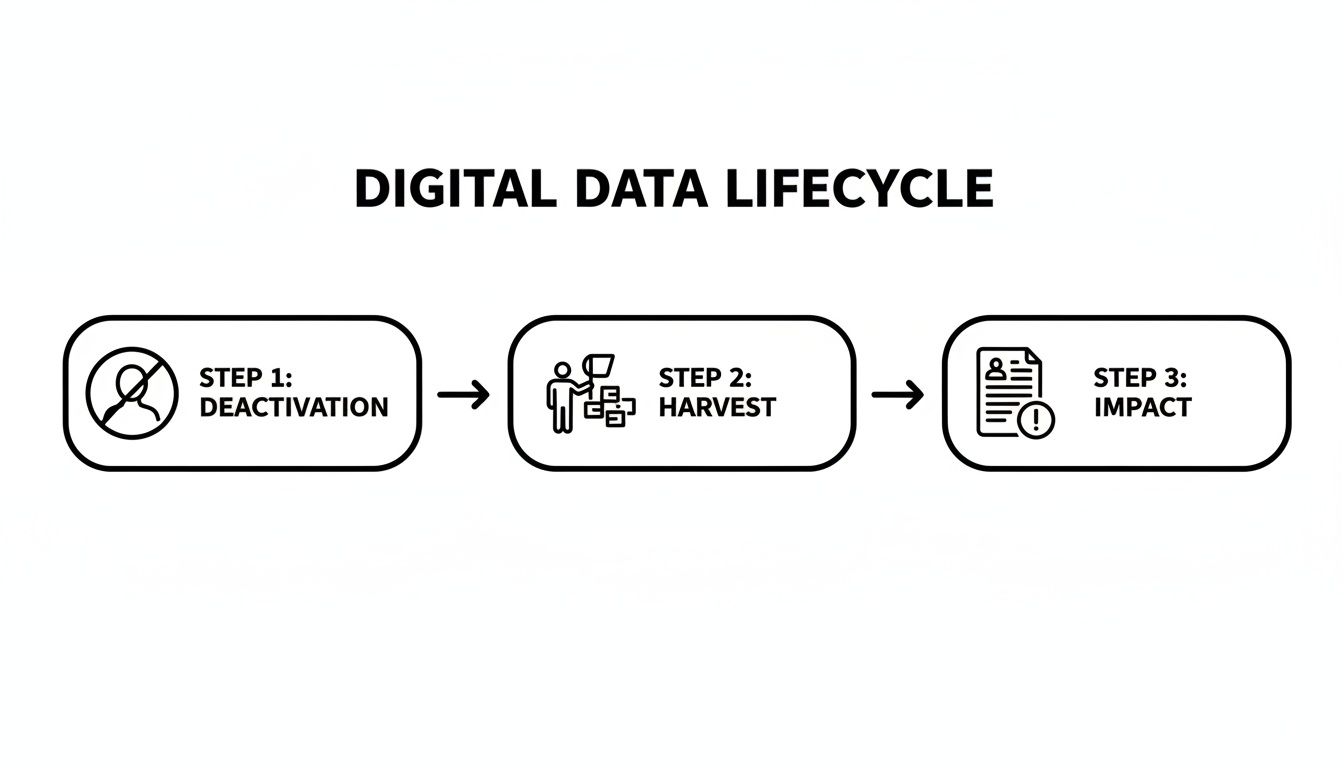
This process reveals a harsh truth: your “deleted” or forgotten data can be harvested and weaponized, leading to real-world problems for your privacy and reputation long after you’ve moved on.
Automating the Discovery Process
Let’s be realistic. Manually hunting for every digital breadcrumb you’ve ever left is a monumental, if not impossible, job. The average person has well over 100 online accounts, and many of those are buried deep in databases you’d never find on your own. This is where you have to move beyond manual searches and use automated tools.
Key Insight: A manual audit is a fantastic start, but it can only take you so far. Automated tools scan hundreds of platforms, including the murky world of data brokers and breach databases, that you would likely never discover on your own.
These OSINT platforms automate the discovery phase, giving you a comprehensive report of where you’re exposed. They cross-reference your name, emails, phone numbers, and known usernames across a vast network of websites.
For instance, an automated scan can find things a manual search would miss:
- An old MySpace profile with embarrassing high school photos that could undermine your professional image.
- Your name, age, and address listed on a data broker site like Spokeo, making you a target for scams and identity theft.
- A forgotten gaming account on Steam or Discord with publicly visible activity that could be used to profile you.
- Your email address showing up in a known data breach, exposing a password you might still be using elsewhere—a major risk for your financial and gaming accounts.
This is the most critical part of the process. Without a complete map of your exposure, your cleanup efforts will be guesswork, leaving behind major security holes and reputational landmines.
To get a true sense of what’s out there, you need a specialized scanner. If you’re ready for a deep dive and want to protect your personal safety and job prospects, check your digital footprint to see what information is publicly available. An automated report gives you the detailed map you need to start the takedown process with confidence.
Step 2: Your Takedown Strategy for Old Accounts
Okay, you’ve mapped out your digital footprint. Now for the hard part: the takedown. This is where you shift from just looking to actively dismantling the accounts you’ve found.
Be warned, this takes patience. Every platform has its own deletion process, and many of them are deliberately confusing. They want you to give up. Don’t.
Your goal isn’t to just hide a profile. You need to erase your online presence from these services for good. This means always choosing deletion over deactivation. Deactivation is a temporary pause button; deletion is the only way to request permanent data removal.
Navigating the Deletion Labyrinths
Let’s start with the big ones. Companies like Google, Meta (Facebook and Instagram), and LinkedIn hold mountains of our personal data. Cleaning these out first will make the biggest immediate difference.
Google: Killing your Google account is a huge step. It takes out your Gmail, YouTube, Google Drive, and everything else tied to it. Before you pull the trigger, use Google Takeout to download an archive of everything you want to keep. The actual deletion tool is buried in your Google Account settings under “Data & Privacy.”
Facebook (Meta): Facebook loves to push “deactivation” but makes true deletion a pain to find. Look for it under “Settings & Privacy,” then “Settings,” and finally “Your Facebook Information.” They’ll give you a 30-day grace period where your account is just deactivated, hoping you’ll come back.
LinkedIn: To get rid of your work history, head to “Settings & Privacy” > “Account preferences” > “Account management.” LinkedIn will also offer to “hibernate” your account, but you want the option to close it permanently.
For a deeper dive into sprucing up the profiles you decide to keep, our guide on essential social media clean-up steps has you covered.
Tackling the Forgotten Frontiers: Gaming, Forums, and Dating Apps
Beyond the usual suspects are the digital back alleys—old gaming profiles, forums you forgot you joined, and one-off e-commerce sites. These accounts feel harmless, but they’re often goldmines of personal data like old addresses, phone numbers, and payment information.
Think about that ancient Steam account with a public wish list or a Discord profile that links to your other social media handles. These are the breadcrumbs data miners and criminals follow to piece together a complete and accurate profile on you, potentially leading to targeted phishing attacks on your valuable gaming accounts.
Real-World Impact: I’ve seen this go wrong firsthand. A job applicant was rejected because a recruiter unearthed their old gaming forum account. They used the same username as their professional one, and the forum was filled with years of immature posts. A digital ghost from a decade ago cost them a real-world career. Similarly, an old, unverified dating profile could be used by a scammer to catfish someone, causing immense emotional and financial damage.
Go through the list you built during the discovery phase, one by one. Search for a “delete account” or “privacy” page. If you can’t find one, you’ll have to email customer support directly. Be persistent.
Confirmation and Follow-Up
Hitting “delete” doesn’t mean your data vanishes instantly. Some companies hang onto it for a while, and search engines can still show old, cached versions of your profile. You’re not done until you confirm it’s actually gone.
Here’s how to make sure the job is done:
- Try to Log In: After the company’s stated deletion period (like Facebook’s 30 days), try logging in. You should get an “account not found” error.
- Search for Your Profile: Use a search engine and look for your old profile URL. If it pops up, it’s likely a cached page that hasn’t been updated yet.
- Use Google’s Removal Tool: For stubborn search results, you can submit the old URL to Google’s Remove outdated content tool to ask for it to be de-indexed.
This final check is non-negotiable. It’s the only real way to know that your efforts to erase your online presence were successful and your data is finally out of the public eye.
Step 3: Removing Your Data From Broker Databases

Deleting your social media accounts is a good start, but it barely scratches the surface. The real challenge in erasing your online presence lies in tackling the shadowy world of data brokers—companies that legally buy and sell your personal information without ever getting your consent.
These businesses, like Spokeo and Whitepages, hoover up data from public records, marketing lists, and online trackers to assemble detailed profiles. Your name, current and past addresses, phone numbers, family members, and even estimated income are all just products to be sold to anyone willing to pay. This information is a rich source for identity thieves, romance scammers, and stalkers.
Many people turn to paid removal services, hoping for a one-click solution. However, a revealing 2024 Consumer Reports study found that even popular paid services struggled, removing only about 35% of data instances they found. This highlights that a proactive, manual approach is often necessary.
Your Manual Opt-Out Strategy
This doesn’t mean you’re helpless. It just means you need a smarter strategy. The most effective approach combines targeted manual opt-outs with automated discovery tools to find where your data is hiding. First, it’s time to roll up your sleeves.
Start by going after the biggest and most common data brokers. Thanks to laws like the CCPA in California and GDPR in Europe, many are legally required to offer a way for you to opt out.
- Hunt Down the Opt-Out Page: The easiest way to find it is to search for “[Broker Name] opt out” or “[Broker Name] privacy.” These links are almost always buried in the website’s footer.
- Submit Your Details: You’ll have to provide your name, address, and email to help them find your profile. It feels backward, but it’s a necessary step for them to identify and flag your data for removal.
- Verify the Request: Most brokers will send a confirmation email. If you don’t click the link inside it, your request won’t be processed. It’s an easy step to miss.
I’ll be honest—this process is a grind. Keeping a simple spreadsheet to track which sites you’ve contacted and when you sent the request is a lifesaver.
Manual Opt-Out Vs. Automated Services Effectiveness
Deciding between going it alone or paying for a service can be tough. While manual opt-outs give you full control, automated services promise to save you time. Here’s a look at how they stack up.
| Method | Effectiveness Rate | Pros | Cons |
|---|---|---|---|
| Manual Opt-Out | 40-60% (Varies with effort) | No cost, full control over what’s submitted, can be more thorough if you’re persistent. | Extremely time-consuming, requires constant follow-up, easy to miss smaller brokers. |
| Automated Services | ~35% (Per 2024 study) | Saves significant time, covers a broad range of brokers automatically, provides ongoing monitoring. | Can be expensive, effectiveness varies widely, you’re trusting a third party with your data. |
Ultimately, neither method is a “set it and forget it” solution. A hybrid approach—using an automated tool for discovery and then manually tackling the biggest offenders—is often the most effective.
Finding Out Which Brokers Have Your Data
Manually checking the hundreds of data broker sites out there is a fool’s errand. You’ll burn out long before you find them all. This is where you can work smarter by using OSINT (Open Source Intelligence) principles. Instead of blindly sending out requests, you first need to know who actually has your data.
An automated discovery tool can scan hundreds of data broker sites and give you a clean, actionable list of every profile tied to your name, email, or phone number. This turns a frustrating guessing game into a targeted takedown campaign.
Critical Warning: A common mistake is thinking that once you remove your data, it’s gone for good. It’s not. Data brokers are constantly scraping the web and repopulating their databases. Your profile can, and often will, reappear. Regular check-ups are non-negotiable for ongoing personal safety.
For some, the problem goes deeper than just marketing data. If your digital footprint includes sensitive public records, you may need to take legal steps. For example, learning how to seal a criminal record can be a crucial step in cutting off the supply of that information to data brokers at the source.
Once your initial sweep is done, the job shifts to maintenance. To make this sustainable, check out our guide on automating data broker removal for more advanced strategies. By pairing your own targeted efforts with automated monitoring, you can get your information off these sites—and keep it off.
Step 4: Manage Your Reputation When Deletion Fails

You’ve done the work. You deleted old accounts, sent opt-out requests, and cleaned up what you could. But then you hit the wall. Some things just won’t disappear—an old news article, a long-forgotten forum post on a site that ignores takedown requests, or content mirrored across the web.
It’s a frustrating but common part of trying to erase your online presence. At this stage, your strategy has to shift from pure deletion to active reputation management.
If you can’t remove it, you have to bury it.
This is all about building a positive, professional, and controlled online presence that shoves unwanted content off the first page of Google, where it becomes almost invisible to recruiters, potential dates, and anyone else searching your name.
Building Your Positive Online Foundation
Think of search engine results as digital real estate. Your goal is to own as much of that first page as possible with content you control. When someone searches for your name, you want them to find polished, professional profiles—not that embarrassing photo from a decade ago.
Start by claiming and optimizing your own digital properties. This is your first line of defense.
LinkedIn: A complete and active LinkedIn profile is your most powerful asset. It almost always ranks high for name searches. Make sure every section is filled out, use a professional headshot, and share industry-relevant content once in a while to keep it fresh.
Professional or Personal Website: Buying and building a simple site under your own name (like YourName.com) is effective. It serves as a central hub that you own and control. Post a professional bio, showcase your portfolio or work experience, and maybe write a few articles related to your field.
Other Social Profiles: Claim your name on other key platforms like X (formerly Twitter) or even a public-facing Facebook page used strictly for professional purposes. The key is to keep them polished and on-brand.
The whole point is to create a network of high-authority pages that search engines will naturally prioritize over old, less relevant content. For a deep dive, our guide on online reputation management gives you specific, actionable strategies to build out this positive presence.
The Power of Suppression Through Content
Once you have your foundational profiles set up, it’s time to go on the offensive. The next phase is all about creating fresh, positive content that will outrank the negative stuff. Search engines love new and relevant information. By consistently publishing quality content tied to your name, you dilute the impact of what you can’t delete.
This strategy is known as suppression. You’re not deleting the bad, you’re just creating so much good that it pushes the negative results down to the second or third page of search results, where almost nobody looks.
A critical mistake is thinking deletion is the only answer. An insightful University of Washington study revealed that 63% of “deleted” online content remains accessible through archives and caches. When you combine this with the fact that recruiters admit to rejecting 70% of candidates based on negative online discoveries, the need for an active reputation strategy becomes clear. You can explore more about these findings and how your digital footprint impacts your career.
So what kind of content actually works for suppression?
- Guest posts on blogs in your industry.
- Interviews or features on podcasts or in online publications.
- Articles you publish on platforms like Medium or your own professional blog.
Every new piece of positive content you create is another asset working to bury the past and redefine your online narrative.
Ongoing Monitoring and Vigilance
Your work isn’t over once you’ve built this positive firewall. Online privacy and reputation management are ongoing processes, not one-time fixes. You have to stay vigilant to make sure new, unwanted information doesn’t pop up and undo all your hard work.
Set up alerts to monitor your name online. A tool like Google Alerts is free, simple, and effective. Create alerts for your full name, any common misspellings, and known usernames you’ve used.
When an alert hits your inbox, you can act fast. If it’s something negative, you can immediately fire up your suppression strategy. If it’s positive, you can share and promote it to strengthen your online reputation even more. This proactive monitoring is what keeps you in control of your digital story for the long haul.
Getting Answers to Your Toughest Digital Privacy Questions
When you start down the path of erasing your online presence, you’re bound to run into some confusing situations and murky terminology. It’s normal. Let’s clear the air and tackle the most common questions about online identity protection, scam prevention, and reputation management.
Is It Really Possible to Erase My Online Presence Completely?
Let’s get this out of the way first: no, complete and total erasure is a myth. The internet just wasn’t built that way. It’s designed for permanence. Information gets copied, cached, and archived in countless places far beyond your control.
Even after you delete an account, that data can linger for years on backup servers, in the databases of data brokers who scraped it long ago, or on archive sites like the Wayback Machine.
But that doesn’t mean this is a hopeless cause. The goal isn’t digital non-existence. The goal is to shrink your discoverable footprint. By methodically taking down accounts, opting out of broker sites, and cleaning up search results, you make it difficult for the average person—whether that’s a recruiter, a romance scammer, or just a nosy acquaintance—to find anything about you.
Think of it less like wiping a whiteboard clean and more like redacting a sensitive document. You can’t make the page blank again, but you can black out the vast majority of the information, rendering it effectively private for all practical purposes.
How Long Until I Start Seeing Results?
Patience is a virtue in the world of data removal. The timeline for seeing the fruits of your labor can vary wildly, and it all depends on where the information is and what kind of data it is.
- Social Media Deletions: This is usually the quickest win. When you nuke a profile on Facebook or Instagram, it typically vanishes from public view within minutes or hours. But keep in mind, most platforms have a 30-day “grace period” where your data is just deactivated, not permanently deleted.
- Data Broker Opt-Outs: Get ready for a much slower burn. After you fire off an opt-out request, it can take anywhere from a couple of days to several months for your profile to actually disappear. Worse, they often pop back up later, which is why ongoing monitoring is so critical.
- Search Engine Removals: Once content is gone from the source website, it can still take weeks for Google and other search engines to crawl that page again and finally drop it from their results. You can sometimes give this a nudge with tools like Google’s Remove outdated content tool.
You’ll see some early victories, but making a real dent in your public digital footprint is a project that unfolds over several months, not days.
What Are My Legal Rights When It Comes to My Data?
Your rights depend almost entirely on where you live. The legal framework for data privacy is a patchwork of different rules, but a couple of major laws really set the tone.
| Law | Region | Key Rights Granted |
|---|---|---|
| GDPR (General Data Protection Regulation) | European Union | Grants the powerful “Right to Erasure” (or “Right to be Forgotten”), which lets you demand that companies delete your personal data. |
| CCPA/CPRA (California Consumer Privacy Act/Privacy Rights Act) | California, USA | Gives consumers the right to know what data is collected about them, request its deletion, and opt-out of its sale. A growing number of US states are passing similar laws. |
If you’re in the US but outside a state with strong privacy laws, your rights are more limited. You often have to fall back on whatever a company’s individual privacy policy says. The good news is that many larger companies are starting to apply CCPA-like standards to all US customers, so it never hurts to make a formal deletion request.
If I Can’t Erase Everything, What Is the Single Most Important First Step?
The absolute most important first step is discovery. It’s simple: you can’t remove what you don’t know exists. Before you touch a single “delete account” button, your first mission is to build a comprehensive map of your entire digital footprint.
This means digging through old email inboxes for welcome messages, running reverse image searches on your old profile pictures, and checking your password managers for long-forgotten logins.
This initial audit becomes the foundation for your entire takedown strategy. It’s the step that turns the fuzzy goal of “improving my privacy” into a concrete, actionable plan to methodically reclaim your personal information and protect yourself from identity theft, scams, and professional fallout.
The discovery phase can be the most tedious and time-consuming part of this whole process. To make it easier and ensure you don’t miss any hidden accounts or data broker profiles that could impact your safety or career, Digital Footprint Check can automate this entire search. Our free scan gives you a quick, clear picture of your public exposure.
Get your free, instant privacy audit at www.digitalfootprintcheck.com/free-checker.