· Digital Footprint Check · Content Marketing · 16 min read
How to Check Your Digital Footprint: the Ultimate 2026
Learn how to check your digital footprint with this practical guide. Uncover what the internet knows about you and take steps to protect your online privacy.

Every click, search, and post adds to your digital footprint: a data trail about who you are. Employers scrutinize it, data brokers sell it, and identity thieves exploit it. Before you can clean it up, understand what it’s made of and how it affects your job prospects, safety, and dating life.
It’s a mix of active data you share on purpose and passive data collected in the background, like app location data. Checking your footprint is a privacy audit worth doing for everyone, not just the paranoid.
What Your Digital Footprint Really Says About You

Your footprint extends beyond social media. The traces you leave online form a detailed picture of your life, habits, and identity, and they affect your career and security.
To really get a handle on it, you need to understand the two core types of data you’re leaving online. This helps you figure out what you can control directly versus what’s being collected in the background.
| Footprint Type | What It Is | Common Examples |
|---|---|---|
| Active | Information you intentionally share or create online. | Social media posts, blog comments, product reviews, emails you send, photos you upload, and online forms you complete. |
| Passive | Data collected about you without your direct action, usually in the background. | Your browsing history tracked by cookies, IP address, location data logged by apps, and what device you’re using. |
By separating your footprint into these two categories, you can start to see where your biggest privacy risks are. The active stuff is often easier to find and remove, but the passive data is where the real work begins. We break this down even further in our guide on what a digital footprint is.
The Real-World Impact on Your Life and Career
This combination of active and passive data has tangible, often unseen, effects on your life. For instance, 93% of hiring managers check candidates online before an interview. An old photo or a forgotten comment can cost you a job offer.
But the stakes are even higher on personal safety and finances.
- Identity Theft: Criminals and romance scammers piece together public details, like your city, birthday, and pet’s name, to build profiles for phishing or identity theft.
- Online Dating Safety: In the world of online dating, a poorly managed digital footprint can lead to dangerous situations. A 2023 FBI report showed that romance scams resulted in over $650 million in losses, with criminals exploiting personal details found online to manipulate their victims. A clean footprint makes you a harder target for catfishing and other scams.
- Data Brokers: These companies collect, bundle, and sell detailed dossiers on you—often including your address, phone number, and family members’ names—to anyone willing to pay, from marketers to malicious actors.
On average, an internet user generates about 1.7 MB of data every second. This adds up fast, creating a massive digital footprint that impacts your career, finances, and personal security.
It’s a stark reminder that your online data isn’t just abstract information; it’s a valuable asset. This is also why understanding concepts like secure data destruction is so important. Simply deleting a file or a post often isn’t enough to erase it, which is a key takeaway from guides like What Is Data Sanitization Explained. Your footprint is real, and knowing what it contains is the first step toward taking back control.
Conducting Your Own Digital Investigation

Before you jump to automated tools, your first step is a good old-fashioned manual search. Put on your detective hat—your own name is the case file. This hands-on approach gives you a crucial baseline of what a potential employer, a new date, or a scammer can dig up about you in just a few minutes.
A startling 60% of internet users have something in their digital footprint they wish was private. The real problem? Most have no idea it’s even out there. This initial search is all about uncovering those hidden, and often forgotten, pieces of your past.
Master Advanced Search Techniques
Just Googling your name isn’t going to cut it. To really see what’s lurking, you need to use advanced search operators. These are simple commands that sharpen your search, and they’re the same tricks professional investigators and OSINT analysts use to find information buried deep online.
Here are a few powerful operators to get you started:
- Exact Phrases: Always start by putting your full name in quotation marks. A search for
"Jane Marie Doe"will yield far more accurate results than just typing Jane Doe. - Site-Specific Searches: Remember that old forum or gaming profile? You can search specific websites using
site:reddit.com "YourOldUsername". Try it with platforms you used years ago. - Excluding Terms: If you share a name with someone famous, use the minus sign to filter out the noise. For example,
"Jane Doe" -actresswill remove results about the well-known actress.
You can combine these for even more powerful results. A query like site:reddit.com "YourOldUsername" "YourCity" might surface posts you made a decade ago that are still public. This is how you find the digital skeletons you didn’t know were in your closet.
Audit Your Social Media and Gaming Profile Privacy
Your social media and gaming profiles are often the biggest windows into your life. The privacy settings on these platforms frequently default to being more public than you’d think, exposing your personal information without you even realizing it. A compromised gaming account, for example, can be a gateway for criminals to access other, more sensitive accounts.
Don’t just assume your profiles are locked down. Log out of your accounts or open an incognito browser window, then search for your own name on Facebook, Instagram, LinkedIn, and even Steam. What a complete stranger can see might shock you.
This simple test shows you what’s visible to the public, not just your friends. You might find old photos, your full friends list, your workplace history, and even location check-ins are there for anyone to see. Our guide on how to find a person on social media gives you more insight into just how easy this is for others to do.
Think of this manual investigation as creating a “hit list” of immediate risks. Every exposed piece of information—from an unprofessional old profile picture to a public email address—is a liability. Once you have this list, you’ll be ready for the next step: using more powerful tools to find the data you can’t see on the surface.
Using OSINT Tools to See the Full Picture
A manual search is a decent first pass, but it only shows you the tip of the iceberg. To get a real sense of what’s floating around out there, you have to move beyond a simple Google search and use the kinds of Open Source Intelligence (OSINT) tools the pros use for online identity protection.
Think of it like this: a manual search is a flashlight, but OSINT tools are the floodlights. They’re automated platforms built to scan hundreds of sources you’d never find on your own—including data broker sites, breach databases, and the deep web—giving you a complete picture of your exposure.
What Deeper OSINT Scans Actually Find
Automated tools don’t just look for your name. They’re designed to connect the dots, linking seemingly random bits of information—an old username, a phone number, a forgotten email address—across a vast web of public and private databases.
Here’s just some of what these platforms can pull together:
- Social and Gaming Profiles: They dig up accounts you forgot you made, linking them to your current email or username. This includes everything from old forums to ancient gaming networks where your personal data might be exposed.
- Data Breach Records: These tools scour massive databases of hacked information to see if your passwords, emails, or phone numbers have been exposed and are for sale on the dark web.
- Data Broker Exposure: OSINT scans identify which of the hundreds of data brokers are selling your personal information, including your physical address, phone number, and relatives’ names.
- Deep Web Mentions: More advanced tools can even spot mentions of your data on parts of the internet that aren’t indexed by normal search engines, a common marketplace for stolen data.
The real power here is how these tools stitch together disparate pieces of your history into a single, easy-to-read report. If you want to dig into the technology behind it, you can learn more about the free OSINT tools that make these comprehensive searches possible.
Real-World Example: A Job Candidate’s Hidden Risk
Let’s look at a real-world scenario. Imagine a professional, we’ll call her Alex, who is up for a major promotion to a leadership role. She’s done her due diligence, Googling herself and finding nothing concerning. She feels confident.
But an automated footprint check tells a different story. The scan uncovers a gaming profile from over 10 years ago under an embarrassing username, but it’s linked to Alex’s current professional email. Even worse, it finds that same email and an old password exposed in a data breach from an e-commerce site she used once back in 2012.
This screenshot shows just how simple it is to kick off one of these scans.
Just by entering an email, phone number, or username, the tool gets to work connecting the dots that are invisible from the surface.
Without that deeper check, Alex would have walked into her final interviews unaware of these risks. A thorough background check could have easily connected that unprofessional username to her, and cybercriminals could use the breached password to try and access her more important accounts.
This is the critical advantage an OSINT-powered tool provides for reputation management and cybersecurity. It delivers a comprehensive report that’s simply impossible to build by hand, revealing the surprising—and often dangerous—links between different parts of your digital life.
Once you have that full picture, you can finally take targeted, effective action. Ready to see what’s really out there? You can start with a free check of your digital footprint right now.
How to Analyze and Secure Your Findings
Alright, you’ve done the digging. Whether you went through the painstaking process of a manual search or used powerful OSINT tools, you now have a report staring back at you. This isn’t just a list of links—it’s your battle plan for reclaiming your online identity and managing your reputation.
The real work starts now. Getting this data is one thing; turning it into a concrete action plan is another.
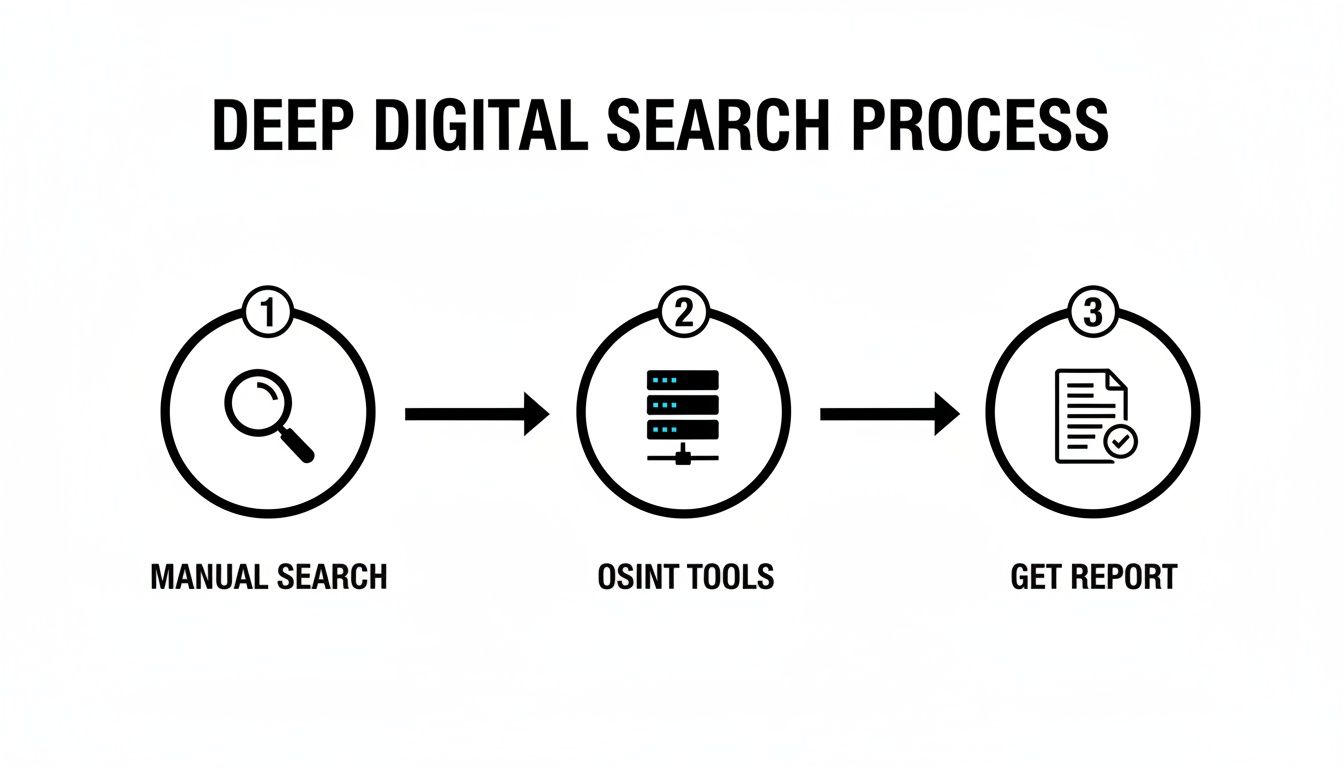
As you can see, a proper digital footprint investigation combines both hands-on searching and automated tools to build that single, actionable report. So, let’s break down how to use it.
Triage Your Risks: From Critical to Minor
Not all exposed data is created equal. The first thing you need to do is triage your findings to tackle the most dangerous stuff first. Sort everything you’ve uncovered into a simple risk hierarchy.
| Risk Level | Types of Information | Immediate Actions |
|---|---|---|
| Critical | Exposed passwords, home address, phone numbers, SSN, credentials in data breaches. | Change passwords immediately, enable 2FA, place fraud alert on credit. |
| High | Unprofessional social media posts, public political rants, embarrassing photos, negative comments. | Delete posts, change privacy settings to “private,” contact site admins for removal. |
| Medium | Forgotten accounts, public friend lists, over-sharing on dating profiles, apps with excessive permissions. | Delete old accounts, limit public information, review and revoke app permissions. |
This triage system is all about focusing your energy where it counts. A breached password is a five-alarm fire; an old MySpace profile is a smoldering ember. Deal with the fire first.
Launch Your Cleanup Campaign
With your priorities straight, it’s time to start scrubbing.
For critical risks, immediate containment is the only answer. If a password was breached, change it immediately, especially if you’ve reused it on other sites. If your phone number is out there, enable two-factor authentication (2FA) on all important accounts to block SIM-swapping attacks. Data breaches are a fact of modern life; according to Statista, over 353 million people were affected by data breaches in the US in 2023 alone.
On reputation and privacy risks, your strategy will be a bit different:
- Contact Website Administrators: For content on blogs, forums, or smaller websites, a polite but firm email to the site owner can often get the content taken down.
- Use Google’s Removal Tools: Google has a specific process for requesting the removal of sensitive personal information from its search results. It won’t delete the content from the source, but it will make it much harder to find.
- Delete, Don’t Deactivate: When you’re ready to part with old social media accounts, always hunt for the “delete” option. Deactivating an account just hides it, leaving all your data on the company’s servers.
Don’t forget about your physical devices. Ensuring the secure destruction of data on old hard drives and phones is just as important as cleaning up your online presence.
Finally, tackling data brokers is a unique beast. Your information is likely scattered across hundreds of these sites, and removing it manually is a never-ending game of whack-a-mole. You can learn more about how to manage data broker removal in our dedicated guide.
Building Good Digital Hygiene for the Future
Think of your digital footprint check as a deep clean for your online life—it’s a great start, but the real work is in the daily upkeep. The goal isn’t just a one-time cleanup. It’s about shifting your mindset from being reactive to proactive, building a strong foundation of cybersecurity and digital privacy.
This means building sustainable habits that keep your online presence secure and private for the long haul. Instead of waiting for a problem to pop up, you manage your privacy and reputation by design, minimizing the data you expose from the very beginning.
Fortify Your Accounts with Strong Cybersecurity Practices
Your first and most powerful habit should be strengthening your online accounts. This is your primary line of defense against identity theft, unauthorized access, and the misuse of your personal information. It all starts with how you handle your passwords.
Consider this: a staggering 95% of personal data collected by some popular apps is directly tied to your identity. That makes every account—from your email to your gaming profile—a potential gateway for an intruder to access your entire digital life.
Here’s how to lock down your accounts right now:
- Embrace a Password Manager: Stop reusing passwords. A password manager creates and stores complex, unique passwords for every site you use. This one change alone demolishes a huge cybersecurity risk.
- Enable Two-Factor Authentication (2FA) Everywhere: 2FA adds an essential second barrier to your accounts. Even if a thief steals your password, they can’t get in without also having your phone or authenticator app. Prioritize it for email, banking, social media, and gaming accounts.
- Scrutinize App Permissions: Before you hit “install” on any new app, review the permissions it requests. A simple calculator app has no business asking for access to your contacts or microphone. If a permission seems unrelated to the app’s function, deny it.
Putting these habits into practice drastically reduces the odds of a simple data breach spiraling into a full-blown identity crisis. For a deeper dive, check out our guide on password manager best practices.
Compartmentalize Your Digital Life
Another powerful long-term strategy is compartmentalization. Stop using a single email address for everything you do online. When all your accounts are linked to one identity, a breach in one place can quickly compromise your entire digital world.
Think of it like this: You wouldn’t use the same key for your house, your car, and your office. Apply the same logic to your digital identity to limit the damage from any single point of failure.
A simple and effective way to start is by creating separate email addresses for different parts of your life. For instance:
- Professional Email: For your career, LinkedIn, and networking.
- Social & Personal Email: For Facebook, Instagram, and friends.
- “Burner” Email: For online shopping, newsletters, and services you don’t fully trust.
This small change makes it harder for data brokers and bad actors to connect the dots and build a complete profile on you. This is the proactive mindset that’s key to maintaining a secure and positive online presence for years to come.
Frequently Asked Questions About Digital Footprints
Once you start digging into your digital footprint, a few big questions almost always come up. It’s normal. Let’s get them answered so you can feel confident as you continue to take control of your online presence.
How Often Should I Check My Digital Footprint?
Think of managing your digital footprint like a regular health check-up. You don’t just go to the doctor once; you need a consistent schedule to stay ahead of any new issues.
We recommend doing a manual audit every quarter. Set aside an hour every three months to run those deep Google searches and comb through your social media privacy settings. This regular check-in is your first line of defense, helping you spot new problems before they snowball.
For true peace of mind, though, an automated monitoring tool is the way to go. These services work for you 24/7, scanning for new data breaches, data broker listings, and other exposures daily. They give you real-time alerts so you can take action the moment something pops up.
Can I Completely Erase My Digital Footprint?
This is the million-dollar question. The short answer is no, but the long answer is much more empowering. While erasing your digital footprint is practically impossible, you can shrink and control it in very significant ways.
Think about it: total erasure would mean wiping your data from every public record, data broker database, and archived server in the world. Once data is out there, it gets copied, sold, and stored in places you’ll never see.
The goal isn’t total invisibility, which is a myth. The realistic and powerful goal is significant reduction and control.
By following the cleanup process—purging old accounts, scrubbing your details from data brokers, and locking down your settings—you make yourself a much, much harder target for bad actors, scammers, and identity thieves. Focus your energy there.
What Are the Biggest Risks of an Unmanaged Digital Footprint?
Leaving your digital footprint unchecked is like leaving your front door wide open online. You’re inviting threats that can cause serious real-world damage to your reputation, finances, and safety.
The three biggest risks you’re up against are:
- Identity Theft & Financial Scams: Every exposed detail—phone number, address, old passwords from a breach—is a puzzle piece for criminals. They assemble these pieces to open accounts in your name, commit romance scams, or hijack the ones you already have.
- Reputation Damage: A single off-color joke from a decade ago, an old embarrassing photo, or a heated comment can derail a career. With over 90% of recruiters screening candidates online, your digital reputation is a massive factor in your professional life.
- Personal Safety Risks: When your home address, daily routines, or family members’ names are easily found online, you become vulnerable to doxxing, stalking, and even physical threats. This is a particularly high risk in online dating and for those with a public-facing profile.
Proactively managing your digital footprint is the most direct way to protect yourself from every one of these risks.
Are you ready to see what your digital footprint reveals? Digital Footprint Check offers a comprehensive, free scan to uncover your online exposure across hundreds of sources, including data broker sites and breach databases. Get started with your free check now at www.digitalfootprintcheck.com/free-checker and take the first step toward securing your online identity.