· Digital Footprint Check · Content Marketing · 16 min read
How to Remove Public Records Online That Expose You
Learn how to remove public records online with a practical 2026 guide covering search delisting, broker opt-outs, and source deletion.

The FBI recorded 859,532 Internet Crime Complaint Center complaints and more than $16.6 billion in reported losses in 2024. Its report also attributed $389,312,356 in reported losses to confidence and romance fraud, a reminder that exposed addresses, phone numbers, relatives, and property details aren’t harmless background information. They give strangers material for phishing, impersonation, account-recovery attacks, and targeted scams. (FBI Internet Crime Complaint Center 2024 report)
Learning how to remove public records online starts with one uncomfortable distinction: removing a search result isn’t the same as deleting the source record. You need to run both tracks, search-result suppression and source-level deletion, correction, sealing, or redaction, at the same time. A broker opt-out alone doesn’t clear a court filing, property deed, voter record, professional license, or government registry.
This guide uses the workflow I recommend for messy cases. You’ll learn how to find every copy, choose the right remedy, submit stronger requests, protect sensitive identity documents, and verify that the information stays gone or becomes harder to discover.
Why Public Records Are Harder to Remove Than People Expect
Online cleanup has two separate jobs. Track one reduces discoverability in search engines. Track two addresses the website or government system that holds the underlying record. Completing only the first job can hide a page from a name search while leaving the same information available through another query, a direct URL, an archive, or a commercial aggregator.
That distinction matters in ordinary situations. A recruiter may find an old court page while reviewing a candidate. A scammer may combine a public address with a phone number from a people-search site. A survivor of domestic abuse may discover that a government-origin housing record has been copied into several commercial profiles. Each situation requires a different escalation path, and none is solved reliably by pressing one opt-out button.
The two-track model
Start with the source. Identify who publishes the record, whether the record is legally public, and whether the exposed information is inaccurate, outdated, excessive, or dangerous. Then pursue the source remedy, such as correction, redaction, sealing, expungement, suppression, or deletion where the publisher permits it.
Run the search-engine track in parallel. Google may remove an eligible result, but Google says search engines can’t remove content directly from the websites hosting it. People seeking full deletion must contact the webmaster or records custodian separately, and a request must identify the specific page URLs under review. (Google Search removal guidance)
Practical rule: A delisted URL is not a deleted record. Track both outcomes separately.
What a successful cleanup looks like
A strong cleanup file contains the original URL, the exposed fields, dated screenshots, copies of every request, response dates, and the current status. Mark each result as removed, corrected, de-indexed, or still active. That language prevents false confidence when a broker removes a compiled profile but the originating court or property record remains online.
By the end of the process, you should know which records can realistically disappear, which require a legal remedy, and which need ongoing suppression. There isn’t a universal eraser for public information, but there is a disciplined way to reduce exposure and respond when copies return.
What Removal Means in 2026
Removal has two separate tracks: search-result suppression and deletion or correction at the original source. The Court of Justice of the European Union established a foundational privacy remedy in May 2014, allowing people to ask search engines to delist certain results associated with their names. The original page could remain on the publisher’s website while search engines limited its visibility for name-based searches. (NPR’s account of Google’s delisting data)
Google reported that, from May 2014 through the end of 2017, it received more than 650,000 requests involving approximately 2.43 million URLs and delisted about 43% of the requested URLs. Private individuals accounted for 89% of requests. Each URL was assessed separately, along with the public interest in keeping it visible. A broker opt-out or delisted search result therefore does not equal deletion from the underlying court, property, licensing, or publisher record.
Why context decides the result
A Google Research study examined 3.2 million URLs submitted during the first five years of the European privacy ruling. It found that 17% of removals related to a requester’s legal history, including crimes and alleged wrongdoing. News, government, social-media, and directory websites were frequent source categories, while 1,000 requesters generated 16% of all requests. (Google Research’s five-year study)
A persuasive request names the exact page, explains the privacy harm, and shows why the information is inaccurate, outdated, excessive, or disproportionate. Address publication that creates a concrete safety risk, or explain why continued exposure no longer serves journalism, public safety, or accountability. Embarrassment alone rarely provides enough context.
For criminal matters, pursue the source remedy as well as search suppression. People researching clearing your Texas criminal record should understand the difference between expungement and nondisclosure before relying on a search-engine request.
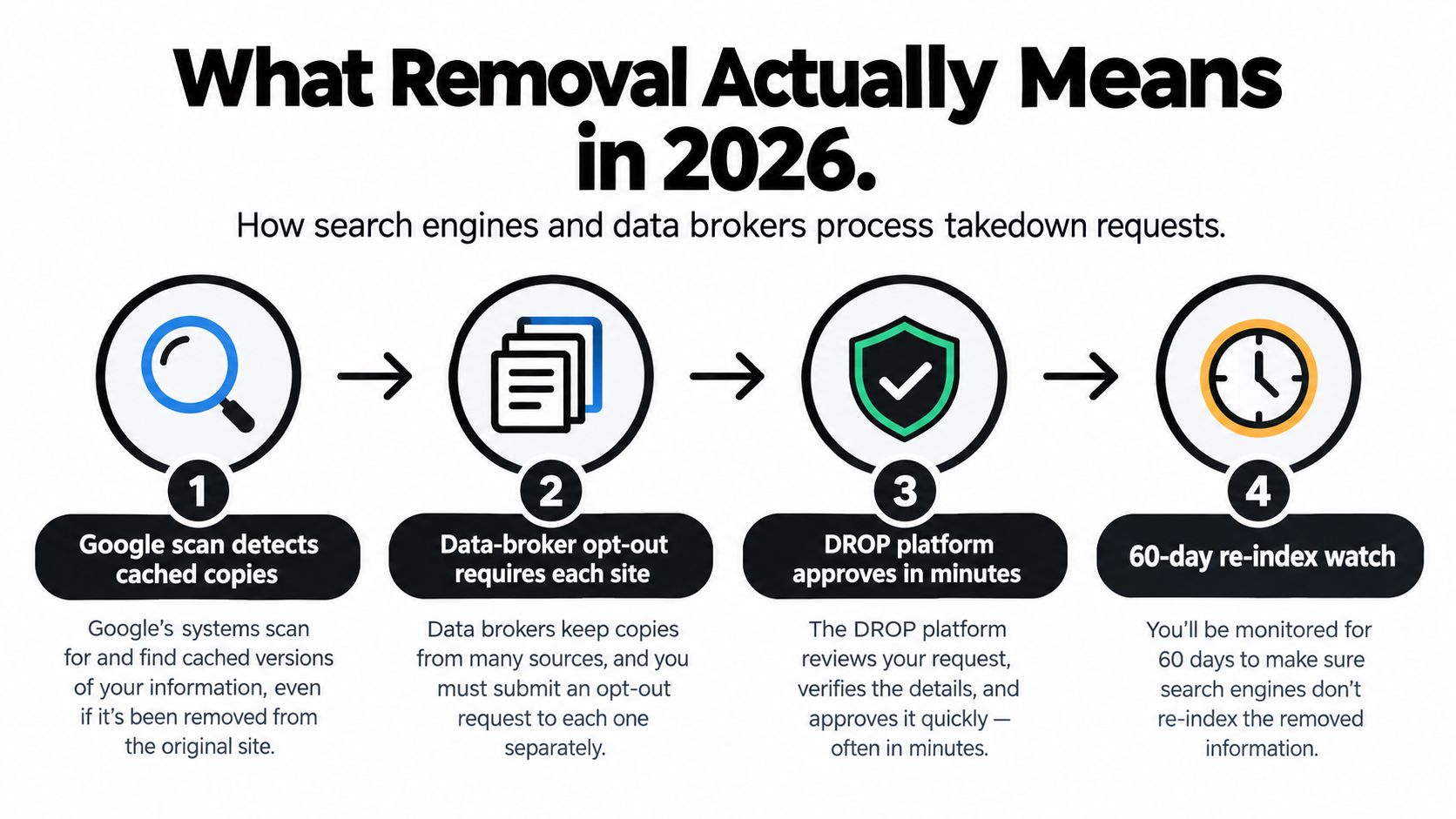
A successful request may hide one result from a name search while leaving the source, copies, archives, social networks, or other jurisdictions untouched. Track delisting separately from deletion, and treat each as a case requiring its own evidence and follow-up.
Mapping Where Your Records Live
Build an inventory before submitting requests. Use a clean browser session and search your exact name in quotation marks. Repeat the search with middle names, initials, former surnames, common misspellings, and location terms. Search address variants, phone-number formats, email addresses, usernames, and reverse-image matches as well.
Record each full URL, page title, exposed fields, publisher, and date checked. Save the page text and a dated screenshot before contacting the operator. A page may change after your request, and a precise record of its original content supports corrections or escalation.
Classify every result before choosing a remedy
A government source calls for a different response than a people-search profile. A search index may be removable even when its source stays online. You can usually edit a profile you control directly, while a third-party page may require a privacy request or legal-removal submission.
Search beyond your name. Public-record compilations can expose full address history, relatives, property information, and professional license numbers. Brokers may combine separate lawful sources into one actionable profile. Map that information chain instead of treating each page as an isolated problem.
For a stronger baseline, use this guide on how to find what data brokers have on me. It helps identify broker copies before you spend time contacting the wrong publisher.
| Record type | Best primary remedy | Typical success |
|---|---|---|
| Government record | Correction, redaction, sealing, or expungement through the responsible agency or court | Depends on accuracy, eligibility, and local law |
| Data-broker profile | Direct opt-out, deletion request, or California DROP submission | Often practical for the compiled profile, but copies can return |
| Search-indexed third-party page | Source request plus eligible search-engine removal | Search visibility may fall while the source remains |
| User-controlled profile | Edit, delete, restrict, or secure the account directly | Usually immediate if you control the account |
Keep search-result suppression and source deletion in separate columns. A broker opt-out may remove one profile while leaving the underlying government record, another broker copy, or a cached version available. Track each source, copy, request, and follow-up independently so a temporary search-result change does not look like full removal.
Filing a Google Removal Request That Gets Approved
Google’s personal-information workflow is most useful when a result exposes a high-risk identifier. The current form covers a home address, phone number, email address, Social Security number, passport number, and driver’s-license number. Google may decline requests involving pages it considers especially valuable to the public, including some government, news, educational, and business websites. (Google’s personal-information removal workflow)
Prepare the submission
Search for the result first and copy the exact page URL. Save a screenshot showing the identifier and surrounding context, then write a short explanation that connects the exposed field to a concrete privacy or safety risk. Keep the explanation factual. “This is personal information” is weaker than “This page publishes my current home address alongside my phone number and makes it searchable by my full name.”
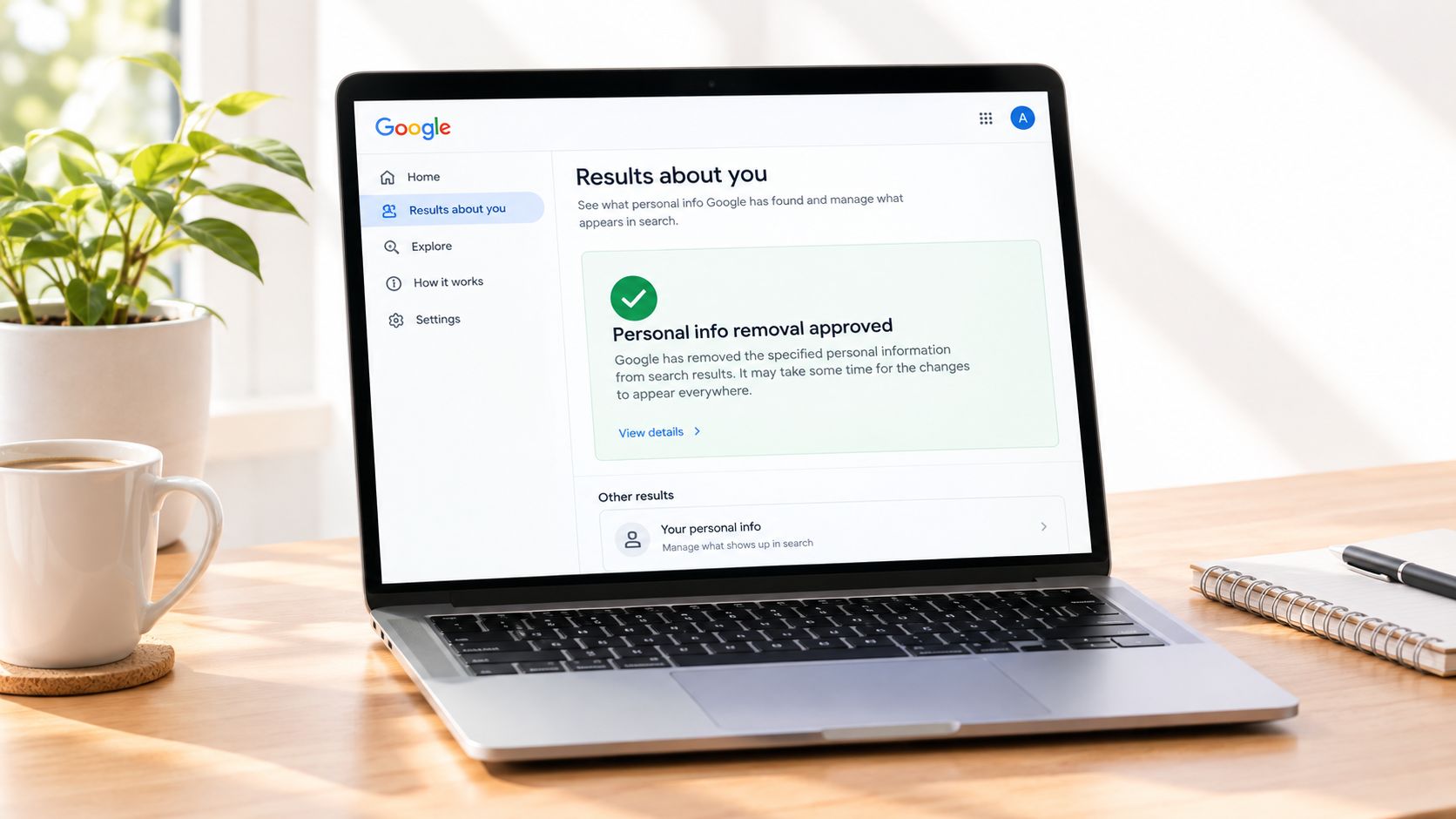
Use Results about you to monitor Search for your address, phone number, or email when the feature is available to you. For other qualifying identifiers, use Google’s dedicated personal-information removal form. Submit each relevant URL rather than listing an entire domain and hoping Google will infer the pages involved.
A separate source request is still mandatory. Google says it can’t remove the page from the hosting website, so contact the publisher, webmaster, clerk’s office, or records custodian at the same time. If the source removes or changes the content, return to Google with the updated evidence.
This guide to removing personal information from Google can help you organize the search-result portion without confusing it with source deletion. For more context on Brian Hansford Law on record removal, review the legal and publisher-level options before you frame a request as a blanket deletion demand.
Here’s a short workflow you can reuse:
- Find the result: Search exact-name and identifier variants.
- Preserve evidence: Save the URL, screenshot, page text, and date.
- Choose the category: Identify the exposed identifier and whether a public-interest issue may apply.
- Submit precisely: Explain the harm and request review of the named URLs.
- Contact the source: Ask for deletion, correction, redaction, or legal restriction.
- Recheck: Test the result using name and identifier variations after the source responds.
Google’s removal changes discoverability, not ownership of the underlying record. If the page is lawful and accurate, source deletion may fail even when a search result is suppressed.
Using California’s DROP Platform for Bulk Broker Opt-Outs
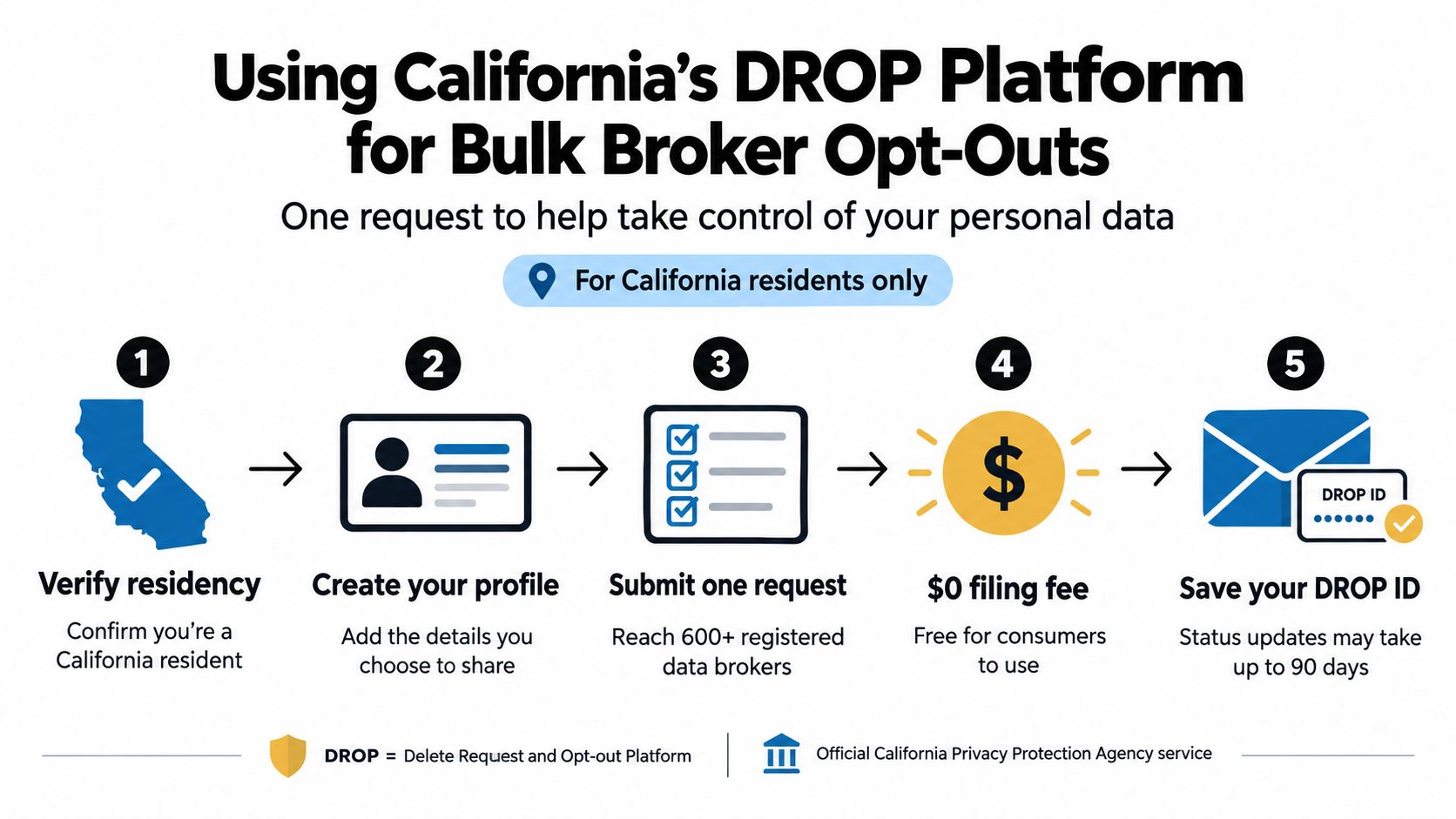
California residents can send a centralized deletion request to registered commercial data brokers through the Delete Request and Opt-Out Platform, known as DROP. The platform covers more than 600 registered data brokers and requires residency verification, profile creation, submission, and status review. Read the California Privacy Protection Agency’s DROP information before submitting.
Build a matchable profile
A broker can act only when its records match the identifiers in your request. Add your current name, relevant former names, current address, useful historical addresses, phone numbers, and email addresses. Leave out unrelated sensitive details. Extra information does not guarantee a better match and increases the amount of data held in the request.
Check the confirmation carefully and keep a copy of your submission. A broker may reject the request because its file contains an old address while your profile lists only a current one. For example, if DROP reports no match but a broker page still displays your former address and phone number, compare those fields with the submitted profile, add the missing identifiers through the available correction or resubmission process, and retain screenshots showing the failed match.
DROP sends requests to participating brokers. It does not remove the government record, news page, court filing, or other source that supplied the broker’s data.
Use the future processing cadence correctly
Beginning August 1, 2026, participating brokers must access and process deletion lists at least every 45 days. They must standardize and hash internal records, match the supplied identifiers, process requests, and report status through DROP.
Treat the cadence as a verification schedule. Save the confirmation, review each status, and search broker sites again after processing. A new collection event can recreate a profile, so repeat checks matter even after a successful opt-out.
For a broader data broker removal workflow, separate broker-profile suppression from deletion or correction at the original source. DROP addresses the broker track, while source-level action remains a separate task.
Handling the Records That Platforms Will Not Touch
Some records won’t disappear through a commercial opt-out. News articles, mugshot pages, criminal court filings, professional-license lookups, property deeds, voter files, and government registries each have their own rules. The first question is whether the source is inaccurate or whether the information is lawful but harmful.
Match the remedy to the source
An inaccurate article calls for a correction request supported by documents. An eligible court record may require sealing, expungement, or another court process. A professional registry may have an agency-specific correction procedure. A lawful property deed generally remains a public record, which makes suppression of commercial copies more realistic than deletion from the land-record system.
Contact the original publisher first. Ask for correction, redaction, removal, or an updated note, and keep the request focused on specific errors or sensitive fields. If the publisher changes the page, submit the updated URL and evidence to the search engine. If the publisher refuses, request a written explanation and identify the applicable privacy, public-records, or correction rule.
For people researching clearing your record in Illinois, the state-specific distinction between expungement and other record treatments matters. The same principle applies elsewhere: determine the legal remedy at the source before assuming a broker or search engine can solve it.
What to do when the source refuses
An old news article may be accurate but disproportionately damaging because it ranks for your name years later. You can ask the publisher to update the article, remove unnecessary personal details, add accurate final-outcome information, or restrict indexing where its policy permits. Search-result suppression may reduce visibility, but it won’t rewrite the article.
A mugshot site may be a commercial republisher rather than an official record custodian. Send proof of dismissal, sealing, expungement, or correction where applicable, then escalate through the site’s privacy channel, consumer-protection process, or counsel if the operator ignores a valid request.
Use a cease and desist letter template only after identifying the correct publisher, factual error, legal basis, and requested remedy. A vague threat usually performs worse than a documented demand.
If a government record is lawfully public, aim for correction, redaction, sealing where eligible, and suppression of republished copies. Don’t promise yourself blanket deletion.
A 30/60/90 Day Monitoring Plan to Keep Records From Coming Back
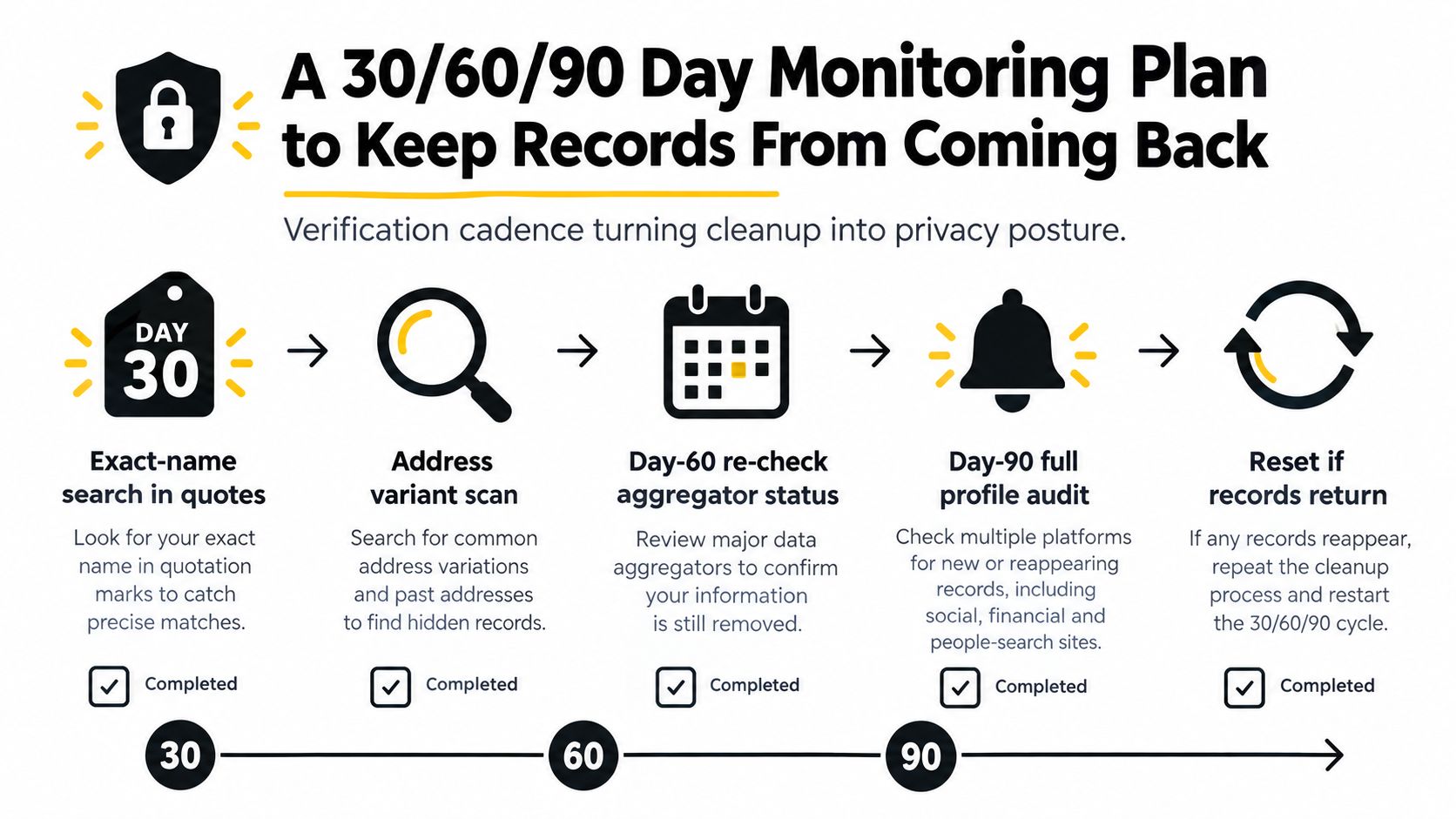
Cleanup fails when checking stops after the first confirmation email. Pages get copied, broker profiles return, search indexes refresh, and a new address or phone number can create another match. A 30/60/90-day schedule turns removal into an ongoing privacy practice and keeps two tracks separate: search-result removal and source deletion. A hidden result is not the same as a deleted record.
The risk is practical. The FBI Internet Crime Complaint Center 2024 report documents the continuing scale of online crime, which makes recurring exposure worth tracking rather than ignoring. A reappearance is most dangerous in the first weeks after a broker rebuilds a profile, so the Day 30 check deserves the closest attention. Treat every return as a new exposure event, not as evidence that the original request worked permanently.
Day 30 checks
Repeat the exact-name searches that located the original pages. Put the full name in quotation marks, then test former names, initials, city combinations, and address variations. Search the phone number and email address separately, including common formatting changes. Run each query in the search engines your audience or potential abuser might use.
Open every target URL in your log and assign one status:
- Removed: The page no longer loads, or the requested fields are gone.
- Corrected: The source remains, but inaccurate or excessive information has changed.
- De-indexed: The source remains, but the eligible result no longer appears for the tested query.
- Still active: The page or profile remains substantially unchanged.
Do not treat “not found” as proof of deletion. Test the direct URL, another search engine, and a variation of the original query. A result can vanish from one name search while remaining visible through an address, phone number, username, or distinctive phrase from the page. Record the query that produced each result so the next check is comparable.
Day 60 checks
Repeat broker-specific lookups and search your address with your phone number. Check relatives, property references, professional directories, and old usernames. Run a reverse-image query for profile photos that may connect a dating account, gaming profile, forum identity, or social account to your real name.
If a broker profile has returned, compare its fields with your original submission. Update matching identifiers only when necessary, submit the broker’s current request, and save the confirmation. A broker opt-out removes one public copy from one platform. It does not delete the source record, copied pages, government entries, or search results that remain elsewhere.
If a source page changed but still exposes a sensitive field, send a focused correction or redaction request instead of restarting with a generic deletion demand. Keep the search-engine track separate. Requesting removal from search results can reduce visibility, while source deletion or correction changes what the publisher stores.
For broader monitoring approaches, review these tools for monitoring your digital footprint and keeping your data safe. Choose tools that let you document findings without handing unnecessary identity data to an unknown operator.
Day 90 checks
The third checkpoint is a full profile audit. Search exact names, address and phone combinations, email addresses, usernames, reverse-image matches, and broker listings. Revisit government-source pages, news archives, court systems, and commercial profiles separately because each category can change on a different schedule.
Reset the process if you find a new aggregator listing, republished news page, copied profile, or record that returns after a broker response. Send a new source request, update the search-engine submission if the URL qualifies, and record the event. Monitoring works when reappearance triggers action.
The practitioner checklist
Keep one private record containing:
- Every target URL: Include the publisher, page title, exposed fields, and date found.
- Evidence: Save dated screenshots and relevant page text before submitting a request.
- Request history: Store forms, confirmation emails, responses, and escalation dates.
- Identity matching data: Note the names, addresses, phone numbers, and email addresses used.
- Status changes: Mark each page removed, corrected, de-indexed, or still active.
- Reappearance triggers: Record new broker profiles, copied pages, and changed search queries.
California residents should use DROP for the bulk broker step, then handle residual sources manually. Residents elsewhere should work through each publisher’s deletion, correction, suppression, or legal-removal process. Everyone should keep source deletion separate from search-result removal.
Bring in legal counsel when the issue involves a sealed-record question, an ex-partner or stalker publishing address details, identity-theft indicators, a threatened person, or a job offer that depends on cleaning up a record. A lawyer can assess court remedies, agency procedures, defamation or harassment concerns, and formal escalation. Do not send excessive identity documents to a stranger offering guaranteed removal.
Run a baseline check before cleanup and repeat it afterward. Digital Footprint Check scans public records and other online sources and provides step-by-step guidance for requesting removal or redaction from relevant websites, clerk’s offices, or government agencies. Use the results as an inventory, not as a promise that every lawful public record can be erased.
Digital Footprint Check can help identify exposed public records, broker profiles, usernames, breach-related data, and other online traces before removal requests begin. Run the free check to establish a baseline, document what needs attention, and visit Digital Footprint Check to start with evidence rather than guesswork.