· Digital Footprint Check · Content Marketing · 19 min read
Your 2026 Online Privacy Check: a Step-by-step Guide
Conduct a comprehensive online privacy check with our step-by-step guide. Discover exposed data, secure accounts, and protect your digital identity in 2026.

Your online privacy check should start with one uncomfortable truth. Your data may already be sitting in places you would never think to look.
The scale is hard to ignore. The 2024 National Public Data breach potentially affected a vast number of individuals, including many in America, the UK, and Canada. Yahoo’s historic breach also compromised a large number of accounts. Incidents at that scale are why privacy work cannot stop at browser settings or deleting a few old posts. Your real exposure usually lives across breach records, forgotten logins, gaming handles, people-search sites, old forums, and public traces tied together by the same email, phone number, or username. That is the practical reason to treat an online privacy check like an audit, not a quick cleanup.
Why a Deep Online Privacy Check Is Non-Negotiable in 2026
A shallow privacy routine gives people false confidence.
Clearing cookies, using private browsing, or locking down one social profile can reduce minor tracking. It does not show whether an old school email appears in breach data, whether a reused gamer tag links back to your real name, or whether a forgotten account still exposes your photos, hometown, or contact details across dozens of services.

I see the same pattern in client audits. Someone checks Google, reviews Instagram, and assumes the job is done. Then we trace the same username through a dormant Reddit account, an old Xbox profile, a fitness app leaderboard, and a forum post from 2016 that still shows a city, age range, and personal interests. None of those records look serious alone. Together, they create a usable identity map.
This is the primary issue in 2026. Exposure is cumulative.
Privacy is control, not invisibility. Plenty of people want to be public in specific places, such as LinkedIn, a business site, or a creator profile. Problems start when visibility spreads beyond the boundary you intended and into places that invite impersonation, harassment, account takeover attempts, or reputation damage.
Exposure now comes from correlation
The older privacy model focused on securing your primary accounts. That still matters, but it misses how people are found and profiled now.
Scammers, stalkers, and data brokers rarely rely on one source. They correlate small details across hundreds of platforms. A phone number on an old marketplace listing can connect to a messaging app. A reused avatar can tie a dating profile to a gaming handle. A wishlist, comment history, or public friend list can reveal routines, family links, or location clues you never meant to share.
This is why a thorough online privacy check has to work more like an OSINT audit than a quick cleanup. The goal is to find what can be linked, not just what is obvious on the surface.
Name searches miss the highest-risk traces
A basic search for your full name catches only the easiest results. High-risk exposure often sits under identifiers you forgot you used.
A useful privacy check asks questions like these:
- Which old email addresses still appear in account recoveries, forum profiles, or breach records
- Which usernames were reused across social apps, gaming platforms, marketplaces, and niche communities
- Which past phone numbers still connect to public listings or dormant accounts
- Which photos, bios, or location clues appear under alternate names or handles
- Which accounts reveal enough context for impersonation, password reset targeting, or reputation attacks
Regular individuals are often surprised by where the trail leads. I have seen a single reused handle uncover accounts on Discord, Steam, Tumblr, archived message boards, cashback sites, and hobby forums in under an hour. That is why a serious audit should cover mainstream platforms and the quieter corners of the web where old data tends to survive.
The practical risk is clear. If someone else can map your identity faster than you can, they control the next move.
A deep audit gives you routine digital maintenance and a prioritized fix list. For a fuller explanation of how that work supports identity theft prevention, read this guide on conducting an online digital footprint check. If you review how other online services handle personal information during your audit, partner pages such as Privacy Policy can also help you assess what data may still be retained.
Preparing for Your First Thorough Privacy Audit
Do not start by searching randomly.
A strong online privacy check begins with preparation. That keeps you from overlooking your oldest identifiers, and it stops the process from turning into a stressful spiral of tabs, screenshots, and half-finished fixes.
Build your identifier list first
Your audit runs on pivots. In OSINT work, a pivot is the clue you use to find connected traces.
For many individuals, the most valuable pivots are:
- Email addresses used for school, work, gaming, shopping, and throwaway signups
- Phone numbers including old mobile numbers if you still remember them
- Usernames from social platforms, forums, gaming services, and dating apps
- Name variations such as middle initials, old surnames, shortened versions, and handles tied to your real name
- Profile photos that may have been reused across platforms
Write them down in one private document. A password manager secure note works well. An encrypted local note also works. Avoid dropping this inventory into a random cloud doc without checking your sharing settings first.
Decide what success looks like
Do not use “remove myself from the internet” as the goal. It is unrealistic for many individuals and unnecessary.
Use categories instead. That helps you make decisions quickly.
| Exposure type | Keep | Restrict | Remove |
|---|---|---|---|
| Professional profiles | If they support your work or reputation | Tighten visible details | Remove abandoned duplicates |
| Social accounts | Keep active accounts you intentionally use | Lock old posts and follower visibility | Delete forgotten or risky profiles |
| Forums and gaming profiles | Keep only if still used and secured | Remove personal details from bios | Delete inactive accounts |
| Public records and people-search traces | Rarely a “keep” category | Request opt-outs where possible | Prioritize removals when personal data is exposed |
That framework reduces emotional decision-making. You are not reacting to every discovery as a crisis. You are classifying it.
Set up a safe working environment
Use a separate browser profile for the audit if possible. That keeps your searches cleaner and avoids mixing your everyday logins with investigation work.
Have these ready before you begin:
- Password manager for updating weak or reused credentials.
- Authenticator app if you plan to turn on MFA during the cleanup.
- Private tracking sheet with columns for platform, identifier used, issue found, risk level, and action taken.
- Dedicated inbox or secure notes area for account recovery emails and takedown confirmations.
If you are reviewing how a company or service handles your data during this process, it helps to read a real policy carefully instead of assuming the default settings are safe. A plain-language example of a policy structure is this Privacy Policy, which can help you spot what to look for when checking how a service describes data collection, retention, and sharing.
Tip: Expect to find something outdated, embarrassing, or more public than you intended. Treat the audit like paperwork, not a personal judgment.
Start with a checklist, not memory
Individuals often forget at least one old email address or username. That is enough to miss the trail that matters.
A written process is the fix. If you want a simple structure before you start, this free privacy checklist is useful for tracking the common categories people overlook.
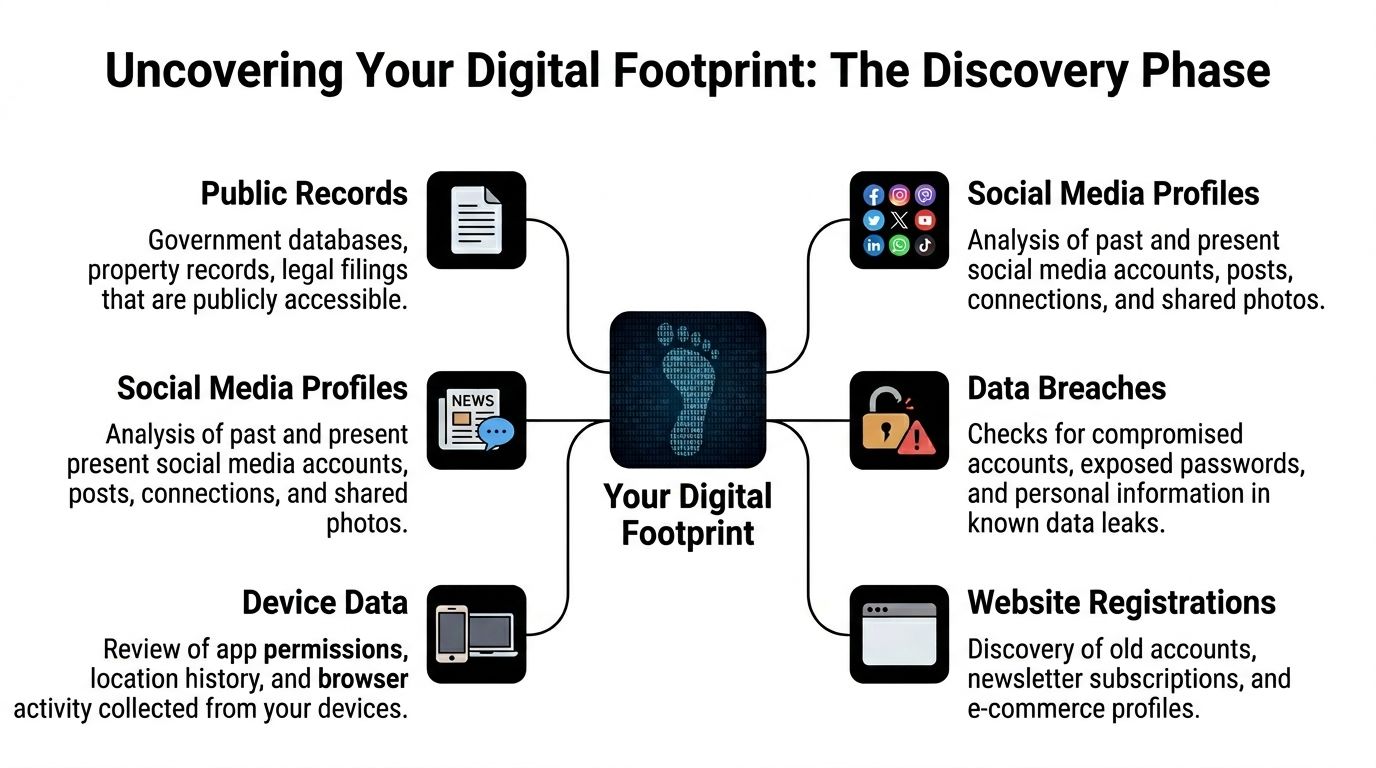
The Discovery Phase Uncovering Your Full Digital Footprint
A thorough online privacy check in this phase stops looking like a browser tune-up and starts looking like investigation work.
The aim is not to search your name once. The aim is to map how your identifiers connect across the web.
Search by identifier, not by ego
A name search is useful, but it is often noisy. Common names create false positives. Uncommon names create a false sense that you found everything.
Start with identifiers that platforms and breach datasets use:
- Email address searches often reveal newsletters, old forums, business listings, and breach records.
- Username searches can uncover social profiles, gaming accounts, comments, and forgotten registrations.
- Phone number searches can expose marketplace posts, messaging app traces, or directory entries.
- Image searches can connect profile photos reused across different services.
If you reused the same handle on Twitch, Reddit, Discord-adjacent communities, game forums, and marketplace profiles, that handle becomes the thread that ties your whole footprint together.
Browser privacy tests are not enough
Many individuals stop too early at this point.
The gap matters because standard browser checks miss much of your distributed footprint. According to Experte’s browser privacy check analysis, 80% of your digital footprint can be scattered across the web, 70% of users have unintended profiles on obscure sites, and over 300 million gaming accounts were leaked globally. That is why a meaningful audit has to look across many niche platforms, not just your current browser setup.
That last point matters for more than gamers. Parents, job seekers, and daters often discover that obscure services expose more than mainstream social platforms do.
Where to look during discovery
The most productive audit passes usually move through these buckets.
Known accounts and obvious profiles
Start with services you know you use or used to use.
Check:
- current social profiles
- old social profiles
- shopping accounts
- school and alumni pages
- professional profiles
- blog comments
- forum signatures
- dating profiles
- creator accounts
- marketplace listings
Look for old bios, visible birthdays, location details, public friend lists, and links to other profiles.
Forgotten and low-signal accounts
This category causes a surprising amount of trouble because people stop monitoring it years ago.
Look for:
- hobby forums
- fandom sites
- gaming communities
- giveaway and contest sites
- old app communities
- niche message boards
- review sites
- dormant personal websites
These accounts often have weak passwords, old profile photos, and usernames that connect back to active accounts.
Breach exposure and credential traces
At this point, risk moves from reputation to account compromise.
Cross-reference your identifiers against breach databases and tools that surface known compromises. If one old address appears in multiple breach records, assume the password tied to it may still be in circulation somewhere.
Services that help uncover accounts by identifier can speed this up. One option is finding all accounts linked to an email address, which reflects the practical OSINT approach of pivoting from one known identifier into a broader footprint map.
Tip: Save evidence as you go. Screenshot profile pages, note dates, and record URLs before you request deletion or change settings.
Reverse the search path
A strong audit does not only ask, “Where am I visible?”
It also asks, “How would someone else find me?”
Try these reverse paths:
- from your gaming tag to your social accounts
- from your old email to shopping accounts and breach records
- from your phone number to messaging handles and marketplace posts
- from your profile photo to old accounts on unrelated sites
- from your real name plus city to public mentions and records
If a stranger can move from one clue to another in a few minutes, your footprint is too connected.
What usually surprises people
Three discoveries come up repeatedly in first audits.
| Common finding | Why it matters | Typical fix |
|---|---|---|
| An abandoned account still indexed in search | Exposes old content or personal details | Delete account or de-index where possible |
| A reused username links work and personal identities | Makes correlation easy for employers, scammers, or harassers | Change active handles where practical and remove links in bios |
| A breached email still controls live accounts | Raises takeover risk | Change passwords, update recovery methods, enable MFA |
The discovery phase is not about fear. It is about visibility. Once you can see the footprint clearly, the decisions become much easier.
From Data Points to Action Plan Analyzing and Fixing Risks
Raw findings do not protect you. Decisions do.
The best privacy teams begin with privacy audit assessments and review high-risk data systematically. That same logic works at the personal level. The TrustArc explanation of privacy program effectiveness notes that leading organizations start with structured audits and track completion of Privacy Impact Assessments on higher-risk data. For an individual, that means reviewing each discovered item one by one and measuring progress by what you secure, restrict, or remove.

Use a simple risk sort
You do not need a complicated scoring model. You need triage.
Sort each finding into one of these buckets.
Urgent risk
This includes breached credentials, exposed contact data tied to active accounts, public profiles containing location or workplace details, and anything that could enable impersonation or account recovery abuse.
Handle these first, ideally the same day.
Moderate risk
This includes old forum accounts, stale marketplace profiles, public friend lists, tagged photos, and visible usernames that connect identities you would rather keep separate.
These matter, but they can follow the urgent work.
Low risk
This includes old mentions that are not sensitive, inactive profiles with minimal information, or public professional content you intentionally maintain.
These get reviewed, but not at the expense of actual security gaps.
Fix credentials before content
Many people want to start by deleting old posts. That feels satisfying, but it is not the highest-value first move if exposed credentials are in play.
Start here:
- Change passwords on any account tied to a breached or old email.
- Turn on MFA for email first, then banking, social, gaming, cloud storage, and shopping accounts.
- Update recovery methods so dead phone numbers and old email addresses are removed.
- Check connected apps and revoke anything you do not recognize or no longer use.
If you use a privacy service for broader exposure cleanup, this is also the stage where tools that identify people-search listings and similar traces become useful. For example, data broker removal addresses a category of exposure that manual account cleanup often misses.
Then fix visibility and content
Once access security is under control, reduce what people can see.
A practical sequence looks like this:
- lock down social privacy settings
- remove birthdays, phone numbers, and hometown details from profiles
- make follower and friends lists less visible where possible
- delete abandoned accounts
- request takedowns for old content when deletion is unavailable
- change usernames that create obvious cross-platform links
This short video is a useful companion while you work through cleanup decisions:
Work from highest impact to lowest friction
People get stuck when they chase the hardest removal first.
Do the easiest high-impact tasks early. A hidden birthday, removed phone number, changed password, or enabled MFA can reduce risk fast. Difficult requests, such as obscure forum deletion or old content takedowns, can run in the background afterward.
Key rule: Secure the door before repainting the walls.
A practical remediation table
| Finding | Risk | First action | Follow-up |
|---|---|---|---|
| Email appears in breach records | High | Change password anywhere reused | Enable MFA and update recovery options |
| Old social account is public | Medium to high | Log in and review profile visibility | Delete or strip identifying details |
| Gaming handle links back to real identity | Medium | Change public bio and remove personal info | Consider a new handle for future signups |
| People-search listing exposes contact details | High | Submit opt-out request | Track if listing reappears later |
| Embarrassing old forum post | Medium | Remove if possible | Request de-indexing or account deletion |
The outcome you want is clear. Fewer exposed accounts, fewer connecting identifiers, fewer ways for strangers to correlate your life.
Building Your Digital Privacy Defense System for the Future
Cleanup is not the finish line. It is the baseline.
Many individuals drift back into exposure because they fix old problems but keep creating new ones. They sign up for apps with their main email, reuse recognizable usernames, skip default privacy reviews, and forget to monitor for fresh breaches.

The behavior gap is clear. The Secureframe privacy statistics summary notes that 86% of users take some steps to mask their footprint, but only 29% change default privacy settings, only 26% enable MFA, and only 17% use encrypted email while 14% use a VPN consistently. In practice, that means many people do the visible basics and skip the controls that hold up over time.
Build habits that lower future exposure
Privacy maintenance should be boring. If it depends on motivation, it will not last.
Use a repeatable rhythm.
Weekly habits
- Review unusual account alerts from email, social, gaming, and financial services.
- Check new signups and ask whether each service needed your real name, primary email, or phone number.
- Save suspicious messages instead of clicking through them during busy moments.
Monthly habits
- Review privacy settings on the few platforms you use most.
- Look at account connections and remove old third-party app access.
- Search one identifier each month, rotating between your main email, an old email, a common username, and your phone number.
Quarterly habits
- Audit dormant accounts and close what you no longer use.
- Review password manager entries for duplicates or old credentials.
- Run a broader online privacy check across social, breach, gaming, and public-record exposure.
Choose better defaults for new accounts
Future privacy improves when signups stop feeding the old problem.
Use:
- unique passwords for every service
- alias or burner emails where appropriate
- less identifying usernames on nonessential platforms
- limited profile fields unless public identity is the point
- MFA from day one on important accounts
That one change matters more than perceived. A clean audit can be undone quickly by a few careless registrations.
Tip: Treat every new signup like a permanent record unless you know how to delete it later.
Monitoring beats one-time cleanup
A one-time online privacy check tells you where you stood on one day. Monitoring tells you when the situation changes.
That matters because breaches surface later, people-search listings reappear, and old identifiers get rediscovered. A durable setup includes alerts, recurring review, and a short written policy for yourself or your family about how accounts get created and managed.
If you want a practical maintenance framework after cleanup, these ways to protect your online privacy cover the habits that keep your footprint from expanding again.
Privacy Strategies for Your Life Scenarios and Next Steps
A broad privacy audit often turns up far more than social profiles. For regular people, an OSINT-level check can surface traces across hundreds of places, including old forums, broker sites, shopping accounts, gaming services, public records, and niche apps you forgot existed. That is why the right plan depends on your real life, not generic tips.
Privacy risk changes with role and routine. A parent is dealing with family exposure. A job seeker is dealing with reputation and search visibility. A gamer may have years of alias reuse across platforms. Someone using dating apps has a very different safety problem, where small details can be combined to identify them offline.
If you are job hunting
Employers rarely need advanced tools to build a rough profile. A real name, one old username, and a profile photo can connect a polished LinkedIn presence to public comments, niche communities, and personal accounts that were never meant to sit side by side.
The main issue is overlap.
Check your name with your city, past usernames, old email handles, and image search on current and older profile photos. Look for anything that ties your professional identity to argumentative forum posts, public jokes that aged badly, or side accounts that disclose more than you would share in an interview. I have seen candidates lose control of the narrative because a recruiter found a ten-year-old handle reused on Reddit, Twitch, and a hobby forum in under five minutes.
Cut what adds risk and no professional value. Lock down what must stay.
If you are a parent
Children build a digital footprint long before they understand permanence. Family posts, school event pages, gaming profiles, sports rosters, video comments, and recovery emails tied to a parent account can all expose details that are useful to strangers and embarrassing later.
Start with what an outsider could learn in one session. Search for your child’s name, nickname, gamer tag, school, team name, and any family usernames that appear publicly. Then review photos and bios for location clues, uniforms, birthday references, routines, and friend lists. The problem is rarely one dramatic post. It is the accumulation of small facts that reveal where a child goes, who they know, and how to contact them.
A written household rule set helps. Keep it simple. No school names in public bios, no visible home exterior, no birthday screenshots, no recovery details shared in profiles. If you want a plain example of how a service explains data handling, read our privacy policy and use it as a checklist for the disclosures you expect from apps your family uses.
If you are a gamer
Gaming identities tend to spread wider than people expect. One handle can appear on console networks, Steam groups, Discord servers, tournament brackets, old clan pages, mod forums, skin marketplaces, giveaway entries, and archived chat logs.
That creates a real mapping risk. A persistent alias can expose your timezone, friend circle, spending habits, and sometimes your real name if you ever mixed personal accounts with hobby accounts. Forgotten marketplace accounts are a common weak spot because they often contain stale recovery emails, old payment references, and public transaction history.
Audit every active and retired username you can remember. Check where each one appears, whether inventories or friends lists are public, and whether any account still points back to your main email. If you stream or compete, separate public-facing gaming identity from your primary identity as much as the platform allows.
If you use dating apps
Dating profiles are meant to be seen. The job is to control how far that visibility travels.
A first name, age range, job title, neighborhood, and a few reused photos can be enough for someone to identify your employer, social accounts, or home area. That matters for personal safety, especially if a match becomes intrusive, manipulative, or will not respect boundaries.
Check whether your dating photos appear elsewhere under your real name. Review linked Instagram or Spotify accounts, visible workplace clues, and any username that matches older platforms. Also check whether your main phone number is attached to public profiles, messaging apps, or people-search listings. In practice, small changes help a lot here. Use photos that are not posted elsewhere, avoid cross-linking by default, and keep your main handle out of dating apps.
If you want the process done faster
Manual searching works, but it is slow once you move past the obvious platforms. A proper OSINT-style review means checking far beyond Google and major social sites. It includes breach exposure, people-search listings, old communities, hobby forums, gaming ecosystems, and low-traffic platforms that still hold public profile data years later.
For that purpose, Digital Footprint Check provides OSINT-based searches across many platforms and helps surface hidden exposures that basic browser checks miss.
What matters next is remediation. List each finding by risk level. Secure accounts that can be used for takeover first. Then remove public data, restrict visibility, replace reused identifiers, and document what you could not remove so you can watch it over time.
Start with the scenario that creates the highest real-world risk for you. If that is work, audit reputation first. If that is family safety, start with child and household exposure. If that is dating or gaming, focus on correlation risk and account recovery paths. A good privacy check is not just a list of leaks. It is a decision tool that tells you what to fix first.