· Digital Footprint Check · Content Marketing · 16 min read
Internet Footprint Scan: Protect Your Digital Life
Perform an internet footprint scan to safeguard privacy, reputation, & security. Our guide covers tools, methods, and remediation.

A lot of people discover their online history only when it starts affecting real life.
A recruiter goes quiet after a strong final interview. A new partner asks about an old username they found on a forum. A gamer realizes a forgotten account still points back to a current email address. In each case, the problem is the same. Someone else looked you up before you looked yourself up.
An internet footprint scan is how you fix that. It is a structured self-audit of the names, emails, usernames, phone numbers, profiles, breach records, and public traces tied to you across the web. Done properly, it shows more than what is visible. It shows what connects.
Most guides stop at tools. That is not enough. The hard part is deciding what matters, what can wait, and what to clean up first. The most useful scan is not the one that finds the most links. It is the one that gives you a practical order of operations.
Your Digital Ghost Haunting Your Future
A common pattern looks like this. Someone applies for a job, interviews well, then gets a vague rejection. Later they search an old username and find a decade-old gaming forum account tied to a current email. The profile is inactive, but the posts are still public. The jokes aged badly. The account still shows enough details to connect that old persona to a current professional identity.
That same pattern shows up in dating, freelancing, and personal safety cases. An old marketplace account still lists a phone number. A fitness app profile exposes a city. A forgotten discussion board reveals a personal interest that should have stayed private. None of this requires a hacker. It just requires time, curiosity, and a search bar.

The scale of the problem is not small. As of January 2024, there are over 5.35 billion internet users, and 3,214 data breaches in 2023 exposed 3.2 billion records, with 74% containing personally identifiable information according to Palowise digital footprint statistics. That matters because the details people leave behind are not isolated. Email addresses, usernames, public profiles, and breach data often connect cleanly enough to build a usable dossier.
A digital footprint is not just a reputation issue. It is part background check, part attack surface.
What an internet footprint scan reveals
A proper scan can uncover:
- Old social accounts that still rank in search results
- Gaming and forum profiles linked by reused usernames
- Dating app traces or public mentions that affect privacy
- Public records and people-finder listings with address or phone data
- Breach exposure tied to active email addresses
- Cross-links between personal and professional identities
The biggest mistake is assuming that if you stopped using an account, it stopped representing you.
The goal is not to erase your past. In many cases, that is not possible. The goal is to control what is easy to find, easy to connect, and easy to exploit.
Preparing for Your Digital Investigation
A useful scan starts before you type anything into Google. It starts with seed data. If you search with weak inputs, you get weak results.
Professionals who do OSINT work begin with identifiers, then expand outward. That is the right model for self-auditing too. You are building a search map from the details you have used across different phases of your online life.
Research on digital footprint awareness shows that scans can reveal meaningful risk signals. In iGaming, legitimate accounts averaged 1.26 past data breaches compared to 0.65 for suspicious ones, and only 3% of users habitually monitor their footprints according to Pew Research digital footprints data. This low monitoring rate means stale exposures linger.
Build your seed list first
Start with every identifier you can remember, not just the ones you still use.
| Identifier Type | Examples | Where to Look |
|---|---|---|
| Email addresses | Current Gmail, old school email, first work email, throwaway signup accounts | Password manager, inbox search, old resumes, account settings, contacts |
| Usernames | Gamer tags, forum handles, Reddit names, old aliases, display names | Game launchers, old screenshots, saved logins, browser autofill |
| Phone numbers | Current mobile, old family plan number, previous work number | Old bills, cloud contacts, messaging apps, CVs |
| Full names and variants | Full legal name, maiden name, nickname, initials | Past social profiles, published bios, event pages |
| Profile photos | Current headshot, old avatars, cosplay photos, gaming logos | Photo library, cloud storage, social accounts |
| Locations | Current city, old hometown, university town | Old account profiles, shipping confirmations, archived posts |
Pick one objective
People get overwhelmed when they try to solve every privacy problem at once. Pick the main reason you are scanning.
If you are job hunting, focus on professional reputation, search results, and old public commentary. If you are worried about account takeover, focus on breach history, reused usernames, and forgotten accounts. If you are dating, focus on what a stranger can infer quickly about your life, routines, and identity.
A background check mindset helps here. If you want a structured starting point, review a self-audit approach like this guide on running a background check on yourself.
Set boundaries before you search
This work gets messy fast. Decide in advance how you will record results.
Use a simple sheet with these fields:
- Item found
- Where it appears
- How it was found
- What it reveals
- Risk level
- Next action
That last column matters most. A scan without an action column becomes digital hoarding.
Do not rely on memory during the search. Log findings as you go. Forgotten details are how duplicate work and missed risks happen.
Think in time periods, not platforms
People often search only current platforms. That misses problem accounts.
Break your history into eras:
School years Old forums, early social media, photo-sharing sites, fan communities.
Early work years LinkedIn, company bios, conference pages, portfolio sites.
Gaming and hobby years Steam groups, Discord handles, tournament pages, Reddit, niche boards.
Current life Active socials, commerce accounts, newsletter signups, app ecosystems.
This timeline approach works better than platform-by-platform guessing because people remember life stages more reliably than app names.
Conducting Targeted Searches Across Your Digital Life
Here begins the internet footprint scan. The work is not one big search. It is a series of targeted searches across different exposure vectors.
Professional OSINT scans usually follow a simple pattern. They start with seed data, move into passive reconnaissance, then correlate accounts using fuzzy matching. According to Brightside OSINT methodology details, manual audits can take 20-40 hours and automated SaaS platforms can reach 92% coverage across surface web sources.
Search your name like a stranger would
Start in an incognito window. Search your full name in quotes. Then search name plus city, employer, school, hobby, or username.
Search operators help here. If you have not used them before, this Google search operators guide from Magic Logix is a practical reference. The operators are simple, but they narrow noise fast.
Useful examples include:
Exact full name
"First Last"Name plus employer
"First Last" CompanyName on a specific site
site:linkedin.com "First Last"Old username across indexed pages
"oldgamername"Email address in public pages
"you@example.com"
Do not stop after one page of results. Go deeper, especially if your name is uncommon.
Search usernames across platforms
Usernames are often more revealing than names. People recycle handles for years, especially across gaming, forums, and hobby communities.
Search each username in quotes. Try variants with added numbers, underscores, old prefixes, and shortened forms. If you used the same tag on a shooter forum, Discord, and a personal Reddit account, that can tie those identities together even if your real name is absent.
Look especially at:
- Gaming ecosystems such as Steam community pages, stat trackers, tournament pages, mod sites
- Discussion communities like Reddit, niche boards, fandom spaces
- Marketplace and creator platforms where an alias may still show a bio, profile photo, or location
- Archived mentions in old comments, ranking lists, or cached profile pages
One of the easiest ways to extend this manually is to search from a known email outward. A tool like find all accounts with an email address can help surface services and public references connected to an address you still control.
Check breach exposure for every active email
Breach checks are not optional. They tell you whether your email has shown up in credential leaks, and they often reveal where old account relationships still exist.
Search every email you have used for meaningful accounts. Prioritize:
- Primary personal email
- Work email used on public services
- Old school email
- Aliases tied to gaming or dating accounts
- Any address reused across many sites
If an old address appears in multiple breaches and you still use a related password pattern anywhere, treat that as urgent. The issue is not just the exposed account. It is password reuse, account recovery overlap, and the chain of connected services.
Audit social media beyond your own profiles
Many people check only what they posted. You also need to check what others posted about you.
Search for:
- Your full name with platform-specific searches
- Old profile photos reuploaded elsewhere
- Tagged images and public mentions
- Event pages, school lists, club rosters, and comments
- Public friend lists or follower overlaps that reveal relationships
Look at your profile as a logged-out visitor where possible. Privacy settings often hide details from you because you are already signed in.
Later in your scan, it helps to watch a walkthrough of the search process before you continue into deeper analysis:
Search gaming, dating, and niche communities separately
In these niche communities, many people miss obvious exposure.
A standard reputation audit usually checks LinkedIn, Facebook, Instagram, and maybe X. That misses the places where people act less guarded. Old clan forums, fan wikis, dating app remnants, Discord directory pages, and niche hobby sites often contain the most personally revealing details.
Look for things such as:
- Gaming profiles with public friend graphs, match history, old bios, or account links
- Dating footprints including reused photos, display names, city references, and public review or discussion mentions
- Hobby communities that reveal routines, schedule patterns, local groups, or political views
- Legacy sites where profile deletion was never completed
These traces matter because they create context. A single old profile may not seem serious until it confirms your city, age range, favorite games, and a reused handle tied to your work-facing account.
Search public records and people-finder sites
This step is less comfortable, but it matters.
People-finder sites and public records aggregators can expose addresses, phone numbers, age bands, relatives, and previous locations. For someone concerned about stalking, harassment, or dating safety, this is often the most actionable part of the scan.
Search your full name plus city and state. Search old addresses if you have them. Check whether records are fresh or stale. Stale records still matter if they connect family members or reveal historical patterns.
Manual search versus automated scanning
Manual searching teaches you how your data is exposed. That matters. It makes you better at spotting patterns and weak points.
Manual searching also has obvious limits:
| Method | Best for | Weakness |
|---|---|---|
| Manual Google and platform searches | Understanding context and checking obvious public traces | Slow, repetitive, easy to miss correlations |
| Username searches | Finding reused handles across communities | Misses accounts with changed aliases |
| Breach lookups | Verifying account exposure and old service ties | Does not show the full public narrative around you |
| Automated platform scanning | Broad discovery across many sources | Needs review and prioritization after results arrive |
An automated service can save time in this area. Digital Footprint Check scans many platforms across social, gaming, professional, and breach-related sources, which makes it useful for initial discovery when you need a broad starting inventory. The primary value, though, still comes from your analysis afterward. No scanner can decide your personal risk priorities for you.
The best scan combines both approaches. Use automation for reach. Use manual review for judgment.
Analyzing Your Findings and Assessing Your Risk
A long list of links is not insight. You need a system for deciding what can hurt you, what can be exploited, and what is outdated noise.
At this stage, people either regain control or give up. The difference is triage.
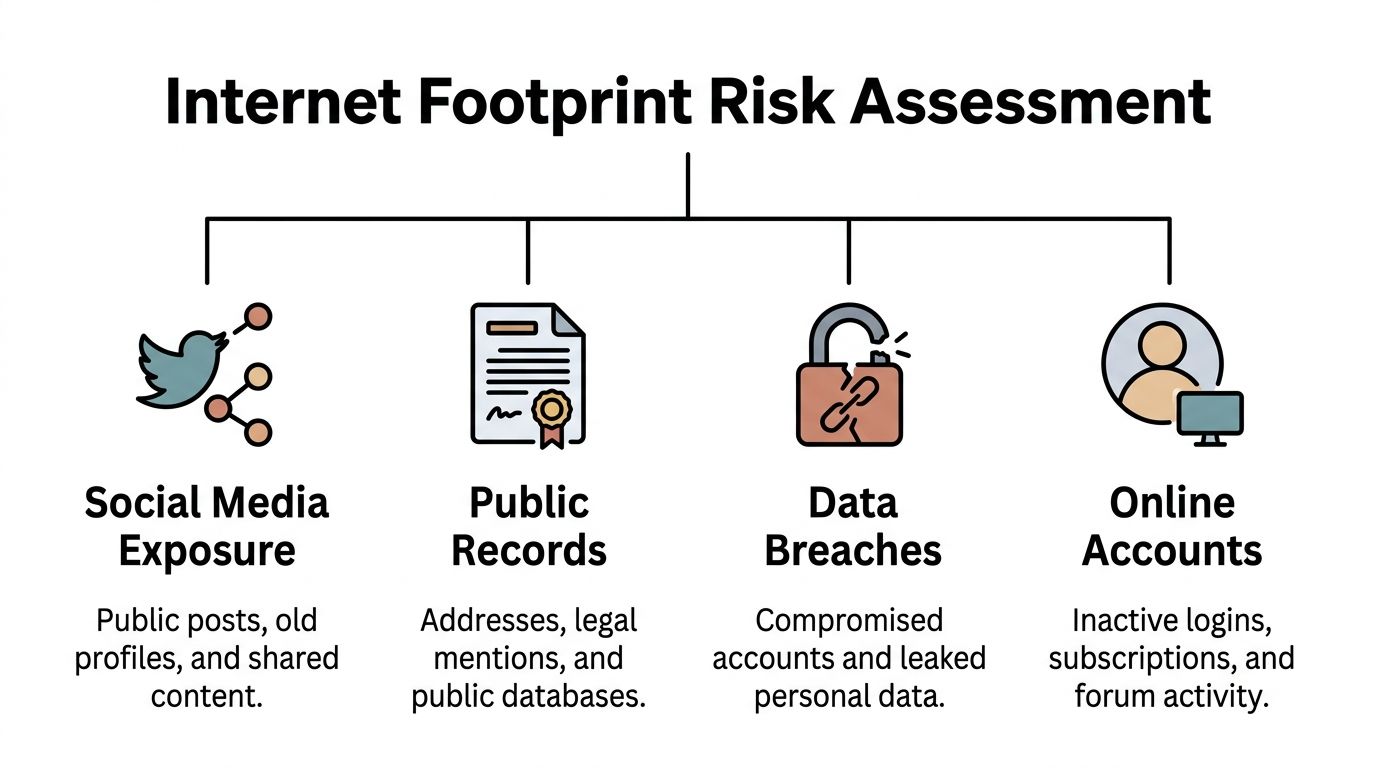
Advanced scanning often uses structured risk models such as fault tree analysis. One practical takeaway from IS Partners coverage of human error and exposure is that 47% of platforms lack deletion mechanisms, and integrating dark web APIs can produce a 20-30% uplift in discovering hidden digital shadows. In plain terms, some data is hard to remove, and some of your exposure sits outside normal web searches.
Sort findings by impact, not by embarrassment
People tend to focus first on the most cringe-inducing content. That is understandable, but it is not always the highest risk.
A better model is:
| Risk level | Typical example | Why it matters |
|---|---|---|
| Critical | Breached email tied to active accounts or reused passwords | Can lead to account takeover and identity abuse |
| High | Public address, phone number, family links, doxing material, explicit reputational content | Creates personal safety or serious reputational exposure |
| Medium | Outdated work profiles, old bios, inactive public accounts | Can confuse employers or reveal unnecessary context |
| Low | Benign mentions, stale references with little identifying detail | Usually worth tracking, not urgent cleanup |
If you want a starting point for breach-related triage, a free data breach checker is useful for separating credential risk from general reputation risk.
Look for connections between findings
The most important part of analysis is not each item on its own. It is how the items reinforce each other.
Examples:
- A gaming username appears on a forum profile.
- That profile lists an old email.
- The same email appears in a breach record.
- A matching avatar links to a current social account.
- The social account reveals a city and employer.
None of those fragments is devastating alone. Together, they build a clean line from hobby identity to real-world identity.
This is why analysts care about correlation. Attackers, recruiters, scammers, and jealous ex-partners all do some version of the same thing. They gather fragments until the pattern becomes obvious.
Ask four questions about every serious finding
Use these questions to decide priority fast:
Is it tied to something active? Old data becomes urgent when it connects to a current email, password habit, or account recovery path.
Does it expose location or contact details? Address, phone number, and relationship data raise personal safety concerns quickly.
Can a stranger use it to impersonate or pressure you? Public bios, old posts, and breach details can all support phishing, extortion, or catfishing.
Would this matter in a hiring, dating, or family context? Different exposures have different real-world consequences. Score them accordingly.
If a finding affects both security and reputation, treat it as a security issue first. Reputation harm is painful. Account compromise spreads faster.
Watch for passive footprint clues
One of the most overlooked parts of an internet footprint scan is the passive footprint. It is not what you posted. It is what platforms, data brokers, analytics systems, and account ecosystems collected around your behavior.
You may not see these records directly, but clues show up through targeted ads, people-finder listings, account recovery suggestions, recommendation engines, and strange profile associations. These are often harder to clean up than an old post because they were not created as a normal public profile in the first place.
That is why analysis matters more than simple discovery. You are not just finding content. You are identifying the shortest path someone else could use to learn too much about you.
Creating Your Action Plan for Remediation and Cleanup
Cleanup works best when it is ruthless about order. Do not start with cosmetic fixes.
If you found a breached email tied to active services, that comes before scrubbing an old meme account. If your address is public on a people-finder site, that comes before rewriting a stale bio.
Start with the items that reduce immediate harm
Handle these first:
Change exposed passwords Any account connected to a breach or old password pattern needs a new unique password. Then update related accounts that may share recovery options.
Enable stronger sign-in protection Turn on two-factor authentication for email, banking, social platforms, and gaming accounts with stored payment details.
Lock down account recovery paths Review backup emails, phone numbers, and security questions. Old recovery methods create easy bypass routes.
Remove public PII from broker and people-finder sites Home address, personal phone, and family associations should move to the top of the list.
If data broker exposure is part of your risk picture, use a structured data broker removal process instead of trying to remember each site manually.
Handle reputational cleanup next
Once the urgent security items are controlled, move to public-facing cleanup.
That usually includes:
- Deleting old profiles you no longer need
- Archiving or removing posts that no longer represent you
- Untagging yourself from public photos
- Locking down friend lists and old comments
- Updating bios so search results show current, accurate information first
This part matters for hiring and dating because people make quick judgments from incomplete information. You do not need a perfect public image. You need a coherent one.
Accept the trade-offs
Not everything should be deleted.
A sparse internet presence can also look strange, especially for professionals, freelancers, creators, and people who need trust signals online. The goal is not invisibility. The goal is reducing unnecessary exposure while keeping the profiles that help you.
That usually means:
| Keep and improve | Remove or restrict |
|---|---|
| Current LinkedIn or portfolio | Dead forums and unused communities |
| Relevant professional bios | Old accounts with personal details |
| Active creator or business profiles | Public profiles with stale contact info |
| Necessary gaming or community accounts | Anything tied to breached emails or unsafe recovery settings |
One cleaned-up primary email account is worth more than deleting ten harmless old posts.
Write a maintenance note for yourself
This sounds minor, but it prevents future drift.
Create a note with:
- Accounts you kept
- Accounts you deleted
- Sites where opt-out requests were submitted
- Password manager updated yes or no
- Dates for follow-up checks
Without that record, people repeat the same discovery work six months later.
Ongoing Monitoring The Proactive Approach to Privacy
A single internet footprint scan is a snapshot. Your online exposure keeps changing after the scan ends.
New breaches happen. Old accounts get reindexed. Removed information reappears in new places. Platforms change privacy settings. People tag you in things you did not post. That is why cleanup alone is not enough.
The broader breach environment makes this obvious. The average cost of a data breach reached $4.45 million in 2023, with 82% involving the human element and 95% attributed to human error, according to the same Palowise figures cited earlier in this article. Forgotten accounts and unmanaged digital traces fit that pattern. They create preventable weak points.
A practical long-term setup includes:
- Recurring self-searches for your name, usernames, and primary email
- Breach monitoring for active email addresses
- Periodic privacy reviews on social, gaming, and dating platforms
- Ongoing removal checks for people-finder and broker listings
If you want a broader monitoring routine, this resource on top tools for monitoring your digital footprint and keeping your data safe is a useful next step.
The main shift is mental. Stop treating privacy as a one-time cleanup project. Treat it like account hygiene. Small, regular checks work better than rare, exhausting overhauls.
Run a scan before someone else does. Digital Footprint Check lets you start with a free checker so you can see what names, emails, usernames, and public traces may already be exposed across the web.