· Digital Footprint Check · Content Marketing · 18 min read
The Complete Guide to Reverse Username Search in 2026
Learn how a reverse username search can uncover hidden accounts, protect your digital identity, and ensure your online safety. Your essential 2026 guide.

That simple username you’ve used for years? It’s more than a login—it’s a digital key that can unlock your entire online life. We call the process of turning that key a reverse username search: taking a single username and mapping out all the online accounts tied to it. This guide will walk you through how to use this powerful technique to protect your digital privacy, secure your identity, and manage your online reputation in 2026.
Your Digital Identity Starts with a Handle

Think about how many places you’ve used the same handle, or a slight variation of it. It’s probably your go-to for Instagram, your gamer tag on Steam, and your login for that obscure forum you joined a decade ago. Each time you reuse a username, you’re leaving a digital breadcrumb.
This repetition, while convenient, creates a trail that connects otherwise separate parts of your life into a single, highly traceable digital identity. For anyone concerned with digital privacy, understanding this trail is no longer optional—it’s a critical life skill for controlling your own online narrative. A quick reverse username search on yourself is one of the most powerful things you can do for your personal security, online identity protection, and reputation management.
How a Username Connects to Real-World Risks and Opportunities
The link between a simple username and real-world consequences is stronger and more direct than ever. Unfortunately, the rise of accessible OSINT tools for reverse username searches mirrors the escalating threat of digital impersonation, catfishing, and credential stuffing attacks. Cybersecurity firm reports show that a staggering 65% of identity theft cases in the US and EU now start with an exposed username found on social media or in a forum database leak.
Here’s how this can play out in different areas of your life, demonstrating the real-world impact on everything from your job prospects to your personal safety:
- Job Prospects: A hiring manager finds your username on your resume’s portfolio link. A quick search uncovers an old, forgotten forum account where your posts were less than professional. A 2023 study found that 77% of employers use social media to screen candidates, and negative findings directly lead to rejected applications.
- Online Dating Safety: Before meeting someone from an app, running a search on their username can help with dating app verification. It can reveal inconsistencies or red flags on other platforms, helping you detect potential catfishing or a romance scam before you become emotionally or financially invested.
- Gaming Account Security: Gamers are a huge target. With criminals linking gamer tags to real-world identities for harassment or account theft, a search can show you exactly where your gaming profile is exposed so you can lock down your accounts and protect your valuable digital assets.
- Identity Theft Prevention: The first step to closing security holes is finding them. A reverse username search uncovers old, forgotten accounts—prime targets for hackers. If you don’t know an account exists, you can’t protect it from being the weak link in your cybersecurity.
To put this in perspective, here’s a look at the risks versus the benefits of being proactive about your online identity protection.
Digital Footprint Risk vs. Proactive Monitoring Benefit
This comparison table breaks down the tangible consequences of leaving your online presence unmanaged compared to the advantages of using proactive searches to stay in control of your digital privacy.
| Area of Concern | Risk of Unmanaged Footprint | Benefit of Proactive Search & Monitoring |
|---|---|---|
| Professional Reputation | Old, unprofessional posts or photos resurface during a background check, costing you a job offer and damaging your career prospects. | Discover and remove embarrassing content, ensuring you present a clean, professional online image to potential employers and colleagues. |
| Personal Safety & Security | Exposed personal information on old profiles (address, phone number) is used for doxxing, stalking, or real-world harassment. | Identify and remove sensitive data from public view, significantly reducing your risk of online harassment escalating to real-world harm. |
| Identity Theft & Financial Fraud | Forgotten accounts with weak, reused passwords are breached, giving criminals a gateway to steal your identity and access financial accounts. | Find and delete old accounts, closing critical security gaps before they can be exploited by threat actors for identity theft. |
| Romance Scams & Catfishing | You trust someone online whose identity is fabricated. They exploit that trust for financial gain, leading to devastating emotional and monetary loss. | Verify the digital identity of new contacts. Uncover inconsistencies and red flags that are hallmarks of catfishing and romance scams. |
| Online Privacy & Data Exposure | Data from different platforms is aggregated by data brokers, creating a detailed profile of you that is sold without your consent. | Understand what information is publicly available, empowering you to opt out of data broker sites and reclaim your personal privacy. |
As you can see, the difference between being a victim and being prepared often comes down to one thing: awareness.
A reverse username search empowers you to see your digital footprint the way others do—employers, new connections, and even bad actors. It’s the first step in taking control of your online narrative and protecting your identity.
Ultimately, running a reverse username search on yourself is a critical act of digital hygiene. It’s about auditing your own vulnerabilities and consciously managing what the world can see about you. By understanding what’s out there, you can protect your personal safety, secure your professional reputation, and stop identity theft before it starts. You can learn more about what makes up your complete digital footprint in our detailed guide.
Laying the Groundwork for a Successful Username Search
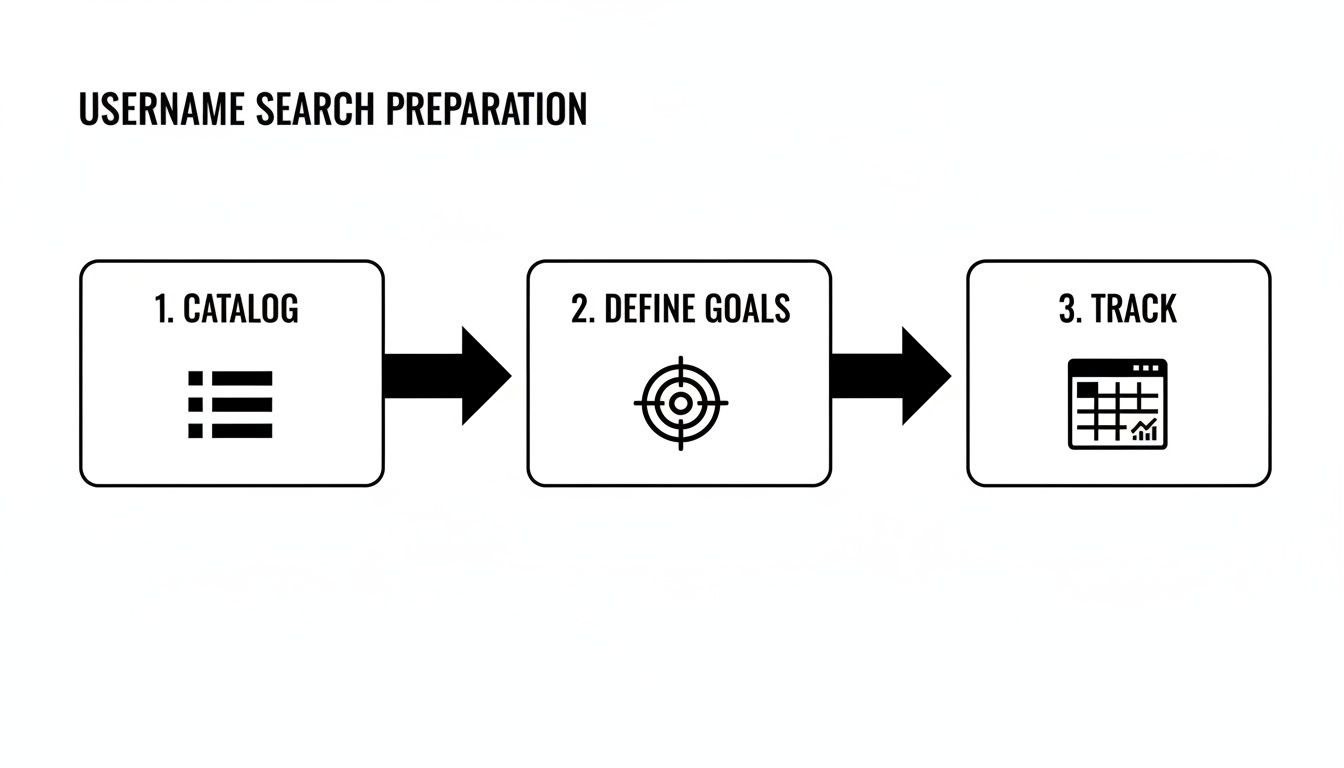
Most people think a reverse username search starts with typing a handle into Google. That’s a mistake. Jumping in without a clear plan is the fastest way to get buried in useless data and miss the very connections you’re looking for. A practical, educational approach to OSINT begins with preparation.
Effective investigation starts with building a roadmap so you know exactly what you’re looking for, why you’re looking, and how you’ll organize what you find. This initial scoping is what separates a focused, efficient search from a frustrating waste of time.
Step 1: Catalog Every Known Username
First, you need to build a master list of your digital aliases. You’ll probably be surprised by how many you’ve created over the years. Think beyond your current handles and dig deep into your digital past to get a full picture of your online identity.
- Current Usernames: List all the handles you actively use today across social media, professional sites, and gaming platforms.
- Old Nicknames: Don’t forget those embarrassing handles from your teenage years on old forums or messaging apps. Yes, even
Sk8rBoi2004is a relevant data point. - Common Variations: Do you add numbers, symbols, or birth years? Note any patterns, like
Gamer123,Gamer_123, orTheRealGamer. These small tweaks are important clues. - Gaming & Community Tags: Your identity on platforms like Steam, Xbox Live, or specific Discord servers is just as critical. Gamer tags are frequently reused across non-gaming sites.
Think of this as an “inventory” of your digital life. Taking a full stock lets you see your entire online story at once, spot recurring patterns, and decide which parts are no longer relevant—or safe—to have floating around. This is a foundational step in reputation management.
Step 2: Define Your Search Goals and Set Ethical Lines
With your list of usernames in hand, you need to be crystal clear about your objective. Your goal will dictate the entire search strategy.
Are you:
- Auditing for Professional Risk? Your search will be laser-focused on finding unprofessional content that could jeopardize your job prospects.
- Improving Personal Cybersecurity? The priority is finding exposed personal data—old phone numbers, past addresses, or family details—to prevent identity theft.
- Investigating a Potential Romance Scammer? In this case, you’re hunting for red flags, inconsistencies across platforms, and other signs of a fabricated identity to avoid a catfishing situation.
This is also the moment to establish your ethical boundaries. A reverse username search should be a tool for defense and protection, not a weapon for intrusion. We’re strictly working with Open-Source Intelligence (OSINT), which is information that is already publicly available. Using it for defensive purposes—like securing your own accounts or verifying someone’s identity for your own safety—is both legal and ethical.
For a deeper dive into the right way to gather this info, check out our guide on essential OSINT tools for beginners. It will help you understand how to collect intelligence responsibly.
Step 3: Set Up a Tracking System
Finally, set up a simple tracking system before you even open a browser tab. A basic spreadsheet will do. Create columns for the Username, the Platform where it was found, the direct URL, and a Notes section for observations. This simple document will become your command center, keeping you from getting lost in a sea of browser tabs and helping you analyze your findings systematically later on.
Alright, you’ve got your list of usernames and a clear goal. Now for the real hunt. A single username can pop up in different contexts—from polished professional networks to anonymous gaming forums. Knowing where to look is half the battle.
Thinking Beyond the Usual Suspects
Not all online platforms are built the same, so your search strategy has to adapt. Here’s a quick breakdown of where to look and what to look for:
- Social & Professional Networks: When searching sites like Instagram, Facebook, and LinkedIn, don’t just stop at the primary username. Try common variations with numbers or underscores.
- Community Forums & Message Boards: This is where you can find gold. Think Reddit, Quora, and thousands of hobby-specific forums. These platforms are treasure troves of opinions and discussions linked to a username.
- Gaming Hubs: Never underestimate gamer tags. A handle used on Steam or Discord is often a person’s “everywhere” name. Finding a gamer tag can be the key that links a gaming persona to a real-world identity, which is crucial for both gaming account security and broader cybersecurity.
- Data Breach Repositories: This is a critical security check. Running a username through a breach database tells you if that handle was compromised in a known data leak, a common starting point for identity theft.
To get a better sense of how these pieces fit together, it helps to understand the power of a modern search engine for people, which can tie these disparate sources together automatically.
From Manual Grind to Automated Insight
Let’s be realistic: manually checking hundreds of websites is a monumental waste of time and you’re guaranteed to miss things. We’re talking about billions of social media users globally, with the average person managing multiple accounts. Username reuse is a huge part of everyone’s digital footprint.
This is where automated tools change the dynamic. Instead of spending hours hunting down profiles one by one, a dedicated service can scan hundreds of sources in minutes.
A comprehensive tool like Digital Footprint Check doesn’t just scan the big names. It digs into over 500+ platforms, including obscure international social networks, niche forums, and critical data breach databases that manual searches almost always overlook.
This automated approach transforms a tedious, error-prone task into an efficient, repeatable process. You get a complete picture of where a username appears online, saving countless hours while getting results that are far more accurate and thorough. Our guide on how to find a person on social media digs deeper into these powerful methods.
Uncovering More with Advanced Search Techniques
Basic searches on individual platforms will only show you the most obvious, surface-level results. To map out a username’s complete digital footprint, you have to start thinking like an investigator and dig deeper. This is where you go beyond just plugging a name into a search bar and start connecting the dots across the wider internet.
A great place to level up your search game is with search engine operators. These are simple commands that transform a general search engine like Google or DuckDuckGo into a high-precision OSINT tool. By adding these instructions to your query, you can tell the search engine exactly where to look.
For example, running a search for "GamerGuy123" site:reddit.com tells Google to find every mention of that exact username, but only on Reddit. It’s an effective way to zero in on specific communities where you suspect someone is active.
Mastering Search Engine Operators
You can get even more granular by combining these operators. Just learning a few of them can radically improve the quality of what you find in a reverse username search.
"username": Putting the username in quotation marks forces an exact match. This is crucial for filtering out similar but irrelevant results.site:website.com: This operator restricts your search to one specific website. It’s perfect for quickly checking if a known username exists on a forum or social network.intext:"keyword": This command searches for a specific word or phrase within the text of a webpage. You can use it to narrow down profiles by looking for common interests, locations, or phrases mentioned in their bio.-keyword: Adding a minus sign tells the search engine to exclude a term. For instance,"ProGamer" -youtubewill find mentions of that username everywhere except on YouTube.
These commands let you surgically extract information that would otherwise be buried. It’s a core skill for any kind of open-source intelligence work.
The Art of Contextual Analysis: A Real-World Example
Finding an account is one thing; proving it belongs to the right person is something else entirely. This is where contextual analysis becomes essential. It’s the human part of the investigation, where you piece together small, seemingly unrelated details to confirm a match with confidence.
Real-World Example (Catfishing Detection): Imagine you’re vetting a profile on a dating app. A reverse username search reveals the same username on a niche gaming forum.
- Dating Profile: Looks clean, professional, claims to be a “world traveler.”
- Gaming Forum Profile: Posts from the same user complain about being broke and never leaving their city. They use a profile picture of a different person.
- The Connection: Contextual analysis links these two separate personas. The conflicting information is a massive red flag for catfishing, protecting you from a potential romance scam.
This is a critical part of the puzzle. To build on these skills, you can explore other investigative avenues; a comprehensive guide on email address reverse search is a great next step for uncovering even more digital breadcrumbs.
From Manual Scripts to User-Friendly Power
For those with technical know-how, OSINT tools like Maigret on GitHub can check a username against thousands of websites. The catch is that these scripts require comfort with the command line, which can be a barrier for many.
This is where modern, user-friendly platforms shine. A tool like Digital Footprint Check harnesses the same power as these advanced scripts but presents it in an easy-to-use interface. You get professional-grade results without needing to write a single line of code, making powerful digital privacy and cybersecurity tools accessible to everyone.
If you’re interested in what’s available, it’s worth exploring the landscape of social media investigation tools to see which approach fits you best.
Turning Your Findings into Action: A Practical Guide

Running a reverse username search is the diagnostic step; knowing what to do with the results is the cure. This is where you move from just knowing about your digital footprint to actively shrinking your attack surface and taking control of your online identity protection.
First, methodically verify every account your search turned up. Is that old gaming forum profile really yours? Look for corroborating details like a matching profile picture, a similar writing style, or links pointing to other accounts you know are yours.
Your Remediation Checklist for Digital Privacy and Security
Once you’ve confirmed ownership, it’s time for a full security audit. This is where you plug the holes you’ve uncovered. Think of it as essential digital housekeeping.
Your immediate priorities should be:
Secure or Delete Old Accounts: For every dormant or forgotten account, you have two choices. If it has value, lock it down with a new, unique password and enable two-factor authentication (2FA). If it’s just digital junk, delete it for good. Each abandoned account is a potential entry point for identity theft.
Tighten Privacy Settings: Go through every active account and audit the privacy settings. Who can see your posts? Your photos? Your location? Ensure sensitive information like your email and phone number is set to private. This is a fundamental step in reputation management and personal safety.
Address Data Breach Exposures: If your username appeared in a data breach database, act fast. Immediately change the password on that account and any other account where you might have reused it. This is non-negotiable and your best defense against credential stuffing attacks.
The threat here is very real. Recent statistics show that 81% of data breaches involve compromised credentials, often stemming from reused usernames and passwords. A reverse username search is a critical cybersecurity tool for everyone—from parents monitoring their kids’ online safety to HR teams vetting candidates.
Managing Your Online Reputation for Career and Life
Beyond pure security, this process is an essential tool for reputation management. Unprofessional comments or embarrassing photos from a decade ago can impact your career prospects, relationships, and public image today.
A reverse username search isn’t just about finding what’s vulnerable; it’s about finding what’s visible. Taking control of that visibility is the essence of modern online identity protection.
If you find content that could damage your professional image, take action. Delete the posts if you can. For those ancient and unnecessary profiles, our guide on how to delete your online presence gives you a complete walkthrough.
Ultimately, this cleanup isn’t a one-and-done job. Your digital footprint is constantly changing. Using an ongoing monitoring service like Digital Footprint Check can automatically alert you to new accounts and exposures, ensuring you maintain a clean and secure online presence for the long haul.
Common Questions About Reverse Username Searches
Even with a solid plan, jumping into a reverse username search can bring up a few key questions about ethics, dead ends, and self-protection. Let’s tackle the most common questions with an accessible, educational approach so you can proceed confidently.
Is It Legal and Ethical to Perform a Reverse Username Search?
Yes, using a reverse username search to find information that’s already publicly available is perfectly legal. The practice is a core part of Open-Source Intelligence (OSINT). The real question isn’t about legality, but intent.
It’s ethical to use these searches for defensive reasons, such as:
- Online Identity Protection: Protecting yourself from being impersonated or having your identity stolen.
- Reputation Management: Auditing your online reputation before applying for jobs.
- Cybersecurity: Understanding your family’s digital exposure to keep them safe.
- Dating App Verification: Verifying someone you met online to prevent catfishing and romance scams.
Where it crosses the line into unethical—and potentially illegal—territory is when the search is used for malicious reasons like stalking, harassment, doxxing, or fraud. Professional tools like Digital Footprint Check are built specifically for these positive, ethical use cases, promoting digital privacy and safety.
What if My Search Returns No Results?
Hitting a wall and finding zero results can be just as revealing as finding a dozen profiles. This usually means the person is a “digital ghost,” meticulously managing their privacy with unique usernames for every platform and keeping their accounts on lockdown. It could also mean the username you’re searching is misspelled or no longer in use.
A blank search result isn’t a failure; it’s a data point. It might signal strong digital privacy habits, or it could be a clue that you need to try different username variations to uncover the real connections.
How Can I Protect Myself from Being Found?
The single most effective defense against being easily tracked is to stop reusing usernames. It’s that simple. Create different handles for different parts of your life—one for professional sites, another for social media, and a separate one for gaming or forums. This compartmentalization makes it difficult for someone to connect your different online personas.
Beyond that, get in the habit of auditing and tightening the privacy settings on all your accounts. Lock down who can see your posts and personal info. To stay a step ahead, use a scanner to see what’s publicly visible about your own usernames. This lets you close privacy gaps before anyone else finds them.
Are Free Username Search Tools Good Enough?
Free tools can be a decent starting point, but they have serious drawbacks. They typically only scan a handful of major social media sites, and their information is often outdated or incomplete. Worse, they’re notorious for false positives.
For any serious cybersecurity audit, reputation check, or safety investigation, a professional service is the only way to go. A comprehensive tool scans hundreds of sources—including obscure forums, data breach databases, and gaming networks—to deliver results that are far more accurate and actionable, providing a true picture of one’s digital identity.
Ready to see what your username reveals about your digital privacy and online identity? Digital Footprint Check provides the most thorough reverse username search available, scanning over 500 platforms to give you a complete picture. Get a head start on protecting your digital life and managing your reputation with our free profile checker today.