· Digital Footprint Check · Content Marketing · 23 min read
What Information Is Online About Me and How to Protect It
Curious about 'what information is online about me'? This guide shows you how to find, assess, and manage your digital footprint to protect your privacy.
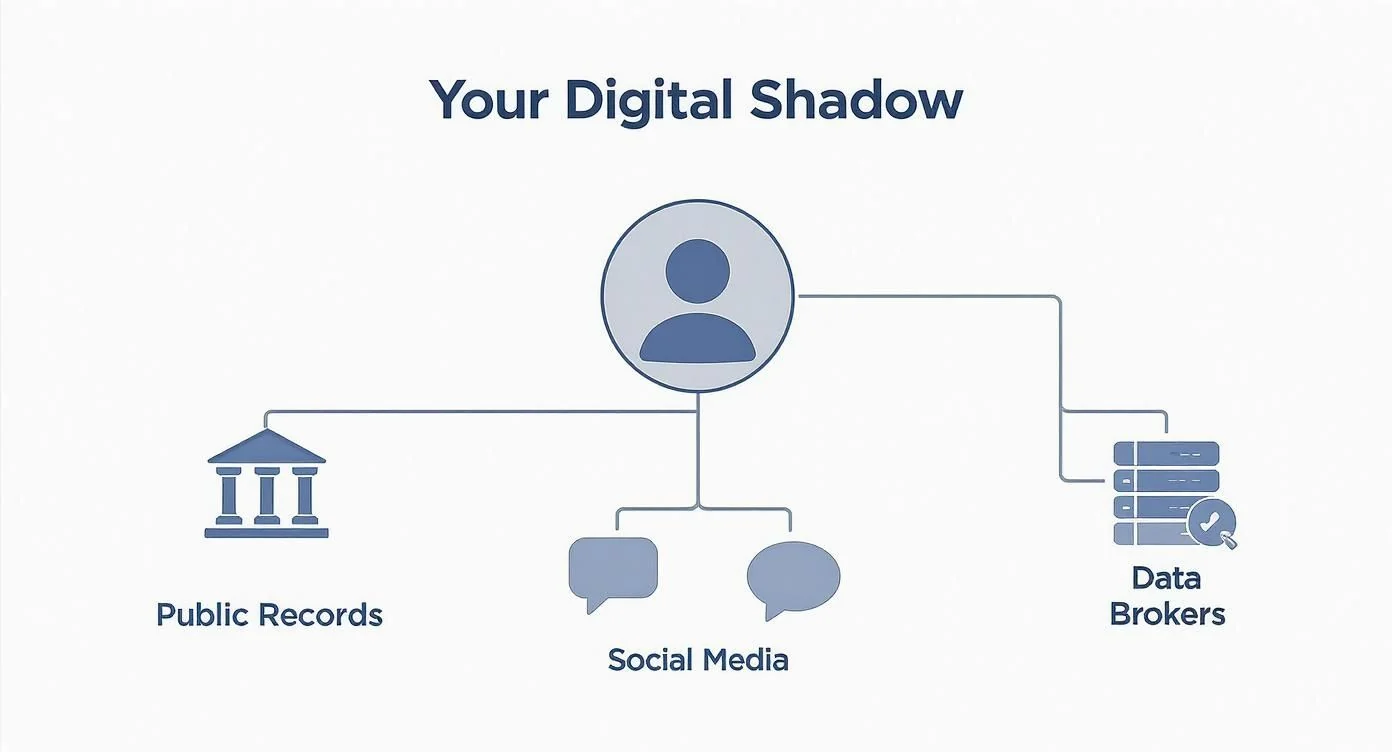
The answer to “what information is online about me” is usually more than you think. Your online identity goes beyond public posts: it’s public records, website data, and details from gaming profiles and dating apps, combined into a detailed profile that affects your job prospects and safety.
Understanding Your Digital Shadow
Every time you go online, you leave a trail. Some of it you make on purpose: a photo on Instagram, an update on LinkedIn.
But other traces are left behind without you even thinking about it. Website cookies that follow you from site to site. Your phone logging your location for an app. All these scattered bits of data are collected, combined, and assembled into your digital shadow—a comprehensive and often invisible profile of who you really are.
That shadow is woven from sources that gather and trade your information. Social media is part of it, but the data goes deeper, affecting your real-world security.
The Sources of Your Online Data
Your digital shadow is assembled from many sources across the internet. Knowing where the data comes from is the first step to protecting your identity.
- Public Records: A surprising amount of official information is now online and accessible to anyone. Think property records, court filings, and even voter registration lists.
- Social Media & Online Forums: Every comment, like, tag, and profile detail you share on Facebook, X, Reddit, or a gaming forum adds to the picture.
- Data Brokers: These are companies whose entire business is collecting personal information from thousands of sources, packaging it into detailed profiles, and selling it. They sell to marketers, background check companies, and pretty much anyone willing to pay.
This constant flow of data from different streams is what forms your digital shadow.
Your online identity combines what you actively share with what’s collected passively. For a deeper look at this, check out our guide on the differences between a digital footprint and a digital shadow.
This isn’t a small-scale issue. Today, roughly 6.04 billion people are online, meaning nearly three-quarters of the world’s population is constantly generating these digital traces.
Common Types of Your Information Found Online
To give you a clearer picture, here’s a quick rundown of the personal data categories commonly floating around on the internet, where they come from, and who can see them.
| Information Category | Common Examples | Typical Sources | Real-World Impact |
|---|---|---|---|
| Personal Identifiers | Full name, date of birth, current and past addresses, phone numbers, email addresses | Public records, social media profiles, data broker databases, online forms | Key data for identity theft, doxxing, and romance scams. |
| Professional & Financial | Employment history, education level, income estimates, property value, known associates | LinkedIn, public records, data brokers, professional directories, news articles | Used by recruiters to assess job prospects and by scammers for targeted financial fraud. |
| Social & Behavioral | Photos and videos, political affiliation, religious views, hobbies, online purchases | Social media, forum posts, data brokers (tracking cookies), loyalty programs | Shapes your online reputation and can be used to create detailed psychological profiles for manipulation. |
| Location Data | GPS coordinates from photos (EXIF data), check-ins, IP address geolocation, cell tower data | Smartphone apps, social media tagging, public WiFi usage | Poses a direct risk to personal safety, enabling stalking and real-world tracking. |
This table just scratches the surface. The sheer volume of interconnected data points can reveal far more about your life, habits, and relationships than any single piece of information ever could, making you vulnerable to everything from catfishing to identity theft.
How to Manually Uncover Your Digital Footprint
Ready to play digital detective? You don’t need fancy software to figure out what information is floating around about you online. With a few smart techniques and the web browser you’re already using, you can start mapping out your public-facing data. This hands-on approach is the crucial first step toward understanding—and managing—what the world can see.
This process is a lot more than plugging your name into Google. It’s about using advanced search operators, which are simple commands that act like filters for your search. Think of it like tuning a metal detector to find only gold, instead of every random piece of junk buried in the sand.
Master Advanced Search Techniques
A basic search for your name will probably spit back thousands of results, and most of them won’t even be about you. To get anywhere meaningful, you have to be precise. That’s where advanced search operators become your best friend.
Let’s start with the basics and build up. These simple additions to your search queries can narrow the firehose of information down to exactly what you’re looking for.
Essential Search Operators to Use:
- Quotation Marks for Exact Phrases: Searching for
"John Smith"forces the search engine to show results only where “John” and “Smith” appear side-by-side in that exact order. This simple trick filters out results for a “John” who works with a “Smith” but isn’t named “John Smith.” - Site-Specific Searches: Using
site:facebook.com "John Smith"searches for your name only on Facebook. This is powerful for checking specific social media platforms, old forums, or company websites. - Excluding Terms: If you share a name with a celebrity or just have a common name, the minus sign is your go-to. For example,
"Jane Doe" -actresswill remove any pages that also mention the word “actress.” - Filetype Searches: Ever wonder if that old resume is still out there? Try
"Jane Doe" filetype:pdfto hunt down publicly accessible PDF files containing your name.
By combining these, you can create some seriously powerful queries. Something like site:linkedin.com "John Smith" "Project Manager" -Chicago will find profiles matching a specific name and job title but exclude results from a certain city. This level of precision is what separates a real audit from a casual search.
Search Beyond Your Name
Your digital footprint isn’t just tied to your legal name. It’s connected to all those usernames you’ve used over the years, your email addresses, and even your photos. A thorough search means investigating all of these unique identifiers.
Most of us have recycled the same username across dozens of platforms, from gaming forums to social media. A quick search for that old username can dig up forgotten accounts and posts you made a decade ago, potentially revealing opinions or personal details you’d rather keep in the past. This is a common attack vector for compromising gaming account security.
A study on online behavior found that a significant number of users recycle usernames across different services. This habit, while convenient, creates a breadcrumb trail that can link seemingly anonymous accounts directly back to an individual’s core identity.
To really expand your search, make a list of every identifier you can think of and start digging:
- Username Variations: Search for every username you’ve ever used. Don’t forget the embarrassing ones from your early days on the internet.
- Email Addresses: Search for both current and old email addresses, making sure to enclose them in quotes. This can reveal where your email was exposed in data breaches or listed publicly on a website.
- Phone Numbers: Carefully search for your phone number. This is often a direct path to data broker sites and public directories that list your personal information without ever asking for your permission.
Use Reverse Image Search
What about all the photos of you online? A reverse image search lets you upload a photo—like a profile picture—and find other places it appears on the internet. This is a fantastic way to find imposter accounts using your image or old profiles you forgot you created.
This technique is especially important for protecting your identity on platforms like dating apps or professional networks where your face is a key identifier. Scammers frequently steal photos to create fake profiles for catfishing and romance scams. Verifying that your images aren’t being used elsewhere is a key step in online dating safety.
Conducting this kind of deep dive is the foundation of any good online cleanup. To learn more about turning these findings into action, check out our detailed guide on how to perform a personal online audit. Manually uncovering your footprint gives you the raw data you need to start taking back control.
Using Specialized Tools to Dig Deeper
Googling yourself is a great start, but it really only scratches the surface. To get the full picture of what information is out there about you, it’s time to move beyond standard search engines and into the world of specialized tools. These platforms are designed to scan parts of the web that a typical search will never find, giving you a much more honest look at your public profile.
Think of it this way: a manual search is like looking at a city map. You can see the main streets and major landmarks, no problem. But specialized tools are like having access to satellite imagery and architectural blueprints—they show you the hidden alleyways, the underground utilities, and the fine details of every building.
An Introduction to Ethical OSINT
Many of these more advanced techniques fall under the umbrella of Open-Source Intelligence (OSINT). Don’t let the name intimidate you. This isn’t some shady, covert activity; it’s simply the practice of gathering and analyzing information from publicly available sources. It’s what journalists, researchers, and cybersecurity pros do every day.
You can—and should—use these same principles ethically for your own benefit. The goal isn’t to spy on others but to conduct a deep, honest audit on yourself. When you start thinking like an investigator, you’ll uncover vulnerabilities you never even knew existed, which is the foundation of good cybersecurity. You can get a better handle on the basics in our guide to OSINT tools for beginners.
Exploring Public Records and Data Broker Sites
A huge chunk of your online data isn’t on social media—it’s tucked away in places like government databases and data broker websites. These platforms are absolute goldmines of personal data, often collected, packaged, and sold without you ever clicking “I agree.”
- Public Records Databases: These sites vacuum up information from official sources like county clerk offices, court records, and property tax assessors. Anyone with a few minutes to spare can potentially find your past addresses, marriage licenses, and legal filings.
- Data Broker Sites: You probably know them as “people search” websites. Their entire business model is to build and sell detailed profiles about people like you. They scrape data from social media, public records, and marketing lists to create dossiers that can include your family members, phone numbers, and even a guess at your net worth.
The amount of information these sites have on you can be shocking. What’s even more concerning is how easily this data can be weaponized. Identity fraud losses hit a staggering $43 billion last year, affecting 40 million U.S. adults. This isn’t just a privacy issue; it’s a direct financial risk, as criminals use these exact data points to open accounts, file fraudulent tax returns, and commit other forms of identity theft. You can discover more insights about these identity fraud trends and see just how closely they’re tied to data exposure.
Automating Your Search for a Clearer Picture
Let’s be realistic: manually sifting through hundreds of data broker sites and public records databases is a monumental task. It’s tedious, time-consuming, and you’re almost guaranteed to miss something important. This is where automated services become an absolute major advantage.
Using an automated tool is like hiring a team of researchers to work for you 24/7. It systematically scans hundreds of sources at once, pulling all the findings into a single, easy-to-read report that would take you weeks or even months to compile on your own.
A dedicated platform can rapidly scan for your name, usernames, email addresses, and phone numbers across a vast network of sources, including those hard-to-find forums and even the dark web. An automated approach is simply more thorough and way more efficient.
For example, a service like the Digital Footprint Check free checker streamlines this entire process. It automates the deep dive for you, presenting a clear, immediate overview of where your information is exposed.
The screenshot below shows exactly how a scan can reveal potential data breaches and exposed accounts tied to your personal information.
This kind of organized report immediately flags your biggest risks. Instead of drowning in endless search results, you get an actionable starting point, allowing you to prioritize which accounts need securing and what data needs to be taken down first. This is a critical first step in proactive identity theft protection.
Connecting Your Online Data to Real-World Risks
So, you’ve Googled yourself and found a few old accounts or public records. It might not seem like a big deal. A stray comment here, an old profile there—what’s the harm?
The real danger isn’t in any single piece of information. It’s how easily those scattered data points can be connected to create a detailed, and often vulnerable, picture of your life. Each tidbit is a puzzle piece that, when assembled by the wrong person, reveals far more than you ever intended.
This isn’t just some abstract privacy issue. Your digital footprint has tangible, real-world consequences that can mess with your career, your finances, and even your personal safety.

Professional Reputation and Job Prospects
One of the most immediate ways your digital footprint can bite you is in your professional life. It’s no secret that recruiters and hiring managers look up candidates online. What they find—or don’t find—can be a deciding factor.
That unprofessional photo from a decade-old social media account can easily overshadow a stellar resume. A heated comment you made on a public forum years ago can be dug up and taken out of context, raising questions about your judgment. This kind of digital baggage can quietly get you disqualified from opportunities you never even knew you had. Effective reputation management starts with knowing what information is out there.
Financial Fraud and Identity Theft
To a criminal, your personal data is pure gold. Seemingly harmless details like your date of birth, mother’s maiden name, or even your first pet’s name—often shared in those “fun” social media quizzes—are the exact answers to common security questions.
When scammers combine these tidbits with information from the latest data breach, they can build a scarily convincing profile of you. They can then use these details to:
- Craft hyper-personalized phishing emails that trick you into handing over passwords or financial info.
- Answer security questions and waltz right into your bank accounts, email, or other sensitive platforms.
- Open new credit cards in your name, leaving you with devastating financial consequences and a torched credit score.
The scale of this problem is massive. One report revealed 2,116 publicly reported data compromises in just the first three quarters of the year, hitting more than 262 million victims. With this constant flood of breaches, your information is almost certainly out there, making proactive monitoring a necessity. You can read the full analysis on data breach trends to grasp the growing risk.
Personal Safety: From Online Dating to Doxxing
Perhaps the most alarming risk is the one to your personal safety. Think about it: your home address is often in public records, your favorite coffee shop is tagged in your check-ins, and your daily routine is mapped out by geotagged photos. A stalker or other malicious person can piece this all together.
This kind of data aggregation allows someone to predict your movements and find you in the real world. In the world of online dating, this risk is dialed up to eleven. Someone you just met could use your name and a few details from your profile to uncover your address, workplace, and social circles, creating a dangerous power imbalance right from the start. This is why dating app verification and exercising caution are so critical.
Real-World Example: In a widely reported case, a woman was stalked by a man she met on a dating app. He used her first name and the university mentioned in her profile to find her public social media accounts, which contained enough geotagged photos to reveal her neighborhood and favorite hangouts. This online data directly led to offline harassment.
Risks in Gaming and Online Communities
Even niche hobbies like gaming aren’t safe. Your gaming profile probably has a unique username, one you might reuse across different platforms. If your email gets linked to that username in a forum data breach, a hacker could try to break into your gaming account, which might hold valuable digital items or linked credit cards. This makes gaming account security a vital part of your overall digital privacy.
Worse, a heated argument in a game can spill over into “doxxing,” where an angry player publishes your personal information online as a twisted form of revenge. Understanding the hidden dangers of your digital footprint is the first step toward locking down these seemingly separate parts of your online life.
From a missed job to a drained bank account, the answer to “what information is online about me?” directly shapes your real-world vulnerabilities. This is why managing your digital presence is no longer just a good idea—it’s a critical part of modern personal security.
Your Action Plan for a Digital Cleanup
Finding out just how much of your life is scattered across the internet can be a bit of a shock. But that discovery is the first, most important step toward getting back in the driver’s seat. It’s time to shift from knowing to doing. This is your practical, step-by-step guide to scrub your online presence, shrink your exposure, and build up your digital defenses.
Think of it like digital spring cleaning. We all have old, forgotten, or just plain risky information that’s piled up online over the years. Tidying it up isn’t a one-time chore; it’s an essential routine for staying safe in the modern world.
Lock Down Your Social Media Profiles
For most of us, social media accounts are the biggest and most public part of our digital footprint. Locking them down is the first and most powerful move you can make. It’s time to open up every platform you use—Facebook, Instagram, LinkedIn, X, you name it—and get cozy with the privacy settings.
First things first: make your accounts private. This simple flip of a switch stops total strangers from scrolling through your posts, photos, and personal details. Next, dig into your post history. Most platforms have a tool that lets you limit the visibility of all your past posts to “Friends Only,” which saves you from the nightmare of changing them one by one.
Finally, take a hard look at your “friends” or “followers” list. If you don’t recognize a name or haven’t spoken to them in years, it might be time to remove them. A smaller, trusted circle is always safer than a massive, anonymous audience.
Audit and Prune Your Online Content
With your privacy settings tightened, the next job is to review what you’ve actually posted. Everything you’ve shared online shapes how you’re seen by the world, and that includes potential employers.
It’s not just a hypothetical problem. A recent survey found that 70% of employers use social media to screen candidates, and a staggering 57% have rejected an applicant because of something they found. That stat alone makes it crystal clear: managing your online reputation is a non-negotiable part of career management.
A single ill-advised post from a decade ago can resurface at the worst possible moment. Proactively removing questionable content isn’t about hiding who you are; it’s about curating a digital identity that accurately reflects your current self.
Go through your old posts, photos, and comments with a critical eye. Ask yourself: would I be okay with a future boss, a new partner, or a random stranger seeing this? If the answer is no, get rid of it.
Tackle Data Brokers and Public Records
Some of the most intrusive data about you isn’t on social media—it’s held by data brokers. These are the shadowy companies that buy and sell personal information, creating detailed profiles with your address history, phone numbers, and family members, all without your permission.
Getting your info off these sites is a pain, but it’s a necessary one. Every data broker has its own opt-out process, which usually means filling out a form and proving you are who you say you are. It feels like a frustrating game of whack-a-mole, but every profile you knock down reduces your risk of identity theft and scams.
On a positive note, Google now offers tools to request the removal of your personal information from its search results. You can submit requests to delist pages showing your home address, phone number, or email, giving you another layer of control.
Hunt Down and Delete Old Accounts
Over the years, you’ve probably signed up for dozens—if not hundreds—of websites, apps, and newsletters you forgot about. These “zombie” accounts are sleeping security risks. If one of those old, unused services gets hit by a data breach, the password you used could be exposed, putting your current accounts in danger if you ever reused it.
Make a list of any old services you remember and go to each site to formally delete your account. Don’t just log out; find the “delete account” option. For the ones you can’t remember, you can scan your email addresses to find linked accounts. Killing off these zombie accounts is a critical step in shrinking your digital attack surface.
This cleanup mentality should extend to your physical devices, too. Before you sell or get rid of an old phone or computer, it’s crucial to erase your data securely. For example, you should always learn how to wipe your iPhone to ensure no sensitive information gets left behind for the next owner. This physical cleanup is just as vital as your online efforts.
To help you get started, we’ve put together a simple action plan. Think of this as your checklist for reclaiming your digital privacy.
Digital Cleanup Action Plan
| Action Step | Key Objective | Where to Start |
|---|---|---|
| Secure Social Media | Limit public visibility of your personal life and past posts. | Go into the Privacy Settings on Facebook, Instagram, X, and LinkedIn. |
| Audit Your Content | Remove any old, embarrassing, or unprofessional posts. | Manually review your post history, photos, and tagged content. |
| Remove Data Broker Profiles | Eliminate publicly available dossiers containing your personal info. | Search for your name on people search sites and follow their opt-out steps. |
| Delete Old Accounts | Reduce your exposure to future data breaches from unused services. | Scan your email for old signups and visit each service to delete your profile. |
| Set Up Monitoring | Get alerts when your name or personal data appears in new places. | Use Google Alerts or a professional monitoring service. |
| Wipe Old Devices | Ensure no personal data is left on hardware you no longer own. | Follow manufacturer guides for factory resetting and securely wiping devices. |
Taking these steps will put you miles ahead of the average person on digital privacy. It takes a bit of upfront effort, but the peace of mind you gain is more than worth it.
Proactive Habits for Long-Term Digital Privacy
Cleaning up your digital footprint is a fantastic start, but keeping it clean is where the real work begins. Long-term privacy isn’t about a one-time fix; it’s about building strong, proactive habits that become second nature. Think of it less like a deep clean and more like preventative maintenance for your online life.
These are the small, consistent choices you make every day that shield your information from prying eyes.

This means getting into a few simple yet powerful cybersecurity routines. Start using email aliases whenever you sign up for something new—it keeps your main email address out of breach lists. Get ruthless with app permissions. Does that free-to-play game really need access to your entire contact list? And please, use a password manager. It’s your single best defense against breaches, creating strong, unique passwords for every account you own.
Building Your Digital Defenses
Enabling two-factor authentication (2FA) everywhere you possibly can is non-negotiable. It adds a crucial security layer that can stop a hacker in their tracks, even if they’ve managed to steal your password.
It also pays to schedule a recurring “digital check-up” for yourself every few months. Take an hour to review your privacy settings on key accounts and run a quick search for your name. You’ll be surprised what can pop up, and staying on top of it is half the battle.
The stakes for ignoring this stuff are terrifyingly high. The FBI’s Internet Crime Complaint Center (IC3) logged over 800,000 complaints last year alone, with total losses soaring past $10.3 billion. A massive chunk of these incidents involved scams that directly exploited personal information left exposed online. You can read the full IC3 report on the growing costs of cybercrime.
As you cultivate these defensive habits, you can also go on the offensive. Learning how to build a personal brand online is a powerful way to control the narrative and ensure that when people search for you, they find the professional, positive information you want them to see.
For true peace of mind, automated monitoring can make this long-term vigilance feel effortless. A service like the Digital Footprint Check free checker watches your back 24/7, sending you an alert the moment new information about you appears online so you can act immediately. This transforms digital privacy from a constant source of worry into a manageable, automated routine.
Frequently Asked Questions
When you first start looking into your online presence, a few big questions always come up. Here are the straight answers to the ones we hear most often.
Can I Completely Erase Myself from the Internet?
Let’s be realistic: achieving 100% digital invisibility is a ghost story. It’s pretty much impossible. Information locked away in public records, news archives, and the backup servers of data brokers is notoriously stubborn and, in many cases, can’t be removed at all.
The real goal isn’t to vanish but to achieve significant reduction and control. Think of it like this: you can’t stop the rain, but you can wear a raincoat. By methodically removing what you can—like old social media accounts and data broker profiles—you shrink your public-facing footprint. This makes you a much, much harder target for scammers, stalkers, or even just nosy recruiters.
How Often Should I Check My Online Information?
If you’re doing it by hand, a good rule of thumb is to schedule a deep-dive search for your name, usernames, and other key details at least once per quarter. This cadence is frequent enough to help you catch new information that’s popped up without it becoming a full-time job.
But here’s the thing: your digital footprint is constantly changing, sometimes daily. That’s where automated monitoring really shines. It’s like having a security camera for your online identity, running 24/7. It alerts you almost immediately when new mentions or data exposures appear, letting you handle risks right away instead of discovering them three months from now.
Does Using a VPN Hide My Digital Footprint?
A VPN is a critical piece of your privacy toolkit, but it’s important to know what it actually does. A VPN doesn’t hide your existing digital footprint—it primarily hides your real-time online activity and your IP address. It wraps your internet connection in a layer of encryption, stopping your internet provider or someone snooping on a public Wi-Fi network from seeing the websites you visit.
It does nothing, however, to remove the personal information already published about you on social media, people-search sites, or in data broker databases. A VPN protects your browsing, not your public data.
Ready to see what the internet really knows about you? Digital Footprint Check automates the entire discovery process, scanning hundreds of sources to give you a clear, immediate picture of your online exposure in just a few minutes. Take the first step toward getting your privacy back.
Get your free scan at www.digitalfootprintcheck.com/free-checker