· Digital Footprint Check · Content Marketing · 19 min read
Active Directory on Linux: the Sysadmin's Integration Guide
Learn how to integrate Linux with Windows AD. This guide covers options for Active Directory on Linux, including joining a domain and running a Samba DC.

Most Linux and Windows environments reach the same point eventually. Windows desktops authenticate against Active Directory. Linux servers still have local users, scattered sudoers files, and different password handling depending on who built the box. User offboarding gets messy, access reviews take too long, and the team starts asking the same question: should we bring Linux into Active Directory, or are we about to create a bigger dependency than we want?
That's the right place to start. Active Directory on Linux isn't a single implementation. It's an architectural choice about where identity lives, how much autonomy Linux systems keep, and how much operational complexity your team is willing to absorb. The command line matters, but the decision comes first.
Bridging the Divide Why Use Active Directory on Linux
The practical reason to use Active Directory on Linux is simple. Most organizations want one place to manage identities, one place to disable accounts, and one set of groups to drive access. If your estate includes Windows endpoints and Linux servers, separate identity silos become an operational tax very quickly.
Active Directory has been around for a long time, and that matters. It debuted with Windows 2000 Server in 1999 and was built around LDAP, Kerberos, and related directory technologies, which is why Linux can interoperate with it using standard identity protocols instead of a Microsoft-only mechanism, as outlined in the Active Directory overview. That detail is more than trivia. It explains why Linux hosts can authenticate with Kerberos, query directory data with LDAP, and fit into the same enterprise identity model as Windows.
That's the bridge. Linux doesn't have to pretend to be Windows. It just has to speak the right protocols.
For day-to-day administration, that gives you a few concrete wins:
- Central account lifecycle management means disabling a user in AD can remove their practical access path across mixed systems.
- Group-based authorization lets admins tie SSH, sudo, or application access to existing directory groups instead of hand-editing local files on each host.
- Auditability improves because identity comes from a central directory rather than a pile of machine-local accounts.
Practical rule: If your team already depends on AD for people, groups, and offboarding, keeping Linux outside that model usually creates more exceptions than freedom.
There's also a security angle. Password sprawl gets worse when every Linux server has its own local account habits. Centralized identity doesn't solve every problem, but it reduces one common class of administrative drift. If you're tightening small business security generally, the same discipline shows up in broader cybersecurity tips for small businesses.
What trips people up is assuming the answer is always “join the box to the domain.” Sometimes that's right. Sometimes Linux should consume AD but not depend on it for everything. Sometimes Linux should own directory services itself. Those are different designs, and they behave differently when DNS breaks, a domain controller is unreachable, or the Linux side becomes the dominant platform.
The Three Architectural Paths for AD on Linux
Most articles flatten this topic into one recipe. Install SSSD, run realm join, done. In production, that's too narrow. A better question is whether Linux should consume Active Directory, provide an AD-compatible domain, or sit behind an identity layer that cooperates with AD.
Univention highlighted a gap that many admins feel in practice: teams often see instructions for one path, but not the tradeoffs around centralized identity, autonomy, domain controller dependence, or what to do when Linux is the primary platform rather than Windows, as discussed in their write-up on Linux and AD integration choices.
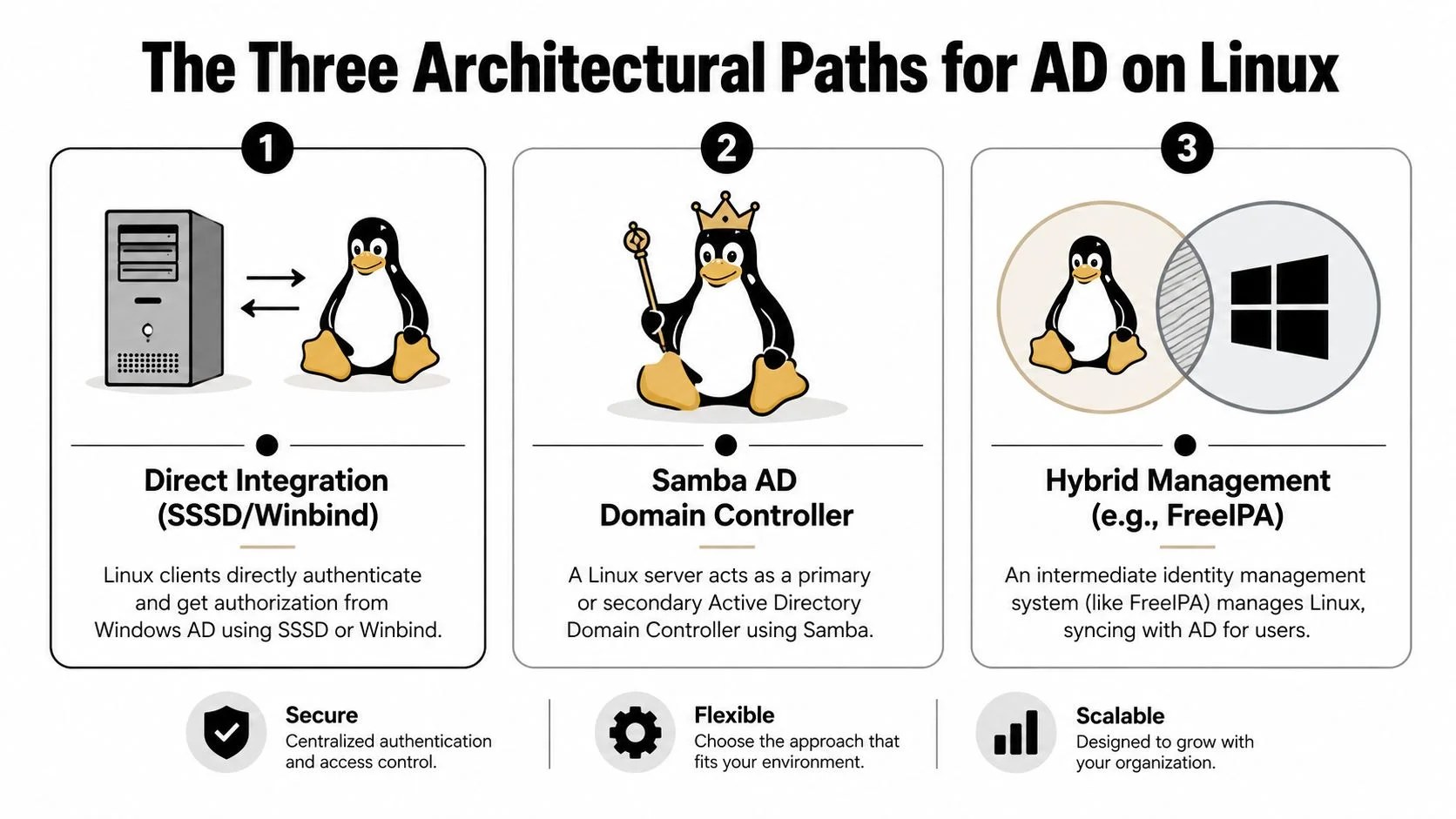
Direct integration with AD
This is the common path. Linux clients join an existing Windows AD domain and authenticate directly with AD using tools such as SSSD, realmd, adcli, and sometimes Winbind.
It's usually the right answer when Windows AD already exists and Linux is just another set of systems that need to consume central identity. It keeps the design straightforward. Your Linux hosts don't become directory servers. They trust the existing one.
The downside is dependency. If AD is down, misconfigured, or unreachable because DNS is wrong, Linux authentication starts failing in ways that can look mysterious until you trace the stack properly.
Samba as an AD-compatible domain controller
This path is different. You're not just integrating Linux with Active Directory. You're asking Linux to host an AD-compatible directory service using Samba.
That can be attractive when your infrastructure is Linux-heavy and you want to reduce reliance on Windows Server while still supporting AD-style domain behavior. It can work well, but it shifts responsibility onto your team. DNS, replication design, service management, and compatibility become your problem to own.
Running Samba as a domain controller makes sense when Linux is part of the identity foundation, not just another client of it.
Hybrid management with Linux-native identity
Some environments want AD integration without making AD the center of everything. That's where Linux-native or Linux-first identity layers come in. In practice, teams often look at options such as FreeIPA or similar platforms that can coexist with AD, sync selectively, or partition responsibilities.
This approach can give Linux more autonomy. It also introduces another identity system, which means another system to maintain, secure, and explain to auditors and admins.
Here's the practical comparison.
| Approach | Primary Tool | Best For | Key Benefit | Main Drawback |
|---|---|---|---|---|
| Direct integration | SSSD or Winbind | Existing Windows AD environments with Linux clients | Centralized identity with minimal extra layers | Strong dependence on AD health and name resolution |
| Samba AD domain controller | Samba | Linux-centric environments that want AD-compatible domain services | Reduces need for Windows-based domain controllers | Higher operational complexity |
| Hybrid management | FreeIPA or similar Linux-native directory layer | Teams that want Linux autonomy with AD interoperability | More control over Linux identity design | Another moving part to operate |
A lot of teams overcomplicate this decision. A simpler decision model works better:
- Choose direct integration if Windows AD is established and you mainly need Linux logins, group lookups, and centralized access control.
- Choose Samba DC if Linux needs to host the directory layer itself.
- Choose hybrid management if Linux identity requirements differ enough that direct dependence on AD becomes a liability.
If you're also thinking about broader exposure of identities and accounts outside the data center, the same architectural mindset applies to protecting your data online. Centralization helps, but only when you understand what it makes simpler and what it makes more fragile.
Guide Joining Linux Systems to an Existing AD Domain
Monday morning failure case. A Linux VM was "joined to AD" on Friday, realm list looks fine, but nobody can log in over SSH. In practice, that usually means the team treated the join itself as the goal. It is only the first checkpoint.

For an existing Windows AD environment, direct integration is usually the lowest-friction option. The usual stack is realmd, adcli, SSSD, and your Kerberos client packages. That gives you centralized authentication and identity lookups without adding another directory layer. The trade-off is straightforward. If DNS, time sync, or AD site connectivity are messy, Linux will expose those problems quickly.
A practical baseline on many distributions looks like this:
sudo dnf install realmd adcli sssd sssd-tools oddjob oddjob-mkhomedir krb5-workstation
On Debian or Ubuntu, the package names differ slightly:
sudo apt install realmd adcli sssd sssd-tools libnss-sss libpam-sss packagekit krb5-user
Package names vary by platform, so confirm what your distribution ships before copying commands between systems.
Before you join anything
Join failures are usually boring. That is good news, because boring problems are easier to fix.
Check the basics first:
- DNS for the host points to AD DNS servers, or to resolvers that can correctly answer AD records
- The host can resolve the domain and domain controllers
- Time is in sync closely enough for Kerberos to work
- Required ports to domain controllers are reachable
- The hostname and FQDN are set correctly
A few quick checks catch a lot:
hostname -f
resolvectl status
dig _ldap._tcp.dc._msdcs.example.com SRV
dig _kerberos._tcp.example.com SRV
timedatectl
If SRV lookups fail or time is off, stop and fix that before trying to join. A failed join after bad DNS output rarely gives you new information.
Discover the realm first
realm discover tells you whether the machine sees the domain the way you expect it to. That matters because discovery problems usually point to DNS, Kerberos, or naming issues, not to SSSD itself.
realm discover example.com
Review the output closely. Confirm the realm name, the client software selected, and the domain information returned. If discovery shows the wrong realm, no realm, or inconsistent casing, correct the underlying issue first.
I prefer doing a Kerberos test before the join if I have a delegated join account available:
kinit joinaccount@example.com
klist
If kinit fails here, the join will usually fail too, or succeed partially and leave you with harder troubleshooting later.
Join the domain
Once discovery and Kerberos look sane, join the machine with an account that has permission to add computers to the domain:
sudo realm join example.com -U joinaccount
After that, verify the system state immediately:
realm list
id user@example.com
getent passwd user@example.com
Those checks answer different questions. realm list shows that the machine believes it joined. getent passwd proves the Linux name service path can resolve an AD user. id confirms user and group mapping are working. If realm list succeeds but getent passwd returns nothing, the host is joined in theory and still useless for logins.
Check SSSD before testing SSH
The generated config is a starting point, not a finished design. Look at /etc/sssd/sssd.conf and confirm it matches your login and access model.
Settings that often need attention:
- whether users log in as
useroruser@example.com - whether only specific AD groups should have access
- whether you want fully qualified names enabled
- whether home directories should be created automatically
A simple example looks like this:
[sssd]
services = nss, pam
config_file_version = 2
domains = example.com

[domain/example.com]
id_provider = ad
access_provider = ad
ad_domain = example.com
krb5_realm = EXAMPLE.COM
use_fully_qualified_names = False
fallback_homedir = /home/%u
default_shell = /bin/bash
Permissions matter here:
sudo chmod 600 /etc/sssd/sssd.conf
sudo systemctl restart sssd
sudo systemctl enable sssd
If you want home directories created at first login, enable that explicitly. On Debian-derived systems, a common method is:
sudo pam-auth-update --enable mkhomedir
On RHEL-family systems, oddjob-mkhomedir is commonly used, depending on release and PAM defaults.
Test the full login path
Do not stop after id works. Authentication, identity lookup, PAM session setup, and SSH access control can each fail separately.
A clean test sequence is:
realm listgetent passwd user@example.comid user@example.comkinit user@example.com- SSH or console login with the same account
That order saves time. It isolates whether the failure is in domain membership, NSS, Kerberos, or PAM. I also recommend testing with a normal delegated AD user, not only with a domain admin account, because admin accounts often bypass the restrictions that break real user access.
A visual walkthrough helps if you're validating the flow against a live system:
Common mistakes after a successful join
The join command can succeed while the deployment is still wrong. These are the problems I see most often:
- DNS points to public resolvers instead of AD DNS
- users resolve only with
user@domain, but the team expects short names - SSSD is running, but NSS or PAM integration is incomplete
- home directory creation is missing
- access control is too open, so every domain user can attempt login
- access control is too strict, so only the join account works
If access should be limited, set that intentionally. For example, realm permit can restrict access to specific groups or users instead of exposing every AD identity to every Linux host.
Credential handling during join operations
Join accounts tend to get passed around in chat, pasted into terminals on jump boxes, and left in shell history. That is a bad habit, especially in larger environments where the same delegated account joins many systems. Teams that document and enforce password manager best practices usually handle this part better, because the join credential, break-glass accounts, and service account secrets stop living in ad hoc text files.
Validation that actually matters
The useful question is not "did the machine join?" The useful question is "can the right AD users authenticate, get their groups, receive the right shell and home directory, and be denied when policy says no?"
Validate that on one host before automating it across fifty. That is how you avoid mass-producing a broken pattern.
Guide Running an AD-Compatible Domain on Linux with Samba
Using Samba as an AD-compatible domain controller is a different class of work. You're no longer integrating a Linux host into someone else's identity system. You're building the directory service on Linux itself.
That can be the right call in Linux-first environments, labs, branch deployments, or organizations trying to reduce Windows Server dependency. It can also go sideways fast if you treat it like a package install instead of a domain design exercise.
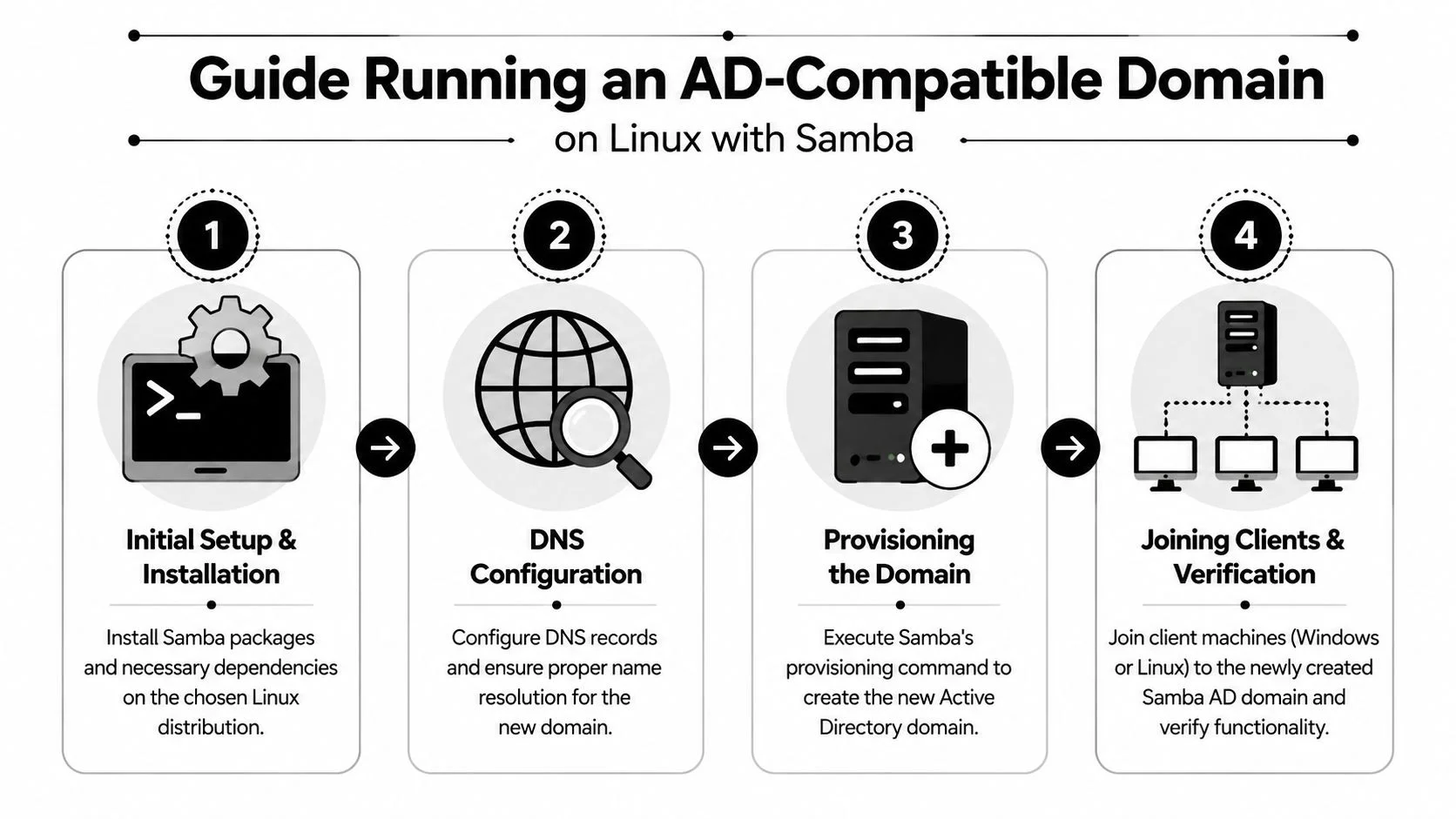
A standard Samba AD DC setup sequence includes disabling conflicting services such as smbd, nmbd, and winbind, masking them, then enabling samba-ad-dc. Admins also commonly point /etc/resolv.conf to 127.0.0.1 and disable systemd-resolved, based on the Samba AD DC walkthrough in this setup video. The most common failure mode is name resolution. If DNS is wrong, the rest won't behave.
Start with the design, not the package manager
Before provisioning anything, decide what this server is supposed to be:
- A new primary AD-compatible domain
- An additional domain controller in an existing design
- A test or migration platform
Those scenarios don't carry the same risk. A greenfield Samba domain gives you freedom. A migration or coexistence scenario demands much more caution around naming, DNS authority, and client behavior.
DNS is usually the first thing that breaks and the last thing people check carefully enough.
Prepare the host correctly
On a system meant to run Samba as an AD DC, the key preparatory step is removing service conflicts. Traditional Samba file server components and an AD DC role are not the same thing.
A practical prep checklist looks like this:
- Disable conflicting services such as
smbd,nmbd, andwinbind - Mask those services so they don't come back after reboot or package updates
- Enable the DC role by using
samba-ad-dc - Ensure the host uses the correct DNS path before provisioning the domain
That last point is where many setups fail. If the server resolves names using the wrong resolver chain, provisioning may appear to work while SRV lookups or client joins fail later.
Provision the domain
Once the host is clean and DNS behavior is intentional, provision the domain with Samba's domain setup tooling. The exact command syntax varies by distribution and package layout, so use the tooling provided by your platform and verify what gets generated.
During provisioning, pay attention to:
- Realm and domain naming
- Administrator credentials
- DNS backend choices
- Generated configuration paths
After provisioning, start the samba-ad-dc service and make sure it survives reboot cleanly.
A basic verification routine should include:
- Checking service status for
samba-ad-dc - Running
samba-toolcommands to inspect domain health - Verifying expected directory records resolve through the Samba-provided DNS path
What works well with Samba AD DC
Samba can be a very strong fit when your team is already comfortable operating Linux infrastructure and wants directory services to live in that same operational model. It also helps when you want to keep Windows clients and Linux systems under a familiar domain pattern without centering the stack on Windows Server.
The good outcomes usually have the same traits:
- Clear DNS ownership
- Few unnecessary identity layers
- Strong backup discipline
- Admins who know whether a problem is in Kerberos, LDAP, Samba, or DNS
What tends not to work
Samba AD DC struggles when teams expect it to erase architectural uncertainty. It won't. If the environment already has unclear naming, split-brain DNS behavior, or half-planned coexistence assumptions, Samba won't make those easier.
A few patterns usually lead to pain:
| Symptom | Likely reason |
|---|---|
| Clients can't join the domain | DNS path isn't using the DC correctly |
| Authentication works inconsistently | Name resolution or service conflicts remain |
| Admins keep editing the wrong services | The server was prepared like a file server, not a DC |
If you choose this path, treat it like core infrastructure. That means tested recovery, careful change control, and explicit ownership. A domain controller is not a side project.
Troubleshooting Common Linux AD Integration Headaches
When Active Directory on Linux fails, the errors often point in the wrong direction. The password looks wrong, but it's time skew. The join command looks broken, but it's DNS. The user seems absent, but SSSD isn't resolving the naming format you think it is.

The fastest way to debug is to work symptom first, then trace backward through the identity stack.
Realm join fails immediately
If realm discover or realm join fails, assume infrastructure before configuration.
Check these first:
- Name resolution because a host that can't find the realm correctly won't join it correctly
- Domain naming and case because realm names are less forgiving than people expect
- Basic reachability between the Linux host and the AD services it needs
If discovery is incomplete or inconsistent, fix that before changing SSSD.
Password is correct but authentication fails
This usually smells like Kerberos trouble. A user enters valid credentials, but the system still rejects the login or refuses to obtain tickets.
Use a minimal validation set:
kinitto test ticket acquisition directlyklistto see whether a ticket existsid user@domainto confirm account resolution- SSSD logs if Kerberos and identity results disagree
If kinit fails, don't spend time on SSH or sudo yet. Fix the ticket path first.
A failed Kerberos path can look like a bad password even when the password is fine.
User not found even though the join worked
This is one of the most frustrating states because admins see a successful join and expect the system to be usable. Then getent passwd user@domain returns nothing.
That usually points to one of these:
- SSSD domain configuration isn't aligned with the actual AD domain
- The username format is different from what you're testing
- Caching or stale state is interfering with fresh lookups
Useful checks include reviewing /etc/sssd/sssd.conf, restarting SSSD after changes, and rerunning getent and id tests with the exact domain-qualified username format you intend to support.
Login works but the session is broken
This is the classic “I got in, but the box is still unusable” problem. The user authenticates, then lands without a proper home directory, expected shell environment, or intended authorization.
Look at the Linux side, not AD:
- PAM configuration may not be creating home directories
- Shell assignment may not match your policy
- Access controls may be too broad or too restrictive
A successful authentication event doesn't prove a good user experience. It only proves credentials passed one step.
A simple symptom map
| Symptom | Most likely area to inspect | First useful command |
|---|---|---|
| Join fails | DNS or realm discovery | realm discover <domain> |
| Password rejected unexpectedly | Kerberos | kinit |
| User lookup fails | SSSD or LDAP-visible identity | getent passwd user@domain |
| Ticket questions | Kerberos cache state | klist |
| Login succeeds but environment is wrong | PAM and local session setup | Review PAM config and test login again |
One operational habit helps more than any single command. Change one thing at a time. AD integration spans DNS, Kerberos, LDAP, PAM, SSSD, and local policy. If you edit all of them in one pass, you won't know what fixed it or what broke it.
If you suspect an actual compromise rather than a configuration problem, move out of troubleshooting mode and into incident response. That broader workflow overlaps with practical steps for getting rid of hackers, especially when authentication failures turn out to involve credential misuse rather than bad config.
Hardening Your Integration and Final Best Practices
A successful domain join only proves the plumbing works. It does not mean the Linux host is safe to put into production.
The first hardening decision is authorization scope. If you let any authenticated domain user reach a server, Active Directory becomes a large shared trust boundary instead of a controlled identity source. On Linux, that usually means limiting logins to a small set of AD groups in SSSD, SSH, and sudo, then reviewing those groups like any other privileged access path.
Offline authentication deserves the same level of scrutiny. Cached credentials are useful for laptops, remote sites, and systems that must keep operating through a temporary directory outage. They also change your risk profile. A server that can still accept cached logins during an AD outage may be doing exactly what you want, or exactly what your security policy forbids. Test that behavior on purpose. Disconnect the host from the domain controllers, verify who can still log in, and confirm how long the cache remains valid.
A few checks catch many bad assumptions:
- Restrict login access to approved AD groups in SSSD or your PAM stack, not to the whole domain.
- Map
sudocarefully to admin groups and keep the privileges narrow. - Set a policy for offline logins and verify it with an actual network loss test.
- Rotate and protect join credentials. Machine accounts and keytabs deserve the same care as service credentials.
- Keep time and DNS boring. Drift and name resolution problems still cause many AD failures after a system has been working for months.
- Back up Samba DCs like directory infrastructure, with tested restores, not just copied files.
If you use SSSD, inspect the effective settings instead of trusting what you think is in the config:
sssctl config-check
sssctl domain-list
sssctl user-checks user@domain
For Kerberos-backed access, verify the host keytab and ticket path before users find the problem for you:
klist -k
kinit -k HOSTNAME\$@REALM
klist
For SSH, pair AD group controls with a clear allow-list:
# /etc/ssh/sshd_config
AllowGroups linux-ssh-admins linux-ssh-users
For sudo, keep the mapping explicit:
# /etc/sudoers.d/ad-admins
%linux-sudo-admins ALL=(ALL) ALL
The architecture choice still matters here. A host joined to an existing AD domain needs tight local policy because the trust boundary lives elsewhere. A Samba AD DC needs the same host hardening plus directory-specific backup, replication, and patch discipline. Hybrid designs reduce dependence on AD for every decision, but they also add another identity system to operate. There is no universally correct model. The right one is the one your team can secure, monitor, and recover under pressure.
Good AD integration on Linux should feel uneventful. Users who should get in can get in. Users who should not, cannot. When something breaks, the failure stays small enough to diagnose from the shell.
If you are tightening both system access and user habits, these personal cybersecurity best practices complement the infrastructure controls above.
If you want to see what identity data, exposed accounts, and public traces are already tied to your name, email, phone number, or usernames, try the free check from Digital Footprint Check. It's a practical way to review your online exposure before someone else does.