· Digital Footprint Check · Content Marketing · 16 min read
How to Get Rid of Hackers: a 2026 Response Guide
Worried you've been hacked? Learn how to get rid of hackers from your accounts and devices with our step-by-step incident response guide for 2026.

You usually know something is wrong before you can prove it. A password reset email lands in your inbox that you never requested. A friend asks why you sent them a strange link. Your phone suddenly loses service, then your email password stops working. Or your laptop camera light comes on when you're not using it.
When people ask how to get rid of hackers, they often imagine someone sitting inside their device, typing in the dark. Sometimes that's true. More often, the attacker is sitting inside your accounts instead. They're using stolen passwords, hijacked sessions, access to your email, or a SIM swap to keep control while you're focused on antivirus scans.
That distinction matters because the fix is different. If the problem is on the device, you isolate it. If the problem is in your accounts, you have to lock down identity, recovery methods, and every place the attacker can re-enter.
First Signs of a Hack and Immediate Triage
At 7:15 a.m., your phone drops service, your inbox starts filling with password reset emails, and a friend asks why you sent them a strange link. That is enough to treat the situation as active. Do not wait for proof.
Start by deciding what was likely hit first. A compromised device and a compromised account can look similar from the outside, but the first moves are different. Device compromise points to malware or remote access on the computer or phone itself. Account compromise is more common, and it often starts with exposed personal data, reused passwords, stolen session cookies, or a SIM swap that gives the attacker control of recovery codes.
Bitdefender notes that account takeovers can persist through session theft, email compromise, and SIM swapping, even after a password change. It also warns that SMS-based two-factor authentication can be intercepted, which is why authenticator apps are safer for recovery and sign-in (Bitdefender's account takeover guidance).
Device compromise vs account compromise symptoms
| Symptom | Likely Device Compromise (Malware) | Likely Account Compromise (Stolen Credentials) |
|---|---|---|
| Mouse moves on its own or apps open by themselves | Yes | Unlikely |
| Webcam or microphone activates unexpectedly | Yes | Possible, but less direct |
| Password reset emails you didn't request | Possible | Yes |
| You're signed out of email or social accounts from all devices | Possible | Yes |
| Friends receive messages you didn't send | Possible | Yes |
| New forwarding rules appear in email | Unlikely | Yes |
| Phone suddenly loses cellular service, then accounts get targeted | Unlikely | Yes, possible SIM swap |
| Security software is disabled or system settings change on their own | Yes | Unlikely |
| New logins appear from unfamiliar devices or locations | Possible | Yes |
| Banking, social, and email all show suspicious activity at once | Possible | Very likely if email was compromised first |
If you are unsure, work the problem as both. That is the safest assumption in the first few minutes.
Use a second, trusted device for checks and recovery. If the laptop or phone in your hand is the one acting strangely, do not use it for email, banking, password resets, or account recovery. I have seen people lock an attacker out of one account, then hand them the new password by changing it on the infected device.
What to do in the first fifteen minutes
Check your email exposure first. If the attacker got in through old breach data, password reuse, or publicly exposed personal details, you need to know that before you start resetting everything blindly. Run an email exposure check to see whether your address has appeared in known breaches and use that as a clue for root cause, not just cleanup.
Then look for signs that point to identity takeover rather than malware. Unknown password reset requests, new inbox forwarding rules, recovery changes, carrier issues, and login alerts from places you do not recognize usually mean the attacker is abusing access to your accounts. That is why this article does not stop at virus scans. In many cases, the primary weakness is in your digital footprint. Old breach records, exposed recovery emails, public profile details, and reused passwords give the attacker a clean path back in.
If the phone is the center of the problem, this practical guide for phone users can help you separate an ordinary device glitch from signs of compromise.
Red flags that need immediate action
- Primary email shows changes you did not make. New forwarding rules, filters, recovery addresses, or trusted devices put the attacker in position to reset everything else.
- Your phone loses service for no clear reason. That can be a carrier issue, but during an account takeover it can also line up with a SIM swap attempt.
- Money is involved. If banking, payment apps, or crypto accounts show suspicious activity, contact the provider first and read articles later.
- Work access is mixed in. If the affected account or device touches your employer's systems, report it through the company's security or IT channel right away.
The goal in triage is not to solve the whole incident. The goal is to identify whether you are dealing with malware, identity takeover, or both, so your next actions cut off the attacker instead of wasting time.
Contain the Breach and Stop Further Damage
You open your email and see password reset messages, then a bank alert, then a text that your number may have changed. At that point, speed matters, but random clicking makes things worse. Containment is the stage where you cut off the attacker's access before they can use one compromised account to take over the rest.
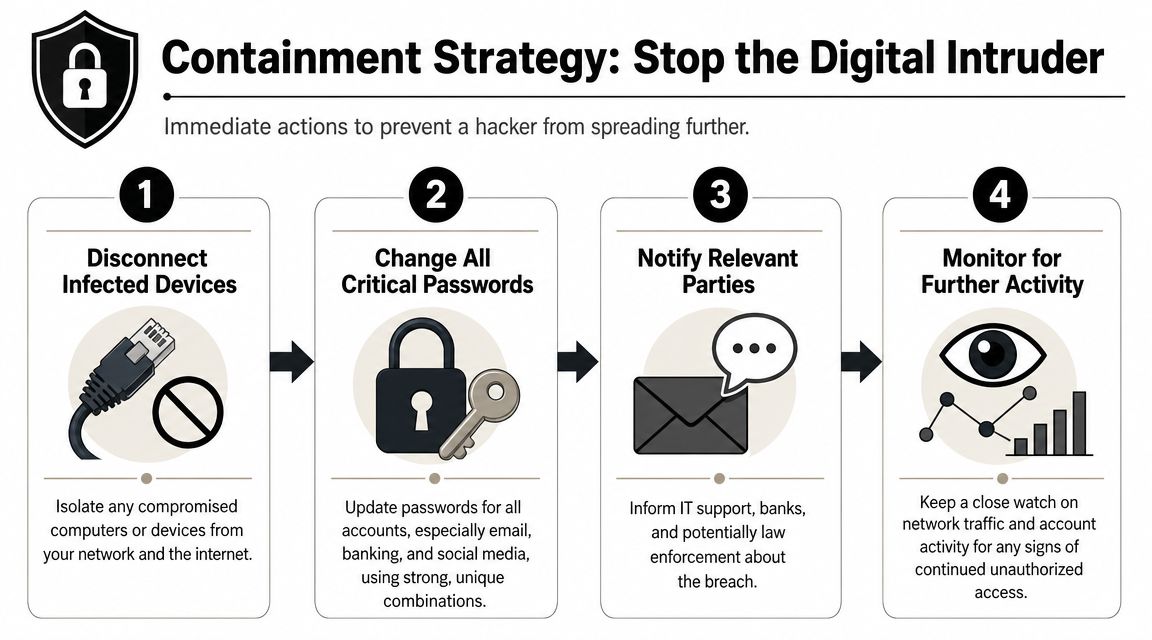
In incident response, the order matters. Stop access first. Preserve what you may need later. Save cleanup for after the attacker loses their foothold. For a home user, that means making a few high-value changes from a clean device instead of trying to inspect every setting on the compromised one.
If you suspect device compromise
Assume anything typed on that device can be seen until you prove otherwise.
Put the device in airplane mode or disconnect it from Wi-Fi if you can do that safely. Then switch to a different trusted device and handle the accounts the attacker is most likely to use against you.
- Lock down your primary email account first. Email is usually the reset path for everything else, so review recovery methods, remove unknown devices, and sign out other sessions.
- Change passwords for financial, shopping, and cloud accounts. Start with accounts that can move money, store tax documents, or expose private files.
- Freeze account recovery routes you do not recognize. Unknown backup emails, phone numbers, passkeys, and trusted browsers are often how an attacker gets back in.
- Tell key providers the account may be compromised. Banks, payment apps, and your mobile carrier can place extra checks on changes while you regain control.
Do not start your malware cleanup yet. If the attacker still has access to your email or phone number, they can undo your work faster than you can finish it.
If you suspect account takeover without obvious malware
This is the pattern I see more often. The laptop or phone may be fine. The attacker got in through exposed personal data, reused credentials, weak recovery settings, or a hijacked phone number.
Start where account takeovers spread:
- Check the inbox for silent persistence. Look for forwarding rules, mailbox delegates, filters, recovery changes, and security alerts you did not trigger.
- Revoke active sessions. Sign out everywhere on major accounts so stolen session cookies or remembered logins stop working.
- Reset passwords from a clean device. Use unique passwords, not modified versions of old ones.
- Replace SMS-based recovery where possible. Authenticator apps and hardware keys are harder to intercept.
If your phone number is tied to recovery, treat the carrier account as part of the breach. Review the warning signs of SIM cloning and related phone number takeover risks before you call your carrier, so you can ask for port-out protection, a carrier PIN, and notes on recent SIM or line changes.
A repeat login after a password reset usually points to a second access path. In plain terms, the attacker may still control your email, your phone number, a saved session, or a recovery option you missed. That is why containment is not just about changing one password. It is about closing every route back in.
What not to do during containment
- Do not delete emails, logs, or alerts right away. They can help you prove fraud, recover accounts, or trace how the takeover started.
- Do not use the compromised inbox as your source of truth. Confirm changes through the account's security page or official support.
- Do not keep testing the infected or suspicious device. Every extra login gives the attacker another chance to capture data.
- Do not focus only on malware. A large share of personal hacks are really identity and account recovery failures, not just bad software on a laptop.
Containment works best when you think in terms of access paths. Email. Phone number. Saved sessions. Recovery settings. Cut those off first, and the attacker usually loses momentum fast.
Eradicate the Hacker from Your Systems
Containment stops the bleeding. Eradication removes the foothold.
For personal devices, the most reliable path is not clever. It's credential reset, full malware scan, and clean reinstall or factory reset. Microsoft advises changing important passwords, running full malware scans, and using a fresh Windows installation for severe cases. Security.org recommends a factory reset for a hacked phone after backing up essential data (Microsoft recovery guidance).

For laptops and desktops
If you strongly suspect malware, remote access tooling, or tampering, don't waste days trying to “clean” it perfectly in place.
Use a tiered approach:
- Start with a full antivirus or antimalware scan if you need a quick read on obvious threats.
- Review startup items and installed remote-control tools only if you know what you're looking at.
- Reinstall the operating system if the system handled sensitive accounts, financial data, or work access.
That last step is the one that's often resisted. It feels extreme. In practice, it's often faster and more trustworthy than endless partial cleanup.
For phones and tablets
Phones are different because so much of your identity lives there. Email, messaging apps, banking alerts, and authentication codes all flow through one small device.
Back up what you need. Photos, contacts, essential notes. Then factory reset if you have credible signs of compromise. Reinstall apps manually. Don't restore from a backup if you think the issue may have come from a bad app or tampered settings.
Field note: The cleanest rebuild is selective. Restore your life, not every old setting.
A complete wipe matters for storage too. If you're resetting a computer you plan to keep or dispose of, use a proper drive wiping process rather than assuming deletion removed everything.
For online accounts
Getting rid of hackers from accounts is less about one password change and more about removing every lingering path back in.
Run this checklist:
- Change the password
- Sign out of all active sessions
- Remove unknown devices
- Review third-party app access
- Delete suspicious forwarding rules and delegates
- Update recovery email and phone
- Switch to app-based MFA
- Save backup codes offline
Here's a useful explainer before you work through that list:
The mistake people make after a reset
They rebuild the same weak setup. Same reused password style. Same SMS fallback. Same public recovery clues. Same old linked apps they forgot they authorized years ago.
If you don't change those, the attacker doesn't need malware anymore. They just need the same opening.
Rebuild and Secure Your Digital Defenses
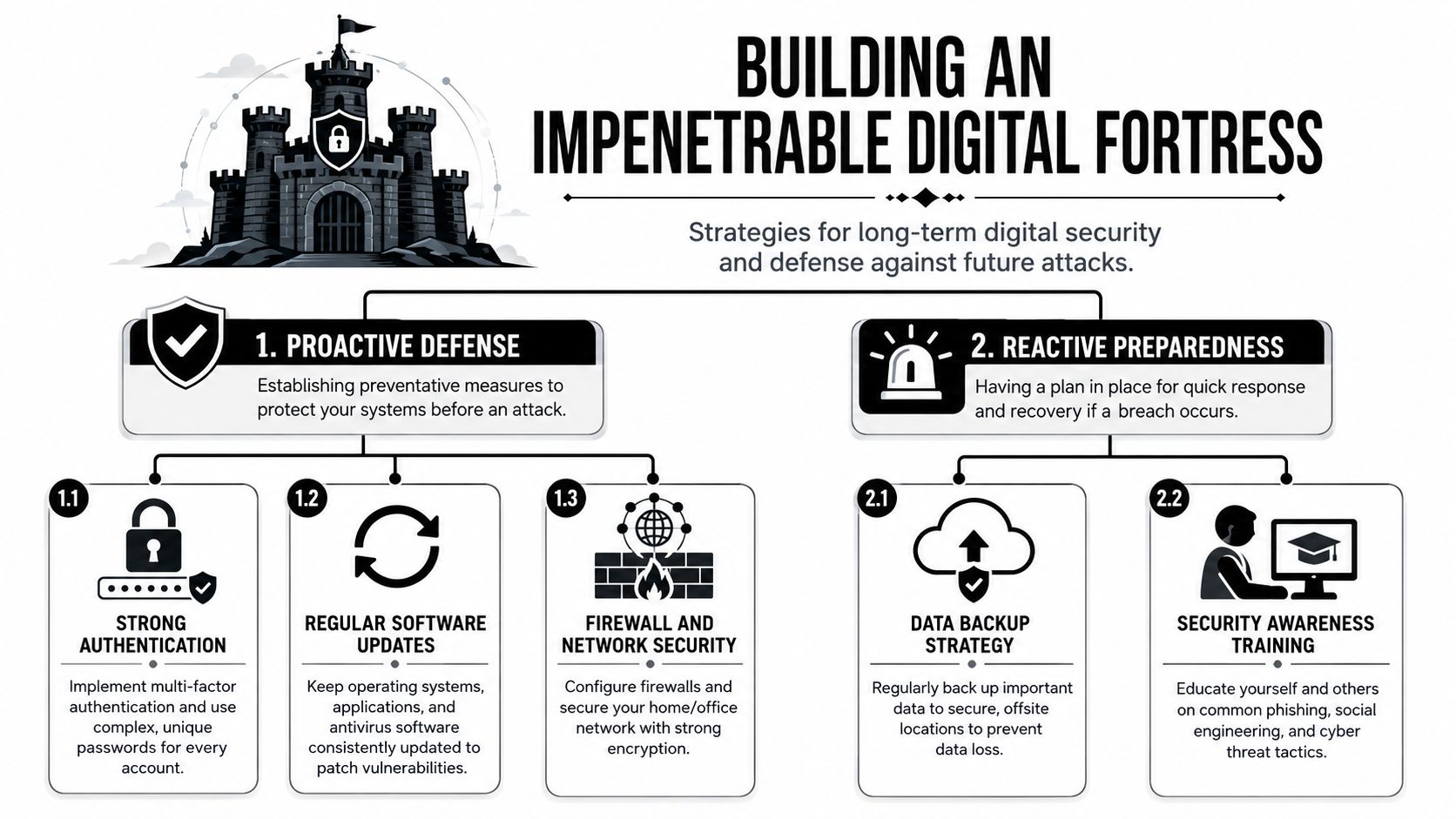
A clean reset fails fast if you rebuild the same weak setup. I see this after account takeovers all the time. The malware is gone, the device is clean, and the attacker still gets back in through a reused password, a weak recovery path, or an old account the owner forgot existed.
The goal here is not to make your setup perfect. It is to remove easy paths back in and make the next attack much harder to pull off.
Replace reused passwords with a system
Password reuse keeps small breaches from staying small. If one old forum, shopping site, or app gets exposed, attackers try those same credentials everywhere else. That is how a leak from years ago turns into a current email or banking crisis.
Use a password manager and let it generate a different password for every account. That addresses the core issue. You no longer need to remember dozens of credentials, and a breach at one site does not hand over access to the rest.
Start with the accounts that can grant access to other accounts first. Email, Apple ID or Google account, banking, cloud storage, password manager, and social platforms all belong at the top of the list. Then work outward. If you need to track down forgotten logins before you can secure them, review ways to find all accounts linked to an email address.
Upgrade MFA and recovery paths
Turning on MFA helps, but the method matters. A security key or authenticator app gives better protection than SMS, especially in takeover cases tied to exposed personal data. SMS can still be intercepted through SIM swaps or carrier fraud. Email codes are only as safe as the email account receiving them.
Use this order of preference when you can:
| Method | Security value | Main weakness |
|---|---|---|
| Security key | Strong | Less convenient, easy to postpone |
| Authenticator app | Strong | Still depends on your device security |
| Email code | Better than password alone | Fails if email is already compromised |
| SMS code | Better than nothing | Exposed to SIM swapping and interception |
Recovery settings deserve the same attention as MFA. Remove old phone numbers, stale backup emails, and security questions with answers someone could piece together from public posts, people-search sites, or past breaches. Account takeover frequently begins with these weak points. The attacker does not beat your password. They reset it.
Secure the network and the home edge
If your home has laptops, phones, cameras, smart TVs, and work devices on the same network, the router becomes part of your defense. Update its firmware, change the admin password, disable remote management unless you need it, and put IoT devices on a guest network if your equipment supports that.
A standard consumer router is enough for many households. Some people want tighter controls, better logs, or stronger separation between device groups. In those cases, dedicated options such as Redchip's network firewalls can make sense. The trade-off is setup time and ongoing management.
Build routines that still work under stress
Good security habits need to be simple enough to repeat when you are tired, busy, or dealing with another problem.
- Turn on automatic updates for your operating system, browser, router, and apps.
- Keep offline or cloud backups you can verify so a wipe or lockout does not become a disaster.
- Review account activity and login alerts regularly so you catch small warning signs early.
- Remove old app connections and browser extensions you no longer use.
- Audit old accounts a few times a year and close the ones that no longer serve a purpose.
This part matters because many real-world hacks are not advanced intrusions. They are account takeovers fueled by exposed data and weak account hygiene. Rebuilding your defenses means fixing both sides: the technical setup and the personal information trails that make you easier to target.
Investigate Your Digital Footprint to Find the Source
A lot of “hacks” start with information you left in public. Old usernames. A breached email. Birthday posts. Public friend lists. Gaming handles reused across platforms. A phone number exposed in a directory. Enough fragments to answer security questions, target your inbox, or impersonate you convincingly.
Consumer security guidance increasingly treats that public trail as part of the attack surface. Many incidents aren't purely technical intrusions at all. They're social engineering attacks built on exposed personal data from social profiles, public records, and breach databases, which is why reducing your public footprint matters as much as technical hardening (consumer guidance on exposed digital footprints and social engineering).

Think like an OSINT analyst
OSINT sounds technical, but the basics are simple. Look at yourself the way a stranger would.
Search for:
- Your main and old email addresses
- Usernames you've reused
- Phone numbers
- Full name plus city
- Profile photos reused across platforms
- Old forum posts, gamer tags, and marketplace accounts
The point isn't paranoia. It's root cause analysis. If an attacker targeted you through account recovery, phishing, or impersonation, your public footprint often explains why you were easy to target.
What attackers often piece together
An attacker doesn't need a hidden exploit if they can learn enough to be believable.
They might combine:
| Exposure | How it gets used |
|---|---|
| Breached email address | Password reset targeting, phishing, credential stuffing |
| Reused username | Finding linked accounts across platforms |
| Public birthday or pet name | Guessing weak passwords or security answers |
| Visible phone number | SIM-swap targeting, harassment, recovery abuse |
| Public friend or family details | More convincing impersonation and phishing |
Account security and privacy overlap in this context. The less a stranger can learn quickly, the harder it is to aim an attack at you specifically.
Do one careful self-audit
Pick one identity thread and follow it. For example, start with your oldest email address and map every account, mention, and profile tied to it. That often surfaces forgotten accounts, recovery paths, and abandoned profiles that still expose useful personal details.
If you want help tracing that trail, a tool can speed up the work. Digital Footprint Check's free checker is one option for scanning public exposure, and this guide on finding accounts linked to an email address is useful when you're trying to discover where an old inbox still connects to live profiles.
What gets you targeted isn't always malware. Sometimes it's the fact that a stranger can learn too much about you in ten minutes.
When to Call for Professional Help
Some cases are bigger than self-service cleanup. If money moved, work systems were touched, or the attacker is persistent, threatening, or stalking you, bring in other people fast.
Call your bank or provider immediately when money or service is involved
If there are unauthorized transactions, card changes, or suspicious recovery attempts tied to a financial account, contact the bank or platform right away through official channels. Freeze what needs freezing. Ask them to note the account for fraud review.
If your mobile service dropped at the same time your accounts were targeted, call your carrier and ask about takeover protections, recent account changes, and whether your number was moved or ported.
Notify your employer if work is in scope
If the compromised device, email, cloud drive, or messaging account is tied to your job, report it. Don't wait because you're embarrassed. Small personal incidents become business incidents when company data, client information, or internal access is involved.
Involve law enforcement when threats cross the line
You should strongly consider a police report when:
- Money was stolen
- Someone is impersonating you
- The attacker is blackmailing or threatening you
- The behavior looks like stalking or harassment
- Identity documents or tax-related records are involved
If you need to understand reporting duties in a business or employment context, review data breach notification requirements and coordinate with legal or compliance support where appropriate.
Bring in a forensic professional when the facts matter
A private forensic investigator or incident response firm makes sense when you need to preserve evidence, understand exactly what happened, or document the event for legal, insurance, or employer reasons.
That's especially true when:
- you can't tell whether the compromise was on-device or account-based
- the attacker keeps regaining access
- you suspect spyware or targeted surveillance
- you're dealing with a divorce, stalking, extortion, or workplace dispute where proof matters
You don't always need a professional to get rid of hackers. But you do need one when the stakes move beyond inconvenience and into safety, money, or legal exposure.
If you want to understand what personal data, profiles, and breach exposure may have made you vulnerable in the first place, try Digital Footprint Check. It helps you identify publicly accessible information tied to your email, usernames, and online presence so you can reduce exposure and tighten the accounts attackers are most likely to target next.