· Digital Footprint Check · Content Marketing · 15 min read
Business Continuity Management: Your Complete 2026 Guide
Learn what business continuity management is, its key components, and how to protect your organization from disruption with our complete 2026 guide.

Only 49% of businesses globally have a formal continuity plan, which means approximately 171 million US companies remain unprepared for a significant continuity break according to business continuity statistics compiled by Go Beyond. That number changes how you should think about business continuity management. This isn't a niche compliance exercise for banks and large enterprises. It's a basic survival discipline.
When considering business continuity, individuals often envision flooded offices, server outages, or backup generators. Those matter. But modern disruption often starts somewhere less visible. An employee reuses a breached password. A supplier fails. An executive's exposed personal data creates a physical security issue. A fake social profile damages trust during an already stressful incident. Your public digital footprint can turn a manageable event into a wider operational problem.
That's why business continuity management deserves a broader lens. It isn't just about getting systems back online. It's about keeping the organization functioning when technology, people, vendors, facilities, or reputation come under pressure.
What Is Business Continuity Management
Business continuity management is the discipline of making sure a business can keep operating during disruption and recover in an organized way afterward. A simple way to understand it is to think of it as the company's resilience playbook. Not just for IT, and not just for disasters, but for the whole organization.
The core idea is straightforward. If something important breaks, who does what, in what order, using which tools, from which location, with which backups and substitute providers? If those answers only exist in a few people's heads, the business is fragile.
BCM versus disaster recovery
Readers often misunderstand this distinction. Disaster recovery usually focuses on restoring systems and data. Business continuity management is wider. It covers customer service, payroll, communications, leadership decisions, vendor coordination, legal obligations, remote work arrangements, and the practical reality of how people keep the business moving.
A ransomware event is a good example. Restoring servers is disaster recovery. Deciding how staff communicate, how customer support operates, how orders are handled manually, and how public messaging is managed belongs to business continuity management.
A business can have solid backups and still fail operationally if nobody knows how work continues while those backups are being restored.
Why digital exposure belongs in the conversation
Traditional continuity plans often focus on buildings, hardware, and internal systems. That's no longer enough. Publicly exposed data changes risk. A company's online footprint can reveal leaked credentials, impersonation risks, employee oversharing, or sensitive information that attackers and scammers use during a crisis.
If you want a practical starting point, it's helpful to understand what a data breach actually looks like in real terms. Many continuity failures begin with exactly that kind of exposure, then spread into downtime, legal headaches, and reputational damage.
What BCM really protects
A mature BCM program protects more than uptime. It protects:
- Operations: How core services continue when normal workflows break.
- Revenue flow: How the business keeps serving customers during disruption.
- Trust: How employees, partners, and customers judge competence under pressure.
- Decision quality: How leaders respond when facts are incomplete and time is tight.
That broader view matters because disruption rarely stays in one lane. A cyber incident becomes a vendor issue. A vendor issue becomes a customer communications issue. A reputation issue becomes a hiring problem. BCM exists to stop that chain reaction from turning into organizational paralysis.
The Core Components of a BCM Program
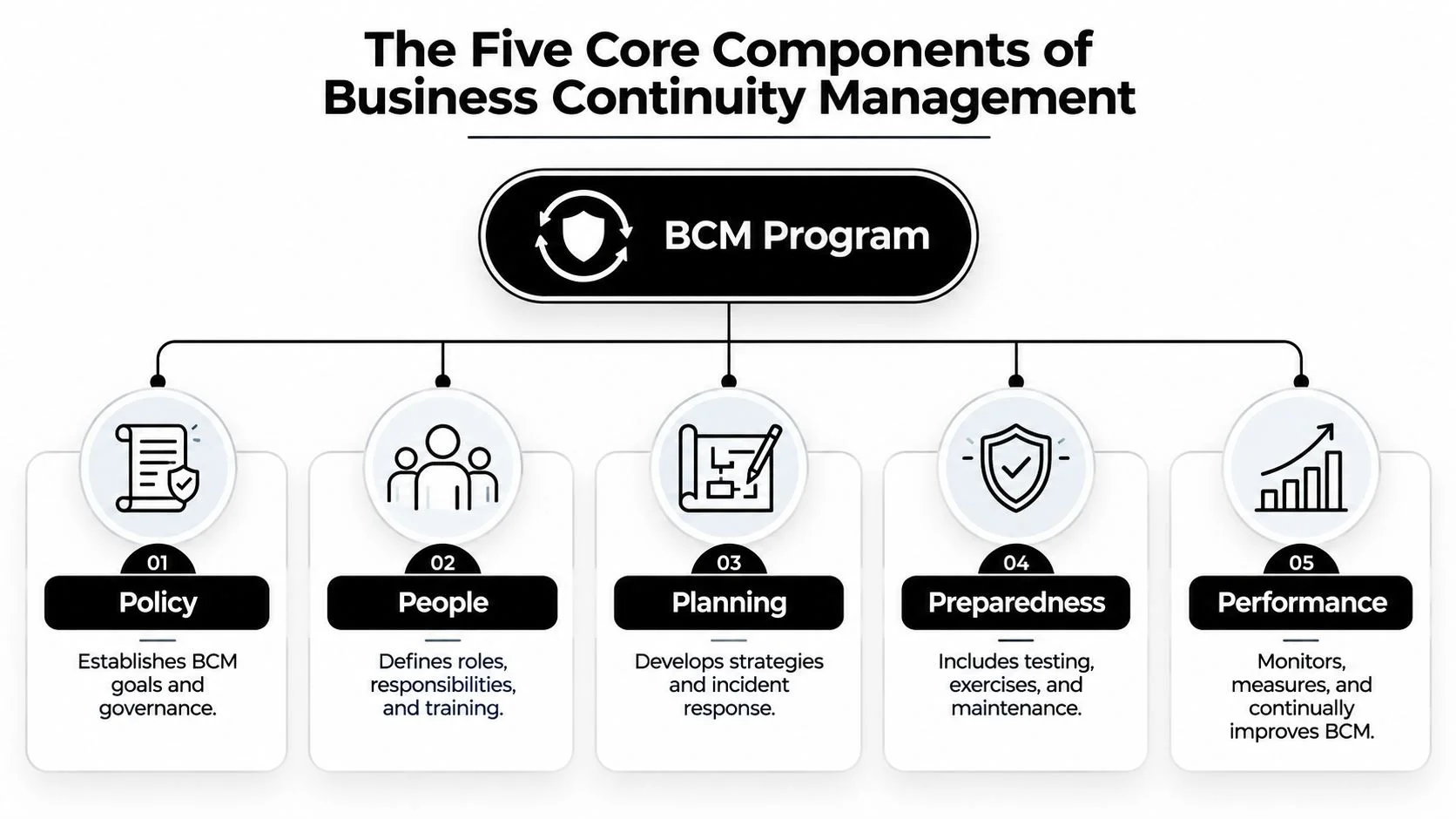
The easiest way to make business continuity management practical is to map what the business depends on. A useful model is the five P's. The Business Impact Analysis process requires organizations to map People, Places, Providers, Processes, and Programs, with each ranked by importance and specific recovery time, as outlined in Travelers' business continuity planning guidance.
The five P's in plain language
Some organizations use slightly different labels in workshops, but the underlying logic is the same. You identify what matters, what it depends on, and how fast it must be recovered.
- People: Essential employees, backups for key roles, decision-makers, and specialists. If your payroll manager is unreachable, can someone else execute payroll?
- Places: Offices, warehouses, call centers, data rooms, and alternate work locations. If one site goes dark, where does the work move?
- Providers: Critical suppliers, hosting vendors, payment processors, and outsourced service partners. If one supplier fails, what is the replacement path?
- Processes: Customer support, shipping, billing, authentication, incident communications, and all the workflows that make the business function.
- Programs: The software, systems, collaboration tools, and business platforms that support those processes.
Risk assessment and BIA do different jobs
People often blend these two together, but they answer different questions.
A Business Impact Analysis, or BIA, identifies which functions are most critical and what happens if they're interrupted. It helps leaders rank systems and activities by consequence. In simple terms, the BIA asks, "What breaks first, and how bad is it?"
A risk assessment looks at likely threats and weak points. It asks, "What could cause that interruption?" That includes cyberattacks, hardware failure, power loss, accidental deletion, vendor failure, and digital exposure from public information.
Practical rule: If your team can't name the business process, the owner, the key dependency, and the acceptable downtime, the continuity plan is still too vague.
Where digital footprint risk fits
Modern BCM gains precision. A risk assessment shouldn't stop at internal assets. It should include public signals that reveal operational risk. That can mean breached employee accounts, exposed contact details for senior staff, abandoned social profiles, developer usernames tied to old forums, or vendor information that suggests a weak security posture.
For smaller organizations, this overlaps heavily with basic cyber hygiene. A useful companion resource is this guide to cybersecurity tips for small businesses, because continuity gets much easier when avoidable exposure is reduced early.
Building from dependencies, not wishful thinking
A plan only works if it reflects how the business runs. That's why operations and reliability teams often benefit from thinking in terms of dependencies and maintenance, not just policy documents. Work on mastering asset lifecycle management fits naturally here because aging hardware, unsupported systems, and poorly tracked assets often become continuity problems before anyone labels them that way.
A BCM program gets stronger when it stops asking, "Do we have a plan?" and starts asking, "Do we understand the chain of dependencies that keeps this function alive?"
Understanding the BCM Lifecycle
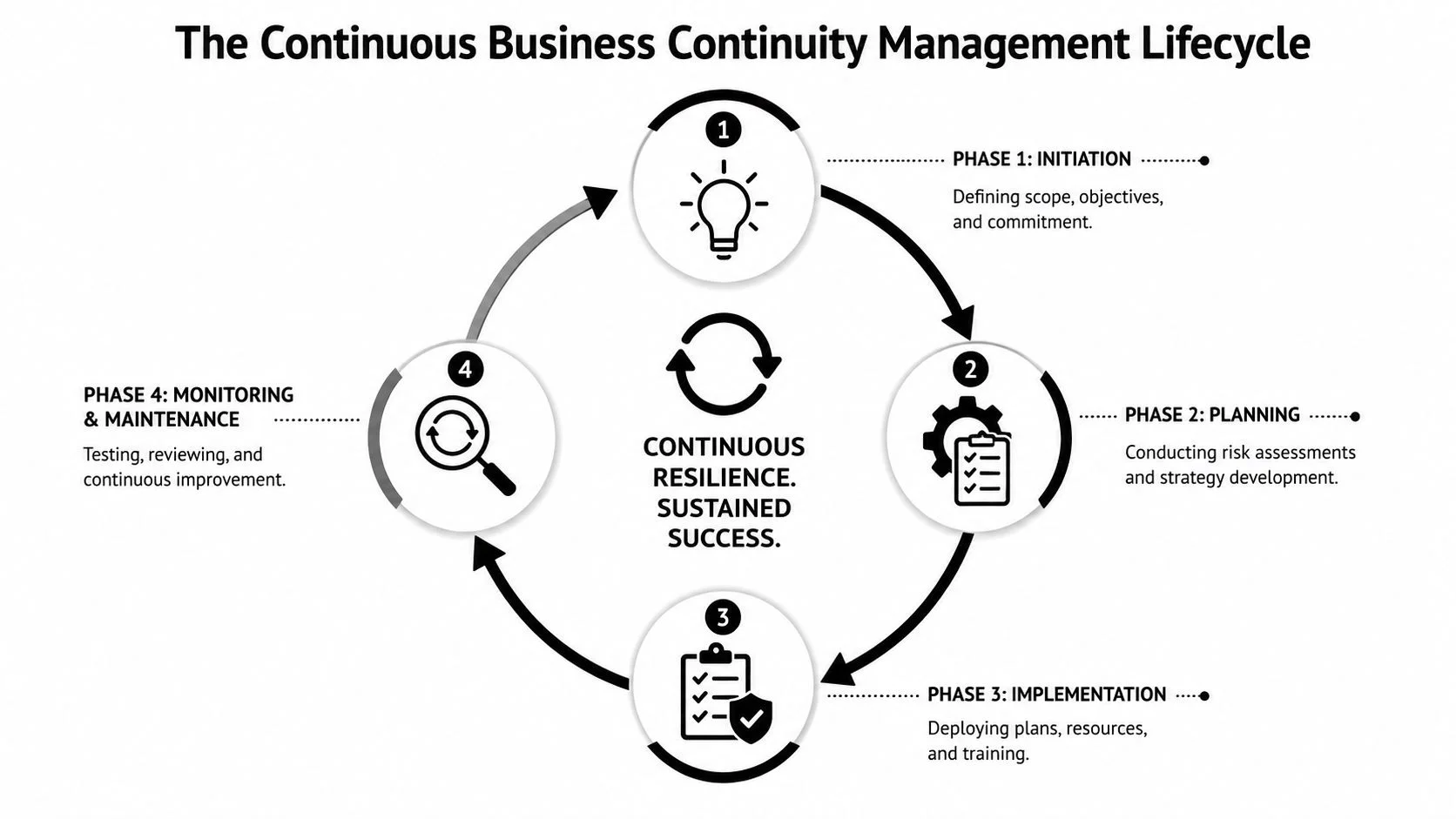
Business continuity management isn't a document you finish. It's a cycle you maintain. The formal structure matters here. The BCM lifecycle is defined through four distinct processes: initiation, planning, implementation, and operational management, aligned with ISO 22301:2019, and the plan needs a biannual or annual maintenance cycle to remain effective according to the ISO 22301:2019 standard reference.
Initiation and planning
Initiation is where leaders define scope, ownership, and expectations. Which business units are in scope? Who approves recovery priorities? Which incidents trigger the plan? Without those decisions, continuity work drifts.
Planning is where analysis becomes action. Teams document risks, identify critical functions, assign owners, and set recovery strategies. If this phase is weak, the rest of the program usually turns into generic templates.
Implementation and operational management
Implementation means turning plans into something people can use. That includes training, communication paths, recovery procedures, call trees, technical preparations, and exercises. A plan that hasn't been practiced is still theory.
Operational management is the part many firms neglect. Businesses change constantly. Staff leave, software gets replaced, vendors change terms, offices close, and threat patterns shift. If nobody updates the continuity program, it slowly becomes fiction.
Why the cycle matters
The value of a lifecycle is feedback. A tabletop exercise might reveal that a backup contact left months ago. A real incident might show that a cloud dependency wasn't documented. Those findings shouldn't sit in a meeting note. They should feed back into analysis, planning, and maintenance.
That same logic applies to digital identity risk. If a breach exposes employee credentials or a fake executive profile appears online, continuity teams should treat those as planning inputs, not as isolated security annoyances.
Keep one principle in mind. Every test, outage, near miss, or public exposure should improve the next version of the plan.
If you want to connect continuity with recovery mechanics at a more practical level, this guide to disaster recovery planning is a useful companion because it shows how technical recovery fits inside the larger continuity cycle.
Practical BCM Implementation and Metrics
The two metrics that make business continuity management concrete are RTO and RPO. These terms sound technical, but the questions behind them are simple.
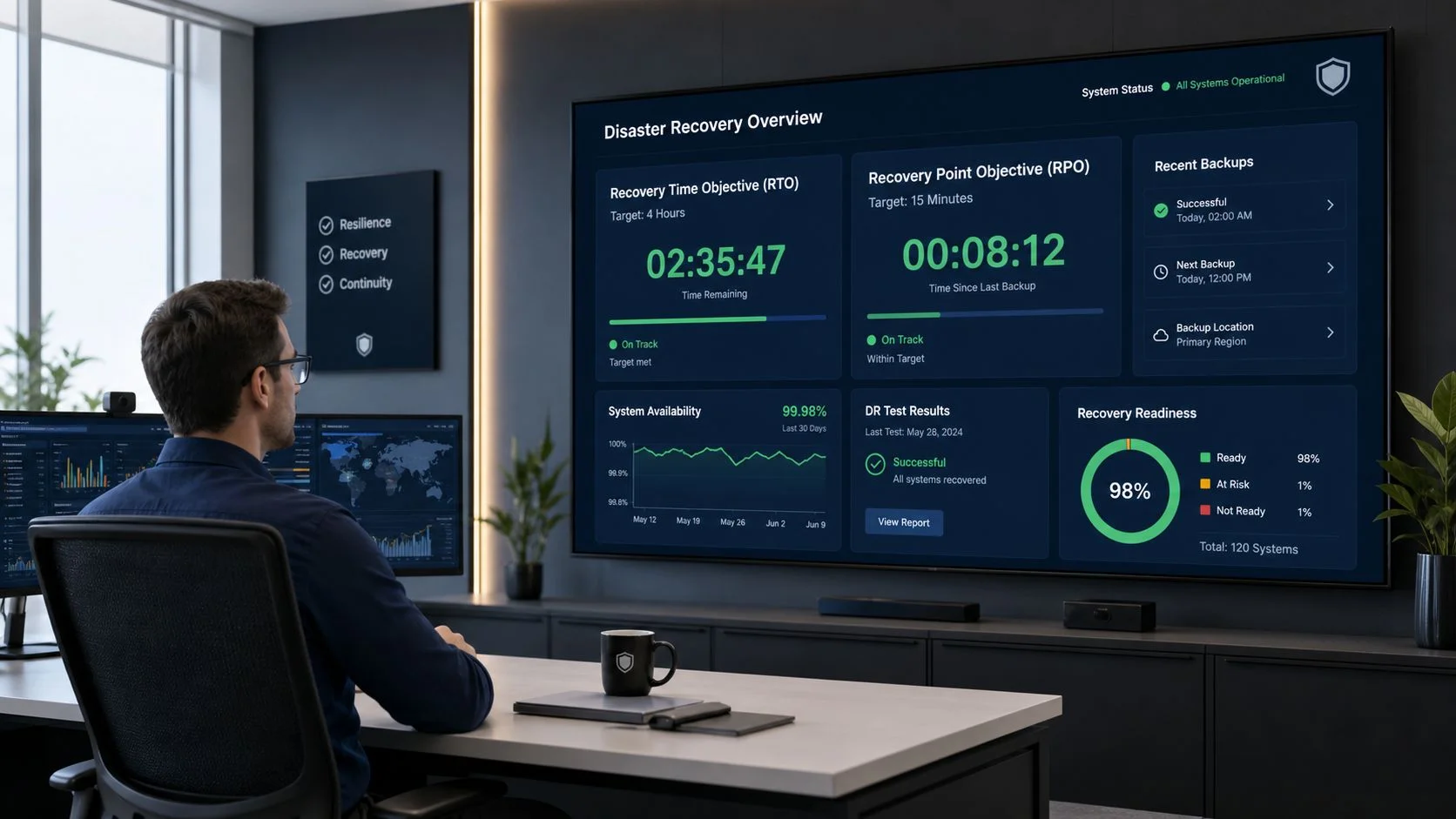
A modern Business Continuity Plan must define Recovery Time Objective (RTO) and Recovery Point Objective (RPO) targets. They represent the maximum acceptable downtime and the maximum acceptable data loss age, as explained in LogicManager's overview of what a business continuity plan includes.
Translate the jargon into business language
Think of RTO as: How long can this function be unavailable before the damage becomes unacceptable?
Think of RPO as: How much recent data can we afford to lose and still recover safely?
A payment gateway, for example, will usually need a tighter RTO than an internal archive. A customer booking system may need a much stricter RPO than a training portal because recent transactions matter.
Examples that make the distinction clear
Here are a few plain-language scenarios:
- E-commerce checkout: If checkout is down, sales stop. The business may decide this function needs to return very quickly and with minimal recent data loss.
- HR document portal: Important, but often less time-sensitive than customer-facing revenue systems.
- Customer support inbox: If unavailable, the company may still operate for a while, but response quality and trust can degrade quickly.
- Security logging platform: The organization may accept short disruption, but not the loss of investigation-critical records.
The point isn't to copy someone else's targets. It's to set targets that match your own risk tolerance and operating reality.
RTO and RPO should influence technical choices
Once targets are clear, teams can choose backups, replication methods, alternate workflows, and recovery procedures that support them. If your RPO is tight, backup frequency and storage design matter a lot more. If your RTO is aggressive, recovery can't rely on one overworked admin and a stale runbook.
A practical backup rule often used in continuity planning is the 3-2-1-1 rule, which means three total copies of data on two media types, with one offsite copy and one immutable copy, as described in Arcserve's business continuity checklist. That kind of structure matters because ransomware and accidental deletion can destroy recovery assumptions very quickly.
Metrics only matter if people can act on them
Good continuity metrics are operational, not decorative. They should help someone decide what to protect first, what to restore first, and who needs to act first.
If your concern is active compromise rather than just recovery design, it's also worth reviewing practical steps on how to get rid of hackers, since compromised accounts often become the trigger event that sends continuity planning into motion.
Integrating Digital Footprint Monitoring into BCM
Business continuity management is updated for real-world digital risk. Traditional BCM asks what systems, people, and suppliers matter most. A stronger program also asks what the internet already reveals about them.
While BCM frameworks require organizations to evaluate critical third-party providers, many lack hard verification data. That gap matters because 60% of business disruptions now originate from supply chain failures rather than internal incidents, according to the AFSA business continuity management IT booklet.
Public data can reveal continuity risk early
Open source intelligence, or OSINT, helps teams spot exposure before it becomes an incident. This isn't about spying. It's about checking what is already publicly accessible.
Examples include:
- Leaked credentials: If developer or admin credentials appear in breach data, attackers may gain access before internal teams realize there's a problem.
- Executive exposure: Home addresses, phone numbers, or family details can raise physical security and social engineering risks during a crisis.
- Abandoned profiles: Old company pages, unused social accounts, and stale employee bios can create impersonation risk.
- Vendor exposure: Public signs of poor security hygiene at a provider can change how much continuity dependence you place on them.
Why this belongs in risk assessment and incident response
A digital footprint isn't just a privacy issue. It's an operational dependency issue. If attackers can gather enough public information to target staff, reset accounts, impersonate executives, or exploit a supplier relationship, your continuity assumptions may already be wrong.
That matters well beyond classic cybersecurity. It affects job prospects when a reputational incident spreads online. It affects personal safety when staff data is exposed. It affects gaming profiles and creator accounts when reused credentials get hijacked. It affects dating app verification and scam prevention because impersonation techniques overlap across personal and business contexts.
Online exposure often becomes the bridge between a small incident and a wider business interruption.
A practical monitoring workflow
A useful operating model looks like this:
- Map identities that matter: executives, admins, finance staff, support teams, privileged accounts, and key vendors.
- Check exposed data sources: public records, social profiles, breach indicators, username reuse, and impersonation signs.
- Tie findings to business functions: don't just list exposures. Link each one to a process, owner, and continuity consequence.
- Trigger follow-up actions: password resets, account hardening, vendor review, communications prep, or physical security checks.
For teams that want a practical way to audit publicly visible exposure, Digital Footprint Check is one option. It uses OSINT methods to search across social platforms, breach databases, gaming profiles, professional networks, and public records to show what information is exposed.
If you want a broader view of the tools and methods behind this kind of monitoring, this guide to top tools for monitoring your digital footprint and keeping your data safe is a useful reference.
Testing Your Plan and Avoiding Common Pitfalls
A continuity plan that hasn't been tested is just a confident guess. Testing shows whether people can execute under pressure, whether dependencies were documented correctly, and whether the plan still matches reality.
Different test styles suit different levels of maturity. Some are lightweight and discussion-based. Others are more demanding and operational.
BCM testing methods compared
| Testing Method | Complexity | Best For |
|---|---|---|
| Tabletop exercise | Low | Teams that need to validate roles, decisions, and communications in a low-stress setting |
| Walkthrough | Low to medium | Reviewing procedures step by step to catch missing details, unclear ownership, or outdated contacts |
| Simulation | Medium | Practicing a realistic disruption with timed actions, cross-team coordination, and escalation decisions |
| Full-scale exercise | High | Mature programs that need to validate operational execution, recovery procedures, and real interdependencies |
What good testing actually checks
The strongest tests don't just ask whether a system can be restored. They check whether the organization can function.
Focus on questions like these:
- Role clarity: Do people know who declares the incident and who approves major decisions?
- Communication: Can staff, customers, suppliers, and leadership be reached through backup channels?
- Dependency mapping: Does the team understand which vendor, tool, location, or person each critical process relies on?
- Usability: Can someone follow the plan quickly, or does it read like a compliance document nobody can execute?
Common reasons BCM programs fail
Many failures come from basic neglect rather than dramatic technical mistakes.
- Outdated contact lists: The incident starts, and key numbers no longer work.
- Shelfware: The plan exists, but nobody has practiced it and few people know where it lives.
- Missing dependencies: A process looks recoverable on paper until a hidden supplier or admin account becomes the blocker.
- No cross-functional ownership: IT has a plan, but HR, legal, operations, and communications aren't aligned.
- Unmanaged digital footprint: Staff data, leaked credentials, or impersonation risk creates chaos the written plan never considered.
"Test the assumptions, not just the document."
A useful habit is to treat every exercise like a fact-finding mission. If the team discovers confusion, delay, or missing information, that's success. You found the weakness before an attacker, outage, or supplier failure found it for you.
Conclusion Building a Resilient Organization
Business continuity management works best when organizations treat it as an operating discipline, not a binder on a shelf. The fundamentals are clear. Identify what matters most. Understand the people, systems, places, providers, and workflows those functions depend on. Set recovery targets that reflect business reality. Test the plan often enough that it stays usable.
What's changed is the threat surface. A resilient organization now has to account for both traditional disruptions and the risks created by its public digital footprint. Exposed credentials, impersonation, stale public profiles, and weak third-party visibility can all turn into continuity problems. If you ignore those signals, your analysis is incomplete before the incident even begins.
This isn't just relevant to enterprise security teams. The same habits that reduce organizational continuity risk also help protect online identity, strengthen cybersecurity, reduce identity theft exposure, improve reputation management, secure gaming accounts, and support safer verification in online dating environments where catfishing, romance scams, and account impersonation are common. Public digital information has real-world consequences.
The good news is that BCM doesn't require perfection to be useful. It requires honest mapping, clear priorities, regular testing, and a willingness to update the plan when the business changes. Organizations that do that build something valuable. Not just recovery capability, but confidence.
If you want a practical first step, run a check with Digital Footprint Check. The free checker helps you identify publicly exposed information tied to your organization, employees, or online identity so you can spot risks earlier, tighten your continuity planning, and reduce the chance that a digital exposure turns into a larger operational incident.