· Digital Footprint Check · Content Marketing · 20 min read
Disaster Recovery Planning: a Guide for Individuals & Smbs
Learn step-by-step disaster recovery planning to protect your digital life and business from identity theft, account takeovers, and data breaches.

You wake up, grab your phone, and see the worst kind of message. Your primary email password has changed. Password reset links for your bank, payroll app, cloud storage, and social accounts all go to that same inbox. Friends start texting that your Instagram is sending weird links. A client asks why they got an invoice update you never sent.
That’s a disaster recovery problem.
Often, disaster recovery planning evokes images of server rooms, hurricanes, and corporate binders nobody reads. In real life, the most common disasters for individuals and small businesses are digital. Account takeovers, ransomware, identity theft, lost devices, exposed customer data, and reputation damage all fit the same pattern. Something critical breaks, you lose access, and every minute of confusion makes the damage worse.
The fix isn’t panic. It’s a plan you can use under stress.
Beyond Floods and Fires Modern Disaster Recovery
A small business can survive a broken window. It has a harder time surviving a locked email tenant, a hijacked payment account, or a ransomware hit that freezes invoices, payroll, and customer messages at the same time.
That is what modern disaster recovery looks like for smaller teams and households. The old model focused on buildings, hardware, and backup tapes. The current problem set is digital first. A stolen session cookie, a SIM swap, a compromised admin login, or a cloud outage can shut down daily life just as fast as a fire once did.
Kyndryl explains in its disaster recovery plan overview that a disaster recovery plan is a documented set of instructions for response, backup operations, recovery actions, alternate processing, and system restoration. For a small business owner, the useful takeaway is simple. Write down what breaks, who does what, and how you get back control while stressed, tired, and short on time.
The disaster usually starts with one account
In many small organizations, one account controls everything that matters. That account is usually email.
If an attacker gets your inbox, they often get the reset path to banking, payroll, accounting, e-commerce, cloud files, and your customer conversations. For an individual, the same pattern applies to tax documents, insurance records, photos, and identity verification. One compromised account becomes a chain reaction.
Use a practical test. If losing one login would stop revenue, block access to important records, or let someone impersonate you, it belongs in your recovery plan.
Prevention matters here because recovery gets harder once stolen credentials start circulating. Checking dark web monitoring services for exposed credentials and account alerts can give you early warning before a takeover turns into a full cleanup job.
Recovery is also a trust problem
Disaster recovery is not only about restoring files. It is also about restoring trust.
If your accounting inbox sends fake invoices, customers may pay the wrong account. If your social profile posts scam links, friends and clients remember that. If your primary phone number gets ported out, two-factor codes stop reaching you exactly when you need them. Those are business continuity failures, but they are also reputation and identity failures.
That overlap is why risk assessment has to include operational damage and public fallout. The same discipline used in PR crises management applies here. Identify what can go wrong, estimate the harm, and decide in advance which incidents justify an immediate response.
The corporate terms still help if you translate them into real life. Recovery time objective means how long you can afford to be locked out of email, payroll, or your storefront. Recovery point objective means how much recent work, transaction history, or customer data you can afford to lose. Once those answers are clear, disaster recovery stops sounding like enterprise jargon and starts becoming a set of decisions you can use under pressure.
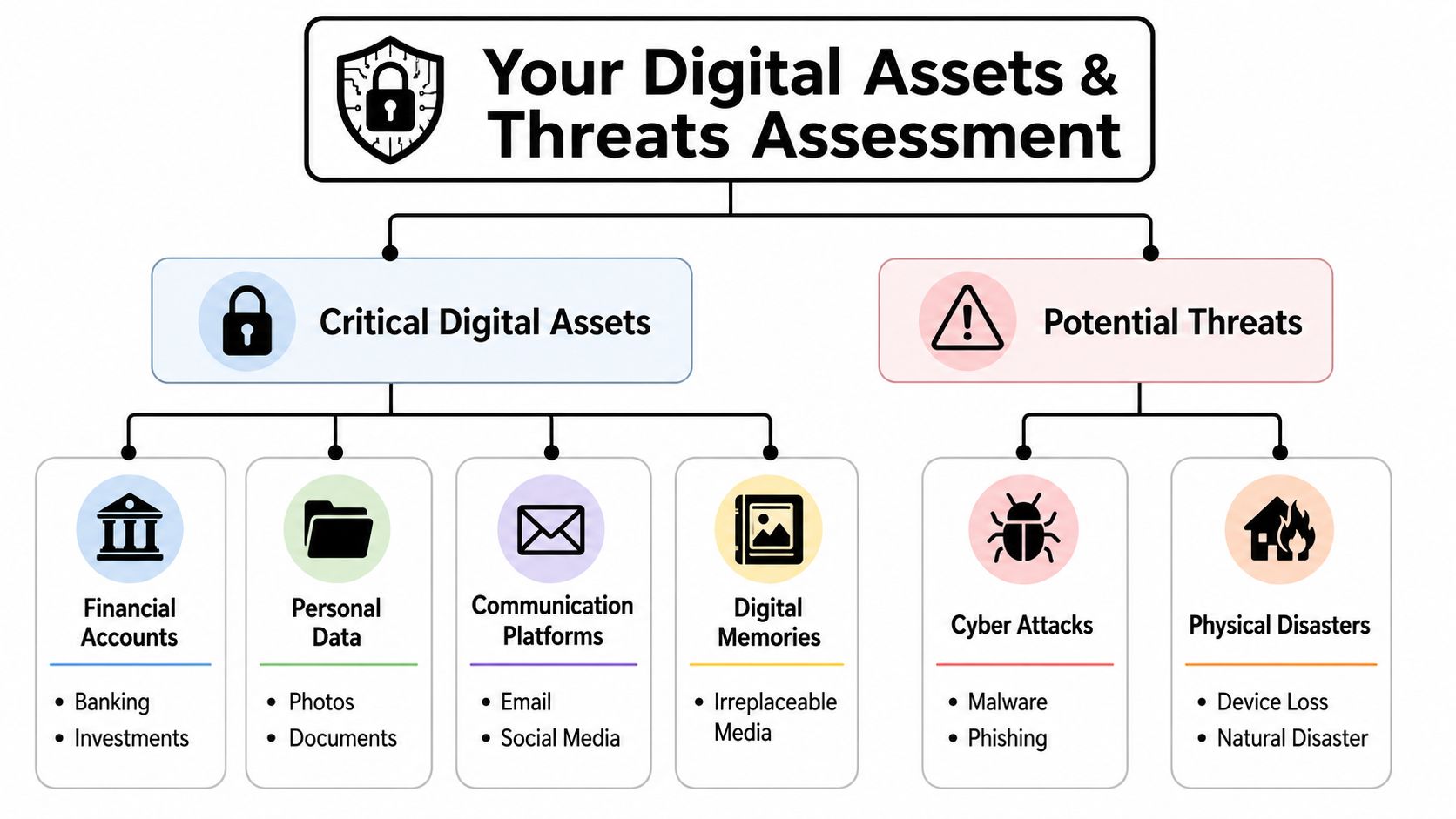
Identify Your Critical Digital Assets and Threats
Most failed recovery efforts start with the same mistake. People protect everything equally, which means they don’t really protect anything well. You need a ranked inventory.
Flexential’s guidance on today’s disaster preparedness landscape makes an important point for modern environments: a disaster recovery plan must define RTO and RPO per workload, document offline communication and failover and failback procedures, and account for hybrid IT and third-party dependencies because outages often involve cloud services, SaaS tools, and external providers, not just internal systems. For a small business owner, that translates to this: don’t just list devices. List every dependency that keeps your day running.
Start with what would hurt most
Use a simple three-tier model. Don’t overengineer it.
| Priority | Asset type | Examples | What failure looks like |
|---|---|---|---|
| High | Identity and control accounts | Primary email, password manager, phone number tied to 2FA, banking login | You can’t prove who you are or regain access |
| Medium | Work and reputation assets | Website admin, LinkedIn, Instagram, Shopify, Stripe, payroll, cloud docs | Revenue stops or trust drops |
| Lower but still important | Archive and convenience assets | Old forums, gaming profiles, streaming accounts, secondary inboxes | Less immediate harm, but useful to attackers |
A personal business impact analysis sounds formal, but it’s just ranking what matters by consequence. Ask two questions for each asset:
- If this disappears today, what breaks first?
- If an attacker controls it, who else gets hurt?
That second question matters more than one might realize. A compromised social account can become a scam channel. A compromised cloud folder can expose contracts, IDs, and family documents. A forgotten account on an old service can become an entry point if it reused a password.
Include third parties and public exposure
Your digital life doesn’t stop at accounts you log into directly. It includes payment processors, cloud backups, mobile carriers, domain registrars, e-signature tools, delivery apps, and contractors with access to customer data.
That’s where public footprint analysis helps. Attackers look for exposed usernames, reused handles, old bios, data breach traces, and abandoned accounts. You should too. If you need to map where an email address has been used publicly, start by learning how to find all accounts linked to an email.
A good inventory should include:
- Core account: The login or service itself.
- Dependency: What else relies on it.
- Recovery path: Backup email, recovery codes, trusted devices, support process.
- Exposure clues: Public usernames, old aliases, leaked profile details.
- Owner: Who handles recovery if this is a business asset.
Recovery gets messy when nobody knows who owns the account, who can contact support, or which phone number still receives verification codes.
Think beyond technical damage
Small businesses often focus on restoring systems and forget trust. But a hacked newsletter list, fake direct messages from your brand, or leaked private details can become a reputation problem before it becomes a technical one. That’s why risk assessment should include customer perception and public response. If you want a practical framework for the reputational side, Sift AI’s guide to PR crises management is useful because it connects operational failure to public fallout.
A quick self-audit
Run through this list and write the answers down:
- Which single account grants access to the most other accounts?
- What data is irreplaceable? Photos, legal records, signed contracts, tax files.
- Which services would stop income if they went down?
- Which account could do the most reputational damage if hijacked?
- What can’t be recovered quickly without another person’s help?
If you can’t answer those from memory, you’ve already found the first gap in your plan.
Build Your Personal Recovery Playbooks
A recovery plan earns its keep at 6:12 a.m., when your phone is gone, your email password no longer works, and a client texts to ask why you sent a crypto link at 5:47. In that moment, memory is unreliable. A short playbook is better than a polished document you will never open under pressure.
Use one page per incident. Give each page a trigger, the first actions, the logins or tools required, and the point at which you can say the problem is contained. That keeps recovery practical and fast.

Translate RTO and RPO into plain English
These terms come from corporate disaster recovery, but they matter just as much at home and in a five-person business.
- Recovery Time Objective, or RTO: How long can you afford to be locked out?
- Recovery Point Objective, or RPO: How much recent data can you afford to lose?
Those answers should be different for each asset.
| Asset | Plain-language RTO | Plain-language RPO |
|---|---|---|
| Primary email | How long can you be locked out before work, billing, or family coordination starts breaking down? | How many recent messages could disappear before you miss something important? |
| Accounting system | How long can invoicing stop before cash flow gets tight? | Can you rebuild today’s entries, or would that create tax and reconciliation problems? |
| Family photo library | How long can access be unavailable? | Can you accept losing anything not yet copied elsewhere? |
| Social media business account | How long before fake posts or unanswered messages start hurting trust? | Which recent posts, DMs, or drafts would be hard to recreate? |
Atlassian’s disaster recovery guidance is useful here because it pushes planning beyond backups. Good recovery depends on clear triggers, assigned roles, and written runbooks. For a small business owner, that means deciding in advance when a bad morning becomes a real incident, who calls the bank, who contacts customers, and who documents what changed.
Three playbooks almost everyone needs
Lost or stolen phone
A missing phone is rarely just a hardware problem. It can hold your authenticator app, saved passwords, email sessions, banking alerts, and the number tied to account recovery.
Write the order down now:
- Locate or lock the device with Apple, Google, or the manufacturer’s device-finding tool.
- Call your carrier and ask what protections can be added to the line.
- Revoke sessions for your main email, banking, password manager, and social accounts from a trusted device.
- Move MFA to backup codes, a secondary device, or another approved method.
- Check account recovery settings for changes to backup email addresses, phone numbers, or trusted devices.
This is also where digital-first threats show up clearly. A stolen phone can turn into account takeover, identity abuse, and impersonation if the attacker reaches your primary inbox or mobile number first.
Hacked social or email account
Sequence matters more than speed alone. People often rush to post a warning before they have secured the account.
Use this order:
- Contain the account. Change the password if access remains. Revoke sessions, remove suspicious connected apps, and review forwarding rules or delegated access.
- Preserve evidence. Save screenshots of login alerts, profile changes, messages sent, and account recovery notices.
- Use the recovery path. Work through backup email, recovery codes, trusted devices, or the official support form.
- Check for spread. Review linked services, password resets, and inbox rules that could let the attacker come back.
- Notify affected people. Tell customers, family, or followers if scam messages, fake invoices, or malicious links were sent.
A good playbook covers the first 15 minutes, the first hour, and the checks you run after access is restored. That last part gets skipped all the time.
If account hijacking is one of your highest-risk scenarios, build prevention into the same document with these account takeover prevention steps. Recovery is cheaper when the attacker never gets a stable foothold.
Ransomware or device encryption alert
For an individual, this may be a laptop with tax records and family documents. For a small business, it may be the workstation that handles invoices, contracts, and customer files.
Your playbook should answer four blunt questions:
- What gets disconnected first?
- Who decides whether to shut down the device or preserve it for investigation?
- Where is the last clean backup, and who can access it?
- How do you keep operating if that machine stays offline for days?
Write down the backup drive location, cloud backup owner, IT vendor contact, and the first documents you need restored. If you rely on shared messaging or staff alerts during an incident, even a small team can benefit from tools built for crisis communication software so updates do not depend on the same compromised account.
Assign roles even if your team is tiny
Small businesses often assume everyone will pitch in. In practice, that leads to duplicate work and missed steps.
Use a simple split:
- Decision maker: Declares the incident and approves outside communication.
- Technical responder: Handles resets, isolation, restores, and evidence collection.
- Communicator: Updates staff, clients, family, or close contacts through approved channels.
- Recorder: Logs what happened, what changed, and what still needs follow-up.
A solo operator can still use these labels. They force order onto a stressful hour. They also make handoff easier if you need to call a spouse, business partner, managed service provider, bank fraud team, or platform support rep.
Keep the playbooks short enough to use
One page is usually enough.
Include these fields:
- Scenario
- Trigger for declaring the incident
- First five actions
- Who to contact
- Accounts, devices, or data affected
- Where recovery codes, backups, and proof of identity are stored
- What recovery looks like
Be specific about that last line. Recovery is not “I got back in once.” Recovery means the attacker is out, recovery settings are corrected, connected apps are reviewed, affected people are warned if needed, and the account is watched for repeat abuse. For higher-risk cases, add one more line: What public traces should you monitor afterward? That is where OSINT checks become useful. They can help you spot reused usernames, new impersonation profiles, exposed contact details, or leaked credentials before the next incident starts.
Develop Your Crisis Communication Strategy
At 7:15 a.m., a customer gets an invoice from your email account. At 7:18, your sister gets a payment request over text. By 7:30, you may have changed the password, but the fundamental problem has already spread. People are now deciding whether they can trust anything with your name on it.
Communication is part of recovery. If you stay silent while you sort out the technical side, other people fill in the blanks. They click the fake link, pay the wrong invoice, reply to the attacker, or assume you were careless. For a small business, that turns one account compromise into a sales problem, a support problem, and sometimes a legal problem.
Wharton’s discussion on improving disaster recovery makes a useful point. Recovery plans often fail real people because they assume equal access, equal attention, and equal comfort with digital channels. Small businesses and households run into the same issue. A warning posted on one platform will miss the customer who only checks email, the parent who ignores social media, or the employee whose work phone is already locked out.
Match the message to the audience
Different groups need different instructions, and they need them through channels they already trust.
| Audience | Best channel | What they need to hear |
|---|---|---|
| Family or close contacts | Text or phone call | Whether recent messages, payment requests, or links from you should be ignored |
| Clients or customers | Email from a verified backup address or phone call | What happened, what not to trust, and how to confirm legitimate requests |
| Public followers | Post on an unaffected platform or website notice | Short warning, no speculation, and where future updates will appear |
| Internal staff | Group text, phone tree, or secure backup chat | What to say, what not to say, and which systems are affected |
If you have even a small team, study how crisis communication software handles acknowledgments, backup channels, and delivery tracking. You may not need a full platform, but the design logic is sound. One message path is a weak point.
Write the words now
People under stress either say too little or too much. Templates fix that.
Template for friends and family
One of my accounts was compromised. If you received a recent message, link, or payment request from me, do not click, reply, or send money. I’m securing the account and will confirm from this number when it is safe again.
Template for clients
We found unauthorized activity involving one of our accounts. Please do not act on recent unexpected messages, invoices, links, or payment changes until we confirm directly through our verified contact channel. We will send an update after we finish account review and secure access.
Template for public followers
This account had unauthorized activity. Ignore recent suspicious messages or links. Updates will appear here after access is secured.
Short beats polished. Clear beats reassuring.
Build a backup route before you need one
A communication plan fails fast if it depends on the same account, device, or phone number that was just compromised. Set a backup contact path in advance. That might be a second email domain for the business, a published phone number on your website, a spare admin account on a social platform, or a family contact tree that starts with voice calls instead of apps.
This matters even more for digital-first threats like account takeovers and identity abuse. If an attacker controls your inbox or intercepts your texts, they can block alerts and impersonate you at the same time. If text-based verification is part of your setup, review the warning signs of a cloned SIM card attack and make sure your recovery messages can still go out through another channel.
Plan for the second wave
The first alert tells people to stop trusting recent messages. The second update tells them what to do next.
That follow-up should answer four practical questions:
- Are your accounts back under your control?
- Which messages or transactions were fraudulent?
- What channel should people use to verify future requests?
- What should they watch for next?
This is also where OSINT monitoring earns its place in a personal disaster recovery plan. After the immediate incident, keep watch for impersonation accounts, reused profile photos, leaked contact details, and copied bios showing up elsewhere. Attackers often reuse the same identity fragments. If you only restore access and stop there, you miss the copycat accounts and reputation damage that keep spreading after the password reset.
Test and Rehearse Your Recovery Plan
Saturday morning is a bad time to learn that nobody knows how to get the business Instagram account back, the backup drive has not been checked in months, and the only person who can approve a domain change is on a flight. That is what testing is for. It turns a recovery plan from a document into something you can use when your phone, inbox, payroll login, or storefront gets hijacked.
Small organizations do not need an enterprise disaster recovery program. They do need repetition. A short drill will expose bad assumptions faster than another hour spent polishing the document.
What useful testing looks like
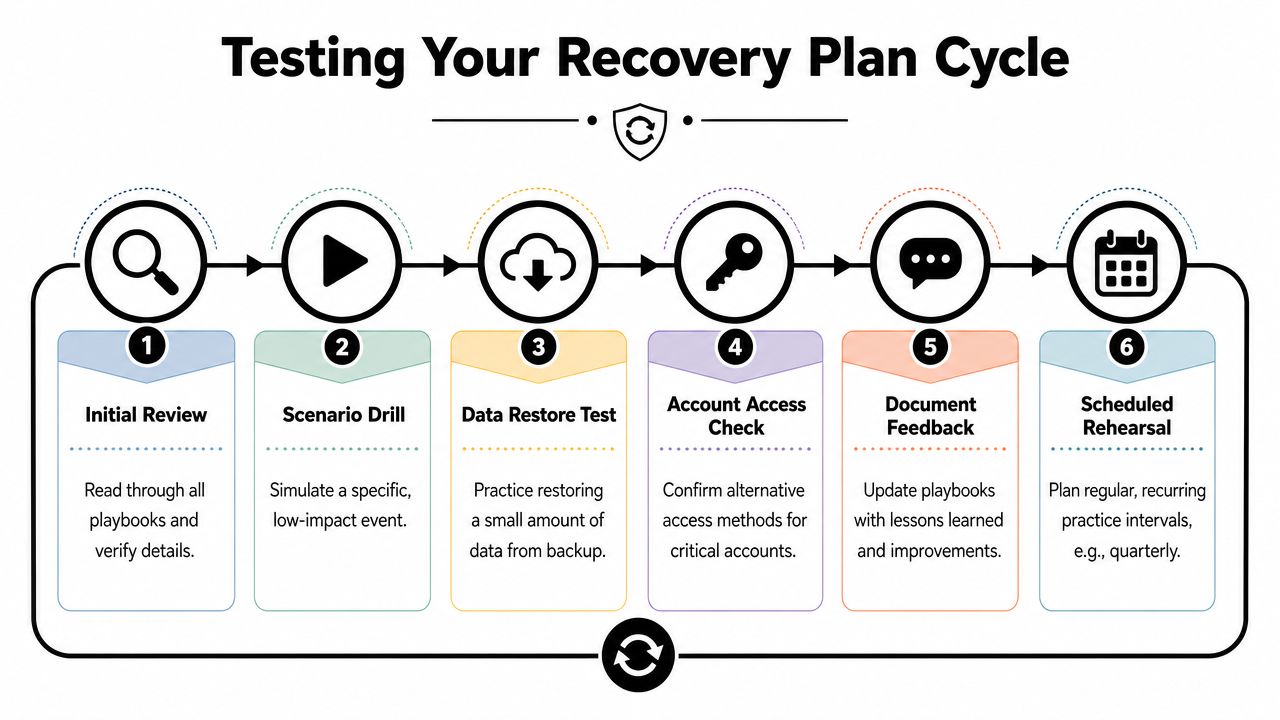
Start with a tabletop exercise. That is a plain-language walk-through of one realistic scenario. Sit down with the people who would respond. A spouse, business partner, office manager, bookkeeper, or teenager with their own accounts all count.
Use situations that match real digital risk:
- Your phone disappears during travel and your authenticator app was on it.
- Your business Instagram starts sending scam links from your account.
- Your bookkeeper loses access to the accounting platform the day payroll is due.
- Your cloud drive begins syncing encrypted files you did not create.
- A customer reports a fake profile using your name, logo, and staff photos.
Then run a hands-on check. Try one restore, one login recovery, or one backup communication path. Good options include restoring a small folder from backup, signing in through a secondary admin account, or confirming that recovery codes are still readable and stored where the plan says they are.
Once a year, run a broader rehearsal. For a small business, that can mean treating the primary admin account as unavailable for a day and seeing whether work still gets done. For a household, it can mean operating as if one email account and one phone number cannot be trusted.
What usually breaks
The problems are usually ordinary.
- Old recovery details: Codes and alerts still point to a retired number or an unused email.
- Wrong account owner: Hosting, payments, or social accounts are tied to a former employee or contractor.
- Backup confusion: Files exist somewhere, but nobody has tested a restore.
- Single-channel dependence: Everyone assumes email, WhatsApp, or text messages will still work.
- Slow decisions: People waste time debating whether it is serious while the attacker keeps going.
- Public exposure you forgot about: Old usernames, leaked contact details, or copied profile photos make impersonation easier.
I see this often after account takeovers. The password reset works, but the fake profiles stay up, the cloned storefront keeps running, or an attacker reuses public identity details on another platform. A rehearsal should include that second layer. Check what an outsider can still find about you and what could be reused against you. If you need a starting point, these cybersecurity tips for small businesses are a practical baseline for tightening weak spots before you test.
Use a simple testing rhythm
Keep the schedule realistic so it happens.
- Quarterly: Run one 30 to 60 minute scenario discussion.
- Twice a year: Test one restore, one account recovery path, or one alternate admin login.
- Once a year: Rehearse a broader incident that affects accounts, backups, and outside communication.
Write down what failed right away. Fix the playbook while the details are still fresh.
Questions to ask after every rehearsal
- Who was clearly in charge?
- How long were we locked out of a key account, and could we afford that in real life?
- Did our backup communication method work?
- Could we restore the files, settings, or account access we expected to restore?
- Which outside dependency slowed us down, such as a carrier, registrar, bank, or SaaS vendor?
- Did we check for impersonation, reused identity details, or other OSINT signals after the initial fix?
A recovery plan proves itself during practice. The incident is the wrong time to find out your backup number is dead, your cloud restore fails, or your public footprint gives an attacker a second way back in.
Maintain Your Plan as a Living Document
Your digital life changes faster than you may realize. You add a finance app. You change mobile carriers. A staff member leaves. You start using a new cloud storage tool. You create a side business, a gaming profile, a second email, or a dating app account. Every change creates a new recovery dependency.
That’s why disaster recovery planning isn’t a one-time project. It’s maintenance.
Use a recurring review checklist:
- Quarterly account review: Remove dead accounts, confirm account owners, and check backup access methods.
- After major changes: Update recovery notes when you switch devices, change numbers, add staff, or adopt a new SaaS tool.
- After incidents or breach notices: Reset assumptions, not just passwords. Review what else the attacker could have touched.
- Annual deep review: Re-rank critical assets, refresh communication templates, and archive old playbooks.
Watch the environment, not just your devices
One reason plans go stale is that people only look inward. They check laptops, backups, and passwords, but ignore what’s publicly visible about them. Old usernames, exposed profiles, breached credentials, and forgotten accounts can expand the attack surface.
That’s especially true for small businesses with shared inboxes, freelancers using personal accounts for work, and families who reuse the same recovery email across multiple services. The plan should be updated whenever your public footprint changes in a meaningful way.
For broader resilience habits that support this work, review practical cybersecurity tips for small businesses and fold the relevant ones into your maintenance cycle.
Keep it usable
A living document doesn’t need to be elegant. It needs to be current.
Store the plan where you can reach it if your main account is gone. Print the critical parts. Keep offline copies of recovery codes and contact numbers in a secure place. Make sure one trusted person knows how to access the essentials if you can’t.
The best recovery plans are a little boring. They’re updated, tested, and easy to follow. That’s exactly what makes them valuable when your inbox is hijacked, your phone disappears, or your business account starts messaging customers with fake links.
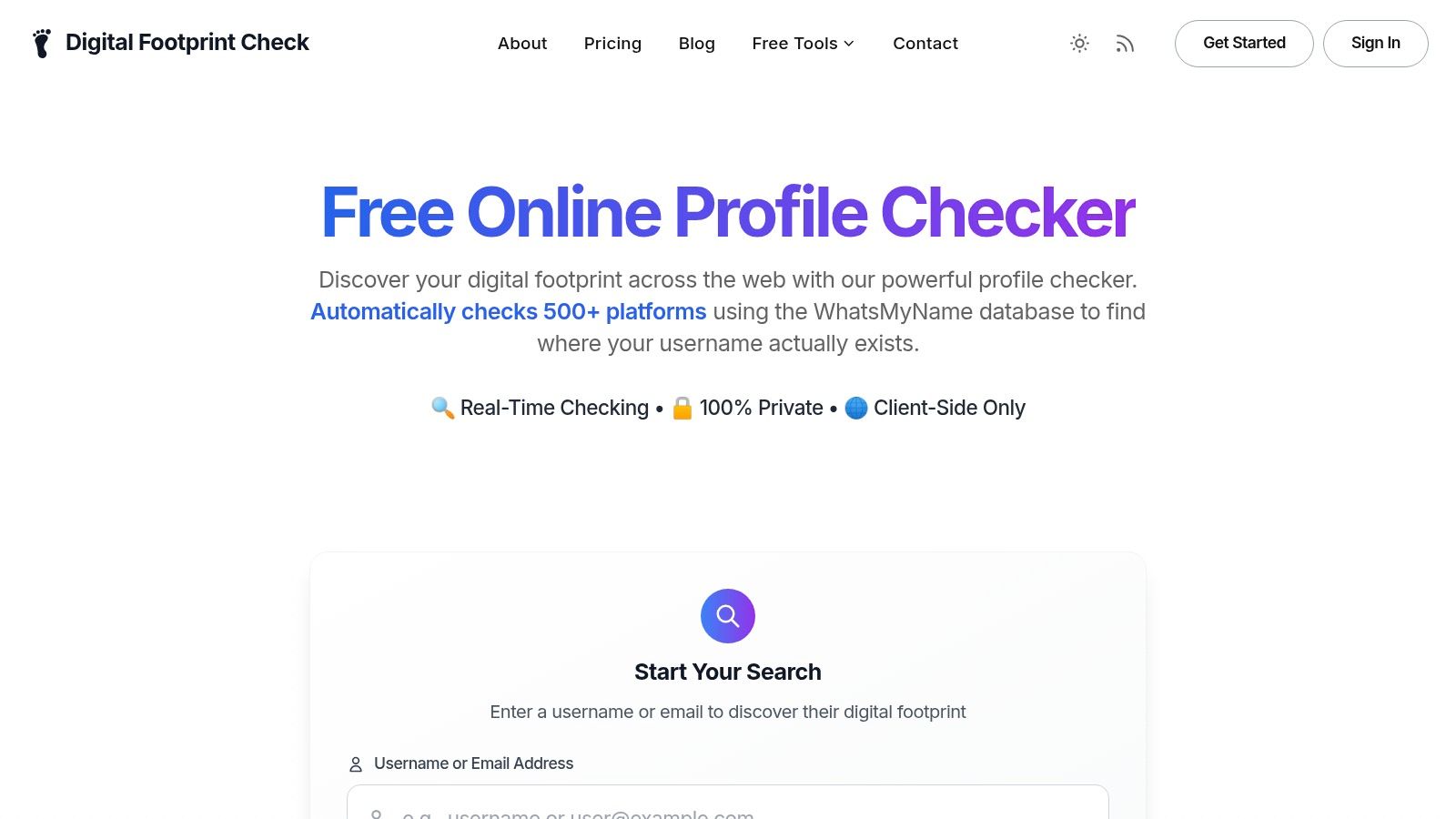
If you want a practical starting point, run a check with Digital Footprint Check. Its free checker helps you see what’s publicly exposed across your digital footprint so you can identify risky accounts, public data, and recovery weak spots before they turn into a real incident.