
· Digital Footprint Check · Content Marketing · 16 min read
How to Remove Your Name From the Internet: a 2026 Guide
Learn how to remove your name from the internet, step by step: source pages, search results, data brokers, and California's DROP program.

You looked yourself up last night in a private window and didn't like what came back. A people-search page still lists the flat you left in 2019, with a phone number you thought was dead. A forum thread from a decade ago sits above your professional profile, and a stranger could map your employer, your town and your partner's first name in about ninety seconds.
The instinct is to find a removal form and start submitting. That's where most cleanups stall. Removal isn't one action. It's four: getting a search result delisted, getting the source page deleted, getting a broker to suppress your record, and catching the record when it reappears after a data refresh. Each outcome uses a different channel, needs different proof and runs on a different timeline. Treat a submitted form as the finish line and you'll end up with a false sense of safety plus three live copies you never found.
So the order matters: inventory first, route second, source page third, legal rights where you have them, verification throughout. Setting it up takes a few focused hours. Keeping it takes about an hour a month.
Build Your Exposure Inventory Before You Submit Anything
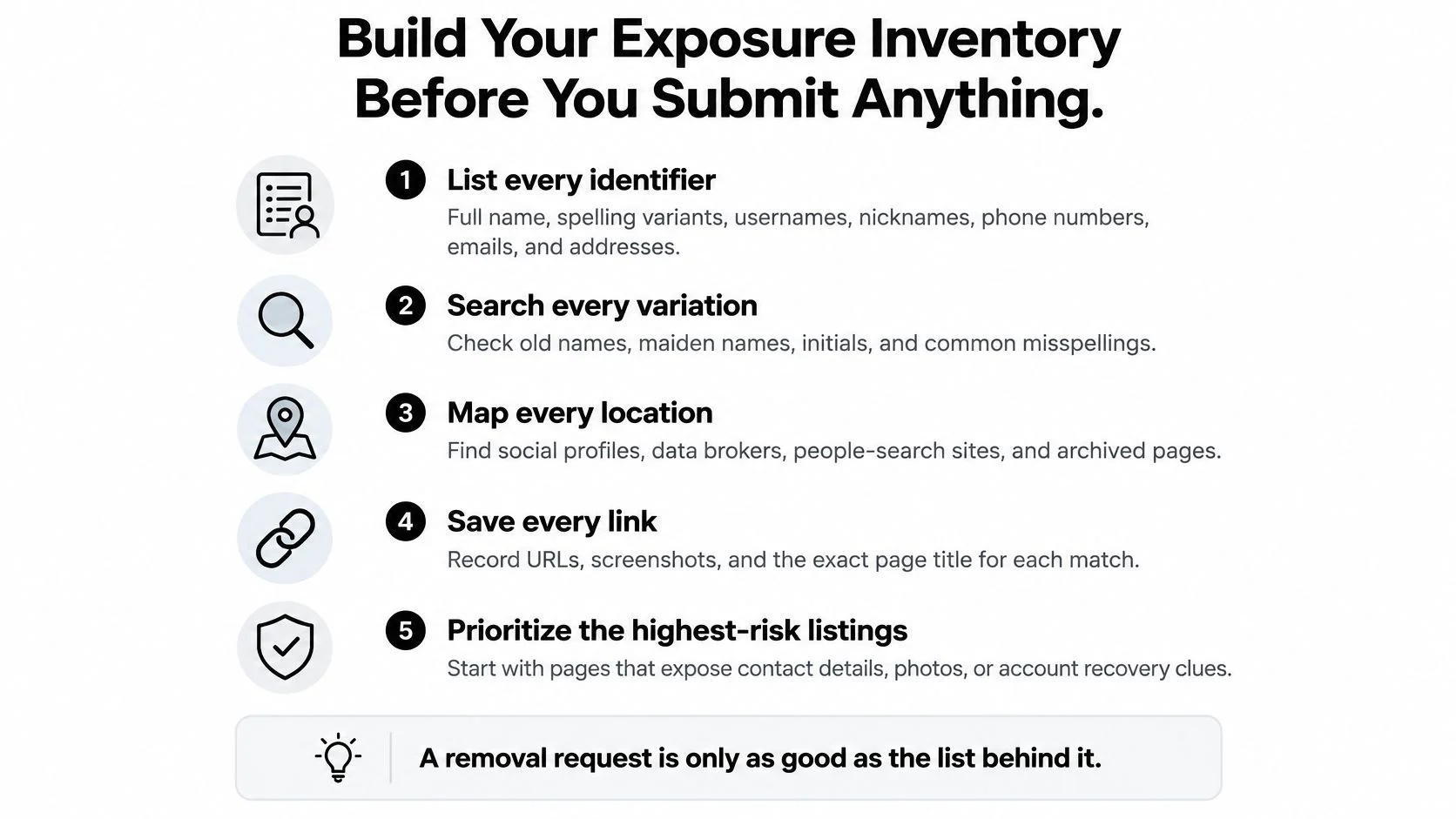
A removal request that names one URL removes one record. If your name lives on nine sites, eight survive, and you won't know which eight unless you wrote them down first. The inventory is the whole game.
1. List every identifier. Full name plus the spelling variants strangers use, former and maiden names, current and retired usernames, every email address you've owned (especially the one attached to account recovery), phone numbers in local and international formats, past addresses, employers, schools, and the profile photos you reuse.
2. Search each identifier alone, then in pairs. Name plus city. Name plus employer. Email plus username. Run every search in a private window, because your own history, location and logged-in accounts soften results in ways a stranger's browser won't.
3. Log what you find. For each hit, record the URL, the page owner, the data type (address, phone, photo, post, court record), the date and a screenshot. Pages change and listings vanish mid-request, so the screenshot becomes your only evidence of what existed before you acted.
4. Sort each hit into a route. Source page, search result, broker listing, public record or breach. The bucket decides who you contact, and getting it wrong wastes a request cycle that can run six weeks.
The test for a finished inventory: hand the sheet to someone else and they could submit every request without asking you a single question.
5. Rank by harm, not by embarrassment. Contact details and recovery email addresses come first, because they enable account takeover and doorstep contact. Old opinions, photos and forum posts come after, even when those are the ones that sting. A 2011 thread about a course you took is annoying; a live phone number next to your street is a safety problem.
The output is one sheet with one priority-ranked row per hit, and it becomes the working log for every request that follows. If you want a worked walkthrough of the discovery half, this guide to how to check your digital footprint shows what a complete picture looks like. Digital Footprint Check approaches the same problem in three steps: search a username or email, review the potential matches, then take action using step-by-step guides.
Here's the audit compressed onto one page:
Which Removal Route Fits Each Type of Listing
Picture a job candidate in her thirties. Her name returns a people-search page carrying a former address and a phone number, and immediately below it a 2014 forum thread where she asked about a training course. She reads them as the same problem. They aren't. The thread is content on a page whose owner can edit it. The people-search listing is a record a company built from public data, and that company's business model depends on keeping it up.
Three actions get blurred together constantly. Delisting removes a result from a search engine's index. Source deletion removes the page or the data itself. Broker opt-out asks a data company to stop publishing or selling your record. They reach different copies, and only two of the three stop the information existing.
Google is unusually direct about the boundary. Its documentation states that search removal does not delete the underlying information and points users back to the website owner first. Its workflow can cover an address, phone number, email address, bank-account number or credit-card number, but the request has to name the specific page URLs. Google can also decline where it judges the result publicly valuable, which typically means government, educational, news or business pages.
Sort every finding into one row before you file anything, so each request reaches the channel that can act on it:
| Listing type | Removal route | What it removes | Realistic limit |
|---|---|---|---|
| Search result pointing to a live page | Contact the site owner to edit or delete the page, then request search removal | Source content and search visibility | Public-value pages such as government or news sites may stay |
| Social media or forum profile | Account privacy settings, then account deletion | Profile content you control | Cached copies and screenshots remain |
| People-search or data-broker listing | Broker opt-out form, or one DROP request in California | The broker's listing | Brokers outside the registry and reacquired data |
| Public court or county record | Redaction request where the law allows it | Limited, depending on jurisdiction | Many records are legally retained |
| Breached account or exposed email | Change passwords, enable stronger sign-in, update recovery details | Account takeover risk | Breach copies already in circulation |
| News article or web archive | Ask the publisher for a correction; request archive removal | Archived or republished copy | Editorial decisions stay with the publisher |
Public records deserve their own note, because they're where expectations run highest and outcomes run thinnest. A court record is often retained by law, so the realistic goal is redaction where a statute permits it, or sealing through the court itself. Even a granted expungement doesn't guarantee the trail is gone, which is why it helps to understand why expunged records may still surface on third-party background checks years later.
For the broker row, start with whichever companies rank on page one for your name and address. This explainer on what data broker sites are covers how those records get bought, merged and resold.
How to Remove Source Pages Before Search Results
Deleting the source is what removes the information. A search removal only hides the result while the page stays live, ready to be re-indexed or scraped by the next engine. Work in this order and you won't do it twice.
1. Start with the page that holds the data. Not the search engine, and not the aggregator that linked to it. Open the page, identify who publishes it, and copy the exact URL.
2. Send a specific request to the site owner. Find the privacy, removal or contact page; the privacy policy usually names a data protection officer or a privacy team. Name the exact URL, the data type and the reason. Attach the minimum needed to prove you're the subject and redact unrelated fields. Never email a full scan of your passport or licence to a general contact address. A date of birth, a partial account reference or a short verification call is normally enough, and the removal request shouldn't hand a stranger a fresh identity file.
Here's the sequence in visual form:
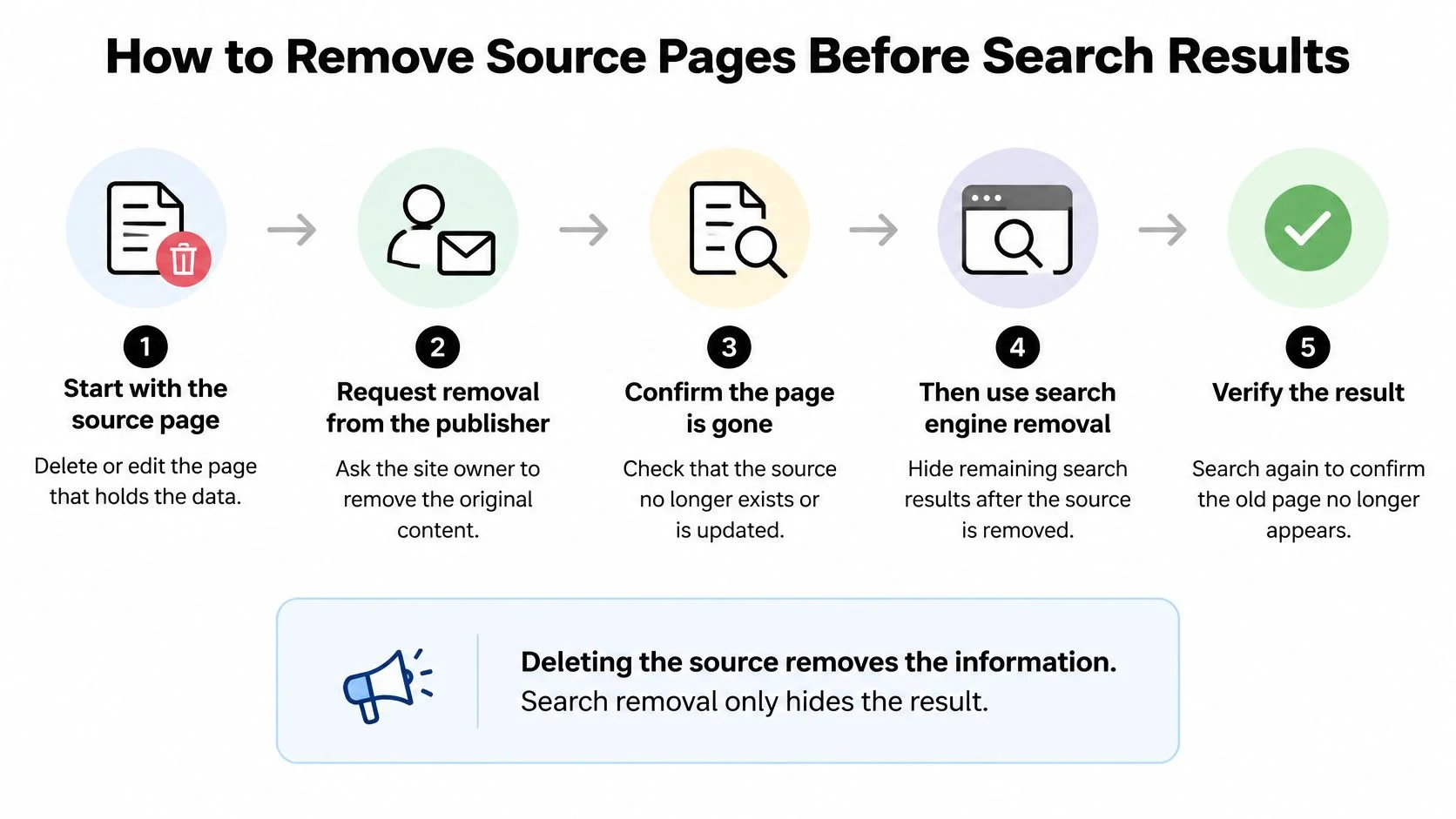
3. Save the receipt and the date. Add both to your log along with the deadline the site states for itself. California's framework for broker deletion accepts exemptions and identity-verification failures as reasons a request falls short, so a submission is never a guarantee (California data broker deletion statute).
4. Only then use the search engine's removal tool. List the specific page URLs, not your name in general. Google accepts categories including address, phone number, email address, bank-account number and credit-card number, and its "Results about you" dashboard will keep watching for new matches. Our walkthrough on how to remove personal information from Google covers the form and the follow-up.
5. Escalate instead of resending. If a site blows past its own stated timeline, use its appeal route or complain to the relevant regulator. Cite the law you're relying on by name and keep the thread in writing. Sending the same form five times produces five ignored forms.
6. Set a recheck date for every request, then move to the next hit. Six weeks out is a sensible default.
One successful removal isn't a permanent state. Brokers reacquire information from public records, marketing partners and newly created accounts, so plan for the record to come back rather than hoping it won't.
A caution that costs people real time: a page already dropped from search can still surface through caches and mirror sites. Note any copies you spot now, because the verification step is where they'll reappear. California residents also have a state-run route for broker-side deletion that skips the per-company queue entirely.
Legal Deletion Rights and California's DROP Program
Public appetite for legal teeth isn't in question. In Project Liberty's 2024 report, 91% of surveyed Americans supported requiring online companies to let people fully delete their personal information. California built the mechanism first.
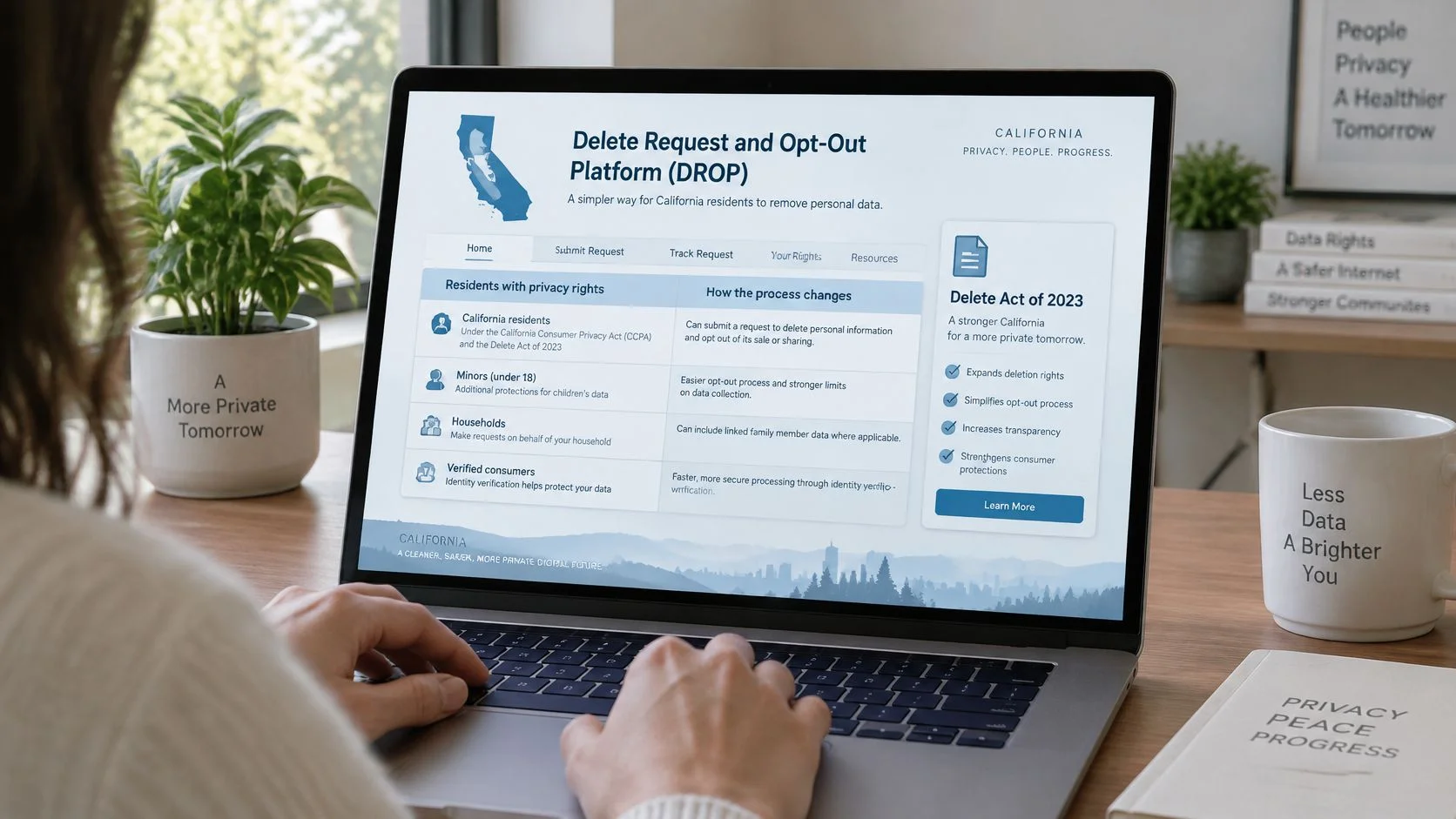
The Delete Act was enacted in 2023 and implemented through the Delete Request and Opt-Out Platform (DROP), which launched on January 1, 2026. A California resident submits one verified deletion request, and the state platform transmits it to registered data brokers instead of the resident emailing each company in turn. Data brokers here means businesses that collect and sell personal information about people they have no direct relationship with, and the records involved can include Social Security numbers, precise location, health-related data and browsing history (Governor's office announcement).
From August 1, 2026, registered brokers must access the mechanism at least every 45 days and process eligible requests within 45 days, subject to legal exceptions. Do the arithmetic before you panic: retrieval plus processing means allowing up to 90 days before you judge a request incomplete. The state said DROP could transmit requests to hundreds of brokers, and later state information described coverage of more than 600.
What the identifier request costs you
Matching your record may require extra details: date of birth, email address, phone number or a pseudonymous advertising identifier. California's proposed rules for the centralized system allow consumers to add those identifiers, and they state that submitting a request consents to disclosing personal information to data brokers for processing (CPPA modified rule text).
That's a genuine trade. You're handing authentication data to the industry you're asking to forget you. Use the minimum identifiers that will still match, confirm the recipient is a registered broker or an authorized processor, and write down exactly what you submitted and when. The same instinct applies to any service already holding your likeness: if you've used AI headshot tools, read the privacy information for AI headshot users rather than assuming those images were deleted after you stopped using the account.
Watch for four recurring failure modes: mismatched identity data, an outdated address, confusing an opt-out of sale with deletion, and assuming public-record exemptions disappear. None of them means the system failed. They mean the request didn't match.
If you live outside California
Rights depend on residence. EU residents work from the GDPR, which grants rights to access, correct, object and erase, and each request runs to its own statutory clock. Most other US states with privacy laws follow a similar shape with different thresholds. Wherever you are, a subject access request is often the smart opening move, because it forces a company to tell you what it holds before you ask it to delete anything. Here's what a DSAR involves.
Whatever your address, DROP and its equivalents cover registered brokers. They don't touch search engines, social networks, court files, archives or a news article someone wrote about you.
If you prefer to watch the process rather than read it, this walkthrough covers the whole removal chain:
Proving Removal Worked and Catching Reappearances
A confirmation email proves a company received something. It proves nothing was deleted.
California's own numbers make that plain. More than 500,000 residents had signed up for DROP by August 2026 and 654 brokers were participating, yet only about 25% had reported processing deletion requests after the August 1 deadline. The same report notes that 99.9% of consumers had a profile deleted by at least one broker, while the typical user's information had been removed by more than 40 (California Privacy Protection Agency). Forty deletions per person isn't failure. It's the scale of the job.
The gap runs deeper than a slow queue. A 2025 investigation by The Markup and CalMatters found that more than 30 data-broker companies hid their deletion instructions from Google, using code that caused search engines to exclude those pages from results (The Markup). If you couldn't find the opt-out page, that wasn't your search technique.
| Outcome | What it means | How to verify | If it fails |
|---|---|---|---|
| Search delisting | The result no longer appears in search | Search the exact name and variants in a private window | Resubmit the search removal with the specific URLs |
| Source-site deletion | The original page no longer exists | Visit the URL directly and check archived copies | Request removal from the archive or the site owner |
| Broker suppression | The broker no longer lists you | Check the broker's listing and your confirmation ID | Resubmit the request and cite the logged ID |
| Reappearance after data refresh | The record returns from new data | Compare against the original inventory log | Restart the request cycle from the first step |
How to run a rescan
Search the exact name, each address in your history, phone numbers, email addresses and image combinations in a private window. Compare the results against the original inventory and mark every row resolved, pending or returned. A drop in visible matches is the metric that matters; a receipt isn't.
When something comes back, the log tells you which request to resubmit and which confirmation number to quote, which saves you from starting the conversation over. If you'd rather have monitoring do the watching, the logic behind social listening and media monitoring options applies directly: you're tracking mentions of a name, just your own.
Practical rule: keep scanning until two consecutive checks show no new matches. One clean scan is a coincidence, not a result.
Protect Accounts and Spot Scams Tied to Exposed Data
The visible listings are the part of your footprint that paperwork can fix. The damage usually arrives through what people do with the rest.
The FTC's 2024 Consumer Sentinel Data Book recorded 845,806 imposter-scam reports, and 22% of those included a reported monetary loss, totalling $2.95 billion. The same year, the FBI logged $389,312,356 in reported losses under "Confidence Fraud/Romance," up from $356,888,968 in 2023 (FTC Consumer Sentinel Data Book 2024). Those categories cover criminals posing as romantic interests, relatives, government agencies, employers and tech support.

- Move your recovery route off the internet. If your recovery email or phone number appears on a listing, anyone who finds it can start a password reset. Switch recovery to an address and number you've never published, then update every account still pointing at the old one.
- Sweep every email in your inventory against breach notices. Reused passwords turn one breach into five. Change anything reused, starting with email and banking, and don't stop at the accounts you still use.
- Turn on phishing-resistant sign-in wherever it's offered. Passkeys and hardware keys beat SMS codes, which fall to SIM swaps. Store backup codes offline in a place that isn't your inbox.
- Verify money and document requests through a channel you already trusted. Call the number you had before the conversation started, not the one in the message. Profile photos and self-reported names prove nothing.
- Treat romance contacts who avoid video calls and push urgent payment as high-risk, especially when the story involves a blocked account, a customs fee or a medical bill.
Account recovery needs the same care as sign-in. NIST's Digital Identity Guidelines define recovery as regaining ownership of an account and its privileges, and the updated guidance adds stronger controls for recovery after an authenticator is lost or stolen. Your recovery path is an attack surface. Treat it like one, and read up on identity theft and how to prevent it before the next breach notice lands.
Start With Your Highest-Risk Listing This Week
Pick one row today. Not the most embarrassing result, the most harmful one: a home address, a live phone number or the email address tied to your account recovery. That single listing is worth more of your evening than the other twenty combined.
Then walk one path end to end. Find the matching row in the route table, send the source request with the exact URL, log the receipt, and set a dated rescan. When that one is done, rerun the inventory from step one, because new copies surface after data refreshes and after each round of removals.
Sort first, submit second, verify third, and expect at least one return visit per record.
Be clear about what a discovery tool can and can't do. Digital Footprint Check doesn't remove information for you. Its step-by-step DIY guides explain how to contact a site or request changes yourself, and its reports show which information about you exists online. The free digital footprint check is the fastest way to see what's left after a cleanup round. The free search gives you a preview with limited features; paid plans provide more searches and full features such as phone and social network checks, gaming profile detection and web reports.
Removal is a habit, not a purchase. Repeat the inventory on a schedule, keep the log, and keep scanning until two consecutive checks turn up nothing new.
Digital Footprint Check shows you what's still out there after the requests go in, then hands you the step-by-step guides to contact each site and ask for changes yourself. If your name is still turning up in searches you thought you'd cleaned, run a search and see the full picture before you write another removal request. Start at Digital Footprint Check and work from the list rather than from memory.