
· Digital Footprint Check · Content Marketing · 11 min read
How to Remove Yourself From People Search Sites in 2026
Learn how to remove yourself from people search sites with step-by-step opt-outs, verification tips and monitoring that catches listings when they return.

You search your name, open a people-search result, and find your home address beside an old phone number and relatives' names. You've already opted out somewhere else, so it's frustrating to discover another profile, especially when you're applying for jobs, using dating apps, or keeping your gaming identity separate from your real name.
Learning how to remove yourself from people search sites means doing more than submitting forms. You need to identify the records, choose the right removal route, verify what changed, and keep a calendar so a confirmation email doesn't become your last check.
Why Listings Keep Coming Back After You Opt Out
Say you remove a profile and stop thinking about it. Months later, your address appears on another site after a broker collects fresh records from an upstream supplier. The earlier request may have worked perfectly, but it didn't cover that other company.
Three outcomes often get confused:
- Opt-out: You ask a site to suppress your listing or stop specified uses of your information.
- Deletion: You ask the company to erase the relevant records, subject to applicable exceptions.
- Delisting: You ask a search engine to remove a result, while the original page may remain online.
California's Delete Act, signed in October 2023 as Senate Bill 362, created a centralized deletion mechanism for verified California residents and recurring broker-processing obligations, according to the California Privacy Protection Agency's system requirements. That recurring requirement addresses the practical problem: brokers can collect information again after an initial removal.
For everyone else, the working method remains site-by-site identification, a verified privacy channel, and documented requests. If the source is a government record rather than a broker profile, use a separate approach to removing public records online.
Practical rule: A submitted form is an action, not a verified outcome. Record what you requested and when you'll check it.
Compare Your Removal Routes Before You Start
Removal routes and what each one covers
| Route | What It Removes | Limits | Who Can Use It |
|---|---|---|---|
| Direct opt-out on each people-search site | That site's listing only | Each site handled separately; some sites suppress data while retaining items covered by public-record exceptions | Anyone, any state |
| California DROP | Personal information held by registered data brokers, matched by identifiers | Excludes public records and information given directly to companies; brokers process on a recurring cycle | Verified California residents |
| Search-engine delisting | Search-result links only | The original page or broker profile remains online | Anyone with a link to submit for removal review |
| Direct request to one data broker | That broker's records | Needs identifying data and verification; can take a full processing cycle | Anyone, any state |
Direct opt-outs are useful when you can see the exact listing you want hidden. A broader broker request is useful when you want the company to address associated records, not just a visible profile. Anyone can submit a request, but enforceable rights and exceptions depend on jurisdiction.
California residents should consider DROP early. The state's DROP flyer describes coverage across more than 500 registered data brokers, while excluding public records, information governed by other privacy laws, and information supplied directly to companies. It's broad coverage, not universal internet deletion.
Match the request to the exposure
DROP isn't anonymous. The official consumer platform requires residency verification and consent to disclose submitted identifiers to registered brokers for processing deletion requests. Review what you're providing and minimize optional information without making the request impossible to match.
Identifier quality matters. An email-based match may miss a separate phone-based record, so don't assume that supplying your newest email addresses every historical profile.
Outside the United States, EU GDPR deletion rights can offer another route, although exemptions and broker-specific practices still affect outcomes. A data subject access request can also help you understand what a company holds before deciding what to challenge.
Start with the route for the most relevant records in your jurisdiction. Then use direct opt-outs for uncovered listings, recording the route, matching identifiers, submission status, and next review date.
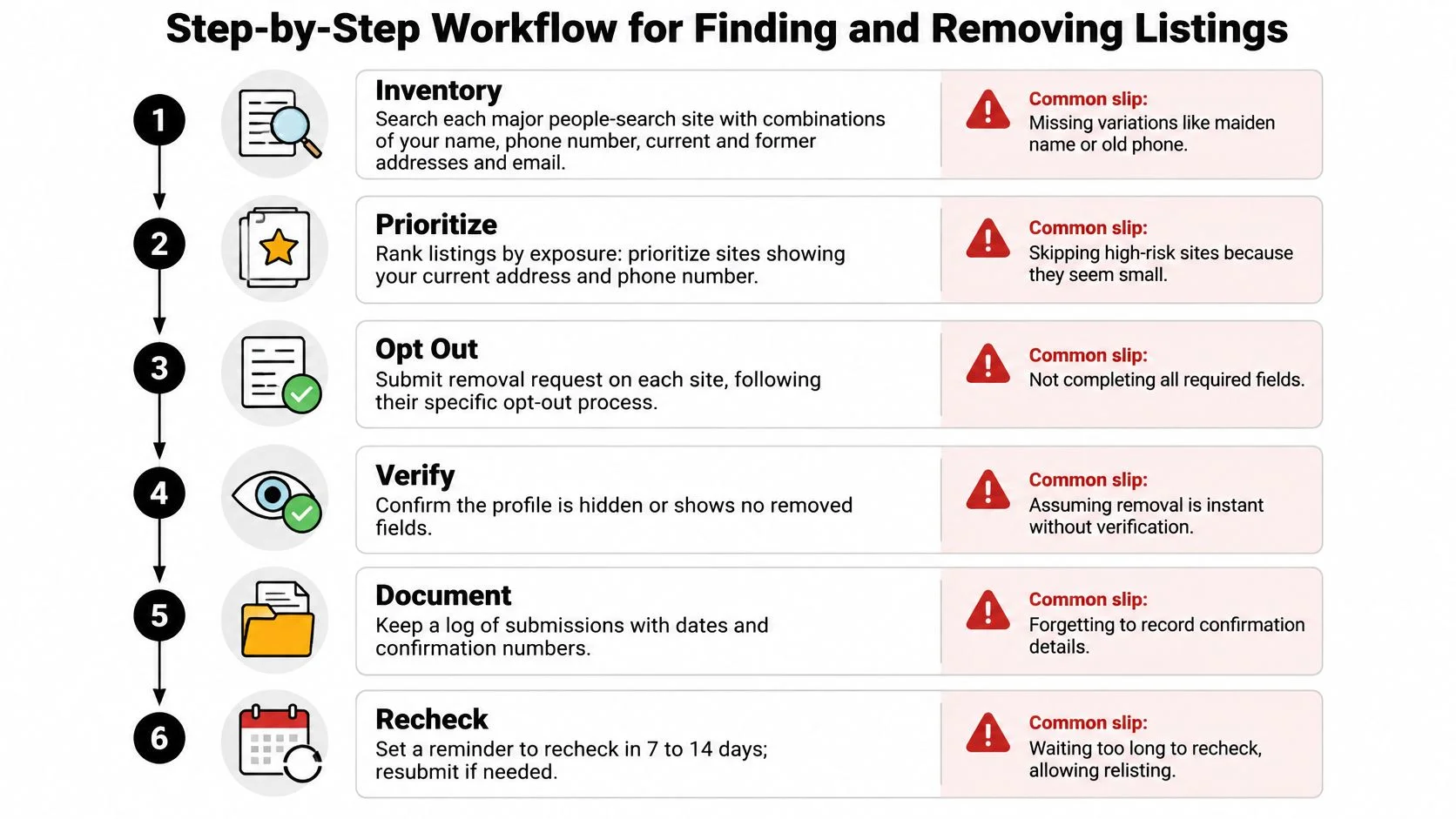
Step-by-Step Workflow for Finding and Removing Listings
Keep a single tracking sheet open while you work. Use the visual workflow as a reminder, but treat the log as your source of truth.
Find the record and preserve the evidence
-
Inventory your listings. Search each major people-search site using your name, phone numbers, current and former addresses, and email addresses. Try former surnames and familiar name variants, then prioritize profiles exposing your current address or direct contact details.
Why it matters: A search using only your current address misses historical records. Common slip: Assuming that no name-search result means the site has no phone-linked profile. Log each discovery and schedule its removal review.
-
Create an evidence entry. Record the site, exact profile URL, exposed fields, discovery date, and opt-out status. Save screenshots, confirmation emails, timestamps, and request identifiers together.
A useful status sequence is found, submitted, verification pending, confirmed, checked, reappeared. Keep “confirmation received” separate from “profile no longer visible.” Common slip: Saving a site's homepage instead of the individual profile URL. Add the next action and its calendar date before moving on.
The FTC's people-search guidance recommends locating your report through identifying information, following the site's opt-out instructions, and repeating the process across services. Use this guide to find what data brokers have on you if your initial searches produce an incomplete inventory.
Submit, verify, and close the loop
-
Use the site's verified privacy channel. Go from the company's own website to its privacy, legal, or opt-out page rather than trusting an unverified removal result. A CookieHub article discussing a 2025 investigation reports that at least 35 data brokers hid opt-out or deletion pages from search engines.
Why it matters: Unofficial pages may collect additional information or imitate legitimate forms. Common slip: Entering your details before checking who operates the page. Record the official destination, submission receipt, and recheck date.
-
Complete verification with minimal disclosure. Supply the fewest identifiers that reliably match your record. Avoid uploading identity documents unless legally necessary; if a site insists, ask it to explain the requirement and whether a less intrusive method is available.
Domestic-abuse survivors, doxxing victims, minors, and people with confidential addresses face especially high stakes. Preserve ignored or rejected requests for escalation to the relevant privacy regulator. Common slip: Sending extra personal information “just in case.” Log the verification method and follow-up date.
-
Revisit the original profile. Check whether it returns no profile or no longer exposes the targeted fields, then run the same identifying search again. A confirmation plus a clean public check supports marking the entry verified.
Common slip: Treating an email receipt as proof that the public listing changed. Record the observed result and the next recheck.
-
Restart when an identifier changes. A new address, phone number, or alias deserves a fresh inventory, not just another visit to old URLs. Some information can remain under public-record exceptions, including sex-offender status, so record the actual outcome rather than labeling everything deleted.
Common slip: Closing the entire audit after one successful opt-out. Add new findings and assign their next action dates.
For a walkthrough alongside your worksheet, use the video below.
At Digital Footprint Check, we don't remove information for you; our guides explain how to contact a site or request changes yourself. We don't store or sell users' search queries.
Search Engine Delisting as a Second Track
In 2024, Google received nearly 180,000 privacy-related requests concerning name-linked results, up 10% from the prior year, according to Surfshark's analysis of delisting requests. Those requests covered more than 800,000 URLs, almost 40% more than in 2023, or approximately five URLs per request; more than 60% of requested URLs were delisted overall, while the personal-information category reportedly reached 99% in that dataset.
Those figures describe a particular set of requests, not your likelihood of success. Eligibility, the information exposed, and the applicable removal process still matter.
Delisting reduces discoverability. It doesn't erase the broker's profile or the underlying public record, and results can differ by territory. Someone with the original URL may still reach the page.
Use the right order
- Request source removal. Contact the people-search site or broker for deletion or suppression through its privacy process. Keep the exact URL and evidence of the exposed fields.
- Request search-result removal. Submit sensitive results that remain indexed, especially pages exposing addresses, phone numbers, email addresses, or government identifiers. Use the appropriate process for the issue rather than assuming every unwanted mention qualifies.
- Search again and log changes. Repeat your name and identifier searches after each processing cycle. New pages deserve new entries, even if they resemble a previously removed profile.
Use the guide to removing personal information from Google to distinguish sensitive-information requests from cases involving an outdated result.
Keep separate statuses for the source page and the search result. “Not found in Google” doesn't mean “deleted by the broker.”
For reputation management, that distinction matters. A job seeker may want an inaccurate profile corrected at its source, while someone facing harassment may prioritize reducing search visibility immediately. Delisting supplements source removal; it doesn't replace it.
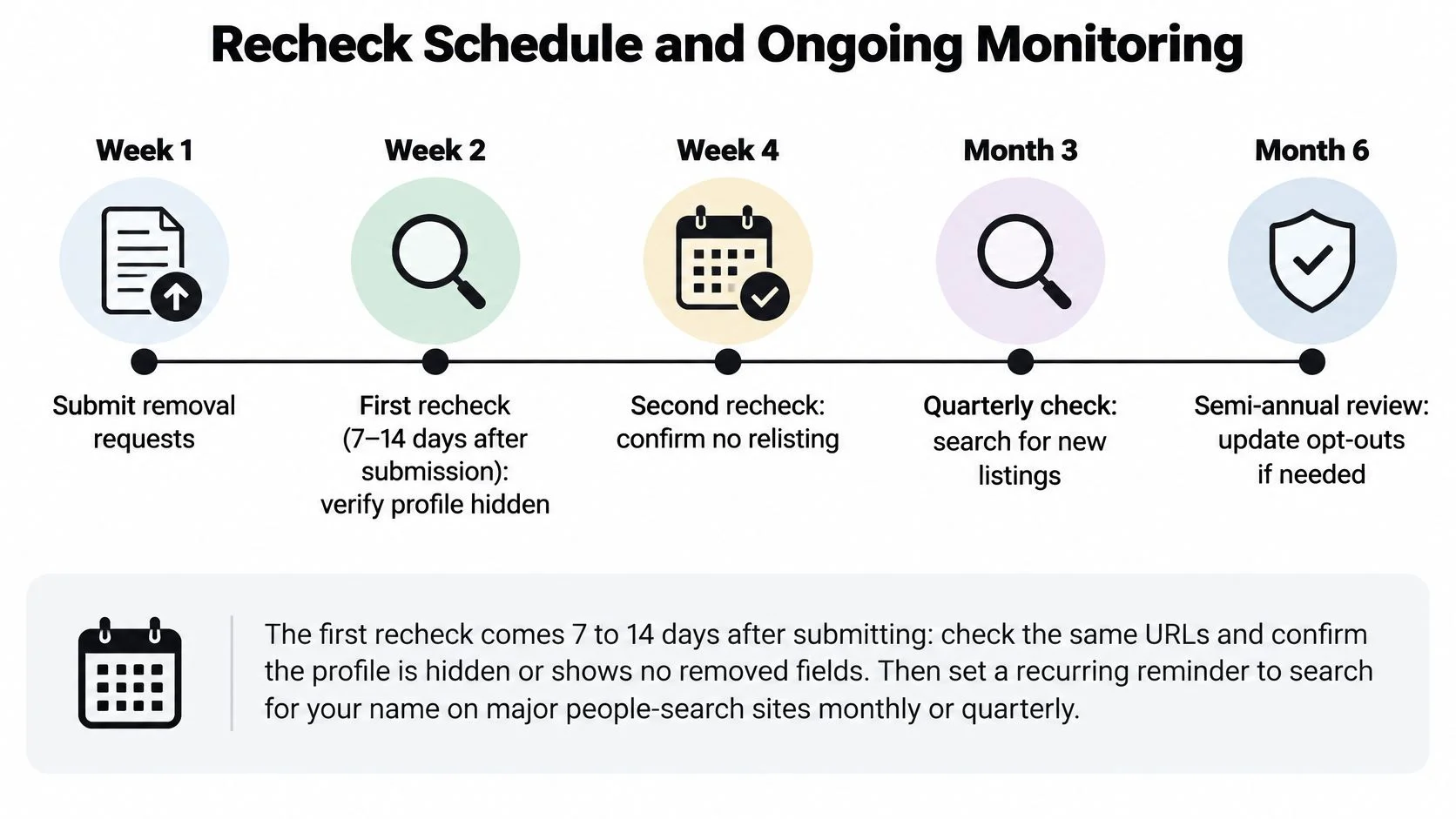
Recheck Schedule and Ongoing Monitoring
Recheck schedule after you submit removals
| Check | When | What to Look For |
|---|---|---|
| First recheck | 7 to 14 days after submitting | Same URLs; confirm the profile is hidden or shows no removed fields |
| Second recheck | 30 to 45 days after submitting | Same URLs plus a fresh name search for new profiles |
| DROP processing cycle | At least every 45 days from August 1, 2026 | Broker dashboards and public search results for California records |
| New identifier appears | Right away | Run the full six-step workflow for the new address, phone, or alias |
The initial checks are working review windows, not promises that every site must finish within them. California's separate statutory schedule requires brokers to access and process DROP requests at least every 45 days beginning August 1, 2026, according to the California Privacy Protection Agency's explanation of DROP deletions.
Use the timeline as a calendar prompt, while following any specific deadline recorded in a broker's response.
Compare identifiers, not just URLs
A republished profile can have a different URL. Checking only bookmarked pages can therefore produce a clean-looking log while a replacement listing remains searchable.
Normalize the identifiers you compare:
- Phone numbers: Store a consistent international-format version so spacing and punctuation don't hide matches.
- Email addresses: Lowercase them for comparison, while retaining the original evidence.
- Addresses: Track common street abbreviations, unit formats, and former addresses.
- Names: Include known aliases and former surnames without assuming every namesake is you.
A matching username alone isn't proof of ownership. Before associating a result with yourself, compare independent details such as a known email, location, or linked profile.
Turn findings into actions
Our process at Digital Footprint Check is straightforward: search a username or email, review the potential matches, then act using step-by-step guides. Keep discovery separate from verification, and verification separate from the removal request.
Automated monitoring can help compare identifiers and flag changes, but don't let an alert replace checking the actual page. A gaming handle linked to a real-name account, for example, deserves closer inspection even when it isn't a people-search listing. Removing a broker profile won't change that account's privacy settings or secure a compromised login.
Build a recurring quarterly name-and-address search into your digital footprint management routine. For every review, record the search terms, observed exposure, status change, and next date. Keep unresolved requests visible until you've verified the outcome or documented the applicable exception.
Set Your Recheck Calendar This Week
Make three concrete decisions this week:
- List every known listing. Include the precise profile URL and the information you want removed.
- Choose a route for each entry. California residents can start with DROP, then handle uncovered listings directly. Elsewhere, assign each site its own request.
- Book the first recheck. Put it in your calendar when you submit, not after you remember the problem again.
To begin discovery, our free digital footprint checker includes Username search for public profiles associated with a handle and Email lookup for public information linked to an address. A check can also surface breach exposure and other online connections that merit separate action.
The free search provides a limited preview. Paid plans provide more searches and full features, including phone and social network checks, gaming profile detection, and web reports. Choose based on what you need to investigate, not on an assumption that paying automatically removes anything.
Prioritize the consequence
If you're job hunting, inspect potential matches for inaccurate identity associations before requesting changes. If you're dating online, treat a profile match as a lead rather than proof of someone's identity or intentions. For scam prevention, examine the connection between accounts without assuming that an exposed email proves fraud.
For personal safety, put current location exposure ahead of cosmetic cleanup. For gaming accounts, address real-name links separately from password security and account recovery.
You remain in control of what you submit to each site. The useful measure is coverage over time, supported by a log that distinguishes requested, confirmed, and independently checked outcomes. Every recheck should leave a dated entry, even when nothing has changed.
Use Digital Footprint Check to discover potential online matches and follow practical guides for requesting changes yourself. Start with a username or email, add confirmed people-search listings to your removal log, and schedule your next check before you close the audit.