· Digital Footprint Check · Content Marketing · 13 min read
Identity Theft and How to Prevent It in 2026
Learn identity theft and how to prevent it with account hardening, MFA, breach checks, and recovery steps that limit real-world harm.

69% of respondents believed they could spot a scam, yet 43% of those confident respondents still became victims during the previous year, according to F-Secure's scam intelligence research. Confidence didn't reliably protect them. A convincing message can reach someone who knows the usual warning signs and still persuade them to act.
Understanding identity theft and how to prevent it starts with that uncomfortable distinction. You don't need to become suspicious of everyone. You need safeguards that still work when a message looks personal, a caller sounds helpful, or a verification request appears legitimate.
What Identity Theft Looks Like Now
A message arrives mentioning your employer, an old gaming username, and a relative's name. The sender claims there's an urgent problem with your payroll account. Nothing looks misspelled, and the details are accurate.
This is an illustrative scenario, not a documented case. Its lesson matters: knowing facts about you doesn't prove someone has authority to contact you. Public information can help an impersonator sound familiar without ever having met you.
Recognize the misuse, not just the message
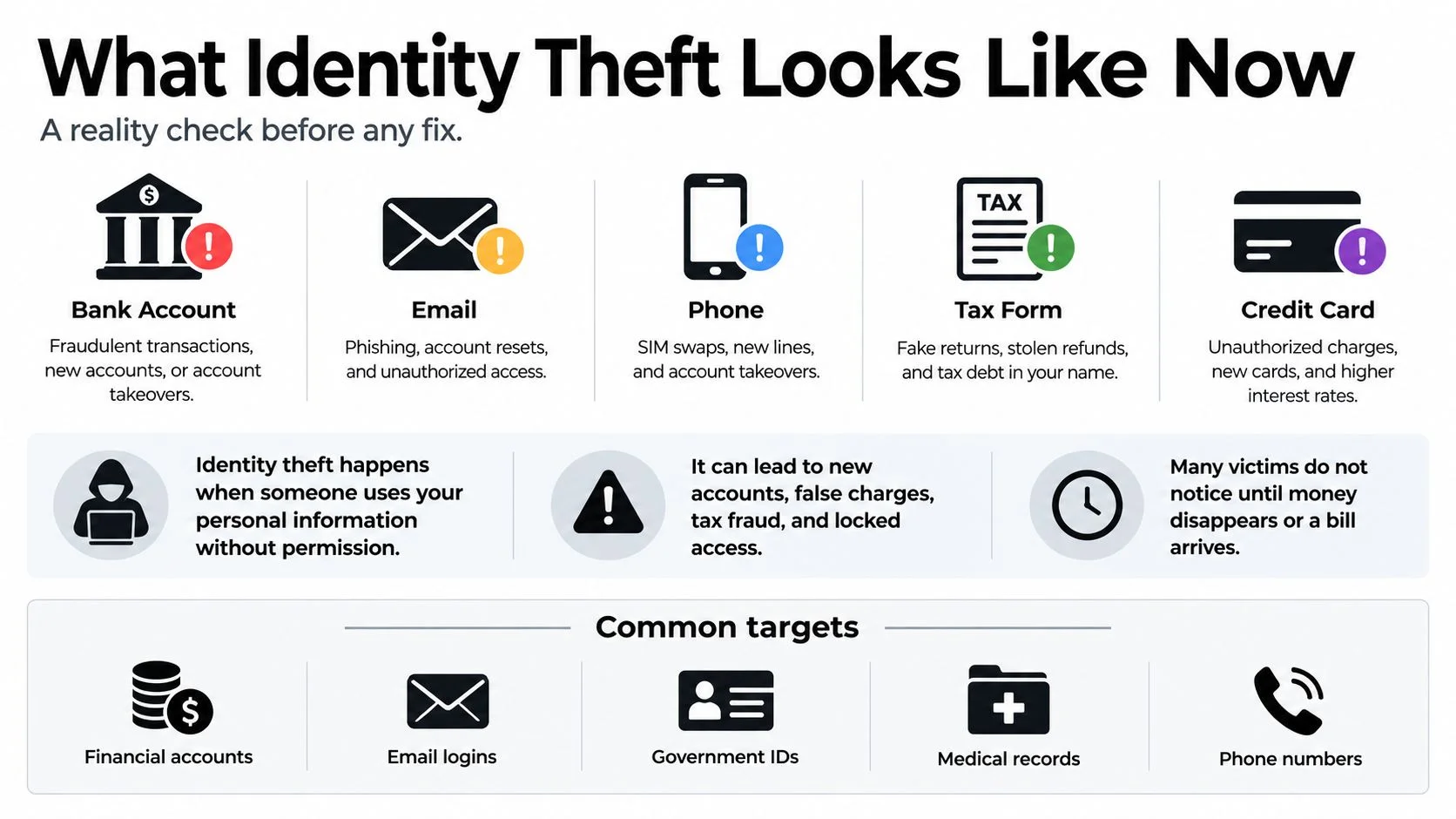
Identity theft means someone uses your personal information without permission. That misuse can involve your money, existing accounts, government identifiers, or reputation. Some attempts begin with a stolen password; others begin with a conversation.
The main forms are easier to recognize when you connect them to something you own:
- Financial identity theft: Someone uses identifying details to seek credit, open an account, or make unauthorized purchases.
- Account takeover: An attacker enters an existing email, banking, gaming, or social account and acts as its owner.
- Tax-related misuse: Someone uses identifying information to submit a fraudulent tax filing.
- Mixed or synthetic identity use: Someone combines real identifying details with other information to construct an identity.
- Social impersonation: Someone poses as you, a relative, a colleague, or a romantic contact to influence another person.
These categories can overlap. A compromised social profile might become the channel for asking your family for money. A stolen mailbox might become the starting point for taking over other accounts.
The infographic groups the information and accounts an attacker may target.
Why confidence isn't a security control
The opening confidence gap isn't an argument against education. It's an argument against making message recognition your only defense. The same research summary reports TransUnion's finding that 29% of consumers across 18 countries and regions lost money to email, online, phone-call, or text-message fraud in the prior year.
A message can contain accurate personal details and still come from someone who has no right to your information or money.
Sloppy spelling can be a warning, but polished writing isn't proof of legitimacy. Neither is a familiar photograph, an employer's name, or a recognizable username.
Understanding how scammers get your information helps explain why a stranger's story can sound so specific. The useful question isn't whether you'd notice a scam. It's which part of your life someone could convincingly impersonate.
How Stolen Details Become Real Harm
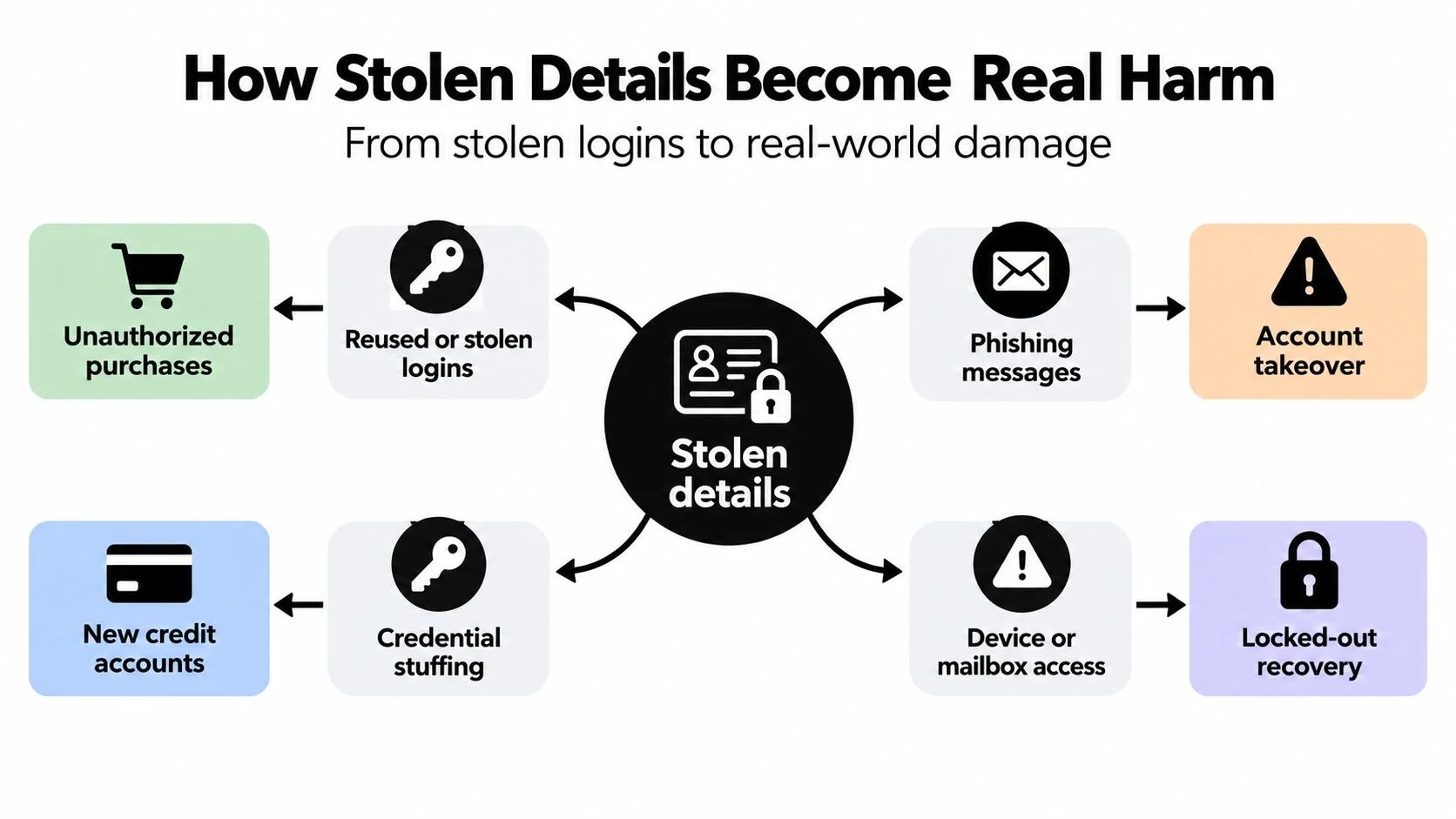
A stolen login doesn't have to remain an isolated problem. If the owner reused it elsewhere, an attacker may try the same credentials against other accounts. This is credential stuffing, testing stolen combinations rather than guessing from scratch.
The flowchart traces possible paths from exposed information to unauthorized activity.
How attackers get a foothold
Verizon's 2025 investigation covered more than 22,000 incidents and 12,195 confirmed breaches, with credential abuse appearing in 22% of breaches and vulnerability exploitation in 20%; human involvement remained near 60%, while third-party involvement doubled from 15% to 30%, according to its Data Breach Investigations Report executive summary. The same report found a 94-day median remediation time for leaked secrets discovered in GitHub repositories.
Those findings describe organizational breaches, not an individual's probability of identity theft. Still, they clarify the routes worth taking seriously: stolen access, unpatched software, persuaded people, and connected providers.
A credential exposed in public code isn't harmless just because nobody has reported misuse. Until the owner revokes it, someone may still be able to use it. Updating vulnerable software and checking connected services belong alongside password security.
What the damage can look like
Consider the consequences rather than just the account's label:
- Job prospects: An attacker could alter a professional profile or send messages that a recruiter mistakes for yours.
- Gaming access: Losing a paid account can mean losing purchases, community connections, and control of a familiar profile.
- Family safety: A public phone number and visible family relationship can support a believable emergency story.
- Dating trust: A person using someone else's photographs can build emotional pressure around a fabricated identity.
Romance and confidence fraud show how costly that last scenario can become. The FBI figures summarized in this romance-scam investor education paper record 23,159 complaints and $929,287,469 in reported losses in 2025, compared with $672,009,052 in 2024, an increase of about 38%.
An emotional connection doesn't authenticate the person behind an account. Moving quickly off-platform or introducing an urgent financial emergency deserves independent verification, not reassurance from the same contact.
For help recognizing a developing compromise, Kons Law's resource on warning signs of account takeover provides an additional reference.
This video offers another format for exploring the subject.
When ranking your own exposure, ask what would hurt most if it failed first. Email, payroll, and phone access deserve attention because the consequences can extend beyond the original account.
Harden Accounts Before Attackers Do
Start with an exposure inventory, not a shopping list of security products. Record the email addresses, usernames, phone numbers, public profiles, breached credentials, and sensitive accounts you still use. Include forgotten accounts if they retain personal information or recovery access.
Rank them by financial, employment, health, and recovery impact. Give particular attention to email, your password manager, banking, tax, payroll, cloud storage, and your mobile carrier. An account that can reset other accounts deserves priority even if it holds no money itself.
Work through each high-impact account
Use the same review process so you don't secure the login while overlooking another entrance:
- Replace reused credentials: Generate a unique password and store it in a password manager. Follow these password security best practices when organizing the change.
- Strengthen authentication: Enable the strongest suitable option the service supports.
- Reduce recovery exposure: Remove unnecessary recovery methods and investigate addresses or phone numbers you don't recognize.
- Inspect existing access: Review active sessions and connected applications. Remove access you no longer need.
- Enable alerts: Switch on login notifications and transaction alerts where available.
Coverage matters more than enrollment. Having strong authentication on a social account doesn't compensate for leaving the email account that resets it poorly protected.
Which Sign-In Check Actually Resists Phishing
NIST recommends phishing-resistant authentication for accounts protecting personally identifiable information, including FIDO2/WebAuthn authenticators. These use public-key cryptography and bind authentication to the legitimate website origin, as explained in NIST's multifactor authentication guidance.
| Method | What the user does | Main weakness | When to use it |
|---|---|---|---|
| SMS | Enters a code delivered by text | Codes can be intercepted or relayed through phishing | When stronger supported options aren't available |
| Authenticator app | Enters an app-generated code | Manually entered codes can still be phished or relayed | Prefer it to SMS when passkeys or security keys aren't available |
| Phishing-resistant authenticator | Uses a supported passkey or security key | Requires compatible service support and recovery planning | Prioritize it for sensitive accounts wherever supported |
An authenticator app is a useful fallback, but it isn't equivalent to phishing-resistant authentication. Keep recovery codes offline, and never approve an unexpected authentication push.
Practical rule: Secure the accounts that can reset the others before polishing low-impact accounts.
Review your inventory monthly and after every breach notification. Investigate unfamiliar recovery addresses or email-forwarding rules, revoke unwanted sessions, and replace reused secrets promptly.
Keep investment research separate from account protection, too. If you're considering speculative purchases, MemeAssist's resource to check Solana meme coins before buying can be an additional research step, but it doesn't replace authentication or establish that a purchase is safe.
Share Less Without Skipping Verification
A dating app requests a selfie. A job portal asks for an identity document. A gaming marketplace wants additional verification before restoring access.
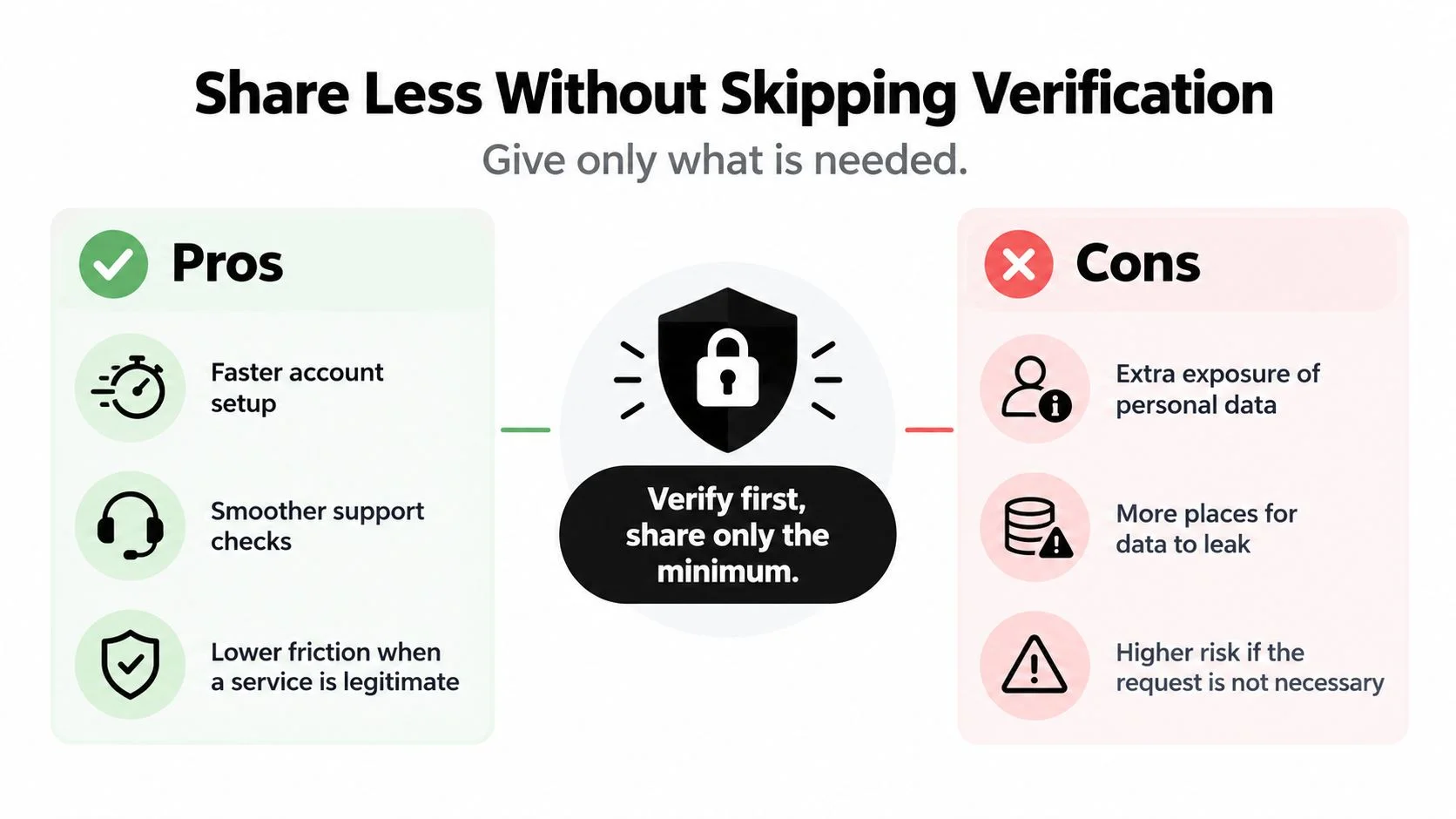
Rejecting every identity check isn't a workable privacy strategy. Submitting everything without asking questions isn't one either. The decision is whether the request is necessary, proportionate, and handled responsibly.
Verification can help and still create exposure
In Veriff's identity-verification survey, more than 75% of global respondents were comfortable using an identity document and selfie, and 90% considered identity-verification or biometric protections important on social media, gaming, and dating services. Yet fewer than one-third of US and UK consumers believed businesses were transparent about data use; 76% of UK consumers and 65% of US consumers said they'd share more information for stronger safeguards.
That tension is reasonable. Verification may help a service resist impersonation while creating another repository of sensitive identity information. A one-time recovery check and routine login security serve different purposes, so they shouldn't automatically require the same data.
The comparison below captures the central trade-off.
Match the evidence to the purpose
For a job portal, ask why a document is needed at this stage and whether the employer or a separate vendor receives it. Don't treat a recruiter's message alone as confirmation that an upload destination is legitimate.
For a dating app, distinguish the platform's verification process from a match asking privately for identification. A verification badge also shouldn't be treated as proof that every story or financial request is genuine.
For a game marketplace, ask whether the check supports recovery, a transaction, or another stated requirement. A request arriving outside the official support process deserves independent confirmation.
Before uploading, ask:
- Minimum necessary data: Does the service need the full document and selfie, or is a less revealing check available?
- Retention and deletion: How long will it keep the material, and what deletion rights apply?
- Vendor responsibility: Who processes the submission, and who can access it?
- Security and notification: What does the service explain about encryption and breach notifications?
Reduce unrelated public exposure as well. Restrict old usernames, personal phone numbers, employer details, and visible family links where they aren't needed. Learning what data broker sites are can help you identify another place to review discoverable information.
Even a credible request needs an independent route. Open the official app yourself, confirm urgent payment or account changes through a separate trusted channel, and never read a one-time code to a caller.
Recover Fast After a Breach or Scam
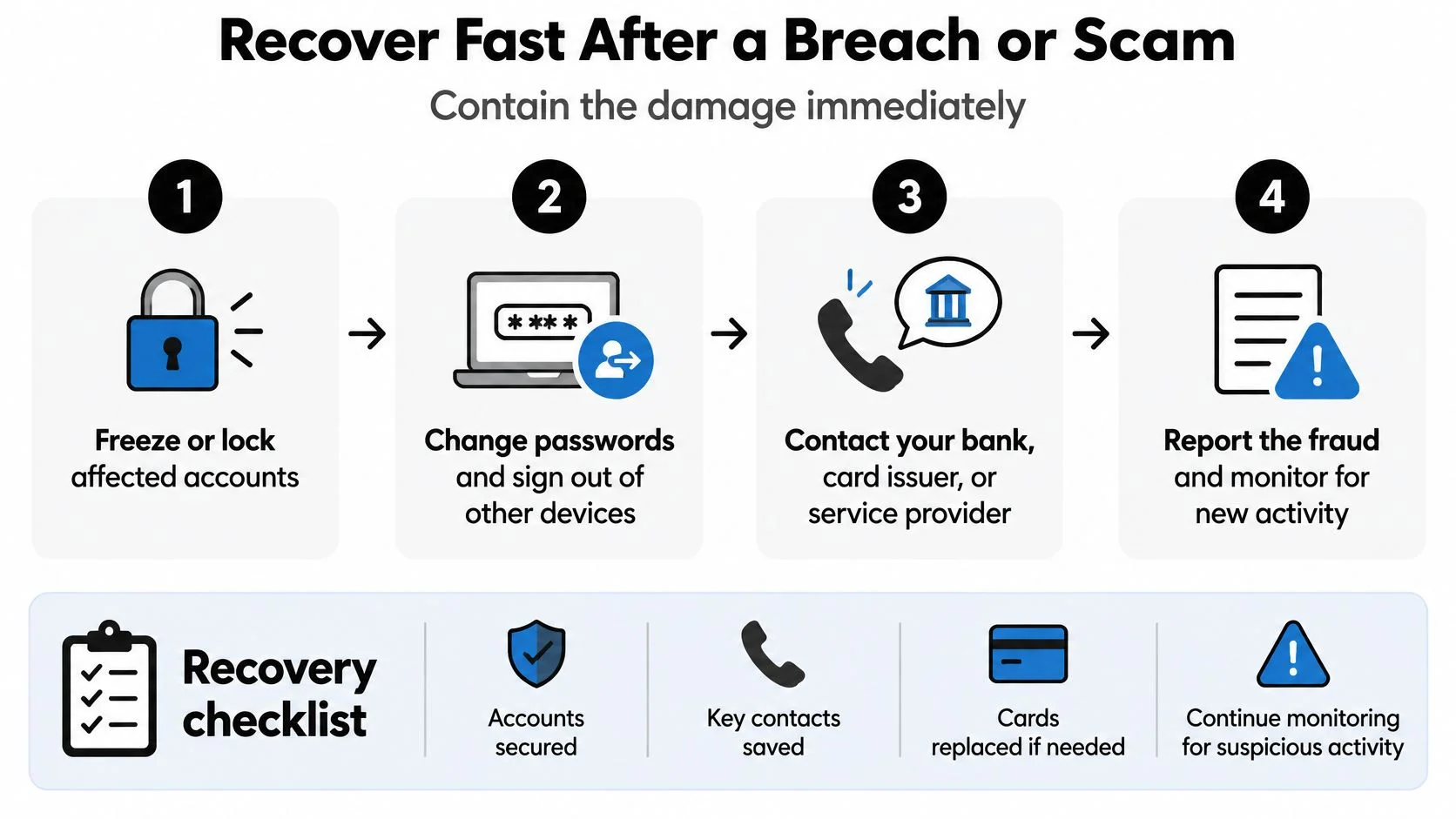
A breach notice arrives, or you discover an unfamiliar transaction. Your immediate task is containment, not deciding whether you should have spotted the problem sooner.
Confirm the alert through the organization's known website or telephone number. Avoid the message's links, even if the warning turns out to be genuine. Then identify what was exposed: passwords, authentication tokens, payment information, government identifiers, or security-question answers.
Close the access that remains
Change the affected password and every other account where you reused it. Invalidate active sessions and API tokens, and strengthen authentication. Check connected-app permissions and mailbox-forwarding rules rather than assuming the password change removed every route back in.
NIST explains that phishing-resistant authentication prevents captured authentication data from being used at an illegitimate verifier and helps stop attacker-in-the-middle relaying. Its guidance on phishing resistance identifies FIDO authenticators used with WebAuthn as widely available options.
Changing a password isn't the same as removing everyone who already has access.
Contact affected financial institutions, replace compromised payment instruments, and arrange the credit or fraud protections available in your country. If your phone account may be involved, contact the carrier about unauthorized changes or possible SIM-swap exposure.
The recovery sequence below provides a visual reference while you work.
Preserve evidence and watch for follow-on activity
Save relevant messages, transaction records, and screenshots. Keep a recovery log with dates, case numbers, contacts, and disputed charges. These records help you explain what happened without reconstructing everything during each support conversation.
Monitor statements and account-recovery messages. Where supported, use alerts for:
- New devices: Access from hardware you don't recognize.
- Impossible travel: Logins from locations inconsistent with plausible travel.
- Password resets: Changes you didn't initiate.
- Recovery-factor changes: A new phone number, address, or authentication method.
For a broader recovery reference, use this guide to what to do after identity theft.
If someone persuaded you to send money, stop sending it. Don't provide more personal or financial information, and report promptly through the appropriate official channel, including the Internet Crime Complaint Center where applicable. The FBI's Internet Crime Report advises victims against paying supposed recovery services, which are frequently fraudulent.
A caller claiming to be support doesn't need you to read back the one-time code generated for your own login. Refuse that request, end the conversation, and contact the provider independently.
Check Your Exposure and Act Today
Searching your name can reveal a profile you forgot. A bank alert can reveal suspicious financial activity. Neither gives you a complete picture of the identifiers someone could use to build a believable impersonation.
The useful distinction is between finding public context and detecting misuse. You want both, but they answer different questions. One asks what a stranger can discover; the other asks whether someone has already acted.
Choose a check that matches the question
| Approach | What it helps you see | What it doesn't establish |
|---|---|---|
| Search your own name | Search-visible pages and reputation issues | Every account connected to an email, phone number, or username |
| Watch bank alerts | Activity involving monitored financial accounts | Public information available before a financial incident |
| Run an exposure check | Discoverable identifiers and connected profiles across supported sources | That every result is yours or that exposure proves fraud |
Digital Footprint Check is one OSINT service that searches 500-plus platforms, including social networks, breach databases, gaming profiles, professional networks, and public records. Its reports help identify accessible personal information, hidden accounts, and signs of compromised credentials. Its identity theft checker is an option alongside manual searches and account-specific monitoring.
OSINT, or open-source intelligence, means investigating information available through accessible sources. Finding a profile isn't proof that its owner committed fraud, and finding an exposed identifier doesn't prove someone has used it. Treat results as leads to verify, not accusations.
Turn findings into decisions
Look for connections that matter. Does an old gaming username connect to a personal email address? Does a professional profile reveal details that would make a payroll impersonation convincing? Does an abandoned dating profile still show information you no longer want strangers to judge?
Check ownership before requesting changes. Similar names and reused usernames can point to other people, so use ethical research methods and respect their privacy. For your own confirmed profiles, decide whether to update, restrict, close, or request removal.
An exposure report can support those decisions, but it doesn't freeze credit, replace a password manager, or guarantee deletion by another platform. Monitoring public exposure is a separate task from controlling access and resolving fraud.
Finish with a manageable work session:
- Run the free check: Review the results before deciding what needs action.
- List exposed identifiers: Record confirmed email addresses and usernames.
- Address high-impact reuse: Replace reused secrets on accounts with financial or recovery power.
- Schedule another review: Set a monthly reminder and revisit the inventory after breach notices.
You don't need a perfectly clean internet presence before making progress. You need a verified list and a concrete next action.
Digital Footprint Check helps you discover accessible personal information and connected accounts so you can prioritize identity-theft prevention. Start by reviewing your exposed emails and usernames, then address the findings that affect your most sensitive accounts. Run your free digital footprint check today.