· Digital Footprint Check · Content Marketing · 16 min read
Social Engineering Awareness for Safer Digital Life
Build social engineering awareness with practical checks for phishing, vishing, romance scams, exposed data, account security, and faster incident response.

You're halfway through a busy afternoon when a colleague sends a quick message: “Can you buy gift cards for the client event? I'll reimburse you later.” The request arrives through a familiar chat account, uses the colleague's usual name, and sounds like a simple favor. Then the second message appears: “I'm in a meeting, so please don't call. I need the codes soon.”
That last detail changes the decision. The request isn't suspicious because gift cards are always dangerous or because the writing looks unusual. It's suspicious because urgency, secrecy, and a request to bypass normal verification have appeared together. Social engineering awareness starts at that moment, before anyone clicks a link or shares a password.
The same decision can arise through a delivery text, a bank call, a Discord message, a dating-app conversation, or an in-person request at an office entrance. The safest habit is simple: pause, separate the request from the identity claim, and verify through a trusted channel. A practical example of how urgency and impersonation combine appears in this guide to an online delivery scam.
When an Urgent Request Becomes a Security Test
You open the chat again. The profile photo looks right. The colleague knows the name of the client, and the event is real. Nothing feels obviously fake, so your first instinct is helpfulness. You start checking which shops sell the cards.
That instinct is exactly what makes the request effective. The attacker doesn't need to create a dramatic story. A believable routine, delivered at an inconvenient time, can push someone into acting before they verify. The cue that should interrupt the normal workflow is a high-consequence action paired with a shortened decision window.
A gift-card request is only one example. A manager may ask you to change vendor bank details. A caller may claim to be from your bank's fraud department. A gaming friend may ask you to “test” a trade by sending an item first. A dating-app match may say an investment opportunity is available only if you transfer money immediately.
The surface story changes, but the pressure pattern remains familiar:
- The request feels plausible: It refers to a real project, account, relationship, or event.
- The timing feels inconvenient: You're told to act before you can think or consult someone.
- The normal process is discouraged: The sender asks you not to call, not to tell anyone, or not to use the standard payment route.
- The requested action is specific: Send a code, approve a login, move money, reveal a password, or click a link.
You don't need to decide whether the person is “really” your colleague based on appearance alone. Identity can be copied, accounts can be compromised, and voices or profile details can be imitated. The safer question is: Would I approve this action if the request arrived without the identity claim?
That question works across phone calls, texts, apps, dating profiles, gaming communities, and in-person asks. It turns a vague feeling into a repeatable verification decision.
Understanding the Social Engineering Attack Cycle
Social engineering is a manipulation system that attempts to move a person from trust to action. It doesn't depend on one channel or one type of message. An attacker may research a target, impersonate someone credible, create emotional pressure, request a sensitive action, and then disappear or move to another target.
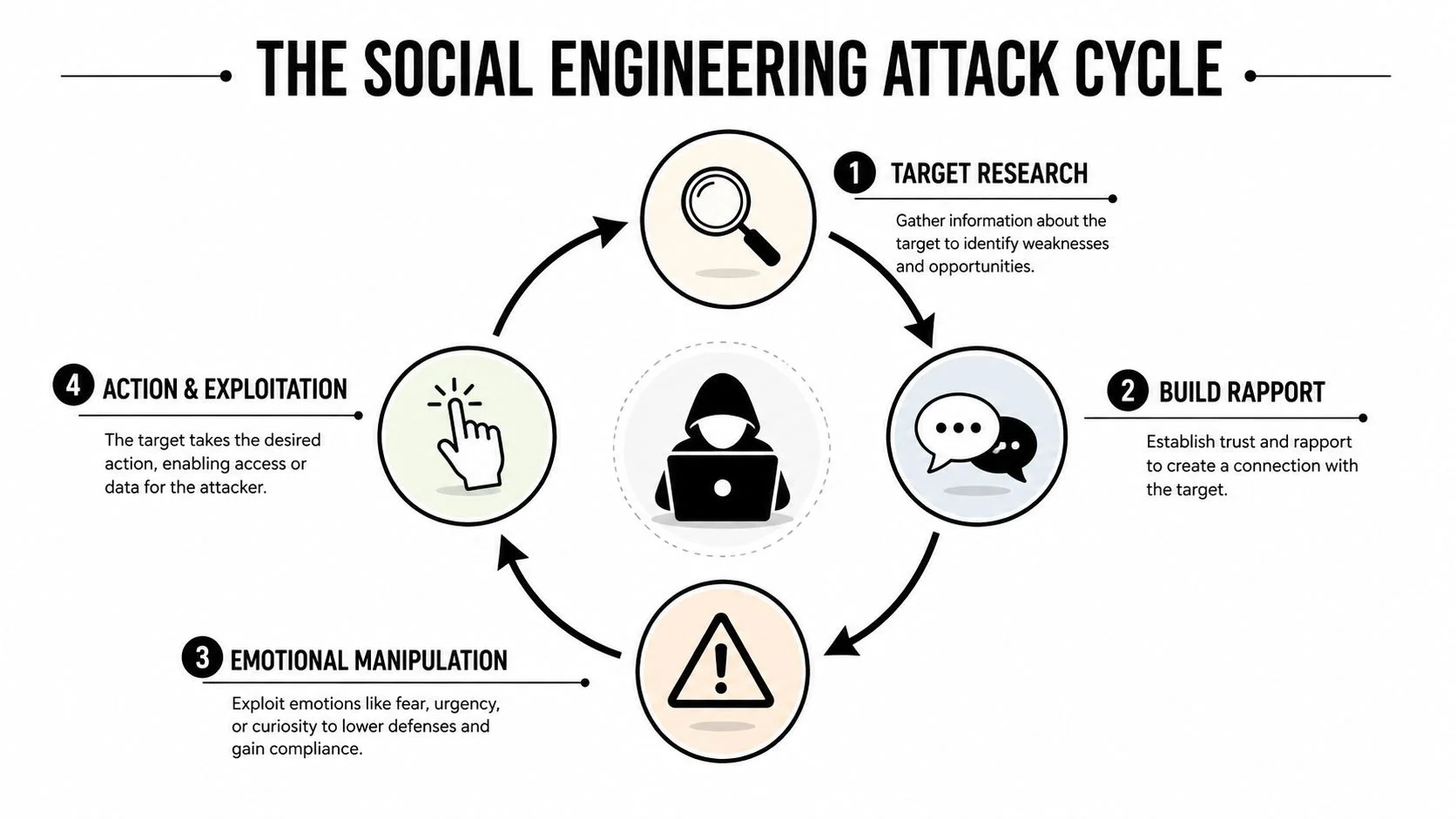
The trust-to-action model
The first stage is target research. Attackers look for public information that can make a later request sound ordinary. A professional profile may reveal a job role, a social post may reveal a conference, and a gaming profile may reveal which items or communities matter to someone.
Next comes rapport or authority. The attacker may pretend to be a manager, vendor, bank employee, helpdesk agent, friend, romantic partner, or moderator. Sometimes the account is genuine but compromised. Sometimes the attacker builds a new identity from copied photographs and public details.
The third stage is emotional pressure. Urgency compresses thinking. Authority discourages questions. Fear makes inaction feel risky. Curiosity encourages a click. Greed can make an offer appear time-sensitive. Helpfulness can make a person feel that verification would inconvenience someone who needs support.
The final stage is action and exploitation. The request might involve credentials, a one-time code, a payment, a file download, a trade, physical access, or a move to another communication channel. Once the target acts, the attacker may delete messages, end the conversation, or use the new information to continue the attack.
Practical rule: Treat emotional pressure as a signal to verify, not as evidence that the request is genuine.
Pretexting, baiting, quid pro quo, and tailgating are different delivery mechanisms for the same cycle. A fabricated IT story is pretexting. A tempting download or free item is baiting. An offer of help in exchange for access is quid pro quo. Following an employee through a secured door is tailgating. Each tactic tries to make the requested action feel easier than the protective action.
The useful habit is to identify what action the interaction is steering you toward. Guidance on how attackers collect personal details can help readers recognize why public information matters, especially when reviewing how scammers get your information.
Common Tactics and Reliable Red Flags
Email phishing is familiar, but the same manipulation can arrive through a phone call, SMS, Teams, Discord, a QR code, or a dating-app direct message. Voice and multi-channel attacks deserve special attention. Independent reporting notes that social engineering appeared in 36% of incident-response cases in 2025, while vishing increased 442%; the reporting on social engineering statistics also describes findings that voice phishing has become a primary confirmed social engineering vector.
A 2024 systematic review found that phishing training was associated with about a 40% reduction in susceptibility, but trained users still fell for 28% of phishing emails, and the review concluded that annualized programs are unlikely to provide sustained protection as retention and behavior change fade over time. Read the systematic review of phishing training effectiveness for the evidence behind that limitation.
| Tactic | Common Channel | Typical Pretext | Reliable Red Flag | Verification Response |
|---|---|---|---|---|
| Phishing | Account notice or document share | Link destination doesn't match the claimed sender | Open the service through a saved bookmark or known app | |
| Smishing | SMS | Delivery, payroll, or account alert | Unexpected urgency and a shortened link | Find the organization's official contact route independently |
| Vishing | Phone | Bank, helpdesk, or fraud team | Refusal to use a known callback number | End the call and dial the number on your card or official statement |
| Quishing | QR code | Parking, payment, login, or package confirmation | QR code leads to an unfamiliar domain | Don't scan, or verify the destination using a trusted device |
| Deepfake voice or video | Phone or video call | Executive approval or emergency request | The request bypasses normal controls | Confirm through a separate, established channel |
| Romance or investment grooming | Dating app or messaging app | Relationship help or exclusive opportunity | Secrecy, rushed trust, or payment requests | Stop financial discussion and seek an outside review |
| Gaming account trade scam | Discord or game chat | Test trade, prize, or account recovery | Request to send the valuable item first | Use the platform's official trade and recovery process |
| Helpdesk impersonation | Phone or chat | Password reset or security check | Request for password or one-time code | Contact IT through the internal directory |
| Multi-channel impersonation | Email followed by phone | Invoice or transfer confirmation | Pressure continues after you ask questions | Verify the original request with the known vendor or colleague |
The most dependable red flags survive changes in technology. Secrecy, gift-card or cryptocurrency payments, mismatched destinations, unexpected urgency, and resistance to independent callbacks matter more than spelling mistakes or logos. Attackers can make a message look polished, but they still need to control your decision process.
Human error guidance from myhalo's guide to user mistakes can help teams discuss these moments without blaming employees. A person who nearly falls for a convincing request needs a safer process, not humiliation.
Phishing awareness also varies sharply by environment. Proofpoint reported an average simulated-phish reporting rate of 18.65%, with financial services at 32.35% and education at 7.71%, as described in its phishing test findings. The practical lesson is to make reporting easy and tailor exercises to the channels and responsibilities each group uses. A realistic DocuSign email scam shows why familiar brands shouldn't replace independent verification.
Real-World Scenarios Across Work and Life
A convincing impersonation often depends on a small piece of exposed information. The detail doesn't need to be secret. It only needs to make the story sound connected to your life.
In a workplace invoice fraud scenario, a finance clerk receives a message that appears to come from a familiar vendor. The message includes the project manager's public LinkedIn photograph and mentions a recent conference visible on social media. The pressure point is a request to update payment details before a scheduled transfer. The stopping action is a callback to the vendor using a number already stored in the company's records, not a number in the message.
A dating-app match may use scraped photographs and hometown facts to create an apparently consistent identity. After emotional trust develops, the match introduces an investment platform and frames hesitation as a lack of confidence in the relationship. The verification response is to stop sending money, avoid moving funds to an unfamiliar platform, and independently check the person's identity claims. Romance scams caused consumers to report more than $1.14 billion in losses in 2023, with a $2,000 median loss per victim, according to the Federal Trade Commission's romance-scam warning. The FTC later reported approximately $823 million in romance-scam losses in 2024, so dating-app safety deserves financial as well as emotional attention.
A gaming community takeover can begin with a friend's compromised Discord account. The message asks for a test trade of an in-game item, then pushes you to send the valuable item first. The exposed detail is the friend's existing relationship with you. The protection is to verify through another channel and use only the game's official trade and recovery features. Enabling two-factor authentication with an authenticator app, hardware token, SMS, or biometric verification adds a separate factor to account access, as explained in this two-factor authentication guide.
Finally, a caller may pose as a bank fraud team using a leaked partial account number and a recent address. Those details make the call sound legitimate, but they don't prove who is speaking. End the call and contact the bank through the number on your card or official statement.
| Scenario | Channel | Exposed Public Detail | Pressure Tactic | Verification Response |
|---|---|---|---|---|
| Invoice fraud | Email and phone | Manager's photo and conference activity | Immediate payment-detail change | Call the vendor using a known record |
| Romance scam | Dating app and private chat | Photos and hometown facts | Emotional escalation and investment urgency | Pause contact and independently review claims |
| Gaming takeover | Discord and game chat | Existing friendship and game interests | Test trade or prize claim | Confirm elsewhere and use official trading tools |
| Bank impersonation | Phone | Partial account data and address | Fear of fraud or account closure | Hang up and call the bank independently |
Reviewing Your Digital Footprint With Ethical OSINT
Ethical OSINT reviews publicly available information about yourself, or research conducted for a legitimate, permitted purpose. The goal is to understand how a stranger might assemble scattered details into a convincing pretext, not to expose another person. The same verification habit applies across phone calls, text messages, messaging apps, QR codes, dating profiles, and gaming accounts: pause, identify the claim, then confirm it through a separate trusted route.
Start with passive discovery
Search your name, email addresses, phone numbers, usernames, employer, and frequently used profile photographs through public search engines. Record what appears without logging in or trying to enter restricted accounts. Look for combinations that reveal your role, work schedule, relatives, hometown, travel plans, gaming identity, or preferred payment services. A single detail may seem harmless, but several details can give an impersonator a believable story.
Review social platforms afterward. Tighten profile visibility, remove unnecessary employer and role information, inspect tagged posts and locations, and check whether photographs show badges, addresses, screens, or metadata. Public professional information can support networking while also helping an impersonator sound familiar. For a detailed walkthrough, see our guide on how to use OSINT for personal security.
Reduce account exposure
Use unique passwords for important accounts and prefer hardware-backed multifactor authentication where platforms support it. Keep a recovery email separate from the accounts it protects, remove unused third-party permissions, and review active sessions after changing security settings. These steps limit what an attacker can do if one account or recovery path is exposed.
Data brokers and public-record listings may reveal contact details or connections. Submit opt-out requests to major aggregators, monitor breach disclosures, and decide whether each detail should be suppressed or monitored. Privacy controls cannot remove every trace. The practical goal is to reduce usable material for a pretext and make suspicious claims easier to challenge.
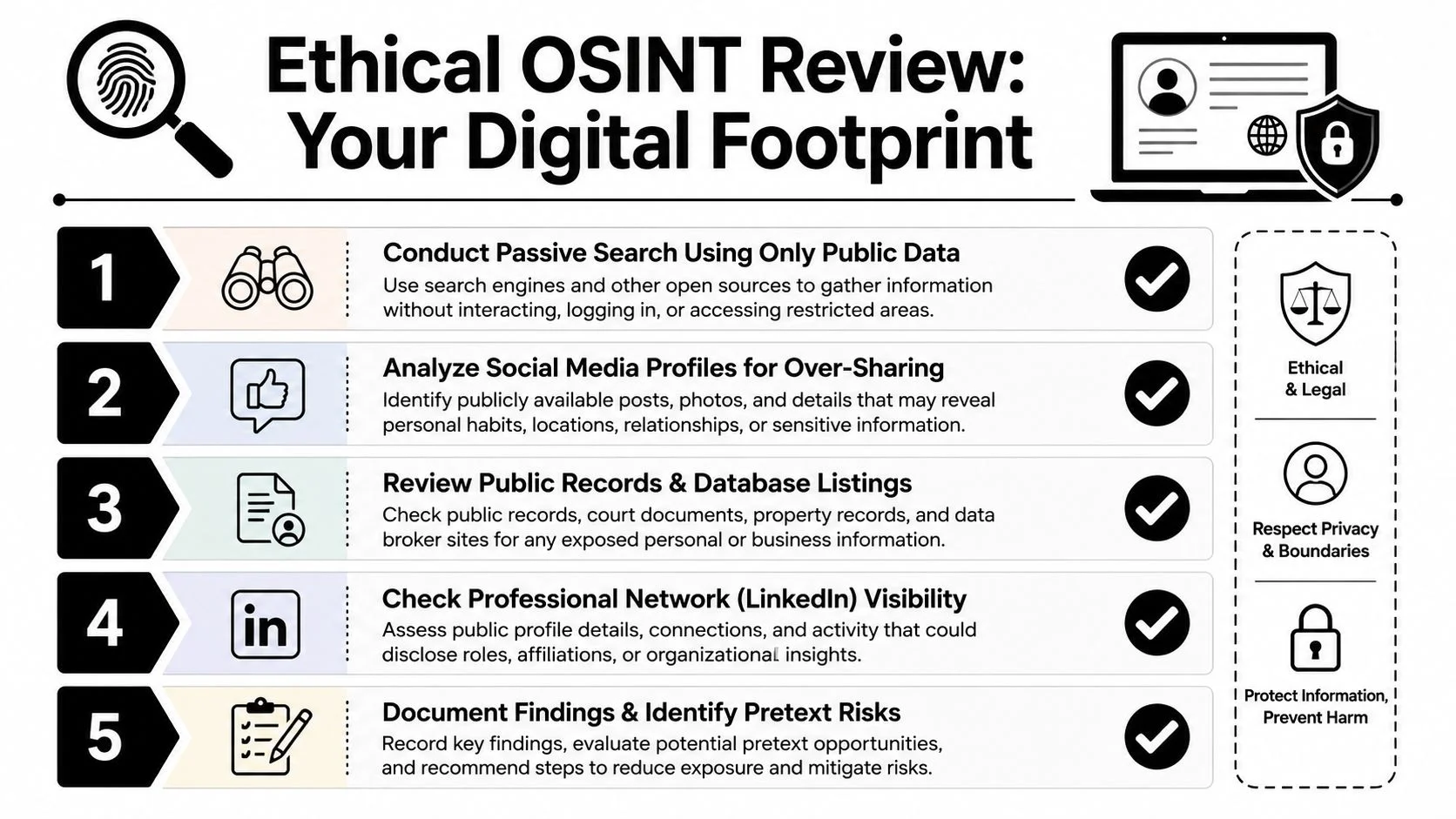
A service such as Digital Footprint Check can help organize a personal review across publicly visible profiles, breach databases, gaming accounts, professional networks, and other online sources. Treat its findings as a starting point for account cleanup and verification planning, never as permission to investigate people without consent.
Review the highest-value details first:
- Identity anchors: Names, phone numbers, email addresses, usernames, and profile photographs.
- Authority signals: Job title, employer, department, manager, client, and professional events.
- Relationship clues: Family names, partners, friends, hometowns, and regular communities.
- Access clues: Gaming profiles, payment services, recovery addresses, and connected applications.
- Routine clues: Travel, work hours, locations, and posts showing when nobody is home.
Keep the results in a private record and revisit them periodically. Accounts, tags, breach disclosures, and public profiles change, so recurring review supports better verification than a one-time cleanup.
Building an Effective Social Engineering Awareness Program
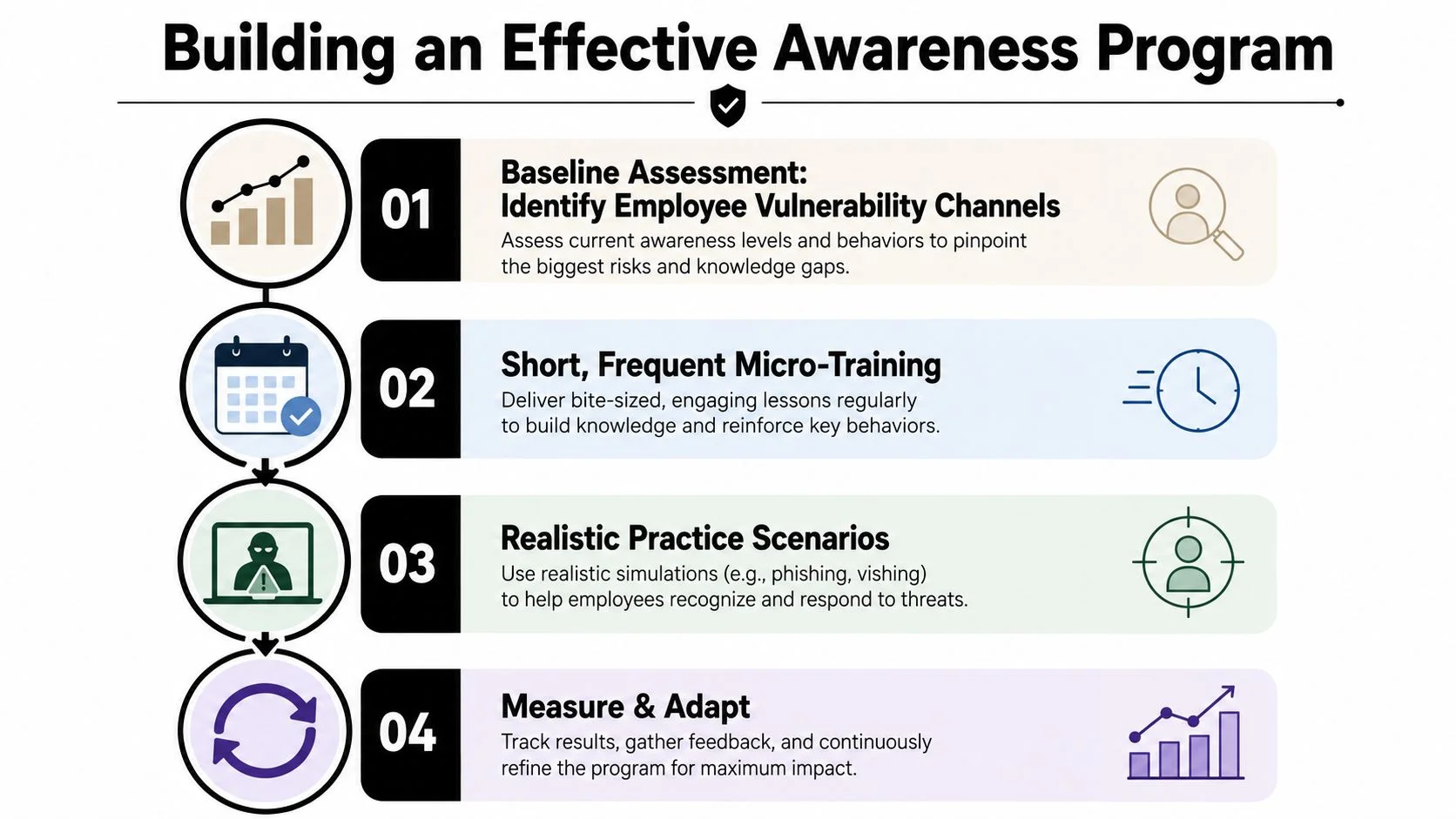
An effective awareness program prepares people to verify requests under pressure. Watching a video is not enough. A systematic review found that short-term training benefits can fade, while a real-world study of 19,500 healthcare employees found traditional training had little operational impact. Embedded training reduced failure rates by about 2%, while interactive, context-specific training reduced phishing risk by 19% when employees engaged with it, according to the healthcare phishing-training study summary.
Establish a useful baseline
Begin with the channels employees use, the information they handle, and the requests attached to their roles. Finance staff may face invoice and payment fraud. Support teams may receive impersonated callers. Executives may be imitated through email, phone, or video. Developers may encounter fake packages or messages from supposed dependency maintainers.
Teach one verification habit across every channel: pause, identify what the requester wants, and confirm the request through a trusted route found independently. That method applies to phone calls, texts, messaging apps, QR codes, dating profiles, gaming accounts, and multi-step impersonation attempts. A familiar name or voice can be copied. The request still needs separate confirmation.
Use short, recurring practice. Monthly micro-modules of 15 minutes or less can cover callback verification, MFA fatigue, or vendor-account changes. Follow each module with a quick decision exercise asking what the employee would do next.
Make reporting and practice realistic
Provide one clear reporting route, such as a button, shared mailbox, or chat command. Send feedback after reports so employees know the alert reached the right team. Quarterly tabletop exercises should rotate through email, phone, messaging, QR codes, and in-person pretexts rather than repeating one phishing template.
Measure reporting volume, time to report, and repeat-attempt outcomes, not only clicks. Reporting a suspicious request is a positive security behavior. Leadership should connect policies to escalation paths and treat mistakes as learning signals, so employees do not hide near misses.
Small businesses can find additional foundational advice in our cybersecurity tips for small businesses guide. Annual training alone has limits. Frequent practice works best when examples match real workflows, requests feel plausible, and the verification step follows each decision immediately.
Responding After a Suspicious Interaction
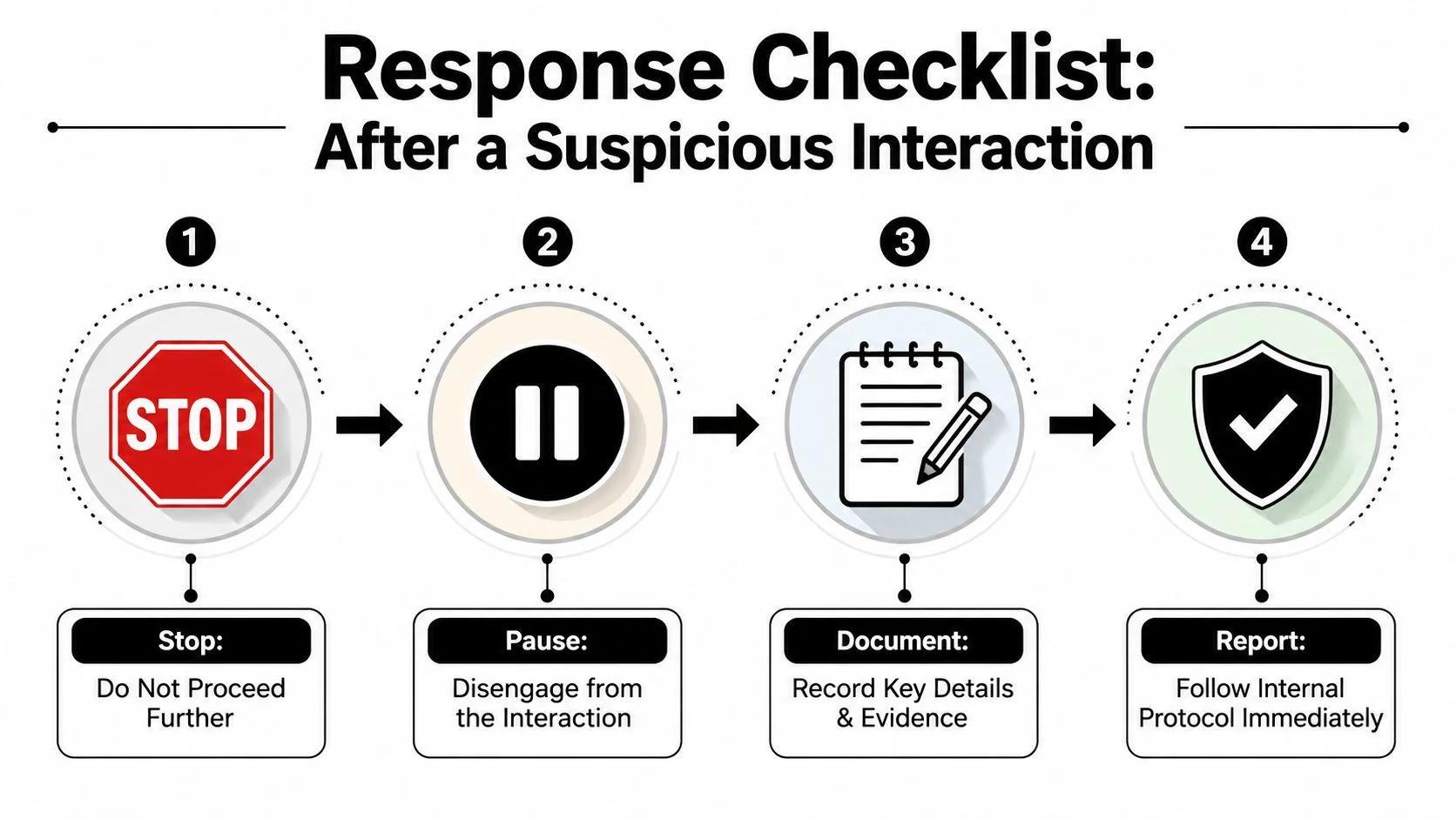
A suspicious interaction doesn't require panic. It requires a sequence that limits additional exposure.
-
Stop the requested action. Don't click again, reply, approve a login, send a code, transfer money, or continue a trade. If the interaction is live, end it politely and avoid arguing with the caller.
-
Switch channels. Contact the person or organization through a trusted route you found independently. Use the number on a bank card, the internal directory for IT, the saved vendor contact, or a separate way to reach a friend.
-
Preserve evidence. Save screenshots, call logs, message headers, URLs, usernames, and timestamps. Store copies locally in a folder with restricted access and avoid editing the originals. Evidence helps your employer, bank, platform, or investigators understand the sequence.
-
Protect touched accounts. Change passwords for accounts involved in the interaction, revoke active sessions, refresh multifactor authentication, and review connected applications or OAuth grants. If you entered credentials into a suspicious page, assume they may be exposed and change them from a trusted device.
Report the event to your employer, bank, platform, domain registrar, or relevant law-enforcement portal. National fraud-reporting services may also apply depending on your country. Contact financial providers quickly when money or payment details are involved.
Monitoring continues after the first response. Review transactions, enable alerts, check inbox rules, inspect account sessions, and search for exposed personal details. The FTC reported that consumers lost more than $12.5 billion to fraud in 2024, a 25% increase from the prior year, in its 2024 fraud-loss announcement. That environment makes follow-up important even when the original interaction seemed minor.
Essential Questions and Next Steps
How can you tell a real bank call from vishing? Don't decide from the caller's number, tone, or partial account details. End the call and use the number on your card, statement, or official app.
Is replying STOP to a suspicious text safe? Avoid replying when the message is unexpected. Use the provider's official app or website to manage alerts and report the text.
What if you entered credentials on a phishing page? Change the password immediately from a trusted device, change it anywhere reused, revoke sessions, refresh multifactor authentication, and notify the affected organization.
How long might attackers monitor a compromised account? There's no dependable universal timeframe. Assume monitoring may continue until sessions, passwords, recovery options, and connected applications have been reviewed.
Are free credit freezes worth activating? They can be a useful identity-theft precaution when your personal information may be exposed. Use the official credit-bureau process applicable to your country.
Keep the routine manageable:
- Daily: Pause before sensitive actions and verify through a separate channel.
- Weekly: Search your name, email, usernames, and phone number for new exposure.
- Quarterly: Review account sessions, recovery methods, app permissions, and privacy settings.
- Prepare now: Create an incident kit with trusted contact routes, reporting links, and a private evidence folder.
Digital Footprint Check offers a free checker for reviewing publicly exposed information that may support impersonation or identity theft. Visit Digital Footprint Check to scan your digital footprint and turn the findings into a practical privacy and verification plan.