· Digital Footprint Check · Content Marketing · 14 min read
Face Recognition Search: Protect Your Digital Identity
Explore how face recognition search impacts privacy & your online photos. Get 2026's practical guide to protecting your digital identity.

You’ve probably seen it happen. A face appears in a dating profile, a gaming account, or a random post that looks a little too familiar, and suddenly you’re wondering whether it’s really them or whether someone lifted a photo from somewhere else. Face recognition search sits right in that uneasy space between convenience and privacy, and it’s become one of the most powerful ways to connect a face to a digital identity.
At its simplest, the technology turns a face into a numerical template, then compares that template against faces already stored in a database. The Security Industry Association describes it as a spectrum from facial detection, which only locates a face, to individual identification, which tries to match a face to a specific person (Security Industry Association). That difference matters a lot, because many people assume a result is proof when it’s often only a lead.
For a plain-language overview of the concept, it also helps to read how facial recognition search works, then come back with one clear question in mind, how much of your life can a face reveal when it’s searchable at scale? If you already think of your public photos as part of your digital footprint, you’re on the right track.
What Is Face Recognition Search
A face on the internet is more than an image file. It can be a clue, a key, or a label, depending on who is searching and what database they’re using. That’s why face recognition search feels so invasive to many people, because the search doesn’t start with your name, it starts with your appearance.
Why it feels different from normal photo search
A regular image search looks for matching pixels, copies, or visually similar pictures. Face recognition search goes deeper, because it tries to compare the structure of a face, the spacing of features, and other measurable traits. In practical terms, that means a photo of you from a vacation, a conference badge, or a profile picture can sometimes be tied back to other accounts or records.
The modern history of face recognition search is usually traced to the 1960s, when early semi-automated systems required human operators to mark facial features before computers compared distances and ratios. A major milestone came in 1973, when Takeo Kanade’s dissertation is widely cited as the first fully automated face-recognition system, and the field later advanced through PCA/Eigenfaces in 1987 to 1991 and the Viola-Jones detector in 2001 (historical overview). Those steps mark the shift from manual comparison toward machine-led search across photo collections and live video streams.
Practical rule: if a system says it can “find anyone,” read that as a claim about indexing and matching, not magic.
Why the distinction matters
A face recognition search result is only as useful as the data behind it. If the system is looking at a small, public set of enrolled images, it won’t “know” the rest of the internet. The National Academies makes that limitation explicit, because these systems search against what’s indexed, not the live web in full (National Academies).
That’s the core privacy issue. People often think the internet is one giant searchable face library, but it isn’t. It’s a patchwork of indexed sites, hidden accounts, data brokers, and unindexed pages, which means one search can miss one photo and catch another. Understanding that gap is the difference between panic and control.
How The Technology Actually Works
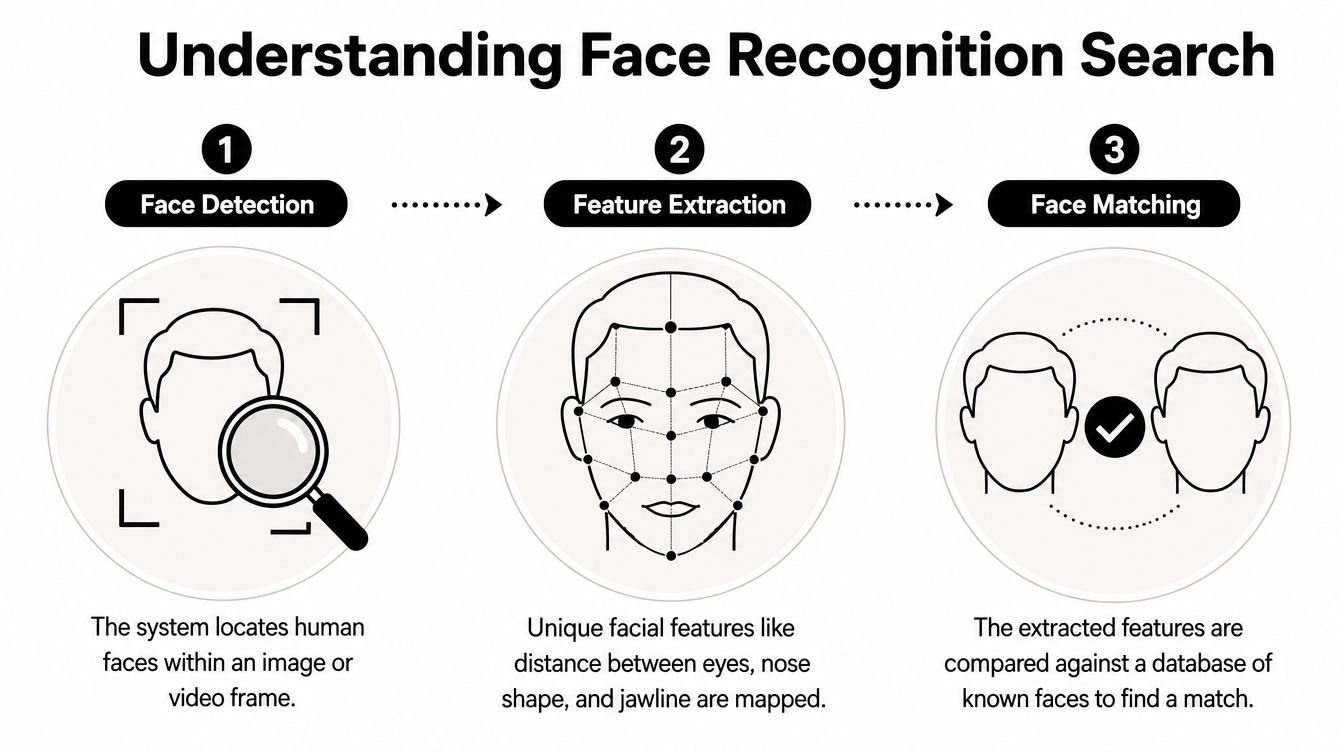
The easiest way to think about face recognition search is as a digital fingerprint for your face. The system doesn’t “see” a person the way you do. It breaks an image into measurable pieces, stores those pieces, then compares them against other stored templates.
Detection, extraction, and matching
First comes face detection, which means the software finds a face in a photo or video frame. The FTC and the Security Industry Association both draw a sharp line between detection and identification, and that line matters because a face can be located without being named (Security Industry Association).
Next comes feature extraction. The system maps landmarks such as the eyes, nose, jawline, and the spaces between them into a numerical format. That number set is often called an embedding or template. It’s not a portrait, it’s a mathematical summary.
Then comes matching. The software compares that template to others in its gallery and ranks likely matches. At scale, this is an indexing-and-comparison task, which is why compact templates and fast similarity search matter so much. Senstar’s datasheet describes a 128-byte face template, 0.040 microseconds per template comparison, and 25 million matches per second per core, which shows why vendors care so much about speed and memory use (Senstar datasheet).
Why image quality changes everything
A lot of people blame the algorithm when the fundamental problem is the photo. Microsoft’s Azure Face API says the minimum detectable face size is 36x36 pixels in images up to 1920x1080, and its guidance for reliable identification is a frontal face of at least 200x200 pixels with about 100 pixels between the eyes (Azure Face API). It also warns that performance drops when faces are small, tilted, or blurred.
That means a crisp selfie can search well, while a cropped avatar, a grainy screenshot, or a sideways club photo can fail. Neurotechnology’s technical guidance points in the same direction, recommending a native inter-eye distance of at least 32 pixels for reliable template extraction and 64 pixels or more for better recognition, plus only modest pose variation around ±15° (Azure Face API).
Practical rule: when the face is small, tilted, or compressed, the system loses the landmarks it needs to compare you accurately.
If you work in visual branding or product design, you’ve probably seen how much image selection changes the result. Even tools like an ai fashion model generator depend on clean, frontal imagery because geometry shapes output quality. Face search works the same way, only with much higher privacy stakes.
For a beginner-friendly breakdown of the broader OSINT workflow, this is also where OSINT tools for beginners becomes useful context, because the technical steps only make sense once you see how data gets collected and compared.
Common Use Cases and Real-World Impacts

A face search can help a parent verify a suspicious profile, help a recruiter spot a public-facing identity trail, or help a gamer check whether an account really belongs to the person claiming it. It can also be used in surveillance, investigations, and reputation checks, which is why the same technology can feel helpful in one context and unsettling in another.
Where people run into it most
In online dating, people use face recognition search to test whether a profile photo appears elsewhere under a different name. That doesn’t prove a scam by itself, but it can expose recycled images, impersonation attempts, or an account that’s hiding its real identity. For people worried about catfishing, that can change a first date from a risky guess into a more informed decision.
In professional life, face search can shape first impressions before a conversation even starts. A public conference photo, a speaker bio, or an old social post can be associated with a name, and that can help or hurt job prospects depending on the context. That’s one reason reputation management has become part of digital identity protection, not just a marketing concern.
Gaming accounts are another overlooked area. A streamer’s face in a profile banner, a Discord avatar, or an old tournament clip can be tied back to usernames and platforms, which can help with account recovery and also help attackers build a more convincing impersonation. People often think gaming identities are separate from real-world identities, but face search can blur that line quickly.
Why scale changed the game
The shift from small research datasets to large photo collections changed what these systems could do. In 2014, Facebook reported training DeepFace using 800 to 1,200 photos for each of 4,030 people, which showed how much data modern face recognition search can consume (MIT Technology Review). That milestone matters because it marks the move from narrowly curated collections to the huge, user-generated image pools that now support consumer, security, and OSINT-style searches.
Practical rule: the more public photos tied to a person, the easier it becomes for a search system to connect dots that were never meant to be connected.
The legal and security world treats these results differently from a simple “yes or no.” In many situations, they’re clues that require human review, not proof on their own. That distinction is especially important when a result might affect a job application, a relationship, or a personal safety decision.
For a deeper look at how those clues get assembled into a public-facing profile trail, the context around reverse image search for people is useful because face search rarely stands alone. It usually works alongside usernames, metadata, and other visible identifiers.
The Privacy Dilemma and Ethical Risks
The biggest privacy problem with face recognition search isn’t just that it works. It’s that it can work on people who never consented to being part of a searchable face library. When images are scraped, indexed, or copied across platforms, a face becomes a reusable identifier that can follow someone far beyond the original upload.
Why false matches matter
The U.S. Government Accountability Office reported that FBI use of face recognition had produced investigative leads in which people were wrongly identified (GAO report). That’s not a minor technical error. When a system points to the wrong person, the consequences can spill into policing, employment, or public reputation.
The main lesson is simple. Face search results are often treated as clues, not definitive proof, because a match can be wrong. Georgetown’s privacy center has also concluded that face recognition as currently used in criminal investigations is likely an unreliable source of identity evidence, which is why cautious review matters before anyone acts on a result.
Consent and surveillance
The ethical issue gets sharper when the data comes from places people don’t expect to be searchable. Public video cameras, social media, and archived images can all feed the system, and the result can feel like a moving boundary between public life and persistent tracking. That’s where consent becomes more than a legal checkbox. It becomes the line between ordinary visibility and ongoing surveillance.
If you’re checking your own privacy posture, the AiHeadshots privacy policy is a good reminder that image use terms matter, especially when faces are being processed at scale. The details of collection, storage, and deletion determine whether a service respects privacy or expands exposure.
The practical reputational risk
A false or outdated match can do real damage long before anyone corrects it. Someone might be flagged as the wrong person, linked to the wrong account, or assumed to be behind an anonymous profile that isn’t theirs. In reputational terms, that’s dangerous because the internet tends to remember allegations longer than corrections.
For individuals, that means caution. For organizations, it means using face search as a starting point for verification, not a final verdict. For law enforcement and security teams, it means pairing the output with other evidence and avoiding overconfidence in a single comparison.
If you want to understand the ownership side of this problem, the issue of who controls your data matters just as much as the face itself. Once an image is copied and indexed, control gets much harder to reclaim.
How to Find Where Your Face Appears Online
A face search audit starts with the simplest tools and gets more specialized only if needed. That approach keeps you from overreacting to a single result and helps you separate obvious matches from scattered fragments of your digital identity.
Start with the public web
Begin with a reverse image search using Google Images or TinEye. Upload a clear photo of yourself, or paste a public image URL if you already know where the picture appears. Look for the same image on unfamiliar sites, profile pages, bios, and cached copies, then record the context around each result.
Don’t stop at the image alone. Open the surrounding page and check whether the photo is tied to your name, a username, a business profile, or a scraped article. A match without context can be misleading, while a match with context can reveal whether the image is being used appropriately or being repurposed without permission.
For a broader people-search workflow, searching people by photo can help you understand how images connect to usernames, pages, and public mentions.
Use dedicated face search carefully
Specialized face search engines can surface results that normal reverse image tools miss, especially when the image has been cropped or reposted. They’re useful because they compare face structure, not just visible pixels. They’re also controversial because they can expose private-looking connections that a casual search wouldn’t find.
That’s why you should treat any result as a lead. Check the source page, the surrounding account, and whether the image quality is good enough to support a meaningful match. If the photo is low-resolution, heavily angled, or tiny, the confidence should stay low.
Then there’s the internet coverage problem. The National Academies notes that these systems search against an enrolled gallery, not the entire live internet, and results depend entirely on what’s indexed (National Academies). That means a search can miss a photo on a new or obscure website, so one-off checks aren’t enough if you’re monitoring reputation or safety over time.
Practical rule: if you care about long-term exposure, treat face search like monitoring, not a one-time scan.
When context matters more than the match
A photo appearing somewhere isn’t always a problem. It may be a conference speaker page, a professional directory, a team bio, or a legitimate press mention. The question isn’t only whether your face appears, it’s whether the appearance reflects how you want to be seen.
If you want a first-pass audit of what’s publicly visible, a broader OSINT review can be more useful than a single face search query. That’s the point of a tool like Digital Footprint Check, because it helps you see how faces, usernames, public profiles, and breach signals fit together instead of treating them as separate problems.
Protecting Your Digital Identity from Face Searches
The goal isn’t to disappear. The goal is to reduce unnecessary exposure and make it harder for strangers, scammers, or bad-faith actors to use your image against you. That starts with the photos you share and the privacy settings that control who can see them.

A practical protection checklist
- Review privacy settings regularly. Tighten visibility on social platforms, apps, and cloud albums so your face isn’t publicly reachable by default.
- Limit public sharing. Be selective about profile photos, event photos, and screenshots that show your face clearly, especially when location or workplace clues are visible.
- Explore opt-out options. Some services and platforms let you reduce facial processing or disable certain recognition features, so check the settings instead of assuming they’re fixed.
- Stay informed. Privacy policies and face search features change, and your exposure can shift when a platform redesigns its defaults.
- Use subtle privacy buffers when needed. In public settings, hats, glasses, or angles can make casual harvesting less useful without changing who you are.
Keep monitoring, not guessing
The biggest mistake people make is assuming one clean search means they’re safe. Images get reposted, accounts get copied, and data brokers can surface old material months later. That’s why continuous review matters more than a one-time cleanup.
If you’ve already found exposed photos or linked accounts, the next step is to reduce the number of places that can resurface them. A removal workflow can help with that, especially when public listings, scraped copies, or brokered profiles keep reappearing. A focused review of data broker removal is a practical next move if you want fewer searchable paths back to your identity.
Bottom line: privacy isn’t a single setting, it’s an ongoing habit.
If you want a clearer picture of where your photos, usernames, and public records are showing up, use Digital Footprint Check to run a focused privacy audit and see what’s already exposed. It’s a practical way to turn face recognition search from a mystery into a manageable part of your digital safety routine.