· Digital Footprint Check · Content Marketing · 13 min read
Master Facebook Lookup by Email
Find anyone on Facebook using email. This guide covers every facebook lookup by email method, from simple searches to OSINT, plus privacy protection tips.

An email lands in your inbox from someone you might need to trust fast. It could be a marketplace seller arranging pickup, a recruiter following up on a role, a new client, or someone from a dating app moving the conversation off platform. The message looks normal. The tone is polished. But the name, photo, and story don’t fully line up yet.
That uncertainty is where facebook lookup by email becomes useful. Not as a party trick, and not as a way to pry into private life. It matters because a single email address often sits at the center of someone’s online identity. If you can confirm whether that email connects to a real Facebook presence, you get another signal for judging credibility, consistency, and risk.
Connecting an Email to a Face in 2026
A practical example makes this simple. Say you receive an email from a person offering to buy an item you’ve listed locally. They want to switch quickly to Facebook Messenger, but the email address they used looks generic. Before you share your phone number or home address, you want to know whether the email belongs to a real person with a stable online presence or a throwaway account built for scams.
Facebook is still the first place many people check. That’s partly because of scale and partly because of history. Facebook has nearly 3 billion monthly active users, and it was originally built around finding people through email-based connections. Privacy settings changed heavily as the platform grew from 1 million users in 2004 to over 500 million by July 2010, but email discovery remains part of how many investigators and ordinary users think about identity verification on the platform, as noted in this Facebook OSINT overview from OSINT Industries.
Why Facebook is still the pivot point
A Facebook profile can answer basic questions quickly:
- Does the identity look lived-in rather than recently assembled?
- Do the profile photo, name, and location match what the person claimed elsewhere?
- Are there public posts, business details, or group activity that support the story?
- Does anything conflict with the email signature, marketplace listing, or dating profile?
Sometimes the answer is no match at all. That matters too. A missing Facebook profile doesn’t prove anything by itself, but a match can help you move from guesswork to verification.
Practical rule: Treat a Facebook match as one signal, not final proof. Real verification comes from consistency across multiple public clues.
If the only image you have is a profile photo from another platform, pair email research with a reverse image search for people. That often helps when the email itself goes nowhere but the same face appears on several accounts under slightly different names.
Digital literacy now includes knowing when to look someone up, what public clues are fair to use, and when to stop. That’s especially true when the stakes involve personal safety, reputation, money, or access to your home or workplace.
Legitimate Reasons for a Facebook Email Search
People sometimes hear “lookup by email” and assume the goal is snooping. In practice, the legitimate use cases are much more ordinary. Many who run a facebook lookup by email are trying to reduce uncertainty before they trust someone.
Dating is one of the clearest examples. If a match moves off the app quickly and starts using email, checking whether that address connects to a real identity can help you spot a catfish before you share personal photos, workplace details, or travel plans. The same logic applies to marketplace sales, freelance hiring, roommate searches, and parent-to-parent coordination in school groups.
Verification is different from surveillance
The ethical line is simple. You’re verifying identity claims someone has already put in play. You’re not trying to break into an account, bypass privacy settings, or expose private information that isn’t publicly available.
That distinction matters because many guides miss the harder question. Finding a profile from an email is only half the job. The primary challenge is confirming that the profile you found belongs to that email. A video discussing the reverse verification problem points out that most guides skip this step, leaving people with screenshots and guesses instead of reliable confirmation.
Common situations where the search makes sense
| Situation | What you’re checking | Why it matters |
|---|---|---|
| Online dating | Name, photos, public history | Reduces catfishing risk |
| Marketplace transaction | Local identity, selling history, profile consistency | Helps assess fraud and personal safety |
| Freelance or business outreach | Real person behind a business email | Protects contracts and payments |
| Reputation check | Public posts tied to a professional identity | Helps avoid preventable credibility issues |
| Reconnecting with someone | Whether the contact details still map to the same person | Prevents mistaken identity |
You’re not looking for secrets. You’re checking whether the public story holds together.
A useful mindset is “minimum necessary verification.” If the email, profile, and context align, stop there. If details clash, slow down before you send money, share documents, or bring the conversation into a more personal channel.
Core Methods for Finding a Facebook Profile
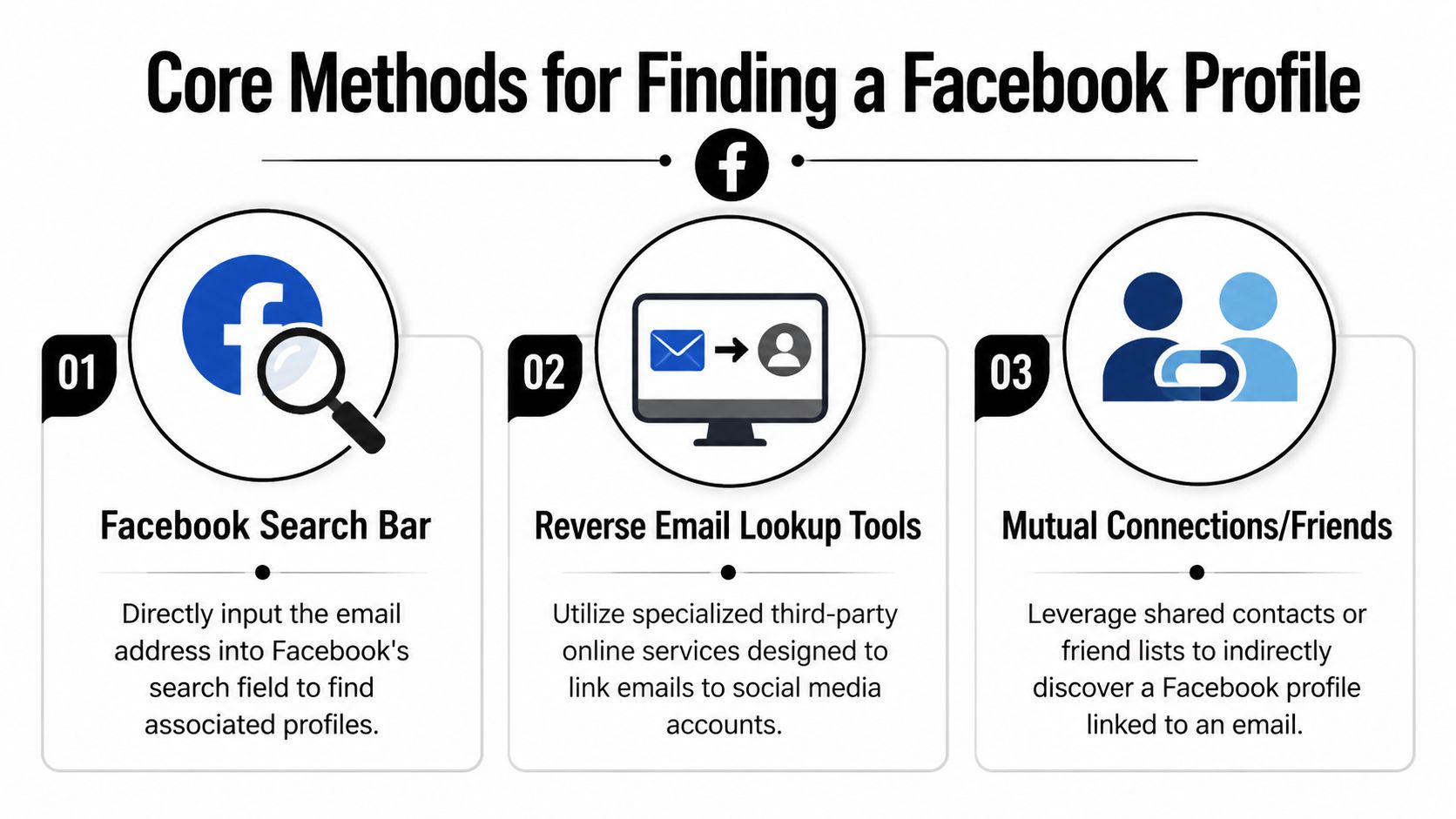
The simplest methods still deserve a try first. They’re fast, low-risk, and they tell you quickly whether the email has any public footprint on Facebook. Just keep expectations realistic. OSINT benchmarks put direct lookups using public data at a 15-25% success rate, while privacy settings block around 70% of profiles from easy discovery, and predictive search can distort neutral results according to this analysis of Facebook search behavior.
Method one using Facebook search
Start inside Facebook itself.
- Enter the email address into the Facebook search bar.
- Check the People filter first.
- Then try broader searches with the local part of the email, especially if the address contains a name or brand.
- Review any public profile, About section, visible posts, and comments for matching clues.
This works best when the person has left their discoverability settings open or has publicly posted the email in a business context.
What doesn’t work well is assuming Facebook search is neutral. It isn’t. Results can be shaped by your own account history, previous searches, location, and engagement patterns. If you’re logged into an account that already has lots of social overlap with your target, you’ll often see more suggestive but less objective results.
Method two using external search engines
Search engines sometimes catch what Facebook search misses. Try the email in quotes together with Facebook-related queries, such as searches limited to the Facebook domain or to likely profile contexts like posts, business pages, or group discussions.
This method is especially helpful when a user has posted the email publicly in a business thread, event page, or About section. It’s less elegant than native search, but often more transparent because you’re seeing indexed pages rather than platform-personalized suggestions.
Search engines are often better at finding old public fragments than Facebook is at surfacing them cleanly.
Method three using account recovery for confirmation only
The “Forgot Password” flow can sometimes indicate whether an email is associated with an account. Use that carefully. The line is bright here: you may view whether the platform recognizes the address, but you should never attempt to proceed beyond basic confirmation.
This method won’t identify a profile in every case, and it can produce ambiguous results. It’s best used only to answer a narrow question: does Facebook appear to recognize this email as tied to an account?
What each method is good at
| Method | Best use | Main weakness |
|---|---|---|
| Facebook search bar | Fast first pass | Personalization and privacy settings |
| External search engine queries | Public traces on indexed pages | Many Facebook pages aren’t indexed |
| Account recovery check | Basic account association signal | Ethical risk if you go too far |
If you want to broaden the search beyond Facebook alone, use a dedicated workflow to find all accounts linked to an email. That usually gives better context than forcing one platform to do all the work.
Advanced OSINT Tactics When Basic Searches Fail
Basic lookups fail often because modern Facebook privacy controls are doing what they were designed to do. That’s where OSINT shifts from direct searching to correlation. You’re no longer asking Facebook to hand you the answer. You’re assembling it from public fragments across platforms.

Advanced methods have a direct hit rate of under 5% after privacy updates, so success usually comes from indirect tactics. Public group posts can help because emails appear in 22% of business networking discussions, and specialized browsing setups can boost efficacy by up to 75% in bulk-query conditions, according to this Facebook OSINT guide from Authentic8.
Cross-platform correlation
The strongest move is often to stop searching Facebook first.
If an email appears on another public platform, that profile may reveal a username, profile photo, business name, or city. Those clues can then be searched on Facebook with much better precision than the email alone.
A practical sequence looks like this:
- Start with the email itself. Search for the exact address on the open web and on public social profiles.
- Extract stable identifiers. Usernames, profile photos, business names, and city references tend to travel across platforms.
- Search Facebook with those identifiers. A username or face often performs better than an email inside Facebook.
- Verify consistency. Compare profile photo style, work history, location, and posting context.
This is also why security teams study OSINT for proactive cyber security. The same public-correlation methods that help researchers map exposure can help individuals verify identity claims before a conversation becomes risky.
Public groups and Marketplace
Many people lock down their profile but stay loose in public activity. Facebook Groups and Marketplace are the most common places to look.
In Groups, people often post for networking, selling, hiring, or support. Those posts can include partial names, contact emails, or references to businesses that connect back to the address you’re checking. Marketplace listings can reveal communication patterns, local geography, and repeated profile photos.
A locked profile doesn’t mean a locked footprint. Users often reveal more in transactions and community posts than in their main bio.
Before you search manually, this video gives a useful view of how investigators think through cross-platform identity work:
Reverse image confirmation
If you suspect you’ve found the right person elsewhere, reverse image searching the profile photo can tighten the chain. A reused headshot, business logo, or event photo may connect Facebook to LinkedIn, a small business page, a forum account, or an old cached result.
Professionals slow down and compare details instead of chasing volume. The point isn’t to generate dozens of weak leads. It’s to build one credible match from independent public clues. If you need a practical workflow for this narrower task, this guide on how to find someone email on Facebook is a useful reference point.
How to Protect Your Profile from Email Lookups
Once you’ve seen how this works from the searcher’s side, the defensive moves become obvious. Most privacy mistakes aren’t dramatic. They’re small leftovers. An old contact email in your About section, a business post in a public group, a Marketplace listing you forgot about, or discoverability settings you never changed.

Lock down email discoverability
Open Facebook’s privacy settings and look for the option that controls who can find you using the email address you provided. Set it to the most restrictive audience available to you. That’s the direct control that limits simple email-based discovery.
Then review profile visibility more broadly:
- Check your About section for any exposed email addresses
- Review old public posts where you may have dropped contact details
- Inspect public group activity for business or selling posts that still reveal an email
- Look at Marketplace listings if you’ve used Facebook for transactions
Reduce linkage across your online life
The safest setup uses different emails for different functions. One for close personal contacts. One for public-facing business. One for shopping or disposable signups. Compartmentalization won’t make you invisible, but it does make accidental linkage harder.
You should also run periodic self-audits. Search your own email address in Facebook, in search engines, and in combinations with your name, username, city, or business. What a stranger can see is often wider than what you remember publishing.
Good defense starts with self-search. If you can find the trail in a few minutes, so can someone else.
If you want to preserve important content before tightening or deleting old posts, a guide to digital data preservation on Facebook can help you archive material responsibly before changing visibility.
Clean up exposure beyond Facebook
Email discoverability isn’t just a Facebook issue. Data brokers, people-search sites, old forums, and breach-related indexing can all make correlation easier. Facebook becomes more searchable when your email is already floating around elsewhere.
That broader cleanup is why many privacy-conscious users also work through data broker removal options. If you remove exposed contact points from the wider web, fewer lookup attempts will ever reach your Facebook profile in the first place.
The Automated Solution for a Complete Digital Footprint Check
Manual searching has a hard ceiling. You can search Facebook, try search engines, inspect groups, and compare profile photos, but you’ll still miss a lot. Public traces are scattered. Platforms index unevenly. Privacy settings create blind spots. And the biggest risk in manual work is false confidence. Thinking you found the right person when you’ve only found someone plausible.
That matters in real life. A mistaken identity can damage hiring decisions, personal relationships, safety planning, and scam detection. The reverse is also true. You can fail to notice that your own email connects to old social profiles, breached credentials, public records, gaming accounts, or dormant handles that still shape your reputation.
A broader approach works better because it treats the email as one part of a network, not a one-platform key. If you’re concerned about what your email exposes, it also helps to review a practical email privacy guide, especially for reducing the tracking signals that accumulate around everyday communication.
When you need a fuller picture, use a service built for correlation rather than improvising your own case board. A good footprint check can show hidden accounts, exposed records, and identity links across social media, public sources, and breach data in one place. If your concern starts with a single email, an account finder gives you a cleaner path than juggling tabs and screenshots.
The practical advantage isn’t just speed. It’s consistency. Automated checks reduce the chance that you stop after the first weak match or overlook a stronger link elsewhere. They also make self-audits easier, which is often the smartest use case of all. Before someone else searches you, search yourself thoroughly.
If you want to see what an email address reveals across the wider web, run a check with Digital Footprint Check. It helps you uncover exposed accounts, public identity links, and privacy risks so you can verify others more responsibly and protect your own online footprint before it becomes a problem.