· Digital Footprint Check · Content Marketing · 13 min read
How to Do a Free People Search Ethically in 2026
Learn how to do a free people search in 2026 using public records, social media, and OSINT techniques. Step-by-step, ethical, and verification-focused guide.
You've found a profile that appears to belong to someone you know. The name matches, the city looks right, and an old phone number seems familiar. Before you contact an employer, confront a dating match, report an account, or share the result with anyone else, pause. Two unrelated people can share the same name and city, and free search results often combine fragments from different individuals.
A careful free people search is therefore less about finding the fastest match and more about proving that the match is correct. Public records, search engines, social platforms, reverse lookups, and people-search sites can provide useful leads, but none should be treated as magical or automatically accurate. The ethical approach is to collect only relevant public information, verify it through independent sources, and avoid decisions that require regulated background-screening procedures.
Why Free People Search Is Mostly a Verification Problem
You find a profile with the right name, a familiar city, and an occupation that seems to fit. That combination can feel conclusive, especially when a free result displays addresses, relatives, or other personal details. Treat it like a box of mixed puzzle pieces, however. Some may belong to different people, and a polished report does not prove the identity behind it.
People-search sites can assemble information from public records, public social media, and data brokers. Their reports may include property information, driving records, voter registration, criminal records, civil actions, vital records, and professional licenses. That breadth explains why a free search can produce a wide profile before payment, while also increasing the risk of a name collision. Public-record and people-search information can provide leads, but it cannot replace verification.
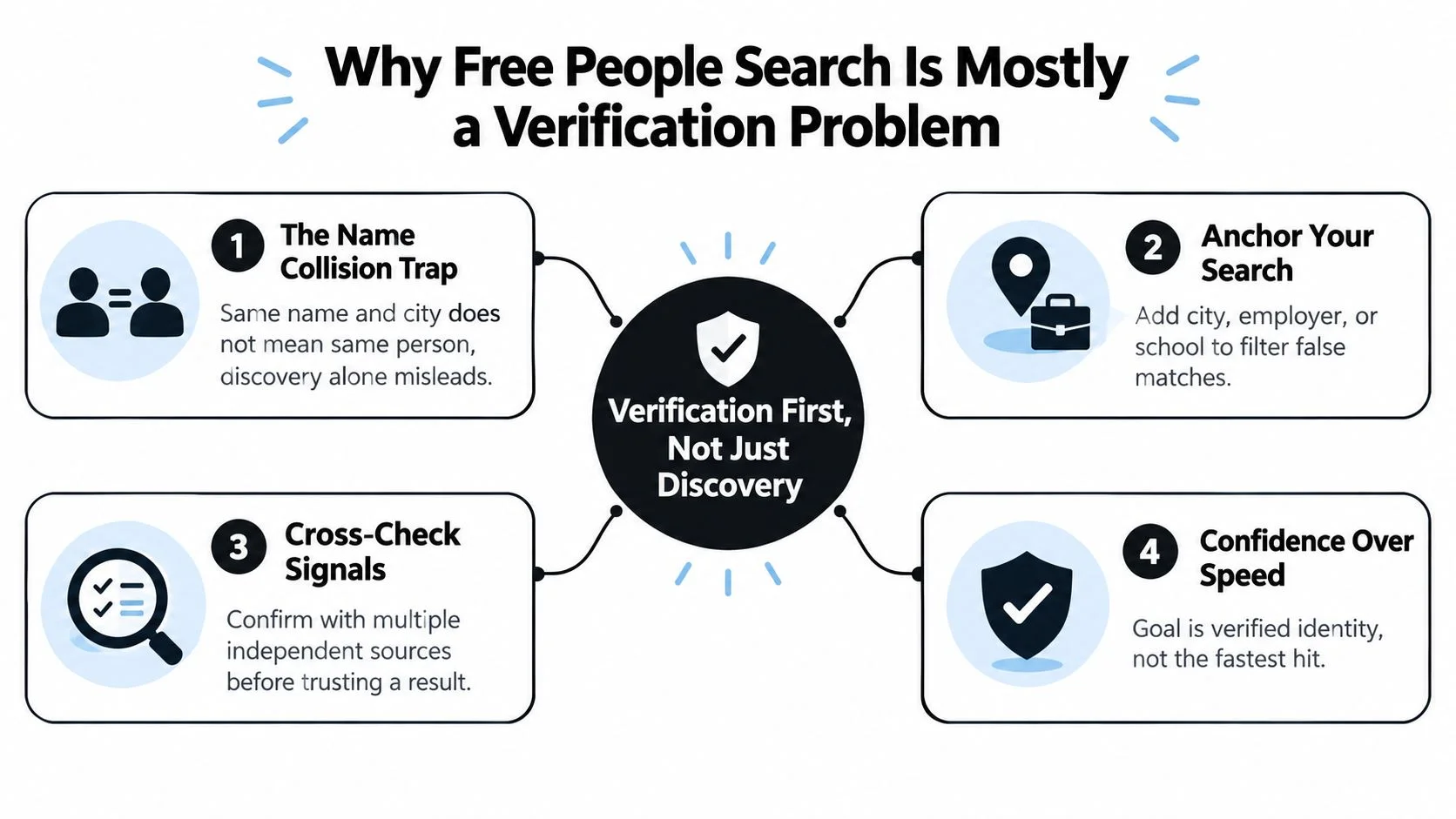
Begin with an anchor that separates the person from others with the same name. Combine the full name with a city, employer, school, or approximate age. For an online interaction, an online handle, phone number, or email address may identify the account more reliably than a common name. An alumni connection or specialist occupation can add another useful point of comparison.
Three signals create confidence
Use three kinds of confirmation instead of trusting one appealing result:
- Independent agreement: Compare sources that do not appear to copy the same database. An employer profile and a professional license provide stronger support together than two aggregator pages repeating identical details.
- Temporal consistency: Check whether the timeline makes sense. A current work profile alongside an address from years earlier may be a useful lead, not proof.
- A corroborating artifact: Look for a public photo, dated post, signed filing, or other item connecting the candidate to your original anchor. A matching profile picture remains only a clue because images can be reused or outdated.
Search engines, social platforms, image tools, public records, and aggregators each contribute pieces to one evidence chain. A free people search tool can help review publicly exposed identifiers, but every result still needs manual comparison.
Practical rule: If you cannot explain why two records belong to the same person, the identity remains unverified.
Searching Search Engines, Social Networks, and Images
Search engines are often the safest first step because they let you inspect public pages without immediately relying on a compiled profile. Put the full name in quotation marks, then add an anchor such as a city, employer, school, or profession. For example, a query using a quoted name and city will usually be more useful than the name alone.
Use operators selectively:
site:limits results to a platform, such as LinkedIn, Facebook, GitHub, Medium, or Substack.inurl:looks for a word in the page address, useful for profile paths or author pages.intitle:searches page titles, which can surface biographies, speaker pages, or public announcements.filetype:can locate public PDFs, such as conference programs, filings, or alumni documents.
The operator doesn't verify the person. It only reduces noise. A LinkedIn result with the right name and city becomes more credible when its Experience section shows the employer you already have, and when a dated post supports the same timeline. Check About, Experience, and Posts pages for consistent locations, work history, mutual connections, and dated milestones. Don't treat a matching photograph as decisive, since profile images can be copied or outdated.

Use images as supporting evidence
Reverse image tools can reveal whether a profile photo appears elsewhere, whether an image belongs to a different person, or whether an account has reused a stock photograph. Try Google Images, Yandex, TinEye, and Bing Visual Search. Yandex often performs well with faces, while TinEye is particularly useful for tracing reposts and older versions of an image.
A reverse match still isn't identity proof. It may show only that the same photograph appears on multiple accounts. Record the source URL, the date you viewed it, and the anchor that connected it to your candidate. That small habit prevents you from confusing a search preview with a verified record and gives you a clear trail when you pivot into registries or professional pages.
The social media people-search guide can help organize that discovery process, especially when a username or public profile is more distinctive than a name.
Keep the purpose narrow. Looking for a public professional profile may be reasonable. Collecting unrelated family details, private contact information, or sensitive records for intimidation, harassment, or surveillance isn't ethical.
Reversing Usernames, Phone Numbers, and Emails for Free
Identifiers often provide cleaner pivots than names. A username can connect public activity across platforms, while a phone number or email may reveal a profile image, display name, or account association. Each result is still a lead, and the same handle can be reused by different people.
For usernames, try Namechk, WhatsMyName, Sherlock, and GitHub code search. Compare bios, avatars, language, time zones, and activity dates. GitHub commit history can be especially helpful when a handle appears beside a consistent technical identity, but a reused username on its own isn't enough.
Phone searches are less predictable. Search the number in several formats and inspect carrier-tagged snippets where available. WhatsApp and Telegram may display a public profile photo, while Truecaller community labels, Numberbook, and Sync.me can sometimes surface a name or directory entry. VoIP and burner numbers often return little or nothing, and a recycled number can connect the search to a previous owner.
Email reversals can produce stronger contextual clues. Gravatar may expose a public avatar, Have I Been Pwned can show breach exposure, Holehe can enumerate possible platform registrations, and GitHub history may connect an address to a public name or profile photo. Breach exposure does not prove account ownership today, and platform enumeration can produce false positives, so treat both as indicators.
| Tool | Identifier Type | Typical Free Output |
|---|---|---|
| Namechk | Username | Possible matching handles across platforms |
| WhatsMyName | Username | Public account candidates and profile links |
| Sherlock | Username | Platform matches that need manual review |
| Gravatar | Public avatar or profile association | |
| Have I Been Pwned | Known breach exposure | |
| Holehe | Possible account-registration indicators | |
| Truecaller | Phone | Community labels or caller identity clues |
| Numberbook or Sync.me | Phone | Directory-style contact information |
The strongest finding is one that combines an identifier with a second anchor. A handle linked to the same public photo, city, and dated activity is more useful than a handle match alone. A display name, avatar, last activity timestamp, or linked account can become a verification anchor when it agrees with information from an independent source.
For a broader username or email review, the reverse username search tool can check publicly available profile associations. Use it as reconnaissance, then open the original platform pages and inspect them yourself.
Public Records, Registries, and People-Search Aggregators
A familiar name can open the wrong file. If a search returns a property record, court entry, or phone listing for “Alex Chen,” treat it as a candidate, not an identification. Free people search works best when you separate primary registries from compiled search products and verify each lead with an independent detail.
Official sources may include federal court information through PACER and RECAP, state voter records where access is permitted, professional licensing boards, Secretary of State business filings, county property records, and UCC records. Depending on the jurisdiction, these records can show court parties, property ownership, voter status, credentials, or corporate officer history. Access rules and available fields vary, so an absent result does not necessarily disprove a connection.
Aggregators such as Whitepages, Spokeo, BeenVerified previews, and TruePeopleSearch can surface possible addresses, relatives, phone numbers, or associated names. The FTC explains that people-search sites assemble reports from public and brokered information, and that reports may include employment, real estate, marriage, divorce, lawsuit, bankruptcy, or arrest records. The FTC's explanation of people-search sites also clarifies why easy access does not guarantee accuracy.
Use an aggregator like an index at the back of a book. It may point toward a page, but the registry is the page you need to read. Large databases can contain extensive records, yet their scale also increases the chance that two people with the same name will be merged or confused.
Use the source hierarchy
| Source | What It Exposes | Typical Cost | Best Use |
|---|---|---|---|
| Court or RECAP records | Dockets, parties, filings | Varies by access route | Confirming a court reference |
| Licensing boards | Credentials and status | Often free to inspect | Verifying a profession |
| Secretary of State filings | Businesses and officers | Often free, fees may vary | Connecting a person to an entity |
| County property records | Deeds, owners, parcel history | Often free to search, document fees may apply | Confirming property-related links |
| People-search aggregators | Compiled contact and relationship clues | Free previews or paid reports | Generating leads only |
A county recorder may charge a document fee for a certified copy, while an aggregator may show an old entry without identifying its origin. Follow the chain: aggregator lead, official lookup, confirmed match. Check the name alongside location, occupation, dates, or another permitted identifier before treating the record as relevant.
The free people-search engine can surface possible leads, but it does not replace an official registry. If a result could affect someone's safety, employment, housing, finances, or reputation, stop at the lead until a primary record supports the connection.
Confirming You Found the Right Person Without Paying
Verification becomes clearer when you pivot from one record to another. Suppose a public voter-registration document places a candidate in a particular city. That fact is useful, but it doesn't establish that every similarly named property or social profile belongs to the same person.
Add a second independent anchor, such as the candidate's employer, school, age range, or professional field. Then pivot to a different record type. A county property record might confirm a co-owner or a consistent address history, while LinkedIn or a professional licensing board can test the employer or occupation. The evidence becomes stronger when each record contributes a different fact instead of copying the same source.
Two matching fields are a starting point. Two independent sources that agree on those fields are a reason to continue checking.
Use this compact workflow:
- Create a candidate record: Write down the name, identifier, city, employer or school, source URL, and capture date.
- Lock one anchor: Use a public profile, voter document, business filing, or other permitted source to establish a specific location or affiliation.
- Pivot to another registry: Search a county property page, court-party index, licensing database, or corporate filing.
- Test the timeline: Ask whether the dates, locations, and employment history can coexist.
- Add a corroborating artifact: Compare a public photo, GitHub commit history, signed filing, dated post, or professional credential.
- Document uncertainty: Mark each item as confirmed, probable, or unresolved.
Free checks can include a Gravatar lookup, GitHub commit history, a court-party search, USPTO inventor filings, and alumni directories. A definitive result usually comes from a record that names the person in a specific role and connects to another independently maintained record. A matching name, age, or city is only a strong hint.
Name collisions remain the central hazard. Identical names and similar ages are common, and household data can be mixed. If you can't show the path from source A to source B, don't act on the result.
Legal Boundaries, Common Traps, and Free Opt-Out Realities
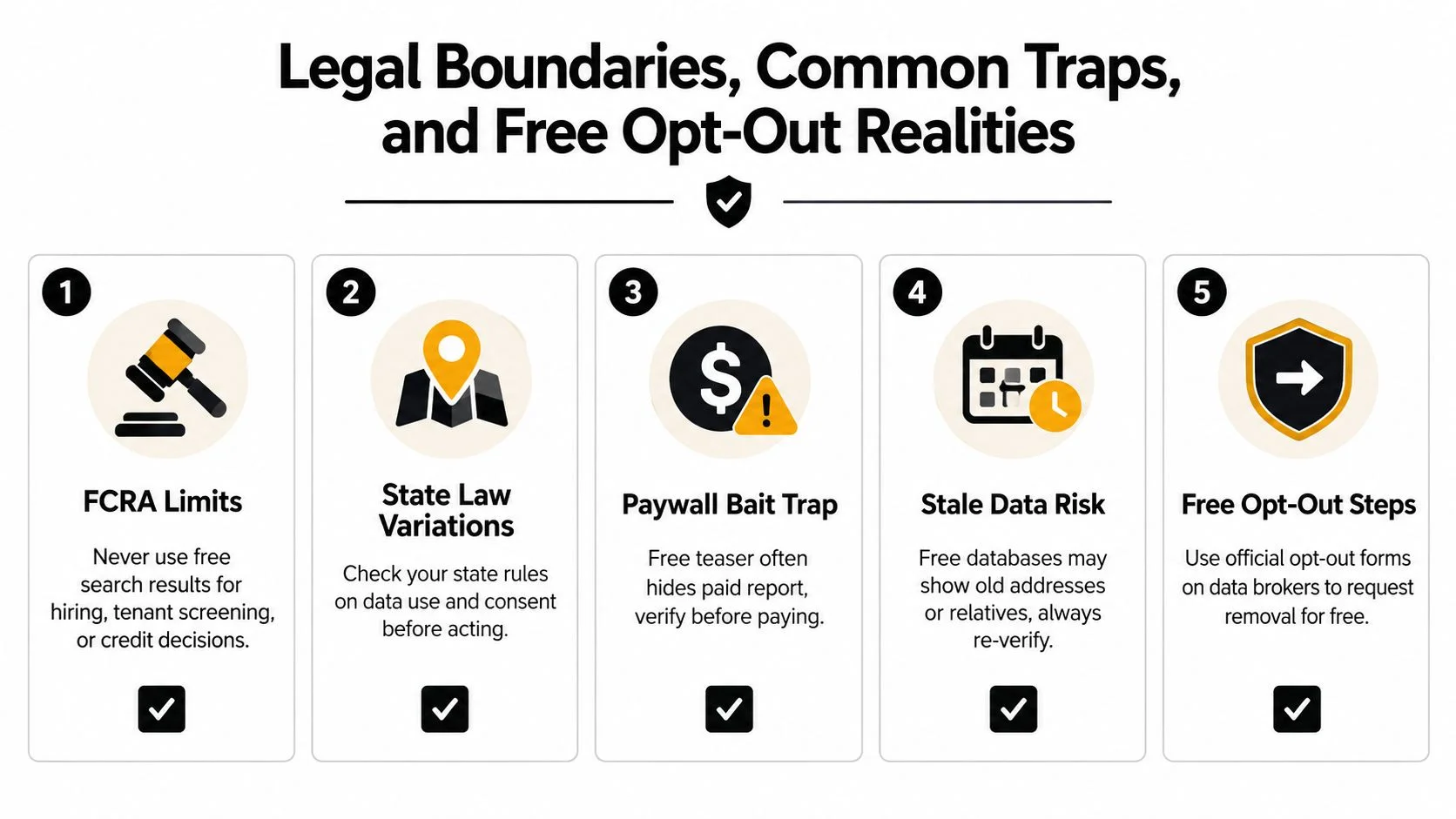
Free doesn't mean unrestricted. The Fair Credit Reporting Act limits the use of consumer reports for purposes such as employment, housing, and credit decisions. A casual people-search result isn't a substitute for a compliant screening process, and state laws may impose additional rules on consent, data use, privacy, or background research. Review whether OSINT is legal before collecting or using information about another person.
The first trap is the false match. Two unrelated people can share a name, birth year, city, employer, or relative. The second is stale data. An aggregator may list an old address or relationship from years ago and present it beside newer information without a clear timeline. A paywall teaser can create another problem by showing just enough detail to encourage payment without proving the underlying match.
Removal is a continuing process
The FTC says people-search removals must be completed one by one for free. EFF's 2025 Opt Out October roundup lists 50+ separate opt-out links, which shows how fragmented the process can be. The FTC's privacy guidance also reflects the need to repeat searches and inspect reports manually.
Common starting points include the official opt-out pages for Whitepages, Spokeo, BeenVerified, TruePeopleSearch, PeopleFinders, Instant Checkmate, Intelius, MyLife, USSearch, and FastPeopleSearch. Use each company's current official privacy or opt-out page rather than relying on a copied guide, because URLs and procedures change.
Expect identity verification, individual submissions, follow-up checks, and possible reposting after a broker refreshes its data. Keep a private log of the listing URL, request date, confirmation, and later status. Opt-out is a process, not a single switch, and suppression services exist for people who can't maintain the work themselves.
Turning a Free Search Into Lasting Privacy Protection
The same methods used to research someone else can audit your own exposure. Search your name in quotation marks with your city, employer, school, and former locations. Reverse your usernames, inspect old email associations, search your public photos, and review aggregator previews. Mark exposed addresses, phone numbers, emails, relatives, gaming profiles, and photos as cleanup candidates.
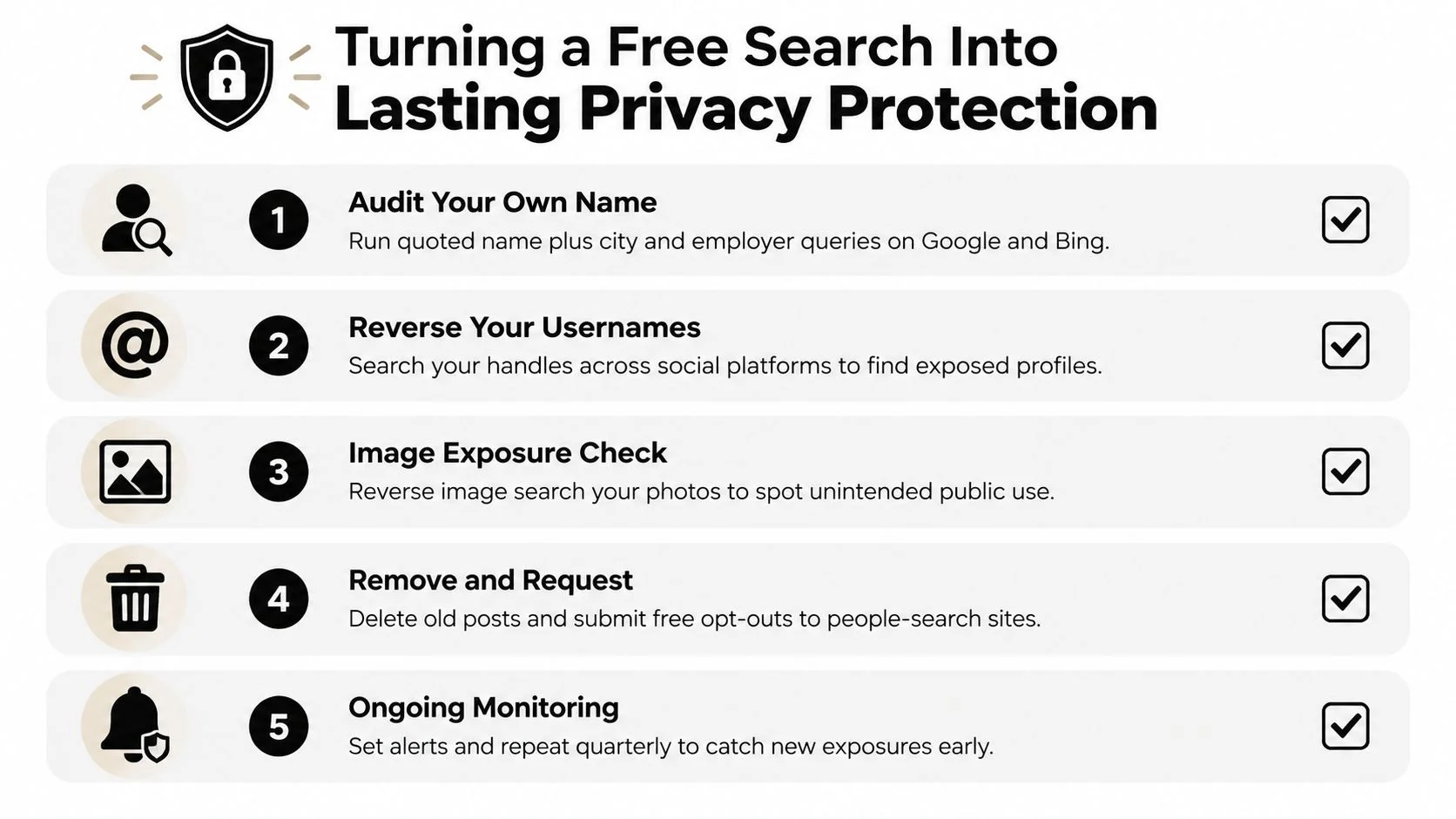
A practical routine can fit into a repeating privacy cycle:
- Identify listings: Record where your information appears and whether the page is current.
- Submit removals: Use official broker forms and save confirmations.
- Request search-result cleanup: Ask Google to review qualifying doxxing or sensitive personal-information results.
- Tighten profiles: Remove old public posts, hide contact details, and review gaming and dating-app visibility.
- Monitor again: Repeat the checks periodically and use separate email addresses for future signups where appropriate.
This matters when you're dating, applying for work, moving to a new city, or protecting a family member. A one-time search gives you visibility into the present snapshot. Ongoing monitoring helps you notice new exposures before a scammer, impersonator, hostile contact, or identity thief uses them.
Digital Footprint Check offers free profile-checking tools that search publicly available associations across usernames and email addresses, including social, professional, gaming, breach, and public-record signals. Visit Digital Footprint Check to audit your exposed identity data, document what needs attention, and turn a free people search into a practical privacy-maintenance routine.