· Digital Footprint Check · Content Marketing · 18 min read
The Ultimate Guide to Username Lookup: Protecting Your
Learn how a username lookup can protect your online identity and reveal hidden accounts, helping you manage your digital footprint.

That username you picked out years ago? It’s more than a login. Think of it as a digital key, one that can unlock and connect your different accounts scattered all over the web. A username lookup is the process of searching for that specific name to see where it appears online. This single search can uncover a trail of public profiles, forum posts, and gaming accounts, all tied back to one handle, creating a surprisingly detailed picture of your life.
This guide will walk you through why your username is a critical piece of your online identity, how to perform a thorough lookup, and what to do with the information you find to protect yourself from risks like identity theft, reputation damage, and online scams.
Your Username Is a Digital Breadcrumb Trail

Most of us reuse the same username across multiple platforms. It’s convenient. But in doing so, we unknowingly leave a trail of digital breadcrumbs that anyone can follow. This habit makes it easy for OSINT investigators, curious employers, potential dates, or even malicious actors to piece together a map of your online life, often connecting accounts you thought were separate.
Let’s say you created the username ‘ShadowGamer87’ back in 2021 for a gaming forum. You then used it for Instagram, a Reddit account, and a hobbyist blog. You’re not alone. This habit is surprisingly common, with data from FootprintIQ’s research on username reuse patterns showing that username reuse jumped from 58% in 2021 and is on track to hit 73% by early 2026.
This trend makes sense when you consider the sheer number of accounts we all manage—over 5.66 billion social media identities exist worldwide as of late 2025. Each account is a dot, and a reused username is the line connecting them.
Real-World Impacts of Your Online Username
It’s a huge mistake to think of your username as just a simple login. It’s a public identifier that carries real-world consequences, merging what you thought were separate online personas into one, easily viewable story. Here’s how a username lookup can affect you:
Job Prospects: A 2022 survey found that 70% of employers use social media to screen candidates. A recruiter running a quick username search could stumble upon an old, unprofessional forum post or a gaming profile with toxic comments, potentially sinking a job offer before you even reach the interview. A seemingly innocent username can become a liability.
Online Dating Safety: When you’re planning to meet someone from a dating app, running their username can be a crucial safety step. It helps verify they are who they claim to be. A lookup can expose red flags, like wildly different profiles on other sites, which could protect you from catfishing or dangerous romance scams.
Gaming Account Security: Gamers often invest hundreds of hours and dollars into their profiles. A username is the first piece of information a hacker needs to target your account for takeover. If that same username is linked to a data breach, your entire gaming identity is at risk.
Reputation Management: That forgotten blog or social media account you made a decade ago can resurface at the worst possible time, painting a picture of you that no longer fits who you are today. Proactively finding and managing these old accounts is key to controlling your public narrative.
Understanding your exposure is the first step toward taking control. A simple username lookup isn’t about creating fear; it’s about empowerment. It provides the map you need to navigate and secure your digital identity.
This process lets you audit your own online presence before a job hunt, check out an online date for safety, or just do some digital spring cleaning. The web of connections between these accounts is what we call your digital shadow. You can learn more by decoding your digital shadow and what your online habits reveal.
Ready to see what’s out there? A free tool can provide a quick and simple way to begin your own username lookup and discover your public exposure.
Choosing Your Username Lookup Tools
Alright, you’re ready to start tracking down a username. The first thing to figure out is which tools you’ll need. Your choice really depends on how deep you plan to dig, from a quick manual search on Google to a full-blown investigation with powerful OSINT (Open Source Intelligence) platforms.
The most basic method is a manual search on your favorite search engine. You can get surprisingly far by using special commands, often called “dorks,” to focus your results. For example, typing inurl:profile "yourusername" tells Google to look for profile pages that contain that exact username. You can also narrow it down to a specific site with a command like site:twitter.com "yourusername", which only shows results from Twitter.
Free vs. Professional Username Checkers
While manual searches are a decent starting point, they’re slow and will almost certainly miss accounts on smaller, niche, or less-indexed websites. This is where dedicated username lookup tools are a major advantage. These websites are built to check hundreds of sites at once, saving you hours of manual work.
A popular free tool is WhatsMyName. It takes a username and scans a large list of common sites to see where it’s registered.
The tool uses a simple color-coded system to show you where the username is found, giving you a quick snapshot of its public presence. It’s an excellent first pass for discovering obvious social media and web profiles.
However, free tools have their limits. They usually don’t dig into gaming forums, check massive data breach records, or search the deeper parts of the web. Their results can also be hit-or-miss, sometimes flagging a profile that doesn’t actually exist. For a thorough analysis required for serious security or reputation management, you’ll need something more powerful. You can find more great starting points in our guide to OSINT tools for beginners.
Key Takeaway: The real difference between free and professional tools isn’t just how many sites they check—it’s the kind of data they find and how they connect it. Professional OSINT services can link a username to other identifiers like emails, phone numbers, and data breach exposures, painting a much more complete and actionable picture of your digital footprint.
The Power of Comprehensive OSINT Platforms
This is where comprehensive platforms like Digital Footprint Check really separate themselves. These aren’t just checkers; they are forensic OSINT engines designed for deep investigation. They cross-reference a username against social networks, gaming profiles, massive data breach databases, and public records. It’s how one simple search can uncover a hidden web of accounts spanning over 500+ sites, including those that free tools miss.
This deep-dive capability is becoming essential. The number of global social media identities is projected to reach a staggering 5.66 billion in 2025, an increase of 259 million in just a single year. Professional tools are built to navigate this vast and complex digital landscape. You can learn more about how forensic OSINT tools conduct username searches to build out a complete profile from a single starting point.
To help you choose the right approach, it’s useful to see how these methods stack up against each other.
Comparison of Username Lookup Methods
| Method | Coverage (Platforms) | Speed & Efficiency | Best For | Real-World Use Case |
|---|---|---|---|---|
| Manual Google Search | Low (only indexed sites) | Very Slow & Manual | Quick checks on a single, known platform. | Searching site:reddit.com "exampleuser" to find a specific user’s posts. |
| Free Username Checkers | Medium (100-300+ sites) | Fast | A rapid initial scan to find public social media accounts. | Using WhatsMyName to see if a dating match has public profiles on major sites. |
| Professional OSINT Platforms | High (500+ sites & databases) | Very Fast & Automated | Deep-dive investigations, reputation management, and security audits. | Using Digital Footprint Check to see if a gaming username was exposed in a data breach. |
Ultimately, the best tool is the one that matches your goal. If you’re just casually curious, a free checker might give you all you need. But for serious reputation management, cybersecurity audits, or verifying someone’s identity for personal safety, a professional platform delivers the depth and accuracy required.
How to Conduct a Thorough Username Lookup: A Step-by-Step Guide
Let’s get into the nuts and bolts of a proper username lookup. This isn’t just about plugging a name into a search bar; it’s a methodical process that real investigators use, moving from wide-angle searches to pinpoint analysis to protect their assets.
First things first, you need to map out your targets. Think back to every username you’ve ever used. Your first email address, that embarrassing AIM screen name, your current gaming handle—get it all down. Don’t forget to list out all the common variations, too. If your go-to is ‘galaxy_rider99’, you also need to think about ‘galaxy.rider.99’, ‘G_Rider_1999’, or even just ‘GalaxyRider’. Attackers will try these variations, so you should too.
Step 1: Brainstorm and Execute Your Search
With a solid list of potential usernames, it’s time to start digging. The best way to do this without getting overwhelmed is to start with the simplest methods and gradually move to more powerful techniques. It’s a structured approach that keeps your findings organized.
Follow this layered search process:
- Go Manual First: Start with a few targeted Google searches. Use operators like
site:instagram.com "galaxy_rider99"to quickly zero in on specific, high-value platforms. This is a quick and dirty way to get immediate hits and confirm your primary targets. - Then, Use Free Checkers: Next, take your primary username and a few top variations and run them through a free checker tool. This will scan hundreds of sites in one go, saving you a ton of manual effort and uncovering accounts on platforms you might not have thought to check.
- Finally, Go Deep with a Pro Platform: For the most thorough investigation, use a professional service. These platforms dig into places free tools can’t reach, cross-referencing your username with data breach records, paste sites, and hidden public data sources. This is where you find the most critical security risks.
This layered approach, from manual to automated, is a classic workflow in the open-source intelligence (OSINT) world. Each step builds on the last, widening the net to create a more complete picture of your digital exposure.
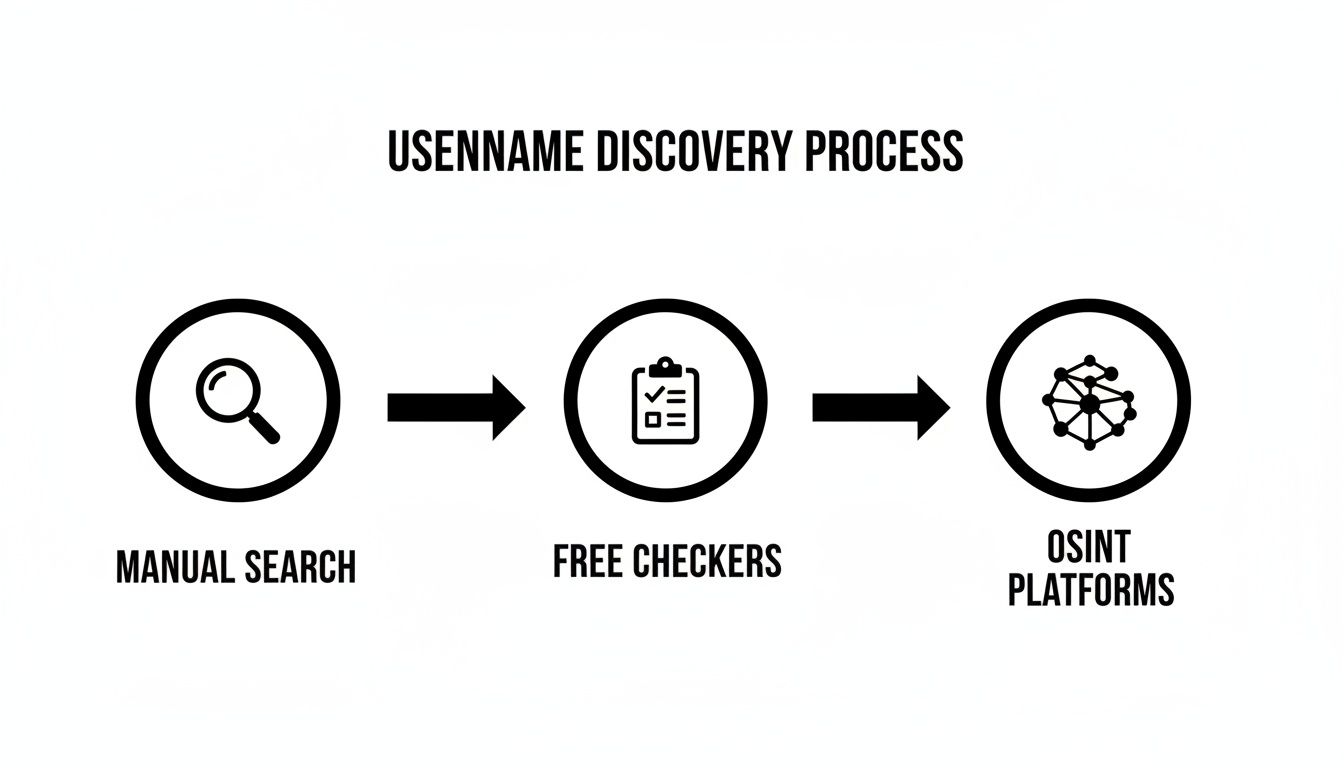
The real power here is how each method uncovers a different layer of your digital identity, giving you a far more complete view than any single tool ever could.
Step 2: Correlate and Organize Your Findings
As the results start flooding in, the real work begins: correlation. This is where you play detective, connecting the dots between an old forum post under ‘G_Rider_1999’ and a public social media profile for ‘galaxy_rider99’. You’re looking for overlaps—the same profile picture, a familiar bio, shared interests, or accounts that link to one another.
The goal isn’t just to find a list of accounts. It’s to understand the story they tell when you piece them together. A single profile might seem harmless, but a cluster of them can reveal patterns in your online behavior and expose surprising security risks.
To keep everything straight, use a simple spreadsheet. Create columns for the username, the platform, the URL, and any notes about the content you found. This simple step turns a chaotic mess of data into a clear, actionable map of your digital life.
This process is more potent than ever because of how we use the internet. A staggering 78% of internet users now research products on social media. But that search behavior goes both ways. Social media is now a primary search engine for many, with 46% of Gen Z using networks like TikTok for their queries. This social search trend is well-documented, and you can find more statistics on social search trends at Statista.com.
Specialized lookup tools that index over 500+ sites are built to uncover accounts that these basic social searches would miss. By following this systematic process, you can effectively find hidden social media accounts and finally get a true picture of your public-facing identity.
Analyzing Your Username Lookup Results
Alright, you’ve run a username search and now you’re staring at a long list of accounts. Some you use every day, others you haven’t thought about in years. This is where the real detective work starts—turning that raw data into a clear picture of who you are online and what risks you face.
It’s not just about finding profiles. It’s about understanding what they say about you and to whom.
Your first pass should be all about triage. You’re hunting for the digital landmines—the breadcrumbs that could seriously damage your personal or professional reputation. We’re talking about old accounts with cringe-worthy content, public profiles spilling too much personal information, or, worst of all, usernames that have popped up in data breaches.
From Data to Actionable Insights
To make sense of it all, you need a system. Sorting your findings helps you figure out what to tackle first. A method I’ve found effective is to group every account into one of three buckets. This simple act turns a jumbled mess of links into a concrete security plan.
Try this categorization:
- Safe: These are your current, secure accounts. You actively manage them, and they present the image you want. Think of your polished LinkedIn profile or a private Instagram account you only share with trusted friends.
- Needs Review: This is your digital “to-do” list. These accounts aren’t immediate fires, but they need a clean-up. Maybe it’s an old Photobucket account filled with blurry college photos or a forum profile with embarrassing posts from ten years ago.
- Urgent Action: These are the red alerts. This bucket is for any account linked to a data breach, a public profile exposing sensitive details like your home address, or any forgotten account that’s a prime target for impersonation, identity theft, or a romance scam.
Think about it this way: discovering an old gaming profile where you used toxic language—under the same username you use professionally—is a huge problem. A recruiter won’t care that it was from your teenage years; they’ll just see a major red flag. That goes straight into the “Urgent Action” category.
Likewise, that public dating profile you forgot to delete is a rich source for romance scammers. They can lift your photos and personal details to build a fake identity, putting you at significant risk of being impersonated or becoming a victim yourself.
The most critical part of this analysis is context. A profile isn’t just ‘good’ or ‘bad’—it’s a piece of a much larger puzzle. You have to ask: Who can see this, and how could they interpret it?
Building Your Remediation Plan
Once you’ve sorted your results, you have a clear roadmap. The “Urgent Action” list is what you handle right now. These are the accounts you need to delete, make private, or lock down immediately. After the fires are out, you can move on to the “Needs Review” list. This involves a more thoughtful process of curating your digital past.
This structured approach is what turns the overwhelming output of a username lookup into a manageable project. It’s the essential bridge between discovery and protection, empowering you to take decisive action. A free tool like the one from Digital Footprint Check can give you that initial list of accounts, providing the foundation for your entire analysis.
Securing Your Identity After a Username Lookup
Finding all the places your username is scattered across the web is a huge first step. But the real work begins now. It’s time to take what you’ve found and build a plan to reclaim your online identity, moving from discovery to active defense against identity theft, scams, and reputation damage.
First things first, tackle the biggest fires. Any accounts you flagged as “Urgent Action”—especially those connected to data breaches, exposing private information, or old profiles just waiting to be used for impersonation—need to be handled immediately. Don’t put it off. Delete them or lock them down tight by changing the password and enabling two-factor authentication.

Create Digital Compartments
One of the most effective long-term strategies for digital privacy is to stop using the same username everywhere. This practice, known as compartmentalization, is a major advantage for reducing your risk. When you use unique usernames, you sever the link that lets someone easily connect your professional life with your personal hobbies or anonymous forum posts.
Try setting up a system that works for you. For example:
- Professional: Stick to a clean, simple variation of your real name for sites like LinkedIn where you want to be found.
- Personal: Use a different handle for private social media that you only share with close friends and family.
- Anonymous: For Reddit, gaming forums, or other public-facing communities, create a unrelated username with zero personal identifiers. This prevents your casual comments from being tied back to your real identity.
Of course, trying to remember a dozen different usernames—each with its own strong, unique password—is a recipe for failure. This is where a good password manager becomes essential. It securely stores all your credentials, letting you use complex passwords for every site without having to memorize a thing.
A one-time cleanup is a great start, but real digital privacy isn’t a one-and-done project. It’s an ongoing process. New accounts get created and old data can pop up again when you least expect it. The only way to stay on top of new exposures is with continuous monitoring.
From Cleanup to Active Defense
Once you’ve dealt with the initial mess, it’s time to shift your thinking toward long-term defense. You’re setting up a permanent security system for your online life. This is where a service like Digital Footprint Check comes in, providing ongoing monitoring that alerts you anytime your username or other personal info shows up somewhere new online or in a data breach.
This approach turns a one-off project into a sustainable security habit. For example, data brokers are constantly scraping and selling your information. You’ll want a streamlined way to deal with them as they inevitably re-add your profile. You can learn more about how to request data broker removal and protect your privacy in our dedicated guide.
By following these steps, you’re doing far more than a username lookup. You’re building a tough, resilient defense for your digital self.
Common Questions About Username Lookups
Once you start pulling back the curtain on username lookups, a few key questions always pop up. It’s only natural to wonder about the legal lines, what it means when you find nothing, and how to react when you find something you wish you hadn’t.
Let’s tackle some of the most common concerns people have when managing their digital identity.
Is It Legal and Ethical to Search for Someone?
This is always the first question, and it’s a big one. The short answer is yes—running a username lookup with information that’s already publicly available is generally legal. It’s really just a more powerful way of doing what search engines already do: sifting through public data.
The more important question is about your intent, which is where ethics come into play. It’s perfectly reasonable and ethical to verify someone’s identity to avoid a catfishing scam, to check on your child’s online activity for their safety, or to vet a potential business partner. Where it crosses the line—and can become illegal—is when the search is used for stalking, harassment, or attempting to break into private accounts.
What if a Username Lookup Finds Nothing?
Don’t panic. An empty search result can actually be a very good sign. For one, it could mean you have excellent digital hygiene and practice the highest standard of online privacy: using unique usernames across different platforms.
However, it could also mean the tool you used just didn’t look in the right places. Many free checkers only scan a handful of major social media sites. A professional service digs much deeper, scanning hundreds of sources, including niche forums, gaming communities, and critical data breach databases. If you’re concerned about your security, a deeper scan is always a good idea. To understand the difference in coverage, you can learn more about the cost and value of username search services.
What Should I Do if My Username Is in a Data Breach?
If a lookup shows your username was exposed in a data breach, you need to act immediately. This is a critical red flag that your password is very likely compromised and in the hands of cybercriminals.
Immediately change the password for that specific account. If you reused that password anywhere else—a common and dangerous mistake—you must change it on all those other accounts too, starting with your email and banking.
Your very next step should be to enable two-factor authentication (2FA) everywhere it’s offered. This simple action adds a powerful security layer that can stop a scammer in their tracks, even if they have your password. It is one of the single most effective things you can do to protect your digital life from identity theft and account takeovers.
Taking control of your online identity starts with knowing what’s out there. A username lookup is your first step toward discovering your digital footprint and securing it against threats. The free tool from Digital Footprint Check can help you start the discovery process today. Get your free report and see what your digital footprint reveals at www.digitalfootprintcheck.com/free-checker.


