· Digital Footprint Check · Content Marketing · 15 min read
How to Search Telegram Users: Osint Guide 2026
Our OSINT guide shows how to search Telegram users. Cover username lookups, phone checks & verification to protect your digital identity & avoid scams.

You’re probably here because a Telegram account has moved from “random username” to “real concern.”
Maybe it’s someone from a dating app who pushed the conversation onto Telegram fast. Maybe a freelance candidate insists on using Telegram but their identity feels thin. Maybe your teenager mentions a new gaming friend and all you have is an @handle. In each case, the question isn’t curiosity for its own sake. It’s whether the person behind the account is who they claim to be.
That question matters more on Telegram than many people realize. Telegram reached 1 billion monthly active users by March 2025, up from 950 million in July 2024, and users spend roughly 41 minutes a day on the app on average, according to Backlinko’s Telegram user analysis. At that scale and engagement level, Telegram isn’t a niche side channel anymore. It’s a major part of people’s public and semi-public digital footprint.
Why You Might Need to Find Someone on Telegram
The most common reason to search Telegram users isn’t technical. It’s personal.
A woman matches with someone on a dating app. The profile looks polished, the messages are smooth, and within a day he asks to switch to Telegram because he “doesn’t trust dating platforms.” A business owner gets a promising inbound message from a contractor who only wants to coordinate through Telegram. A gamer joins a private group and starts getting direct messages from someone who seems friendly, then starts asking oddly specific questions.
Those are ordinary situations. They can also be the opening move for catfishing, romance scams, fake service offers, impersonation, or social engineering.
Verification is often the real goal
Those searching Telegram users don’t need a dossier. They need a sanity check.
They want to know whether:
- A dating contact is consistent: Does the Telegram username match accounts elsewhere, or does it look freshly created and isolated?
- A seller or freelancer is real: Can you connect the Telegram identity to a portfolio, public work history, or established online presence?
- A gaming or community contact is safe: Does the handle show up across normal communities, or only in spaces associated with spam, crypto pitches, or impersonation attempts?
That’s why Telegram searches sit at the intersection of OSINT and personal safety. You’re not trying to “unmask” someone for entertainment. You’re trying to reduce risk before trust gets extended.
Practical rule: If someone wants money, intimate photos, access to your accounts, or a fast move off-platform, verify first and decide later.
Telegram changes the stakes
Telegram’s size makes it useful for legitimate communication, but that same scale also creates room for abuse. With so many active users and a large volume of public usernames, channels, groups, and linked identities, it’s often possible to find at least some breadcrumbs. But scale cuts both ways. You can find genuine public traces, and you can also find a lot of noise.
That’s why a search should start with restraint. Search for enough information to protect yourself, not enough to invade someone’s life.
If your goal is broader identity checking across public platforms, a focused guide on how to find a person on social media can help you think beyond Telegram and compare signals across the wider web.
Starting with Telegram’s Built-in Search Tools
Start inside the app before you touch any external search method. Native features are faster, less messy, and less likely to push you toward weak assumptions.
Telegram gives you a few search surfaces, but they don’t all work the same way. The strongest starting point is usually the exact public username. If a person has one, Telegram lets you look them up directly by @username. If they don’t, or if they use tight privacy settings, your options narrow fast.
What to try first
Open Telegram search and work from the most exact input to the least exact.
Search the full
@usernameIf someone gave you
@name_example, search that exact handle first. This is the cleanest path because usernames are designed to be directly discoverable.Search the username without the
@Telegram may still surface the account, plus public groups or channels using the same term.
Search display names carefully
Display names are weaker identifiers. Many people use common first names, nicknames, or emoji-heavy labels that produce cluttered results.
Check whether the account appears in shared groups
If you already share a public or semi-public group, profile discovery gets easier because Telegram exposes more context around participation.
A practical Telegram OSINT workflow starts with the public username. When that fails, investigators usually pivot to bios, profile images, and public groups. Phone-based lookups are often limited because users can hide their numbers, and the old “People Nearby” route was removed in 2024, which pushed investigators toward username-centric methods, as described in this Telegram OSINT guide from OSINT.Industries.
What phone number search can and can’t do
Many non-experts assume Telegram works like a universal people finder by phone number. It doesn’t.
If you add a number to your synced contacts, Telegram may show you the account tied to that number. But that method depends heavily on privacy settings and your existing contact relationship. In practice, phone lookup is often a dead end unless the number is already in your contacts and the target hasn’t restricted visibility in ways that block useful discovery.
That limitation matters because people often overestimate what Telegram exposes by default. It doesn’t hand over identity neatly.
Telegram Native Search Methods Compared
| Search Method | What It Finds | Reliability | Key Limitation |
|---|---|---|---|
| Exact username search | Public user profile tied to that handle | High | Requires the correct username |
| Display name search | Users, groups, channels with similar names | Low to medium | Common names create many false matches |
| Synced contacts | Accounts linked to saved phone numbers | Medium | Often blocked by privacy settings |
| Shared groups or channels | Contextual profile discovery | Medium to high | Only works if there’s a mutual public space |
| In-app search for public channels | Open channels and sometimes related posts | Medium | Doesn’t prove the person behind them |
Search results in Telegram are leads, not conclusions.
If you’re dealing with a reused handle, it helps to widen the lens and compare that username across other platforms. A cross-platform username search workflow is often the fastest way to tell whether a Telegram identity belongs to a real person with a broader online history.
Advanced OSINT Techniques for Deeper Searches
A common scenario looks like this. Someone messages you on Telegram about a job, an investment, or a rush-to-WhatsApp romance. The profile feels plausible, but you cannot tell whether you are dealing with a real person, a burner account, or a recycled scam identity.
At that point, the job is to test public clues carefully. Telegram rarely gives you a full identity on its own, so the safer method is to track the pieces a user has already exposed elsewhere. A handle, profile photo, invite link, writing style, or repeated alias can all become search starting points.
Use the handle as a pivot point
Usernames are often the best lead because people reuse them out of habit.
Search the exact handle on the open web first. site:t.me username queries can surface public Telegram links, while quoted searches for the same handle may reveal Reddit accounts, GitHub profiles, gaming tags, marketplace listings, or old forum posts. If the username is unique, even a small trail can show whether the account belongs to a real person with a consistent history or a disposable alias built for outreach.
Bio fragments help too. A short quote, a niche phrase, or a repeated sign-off can connect accounts that do not share the same profile name.
For larger-scale public web collection, developers often look at infrastructure that can reliably fetch and process indexed content. If you’re evaluating that side of the workflow, Scrape API is worth reviewing as a technical reference for pulling public pages into a structured process.
Chain multiple selectors
Good Telegram OSINT comes from combining weak signals until they either support each other or fall apart.
A practical sequence looks like this:
- Check the username across public web results. Look for reuse, age, and whether the surrounding context matches the story the person is telling.
- Run the profile image through reverse image search. This often exposes stolen photos, stock images, or pictures lifted from unrelated social profiles.
- Review public groups and channels tied to the account. Posting topics, language, timestamps, and interaction patterns can tell you more than the display name does.
- Search invite links, aliases, and repeated phrases. Admins, sellers, and scammers often recycle wording across channels and profiles.
- Use archives where public traces have changed or disappeared. Deleted usernames, edited channel descriptions, and removed posts sometimes survive outside Telegram.
This takes longer than a quick in-app search. It also cuts down the risk of attaching the wrong identity to the wrong account, which matters in hiring checks, safety screening, and scam prevention.
Work from public evidence, not curiosity
The ethical line matters here.
Searching public material to verify a recruiter, seller, or person you plan to meet is very different from trying to expose someone’s private life. Professional OSINT stays on the public side, keeps notes on where each clue came from, and stops short of harassment, impersonation, or doxxing. If a lead requires deception or access you were not meant to have, it is the wrong method.
That discipline also improves accuracy. People who chase private details too early often miss the simpler answer, such as a reused scam avatar or a handle copied from another platform years ago.
Watch a workflow in action
If you’re new to this style of work, a practical roundup of OSINT tools for beginners can help you decide when to use search engines, archives, reverse image tools, and platform-specific lookups.
Verifying a User’s Identity and Avoiding False Positives
A common Telegram mistake starts like this. Someone sees a familiar face, a reused handle, or a first name that matches a private suspicion, then treats that as proof. In practice, that is how innocent people get tied to scam accounts, old usernames, or someone else’s drama.
For hiring, dating, marketplace deals, or personal safety checks, the standard should be higher. The goal is not to find a plausible match. The goal is to reach a defensible conclusion from public evidence, or admit that the evidence is too weak.
Build confidence from multiple clues
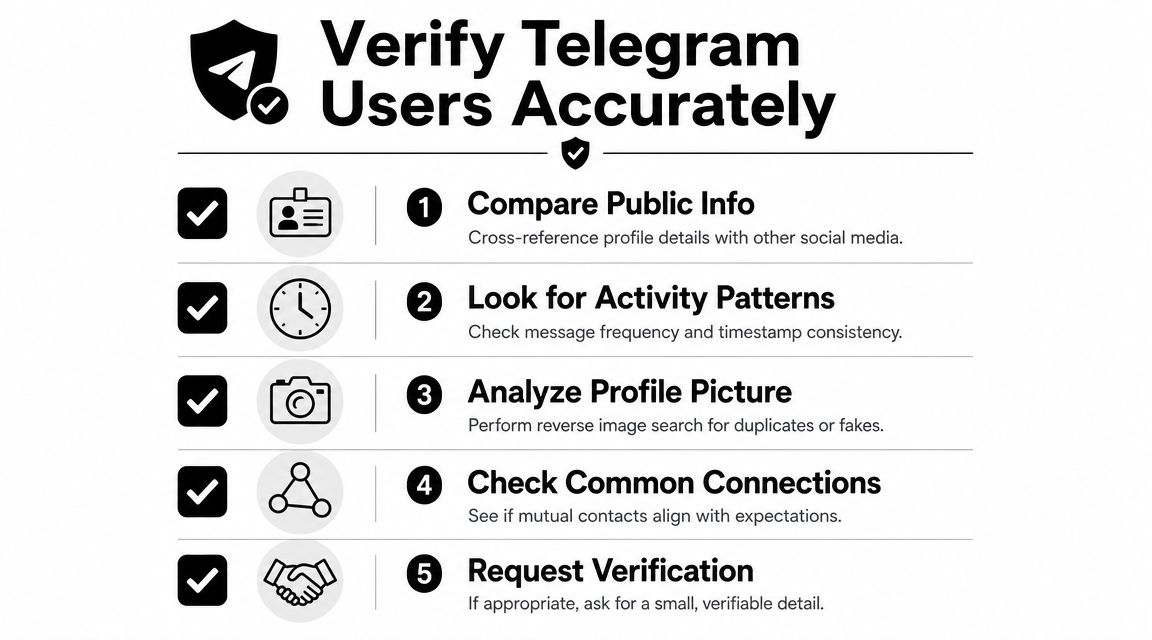
A Telegram account should match across several independent signals before you attach it to a real person.
That usually means checking whether the username appears alongside the same identity elsewhere, whether the profile image has a legitimate history, whether the writing style and language fit the claimed background, and whether public activity makes sense for that person’s role or location. One clue can mislead you. Two can still be coincidence. Confidence improves when unrelated clues point to the same person.
I treat identity work on Telegram like any other OSINT attribution problem. Every claim needs support, and every support point needs context. A profile photo without timeline context is weak. A matching username without external confirmation is weak. A bio that sounds credible is still just a bio.
Use a checklist before you trust the match
Instinct causes false positives. A repeatable process catches more errors.
Compare public claims against public history
If the account says the user is a recruiter, seller, designer, or local professional, look for a public trail that supports that identity. A real person usually leaves consistent traces over time, even if they keep them minimal.Check whether the profile image is original
Reverse image checks often expose impersonation fast. If the same photo appears on stock sites, on unrelated social profiles, or under different names, treat the Telegram account as unverified. This guide to reverse image search for people covers practical ways to test that.Review public activity, not just the profile
Group posts, channel comments, repost habits, language patterns, and active hours often tell you more than the profile page. A claimed local freelancer who only posts in crypto spam groups deserves extra scrutiny.Ask for low-risk confirmation when the stakes justify it
If you are about to send money, share sensitive details, or meet in person, request a small piece of corroboration. A link to the same portfolio they mentioned, a business page tied to the same name, or a fresh selfie consistent with prior context can help. If you need to evaluate an image response, advanced selfie verification techniques can help you spot obvious manipulation or mismatch.
A reliable attribution comes from agreement between independent clues.
Where false positives happen
The first trap is the recycled username. Telegram handles get abandoned, copied, sold, and reused. The same string can point to different people over time.
The second trap is outdated context. A profile photo from years ago, an old city in the bio, or a stale archive hit can still be real, but it can also point to an account that changed hands or a person who no longer uses that identity publicly.
The third trap is emotional certainty. People checking a dating contact, a job applicant, or someone from a personal dispute often start with a theory and then force every clue to support it. That is bad tradecraft and bad judgment. If the evidence does not hold up across multiple checks, the honest answer is that the identity remains unconfirmed.
That restraint matters. A weak match can cost someone a job opportunity, trigger a false accusation in a relationship, or make you miss the actual scammer while focusing on the wrong person.
The Ethical Lines and Privacy Risks of Telegram Searches
Many people assume searching public information is harmless because “it’s already online.” That’s too simple.
Context matters. Intent matters. What you do with the result matters even more.

Legitimate verification versus harmful investigation
There’s a clear ethical line between protecting yourself and trying to control someone else.
Reasonable uses include:
- Checking a dating contact for scam signs
- Confirming a seller, moderator, or freelancer is real before payment
- Reviewing whether a contact has a public history of impersonation or abuse
- Protecting a child, employee, or vulnerable relative in a bounded, lawful context
Questionable or abusive uses include:
- Tracking someone after they’ve asked for no contact
- Collecting details to intimidate, shame, or threaten
- Publishing findings to punish someone
- Using weak matches to make accusations
Public access doesn’t equal moral permission.
Even lawful OSINT can become harassment when the goal shifts from verification to pressure. If you’re collecting data in any professional or development context, it’s worth understanding the broader boundaries around public collection and reuse. This guide to legal data scraping for developers is a useful grounding resource.
Telegram privacy risk isn’t only about usernames
Telegram’s privacy story has a hidden edge. A 404 Media report described a tool that could query specific coordinates and plot the approximate location of some users who had enabled nearby-style functionality in the past, even after Telegram had removed the “People Nearby” feature in 2024. The reporting is detailed in this 404 Media article on Telegram location exposure.
That matters for two reasons.
First, people often think the only risk is being found by username. In reality, location-adjacent leakage can be more dangerous than name discovery, especially in stalking, domestic abuse, and workplace conflict situations.
Second, privacy settings have a long tail. A removed feature doesn’t always erase every downstream risk tied to old exposure, cached data, or third-party tooling.
Use findings carefully
If you search Telegram users for safety, keep your response proportionate.
A few basic rules help:
- Don’t confront with a weak match: If your evidence is thin, ask neutral questions instead of making accusations.
- Don’t escalate publicly: Public callouts create collateral damage fast when identification is wrong.
- Don’t collect more than you need: If your concern is “Should I send money?” you don’t need to map someone’s entire life.
- Document only what matters: Save the exact public evidence tied to your decision, not unrelated personal details.
Ethical OSINT is limited, purposeful, and accountable. If your search starts feeding anger, jealousy, or obsession, stop. That’s no longer verification.
Securing Your Own Telegram Account from Searches
Once you know how people search Telegram users, the defensive side becomes obvious. Most discovery happens because people leave small, connectable clues in public.
You can’t make yourself invisible in every case, but you can make attribution much harder and reduce the chance that someone links your Telegram account to your name, workplace, location, dating life, or gaming identity.
Tighten the obvious settings
Start with the parts of your profile that create easy pivots.
- Use a non-obvious username: Avoid handles you’ve reused for years on public forums, gaming tags, and social accounts.
- Hide your phone number where possible: If your workflow doesn’t require broad discoverability, limit phone-based exposure.
- Review your profile photo: Don’t use the same face image everywhere if you’re trying to reduce cross-platform linkage.
- Check bio details: Job title, city, school, and other specifics can turn a vague account into an identifiable one.
Reduce public correlation
Telegram exposure often comes from context, not from one setting.
Think about:
- Public groups and channels: Joining niche local groups can reveal geography, interests, and associations.
- Linked identities: If your Telegram appears on public websites, old forum signatures, or creator pages, it becomes easier to connect.
- Forwarded content and repost habits: Repeated posting patterns can tie accounts together even when usernames differ.
Searchability is usually the sum of small disclosures, not one dramatic leak.
Make privacy reviews a habit
Privacy hygiene isn’t a one-time setup. Review your settings after app updates, changes in your work or relationship status, and any period where you’ve become more publicly visible online.
A broader checklist for social media privacy settings can help if you want to audit Telegram as part of a wider account review.
If you’re concerned about what else is publicly tied to your phone number, email, usernames, or old profiles, the smartest next step is to check your overall exposure, not just your Telegram account.
If you want a clearer view of what people can find about you online, try the free scan from Digital Footprint Check. It helps you identify public accounts, exposed personal data, and cross-platform traces so you can spot privacy risks early, protect your reputation, and make better decisions before a scammer, stalker, or employer does the searching first.