· Digital Footprint Check · Content Marketing · 17 min read
Username Search All Platforms: Find Digital Footprints
Perform a username search all platforms with our guide. Find social, gaming, & hidden profiles to protect your digital identity. Get started!

A username can follow you longer than you expect.
Maybe you’re applying for a new job and wondering whether an old gaming handle still surfaces in search results. Maybe you matched with someone on a dating app and want to know if their online identity is consistent. Maybe you’re a parent, a manager, or just someone who’s tired of not knowing what the internet still remembers.
A username search all platforms workflow becomes useful for this reason. Not as a gimmick, and not as a voyeur exercise. Used properly, it’s a practical OSINT habit for checking exposure, spotting impersonation, verifying identity clues, and seeing how fragmented an online presence is.
Many individuals make the mistake of treating username searching like a single search box. It isn’t. Good results come from preparation, platform-aware searching, and careful verification. Bad results come from assuming every match is the same person.
Why a Username Search Is Your Digital Swiss Army Knife
A username often connects parts of a person’s life that were never meant to sit side by side.
A job seeker may have used one handle for Twitch, Reddit, Discord, and an old forum years before they built a polished LinkedIn profile. An online dater may see a playful Instagram name and assume it’s unique, only to find the same or similar handle attached to very different accounts elsewhere. A gamer may discover that a public profile, old screenshots, and reused usernames make account targeting easier than expected.
That’s why username searching matters. It helps answer basic but important questions:
- What’s publicly visible: Can strangers tie your accounts together?
- What looks inconsistent: Do multiple handles appear to belong to the same person?
- What creates risk: Are there old posts, exposed profiles, or impersonation signs?
- What needs cleanup: Which accounts should be updated, locked down, or deleted?
For personal privacy, this is a self-audit. For dating safety, it’s a consistency check. For reputation management, it shows whether your professional identity and casual identity are colliding in ways you didn’t intend. For families, it can help adults understand where a child’s public-facing usernames appear, without guessing.
Start with the handle you know
Many individuals begin too narrowly. They search the exact username once, get a handful of results, and stop.
This overlooks the complexities of real-world scenarios. Usernames change. Platforms enforce different character rules. People add underscores when a name is taken, tack on birth years, shorten names, or swap letters and numbers. If you want meaningful coverage, build a small alias sheet before you search.
A practical starting list looks like this:
- Exact username: The handle as you know it now.
- Separator variants:
johnsmith,john_smith,john.smith - Number variants:
johnsmith84,johnsmith123 - Shortened forms:
jsmith,johns - Older gaming-style forms: names with extra letters, abbreviations, or clan-style add-ons
- Display-name overlaps: a username that may also appear inside a profile bio or custom URL
This prep work matters because platforms don’t all treat usernames the same way. Some expose them in the profile URL. Some prioritize display names. Some let people keep an account active after changing the public handle. If you only test one format, you’ll miss obvious trails.
Build your own search worksheet
You don’t need a fancy tool at the start. A simple note or spreadsheet is enough.
Track four fields:
| Search field | What to record | Why it matters |
|---|---|---|
| Known username | The exact handle you started with | Keeps the search grounded |
| Variations | Underscores, dots, numbers, abbreviations | Expands realistic matches |
| Associated clues | City, age range, gaming tags, interests, profile photo themes | Helps later verification |
| Found accounts | Platform name and direct link | Prevents duplicate checking |
People here start thinking like investigators instead of searchers.
Practical rule: Never search a username in isolation if you already know supporting clues like city, job field, favorite game, or profile image style.
Why the same search means different things in different situations
A username check isn’t always about the same outcome.
For a job seeker, the question is, “What would a recruiter connect to me if they started digging?” For dating, the question is, “Does this person’s digital trail look coherent, or does it look manufactured?” For security, it becomes, “How easy is it to pivot from one public identifier to another?”
If you haven’t done a personal audit before, it helps to understand the broader idea of a digital footprint. This guide on digital footprint basics gives useful context for why even small public fragments can combine into a much fuller picture.
What works and what doesn’t at this stage
What works:
- collecting likely variants before searching
- keeping notes as you go
- treating every result as a clue, not proof
- focusing first on platforms where identity and reputation matter most
What doesn’t:
- assuming a rare username is always unique
- assuming a common username is useless
- trusting one result without cross-checking
- jumping straight into broad conclusions from a single match
A good username search starts long before you type anything into a search bar. The strongest results usually come from patient setup, not speed.
How to Manually Find Profiles on Key Platforms
Manual searching is slower, but it teaches you how usernames appear in the wild. That’s useful even if you later switch to automation.
The process is simple in concept. You test the username directly on major platforms, then widen out through search engines and niche communities where people reveal more than they realize.

Check direct profile URLs first
Many major platforms still follow predictable URL structures. That gives you a fast first pass.
Try the username in the platform’s likely public profile path. If the page resolves, don’t stop at the name. Look for bio details, linked accounts, posting style, location hints, and whether the account seems active.
Platforms where this often helps include:
- Instagram: useful for bios, linked websites, and profile photo continuity
- X or Twitter-style profiles: good for handle-based URL checks and older mentions
- Facebook: less reliable for clean public usernames, but still worth checking
- LinkedIn: helpful when a personal brand overlaps with a username or custom slug
- Reddit: valuable because posting history can expose interests, geography, and writing patterns
- Steam and gaming communities: often reveal old aliases, friend networks, or trophy history
- Discord-related public traces: not every account is directly searchable, but invite pages, bios, or connected profiles can leave clues
If you’re trying to map social accounts more systematically, this guide on how to find a person on social media is a useful companion.
Use search engines like a filter
Platform search bars are inconsistent. Search engines often do a better job surfacing public profile pages, old cached mentions, forum posts, and profile snippets.
Useful manual queries include:
site:reddit.com "username"site:instagram.com "username"site:linkedin.com/in "username"site:steamcommunity.com "username""username" "city""username" "game title""username" "email provider name""username" "Discord"
The point isn’t fancy syntax. The point is narrowing context.
If dragonforge returns too many unrelated results, site:reddit.com "dragonforge" "Destiny 2" may cut the noise fast. If annasmith is too broad, pairing it with a city, school, or profession makes manual searching more realistic.
Search engines are often better at finding old forum traces than the forums themselves.
Search by platform type, not just by platform name
Different platform categories reveal different kinds of identity signals.
Social platforms
Instagram, TikTok, Facebook, and X-style accounts are where you’ll often find the most direct personal clues. Profile photos, selfie backgrounds, pets, friend tags, and reposting habits all help.
These profiles are useful for:
- confirming whether a handle is currently active
- spotting linked bios and external sites
- identifying repeated imagery or language
They’re less useful when profiles are private, recently changed, or curated for public appearance.
Professional networks
LinkedIn is a different animal. A username there may be cleaner, more formal, or absent from the profile altogether. Still, custom profile URLs and headline keywords can connect a public career identity to handles used elsewhere.
Watch for:
- matching profile photos across platforms
- the same first name plus similar initials
- shared city or employer clues
- portfolio links that point to other usernames
Gaming and chat ecosystems
Users often leave their oldest and most reusable aliases on these platforms.
Steam, Twitch, Xbox-related communities, PlayStation forums, and game-specific boards can expose a username history that doesn’t appear on polished social profiles. Discord is trickier because much of it isn’t publicly indexable, but associated communities, bot logs, connected socials, and invite landing pages sometimes leak enough context to be useful.
Gaming profiles can reveal:
- older naming conventions
- friend groups or clans
- regional play times
- connected Twitch, YouTube, or X accounts
Forums and niche sites
Reddit is only one layer. Hobby forums, marketplace communities, anime boards, modding sites, fan wikis, and niche discussion platforms often preserve content for years.
That makes them valuable for:
- long-term behavior patterns
- detailed writing style comparison
- old photos or signatures
- usernames that predate current social accounts
A practical manual workflow
If you want a repeatable method, use this sequence:
- Test the exact username on major social and professional platforms.
- Run search engine queries with
site:operators for forums, social sites, and gaming communities. - Add context keywords like city, school, employer, or game title.
- Open only promising matches and log them.
- Check profile cross-links for websites, Linktree pages, or mentions of other handles.
- Review cached traces such as old posts or snippets when available.
- Repeat with username variants from your worksheet.
Manual search strengths and weaknesses
Here’s the trade-off in plain terms.
| Manual method | Strong for | Weak for |
|---|---|---|
| Direct URL checks | Fast checks on major public platforms | Misses hidden or nonstandard profiles |
| Search engine operators | Old posts, indexed profiles, forum traces | Can return clutter for common names |
| In-platform search | Current platform activity | Search bars vary a lot |
| Context keyword pairing | Narrowing likely matches | Depends on already knowing something useful |
Manual searching works best when you need judgment. It works worst when you need scale.
If you only care about a few obvious platforms, it’s enough. If you want broad coverage across social sites, gaming networks, forums, and breach-related pivots, the process gets slow fast.
Streamlining Your Search with Automated Tools
Manual searching gives you intuition. Automation gives you reach.
That matters because thorough username search across platforms uses a layered OSINT process, not a single lookup. According to Digital Footprint Check’s overview of cross-platform username search, automated workflows can scan 500+ sites simultaneously, using input normalization, parallel requests, response parsing, and related checks. The same source notes that active-profile coverage averages 70-85%, while multi-platform detection drops to 41% because 28% username reuse on 5+ sites causes alias fragmentation. It also notes that a manual check of 500 sites can take over 8 hours, while an automated tool can complete that scope in under 10 seconds.
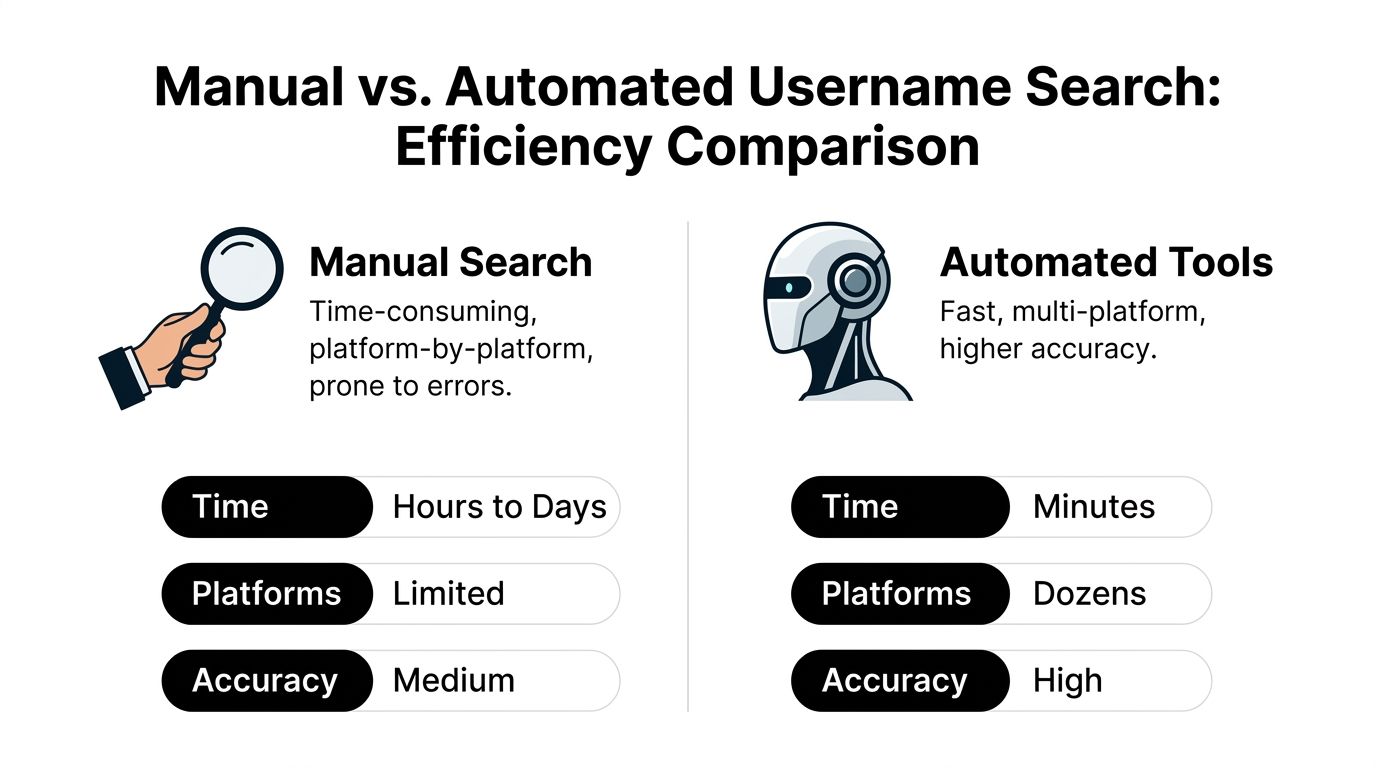
Those numbers explain why experienced analysts don’t treat automation as optional when the goal is broad coverage.
What automated username tools do
The better tools don’t “Google your handle faster.”
They usually combine several tasks:
- Normalize inputs: They test likely handle variations such as underscores and alternate formatting.
- Construct platform URLs: They check predictable profile paths across large site lists.
- Parse responses: They look for signs that a username exists, not just whether a page loads.
- Handle JavaScript-heavy pages: Some use headless browsing to inspect profiles that don’t render cleanly in basic requests.
- Support pivots: Some workflows extend into related identifiers such as email or phone, when appropriate and permitted.
That last point matters. A username-only result can be weak. A username result that aligns with another identifier becomes much more useful.
Manual versus automated search
| Metric | Manual Search | Automated Search (Digital Footprint Check) |
|---|---|---|
| Coverage scope | Limited by time and patience | Broad multi-platform scanning |
| Speed | Slow, platform by platform | Can process large site lists quickly |
| Repeatability | Depends on the person doing it | More consistent workflow |
| Best use case | Small targeted investigations | Broad audits and monitoring |
| Main risk | Missing platforms | False positives still need verification |
There are several public tools in this category, including WhatsMyName-style username enumeration approaches. One option in that broader toolset is Digital Footprint Check’s OSINT tools directory, which is useful if you want to compare methods rather than rely on a single workflow.
Digital Footprint Check also fits this category as a platform that searches 500+ platforms for username-based exposure, including social, gaming, forum, and related public traces. Used properly, that’s not a replacement for analysis. It’s a way to reduce the initial grind.
Where automation helps and where it still fails
Automation shines when the job is repetitive. Checking hundreds of predictable profile paths by hand is a poor use of human attention.
It’s especially helpful when you need to:
- audit your own public footprint regularly
- check a handle across gaming and social sites
- identify obvious impersonation or reused usernames
- support breach monitoring or screening workflows with documented steps
But automation doesn’t solve attribution by itself.
Common usernames create collisions. Slight variations fragment the trail. Some platforms block aggressive queries. Private, deleted, region-specific, or niche communities may not surface reliably. Good tools reduce the search burden. They don’t remove the need for judgment.
Key takeaway: Use automation to gather candidates. Use human review to decide which candidates are real.
That’s the right division of labor. Machines are good at enumeration. People are better at deciding whether an account belongs to the person you care about.
The Art of Verification Separating Signal from Noise
Finding accounts is easy compared with proving they belong to the right person. Here, many username investigations often go wrong. Someone finds the same handle on three platforms and assumes it’s one individual. Sometimes that’s true. Sometimes it’s a collision. Sometimes it’s an impersonator. Sometimes it’s just a common username that multiple unrelated people reached first.
A major challenge in OSINT is exactly this problem. As noted in Digital Footprint Check’s discussion of free username search gaps, people often use inconsistent patterns like john_smith, johnsmith, and jsmith84, while tools still struggle to explain how they distinguish legitimate ownership from coincidental matches. The same source points out that username collisions are a critical pain point for employer screening and impersonation checks.
Verify with clusters, not single clues
One clue is weak. A cluster of clues is stronger.
When reviewing a possible match, compare:
- Profile images: not just exact photos, but recurring faces, pets, cars, tattoos, rooms, or image style
- Bio language: repeated phrases, jokes, pronouns, favorite games, emoji habits
- Location hints: city names, school references, sports teams, time zone patterns
- Linked accounts: Instagram linking to Twitch, Twitch linking to X, Reddit mentioning Discord
- Interests: the same game titles, music scenes, professions, or fandoms
- Timeline consistency: account age, posting gaps, username changes, and whether the activity pattern makes sense
If three or four of those line up, confidence rises. If only the handle matches, stay cautious.
Common false-positive traps
The popular handle trap
Short or obvious usernames attract collisions. A clean handle like mike87 or anna_xo may exist on many platforms and belong to unrelated people.
Don’t confuse repetition with confirmation.
The recycled-photo trap
Some impersonators borrow public photos, then create nearby handle variants. The profile looks familiar enough to fool a quick review.
If you suspect that, compare profile images across search results and use a reverse image search for people to see whether the same pictures appear under different identities.
The lifestyle mismatch
A profile may share a username but conflict with everything else you know. Different country, different age signals, different language, different interests. That’s often enough to downgrade it as a likely non-match.
If the biography, posting style, and platform behavior disagree with the person, trust the disagreement more than the handle.
A simple confidence model
You don’t need a formal scoring system to think clearly. A practical analyst-style approach is enough.
| Confidence level | What it looks like | What to do |
|---|---|---|
| Low | Username matches, little else does | Log it, don’t assume ownership |
| Medium | Username plus one or two supporting clues | Keep investigating |
| High | Multiple aligned clues across platforms | Treat as likely same person |
| Unclear | Mixed signs or conflicting details | Pause and seek more evidence |
This matters in dating checks, workplace vetting, and impersonation reviews because the cost of a wrong assumption is high. You can unfairly attach someone to the wrong content, or miss a real risk because you relied on a superficial match.
What good verification looks like in practice
Good verification is boring in the best way. It involves notes, side-by-side comparisons, and restraint.
You’re looking for coherence. The same person tends to leave repeated patterns even when usernames vary. The wrong person usually falls apart under comparison. Their tone is off. Their photos don’t align. Their networks don’t intersect. Their history doesn’t make sense.
That patience is what separates search from analysis.
Navigating the Ethical and Legal Context of OSINT
Capability isn’t the same as permission.
A lot of people are comfortable running a username search on themselves. Things get murkier when the target is someone else. That’s where ethical OSINT matters, especially because there’s still little practical guidance on what “ethical” means in daily use. As noted by FootprintIQ’s discussion of ethical username search, there’s a real gap around questions like whether searching without consent is ethical, how standards differ between self-audits and employer screening, and what GDPR or CCPA may imply.

A practical ethical line
A good rule is to separate protection, verification, and surveillance.
Protection usually includes things like:
- checking your own username exposure
- auditing a child’s public-facing accounts as a responsible adult
- verifying whether your own photos or handles are being impersonated
- checking public consistency before meeting someone from a dating app
Verification can be legitimate, but context matters. An employer, HR team, or landlord can’t just improvise a secret OSINT program and assume it’s compliant. Internal policies, consent practices, geography, and the way information is used all matter.
Surveillance is the line to avoid. Repeated intrusive monitoring, harassment, intimidation, bypassing privacy controls, or gathering information for coercive purposes isn’t ethical OSINT. Public availability doesn’t turn bad intent into acceptable conduct.
Public doesn’t mean consequence-free
This is the misunderstanding that trips people up.
Yes, a profile may be public. That doesn’t automatically mean you can collect, store, combine, and act on the data however you want. Employment screening and regulated decision-making carry higher risk than a personal self-audit. Privacy rules can also differ by jurisdiction and by the purpose of the search.
If you’re acting on behalf of a business, talk to counsel or your compliance lead before building any repeatable process around username checks. If you’re an individual, keep your use narrow and defensible. Ask whether the search is proportionate, relevant, and limited to a legitimate safety or identity purpose.
Use minimum-force methods
Ethical OSINT isn’t just about law. It’s about discipline.
A responsible workflow looks like this:
- Start with the least invasive method. Public profile checks come before broader correlation.
- Limit the purpose. Search for a clear reason, not curiosity.
- Avoid overcollection. Don’t gather data you don’t need.
- Verify before acting. A false positive can harm someone fast.
- Document your reasoning. Especially in business settings.
Ethical OSINT means using publicly accessible information for a legitimate purpose, with restraint, verification, and respect for privacy boundaries.
When to stop
Stop when the answer is good enough for the purpose.
If you’re verifying that a dating profile is inconsistent, you don’t need to map every forum post a person has ever made. If you’re auditing your own exposure, you don’t need to keep scraping old traces once you’ve identified the accounts that need attention. If you’re in a workplace setting, stop before the search drifts beyond documented relevance.
The best practitioners know when not to continue.
Taking Control of Your Digital Identity
A strong username search all platforms process is less about one tool and more about a disciplined workflow.
You start by listing the handles and variations a real person would use. You search manually on the platforms most likely to expose identity clues. You use automation when the scope gets too large for human patience. Then you slow down again and verify, because a found account isn’t the same thing as a confirmed identity.
That workflow pays off in ordinary situations. It helps job seekers spot profiles that could shape first impressions. It helps people on dating apps pressure-test whether a story holds together. It helps gamers, creators, and privacy-conscious users see how easy it is to connect scattered accounts. It also helps families and professionals make more informed decisions without guessing.
If employment screening is part of your concern, it also helps to understand what shows up on a background check so you can separate formal screening from the broader public web footprint that username searches often uncover.
Once you know what’s out there, the next move isn’t panic. It’s cleanup.
That may mean tightening privacy settings, changing old bios, removing stale accounts, documenting impersonation, or reducing how easily one handle links to the rest of your life. In some cases, it also means limiting how data brokers and public aggregators expose your information. If that’s part of your risk profile, a guide to data broker removal is worth reviewing.
Many people do not have a visibility problem. They have an awareness problem. They don’t know how searchable they are until someone else proves it for them.
A careful username audit fixes that. It gives you a map. Once you have the map, you can decide what to protect, what to remove, and what to leave alone.
If you want to see where a username appears across the public web, run a check with Digital Footprint Check. It’s a practical next step for auditing your online exposure, reviewing old profiles, and spotting risks before someone else does.