· Digital Footprint Check · Content Marketing · 15 min read
Can Someone Hack My Phone: Protect Your Device in 2026
Concerned, can someone hack my phone? Uncover attack methods, warning signs, & steps to secure your data in 2026.

You check your phone and something feels off. The battery dropped fast overnight. A strange text asked you to “verify” an account. An app opens slower than usual. Then the thought lands: can someone hack my phone?
That question is reasonable. Phones now hold the keys to almost everything. Email, banking, photos, passwords, work chats, location history, and the text codes many sites use to confirm your identity all live in one pocket-sized device.
The good news is that phone hacking is real, but it usually isn’t mysterious. Most attacks follow familiar patterns. Most warning signs have simpler explanations than full device takeover. And users can lower their risk a lot with a few practical habits.
The Modern Worry Is My Phone Being Watched
A lot of people don’t start worrying about phone security because they read a technical report. They start worrying because something small feels wrong.
Maybe your screen lights up with a login code you didn’t request. Maybe a delivery text looks legitimate, but the link feels odd. Maybe your partner says they got a weird message from you that you never sent. Those moments create the same fear: not just “is my phone acting up?” but “is someone inside it?”
That fear isn’t irrational. Statista’s reporting on mobile cyberattacks says there were 5.4 million cyberattacks against mobile users worldwide in December 2023, and the same verified data notes Verizon found only 12% of mobile users had a basic security baseline in place. Phones are attractive targets because they connect your accounts, identity checks, money, and personal life in one place.
Why this feels more personal than a laptop problem
When a laptop has an issue, people often think “device problem.”
When a phone has an issue, people think “life problem.”
That reaction makes sense. Your phone follows you everywhere. It stores private conversations, autofills passwords, and often acts as your backup identity proof. If someone gets access to the accounts around your phone, the damage can spread beyond the handset itself.
Practical rule: Don’t treat every glitch as proof of a hack, but don’t ignore patterns that affect accounts, messages, or logins.
A calmer way to think about risk
People often imagine phone hacking as a movie scene where a stranger takes over a device in seconds. Real life is usually less dramatic. Attackers often use familiar tricks, such as fake links, stolen passwords, unsafe app installs, or weak account recovery paths.
That matters because it means you can investigate logically. Look at what changed. Check your accounts. Review your apps and permissions. Focus on evidence, not panic.
If you’re worried right now, you don’t need a horror story. You need a clear filter for what’s common, what’s serious, and what to do next.
How Phones Are Really Hacked in 2026
Most phone hacks don’t start with elite spyware. They start with deception.
Attackers usually look for the easiest route, not the flashiest one. A fake bank text, a login page that looks real, a “missed delivery” message, or an app that asks for more access than it needs will beat a complex exploit every time if a user trusts it.
The UK government’s Cyber Security Breaches Survey 2025 found phishing was the most common attack type among affected organizations, cited by 85% of businesses that experienced a breach. That’s a useful anchor for understanding phone risk too. People picture malware first, but attackers often begin by tricking the human being holding the device.
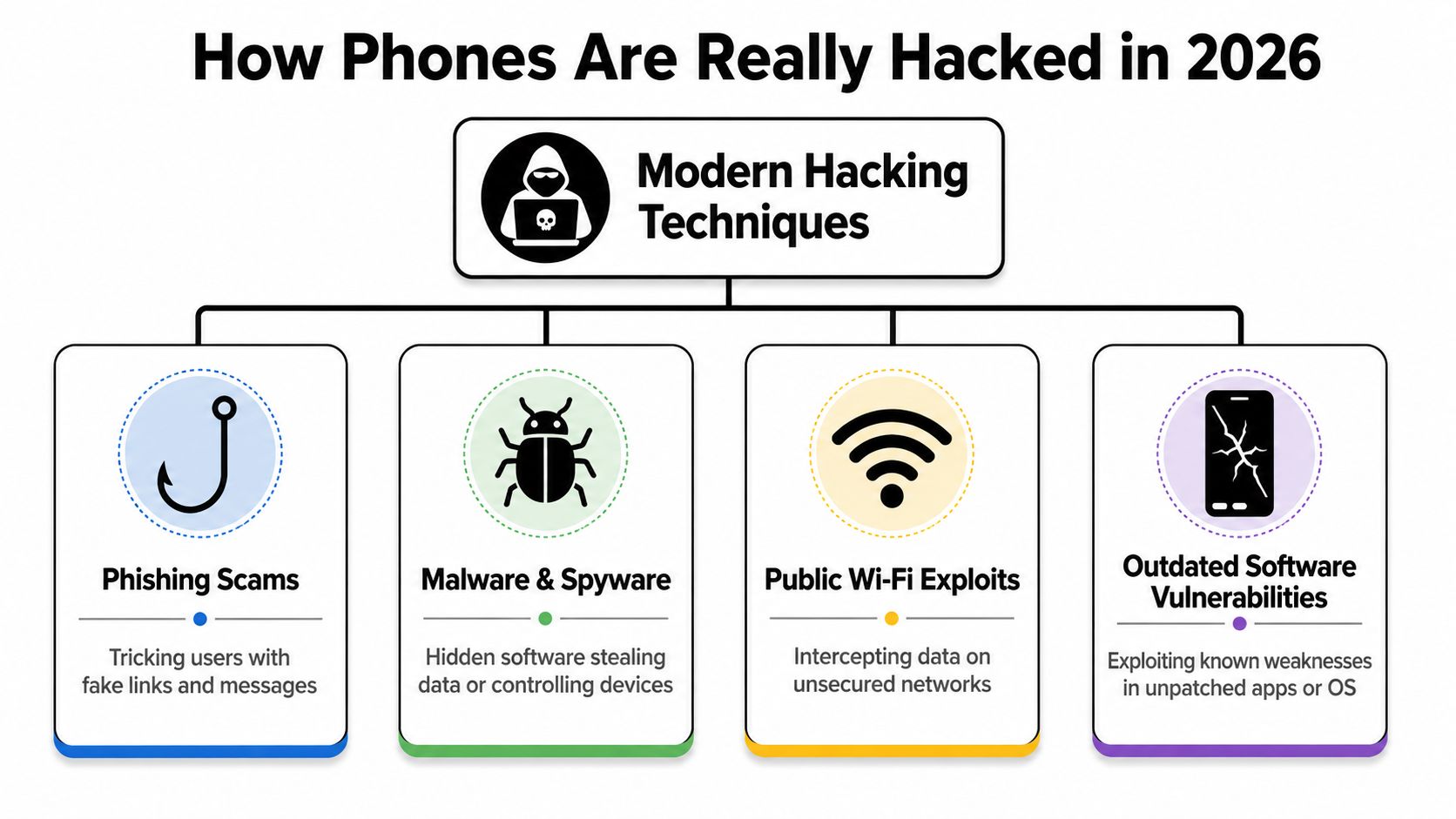
The big four attack paths
Think of a phone like a house with several doors. Attackers don’t need to smash a wall if you open one for them.
| Attack Vector | How It Works | Likelihood for Average User |
|---|---|---|
| Phishing scams | Fake texts, emails, or messages push you to tap a link, enter a password, or approve a login | High |
| Malware and spyware | A harmful app, file, or attachment runs in the background and steals data or monitors activity | Moderate |
| Public Wi‑Fi exposure | A risky network can expose browsing activity or make interception easier if other protections are weak | Moderate |
| Outdated software vulnerabilities | Old operating systems or apps leave known weaknesses unpatched | Moderate to high if updates are delayed |
Phishing is the front door
On phones, phishing often works better than on desktops because mobile screens hide details. You may not see the full web address. A fake login page can look convincing. A rushed tap is enough.
Examples include:
- Delivery scams that claim a package is delayed
- Bank alerts that ask you to “confirm unusual activity”
- Account warnings that pressure you to reset a password
- Social messages that say someone tagged you in a photo or sent a file
Once you give away credentials, attackers may not need to “hack” your phone at all. They can take over email, cloud storage, or messaging, then use those accounts to reset other logins.
Malicious apps and hidden software
A trojanized app is like handing a stranger a copy of your keys because they wore a uniform. The app looks useful, but after installation it asks for access that doesn’t match its job.
A flashlight app doesn’t need your microphone. A wallpaper app doesn’t need your contacts. A calculator probably doesn’t need accessibility permissions.
If an app’s permissions feel unrelated to what it does, treat that as a warning sign, not a minor annoyance.
Risky networks and stale software
A public Wi‑Fi network doesn’t automatically mean your phone is hacked. But hostile or poorly secured networks can make observation and interception easier, especially if you’re logging into sensitive accounts or your device is already weakly protected.
Unpatched software creates another opening. Real-world attacks often rely on old app versions, delayed operating system updates, or previously stolen credentials. That’s why a simple update can close a surprisingly large chunk of your attack surface.
The rare but serious category
There’s also a more advanced class of attack that gets a lot of attention: zero-click or near-zero-click spyware. Independent reporting discussed in Washington University’s piece on whether your phone can be hacked without you touching it notes that advanced spyware can sometimes infect devices through missed calls, crafted iMessages, or silent notifications.
For many, that isn’t the most likely threat. But it’s important because it explains why “just don’t click weird links” is good advice, not complete advice.
If you’re also worried about number-based attacks tied to carrier fraud, this guide on SIM cloning risks and signs helps explain where phone access and account takeover can overlap.
Red Flags vs Glitches Signs Your Phone Is Compromised
A phone acting weird doesn’t always mean it’s hacked. It’s a common point of confusion for users.
A hot phone might just be working hard. A battery that drops fast might be old. An app crash might be a bad update. If you label every bug as “hacking,” you’ll panic and probably miss the actual problem. The FTC’s guidance on protecting your phone from hackers points in that direction by treating many situations as account-security or device-hardening issues first, not automatic proof of full device compromise.
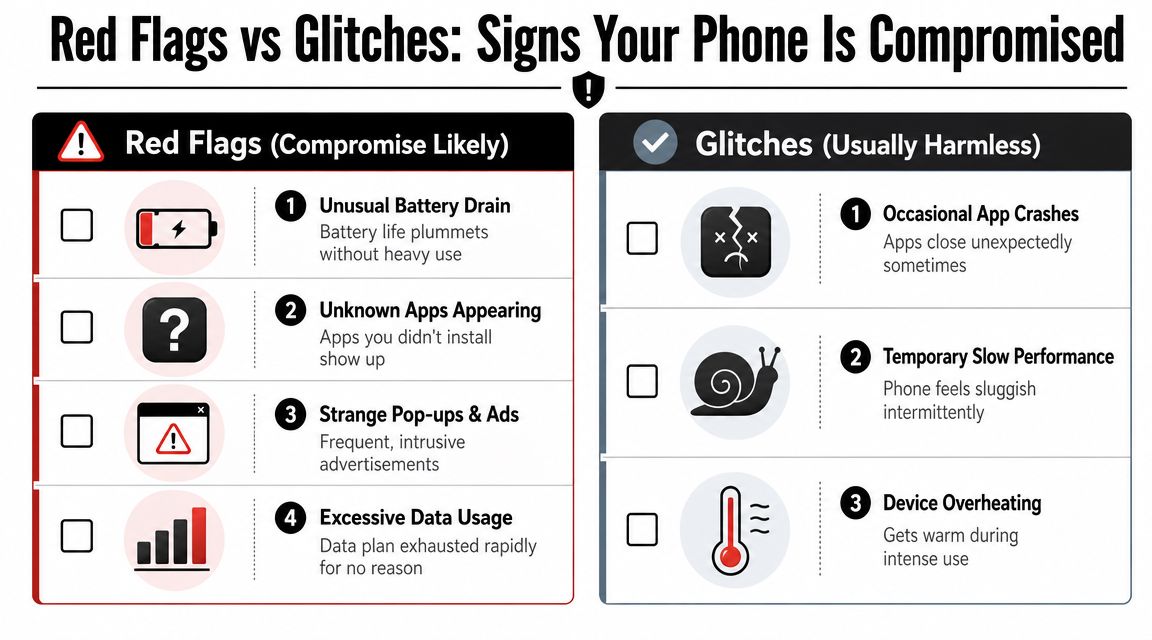
Stronger red flags
These are the signs that deserve immediate attention because they suggest unauthorized access, malicious software, or account takeover.
- Unknown apps appear. You didn’t install them, and they weren’t part of a system update.
- You see login alerts or password reset messages you didn’t trigger. That often points to account compromise, which can be just as serious as device compromise.
- Your contacts receive messages you never sent. Someone may have access to an account linked to your phone.
- Permissions change without your action. For example, a simple app suddenly has SMS, accessibility, or microphone access.
- Your data use jumps and you can’t explain why. Background communication can be a clue, especially if paired with other issues.
- Persistent pop-ups and redirects. This often points to adware, malicious browser behavior, or a harmful app.
Usually weaker signals on their own
These can happen during a hack, but they also happen on perfectly normal phones.
- Battery drain
- Temporary sluggishness
- Overheating during heavy use
- One app crashing after an update
- Random glitches after low storage or too many open apps
That’s why the pattern matters more than a single symptom.
For a broader plain-English explanation of malware on mobile devices, this article on do cell phones get viruses is a useful companion if you’re trying to separate general malware concerns from full phone takeover.
A simple test for realistic diagnosis
Ask yourself three questions:
Is this happening in just one app, or across the phone?
One broken app usually means a software issue. Problems across multiple apps may deserve deeper review.Did this start right after an install, link click, or permission change?
Timing often gives away the cause.Are my accounts showing unusual activity too? If email, banking, or social media logins look suspicious, don’t focus only on the phone. The account layer may be the actual breach point.
A quick visual walkthrough can help if you’re assessing symptoms under stress:
Many “my phone was hacked” cases turn out to be one of three things: adware, an account takeover, or a normal device issue. Those require different fixes.
If you want a more targeted checklist for hidden monitoring tools, this guide on how to find spyware on your phone is helpful because it focuses on behavior and permissions rather than vague warning signs.
Your Step-by-Step Emergency Response Plan
A suspected phone hack feels chaotic because the problem may not be the phone alone. It can also involve the accounts connected to it. Treat the response like shutting off water in a house leak. Stop more damage first, then check which rooms got wet.
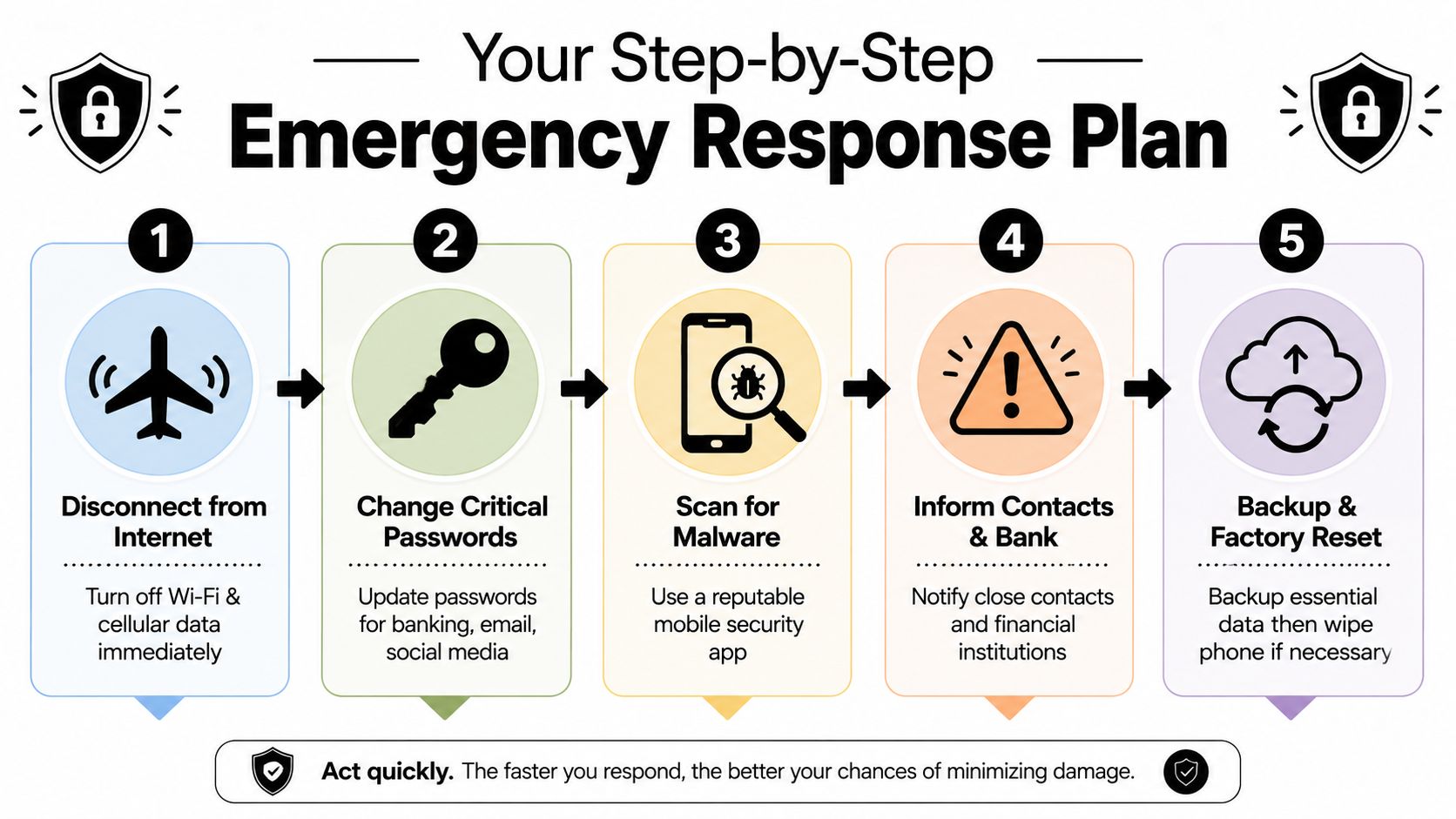
First actions in the first few minutes
Disconnect the phone
Turn on airplane mode. Then switch off Wi-Fi and cellular data if needed. This can interrupt some malicious activity, reduce remote control, and buy you a little time to secure your accounts.
Use a separate trusted device
Sign in from another phone, tablet, or computer you trust. That matters because if your phone is being monitored, changing passwords on the same device can tip off the person watching or leave your new credentials exposed.
Change the passwords that control everything else
Start with your email account. Then change banking, cloud storage, password manager, social media, and messaging app passwords. Email usually acts like the master key because it handles password resets for so many other services.
A good rule is simple. Secure the accounts that can reset other accounts before you worry about cleaning up every app on the phone.
Clean-up steps
Review apps and permissions with a skeptical eye
Look for apps you do not remember installing, especially ones with broad access to accessibility features, microphone, camera, contacts, SMS, or location. If an app has more access than its job requires, treat that as a warning sign.
Run a security scan if your device supports it
Use a well-known security app from the official store only. Avoid random “anti-hack” downloads from websites or ads. In a stressful moment, fake cleanup tools are a common trap.
Check account activity, not just the phone
Review login history, password reset emails, new forwarding rules, changed recovery methods, and unfamiliar purchases. Many people uncover the underlying problem through these checks. The attacker got into email or a social account first, then used that access to make the phone seem suspicious.
Recovery priority: Secure the accounts around the phone first. Attackers usually want access to your email, money, cloud data, or identity. The phone is often just the doorway.
When to escalate
Warn the people and companies that matter
If your accounts sent strange messages, tell close contacts not to click anything. If payment apps, cards, or bank access may be involved, contact those institutions right away. If your phone connects to a car or smart system, review linked access there too, especially through an Android Auto entry system.
Back up important files carefully
Save photos, contacts, notes, and documents you cannot replace. Be selective. Copying everything without thinking can bring the same problem back later if a bad app or risky configuration caused it.
Factory reset if problems continue across the device
A factory reset is the strongest cleanup option individuals have. Afterward, reinstall apps one by one from official stores instead of restoring every app automatically. That gives you a better chance of spotting what caused the problem in the first place.
If you want a more detailed recovery walkthrough, this guide on how to get rid of hackers after suspected phone access explains the cleanup process in more detail.
Proactive Prevention Hardening Your Mobile Defenses
The best phone security habit is boring: make yourself a harder target than the next person.
Attackers usually go after easy wins. That means weak passwords, delayed updates, reused credentials, over-permissioned apps, and careless taps. You don’t need perfect security. You need fewer easy openings.
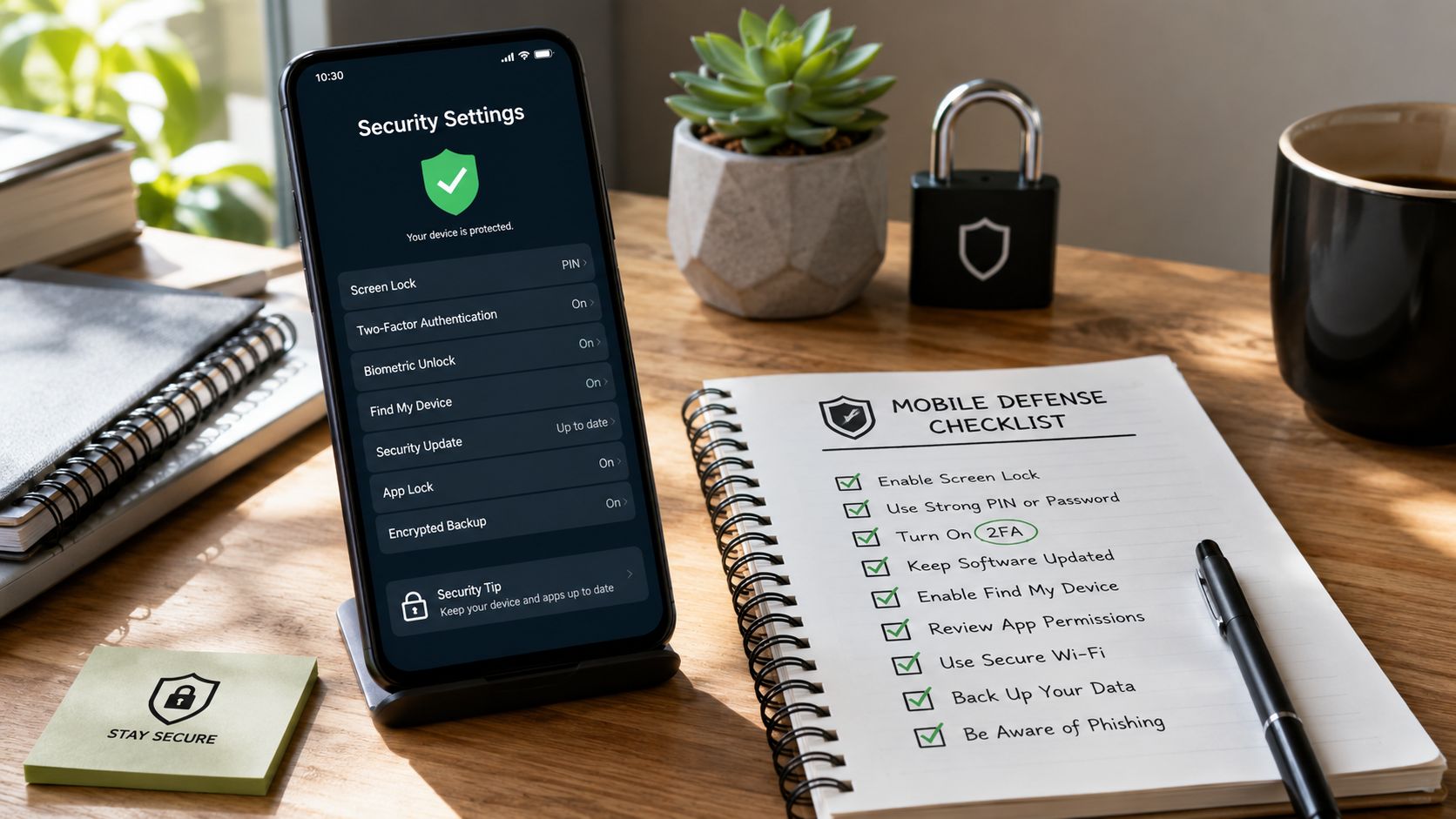
High-impact habits that actually matter
Turn on automatic updates
Operating system and app updates close known weaknesses. If you postpone them for weeks or months, you leave old doors open.Use a strong screen lock
A real passcode beats a simple pattern. Biometrics help with convenience, but the passcode still matters.Use unique passwords for important accounts
Your phone is only as safe as the accounts connected to it. A password manager helps here. If you want a practical system, these password manager best practices are worth reviewing.Enable two-factor authentication where possible
Especially for email, banking, cloud services, and social media.Install apps carefully
Stick to official stores and read permission requests with a skeptical eye.
One Android setting many people forget
On Android, Developer options and especially USB debugging should stay off unless you actively need them. McAfee’s mobile security guidance notes that these settings open a management interface that malware can abuse. In plain terms, they make your phone easier to talk to at a low level.
That doesn’t mean those settings are evil. It means they’re tools for developers, not features the average user should leave enabled.
Reduce exposure on the move
Public charging points, shared networks, and connected-car systems all create convenience. Convenience isn’t the same as danger, but every extra connection is one more thing to manage carefully.
If you use in-car integrations often, understanding how systems connect matters. This overview of an Android Auto entry system is useful for seeing how phone-to-vehicle access works so you can review what your device is linking to.
Security on a phone is less about one magic app and more about disciplined defaults: updated software, strong authentication, careful permissions, and fewer unnecessary connections.
Your Digital Footprint The Fuel for Hacking Attempts
Most attackers don’t start with your phone. They start with information about you.
A public email address, an exposed phone number, an old gaming username, a breached password, a visible workplace, and a list of relatives on social media can all help someone craft a believable message. That’s how a random phishing text turns into a targeted one. It references your bank, your employer, your city, or even a real service you use.
Why public data makes scams more convincing
If an attacker knows your number and where you work, they can send a “security notice” that feels personal.
If they know your email was part of an old breach, they may try that password elsewhere.
If they find your gamer tag, dating profile, or business page, they can cross-link identities and build trust quickly.
This is why digital footprint management matters. The less public detail available, the harder it is to tailor messages that look legitimate.
A useful starting point is understanding what an outsider can learn from scattered public records, profiles, and data leak traces. This article on the hidden dangers of your digital footprint and what hackers can learn about you explains how those dots get connected.
One practical defensive habit
Run a regular exposure check on yourself. Search your email addresses, usernames, old profile names, and phone number where appropriate. Look for public bios, forgotten accounts, breach exposure, and contact details you no longer want visible.
Digital Footprint Check offers a free checker that scans for exposed personal information across public sources and breach-related exposure signals. Used alongside good phone security habits, that kind of visibility helps you spot what attackers may already know before they use it against you.
Frequently Asked Questions About Phone Hacking
Can someone hack my phone if it’s turned off
A fully powered-down phone is much harder to attack remotely because normal connections aren’t active. Generally, the practical risk is far lower when the device is off than when it’s on and connected.
Can someone hack me just by knowing my phone number
Usually, not by the number alone. But a phone number can be enough to start phishing, impersonation, or carrier-related attacks. The bigger risk is what that number helps an attacker connect to.
Does a factory reset remove all malware
Often, yes. But you should still treat account security separately. Change passwords, review account activity, and be careful when restoring backups or reinstalling apps.
Is battery drain proof of hacking
No. Battery drain has many ordinary causes, including aging batteries, background syncing, streaming, poor signal, and buggy apps. It only becomes more concerning when it appears with stronger warning signs.
Is iPhone or Android safer
Both can be compromised. In practice, your habits matter a lot: updates, passwords, permissions, app choices, and account security.
If you’re worried about what attackers might already know about you, start with a simple exposure check. Digital Footprint Check lets you see whether your email, usernames, phone-related details, or other public traces are visible online, so you can reduce the information that fuels phishing, identity theft, and account takeover.