· Digital Footprint Check · Content Marketing · 15 min read
Can Someone Track You by Your Phone Number? Protect Your
Can someone track you by your phone number? Yes. Learn tracker methods, from data brokers to spyware. Protect your privacy.

Yes, but not in the way you might think. A phone number usually isn't a public GPS beacon, but it can be enough to start tracking through carrier systems, apps, linked accounts, or malware already tied to your device.
That's why this question keeps coming up after a strange text, a breakup, a password reset you didn't request, or a sudden feeling that someone knows a little too much about where you've been. People often imagine a phone number working like a map pin. In practice, the number is closer to an index card in a filing system. It helps someone pull data from other places.
The useful distinction is simple. Tracking by the number itself is limited for ordinary people. Tracking through what the number connects to is the primary risk. That includes mobile carriers, location-sharing apps, Apple or Google accounts, spyware, and account recovery systems that rely on SMS.
If you understand that difference, the threat becomes less mysterious and much easier to defend against.
Your Phone Number Is More Than Just Digits
A phone number sits at the center of your digital life. Friends use it to reach you. Apps use it to verify you. Companies use it to match records. Attackers use it as a lookup key.
McAfee notes that a phone number alone does not usually reveal a live GPS location to the public, but it can be enough to initiate tracking through carrier-, app-, or consent-based systems, and that location can still be inferred through cell tower triangulation, Wi-Fi networks, and apps with tracking permissions, even when location services are off. McAfee also notes that lawful phone-number tracking generally requires carrier or law-enforcement cooperation, which makes the number an identifier that enables access to other systems rather than a direct tracker itself (McAfee on phone tracking and location services).
That distinction matters because many people defend the wrong thing. They focus only on GPS settings and ignore the wider privacy chain: apps, account recovery, shared family dashboards, carrier support procedures, and data exposure from old signups.
Practical rule: Treat your phone number like a master username, not like a harmless contact detail.
A privacy investigator learns quickly that the most dangerous data points aren't always the most technical. They're the ones that connect systems. Your number does exactly that. It can tie together social profiles, messaging apps, delivery accounts, cloud backups, and leaked contact databases.
That's one reason businesses and families alike keep investing in managed IT services for data privacy. The challenge isn't one app or one setting. It's the web of services that trust your number as proof of identity.
If you want a feel for the wider abuse potential, this guide on what hackers can do with your phone number is worth reviewing. Location tracking is only one branch of the problem. Account resets, impersonation, and interception are often more damaging.
How Phone Number Tracking Actually Works
When people ask, can someone track you by your phone number, they're usually asking one of two different questions. Can a stranger type my number into a website and see my live location? Or can someone use my number to get access to the systems that reveal where I am?
The second question is where most real-world risk lives.
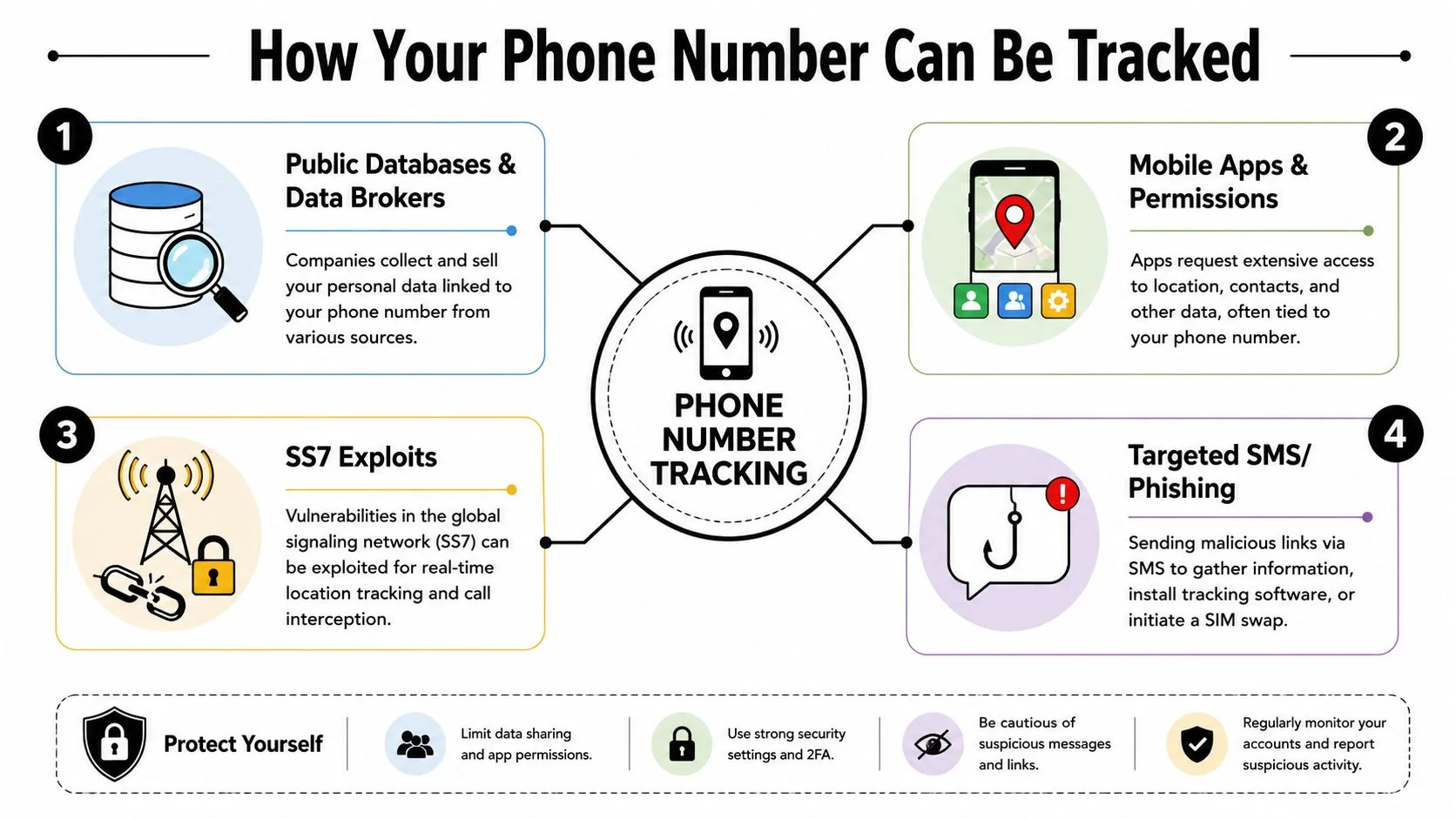
SLNT says it is now possible to track a cell phone location in real time with nothing more than a phone number, and that online services openly advertise such capabilities. McAfee adds that tracking can work through malicious spyware, granted app permissions, carrier network data, or compromised Wi-Fi, showing that phone-number-based tracking is usually part of a broader data and device-access pipeline rather than a single trick (SLNT on phone-number-based location tracking).
Carrier access and network metadata
Your mobile carrier always knows a lot more about your device than is commonly understood. Even without opening a maps app, your phone interacts with the network as part of normal service. That interaction can help place the device within a geographic area.
Ordinary people usually can't query carrier systems directly. But someone may still benefit from that data if they have legal access, insider access, or some form of fraud that tricks support staff into exposing or changing account details.
Think of the number as your mailing address on the carrier side. It tells the network which account and device relationship to examine.
App permissions and silent location leaks
A far more common route is app-based exposure. Many apps ask for location, contacts, microphone access, or background privileges. Some of that is legitimate. Some of it is excessive. Once granted, those permissions can feed location data into accounts and dashboards that someone else may already control.
Examples include:
- Family safety apps: These are designed for consensual location sharing, but they become risky when someone stays logged in after a breakup or keeps access on a shared device.
- Social and messaging apps: A tagged post, a check-in, or a location-enabled chat feature can reveal patterns even when you never intended to “broadcast” your location.
- Utility apps: Weather, shopping, dating, and coupon apps often don't need constant location access, but many users leave it on.
Your number often opens the door. The app, account, or network behind it does the actual tracking.
Data brokers and reverse lookups
A reverse lookup usually won't show your live GPS position. What it can do is connect your number to names, old addresses, relatives, and social profiles. That's enough for a determined person to build a profile, verify identity details, and prepare better phishing or social engineering attempts.
In investigations, tracking often begins with this. A person doesn't begin with a magic locator. They begin with correlation. One number can lead to a name. A name can lead to accounts. An account can lead to location history, messaging records, or consent-based sharing.
Linked Apple and Google accounts
This is the part many articles miss. The biggest risk may have nothing to do with the number itself. It may be the fact that your number is used for account recovery and sign-in verification.
If someone gains access to your Apple ID or Google account, they may not need your phone in hand. They may be able to view synced activity, shared locations, device lists, or recovery options remotely. At that point, the number wasn't the tracker. It was the bridge into the account that became the tracker.
Advanced Threats SIM Swaps and Spyware
Passive location exposure is one thing. Active takeover is worse. Once an attacker can receive your calls and texts or implant software on your phone, the issue stops being “can they find me?” and becomes “can they act as me?”

What a SIM swap really does
A SIM swap happens when someone gets your mobile number transferred to a SIM card they control. They don't need to steal your phone first. They need to convince the carrier that they are you, or exploit weak account recovery around your mobile service.
Once that happens, your incoming calls and texts can go to them. That includes password reset links and SMS authentication codes. In practical terms, the attacker can compromise email, banking, social media, gaming accounts, dating profiles, and any service that still trusts text-message verification too much.
This is why the threat is bigger than location privacy. A SIM swap can turn your number into an account takeover tool.
Norton highlights spyware, phishing, SIM card cloning, and public Wi-Fi as tracking vectors, and notes that recent mobile operating systems now show when apps access camera, microphone, or location. Norton also makes an important point for users: active takeover paths like SIM swap or call forwarding can be more dangerous than GPS-style tracking (Norton on tracking vectors and device indicators).
If you're trying to understand the mechanics, this breakdown of how to clone a SIM card helps explain why SIM-related fraud is so disruptive even when the phone itself seems physically secure.
Spyware and stalkerware on the device
Spyware changes the whole equation. Once installed, it can monitor location, messages, calls, app activity, and sometimes account credentials. In stalking cases, the spyware route is often more realistic than some cinematic “phone number tracker” dashboard.
Common installation paths include:
- Physical access: Someone accesses the phone and installs a disguised app.
- Phishing links: A text or message prompts the target to log in, approve access, or install software.
- Compromised Wi-Fi or malicious downloads: The user connects in the wrong place or installs from an untrusted source.
Call forwarding abuse
Call forwarding doesn't get enough attention. If an attacker enables it on the account or device, they may redirect calls meant for you without needing constant spyware visibility. That can assist with interception, social engineering, or recovery workflows on other platforms.
If your concern is stalking, harassment, or identity theft, don't treat location sharing, SIM control, and account access as separate problems. Attackers often combine them.
Myths vs Reality What a Phone Number Reveals
Confusion around this topic usually comes from collapsing very different risks into one sentence. People ask whether a number can reveal location, but they often mean anything from reverse lookup to live surveillance to iCloud access.
Avast explicitly says people generally cannot use a phone number alone to track you, while McAfee notes that phone-number tracking usually requires carrier or law-enforcement cooperation. The problem is that many people stop there and miss the bigger issue: tracking often comes through carrier data, location-sharing apps, Apple or Google accounts, or spyware, not from the number alone (Avast on phone-number tracking limits).
Phone Number Tracking Myths vs Reality
| Myth | Reality |
|---|---|
| Anyone can type in my number and instantly see my live GPS location | Public access to live location is usually much more limited than that. Real tracking usually depends on carrier access, account access, app permissions, or malware. |
| Turning off location services makes me invisible | It reduces exposure, but it doesn't solve every path. Network interactions, Wi-Fi context, and other device behaviors can still reveal location patterns. |
| Reverse lookup sites show where I am right now | Reverse lookups usually reveal static identity clues, not live movement. They help someone identify and target you, not necessarily track you in real time. |
| If someone knows my number, the worst they can do is call or text me | A number can support password resets, impersonation, phishing, call forwarding abuse, and SIM-related fraud. |
| Account tracking and phone-number tracking are the same thing | They overlap, but they aren't the same. A number may be the key used to reach an Apple, Google, or app account that then exposes location or synced activity. |
What the myths get wrong
The biggest mistake is treating all tracking as one technical capability. It isn't. There's a big difference between:
- Static exposure: Your number appears in public records, old listings, or people-search results.
- Behavioral exposure: Apps and accounts reveal where you go or when you're active.
- Active compromise: Someone has hijacked your number, your accounts, or your device.
That's also why legal questions matter. If you're trying to understand when authorities can lawfully access device or phone data, this overview of Texas legal guidance on phone warrants adds useful context on where legal access differs from personal snooping.
Signs Your Phone Is Being Tracked
Individuals won't catch tracking by spotting some dramatic hacker screen. They notice symptoms. The key is knowing which symptoms point to ordinary app clutter and which ones suggest number-linked abuse, spyware, or account compromise.
Device-level warning signs
Recent mobile operating systems can show when apps access the camera, microphone, or location, which makes them useful for spotting suspicious behavior. Norton also highlights spyware, phishing, SIM card cloning, and public Wi-Fi as tracking vectors, and stresses the need to distinguish passive exposure from more dangerous takeover paths such as SIM swap or call forwarding, as noted earlier in the article.
Look closely at these signs:
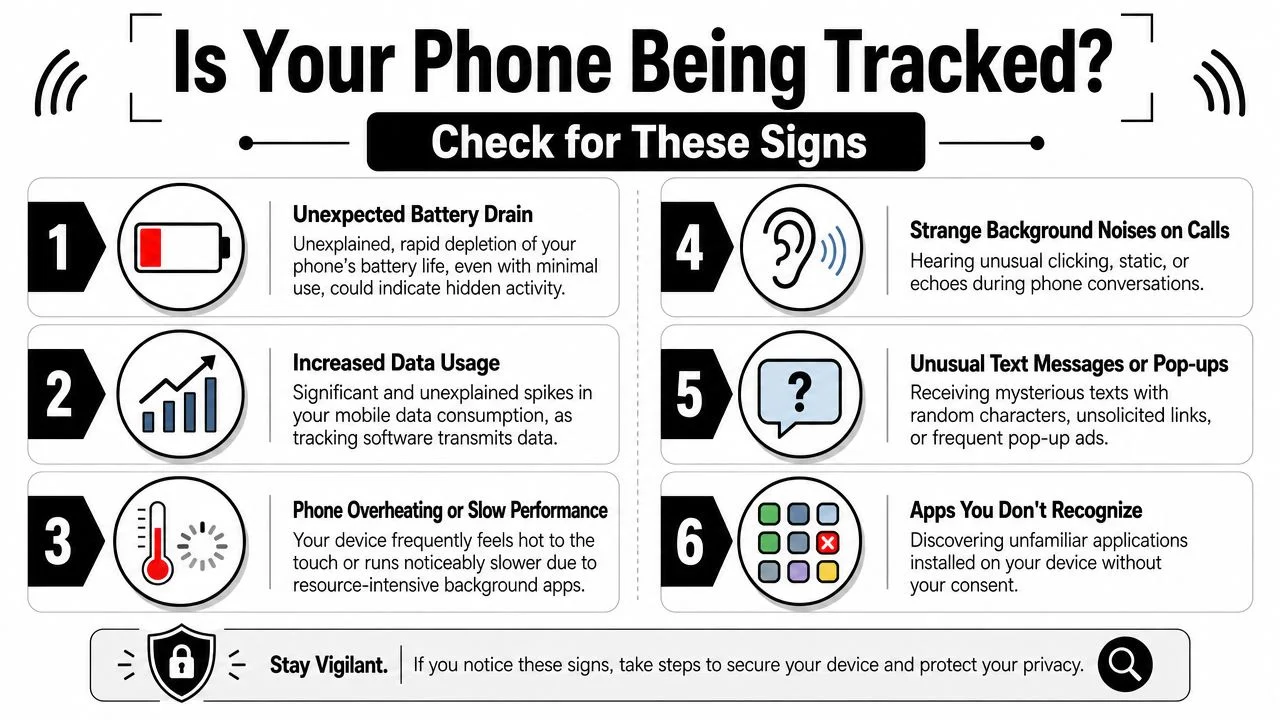
- Unexpected privacy indicators: Your phone shows camera, microphone, or location access when you aren't using an app that should need it.
- Battery drain that suddenly feels abnormal: Spyware and badly behaved apps often stay busy in the background.
- Heat and slowdown: A phone that runs hot while idle or becomes noticeably sluggish may be doing more in the background than you think.
- Unfamiliar apps: A tool you don't remember installing deserves scrutiny, especially if it has broad permissions.
- Odd texts or pop-ups: Random-character messages, fake alerts, and strange prompts can be clues that someone is trying to trigger or manage malicious software.
If you need a practical walkthrough, this guide on how to find spyware on your phone covers what to inspect on both the app side and the settings side.
Number-level warning signs
These are often even more important than classic spyware symptoms:
- Sudden loss of service: If your phone abruptly loses cellular service in a place where it normally works, treat that as urgent.
- You stop receiving calls or texts: Especially concerning when you're also seeing password reset attempts elsewhere.
- Unexpected login or reset messages: An attacker may be testing whether your number can receive verification codes.
- Call forwarding behavior you didn't enable: Friends say you're unreachable, voicemails behave oddly, or calls route in ways that don't make sense.
A dead signal at the wrong moment can be more serious than a fast-draining battery. It may indicate your number, not just your phone, is under attack.
Your Step-by-Step Privacy Protection Plan
The best defense is layered. Don't rely on one setting and assume the problem is solved. You need to secure the number, the accounts tied to it, and the device itself.
Lock down your carrier and account recovery
Start with the mobile account itself.
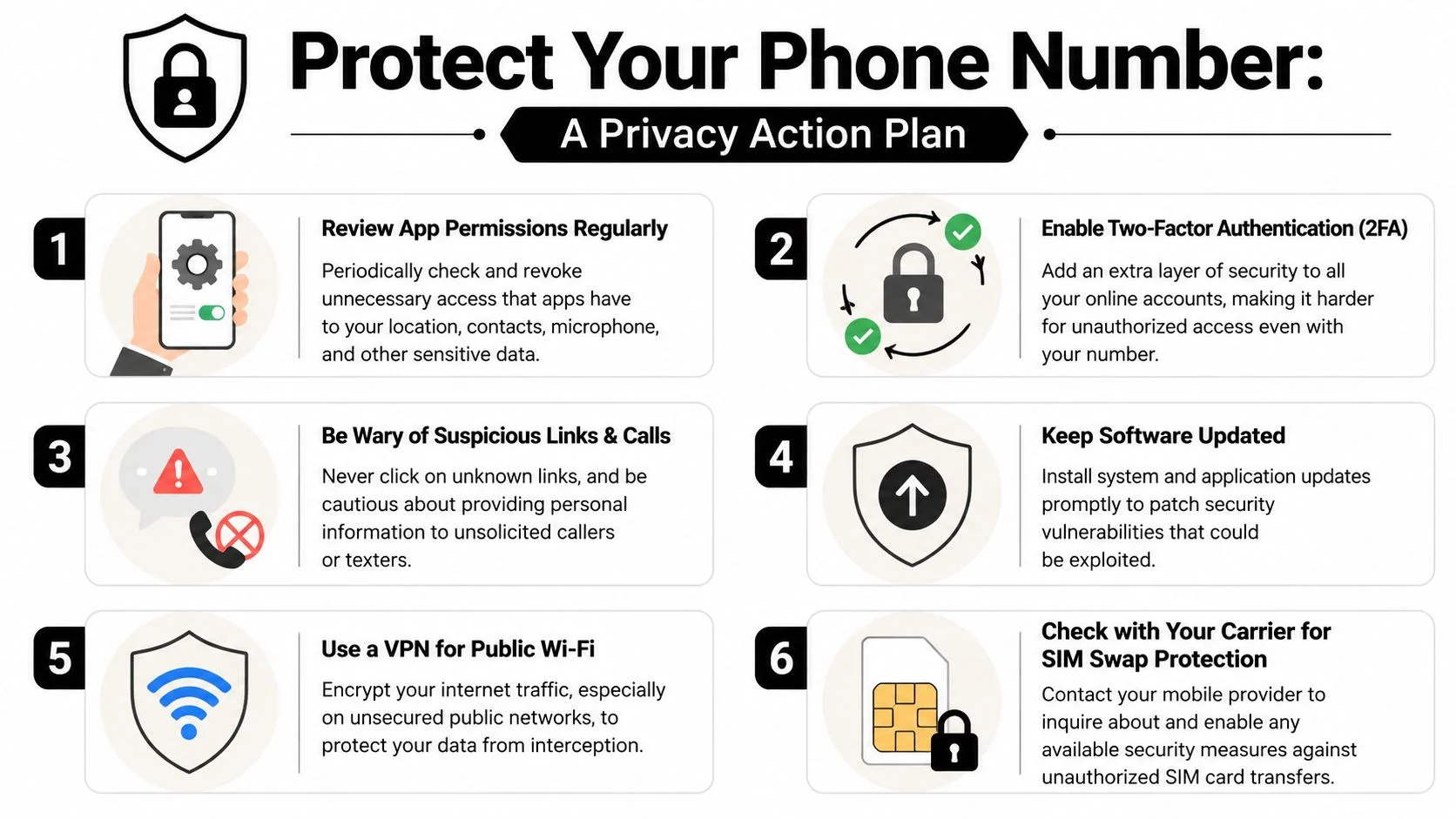
- Set a carrier PIN or port-out protection if your provider offers it. This makes SIM fraud harder.
- Review recovery options on your Apple, Google, email, and financial accounts. Remove old numbers and stale backup addresses.
- Move away from SMS-based verification when possible. Use an authenticator app or other stronger method offered by the service.
These steps don't just reduce tracking risk. They reduce the chance that someone can hijack the number and pivot into your accounts.
Audit the phone like an investigator would
Most users only check whether location services are on. Go deeper.
- App permissions: Review which apps can access location, contacts, camera, microphone, Bluetooth, and background activity.
- Installed apps: Delete anything you don't use, don't recognize, or can't justify.
- Shared access: Check family-sharing dashboards, device lists, cloud sign-ins, and linked tablets or laptops.
- Network hygiene: Be cautious with public Wi-Fi. If you must use it, use a VPN and avoid sensitive logins on untrusted networks.
- Updates: Install operating system and app updates promptly so known weaknesses don't stay open.
For a broader checklist, this guide on ways to protect your online privacy is a solid companion to the mobile-specific steps here.
This short video is also useful if you want a visual walkthrough of common mobile privacy risks and defenses.
Reduce how often you expose your real number
Many privacy problems begin long before any attack. They start when your real number gets reused everywhere.
A practical approach:
- Use a secondary number for low-trust situations: job boards, marketplace listings, dating apps, sweepstakes, and one-off signups.
- Avoid publishing your main number on public profiles: especially where it can be indexed or scraped.
- Prune old accounts: abandoned apps and forums still hold phone data.
- Check where your number already appears online: people often underestimate how many profiles, breach records, and public references are linked back to them.
This is the one place where a footprint audit helps. Digital Footprint Check offers a free checker that can help surface where personal details, including phone-number-linked exposure, appear across publicly accessible sources. Used correctly, that kind of scan helps you find the records and accounts that make targeted tracking easier.
What works and what doesn't
Some defenses sound good but don't solve the actual problem.
| What works | What doesn't solve enough on its own |
|---|---|
| Carrier PINs and stronger recovery controls | Only turning off GPS |
| Authenticator apps instead of SMS where available | Assuming reverse lookup removal fixes account risk |
| Permission audits and deleting suspicious apps | Keeping old shared accounts active |
| Reviewing linked Apple and Google access | Relying on one antivirus app as your only defense |
| Limiting use of your real number online | Believing “private profile” means invisible |
Good phone-number security is account security, device security, and exposure management working together.
When to Take Action and Seek Professional Help
If your concern is general privacy, the action plan above is generally sufficient. Tighten permissions, reduce where your number appears, secure carrier access, and stop using SMS as your default recovery path where you can avoid it.
If you suspect active compromise, move faster. Contact your carrier immediately, ask whether any SIM or forwarding changes were made, and change passwords on your primary email, Apple, and Google accounts from a trusted device. Then review session logs and recovery settings. If the phone itself seems compromised, remove suspicious apps and consider a full reset after preserving evidence you may need.
If harassment, stalking, or financial fraud is involved, treat it as a safety issue, not a settings issue. Preserve screenshots, strange messages, service-loss details, and account alerts. Contact law enforcement and any affected institutions.
Some situations need outside help. If multiple accounts are involved, your number appears widely across public records or data broker listings, or you can't tell whether the issue is device-based or account-based, professional OSINT and privacy review can save time and reduce mistakes. If you're also worried that someone still has deeper access, this guide on how to get rid of hackers is a useful starting point.
The main takeaway is simple. A phone number usually doesn't act like a live public tracker. It acts like a key. Protect the systems that trust that key, and you cut off most of the actual risk.
If you want to see where your number and other personal details may already be exposed, start with the free checker from Digital Footprint Check. It's a practical first step for identifying public exposure that can make tracking, impersonation, and account takeover easier.