
· Digital Footprint Check · Content Marketing · 14 min read
Professional Reputation Management: How to Audit Yours
Learn professional reputation management step by step: audit your search results, fix false listings, and monitor AI summaries of your career.

57% of employers reported finding online content that caused them not to hire an applicant, according to a 2018 CareerBuilder survey conducted by The Harris Poll and summarized by InternetReputation.com. That doesn't mean every rejection follows a search. It means your public information can become part of a hiring decision without you knowing what someone found.
Professional reputation management starts with accuracy, not publicity. You need to know which results belong to you, which claims are outdated, and which personal details don't need to be public. Publishing more won't help if a recruiter, client, or AI tool attaches someone else's career history to your name.
Why Your Name Search Decides Hiring Decisions
In 2024, 73% of hiring managers reportedly said they had rejected candidates because of negative social media findings, according to a CareerBuilder survey cited by Top Echelon. Separately, 51.4% of U.S. employers surveyed by iHire in 2024 used social media as a recruiting resource, making it one of their three most-used recruiting channels. Recruiting through social media isn't the same as screening applicants, but both put public profiles within employers' reach.
The problem isn't that employers find additional information. In a controlled hiring experiment involving 127 participants, publicly available online information increased evaluators' confidence in their judgments, while negative self-disclosures reduced perceived fit and employability relative to positive profiles, according to the study published in the Journal of Computer-Mediated Communication.
An evaluator can therefore become more certain without becoming more accurate. A sarcastic comment, an unexplained employment date, or a namesake's complaint can shape how they interpret an otherwise strong application.
Search beyond your full name
Your first job is an inventory, not a deletion spree. Use these searches as practical discovery routes, not as a claim that every recruiter follows the same procedure.
Search query types and what each reveals
| Search query | Who usually runs it | What it usually reveals |
|---|---|---|
| Full name | Recruiters and first-time contacts | Top results, old profiles and namesakes |
| Full name plus city | Local hiring managers and clients | Location-linked profiles, local news and directory listings |
| Full name plus current employer | Hiring managers verifying a role | Bio claims, team pages and conference listings |
| Username or handle | Anyone who knows your handle | Forum posts, gaming tags and old accounts reusing the same name |
| Email address | Screeners checking identity | Breach exposure, linked accounts and data broker listings |
| Full name plus review or complaint | Cautious reviewers | Negative mentions, court records and forum threads |
An email search won't expose every linked account or breach. Some findings require a dedicated breach-checking service, and an apparent match still needs verification.
For a closer look at screening practices, our guide to whether employers check social media explains what candidates should consider. Employers should keep checks job-relevant rather than treating every discoverable personal detail as hiring evidence.
Practical rule: Ask whether you'd be comfortable with a hiring manager reading a result first, then ask whether that result is accurate and actually yours.
Before your next application, prioritize these five results:
- Your main professional profile: Can someone verify your current role?
- Your highest-ranking namesake result: Could someone mistake it for you?
- Your most visible old account: Does it still describe your career correctly?
- Your prominent image result: Is the identity and context clear?
- Your leading complaint or review result: Is it genuine, current, and properly attributed?
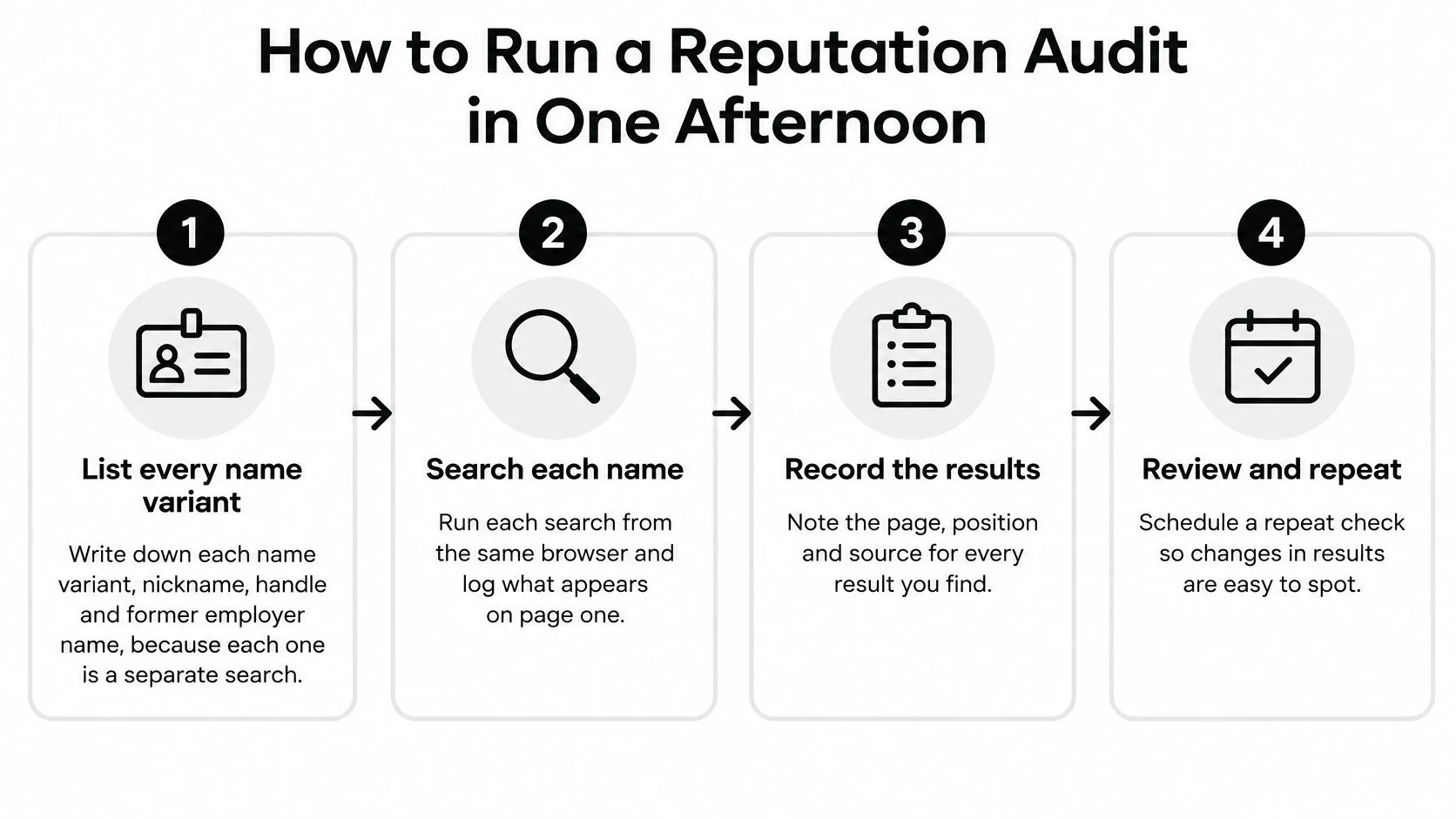
How to Run a Reputation Audit in One Afternoon
Use a spreadsheet rather than relying on memory. Create columns for the search query, page URL, result position, capture date, identity evidence, classification, action, and status.
The workflow below keeps discovery separate from judgment, so you don't delete useful evidence or overlook an embarrassing but harmless namesake.
Gather evidence before changing anything
-
List every identifier you've used. Include full names, former surnames, nicknames, usernames, email addresses, and former employers. A handle from a gaming account may reveal a forum profile that a name search misses.
-
Search signed out in a private window. Run each query and save dated screenshots of the first results page, including the query itself. Private browsing reduces account-linked personalization, but location and search-engine differences can still affect what appears.
-
Open the results and check images. A search snippet may be stale or omit important context, so inspect the underlying page before classifying it. Check image results too, especially photographs linked to old biographies or another person.
-
Tag each result using evidence. Use “accurate and current,” “outdated,” “damaging,” or “belongs to someone else,” and add a separate identity-confidence note. A damaging result can still be accurate, while a flattering profile can still belong to a namesake.
-
Assign one next action. Keep accurate material, update profiles you control, request a third-party correction, or pursue removal where appropriate. Record the reason, such as an incorrect employer, exposed phone number, or mismatched identity.
-
Fix your own assets first and schedule rechecks. Update accessible profiles before spending the afternoon chasing an unresponsive directory owner. Set calendar reminders for 30-day and 90-day rechecks as a working routine, not as a promise that search results will change within those periods.
Make the classifications defensible
Suppose a conference biography lists you at a former employer. Mark it outdated, attach your current employer biography as evidence, and request a precise affiliation update. Don't label the whole page damaging just because it no longer reflects your preferred introduction.
For an ambiguous account, record what you can confirm: a shared username, matching photograph, or conflicting location. A username match alone isn't proof of ownership, especially when the handle is common.
If you want to extend the exercise beyond public search results, use our guide to running an employment background check on yourself. Public search, formal background screening, and private account access are different activities.
A finished audit isn't an empty search page. It's a dated record explaining what each result is, whether it belongs to you, and what you're doing about it.
Store screenshots securely. Your audit may collect contact details, sensitive allegations, and account identifiers that shouldn't become another publicly shared document.
Build Profiles That Employers Can Verify
Give each profile a defined job. A recruiter shouldn't need to reconcile competing biographies or guess whether a portfolio belongs to the person on the application.
Where each professional signal belongs
| Platform or asset | Role in your reputation | What to keep identical |
|---|---|---|
| Primary professional record to make ready for an employer's first check | Name spelling, headline, job titles and employment dates | |
| Personal website or portfolio | Proof of work you control | Same bio, dated case studies and one contact route |
| Industry profiles such as GitHub, Behance or Google Scholar | Verifiable work samples | Name variant, affiliation and links back to your portfolio |
| Personal social accounts | Private by default and outside the recruiter's path where possible | Privacy settings reviewed and no career claims that conflict with your résumé |
| Professional associations or publications | Third-party validation | Membership listing and bylines using the same name |
LinkedIn is a sensible primary record, not a guarantee about where every employer looks first. Choose one authoritative career history and make the others consistent with it.
Consistency should clarify, not oversimplify
Use the same professional name spelling, headline, job titles, and employment dates wherever the fields allow it. If your payroll title differs from your functional role, explain the distinction instead of alternating between them.
Keep a master biography that you adapt for length without changing its claims. For help turning responsibilities into a readable introduction, the profile summary ideas from Interview Pilot offer useful starting structures; replace broad adjectives with evidence specific to your work.
For example, “experienced operations leader” gives a reviewer little to verify. A named process-improvement project, a dated presentation, and an employer-hosted biography offer clearer evidence, provided you're authorized to share them.
Proof of work doesn't require exposing confidential work. Use redacted samples, public releases, approved case studies, or a clear explanation of your contribution. Don't publish client data to make your profile look more credible.
Keep personal identity boundaries deliberate
A 2025 study published in the International Journal of Selection and Assessment found that salient non-job-related social content influenced hiring ratings more strongly than less-salient job-related content. That finding supports making professional evidence easy to find while reviewing prominent personal material, rather than assuming qualifications will outweigh everything else.
Use a recognizable professional photograph and compatible usernames on work-facing profiles. You don't need to reuse that photograph or handle on gaming profiles or dating apps, where separation may better protect your privacy and personal safety.
Private settings aren't a guarantee against screenshots or reposting. Review public biographies, visible comments, and old career claims using our social media cleanup guide for job seekers.
Update your top three profiles so your name, title, and dates agree. Then connect each to one relevant, authorized piece of proof of work.
Manage Reviews on Employment and Client Platforms
57% of job seekers said reviews on employment platforms such as Glassdoor and Indeed influenced their decision to apply, according to 2025 findings reported by Recruiting Headlines. That statistic concerns employer reviews, not individual candidates, but it demonstrates why professionals responsible for a business or practice should pay attention to review pages.
Review management isn't about deleting criticism. It's about making sure readers encounter genuine experiences, accurate factual claims, and a professional response where one is appropriate.
Audit, respond, and request feedback
-
Audit the pages. List platforms where your name, practice, or employer appears, then separate factual errors from dissatisfaction. Flag duplicates and reviews from people you can't verify, but don't declare a review fake merely because the reviewer uses a pseudonym.
-
Respond to genuine feedback briefly. Thank the reviewer, address one specific issue, and offer an appropriate private route for follow-up. Never disclose employment, medical, financial, or client details to defend yourself publicly.
-
Invite feedback without steering it. Ask recent colleagues or clients through a direct, consent-based message, provided the platform permits that relationship to review you. Don't offer incentives that breach platform rules or ask only for positive posts.
A useful response to a scheduling complaint might acknowledge unclear communication and explain how future appointment changes will be confirmed. It shouldn't accuse the reviewer of omitting facts or publish their message history.
Before posting: Write for the next reader deciding whether to trust you, not for the person you want to win an argument with.
Report violations with supporting evidence
Use the platform's reporting function for impersonation, duplicates, or other policy violations. Identify the exact rule and attach only the evidence needed to support your report.
Keep a dated record of the review URL, your report, any response, and the outcome. A negative opinion isn't automatically a removable factual error, and a platform may leave criticism online even after you dispute it.
Check review pages monthly and after a known service problem. Our guide to improving your online reputation can help you turn those checks into a repeatable maintenance habit.
Judge the pattern against your evidence, not the star rating alone. Several recent comments about the same genuine problem call for an operational fix, not a more persuasive public reply.
Respond When False or Damaging Results Appear
Suppose a project manager applying for a director role finds an old news item attributing a bankruptcy filing to her. It belongs to a namesake, but the shortlist will be decided in two days. Her immediate need is a documented identity correction, not a promise to erase the internet.
Classify where the information lives before choosing a response. A publisher correction, platform impersonation report, broker opt-out, and compromised-account response require different actions.
Problems, first moves and escalation points
| Problem | First move | When to escalate |
|---|---|---|
| Outdated or false claim on a site you do not control | Contact the site owner with a dated source and a precise correction request | The site ignores a documented request for two weeks |
| Namesake mixed into your results | Add distinct identifiers such as middle initial, location or employer to your own profiles | The mix keeps appearing in results after you have clarified it |
| Impersonation account using your name or photo | Report it to the platform and warn contacts through a channel you already use | The account asks contacts for money or personal data |
| Breached email or reused password | Change the password, enable multi-factor authentication and review linked accounts | Money, payment details or private messages were accessed |
| Old data broker listing with your contact details | Opt out directly with the broker and record the request | The listing reappears after your opt-out |
The two-week follow-up is a suggested administrative checkpoint, not a legal deadline. Escalate immediately when threats, active fraud, or account compromise make waiting unsafe.
Send a correction someone can act on
For the project manager, the request should identify the page, describe the mistaken attribution, and attach a reliable source distinguishing her from the person involved. She can also prepare a concise clarification for the hiring contact if the confusion becomes relevant.
Use this structure:
- Date and page: Record when you're writing and the exact URL.
- Disputed claim: Identify the sentence, caption, or identity association.
- Supporting evidence: Attach an employer biography, original publication, or relevant public record.
- Requested change: Specify the correction or disambiguation you want.
- Follow-up: Ask for confirmation and log your next contact date.
Digital Footprint Check doesn't remove information on your behalf. Our guides explain how to contact a site or request changes yourself, including the options discussed in addressing negative search results.
Removal has limits. Deleting a source page doesn't necessarily remove copies, screenshots, or stale search snippets, and accurate reporting may remain available. Serious false allegations or threats may warrant qualified legal advice.
Protect the identity behind the result
Verify suspicious messages through an independent channel, not contact details supplied by the sender. Apply that rule to supposed employer requests, dating app verification demands, and messages from gaming contacts asking for account codes or money.
The FTC's 2024 Consumer Sentinel Data Book lists 1,135,291 identity-theft reports, with 86% including the consumer's age information. That doesn't establish that public birthdays caused those incidents, but removing unnecessary birthdates and age hints is sensible privacy housekeeping.
Keep a response log with each request, date sent, evidence supplied, outcome, and next follow-up.
Monitor AI Summaries and Start Your Free Check
Updating your own content can't guarantee an accurate AI summary. A system may draw on third-party pages and community discussions, then combine details about different people with the same name.
In Built In's 2026 employer reputation survey, 91% of talent leaders said AI tools influence how candidates discover and evaluate employers, but only 33% believed their employer brand was accurately represented in AI-generated results. In its separate survey of 119 job seekers, 88% used AI to research employers, and 53% of those AI users decided not to apply after what they found. Those figures concern employer research, not proof of how frequently AI misidentifies individual candidates.
An AI-generated summary deserves the same evidence check as any other reputation result.

Check identity matching, not just wording
Entity resolution means deciding which records refer to the same person. For a career audit, map the profiles that belong to you, verify career claims against primary sources, and explicitly flag namesakes.
People with common names, fragmented careers, dormant accounts, or breach exposure have particular reasons to inspect identity associations carefully. An old consulting biography and a current employee page might both be yours without describing simultaneous employment.
Run a monthly comparison:
- Ask consistent questions: Use two or three AI tools to summarize your career from your full name and role, without supplying sensitive information.
- Save the answer: Record the tool, prompt, date, and any cited pages.
- Verify individual claims: Check employers, employment dates, qualifications, and attributed publications against your evidence.
- Trace mistakes upstream: Request corrections to the underlying source where possible and use the AI service's feedback mechanism.
- Retest without assuming success: A corrected page doesn't guarantee an immediate change in generated answers.
Don't treat an uncited answer as proof that a claim appears in a public record. Ask for supporting pages, then open and inspect them yourself.
Use this accompanying video alongside your written audit routine.
Turn discovery into a documented action
This week, run the six identifier searches, complete your afternoon audit, and schedule the 30-day and 90-day rechecks. Keep the monthly AI comparison as a separate reminder because generated answers can differ from ordinary search results.
Our process works in three steps: search a username or email, review the potential matches, and take action using step-by-step guides. Reports show exactly which information about you exists online, without hidden details; the free search provides a limited preview rather than all paid features.
Start with the free digital footprint checker, but treat discoveries as leads, not verdicts. Compare every potential match against your audit evidence before claiming ownership, contacting a publisher, or drawing conclusions about another person.
Run the free check today and date the first row of your audit log with the query, potential match, and next action.
Digital Footprint Check helps you discover public information that may affect how employers and clients understand your identity. Visit Digital Footprint Check to begin your check, review the potential matches, and choose a documented next step toward a more accurate professional reputation.