· Digital Footprint Check · Content Marketing · 14 min read
Safely Delete Plenty of Fish Account
Learn how to delete plenty of fish account on web and mobile. Our guide covers pre-deletion checks, data removal, and protecting your digital footprint.
You’ve deleted apps before and assumed that was enough. Then a friend texts you a screenshot. Your old Plenty of Fish profile is still visible, complete with photos, bio, and a version of you that no longer fits your life.
That moment often hits harder than expected. Maybe you’re in a new relationship. Maybe you’re applying for jobs and cleaning up anything that feels off-brand. Maybe you’re just done with dating apps and want your personal data back under your control. Whatever pushed you here, the primary task isn’t just to delete plenty of fish account access. It’s to make sure the profile, billing trail, and public traces don’t linger.
A dating profile can create awkward conversations, reputation problems, and unnecessary privacy exposure. It can also leave behind practical messes, like active subscriptions or cached search results that keep showing your profile after you thought it was gone. That’s why the safest approach is part account deletion, part digital cleanup.
Your Digital Life After Dating Time to Clean Up
A lot of people decide to leave POF for a normal reason. They met someone. They want less noise in their life. They’re tired of being searchable in a context that no longer reflects who they are.
The mistake happens right after that decision. People remove the app from their phone and move on, assuming the account is gone too. It usually isn’t. The app icon disappears. The profile often doesn’t.
That gap matters. A stale dating profile can confuse a new partner, surface in a background search, or give a scammer one more piece of personal information to work with. Old bios, usernames, and photos become part of your digital footprint long after you stop thinking about them. If part of this cleanup is emotional as well as practical, this guide to moving on from an ex is a useful companion resource, especially when you’re trying to close old chapters cleanly.
Old dating accounts don’t just look outdated. They can look active to people who don’t know your timeline.
Deleting a dating account is really three jobs:
- Remove access so you can’t be contacted there anymore
- Stop billing so you don’t keep paying after the account is gone
- Check for leftovers so search engines and profile mirrors don’t keep your old identity floating around
Treat it the way you’d treat any other sensitive account closure. Save what you need. Cut every payment tie. Verify the profile is gone. Then check the public web, because that’s where the digital ghost tends to hang around.
Before You Delete Your POF Account A Crucial Checklist
The cleanest account deletion starts before you press delete. This is the point where people usually create a second problem for themselves. They remove the profile, then realize they still needed proof of a conversation, a billing receipt, or a copy of the photos that keep resurfacing in search results.
If your goal is privacy, reputation protection, or personal safety, do a short prep pass first. It takes a few minutes and can save hours of cleanup later.
Save anything you may need later
Once the account is gone, getting information back is unlikely. Assume you will lose access permanently.
Keep copies of anything that could matter later:
- Important chats: Save screenshots of conversations you may need for personal records, harassment reporting, or legal reasons
- Contact handoffs: If you want to keep talking to someone, move the conversation off POF before deleting
- Profile evidence: Save your username, bio, and profile photos so you can identify old copies if they linger on search engines, data brokers, or scraped profile pages
This is also a smart moment to check what else is tied to the same email address. If you want a wider cleanup, use a tool that can find all accounts linked to your email. Forgotten signups are often where the digital ghost keeps showing up.
Cancel your subscription before you remove the account
This step matters because account deletion and billing are not always connected. A deleted profile can still leave you dealing with charges if the subscription was started through Apple, Google, or another payment route.
Check where you originally paid, then cancel there first:
- App Store subscription: Cancel in your Apple subscriptions settings
- Google Play subscription: Cancel through Google Play
- Direct POF billing: Cancel inside the platform’s billing or account settings
- Proof of cancellation: Save the confirmation screen, receipt, and date
People get burned here all the time. They delete the profile, lose access to settings, and only notice the mistake on the next statement.
Review what can still point back to you
Deleting POF removes one account. It does not remove the trail around it.
Look closely at the details that make an old dating profile easy to reconnect to your real identity:
- Reused photos: The same headshot on LinkedIn, Instagram, and POF makes reverse image searches much easier
- Repeated usernames: A unique handle can connect your dating profile to gaming forums, social accounts, or old comment histories
- Bio fragments: A distinctive line from your profile can remain searchable even after the account itself is gone
- Connected sign-ins: Review any login methods or linked accounts you used for convenience
This is not just a reputation issue. It is a safety issue too. The FBI’s Internet Crime Complaint Center has repeatedly reported major losses tied to romance scams in published annual reports, including more than $650 million in 2023 according to the IC3 annual reports on internet crime and romance scam losses. An abandoned dating profile gives strangers more context, more photos, and more ways to impersonate or target you.
Practical rule: Save what you need, cancel payment, document the account, then delete.
Deleting vs Hiding Your POF Profile The Key Differences
A profile that feels “gone” can still leave a trail. That matters when an old dating account shows up in search results, gets screenshotted by someone else, or stays tied to photos and usernames you still use elsewhere.
POF gives you more than one exit. The problem is that these options do very different things. Hiding lowers visibility inside the app. Deleting closes the account. If your goal is to reduce exposure and stop an old profile from hanging around as part of your digital footprint, that distinction matters.
Hiding vs deleting in plain terms
Hiding changes who can find you on the platform. It does not mean the account is gone.
Deleting is the stronger privacy step because it removes the account from active use and makes casual rediscovery much less likely. It is also the better choice for anyone cleaning up a profile that could affect work, family, or personal safety.
| Feature | Hiding Profile | Deleting Account |
|---|---|---|
| Profile visibility | Less visible in normal browsing | Removed from active use |
| Account status | Still open | Closed |
| Reactivation | Usually simple | Usually treated as permanent |
| Best for | Taking a break | Removing an old dating presence |
| Billing impact | Subscription may continue | Subscription may still need separate cancellation |
The trade-off is simple. Hiding is convenient if you may come back. Deleting is stronger if you want distance between your current identity and an old dating profile.
Why this choice matters after the app
The primary risk is not only what happens inside POF. It is what lingers outside it. A hidden profile can still leave behind cached pages, copied bios, reused photos, and username matches that connect back to your real name or employer.
That is why people get tripped up by the softer option. “Take a break” sounds private, but it is really an account state, not a cleanup method.
If you want to check whether an old username, profile snippet, or public result is still floating around, run a profile checker for online accounts before and after deletion. That gives you a practical way to spot the digital ghost left behind after you click delete.
Choose hiding if you want to pause dating. Choose deletion if you want to reduce the chance that an old profile keeps following you around online.
How to Permanently Delete Your Plenty of Fish Account
A deleted dating profile should stop representing you. If it does not, an old username, photo, or bio can keep showing up in places you did not expect, including search results tied to your real identity. That is why the deletion step deserves care.
Once you have saved anything you need and handled billing, remove the account from the account settings, not by deleting the app alone. The app disappearing from your phone does nothing to the profile on POF’s servers.
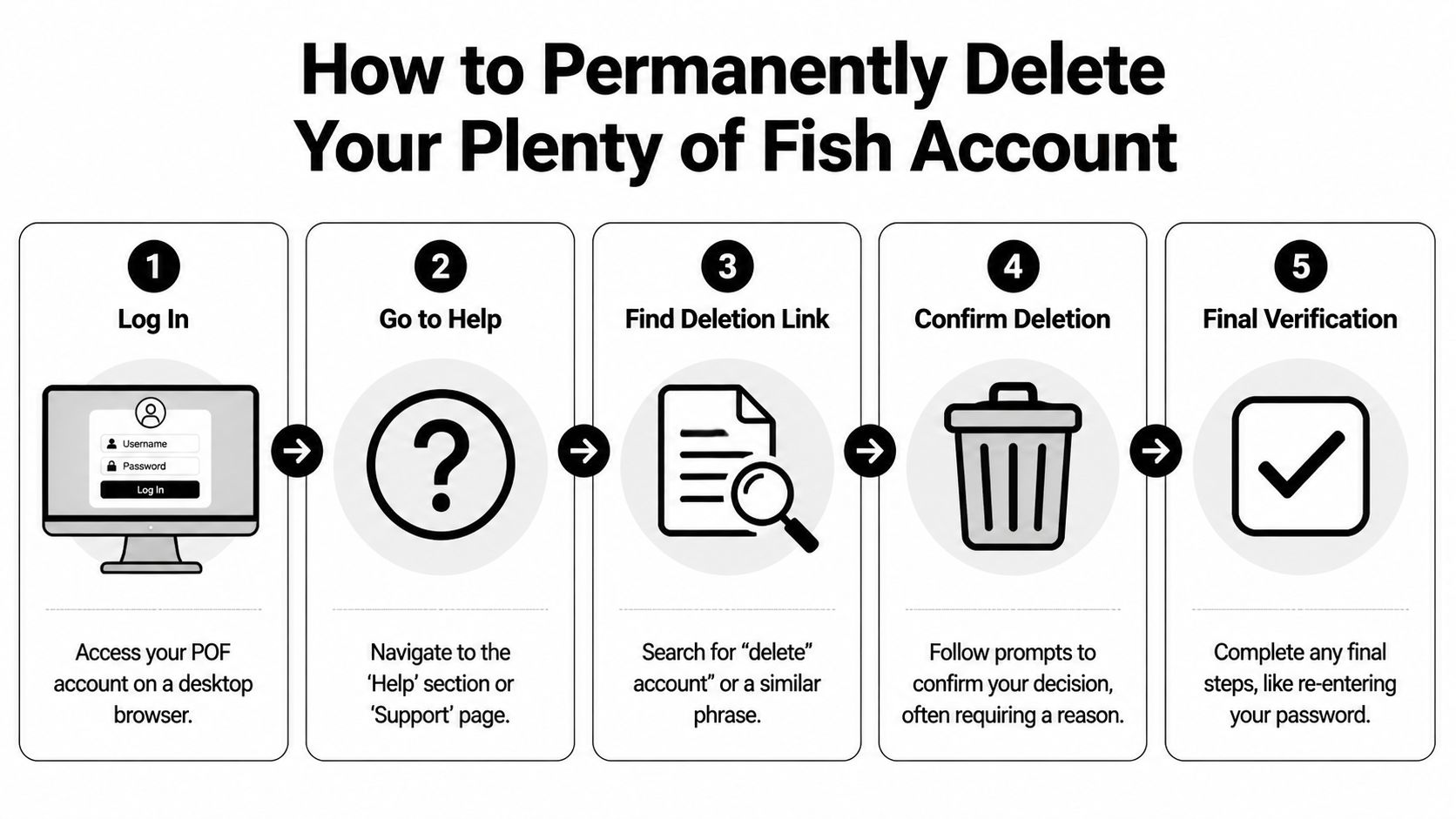
On a web browser
A browser is usually the clearest option because POF tends to show the full account menu there.
- Log in to your POF account
- Click the profile icon
- Open My Profile
- Select Manage Account
- Scroll down and choose Delete My Account
- Follow the prompts and confirm
POF may ask why you are leaving before it completes the request. Finish the form, submit the confirmation, and watch for the final success message.
Deletion is generally treated as permanent. Plan on losing access to your messages, matches, and profile details after you confirm.
On the Android app
Android can work fine, but the app sometimes pushes users toward the softer option first.
- Open the app and sign in
- Tap Profile
- Go to Manage Account
- Choose Delete my account
- If the app offers hiding first, continue until you reach permanent deletion
- Complete any required survey prompts
- Confirm the request
Pay attention to the wording. “Hide,” “pause,” or “take a break” leaves the account in a recoverable state, which is not the same as removing an old dating presence that could still affect your reputation.
On the iOS app
On iPhone, the path can feel less direct because the app may place the temporary break option in front of the permanent one.
- Log in to POF
- Open your profile
- Go to account settings or management
- Continue past any Take a Break prompt
- Select the permanent delete option
- Finish the confirmation steps
That extra screen causes problems for people who are trying to clean up an old profile quickly. If your goal is privacy, keep going until you see language that clearly confirms account deletion.
For a visual walkthrough, this short video can help if the menu labels on your screen look unfamiliar.
If the delete button does not work
The usual causes are practical:
- Wrong password or an outdated login
- Sign-in verification friction
- An app interface problem that goes away in a browser
- Stopping in the hide flow instead of the full deletion flow
Try again in a browser before assuming the account is gone.
After that, do one more piece of cleanup. If your larger goal is to stop an old dating identity from lingering in search, image results, or reused profile directories, use a guide on how to delete your online presence more completely. That is the step that helps reduce the digital ghost people often miss after clicking delete.
What Happens After You Delete Your Account
You delete the profile, feel done, and then a coworker or new partner still finds an old Plenty of Fish result tied to your name. That is the part many people do not expect. Account deletion usually removes your profile from the live platform first. Search engines, image previews, and scraped snippets can trail behind.
That leftover visibility is the digital ghost problem. The dating profile may be gone where you created it, but traces can still show up in search for a while. For privacy, reputation, and personal safety, that gap matters.

What deletion usually changes, and what it does not
After a successful deletion, your POF account should stop functioning as an active profile. People should not be able to use it normally inside the app or site. What can remain is the residue around it. Search listings, thumbnail images, cached text, and copied profile data on third-party pages often update on their own schedule.
That distinction matters because people often test the wrong thing. They see a search result and assume the profile is still live. Sometimes the profile is already gone, and the stale result is what remains.
How to verify the profile is really gone
Check like someone trying to prove removal, not like someone casually Googling themselves.
Search for:
- Your full name plus Plenty of Fish
- Your username plus POF
- Distinctive lines from your old bio in quotation marks
- Old profile photos in image search
If you saved the old profile URL, open it directly. A dead page, error page, or removal notice usually means the account itself is no longer live. A fully loading profile suggests you still have cleanup to do.
You can also use a tool that helps check your digital footprint across public sources so you are not relying only on memory or one search engine.
What to do if search results still show the old page
Handle the platform deletion and the search result as two separate cleanup jobs.
If the POF page is already dead but Google or another search engine still shows the listing, request removal of outdated cached content through that search engine. This is often the step that closes the gap between “deleted” and “hard to find.” For job seekers, that can prevent an outdated dating profile from appearing in a recruiter search. For personal safety, it reduces the chance that someone can use old profile text or photos to confirm your identity elsewhere.
Keep a record of the cleanup:
- Your deletion confirmation
- Screenshots of any lingering search result
- The date you submitted any cache removal request
That paper trail helps if you need to show that the profile is historical, inactive, and no longer under your control.
Beyond Deletion Monitoring Your Lingering Digital Footprint
Removing POF is one cleanup job. Many individuals have several more waiting in the background.
Old dating accounts rarely exist alone. The same email may be tied to other apps. The same username may appear on forums, gaming platforms, marketplaces, and social profiles you haven’t touched in years. A single forgotten profile doesn’t usually create the whole privacy problem. The problem is the pattern those accounts create together.

Why one old account can still cause real trouble
A dormant dating profile can surface during a new relationship. An outdated username can connect your personal identity to old comments or photos. A public bio can give strangers enough context to cross-reference you elsewhere.
For job seekers, it’s often less about scandal and more about control. You want the public version of you to be current, intentional, and hard to misuse. For personal safety, the goal is similar. Reduce discoverability. Reduce context leakage. Reduce the number of places an outsider can stitch your identity together.
Monitoring beats guessing
Hoping your data disappears on its own isn’t a strategy. A better approach is periodic auditing:
- Search your names and usernames
- Check reused images
- Review old email-linked accounts
- Remove profiles that no longer serve you
That process gets harder when data brokers and profile aggregators start copying or indexing personal details. If your broader privacy goal is to reduce where your information circulates, learning about data broker removal and exposure reduction is a smart next step.
The safest online identity is the one you’ve reviewed on purpose, not the one you hope nobody finds.
Frequently Asked Questions About POF Account Deletion
I deleted the app. Is my account gone?
No. Deleting the app only removes it from your device. You need to sign in and complete the actual account deletion inside POF.
Can I recover a deleted POF account?
Treat deletion as permanent. If you may need messages, profile text, or evidence later, save it before removing the account.
I can’t log in, so how do I delete plenty of fish account access?
Start with password recovery and regain account access first. If the app gives you trouble, try a web browser instead. Browser access often exposes account settings more clearly.
I deleted my account but I’m still being charged. What now?
Check where you originally subscribed. If billing came through Apple or Google, cancel it there. If it came through POF directly, review the platform billing settings and keep proof of cancellation.
Digital privacy doesn’t end when one profile disappears. If you want to see what else is still tied to your name, email, username, or old accounts, run a free scan with Digital Footprint Check. It’s a practical way to spot lingering profiles, exposed data, and the online traces you’ve forgotten before someone else finds them first.