· Digital Footprint Check · Content Marketing · 13 min read
Pof Account Delete: a Complete 2026 Privacy Guide
Need to POF account delete? Follow our step-by-step guide for web and mobile, and learn how to permanently erase your data and protect your digital footprint.

You’re probably here for one of a few reasons. You met someone and don’t need Plenty of Fish anymore. You’re tired of dating apps. Or you looked at your old profile and realized your photos, conversations, and personal details are still sitting on a platform you no longer use.
That last point matters more than is often realized. Deleting the app from your phone doesn’t remove the account. Logging out doesn’t remove the account either. If your goal is privacy, a proper pof account delete isn’t just cleanup. It’s a digital identity decision.
A dating profile can expose more than your first name and a few selfies. It can reveal your habits, city, relationship intentions, writing style, social clues, and old photos that still circulate long after you stop using the service. If you’re job hunting, leaving an abusive relationship, reducing scam risk, or just trying to cut down your online footprint, old dating accounts deserve the same attention people usually give social media and shopping accounts.
Why Deleting Your POF Account Is More Than Just a Click
You delete a dating profile because you want it out of your life. That intention is simple. The cleanup is not.
POF sits inside a large dating ecosystem, so an old profile can keep creating exposure long after you stop using it. A dormant account can still reflect your photos, age range, city, writing style, relationship goals, and fragments of conversations that point back to your offline identity. From a privacy perspective, that is not minor clutter. It is residual personal data attached to a searchable version of you.
Deletion solves one problem. It stops your account from remaining active on the platform. It does not erase the possibility that someone already saved screenshots, copied your photos, or reused details from your profile elsewhere.
Why dormant dating accounts create real exposure
Dating profiles carry a different kind of risk than many other accounts. They mix identity data with intent, habits, and social context. That combination can expose more than people expect.
Here’s where the risk shows up in practice:
- Outdated identity signals can surface in searches and create confusion with employers, clients, relatives, or a current partner.
- Photo reuse can feed impersonation, fake profiles, or romance scams on other platforms.
- Location and routine clues from bios, check-in habits, or recurring references can help strangers piece together where you live or spend time.
- Old messages and profile details can remain meaningful even years later if you are leaving an abusive situation, changing careers, or trying to reduce your public footprint.
I treat unused dating accounts as sensitive data stores. That is the right model for POF too.
Deletion is account removal. Privacy cleanup is broader.
Pressing delete is only one part of the job. The second part is verification.
That means checking whether your profile still appears in search results, whether cached snippets or image results still point to it, and whether copied details have spread to people-search or profile-aggregation sites. This is the same mindset used in basic OSINT work. Start with what is publicly visible, confirm what still exists, and then remove or suppress the remaining traces methodically.
If your goal is broader privacy cleanup, pair account deletion with a review of your data broker removal process. Removing the POF account cuts off one source. It does not remove copies, search traces, or third-party listings that may still expose the same identity details.
That is why deleting your POF account matters. It is less about leaving one app and more about closing a loose end in your digital identity before someone else finds it for you.
Pre-Deletion Checklist for Your Plenty of Fish Account
Deleting first and asking questions later is how people lose messages they wanted to keep, forget how they paid, or assume billing will stop on its own. It won’t always work that way.

The most common mistake is simple. Account deletion and subscription cancellation are not the same action. Guidance summarized by NordVPN notes that POF subscribers should cancel membership separately through account or membership settings, and failing to do that first can leave you exposed to continued billing even after the profile is gone (NordVPN’s POF deletion guide).
Check billing before anything else
If you ever paid for POF, stop and confirm where the subscription lives before you touch the delete option.
| What to check | Why it matters | What to do |
|---|---|---|
| Website billing | POF may manage payment directly through account settings | Open your membership or account settings and cancel first |
| Apple subscription | App Store billing can continue separately from profile access | Cancel through Apple subscriptions |
| Google subscription | Google Play billing can continue separately too | Cancel through Google Play subscriptions |
| Old card statements | Useful if you’re not sure how you subscribed | Search for the billing descriptor before deleting |
This is one of those tasks that feels minor until it isn’t. A deleted profile with an active subscription is annoying to untangle because you’ve already removed your own access path.
Save anything you’ll regret losing
POF deletion is meant to be final. That means you should preserve anything meaningful before you proceed.
Use a short personal checklist:
- Important contact details. If you met someone you want to stay in touch with, move the conversation off-platform first.
- Relevant screenshots. Save conversations only if you have a legitimate reason, such as documenting harassment, fraud, or a safety issue.
- Profile photos you uploaded. Keep your originals in your own archive so you don’t later wonder which images were public.
- Billing records. Save any receipts or membership confirmations that may help if a payment issue appears later.
Delete the account only after you’ve decided there is nothing inside it you’ll need again.
Decide whether you want deletion or distance
Some people don’t want permanent removal. They want less visibility. That’s a different goal.
Use this quick comparison:
| Option | Best for | Main trade-off |
|---|---|---|
| Hide or pause profile | You may come back later | Your account relationship with the platform continues |
| Permanent deletion | You want a clean break and less exposure | You lose access and can’t restore the same profile |
If you’re unsure how many old services are attached to the same inbox you used for dating apps, it’s smart to find all accounts linked to your email before you start deleting selectively. POF is rarely the only forgotten account in the stack.
How to Permanently Delete Your POF Account on Any Device
You decide to leave POF, delete the app, and assume that ends it. It does not. Uninstalling only removes the app from your phone. To remove the profile tied to your name, photos, messages, and search visibility, you need to complete the account deletion flow inside POF.
Desktop steps that work
If you have access to a computer, start there. The browser version usually exposes the full settings path more clearly than the app or a mobile screen.
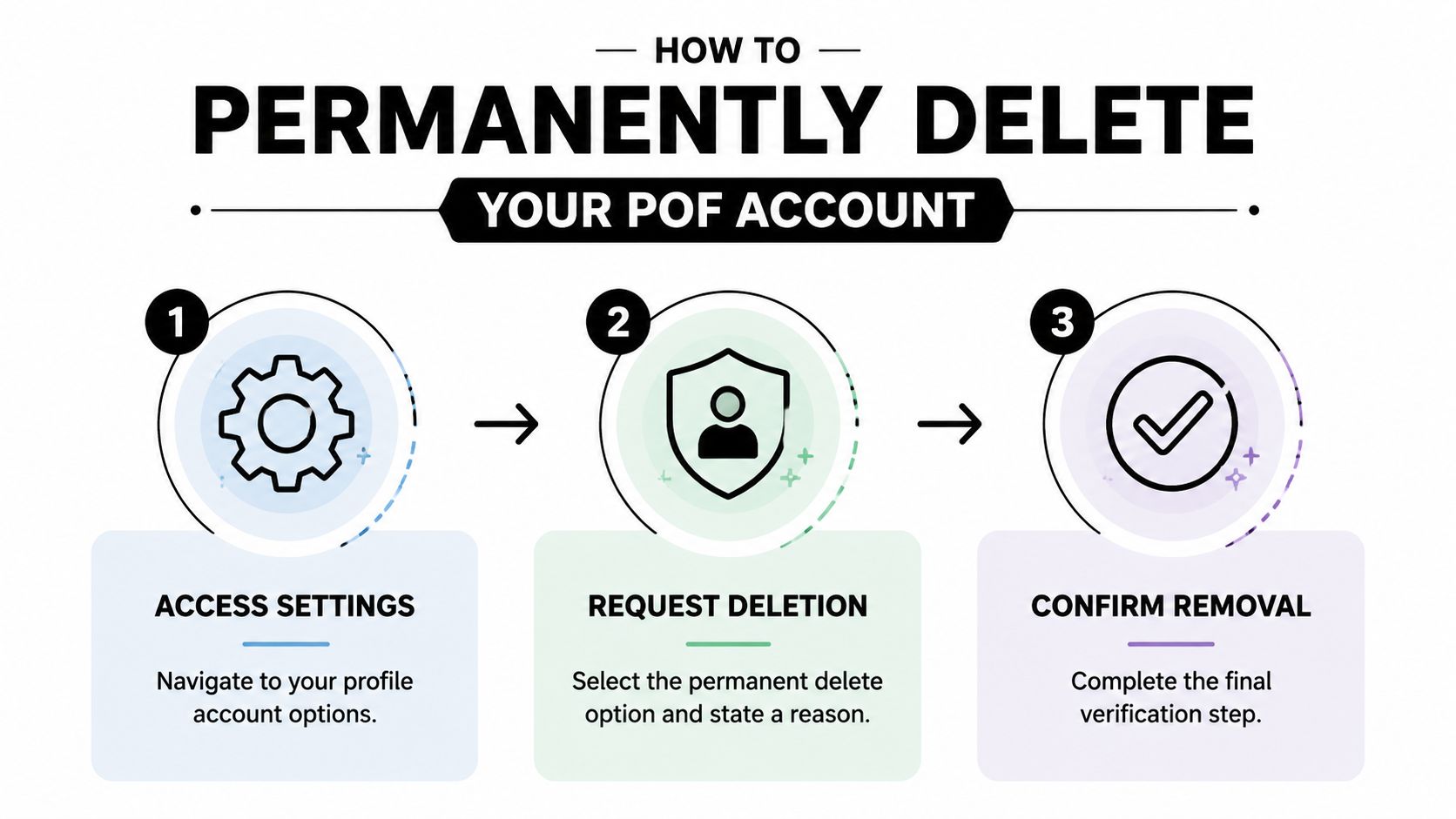
Inside your account, use this path:
- Open My Profile
- Go to Settings
- Choose Delete Account
- Answer any required prompts
- Confirm the deletion
Expect friction near the end. POF may ask why you are leaving or present a few exit questions before the final confirmation appears. That is standard retention design. It does not mean the option is unavailable.
Mobile deletion usually runs through the web flow
On mobile, the process often pushes you to the browser-based version of POF instead of a simple in-app setting. That is common with dating platforms, especially for permanent actions tied to billing, profile control, or account closure.
The cleanest mobile method is usually this:
- Sign in through your mobile browser
- Open your profile or account settings
- Find the delete account option
- Complete the verification questions
- Tap the final confirmation
What matters is that you reach the delete path and finish every prompt. If the app feels limited, switch to your browser instead of stopping halfway.
If you want a second walkthrough with screenshots and plain-language explanations, this guide on how to permanently close your Plenty of Fish profile is a useful companion to the official path. If your larger goal is reducing what remains tied to you online after deletion, use this data removal guide for cleaning up your wider digital footprint.
Here’s a visual explainer if you prefer to watch the flow first.
What deletion removes and what it means
POF treats deletion as permanent at the account level. Once you confirm it, you should assume the profile is gone for good and cannot be reopened later with the same history intact.
That has a real trade-off. You lose access to conversations, matches, and photos associated with that profile.
If losing your messages or match history would create a problem later, stop and archive what you need before the final confirmation.
From a privacy perspective, permanent deletion is the stronger option because it removes the live dating profile rather than leaving it dormant. It is the first step, not the last one, in reclaiming control over your online identity.
Understanding Data Removal and Account Permanence
People hear “delete account” and assume every related piece of data disappears everywhere at once. Online platforms rarely work that cleanly, and POF is no exception.

The important distinction is between public profile visibility and backend retention or platform records. POF’s user-facing help confirms the deletion workflow and its permanence at the profile level, but available user guidance does not clearly spell out downstream retention timelines in the snippet most users will see. That gap is exactly why privacy-conscious users shouldn’t treat the confirmation screen as the end of the story.
User deletion and platform enforcement are different paths
POF account removal is not only something a user initiates. POF’s official blog also states that accounts can be closed for violations such as scam, spam, impersonation, inappropriate imagery, or unsafe use (POF blog on deleted accounts).
That tells you something important about how the platform thinks about deletion. It serves two roles:
| Type of removal | Who triggers it | What it usually means |
|---|---|---|
| User-initiated deletion | The account holder | A privacy or personal choice |
| Platform-initiated closure | POF moderation or enforcement | A trust-and-safety response |
For users, the lesson is straightforward. A deleted account may vanish because you chose to leave or because the platform enforced its rules. Either way, the profile can disappear without giving you a reusable account state.
What permanence means in practice
Permanent doesn’t always mean universal erasure. It usually means the profile is no longer active or restorable in the normal product experience.
That leaves a few realistic possibilities:
- Your public-facing profile is gone, which is the main outcome most users want.
- Platform records may still exist for legal, billing, abuse-prevention, or security reasons.
- Copies outside POF may remain if someone captured your profile elsewhere.
If you want to understand the wider privacy issue around public collection and reuse, this piece on scraping public web data safely provides useful context on why online visibility and downstream data reuse are not the same thing.
A deleted dating profile can be gone from the app and still leave traces in the broader web ecosystem.
For that reason, deletion should sit inside a bigger personal cleanup process. A broader data removal guide is often more useful than treating account deletion as a one-step event.
How to Confirm Your POF Profile Is Actually Gone
This is the part frequently skipped. They click delete, see confirmation, and move on. From an OSINT perspective, that’s not verification. That’s hope.
A stronger approach is to assume there may be digital echoes and then test for them. That matters because third-party guidance points out that the question isn’t only how to delete, but how to verify that residual traces are gone across search engines, cached pages, and data brokers, especially since POF’s help page focuses on the workflow rather than downstream handling (Onerep’s discussion of post-deletion traces).
Start with the obvious checks
Before you do anything advanced, check the basics.
- Try logging in again. If the account was permanently deleted, normal access should fail.
- Test your old profile URL if you saved it or can still find it in browser history.
- Search inside POF using your old username or profile clues from another account, if you have a legitimate way to do so.
- Check old emails from POF for links or profile references that might still resolve.
These checks won’t catch everything, but they’ll tell you whether the deletion likely completed at the platform level.
Look for traces outside POF
Search engines and people-search sites often outlive the original account. That doesn’t mean the POF profile is still active. It means the web may still remember it.
Use this checklist:
| Verification step | What you’re looking for | Why it matters |
|---|---|---|
| Search your name plus “Plenty of Fish” | Search result snippets | Old references can linger after deletion |
| Search old usernames | Cached mentions or copied profiles | Usernames often travel across platforms |
| Reverse-search old profile photos | Reused or mirrored images | Photos can surface on scam or archive pages |
| Check people-search and broker sites | Profile-derived personal details | Some sites may have absorbed fragments of your data |
Field note: Search for the exact phrasing you used in your old bio. Unique sentences often surface faster than a name.
If you need a structured process, this guide on how to check your digital footprint is a practical starting point.
What works and what doesn’t
Some follow-up actions help. Others waste time.
Usually worth doing
- Request search engine removal when outdated snippets or cached references still appear
- Review broker-site opt-out options if your personal details show up elsewhere
- Document screenshots of lingering results before you submit any removals
Usually not enough on its own
- Deleting the app
- Assuming invisibility because you can’t log in
- Searching only your full legal name
- Checking once and never revisiting
For people who want to go beyond manual searching, tools can help map where your identifiers appear across public sources. One option is Digital Footprint Check, which is designed to scan publicly accessible online exposure across a wide range of platforms and records. That kind of scan doesn’t replace deletion. It helps you see what deletion may have left behind.
Next Steps for a Safer Online Presence
A successful pof account delete has three parts. Preparation. Removal. Verification.
Many only do the middle one. That’s why old accounts keep causing problems. They forget to cancel billing, lose access to information they meant to save, or assume that deleting a profile also deletes every public trace connected to it.
The useful habit here isn’t specific to Plenty of Fish. It’s the mindset. Treat every old account as part of your attack surface and your reputation surface at the same time. Dating platforms affect personal safety, social perception, and identity exposure in ways people often underestimate until something awkward or harmful happens.
Use this moment to review your broader account security too. If an old dating login reused a password you still depend on elsewhere, tighten that up now. If you’re thinking more broadly about compromised credentials, recycled logins, and stale accounts, this primer on account takeover prevention is worth your time.
The ultimate win isn’t just leaving one platform. It’s getting more deliberate about what stays connected to your name, your photos, and your contact details online.
If you want to see what still shows up about you after deleting old accounts, run a free check with Digital Footprint Check. It’s a practical way to spot public traces tied to your name, email, usernames, and other identifiers before they become a privacy, safety, or reputation problem.