· Digital Footprint Check · Content Marketing · 13 min read
Is My Email on Dark Web Free Check: Act Now
Is my email on dark web free check - Worried your email is exposed? Perform an 'is my email on dark web free check' with our guide. Use top tools to see if your
You open your inbox, see another company announcing a breach, and feel that small drop in your stomach. Or maybe a friend tells you their old password turned up in a leak. Then the obvious question hits: is my email on dark web free check something I can do right now, without signing up for another expensive service?
Yes. You can get a useful first answer in minutes.
But you also need a realistic perspective. A free check can tell you whether your email appears in known breach data. It can’t tell you everything an attacker may have pieced together about you from public profiles, old forum posts, gaming handles, résumé sites, or dating app clues. That difference matters a lot if you’re job hunting, protecting your main email, or trying to avoid account takeover and impersonation.
Why It’s Smart to Question Your Email’s Security
That uneasy feeling about your email isn’t overreacting. It’s basic digital self-defense.

Few users worry about their email address by itself. They worry about the access it provides. Your inbox connects to password resets, job applications, banking alerts, social accounts, game logins, cloud storage, and private conversations. Once criminals can tie an email to exposed personal details, they have a starting point for phishing, impersonation, and account recovery abuse.
According to F-Secure’s identity theft checker, a new identity theft threat emerges every 22 seconds. That helps explain why dark web monitoring has become a normal part of personal security, not something reserved for large companies or highly technical users.
Why one email matters so much
A compromised email isn’t just “contact information.” It’s an identifier that often follows you across years of online activity.
If you’ve used the same email for a résumé site, a gaming platform, a shopping account, and a dating app, a breach in one place can create pressure everywhere else. Attackers don’t need to know everything at once. They combine fragments.
Practical rule: Treat your primary email address like a master key. If it shows up in breach data, assume someone may test where else it works.
The impact isn’t only financial.
Real life fallout outside cybersecurity
For a job seeker, an exposed email can lead to convincing phishing messages that look like recruiter follow-ups or fake interview invitations. For someone using dating apps, the risk is more personal. A reused email can help a scammer connect a profile to other public accounts and build a more believable approach. For gamers, the stakes can be account theft, lost progress, or stolen in-game items.
That’s why checking your email is worth doing even if nothing seems wrong today. A lot of the damage begins subtly.
If you want a broader look at how exposed bits of public information can add up, this explainer on the hidden dangers of your digital footprint and what hackers can learn about you is a useful companion to a breach check.
Your First Line of Defense Free Dark Web Check Tools
Start simple. Free tools won’t solve the whole problem, but they give you a baseline fast.
Modern services are built for scale. According to LeakNix, modern dark web email checkers employ advanced AI technology to scan 500+ data sources and can search thousands of sites and over 600,000 pages of dark web content. That sounds impressive, and it is, but for a personal first check you still want the tools that are easiest to use and easy to understand.
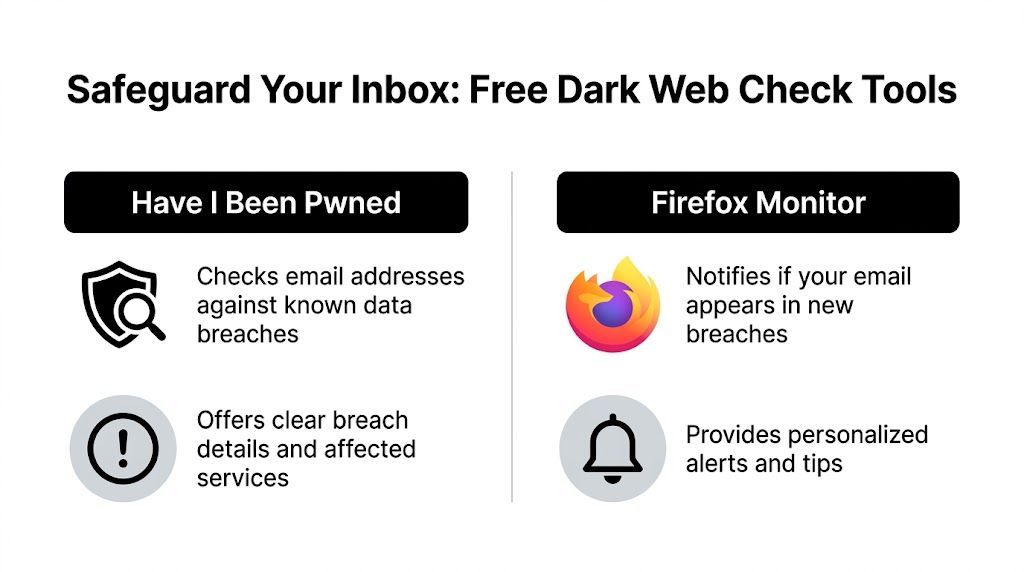
Have I Been Pwned
Have I Been Pwned is usually the quickest starting point.
You enter your email address, submit it, and the service tells you whether that address appears in known breach data. If there are matches, it typically shows which services were involved and what kinds of data were exposed.
Use it like this:
- Enter your main email first. Start with the address you use for account recovery, banking alerts, and important logins.
- Review the breach names carefully. A breach tied to an old forum isn’t the same as one tied to a financial or productivity account.
- List every account that may share that password. If you reused it anywhere, those accounts move to the top of your fix list.
- Repeat for secondary addresses. Old school, work, or gaming emails often get forgotten.
Its main strength is clarity. You can move from “I have a bad feeling” to “this account appeared in these known exposures” very quickly.
Firefox Monitor
Firefox Monitor is another good free option, especially if you want alert-style guidance.
It lets you check whether your email has appeared in breaches and is designed to make the results feel approachable for non-technical users. For many people, that matters. A tool only helps if you use it.
Firefox Monitor is useful when you want:
- Simple language
- A consumer-friendly experience
- Breach awareness without digging through a lot of security jargon
Comparison of Free Dark Web Check Tools
| Feature | Have I Been Pwned | Firefox Monitor |
|---|---|---|
| Primary use | Checks whether an email appears in known breaches | Checks breach exposure with a more guided consumer experience |
| Best for | Fast lookups and breach detail review | Users who want a straightforward alert-style workflow |
| Result style | Clear breach listing and context | Breach notices with practical next-step guidance |
| Ease of use | Very quick and direct | Very approachable for less technical users |
| What it gives you | A baseline view of known exposure | A baseline view plus a more guided experience |
What these tools are good at
They answer one important question: has this email appeared in known breach data?
That alone is valuable. It tells you whether your concern is hypothetical or already documented. If you want another quick option focused on the same kind of first-pass review, this free email breach check resource is worth keeping bookmarked.
A free breach check is a snapshot, not a clean bill of health.
Beyond Automated Scans Manual OSINT Checks
Automated tools look for known breach data. Manual checks look for public traces that never show up in a breach report.
Basic OSINT provides assistance. You don’t need to act like an investigator. You just need to search the way one would.
Search your email as a public artifact
Put your full email address in quotes in a search engine. That forces an exact match search.
Try a few variations:
- Exact email search using the full address in quotes
- Email plus username if your email name matches a handle you’ve used elsewhere
- Email plus keywords like resume, forum, profile, gamer tag, portfolio, or location
What are you looking for? Old posts, cached pages, forum signatures, public directories, event pages, PDF documents, and forgotten account pages. Sometimes the risk isn’t that your email was stolen. It’s that your email was exposed publicly for years and can now be linked to other details.
Follow the username trail
A lot of people build email addresses from the same username they use everywhere else.
If your email is something like firstname.gamername@provider, search the gamer name by itself. Then search it together with platforms you use. Attackers do this because reused identities make correlation easy.
Check for overlap across:
- Gaming sites
- Social media profiles
- Professional networks
- Old communities and hobby forums
- Marketplace accounts
A public gaming handle tied to the same email pattern as your professional presence can create problems you didn’t intend. A recruiter may find it. So can a scammer.
Public data can be as risky as leaked data
A breach tells attackers what was stolen. Public OSINT tells them how to use it.
That combination is what makes spear phishing work. Someone who knows your employer, favorite game, and city can write a much more convincing message than someone who only has an email address.
If you want to learn the broader toolkit behind this kind of searching, these free OSINT tools are a practical next step.
What Free Checks Miss Uncovering Your Full Digital Footprint
A free dark web scan and a digital footprint review are not the same thing.
Free tools usually tell you whether your email appears in known breach data. That’s useful. But it leaves out a lot of context that attackers care about more than you might think.
According to Forestal Security’s discussion of free dark web scanner gaps, existing free dark web email check tools predominantly scan public breach databases but rarely extend to extensive OSINT scans across 500+ platforms including social media, gaming profiles, and public records. That’s the blind spot.
Breach exposure versus footprint exposure
A breach exposure means your data appeared in a compromised dataset.
A footprint exposure means information tied to you is visible online, linkable, and useful. That could be a public username, a phone number on an old listing, a résumé with your city, or a gaming profile that confirms a reused alias.
Those fragments matter because attackers combine them. So do employers, clients, and people you meet online.
Why this matters for work, dating, and gaming
For work, a free breach check won’t show whether your email connects to old public profiles that could shape a hiring manager’s opinion.
For dating, it won’t reveal whether your contact details, usernames, or photos are easy to connect across platforms.
For gaming, it won’t tell you whether your handle, streamer profile, and account recovery clues are sitting in plain sight.
Free tools answer “Was this email in a known breach?” They usually don’t answer “What can someone learn about me from this email?”
This is the point where a broader search becomes useful. Digital Footprint Check is one example of that broader approach. It searches across 500+ platforms including social media, gaming profiles, professional networks, and public records to show what information is publicly accessible and connected to an identity. If you want background first, this overview of what the dark web is and how it works helps separate dark web myths from practical privacy risks.
Decoding the Results What Pwned Actually Means for You
Seeing your email in a breach result can feel dramatic. Sometimes it is. Sometimes it’s a warning with manageable next steps.
What matters is context.
Not all breach results carry the same risk
An old forum breach is different from a breach involving an account you still use for finance, cloud storage, or work. If the result shows only an email address, that’s one level of concern. If it involved passwords, phone numbers, or other personal data, the risk is higher because criminals have more material to work with.
For a job seeker, the danger may be targeted impersonation or fake recruiter messages sent to a known exposed address.
For a gamer, the issue may be credential stuffing against game platforms, Discord, or the email account tied to recovery options.
For someone active on dating apps, exposed contact details can support stalking, impersonation, or highly specific scam messages.
A clean result doesn’t mean invisible
This is the mistake many people make. They search, see no result, and assume the problem is over.
It’s not that simple. As Experian’s free dark web email scan page notes through Norton’s warning, “We do not search for all personal information at all dark web sites”. That means even strong scanning services have blind spots.
So if your search comes back clean, interpret it correctly:
- It means no known match was found in that tool’s coverage
- It doesn’t prove your email has never been exposed
- It doesn’t account for public footprint clues outside breach databases
A “not found” result should lower panic, not lower vigilance.
Read the result like a risk signal
The practical question isn’t just “Was I pwned?”
It’s this: What would an attacker do next with this information?
If the answer is “try this password on other accounts,” you change passwords. If the answer is “build a convincing phishing email around my work or hobbies,” you tighten your public footprint and become more suspicious of outreach that seems almost right.
Found Your Email on the Dark Web Here’s Your Action Plan
If your email shows up in a breach check, don’t freeze. Work the problem in order.

According to Aura’s scan page, because email addresses are often reused, hackers use them to connect data from multiple breaches and create a fuller dossier on their victims. That’s why the right response isn’t limited to one site. You have to think across connected accounts.
Start with the accounts that matter most
Change the password for the breached account first.
Then immediately change any other account that used the same password or a close variation. Reused passwords are what turn one breach into several account takeovers.
Prioritize these:
- Your main email account
- Banking and payment services
- Cloud storage
- Work logins
- Gaming and social accounts with saved payment methods
Turn on stronger login protection
If an account offers two-factor authentication, enable it.
This step matters because password exposure alone is often what criminals have. If you add a second factor, a stolen password becomes much less useful.
For a practical checklist, this guide to email security best practices is a solid reference.
Review what an attacker could do next
After password changes, check the account itself.
Look for:
- Forwarding rules in your email account
- Unknown devices or sessions
- Recovery phone numbers or addresses you don’t recognize
- App permissions you no longer need
- Messages or transactions you didn’t send
If the exposed account is tied to work or a business, a documented process helps. Teams that need a structured checklist can use a Data Breach Response Plan to organize containment, communication, and follow-up.
Here’s a useful walkthrough if you want to see the response process framed visually:
Keep watch after the immediate cleanup
Some attacks happen long after the original leak.
Watch for unusual password reset emails, login alerts, new-device notices, and phishing messages that mention services you actively use. If the breach involved financial data or identifying information, it also makes sense to review statements, account notices, and other warning channels carefully.
The first fix is technical. The second fix is behavioral. Assume more convincing scams may follow because your exposed email gives criminals a starting point.
Frequently Asked Questions About Dark Web Scans
Is it safe to enter my email into a dark web checker
With reputable services, generally yes. Use well-known tools and avoid sketchy sites that demand unnecessary personal details. A legitimate checker should ask for the email you want to search, not your password.
If my email is found, does that mean I’ve been hacked
Not necessarily. It usually means your email appeared in a known breach dataset or exposure source. That’s serious, but it doesn’t automatically mean someone is inside your account right now.
What’s the difference between a free scan and paid monitoring
A free scan gives you a point-in-time answer based on the sources that tool covers. Monitoring watches for new exposures over time and usually gives alerts instead of making you remember to check again.
Why should I care if only my email was exposed
Because email is often the anchor for password resets, identity matching, and account correlation. Even without a password, it can help someone craft better phishing or connect your accounts across platforms.
What if my scan shows nothing
That’s useful, but not final. It means the tool didn’t find a known match in its available coverage. It doesn’t rule out newer leaks, unindexed sources, or public footprint exposure elsewhere.
If you want to go beyond a basic breach lookup, try Digital Footprint Check. It helps you see how an email, username, or other identifiers connect across publicly accessible online sources, which is often the missing piece after a free dark web scan.