· Digital Footprint Check · Content Marketing · 13 min read
Chrome Incognito Mode: What It Hides and What It Doesn't
Discover what Chrome Incognito Mode truly hides and what it doesn't, so you can browse privately and stay informed.

Most advice about Chrome Incognito mode is too simple: open a private window, browse without leaving traces on your device, and your tracks disappear. That sounds reassuring, but it leaves out the part that matters most: Incognito is designed to reduce what stays on your device, not to make your activity vanish from the internet.
That gap explains why people use it for sensitive searches, dating research, job hunting, or checking account access on a shared computer, then walk away with more confidence than the feature deserves. Google’s own help page says Incognito “doesn’t make you invisible”, which is the right place to start if you want a real understanding of browser privacy, not just a clean-looking window (Google Chrome help). For a broader primer on personal data protection, a useful companion is this guide to digital data protection, and for a clearer view of how browsing habits leave a trail, this invisible trail of browsing habits is worth reading.
The Privacy Illusion of Private Browsing
Private browsing feels like a reset button, and that is exactly why it is easy to overtrust. The interface is clean, the window says Incognito, and the browser stops saving obvious local traces like history and form entries after the session ends. That can create a strong sense of safety, even when the rest of the internet still sees plenty.
A traffic analysis from 2025 found that 5.8% of all web traffic passed through Incognito sessions, including 8.2% on desktop and 5.0% on mobile, and the same source estimated roughly 222 million people browsing privately at any given time based on Google Chrome’s estimated 3.83 billion users worldwide (AboutChromebooks). That is a lot of people relying on a feature that removes local evidence, but not online visibility.
Why the comfort is so persuasive
People often reach for private browsing when the stakes feel personal. Someone looking up a medical issue, a job seeker comparing employers, or a person researching a new relationship does not want those searches sitting on a shared laptop for the next user to see. Incognito is useful in that scenario, because it reduces what other people who use the same device can open later.
Practical rule: if the risk is “someone else finds this on my computer,” Incognito helps. If the risk is “someone online sees who I am,” it does not go nearly far enough.
Google’s support language is blunt for a reason. Sites, Google services on those sites, and network operators such as an employer, school, or ISP can still observe activity during the session (Google Chrome help). That is the difference between local privacy and online anonymity. One keeps the next person off your laptop from seeing your trail. The other tries to keep the whole web from linking that trail to you.
A useful companion is this guide to digital data protection, because the core issue is not just what stays on the device. It is the wider digital footprint that can still be stitched together from networks, accounts, and behavioral clues.
Even consumer explainers keep circling back to the same point, because people keep assuming “private” means invisible. AP News summarizes the limit clearly, private browsing hides the fact that you visited a site from the device itself, but not your IP-based location or your ISP’s view of the connection (AP News). That is why Incognito should be treated as a narrow control, not a shield.
That gap between a clean browser window and a visible online trail is where OSINT-style exposure starts. A browser can forget a session, while public records, account links, and browsing patterns still leave enough context for others to piece together who was likely behind the search.
How Chrome Incognito Mode Works
Chrome Incognito mode is a private session, not a privacy cloak. It opens a separate browsing context for the tab you use, then clears the local traces when that context ends. The browser behaves like a guest register that gets wiped after checkout, while the wider building can still keep its own logs.
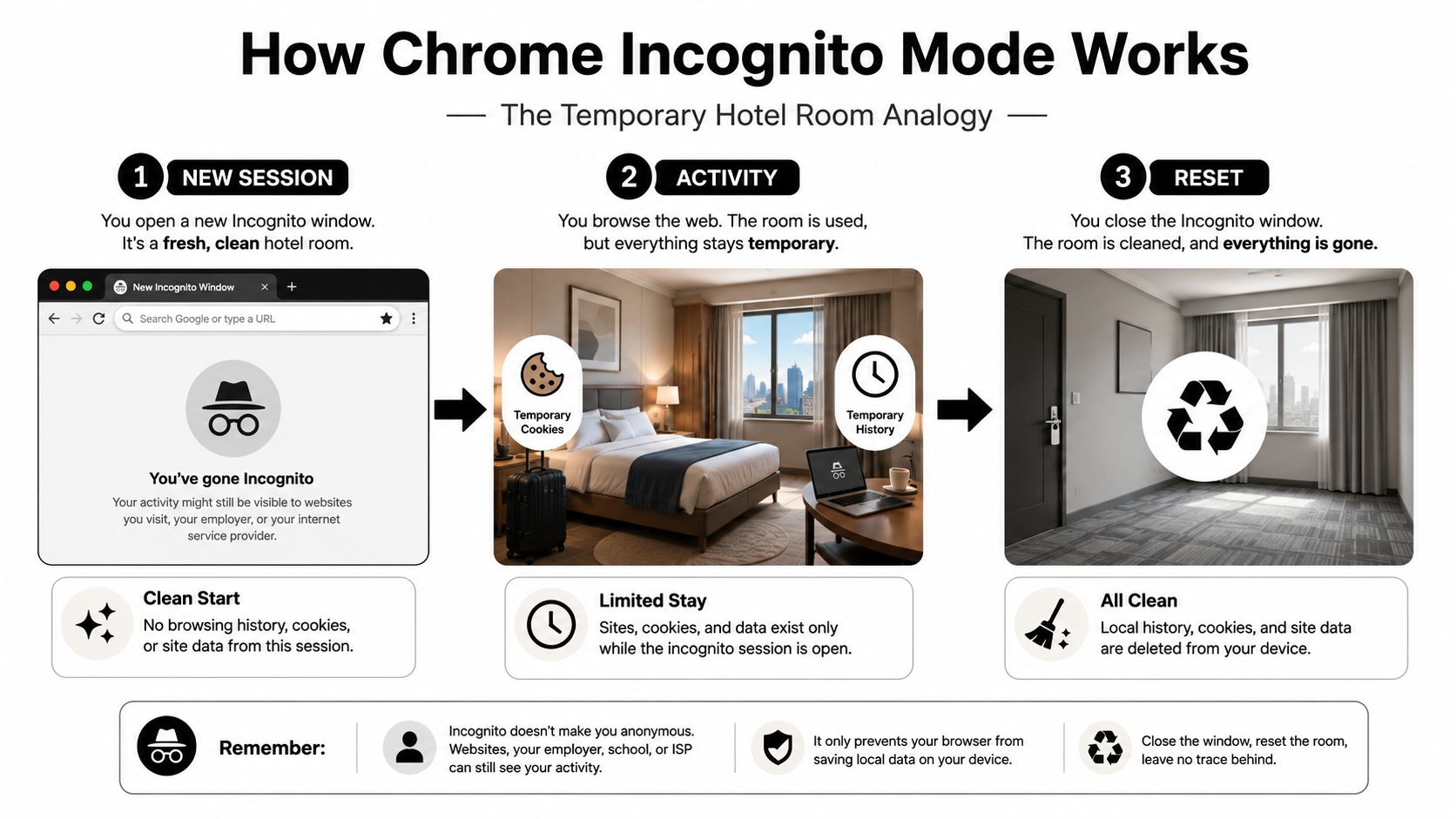
Chrome creates a new browsing session that sits apart from regular windows. It uses a temporary cookie store, and Chrome removes locally stored site data and visit records when all Incognito windows are closed (Chromium Incognito overview, Chrome help). The important detail is timing. While the window stays open, the session is still active.
What disappears and what stays
The cleanup is local and limited, which is why Incognito can be useful on a shared computer. Chrome says it does not save browsing history, cookies and site data, or form entries on the device after the session ends, and temporary cache files are deleted too (Chrome help, Private browsing guide). That prevents the next person using the device from opening your recent activity through the browser history.
Other traces can still remain. Downloads and bookmarks stay on the device after the session, and websites can still collect information during the visit itself (Google Chrome help, Chromium Incognito overview). If you save a file, add a bookmark, or sign into an account, those actions do not vanish just because the window was private.
Why the process split matters
Chromium’s extension system uses a split model in Incognito. Incognito pages run in a dedicated process with a separate memory-only cookie store, and that process cannot talk to the regular browsing process (Chrome extension docs). That separation reduces cross-contamination between normal browsing and private browsing, which is useful when you want one session to stay isolated from another.
That isolation still stops at the browser boundary. It lowers the chance that regular browsing data bleeds into the private session, but it does not hide your visit from the site itself or from other observers outside the browser. If you want a practical next step for local cleanup, this guide on deleting tracking cookies shows how to remove one common residue after browsing.
Chrome also includes newer network-level protection in Incognito through IP Protection for eligible traffic. It routes that traffic through a two-hop proxy system using CONNECT and CONNECT-UDP (MASQUE) while preserving only coarse geolocation such as country (Chrome extension docs). That is a meaningful privacy improvement, but it is tied to rollout and feature eligibility, so it should not be treated as a universal guarantee.
For site-side tracking, the shape of the page matters too. A site that uses Facebook Pixel implementation examples can still connect browsing activity to ad systems through the request itself, even when the browser window is private. Incognito can reduce what stays on your device. It does not erase the broader trail that websites, networks, and ad tech can still assemble around the session.
Who Can Still See Your Incognito Activity
Incognito often feels like a privacy shield, but the cleaner way to see it is as a cleanup tool. It can clear the trail on your device after the session ends, while other parts of the path still remain visible. The easiest way to separate those limits is to look at three layers, your device, your network, and the website you visit.
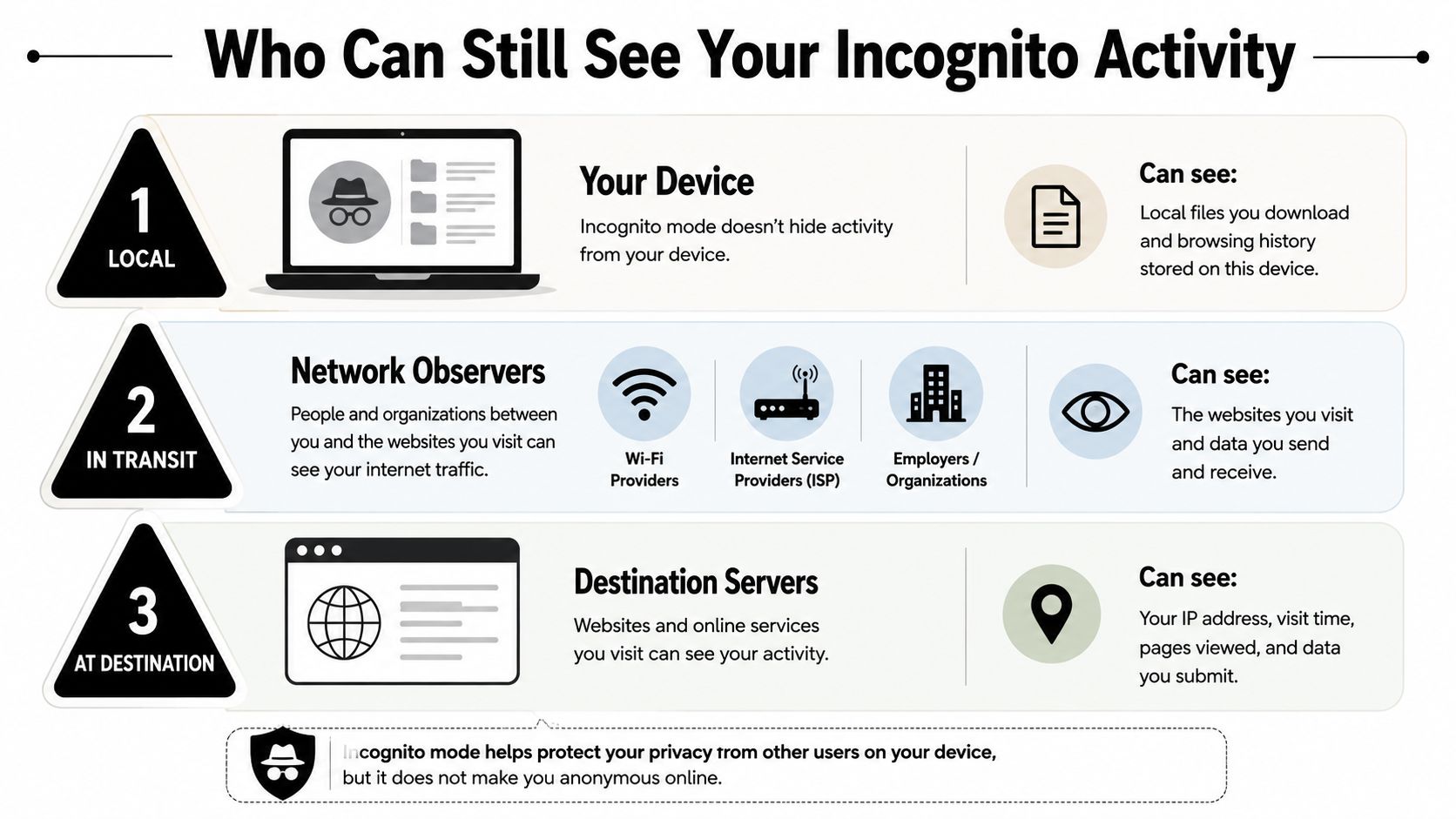
On the device itself, Incognito does what many people expect. It reduces local artifacts, so a shared computer, a borrowed laptop, or a family device is less likely to keep the session in browser history, cookies, or form data after you close the window.
The network layer is different. Your employer, school, or internet provider can still observe that traffic as it moves across their systems, even if the browser window is private. If you want a plain-English explanation of that visibility, this internet provider history guide is a useful companion.
The destination website usually sees the most. It receives your request, can record IP-based connection details, and may tie activity together with browser fingerprinting signals such as canvas fingerprinting, WebGL fingerprinting, font enumeration, and screen resolution. Private browsing does not change those signals. Sites that load embedded services can still collect data during the session, including pages that use Facebook Pixel implementation examples, because the tracking code runs when the page loads.
A useful way to frame Incognito is this. It limits what stays behind on the machine you touched, but it does not hide the session from every observer around it. That difference matters for OSINT work, because a private window can still leave enough signals for a site, a network, or a third-party tracker to connect the dots across a broader digital footprint.
Incognito can also sit alongside site-side tracking in ways users do not expect. A page that includes analytics or advertising scripts may still report the visit, even if no browser history remains on the device afterward. Chrome’s own help text makes the same general point about what Incognito does and does not protect, and the gap between browser privacy and real-world exposure is often where people misjudge their risk.
Incognito Versus Real Privacy Tools
Incognito is one layer in a privacy stack. It’s useful, but it’s not the only thing that matters. The right question is what problem you’re trying to solve, because different tools protect against different kinds of exposure.
| Privacy Tool Comparison | Hides Local History | Hides from ISP | Blocks Fingerprinting | Masks IP Address |
|---|---|---|---|---|
| Chrome Incognito mode | Yes, for the device session | No | No | No |
| VPN | No | Yes, from the ISP’s view of destination traffic | No | Yes |
| Privacy-focused browser | Sometimes, depending on settings | No | Partly, depending on browser design | No |
| Tracker-blocking extension | No | No | Partly, depending on the tracker | No |
| Separate browser profile | Yes, if you keep contexts separate | No | No | No |
That table shows why one tool rarely solves the whole problem. Incognito reduces what stays on the machine. A VPN changes what your ISP can observe, and a privacy-focused browser can reduce tracking surface through default settings. A tracker-blocking extension can cut down on embedded scripts, while separate profiles help you keep work, personal, and sensitive activity from blending together.
The trade-off is convenience. Incognito is built into Chrome, so it’s easy. A VPN adds another layer to manage. Privacy browsers can feel different from what people already know, and extensions can break site behavior if they block too aggressively. None of that makes them bad. It just means each tool solves a different piece of the puzzle.
If your priority is network defense for a business environment, the reasoning is similar. The business network defense tips page is a useful reminder that layered controls matter because no single safeguard covers every threat.
Rule of thumb: use Incognito for local cleanup, a VPN for network privacy, and browser-level protections for tracker reduction.
If you want to reduce IP exposure specifically, this guide to hiding your IP address is a good next step.
Real-World Risks Incognito Cannot Prevent
A job seeker can browse salary pages, interview questions, and competitor sites in Incognito and still leave a wider trail elsewhere. That trail may live in search engines, analytics systems, social platforms, or public-facing profiles that an employer can later connect back to the person. Private browsing keeps the laptop quiet, but it does not erase a public footprint that already exists.
The same gap shows up in personal safety situations. Someone in an abusive relationship may use Incognito to avoid obvious browser history on a shared device, yet account-level tracking still matters. If the other person knows the passwords, monitors email, or checks device backups, the private window does nothing to stop that visibility. The browser may forget the session, while the account history remains intact.
Gaming accounts create another weak point. A player can search guides, marketplaces, or alt-account tactics in private mode and still be linked by usernames, matching avatars, reused profile photos, or public posts that OSINT tools can gather across platforms. In practice, Incognito can hide a local search from someone sitting at the same machine, while identity clues keep appearing in the surrounding account and profile data.
The limits are easy to miss because the browser does one job well. It clears the local trail when the window closes, but it does not control what websites store, what networks observe, or what public records reveal. Privacy tools for reducing your digital exposure matter because the risk often sits outside the browser.
The risk is false confidence. People think the private window solved a problem that lives in accounts, metadata, public records, and platform logs. Incognito can reduce what gets left behind on a device, but it cannot rewrite the rest of a digital identity.
Building a Privacy Stack Beyond Incognito
The fastest way to move beyond false confidence is to treat privacy as a stack, not a switch. Start with the threat you have, then add the tools that match it.
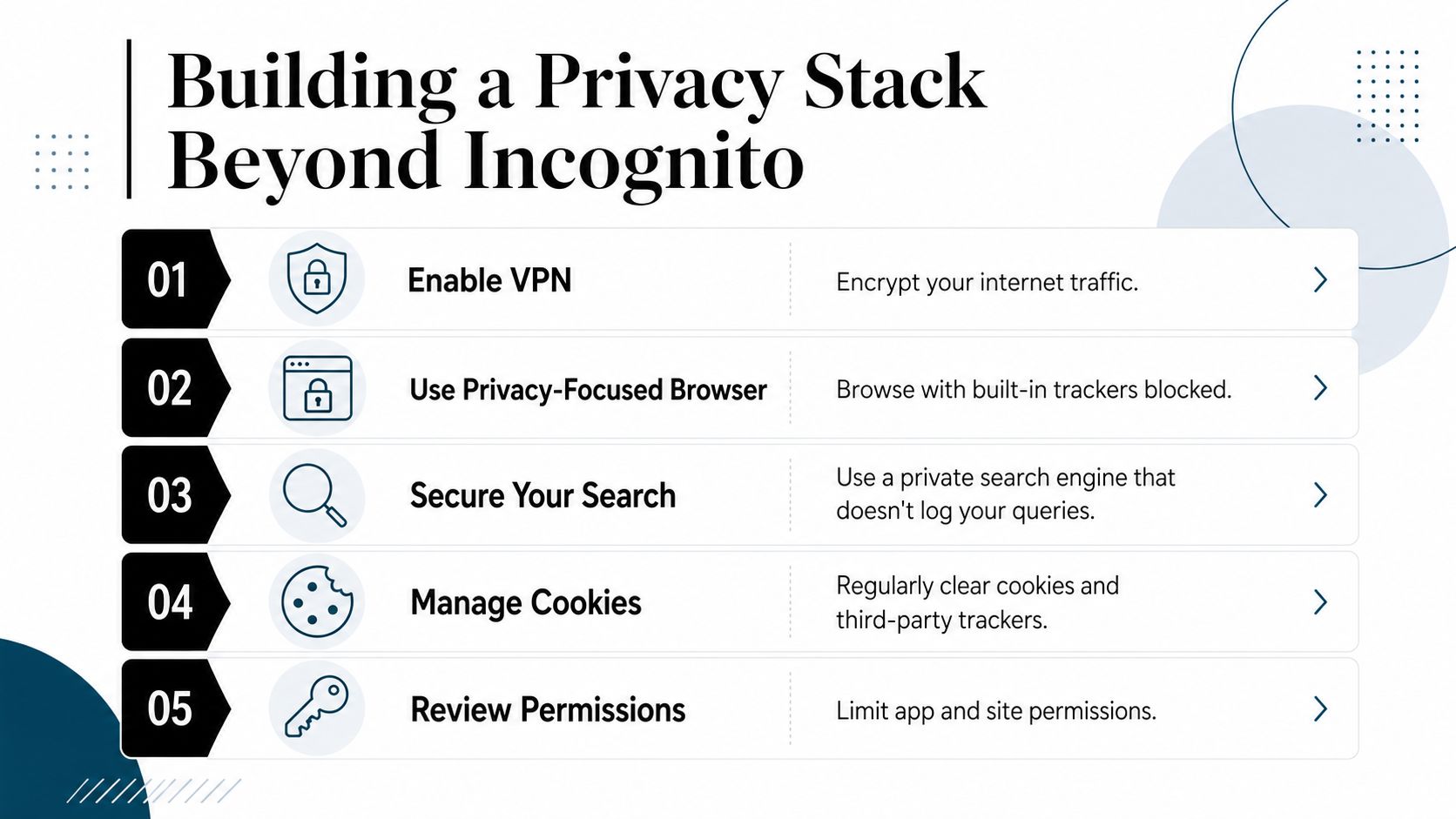
Enable a VPN. This helps encrypt traffic between your device and the VPN provider, which reduces what local network observers can see. It doesn’t hide you from every service, and it doesn’t stop websites from tracking account activity.
Use a privacy-focused browser or hardened settings. Firefox and Brave both offer stronger defaults than a standard browser setup, especially for tracker reduction. A privacy browser won’t make you invisible, but it can shrink the amount of data third parties collect.
Manage cookies deliberately. Clearing third-party cookies and limiting cookie persistence can reduce session carryover between visits. Incognito handles this temporarily, but normal browsing needs regular cleanup.
Review permissions. Site and app permissions can reveal more than people expect, especially when location, notifications, or camera access stay open. The fewer permissions you leave active, the less accidental exposure builds up.
Separate contexts with profiles. Keep work, personal, and sensitive browsing in different browser profiles so logins and synced data don’t mix. That doesn’t block tracking, but it stops one identity from bleeding into another.
You can also add a tracker blocker if your workflow tolerates it, and you can check whether your own account settings are amplifying the problem. If you want a practical overview of privacy tools, this internet privacy tools guide is a useful follow-up.
One option in the same broader category is Digital Footprint Check, which searches public exposure across many online sources so you can see what’s already visible. That kind of audit doesn’t replace browser privacy. It tells you where browser privacy still isn’t enough.
Auditing Your Digital Footprint for Hidden Exposures
Incognito can reduce local traces, but it can’t erase what’s already public. Social profiles, breached credentials, gaming identities, old forum posts, and searchable records can still tie back to you even if you browse privately every day.
That’s where OSINT auditing becomes useful. Instead of guessing what strangers can find, you check it. Digital Footprint Check searches 500+ platforms across social media networks, data breach databases, gaming profiles, professional networks, and public records to reveal what personal information is publicly accessible. For someone worried about identity theft, job prospects, romance scams, or reputation management, that matters more than whether a private window clears local history.
The key insight is simple. Browser privacy manages future traces. OSINT auditing reveals existing exposure. Those are different jobs. If you only use Incognito, you’re protecting the session you’re in right now. If you also audit your footprint, you can spot old accounts, public profiles, and breach exposure that private browsing will never touch.
If you haven’t checked your own exposure lately, start with a focused scan and review the names, usernames, emails, and profiles that surface. Then decide what to delete, lock down, or monitor. For a practical first pass, visit Digital Footprint Check and use the free checker to see what’s already tied to your digital identity.
Private browsing is a useful habit, but it’s only one layer of protection. Run a quick audit, compare what your browser hides with what the wider web still reveals, and take back control of your digital footprint before someone else uses it against you.