· Digital Footprint Check · Content Marketing · 13 min read
Scams on Facebook Messenger: Protect Your Account in 2026
Learn to spot and avoid scams on Facebook Messenger. Protect your account from phishing, impersonation, and payment fraud. Stay safe online in 2026.

A message pops up from your cousin on Facebook Messenger. They say they're locked out of an account, need your help, and ask you to send back a code that just hit your phone. It feels ordinary because the profile photo is right, the name is right, and the request sounds just urgent enough to skip a second thought.
That's why scams on Facebook Messenger work.
Individuals aren't typically fooled due to carelessness. They get fooled because the scam is built on trust. The attacker already knows who you know, what you share publicly, and how to make a fake request sound normal. Sometimes the scam comes from a fake profile. Sometimes it comes from a real account that's already been hijacked.
Messenger scams aren't just random junk messages. They're often part of a broader social engineering play that starts with your public digital footprint and ends with money loss, stolen accounts, or your identity being used against your own contacts.
Your Messenger Inbox Is a Modern Minefield
Messenger feels private, but that's exactly why scammers like it. Public Facebook activity gives them the setup. Messenger gives them the close.
A scammer might first study a public profile photo, a visible workplace, a tagged family member, or a recent life event. Then they send a message that sounds personal enough to lower your guard. That's the pattern behind many of the most convincing scams on Facebook Messenger. The attack doesn't begin in the chat window. It often begins with what you've already exposed online.
If you've ever posted vacation photos, listed a job title, accepted random friend requests, or left your friends list visible, you've given a stranger extra material to work with. That doesn't mean you caused the scam. It means the scammer had more raw material. This is why learning about the hidden dangers of oversharing on social media matters before a message ever arrives.
Why these scams feel so believable
The strongest Messenger scams rarely open with a wild promise. They start small.
A friend asks for a favor. A relative says they lost access to something. Someone you know sends a link with almost no explanation. The message is designed to feel slightly unusual, but not unusual enough to trigger panic.
Practical rule: If a message creates urgency and asks for money, a code, personal details, or a fast click, slow down before you reply.
What's actually at risk
People often think the worst outcome is sending money once. That's only part of the picture.
A successful Messenger scam can lead to:
- Account theft: An attacker gets into your Facebook account and uses it to message your contacts.
- Identity imitation: Your name, photos, and chat history help a scammer sound real.
- Contact exposure: Friends, family, coworkers, and group chats become new targets.
- Reputation damage: A compromised profile can embarrass you or make others distrust future messages from you.
That's why treating Messenger as “just chat” is a mistake. For scammers, it's a trust channel.
Anatomy of a Threat Common Facebook Messenger Scams
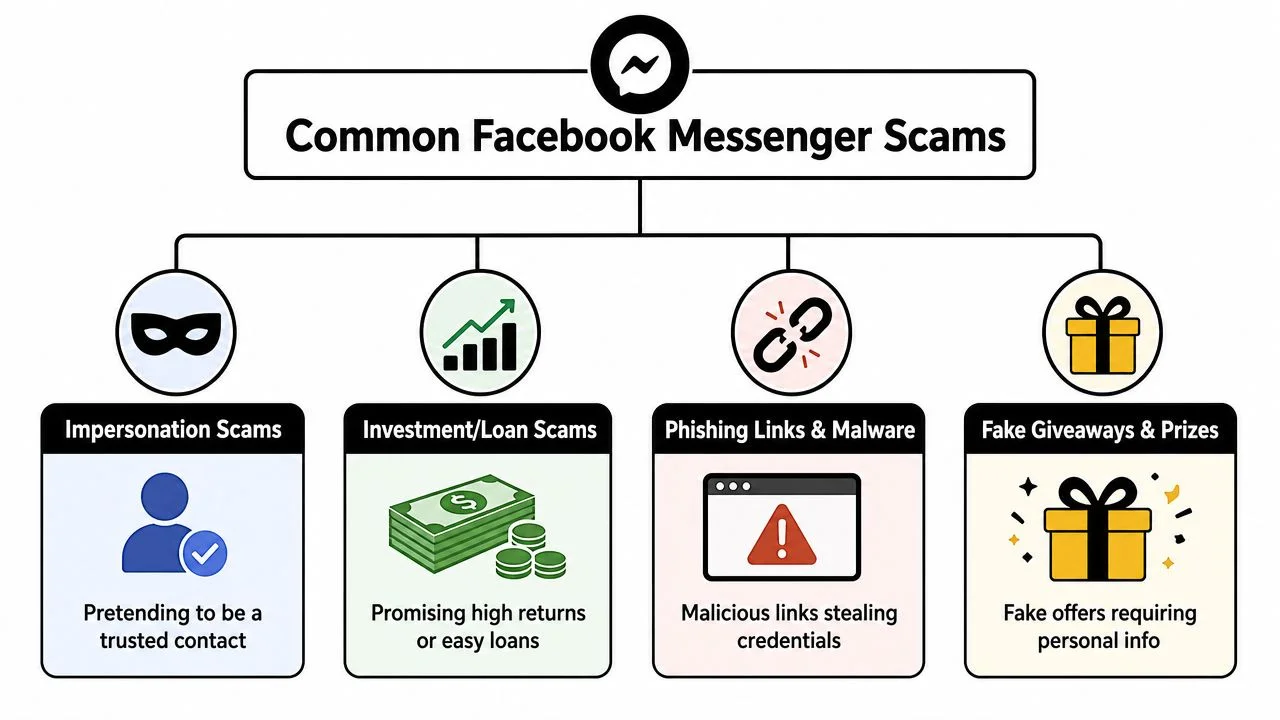
The easiest way to understand scams on Facebook Messenger is to sort them by the scammer's goal. Different scripts, same basic objective. Get your trust first, then get your money, account, or personal data.
Four common scam categories
| Scam Type | Primary Goal | Key Indicator |
|---|---|---|
| Impersonation | Gain trust fast | Message appears to come from someone familiar |
| Investment or payment fraud | Get money | Promises, pressure, or unusual payment methods |
| Phishing links and files | Steal login details or infect a device | Link feels unrelated, rushed, or slightly off |
| Fake giveaways and prizes | Collect personal or financial information | You must “verify” or “pay” to claim something |
Impersonation scams
This is the classic Messenger trap. The attacker pretends to be a friend, family member, coworker, or brand representative.
Sometimes they clone a profile using a copied photo and similar name. Sometimes they message from a real account they've already taken over. The goal is to borrow trust that already exists. If you want to understand the relationship side of this kind of deception, the patterns overlap with social catfishing tactics.
Typical signs include:
- Odd urgency: “I need this right now.”
- Unusual request: “Can you send me a code?” or “Can you lend me money?”
- Behavior mismatch: The person sounds unlike themselves.
Authentication code theft
This one confuses people because the code often comes from a real service. That makes the scam feel legitimate.
A technically important Messenger scam pattern is session takeover via authentication-code theft. Scammers impersonate a trusted contact and ask the victim to relay a one-time login code, which can then be used to complete account recovery or two-factor authentication on the attacker's device. Meta-style guidance warns that Facebook won't ask for passwords, 2FA codes, or financial information through Messenger, as explained in this Meta safety video about code theft scams.
Think of a one-time code like the key card to your hotel room. If someone tricks you into handing it over, they don't need to break the door down. You opened it for them.
Never share a login code sent to your phone or email, even if the person asking seems familiar.
Payment and crypto fraud
These scams lean on excitement, fear, or sympathy. A scammer may pitch an “investment,” request emergency help, or claim you must pay a fee to receive a reward. The details vary, but the pressure is similar. Act now. Don't ask questions. Use a payment method that's hard to reverse.
Malicious links and files
Some Messenger scams want your click more than your conversation. The message may say, “Is this you in this video?” or “You won a giveaway.” The link may lead to a fake login page, a download, or a site that pushes you to enter personal information.
Short messages are part of the trick. Less text means less chance you'll notice something sounds wrong.
Spotting the Trap Real-World Scam Examples and Red Flags
A technical lecture isn't what's needed. What's essential is to know what a bad message feels like while it's happening.
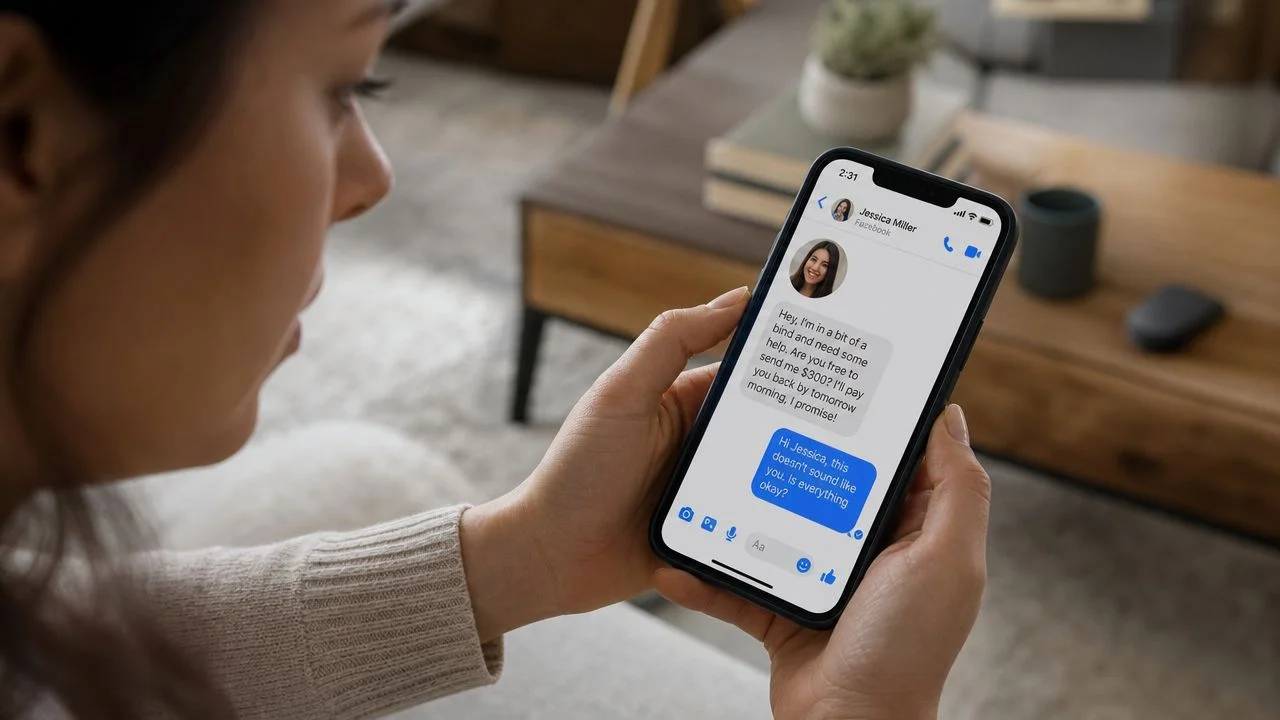
One consumer-security roundup reported that 62% of Facebook users encounter scams weekly, framing Facebook as the most scam-exposed social platform in its dataset, according to the FTC-linked romance scam context cited here. That matters because scammers often use public details like profile photos, friend lists, and workplace information to make a Messenger approach feel personal.
Example one the fake favor from a friend
You get a message from “Jake,” someone you know casually.
“Hey, are you free? I'm trying to get back into my Facebook and they sent a code to my phone but it's not coming through right. Can I use your number real quick?”
Then another message arrives.
“Actually I sent it already. Just forward me the code when you get it.”
Red flags in this short exchange:
- Sudden pressure: The scammer wants speed before you think.
- Confusing explanation: The story doesn't quite make sense.
- Sensitive request: Any request for a code is a major warning sign.
If you're unsure whether a link in a message is safe, use a separate browser and a trusted process for checking if a website is safe before you go anywhere near it.
Example two the emotional money request
A “family member” writes:
“I'm so embarrassed to ask. I'm stuck and can't call. Can you send gift cards now? I'll pay you back tonight.”
This works because it targets your instincts. You don't want to seem rude, and you don't want to ignore someone who might need help.
The warning signs are emotional, not technical:
- Shame language: “I'm embarrassed to ask.”
- Isolation: “I can't call.”
- Nonstandard payment: Gift cards, transfers, or unusual apps.
- Short repayment promise: “I'll pay you back tonight.”
A real emergency can survive a phone call. A scam usually can't.
Example three the bait link
Some messages are little more than a hook.
“Is this your photo?”
“You need to see this.”
“Claim your prize before it expires.”
The attacker wants your curiosity to do the work. The safest move is not to test the link from inside the chat at all.
A quick visual walkthrough can help you recognize how these scams are packaged in practice:
Red flags that matter most
People often focus on spelling mistakes, but scammers don't need bad grammar to be dangerous. Better clues include:
- A request that breaks normal behavior
- Pressure to act before verifying
- A code, password, payment, or login request
- A push to keep the conversation inside chat only
- A mismatch between the profile and the message tone
If something feels slightly off, treat that feeling as useful data.
Emergency Response Plan What to Do If You Suspect a Scam
When you suspect a Messenger scam, your job isn't to investigate it. Your job is to contain it.
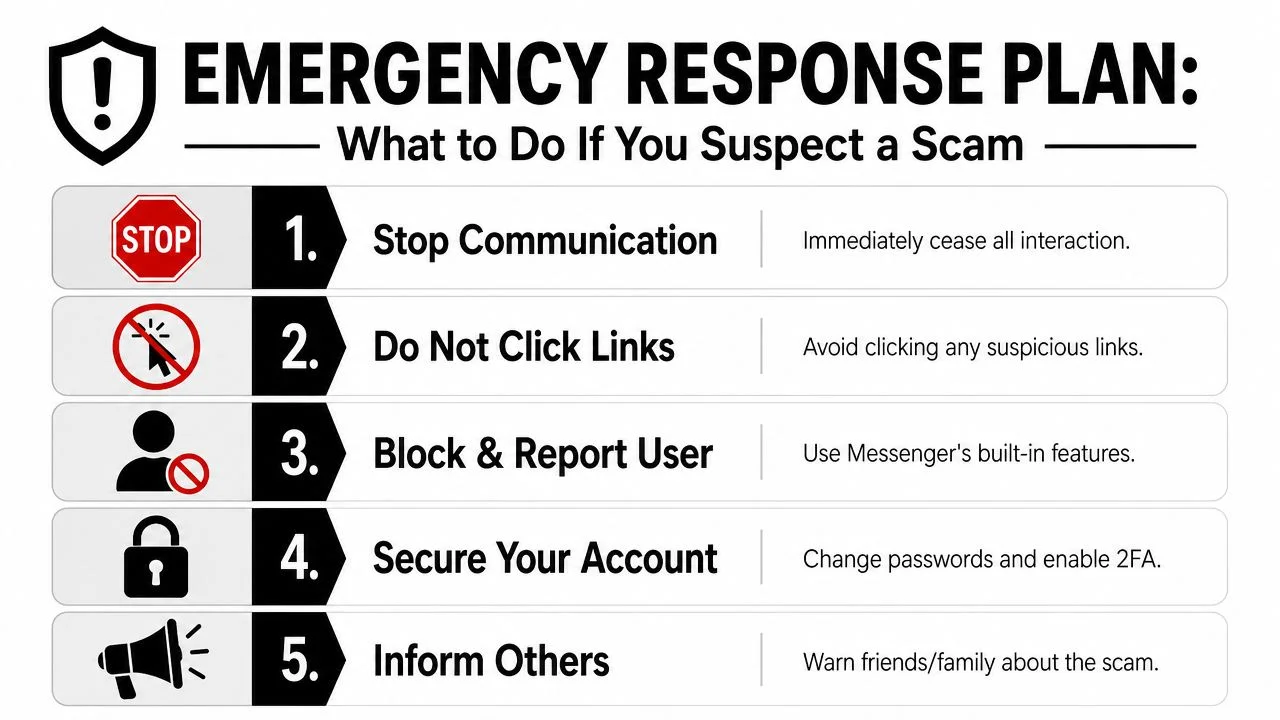
Your first five moves
-
Stop replying
Don't argue, don't test them, and don't try to trap the scammer. Every extra message gives them another chance to manipulate you.
-
Avoid links and attachments
If you haven't clicked yet, keep it that way. If you already clicked, close the page and don't enter anything else.
-
Block and report the account
Messenger and Facebook include reporting options for suspicious chats and profiles. Use them. Reporting helps remove bad accounts and reduces the chance that someone else gets hit next.
-
Secure your account
Change your password from a device you trust. Review active sessions and sign out of devices you don't recognize. If you need a broader recovery checklist, this guide on how to get rid of hackers walks through the cleanup process.
-
Warn the people around you
If the scam came through a cloned or hijacked profile of someone you know, tell them outside Messenger. If your own account may be compromised, notify friends and family so they don't trust recent messages from your profile.
If you already shared something sensitive
The next step depends on what you shared.
- If you shared a password: Change it immediately anywhere you reused it.
- If you shared a login code: Assume the account may be at risk and review recovery settings right away.
- If you sent money: Contact the payment provider or bank as quickly as possible.
- If you shared personal details: Watch for follow-up scams, impersonation, or account recovery attempts.
Fast action matters more than perfect action. Contain first, sort details second.
Fortify Your Defenses Securing Your Account and Digital Footprint
The best defense against scams on Facebook Messenger isn't becoming a human lie detector. It's making your account harder to abuse and your public information less useful to strangers.
A major problem is trusted-account abuse. Group-IB reported campaigns using nearly 1,000 fake or compromised Facebook profiles to spread scams, as summarized by Help Net Security's coverage of the Messenger campaign. Once an account is compromised, attackers can impersonate the victim, blackmail them, or use the profile to spread the scam further.
Lock down the account itself
Start with the basics that reduce risk.
- Use a strong unique password: If your Facebook password appears anywhere else in your life, change it.
- Turn on multi-factor authentication: This adds a second barrier, which helps when a password alone gets exposed.
- Review logged-in devices and sessions: Unknown devices or locations can be takeover clues.
- Check recovery options: Make sure your email and phone number are current and controlled by you.
- Audit connected apps: Remove anything you don't recognize or no longer use.
This is the practical side of account takeover prevention. A lot of Messenger damage happens after the attacker gets in, not before.
Shrink the attacker's research material
Scammers build believable stories out of little scraps. You don't need to disappear from the internet. You need to be more selective.
Tighten these areas:
- Profile visibility: Limit who can see your friends list, posts, and personal details.
- Public bio details: Remove information that makes identity mimicry easy, such as workplace specifics or predictable recovery clues.
- Old posts and tagged content: Review what a stranger could learn in a few minutes.
- Photos: Be careful with family images, children's names, school references, and travel timing.
One practical option is to use a service like Digital Footprint Check to scan where your personal information, usernames, and social profiles are publicly exposed, then use that visibility to reduce what scammers can gather before they contact you.
Don't ignore crossover risks
Messenger scams don't stay inside Messenger. A compromised Facebook account can affect crypto accounts, gaming communities, side hustles, and business contacts. If someone uses Messenger to pitch tokens, trading groups, or wallet help, it's worth learning how to secure your crypto investments before you engage with anything financial.
Your account is not just a social account. It's a trust asset. Protect it like one.
Targeted Threats Guidance for Parents Job Seekers and Employers
Messenger scams hit different people in different ways. The risk changes with context.
Parents and families
Children and teens often assume a familiar profile means a familiar person. That's a dangerous shortcut. Parents should teach one simple rule early: if a message asks for secrecy, money, codes, or a fast click, stop and verify outside the app.
Useful habits include:
- Create a family verification phrase: A simple shared phrase can help confirm real identity during odd requests.
- Talk through scam scripts: Practice what a fake “friend in trouble” message looks like.
- Review privacy settings together: Make sure kids understand what public profile details reveal.
The goal isn't constant surveillance. It's building reflexes.
Job seekers
Job seekers are often under pressure, which scammers know. A Messenger note about a fast interview, remote work, or account verification can feel like an opportunity you can't miss.
The damage isn't only financial. If your Facebook account gets taken over, a recruiter or employer who receives spam, fake investment messages, or suspicious links from your profile may question your judgment or your digital hygiene.
Watch for these warning signs:
- Recruiters who only want to chat in Messenger
- Requests to verify identity through codes or logins
- Pressure to move money, buy equipment, or pay a fee
- Profiles that look polished but vague
Employers and HR teams
A personal Messenger compromise can turn into a workplace problem quickly. Employees often have coworkers, clients, vendors, and applicants in their social networks. If an attacker controls that account, they inherit a believable channel for fake invoices, bogus hiring messages, or malicious links.
Employers can lower risk by:
- Training staff to verify unusual requests off-platform
- Encouraging separation between personal and business communication
- Including social account safety in security awareness training
- Preparing staff for impersonation attempts involving executives or recruiters
A hacked social account can become a bridge into professional trust. That's what makes it dangerous.
From Reactive to Proactive Winning the War Against Scammers
The most useful shift is mental. Stop thinking of Messenger scams as isolated weird messages. They're often trust attacks built from public information, familiar names, and stolen access.
You don't need to become paranoid. You need a routine.
Question requests for codes. Verify money requests outside chat. Review active sessions. Tighten privacy settings. Treat your Facebook account like a front door key, not a casual social accessory. The less public material you offer, and the harder your account is to hijack, the less useful you become to a scammer.
That's how you move from reacting to one message at a time to building real digital resilience.
Your Facebook profile, public posts, old usernames, and exposed personal details can all feed scams on Facebook Messenger. Digital Footprint Check helps you see what information about you is publicly accessible online. If you want a practical first step, try the free checker and review what a scammer could already know before they ever message you.