· Digital Footprint Check · Content Marketing · 18 min read
Can You Send an Anonymous Email? a 2026 Privacy Guide
Can you send an anonymous email without being traced? Learn step-by-step methods for true privacy, see how anonymity fails, and protect your digital footprint.
TL;DR: Yes, you can send an anonymous email, but true, untraceable anonymity is hard and depends on your threat model. Basic privacy is easy with aliases or temporary addresses, while stronger anonymity usually means combining Tor or a no-logs VPN with a privacy-focused email provider and careful operational security. Market data shows demand for these tools is rising fast, with the anonymous email forwarding market valued at $1.2 billion in 2024 and projected to reach $3.8 billion by 2033.
You might be asking this because you don’t want a recruiter to connect a tip-off to your name. Or because you’re signing up for a gaming forum and don’t want another account tied to your main inbox. Or because you’re online dating and want a layer between a new contact and your real identity.
The short answer is yes. The useful answer is that anonymity isn’t one thing. It’s a range, from “I don’t want spam” to “I can’t risk being identified.”
Why Sending an Anonymous Email Matters in 2026
A job seeker wants to report misconduct at a former company without closing off future references. A gamer wants a fresh start in a new community without tying that account to years of forum history. Someone leaving an unhealthy relationship may need to contact a lawyer or support service without exposing a shared inbox. In each case, the question sounds simple. The risk behind it is not.

People leave far more data behind than they expect. An old forum account, a breached shopping login, a reused username, a profile photo, or a recovery email can connect identities that were supposed to stay separate. Once an email address becomes a common thread, it can link work, dating, gaming, purchases, and location clues.
That is why anonymous email matters in 2026. The issue is not mystery for its own sake. It is control over who can connect the dots, how easily they can do it, and what happens if they succeed.
Demand for privacy tools keeps rising, which reflects a practical need for separation and damage control, not just secrecy. Analysts tracking the anonymous email forwarding market have noted strong growth through the next decade. The direction makes sense. More accounts, more breaches, and more cross-platform tracking give people more reasons to split identities instead of running everything through one inbox.
Anonymity is a spectrum
Treat anonymous email as an OpSec decision, not a checkbox.
If the goal is avoiding spam from a download site, a simple alias may be enough. If the goal is contacting a journalist about employer misconduct, that same setup can expose you through provider logs, login records, writing style, or account recovery details. The method only makes sense when it matches the threat.
A practical breakdown looks like this:
- Low-stakes privacy: newsletters, promo codes, one-off downloads, throwaway signups
- Medium-stakes compartmentalization: dating apps, gaming communities, side projects, marketplace messages
- High-stakes anonymity: whistleblowing, reporting abuse, stalking concerns, sensitive legal or medical outreach
Practical rule: Choose the setup based on the harm you would face if someone identified you.
Convenience, cost, and security usually pull in different directions. Free tools are quick, but they often leave more records and offer less control. Paid privacy services can reduce exposure, but they still fail if you sign in from your normal browser, reuse a username, or recover the account with your main email.
Before using any anonymity tool, check what already points back to you. A public handle, exposed inbox, or recycled avatar can collapse the whole setup. Review your existing digital footprint and exposed identifiers before you send anything sensitive.
What people usually mean by anonymous
The word “anonymous” usually covers three different goals:
| Meaning | What they want | How it fails |
|---|---|---|
| Private from the recipient | The other person cannot see the sender’s real inbox | Alias forwarding, provider records, and message headers may still create links |
| Private from casual observers | Their device or connection is not obvious | Browser fingerprinting, IP leaks, and account reuse can expose them |
| Hard to trace under scrutiny | Their identity cannot be tied back easily, even after investigation | Mistakes in OpSec, metadata, legal requests, and pattern analysis can connect the message to them |
The last category requires discipline. Opening a burner inbox is rarely enough. If the stakes are high, the email account is only one part of the problem. The device, network, browser, writing habits, timing, and the rest of your digital footprint matter just as much.
Everyday Anonymity Simple Methods for Basic Privacy
Individuals don’t need deep-cover tradecraft. They need a safer way to hand out an email address without feeding spam, exposing their main account, or tying every online action to one identity. For that, simple methods work well enough.
The two most common options are burner email accounts and email aliases. They solve different problems.
Burner email addresses
A burner is a temporary inbox used for short-lived activity. Think one-off forum registration, a coupon download, or grabbing a file from a site you don’t trust enough to give your real address.
The appeal is convenience. You often don’t need to build a long-term identity around it. If the inbox gets flooded, abandoned, or blocked, you move on.
The problem is that convenience isn’t the same as anonymity. Burners are weak for anything sensitive because they don’t protect you from the rest of your footprint. If you access them from your normal browser on your home connection and write in your usual style, you’ve only hidden one layer.
Email aliases
Aliases are better for ongoing compartmentalization. Instead of creating a whole new inbox each time, you create forwarding addresses that route mail to your real account while hiding that real address from the sender.
This is useful when you want boundaries without constant maintenance. A gamer can use one alias for a tournament platform, another for Discord-adjacent community sites, and another for hardware warranties. Someone using dating apps can give out an alias first and delete it later if the interaction turns odd.
An alias protects your main inbox. It doesn’t erase the rest of your trail.
Aliases are often the smarter default because they support normal life. You can reply, filter messages, and cut off a compromised alias without burning your real account.
Comparison of Basic Anonymity Methods
| Feature | Burner Email (e.g., Guerrilla Mail) | Email Alias (e.g., SimpleLogin) |
|---|---|---|
| Best use | One-time signups and throwaway access | Ongoing signups and identity separation |
| Convenience | Fast for temporary use | Better for long-term management |
| Inbox control | Limited, often disposable | Stronger control and easier organization |
| Spam protection | Good for short bursts | Better for sustained spam control |
| If exposed | Usually discarded | Alias can be disabled or replaced |
| Good for sensitive communication | Usually no | Sometimes, but only for lower-risk cases |
| Main weakness | Easy to misuse as a false sense of security | Doesn’t hide your behavior, device, or writing patterns |
Which method fits your situation
A few realistic examples make the choice clearer.
- Job hunting: Use an alias for recruiters, job boards, and portfolio downloads. If one site leaks or starts spamming, you can shut off that address without touching your primary inbox.
- Gaming: Use separate aliases for publishers, marketplaces, and community tools. That reduces cross-linking between your gamer identity and your personal life.
- Online dating: Use an alias when moving from in-app chat to email. If the person becomes intrusive, you can cut the line cleanly.
- Free trials and random downloads: Use a burner when you don’t expect a future relationship with the service.
If you want to reduce traceability beyond the email layer, your network identity matters too. Even a basic privacy setup gets stronger when you also hide your IP address instead of handing websites your normal connection details.
What these simple methods do not do
People get into trouble when they expect basic tools to deliver high-stakes anonymity. They don’t.
They won’t protect you if you:
- Reuse personal details: same username, profile photo, or writing habits
- Reply from your main account: one mistake collapses the separation
- Open links in your regular environment: your broader online identity can still bleed through
- Send sensitive attachments: files can carry clues even if the address itself looks detached
For low-risk privacy, these tools are solid. For serious anonymity, they’re not enough.
Serious Anonymity Secure Providers and The Tor Network
When the stakes rise, email privacy stops being about just the address. It becomes an operational security problem. Your connection, your device, your provider choice, your sign-up details, and your message content all matter.
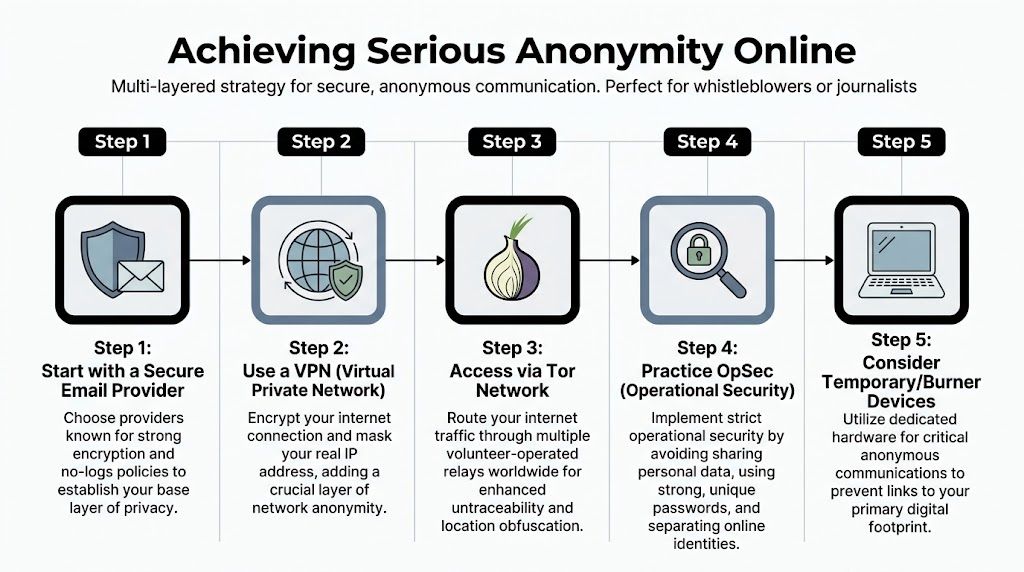
For stronger anonymity, the practical baseline is layered. Proton’s guidance on anonymous email recommends connecting through a no-logs VPN or the Tor network, then using an end-to-end encrypted service like ProtonMail that requires no PII for signup and has zero-knowledge policies. The same guidance warns that metadata in attachments, such as GPS data in photos, can deanonymize an otherwise secure email.
Start with your threat model
Before touching a tool, ask one question: who are you hiding from?
If the answer is “marketing spam and nosy websites,” you don’t need the same setup as someone reporting corruption. If the answer is “a determined person with time, legal power, or technical skill,” every shortcut matters.
A stronger setup usually looks like this in practice:
- Use a separate environment for the task.
- Obscure your network path with a no-logs VPN, Tor, or both.
- Register with a privacy-focused provider such as ProtonMail or Tutanota without using personally identifying details.
- Keep the account isolated from your normal life.
- Remove clues from content and attachments before sending.
Why each layer exists
A VPN helps mask your real IP from the service you use. That’s useful, but it shifts trust to the VPN provider.
Tor Browser adds another layer by routing traffic through multiple relays. That makes network tracing harder and is often the better choice when anonymity matters more than convenience.
A privacy-focused provider gives you better protection around the mailbox itself. Terms like end-to-end encryption and zero-knowledge sound technical, but the practical point is simple. The provider is designed to know less about your content and account activity than mainstream services.
Don’t confuse encrypted content with anonymous identity. Encryption protects message contents. Anonymity depends on the whole setup around it.
What a careful setup looks like
Open a privacy-focused browser environment first. If the risk is meaningful, don’t sign up from the same browser profile you use for shopping, work, and social media.
Connect through Tor, a no-logs VPN, or both, depending on your risk tolerance and technical comfort. Then create an account with a provider like ProtonMail or Tutanota. Use a fresh username that doesn’t echo your existing handles, bios, or naming habits.
From there, treat the account like a sealed compartment:
- Use it only for the purpose you created it for
- Never add recovery details tied to your primary identity if you can avoid it
- Don’t import contacts from your regular life
- Don’t log in casually from your everyday device profile
If phone privacy is part of the same problem, this practical guide on how to make your phone number private is worth reading alongside your email setup. Email anonymity often fails because another identifier, especially a phone number, is easier to connect back to a real person.
The trade-offs are real
Stronger anonymity is slower and more fragile. Tor can be less convenient. Some providers may treat Tor or VPN signups as suspicious. You may hit verification friction. Some websites block anonymized traffic entirely.
That doesn’t make the approach useless. It means you need to choose where inconvenience is worth it.
A quick decision guide:
| Situation | Likely fit |
|---|---|
| Newsletter, coupon, download | Alias or burner |
| Dating, marketplace, hobby community | Alias plus better browser hygiene |
| Sensitive outreach or personal safety concern | Tor or no-logs VPN plus privacy-focused provider |
| High-risk reporting or source protection | Dedicated setup, strict isolation, and disciplined OpSec |
If you want a broader stack beyond email itself, curated internet privacy tools can help you build a cleaner setup around browsing, account separation, and identity protection.
The Digital Ghost How Anonymous Emails Get Traced
A job seeker sends a tip about hiring discrimination from a “clean” account. A gamer reports targeted harassment without using their main inbox. An employee contacts a journalist about fraud. In all three cases, the email address is only one layer of exposure. What gets people identified is usually the full trail around the message.

Anonymous email works on a spectrum of OpSec. If your goal is avoiding spam, small leaks may not matter much. If your goal is reporting misconduct without retaliation, the same leaks can identify you. That is the right frame for tracing. Not “is the email anonymous?” but “which parts of my digital footprint still point back to me?”
Technical tracing points
Email carries more than message text. The account, connection, browser, timing, and attachments all leave clues.
Common failure points include:
- IP exposure: If you sign up or log in without network privacy, the mail service may record the connection source.
- Headers: Routing details can expose infrastructure, sending paths, or weak setup choices.
- Browser fingerprinting: Your browser configuration can be distinctive enough to help correlate sessions.
- Burner service records: Temporary email services often keep enough provider-side data to become useful in an investigation.
- Header anomalies: Odd routing patterns, mismatched time zones, or inconsistent mail clients can stand out.
Investigators and OSINT analysts rarely need one smoking gun. They correlate small artifacts until a pattern points to a person, device, place, or routine.
Network anonymity has structural weaknesses too
Even if you avoid obvious mistakes, traffic patterns can still matter. A 2016 study on statistical disclosure attacks in anonymized email networks showed that analysts can infer network characteristics and identify important participants through relational analysis, even with incomplete data.
That matters in real cases. A whistleblower may never reveal their name in the body of an email, but repeated contact with the same recipient at predictable times can still narrow the field. An abusive ex trying to find a survivor does not need full content access if timing, account reuse, and linked identifiers already tell a story.
Field insight: Anonymous rarely means untraceable. Repetition is often the clue that breaks cover.
Human mistakes usually matter more than software mistakes
People expose themselves through behavior all the time. I see this more often than hard technical failure.
The common problems are mundane:
- Content clues: a reference to a team meeting, local event, internal tool, or phrase you use elsewhere
- Attachment metadata: documents, photos, PDFs, and screenshots can carry names, locations, software IDs, and timestamps
- Session crossover: opening the anonymous account in the same browser profile as personal email or social media
- Identity reuse: the same avatar, handle pattern, sign-off, or writing rhythm across platforms
- Follow-up pressure: replying casually to a probing message and revealing extra detail
If someone already has one identifier, they can often build outward from there. A simple email reverse search workflow can connect a single address to usernames, old profiles, breach data, and public mentions across the web.
A useful explainer sits below. Watch it skeptically. The value is not the scare factor. It is seeing how many separate clues can speak for you.
What works better than false confidence
Good anonymity planning assumes some layer will fail. The goal is to limit what that failure reveals.
| Risk area | Better practice |
|---|---|
| Network | Use Tor or a no-logs VPN that fits your threat model |
| Account identity | Create a fresh account with no personal details or recovery ties |
| Device and browser | Separate the task from your everyday device profile and browser session |
| Attachments | Remove metadata, convert carefully, or avoid attachments |
| Writing style | Keep messages brief, factual, and stripped of personal habits |
| Repetition | Avoid routines in timing, recipients, and phrasing |
That is the trade-off. Stronger anonymity takes more time, more friction, and more discipline. For a casual burner address, that may be excessive. For a source, a survivor, or anyone facing real retaliation risk, it is the cost of doing the job properly.
Navigating the Gray Area Legal and Ethical Considerations
You can send an anonymous email. That doesn’t answer whether you should, or how you should do it responsibly.
Anonymous communication has legitimate uses. A worker may need to report fraud without risking retaliation. A person facing stalking may need to contact support services without exposing a shared inbox. A researcher may need to disclose a vulnerability before a vendor is ready to talk publicly.

The same tools can also be used for harassment, extortion, impersonation, threats, scams, or coordinated abuse. That’s where the legal and ethical line becomes sharp.
When anonymity serves a legitimate purpose
The best test is motive plus method.
Using anonymity to reduce exposure while sharing truthful information, seeking help, or protecting personal safety is different from using anonymity to avoid accountability for harm. Privacy is not the same thing as impunity.
Good-faith uses often share a few traits:
- Minimal disclosure: the sender reveals only what’s necessary
- Specific claims: facts are stated clearly instead of vaguely smearing someone
- Protected channels: whistleblower or compliance routes are used where available
- No intimidation: the message avoids threats, coercion, or manipulation
Anonymous communication is strongest when it protects a vulnerable person, not when it shields abusive behavior.
Why organizations struggle with it
There is a real compliance problem here. The verified brief is clear that the tension between accountability and anonymity is a growing regulatory challenge, and that with GDPR and CCPA, individuals and organizations have to handle anonymous channels with care because they can create legal liability in professional and institutional settings.
An employer, HR team, or school may want anonymous reporting because people won’t speak up otherwise. But if they cannot investigate fairly, preserve records correctly, or address false allegations, the channel becomes risky for everyone involved.
That creates hard questions:
| Scenario | Ethical tension |
|---|---|
| Anonymous workplace complaint | Protect the reporter, but allow a fair process |
| Anonymous tip to a journalist | Protect the source, but verify the claim |
| Anonymous message to a date or ex-partner | Preserve safety, but avoid deceptive escalation |
| Anonymous review or accusation online | Inform the public, but don’t weaponize rumor |
A practical standard for responsible use
If you’re considering anonymous email for a serious reason, apply this filter before sending:
- Is the purpose protective or harmful?
- Is email the least risky channel available?
- Can you make the message factual, narrow, and non-defamatory?
- Would you be comfortable if the message were later examined by an employer, regulator, or court?
If the answer to that last question is no, stop and rethink the plan.
Anonymous email can protect dignity, safety, and truth. It can also create fallout that follows a person for years. If your real goal is to handle a conflict, report harm, or document misconduct, the best move is often a channel designed for that purpose rather than a dramatic attempt at invisibility.
Beyond Anonymity Proactive Privacy and Digital Footprint Management
A job seeker sends an anonymous email to report a toxic manager. The message is technically careful, but their old forum username matches an abandoned X account, the same profile photo appears on a public gaming profile, and a breached email address still ties both identities together. The email stayed hidden. The person did not.
That is the gap many anonymity guides miss. They explain how to mask a message, but not how exposed accounts, reused handles, old bios, cached pages, and public records can connect the sender anyway.
Anonymous email works best as one part of OpSec. Your threat model matters. Someone trying to avoid spam after signing up for a marketplace needs a very different setup from a whistleblower contacting a journalist. In both cases, the limiting factor is often the same. How much of your identity is already visible and easy to correlate?
Why footprint often matters more than the mailbox
If your usernames, photos, writing style, and contact details are scattered across gaming platforms, dating apps, freelance profiles, and old forums, a fresh anonymous inbox will only do so much. The message may be clean while the rest of your online trail is full of clues.
As noted earlier, technical traces can expose anonymous email attempts. Public footprint creates a different problem. It gives other people a head start. A scammer, employer, ex-partner, or investigator may not need to break your anonymity tools if your accounts already line up on their own.
I see this most often in mixed-identity use. A professional uses one name on LinkedIn, a variation of it on Reddit, the same avatar on Discord, and an old Gmail handle on a hobby forum. A single anonymous email sent in that environment carries more risk than the sender expects.
A more durable privacy model
Start with exposure, then choose tools.
- Audit what is already public. Look for exposed email addresses, usernames, profile photos, bios, and cached account pages.
- Separate identities by context. Work, dating, gaming, activism, and buying or selling online should not share the same handles or recovery details.
- Remove what you can. Close unused accounts, change public profile data, and tighten privacy settings where deletion is not possible.
- Match the method to the risk. A throwaway address may be enough for a one-off sign-up. Higher-stakes communication may justify a secure provider, Tor, or a non-email channel built for source protection.
This approach costs more time up front. It also holds up better than chasing a perfect anonymous email setup while ignoring years of account reuse.
What to do next
Start with an inventory of your public traces, not with the mailbox you plan to create. A practical first step is to check your digital footprint for exposed emails, usernames, profiles, and linked accounts.
Once you know what is already visible, you can make better decisions about aliases, recovery methods, secure providers, and whether email is even the right channel for your situation. That is what good OpSec looks like in practice. It is not invisibility. It is reducing easy links, choosing the right level of friction, and avoiding mistakes that make identification simple.