· Digital Footprint Check · Content Marketing · 16 min read
How to Search Facebook From Phone Number in 2026
Learn how to search Facebook from phone number on mobile and web. Step-by-step methods, privacy controls, and safe OSINT alternatives explained.
You get a text from an unknown number, or someone messages you from a dating app and you want to verify they’re real before you keep talking. A lot of people instinctively think, “I’ll just search Facebook by phone number and see what comes up.” In 2026, that idea still has some truth, but it’s much less direct than older guides make it sound.
Facebook phone lookup is now a conditional match, not a public directory. Whether anything shows up depends on contact syncing, lookup settings, and the account owner’s privacy controls. If you’re trying to verify a person, a scammer, or an old contact, it helps to understand the mechanics first, because the difference between “found” and “nothing returned” often has nothing to do with your effort.
If you’re trying to understand what else a number may reveal about you, the broader picture matters too, including what appears in search results, public profiles, and breach data. A good starting point is to check what information is online about me so you’re not treating Facebook like the only place your identity can surface.
Why Phone Number Lookup on Facebook Is Harder Than It Looks
A phone number feels like a neat identifier, but Facebook treats it more like one clue among many. You may type a number and get no result, even if the person has a profile, because the number has to line up with discoverability settings, contact matching, and whatever Facebook is willing to show your account. That is why the result often looks binary to the user while the system underneath behaves conditionally.
Older advice still circulates because Facebook used to behave more like a loose people finder. That changed when direct phone-number search was removed from the public search bar in 2018, after abuse concerns were already well known. BBC covered that shift and explained that Facebook disabled direct phone-number search after researchers showed it could be abused to harvest identities, while EFF noted that phone numbers can still be used in other ways when contacts are uploaded from a mobile phone, which is the part many people miss (BBC).
A lookup can still succeed, but only when several things line up. The account has to allow discovery, the number has to be attached to the right profile, and Facebook has to decide that your search or synced contacts are eligible to surface it. If any one of those pieces is missing, the search may look broken even though it is behaving as designed.
Why the old guides feel wrong
A lot of articles still describe the old workflow, type a number, get a profile, move on. That is outdated. Facebook now behaves more like a matching system than a public directory, so the same number can return a profile for one person and nothing for another, depending on their settings and on how Facebook has indexed the account.
The gap is easier to understand if you separate two questions. First, can Facebook connect the number to an account. Second, can Facebook show that account to you. Those are not the same thing, and people often assume they are. A profile may exist in Facebook’s systems and still stay hidden from your search because the owner limited phone-based discovery, kept contact lookup private, or never attached the number in a way that makes it searchable.
That is also why a lookup can fail for reasons that have nothing to do with the person you are checking. The number may be recycled, the account may be inactive, or the profile may be set up so that only certain contacts can find it. If you are also reviewing a person’s public-facing identity elsewhere, a broader check such as business portrait tips can help you compare what is visible on the surface with what a phone-number search is capable of revealing.
For readers checking an unknown contact, a dating match, or a possible scam, the main mistake is treating silence as proof. A blank result does not confirm anything by itself. It may mean the number is private, unmatched, or no longer tied to the person you expected, which is exactly why a phone lookup on Facebook behaves more like probability than certainty.
If you want a fuller picture of your own exposure, it also helps to review what information is online about me. Facebook is only one place where a number can surface, and a failed search there does not mean the number is absent everywhere else.
Searching Facebook by Phone Number on Mobile
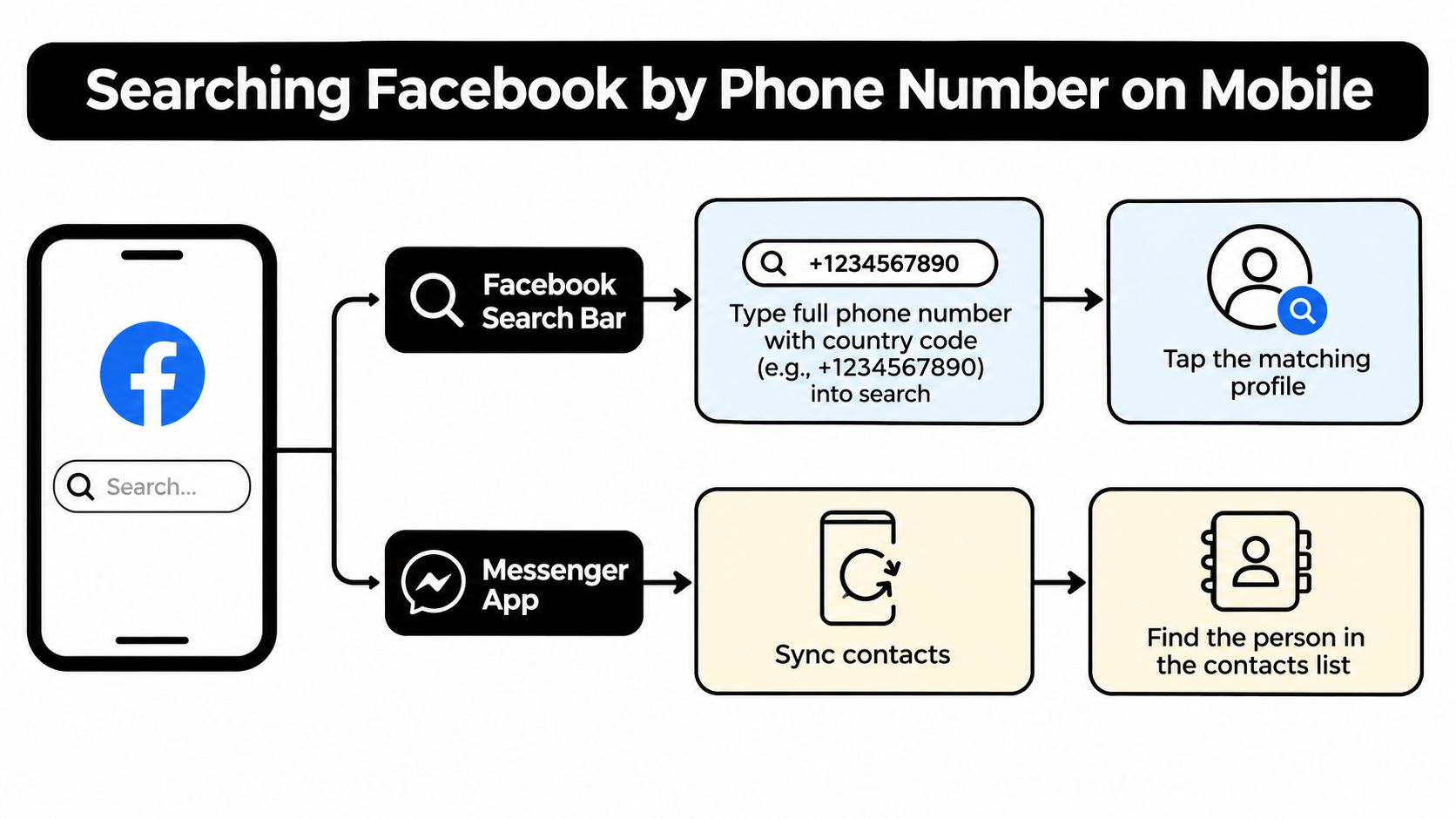
A phone number on mobile can lead to a Facebook profile in two different ways, but both depend on permission and matching conditions that are easy to miss. One path is the app’s own search bar, where a full number may surface a profile if that account is set up to be found that way. The other path uses Messenger or Facebook contact sync, where the number in your address book is compared against accounts Facebook already knows about.
The direct search bar attempt
Start by entering the full number, including the country code, in Facebook’s search bar. If Facebook has a match and the person’s privacy settings allow phone-based discovery, a profile may appear. This is the closest thing to the old phone-number trick, but it now behaves more like a conditional lookup than a public directory. Facebook’s own help flow treats phone discovery as part of contact matching and connection features, not as a general search system (wikiHow).
That makes this a useful first check when you have only a number and no other identifying details. It is also the fastest way to see whether the number is already discoverable on the platform. If nothing appears, the result may reflect privacy settings, a missing phone association, or a profile that Facebook will not show to you.
The contact-sync route on mobile
The second path matters more when the number is already saved in your phone. Add it to your contacts, then allow Facebook or Messenger to sync contacts. Facebook can then compare that saved number with accounts that allow matching by phone and may surface the person through suggestions or contact-based discovery (wikiHow).
This workflow still only works under the right conditions. A saved contact helps, but it does not guarantee a result. Facebook’s own behavior and third-party guidance point to the same idea, the target has to allow phone-based discoverability, and your app has to be permitted to match that contact through syncing (Alibaba).
For a broader view of how unknown numbers are handled elsewhere online, this guide to finding out unknown numbers can help you decide whether a hit is worth trusting or whether the number needs more checking.
A quick summary helps here. Mobile lookup works in stages, search first, then sync, then verify. The first stage sometimes finds a profile on its own, while the second stage is often what reveals a hidden one.
If mobile search returns nothing, that is often the expected result, not a failure of the app. Facebook is showing only what the privacy settings allow, which is usually less than people assume.
Using Facebook’s Web Search and Contact Sync on Desktop
Desktop search makes the process easier to inspect because the browser version shows the contact-matching path more clearly. You can still type a full phone number into Facebook’s search field, but that only helps when the account is already discoverable. On desktop, the stronger signal often comes from synced contacts and the suggestion areas that sit behind the main search box, not from a clean public result.
Why desktop can reveal more than a quick mobile check
The browser view is useful because it shows where Facebook is pulling from. If you upload contacts, Facebook can compare the numbers in that list with accounts that allow phone-based lookup or suggestion. One practical workflow is to save the number, sync contacts, and then check the suggestion surfaces or direct search, which lines up with how matching usually behaves on desktop.
That convenience has a trade-off. Uploading your address book gives Facebook access to every number in it, not just the one you are trying to identify. That is easy to overlook because the focus stays on a single profile, a single friend, or one account you want to verify. If you are checking a family contact, a dating profile, or a work-related identity, that privacy cost deserves attention.
What to look for in the browser
On desktop, check three places. The search bar can return a profile if the number is discoverable. People You May Know can surface accounts through contact matching. Friend suggestions can also reflect synced contacts when a number in your address book matches an account.
Useful distinction: a direct search is a lookup, while suggestion surfaces are matching systems. If you do not separate those two, a weak hit can look stronger than it really is.
If you want to compare phone-based discovery with another common route, a Facebook lookup by email check can help you see whether the same account is exposed through more than one contact detail. Email and phone discoverability often move together, so a result in one place can explain why the other is working too.
The main point is simple. Desktop does not override Facebook’s privacy controls. It just makes the matching logic easier to see. If the target has turned off lookup permissions or your contacts are not synced, desktop will fail in the same way a phone does.
If you want to reduce how much of your own profile can be matched, you can also stay anonymous with SMS Activate while you review your settings and decide what to keep visible.
Privacy Settings That Control Whether You Can Be Found
A phone number search on Facebook only works if the account on the other end allows it. Facebook says people can control who can be suggested to others through email address or phone number, and there is also a separate setting for who can look them up using the phone number they provided (Facebook Help). That is why the same number can return a profile in one case and nothing in another. The result depends on the other person’s privacy settings as much as it depends on the number you typed.
The discoverability setting many users overlook
Inside Facebook’s privacy controls, the key switch is Who can look you up using the phone number you provided. This setting acts like a gate on phone-based discovery. If it is set to Everyone, Facebook has more room to match the number to a profile. If it is narrowed, the match gets harder. If it is set to Only Me, the number stops working as a lookup path for other people.
There is a similar control for email lookup, and both settings shape how Facebook suggests your profile. These are lookup permissions, not a simple on or off label for profile visibility. Someone can have your number saved and still come up empty in search if the lookup permission is restricted.
How to tighten your own discoverability
The About section still deserves a check, because visible contact details can reveal context even after lookup settings are limited. A number listed on your profile is a different kind of exposure from a number Facebook can use to match you in search. Those two paths often get mixed together, which is where confusion starts.
A practical hardening checklist helps separate them.
- Check lookup permissions first: Set phone-number discoverability to Only Me if you do not want people finding you through that number.
- Review email-based lookup too: Phone and email discovery often move together, so leaving one open can leave a gap.
- Audit contact sections: Review your About and profile contact fields for details you do not want visible.
- Revisit suggestions: If Facebook still recommends your profile to people you do not know, the issue may be broader than the phone number field.
For account setup or cleanup, stay anonymous with SMS Activate can help you think through separating a phone number from an identity you want kept low-profile.
If you want a wider view of what else may be exposed across your accounts, a guide to social media privacy settings is a useful next read. Phone lookup is only one route into a profile, and it sits inside a larger set of privacy controls that people often leave untouched.
Third-Party Tools and Reverse Lookup Realities
A people-finder site cannot bypass Facebook’s privacy settings. That limit matters because phone-to-Facebook lookup works only when Facebook has enough signals and the profile owner has allowed that kind of discoverability. Third-party tools usually pull from public records, scraped profile fragments, leaked data, and other OSINT-style signals, so they can help connect a number to a person without opening a hidden Facebook account.
What these tools can do
When Facebook returns nothing, a reverse-lookup service may still surface a name, an old profile, or a related account elsewhere online. These systems search across several sources at once, not just one platform, so they can spot traces that Facebook’s own search will miss. A professional-grade OSINT platform can help you cross-reference a number against usernames, public social traces, or breach-adjacent data, but it still cannot override a profile owner’s Facebook lookup settings.
The key difference is discovery versus confirmation. Discovery tools point you toward where a number appears. Confirmation still depends on whether the result is current, relevant, and tied to the person you are trying to identify.
The legal and ethical line
OSINT is not the same thing as harassment. Searching your own footprint, verifying a dating profile, or checking whether a business contact matches public records is different from using a number to stalk, intimidate, or pressure someone. If a service promises an “instant identity reveal” without explaining where its data comes from, treat that as a warning sign.
A simple evaluation rule helps here.
- Look for source clarity: Good tools explain whether they rely on public records, social profiles, or breach data.
- Watch for false certainty: If a site says every number maps to one unique person, be skeptical.
- Treat recycled numbers carefully: A number may point to an old owner or a secondary account, not the current user.
If you need one broad search point for a number, a service like reverse international phone number is more useful than a single-platform trick because it treats the lookup as cross-platform investigation, not Facebook-only magic.
Digital Footprint Check also offers a free profile search that can start from a phone number and scan across online profiles and digital footprint data. That fits the same category of broad OSINT checks. Used carefully, tools like that can show whether a phone number leaves a real footprint elsewhere, but they still do not guarantee a Facebook match.
Troubleshooting When the Search Returns Nothing
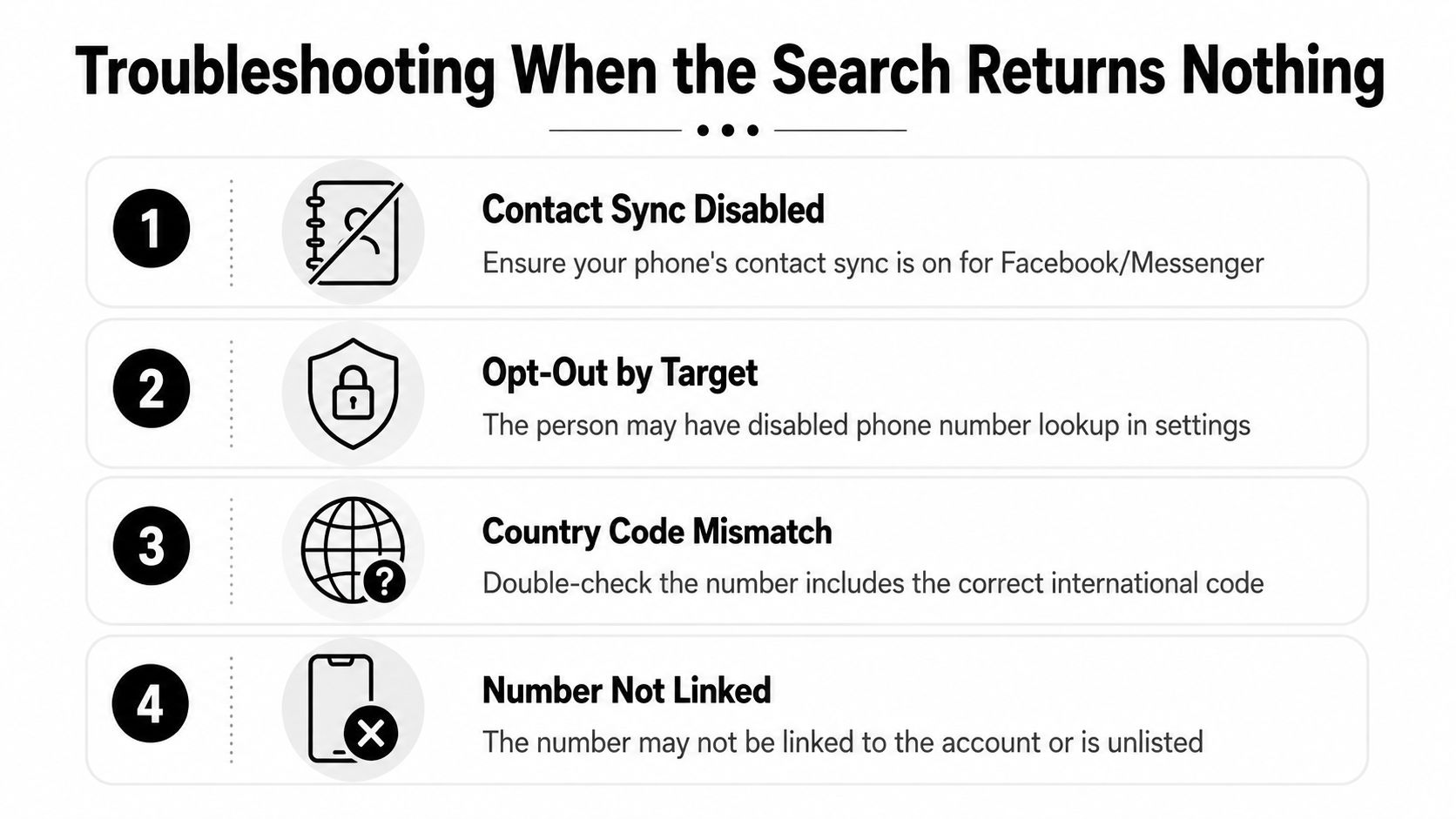
A blank Facebook result usually means the lookup failed at one of a few checkpoints. Start with the parts you control before assuming the other person hid everything. If the number is not saved in your contacts, if contact sync is off, or if the country code is wrong, Facebook may have nothing to match against even when the account is searchable.
The most common failure modes
Start with contact sync. If Facebook or Messenger cannot read your address book, the lookup behaves like a library search with no catalog access, so the match may never surface. Then check the number format, especially the international code, because a country code mismatch can block the search even when the digits are correct.
Privacy settings can stop the result as well. Facebook controls whether other people can find an account by phone number, so a blank result can mean the number is not discoverable to you, as noted in Facebook Help. Recycled numbers complicate the picture further, because a valid number may point to an old owner, a secondary account, or no current Facebook exposure at all.
A quiet failure is still a failure. The search may be working exactly as designed, just with more limits than the interface makes obvious.
How to judge a weak hit
If a profile does show up but you are unsure it belongs to the right person, slow down. A phone number match is only one signal, and on its own it can be misleading. Check the profile photo, mutual friends, tagged posts, and timeline behavior before treating the result as reliable.
A useful match should survive more than one check. If the photo, location, friends, and activity point in different directions, treat the result as tentative.
That caution matters in dating safety and scam prevention. A partial hit can look convincing enough to act on, especially if someone is trying to build trust quickly. Compare the profile with what you already know, then decide whether the result fits or just looks close on the surface.
If you want a broader read on whether a number leaves a footprint elsewhere, a service like GEO Agency can be part of that wider check. Facebook may return nothing while other public or semi-public traces still exist, so the search result alone should never be treated as the full story.
Protecting Your Own Number and Managing Next Steps
If you’ve found that Facebook can still surface your number, fix that first. Remove the phone number from your profile if you don’t need it there, then tighten Who can look you up using the phone number you provided to Only Me. If you also use email lookup, lock that down too, because the two settings often act like companion doors.
The bigger privacy picture
Facebook is only one place where your number can be linked to your identity. Even after your Facebook settings are tightened, the same number can still appear in breach databases, public records, data broker profiles, gaming accounts, or old social profiles. That’s why phone-number privacy is really a digital footprint problem, not just a Facebook setting problem.
If you manage reputation for work, dating, or family safety, this matters in practical ways. A recruiter may find an old profile. A scammer may use a number from one site to impersonate you elsewhere. A gamer may discover that a phone-linked account traces back to other usernames you thought were separate.
A sensible next step
A service like GEO Agency is relevant if you’re thinking about how searchable identity signals spread across the web, but if you want a more direct privacy check, a free footprint scan is the better first move.
Digital Footprint Check can show where a phone number or other identity details appear across the wider internet, which is the right next step after you’ve locked down Facebook-specific discovery. If you care about your own exposure, or you’re verifying someone else’s footprint before you trust a number, don’t stop at one platform. Run a scan, review the matches, and then tighten the settings that exposed them in the first place.
If you want a clearer picture of where your phone number, emails, and social profiles show up beyond Facebook, visit Digital Footprint Check and run a free scan. It’s a practical way to see what’s publicly connected to your identity before someone else does.