· Digital Footprint Check · Content Marketing · 14 min read
How to See Search History: a Complete 2026 Privacy Guide
Learn how to see search history on Google, browsers, and mobile devices. Our guide covers how to manage, delete, and protect your data from prying eyes.

You search one sensitive thing, close the tab, and tell yourself it’s gone. Then the doubt starts. Is it still in Chrome? In your Google account? On your phone? On the home router? Could a partner, employer, parent, scammer, or investigator piece it together?
That anxiety is common because search history isn’t stored in one neat place. It’s scattered across browsers, accounts, apps, synced devices, and network logs. If you want to see search history clearly, you need to stop thinking like a casual user and start thinking like someone auditing a digital footprint.
That shift matters outside privacy circles. A messy search trail can affect job hunting, personal safety, gaming account security, online dating trust, scam prevention, and reputation management. The same breadcrumbs that help you reopen a useful page can also expose habits, interests, routines, and vulnerabilities.
Why Your Search History Is More Than Just a List of Links
A familiar example. Someone searches for a health symptom late at night, checks a few treatment options, looks up a nearby clinic, and then searches an ex-partner’s name out of curiosity. The next morning, they don’t just want to delete a few queries. They want reassurance that the whole episode didn’t leave a permanent mark.
That instinct is right. Search history is part of your digital identity, not just a convenience feature. It records what worried you, what tempted you, what you planned, what you nearly bought, and sometimes who you were thinking about. Over time, that trail becomes more revealing than any single social profile.
Google’s scale shows why this matters. Google holds an estimated 90.83% market share and processes over 13.7 billion search queries every day worldwide. Some recent estimates place daily totals between 8.5 and 16.4 billion, and the platform handles over 99,000 searches every second according to this roundup of Google usage statistics. When a service operates at that level, your search history isn’t an edge case. It’s part of one of the largest behavioral datasets ever assembled.
Your searches tell a story
A single query means little. A pattern means a lot.
Searches for salary negotiation, interview thank-you emails, and commuting times can signal a job move. Searches for burner phone apps, hotel check-ins, and “how to hide notifications” can raise very different questions. Searches related to dating apps, gaming forums, romance advice, or identity theft cleanup can reveal pressure points that scammers and manipulators know how to exploit.
Practical rule: If a stranger saw a month of your searches, they could infer parts of your life you’ve never posted publicly.
That’s why broad privacy awareness beats one-off deletion. If you only clear a browser tab history, you may miss account-level activity, app search logs, or network traces that still exist elsewhere.
For a deeper look at how these patterns expose behavior, this guide on the invisible trail created by your browsing habits is worth reading.
Why it matters in the real world
This isn’t abstract. Search history can shape:
- Job prospects: Recruiters and hiring teams increasingly care about digital reputation, judgment, and consistency.
- Personal safety: Searches can expose location habits, fears, or relationship problems.
- Dating trust: A person’s search trail can hint at catfishing, parallel relationships, or romance scam targeting.
- Gaming security: Searches about account recovery, cheats, marketplaces, or modding communities can reveal valuable account interests.
- Identity protection: Search behavior often connects to breach cleanup, password resets, and account ownership clues.
Seeing search history clearly is the first step. Understanding what else it connects to is where privacy work gets serious.
How to Find Your Search History on Any Platform
If you want to see search history properly, check accounts first, then devices, then apps, then any network-level record you can access. Often, however, this process is reversed: a browser is cleared, and the story is assumed to end there.
Check your Google account activity
For many people, Google is the main archive. If you’re signed in while searching on Chrome, Android, YouTube, Maps, or other Google services, your account activity may hold a broader timeline than your browser alone.
Open Google My Activity while logged into the correct account. Look for web and app activity, search queries, voice interactions, and activity tied to products like YouTube. If you use multiple Google accounts, repeat the process on each one. People often miss work, school, or old personal accounts that still sync data.
What this reveals is context, not just searches. It can show when you were active, what device you used, and which services linked to the same session.
Review browser history on the device itself
Local browser history still matters because it often captures actions that account dashboards don’t display neatly.
Here’s where to look:
- Chrome: Open History from the browser menu. If sync is enabled, compare what appears locally with what appears in your Google account.
- Firefox: Check the History or Library area. Firefox may keep useful local records even when your broader account footprint is lighter.
- Safari: On Mac, use the History menu. On iPhone or iPad, Safari history sits in browser settings and the app itself.
- Edge: Review browsing history from the menu and note whether your Microsoft account is syncing activity across devices.
- Brave and other privacy-focused browsers: Check local history, but don’t assume “privacy-focused” means invisible elsewhere.
Look at mobile search traces
Phones create overlapping records. You may search in a browser, then continue inside apps.
On Android, review:
- Google app searches
- Chrome history
- YouTube search history
- Google Play Store search history
- Maps and app activity tied to your Google account
On iPhone, check:
- Safari history
- Spotlight or Siri suggestions tied to prior behavior
- App Store search history
- Searches inside apps like YouTube, TikTok, Reddit, or dating platforms
A phone often reveals your real habits better than a laptop because people use it impulsively. Late-night searches, location-based queries, dating app lookups, and gaming account recovery attempts usually happen there first.
Don’t forget platform-specific histories
Search activity lives inside platforms that don’t feel like “search engines” at all.
You should also inspect:
- YouTube: Search history can expose interests, anxieties, and rabbit holes you never typed into Google.
- App stores: Search logs reveal what you considered installing, including dating, finance, parental control, or privacy apps.
- Social media: Instagram, TikTok, X, Facebook, Reddit, and LinkedIn all keep internal search trails to varying degrees.
- Dating apps: Name, location, and profile search behavior can become highly personal very quickly.
- Gaming ecosystems: Store searches, player lookups, and forum activity can point to account value and security risks.
Where your search history is stored
| Platform / Entity | Data Stored | User Visibility | Deletion Permanence |
|---|---|---|---|
| Google account | Web and app activity, service-linked searches | High through My Activity | User-visible deletion may not answer backend retention questions |
| Browser on device | Visited pages, typed queries, session traces | High if you have the device | Local deletion removes visible history, not necessarily all related traces elsewhere |
| Mobile apps | In-app searches and recommendations | Moderate, varies by app | Often partial and platform-specific |
| Social platforms | Profile searches, topic searches, watched content signals | Low to moderate | Often limited user control |
| App stores | App search terms and related activity | Moderate | Usually manageable from account or app settings |
| Router or network logs | Domain-level traffic records and timestamps | Low for most users | Depends on device, provider, and admin access |
| ISP records | Connection metadata and domain-level traces | Usually not directly visible to the user | Not controlled by clearing your browser |
Start with the account that benefits most from keeping a memory of your activity. That usually gives you the fastest, broadest picture.
What Your Search History Reveals About You
When people finally see search history in one place, they usually react to the content. What matters more is the pattern. Patterns create profiles.

Patterns expose priorities and pressure points
A week of searches can reveal:
- Career movement: salary negotiation, resignation letters, industry certifications, commute times
- Relationship status: dating app tips, infidelity signs, ex-partner lookups, couples counseling
- Financial stress: debt relief, emergency loans, account recovery, side hustle research
- Health concerns: symptom searches, clinics, pharmacies, support forums
- Gaming profile value: account trading terms, skin marketplaces, cheat detection, password resets
- Emotional vulnerability: loneliness queries, romance advice, “is this a scam” checks
That’s why the same history can look ordinary to you and highly informative to someone else. A recruiter might read “how to negotiate salary” as confidence. Another employer might read repeated searches about burnout, lawsuits, or noncompete clauses as signs of imminent departure. Context changes interpretation.
Why investigators and scammers care
Forensic investigators can access web history through credentialed logins or authorized requests, and ISPs often log connections that can still provide useful records after local history is cleared via SNI or DNS logs, as explained in this overview of browser history evidence and investigations. The common mistake is assuming deletion on your device erases the timeline. It often doesn’t.
That has a non-criminal side too. A scammer who learns someone has been searching for companionship, divorce support, military deployment dating, or urgent money help can tailor a believable approach. Romance scams and catfishing work because they exploit timing and emotion, not just weak passwords.
Your search history doesn’t just show what you wanted. It can show what you feared, what you hid, and when you were easiest to manipulate.
For people trying to understand the bigger behavioral picture, this breakdown of your digital shadow connects search activity to broader reputation and exposure risks.
Real-world reading of the same data
One search doesn’t define you. Repetition does.
A hiring manager seeing queries around interview prep, certifications, and portfolio examples might view that as initiative. A scammer seeing repeated searches for “verify dating profile,” “military boyfriend abroad,” and “gift card romance scam” might realize the target is already suspicious and change tactics. Search data becomes useful when someone can place it on a timeline.
That’s why privacy work isn’t only about hiding. It’s also about understanding what your own data says before someone else does.
Taking Control How to Delete and Manage Your Data
Deletion matters. It just isn’t the whole job.

Remove what you can actually see
Start with the places you control directly.
- Google My Activity: Delete individual searches, remove activity by date range, and review whether Web & App Activity is enabled.
- Chrome, Safari, Firefox, and Edge: Clear browsing history, search form entries, cookies, and cached content based on what you want removed.
- YouTube and app stores: Clear internal search history separately. These logs often survive after a browser cleanup.
- Mobile devices: Repeat the process on every device because one synced phone can repopulate suggestions and activity cues.
This isn’t just housekeeping. It reduces casual exposure. Shared devices, shoulder surfing, family account access, and surprise autocomplete suggestions cause a lot of real-world privacy damage.
Set limits instead of relying on memory
Manual deletion works only if you do it consistently. Few maintain that habit.
Better controls include:
- Auto-delete settings: Use built-in account controls where available.
- Private browsing for one-off sessions: Useful for reducing local traces on the device you’re using.
- Separate profiles or browsers: Keep work, personal life, dating, gaming, and financial tasks apart.
- Sign-out discipline: Shared computers and family tablets create accidental exposure fast.
Here’s a practical walkthrough worth watching before you clean things up:
Understand what deletion doesn’t do
Most advice proves insufficient. Search engines may let you hide or delete visible history, but that doesn’t prove every related record is gone.
Users have long been skeptical that disabling history stops collection entirely. Norton notes a core concern clearly: people question whether deleted history is purged from backend systems, and disabling history may only reduce visibility rather than stop collection, according to its discussion of who can see your search history.
Key distinction: Front-end deletion removes what you can see. It doesn’t automatically prove full backend erasure.
That doesn’t mean deletion is useless. It means you should treat it as one layer. Not the finish line.
What works better than a single purge
A stronger privacy routine looks like this:
- Use deletion plus separation: Keep sensitive searches in a dedicated browser profile or private session.
- Audit synced accounts: Old tablets, secondary Gmail accounts, and unused browsers often keep the longest memory.
- Review saved logins and autofill: Search terms often connect to accounts, addresses, and payment details.
- Check recurring exposure: Search activity becomes more revealing when it aligns with social profiles, dating accounts, gaming handles, or public posts.
If you want step-by-step cleanup guidance focused on Google itself, this article on how to delete Google history and searches is a useful companion.
Privacy Rights and the Ethics of Searching
Your search history is personal data. In many places, the law treats it that way. Ethics should too.
The law has moved closer to the user
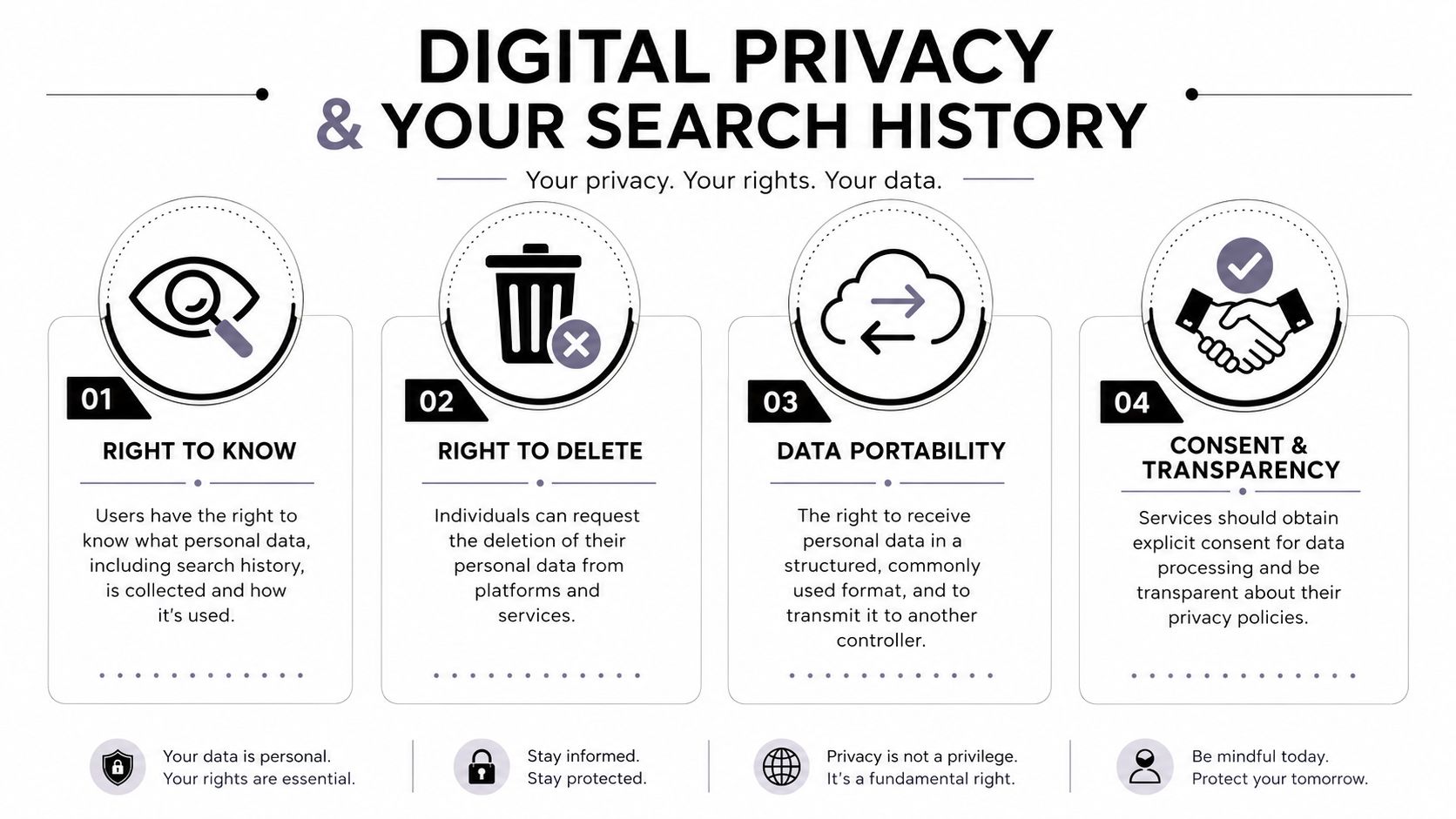
By the end of 2024, data protection laws covered 6.3 billion people globally, representing 79% of the world’s population, and 144 countries had enacted data and consumer privacy laws as of early 2025, according to Usercentrics’ privacy statistics summary. That matters because it creates a practical baseline. Many people now have enforceable rights to access, control, and request deletion of personal data, including search-related records.
Those rights typically revolve around four ideas:
- Access: You can ask what data a service holds.
- Deletion: You can request removal within the platform’s legal framework.
- Control: You can limit certain forms of collection and processing.
- Portability: You can request your data in a usable format where the law allows.
For a broader philosophical and practical view, this discussion of who owns your data is a strong place to continue.
The ethical line is often clearer than people admit
Can you check a partner’s search history? A child’s? An employee’s?
Sometimes you can. That doesn’t always mean you should.
A parent protecting a young child faces different responsibilities than a jealous partner searching for proof. An employer securing a company-owned device faces different obligations than a manager snooping into private behavior. Consent, necessity, proportionality, and transparency matter more than curiosity.
Trust collapses fast when monitoring is secret, excessive, or done for emotional leverage.
A simple ethical test
Before you inspect someone else’s history, ask four questions:
| Question | Why it matters |
|---|---|
| Do I have clear authority or consent? | Without this, you may cross legal and ethical boundaries |
| Am I protecting safety or chasing suspicion? | Motive changes what counts as reasonable |
| Is there a less intrusive way to solve the problem? | Direct conversation often beats covert monitoring |
| Would I defend this decision openly? | If not, it probably fails the transparency test |
The strongest privacy posture combines rights with restraint. You should defend your own search privacy while being careful not to violate someone else’s in the name of concern.
Go Beyond Your Browser With an OSINT Footprint Check
Manual history checks are useful, but they’re narrow. They show what happened in a browser or account. They don’t show what your activity connects to across the wider web.
Search history is only one slice of exposure
A complete digital footprint can include:
- Social media accounts: active, abandoned, or forgotten
- Data breach exposure: leaked credentials tied to email addresses or usernames
- Gaming profiles: public handles, marketplaces, clan pages, community posts
- Dating app traces: usernames, reused photos, bios, linked socials
- Forum and comment activity: searchable posts that shape reputation
- Public records and directories: depending on jurisdiction and platform policies
People often get blindsided. They clean browser history but leave old Reddit posts, an exposed gamer tag, a searchable dating profile, and reused usernames sitting in public view. A recruiter, scammer, abusive ex, or impersonator doesn’t need your Chrome history if your broader footprint already tells the story.
Why OSINT changes the workflow
OSINT means Open Source Intelligence. In practical terms, it’s the discipline of finding and connecting publicly accessible data across platforms.
That matters because manual checking has three limits:
- It’s fragmented: You have to remember every platform you ever used.
- It’s slow: People abandon the process halfway through.
- It misses connections: Reused usernames, old profile photos, breach traces, and linked identities are easy to overlook.
With OSINT, you stop asking only “how do I see search history?” and start asking better questions. Where else is my identity visible? What accounts are tied to this email or username? What would someone learn about me before a job interview, a date, a custody dispute, or a scam attempt?
Browser cleanup protects the local surface. OSINT shows the wider map.
If you’re new to this style of research, this introduction to OSINT tools for beginners gives a solid starting point.
When a full footprint check makes sense
A broader check is worth doing if you’re:
- Applying for jobs: You need to know what an employer can find before they search.
- Dating someone new: It helps verify identity and spot catfishing or romance scam signals.
- Protecting gaming accounts: Public gamer tags can reveal linked profiles and valuable targets.
- Recovering from identity theft: You need to look beyond one compromised account.
- Managing family safety: Parents and caregivers often need visibility into exposed accounts and reused identities.
- Cleaning up reputation issues: Search history doesn’t fix public traces left elsewhere.
The key idea is simple. Search history is where many privacy concerns begin. It’s rarely where they end.
If you want to move from guesswork to a clear picture of your exposure, try the free checker from Digital Footprint Check. It helps you look beyond one browser and see what personal data, accounts, and public traces may already be visible across the web. For anyone concerned about identity theft, job prospects, dating app verification, scam prevention, gaming profile security, or online reputation, it’s a practical next step.