· Digital Footprint Check · Content Marketing · 15 min read
Spot and Stop a Best Buy Scam: a 2026 Guide
Spot a Best Buy scam before it's too late. Learn the top scams, red flags, and how to protect your digital footprint from Geek Squad impersonators.
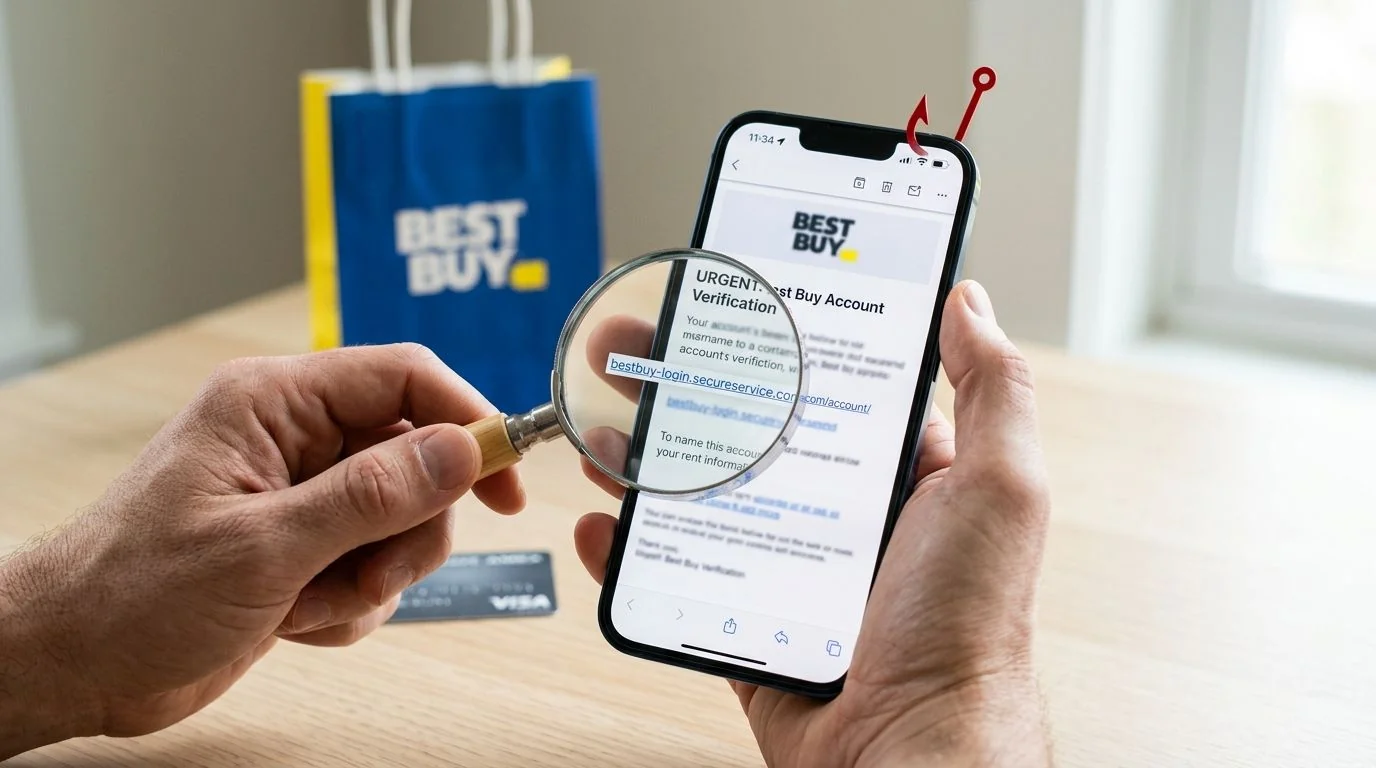
A Best Buy scam isn’t a niche problem anymore. In 2026, the FTC highlighted that Best Buy and Geek Squad were the most frequently impersonated companies in consumer fraud reports, with about 52,000 complaints and roughly $15 million in reported losses according to FTC-related coverage summarized by Fox 32 Chicago.
That number matters because it changes how you should think about these messages. This isn’t just random spam with bad grammar. It’s a repeatable scam model built around a trusted brand, familiar invoices, and the kind of panic that makes smart people click first and think later.
A typical version looks ordinary. You get an email that says your Geek Squad plan is renewing. It shows a charge you don’t recognize. There’s a phone number to call, a deadline, and just enough retail branding to feel real. If you’ve ever bought a laptop, TV, console, or appliance, the message fits into your life story. That’s why it works.
The part many guides miss is what makes the message believable in the first place. Scammers often don’t rely on luck alone. They use scraps of your public online identity, old breach data, reused usernames, and exposed contact details to make fake Best Buy messages feel specific. If you want a deeper look at how exposed data shapes attacks, this breakdown of the hidden dangers of your digital footprint is a useful primer.
Why Best Buy Scams Are So Deceptively Effective
Best Buy scams work because they borrow trust instead of trying to earn it.
Individuals generally won’t open a message from a stranger promising impossible money. But they will look at a message that appears to involve a company they already know. Best Buy and Geek Squad have a clear, recognizable identity. Scammers copy that identity, then add urgency.
Familiar brand, unfamiliar pressure
The fraud usually starts with something that sounds administrative, not dramatic. A renewal notice. A billing issue. A support warning. A refund problem. The message doesn’t need to be perfect. It only needs to create enough stress that you stop asking basic questions.
Practical rule: If a message makes you feel rushed before it makes you feel informed, treat it as suspicious.
That emotional sequence is the scammer’s real tool. First, they create tension. Then they offer a fast way to “fix” it, usually by calling a number, clicking a link, opening an attachment, or letting them access your device.
Why normal people fall for it
This kind of best buy scam doesn’t target ignorance. It targets routine.
You’ve probably seen legitimate renewals from streaming services, software subscriptions, and retailers. You may have bought tech support in the past or at least heard of Geek Squad. The scam hides inside that familiarity. It feels like one more annoying but ordinary account notice.
A family member might say, “I called because I wanted to stop the charge.” That’s the trap. The victim isn’t trying to do something reckless. They’re trying to solve a small billing problem quickly.
The safest mindset is simple. Don’t prove a message is real by interacting with it. Prove it independently.
The Four Most Common Best Buy Scams Explained
Best Buy and Geek Squad were the most commonly impersonated corporate entities by tech-support scammers in 2023, and these scams often create urgency with a fake renewal, a fictitious $349 invoice, or a claim that a device is compromised, as reported in USA Today’s summary of FTC findings.

Geek Squad renewal scam
This is the classic callback trap.
You receive an email saying your Geek Squad protection or support plan is about to auto-renew. The amount is large enough to upset you, but not so bizarre that you instantly dismiss it. The message tells you to call if you want to cancel.
“Your annual Geek Squad subscription will be renewed today. If you did not authorize this transaction, call support immediately.”
The hook is the fake charge. The goal is to get you on the phone. Once you call, the scammer tries to pull you into the next stage, which may include remote access, payment, or disclosure of banking details.
Fake invoice attachment scam
Some messages don’t put the details in the email body. They attach an “invoice,” “receipt,” or “renewal confirmation” file instead.
That matters because attachments feel official to many people. A PDF, image, or invoice-style layout can create the impression of a real transaction. Once you open it, the file pushes you toward a phone number or malicious link.
A simple rule helps here. If you didn’t expect a Best Buy billing document, don’t trust one that arrives out of the blue.
Gift card impersonation scam
Gift card demands are one of the clearest signs of fraud. Scammers may claim you owe for support, need to stop a charge, or must verify a refund process by purchasing Best Buy gift cards.
This scam also overlaps with fake prize messages and fake authority impersonation. The criminal may pretend to be from Best Buy, a support team, or even another organization while steering you toward Best Buy cards.
If you’ve seen similar tactics in other retail fraud, this guide to the “$1000 Walmart gift card” text message scam shows how scammers reuse familiar retail branding across different campaigns.
Product delivery and prize scams
Not every best buy scam uses the Geek Squad name. Some use shipping alerts or fake winnings.
A delivery scam says there’s a package delay, failed drop-off, or shipping problem that requires you to click a link. A sweepstakes scam says you won a Best Buy prize and only need to “confirm” details or pay a small fee.
Here’s the difference between real customer service and fraud:
| Scam type | What it says | What the scammer wants |
|---|---|---|
| Renewal scam | Your plan is renewing | A callback and emotional panic |
| Invoice scam | You were charged | Phone contact or a malicious click |
| Gift card scam | You must pay quickly | Irreversible payment |
| Delivery or prize scam | You need to verify or claim | Personal data or account access |
The pattern stays the same even when the story changes. A trusted brand gets your attention. Pressure gets your compliance. Confusion hides the fraud.
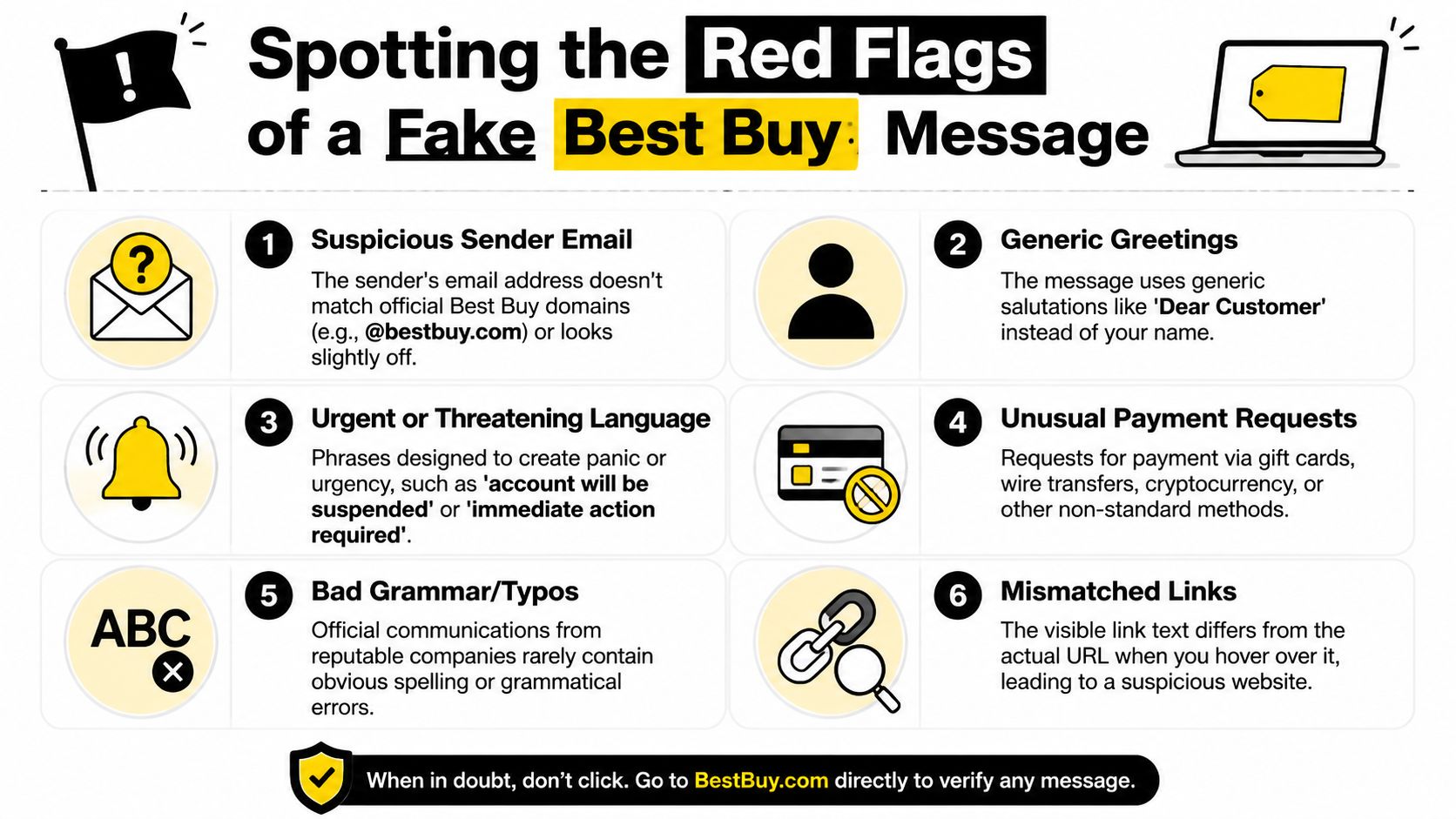
Spotting the Red Flags of a Fake Best Buy Message
Phishing campaigns that imitate Geek Squad often change tactics to dodge filters, including emails sent from unique random Gmail addresses, shifting subject lines, and fake invoices attached as unique JPG files, according to the Fashion Institute of Technology IT advisory.
What stands out first
A fake Best Buy message often looks polished at a glance. The clues usually appear in the mechanics.
- Sender mismatch: If the message claims to be from Best Buy but comes from a random Gmail account or an address that doesn’t match the brand, that’s a major warning sign.
- Image-based invoice: A JPG invoice is suspicious because attackers use image files to sidestep simple text-based scanning.
- Changing subject lines: Constant variation helps scammers keep hitting inboxes even after one version gets blocked.
If you’re curious about the site behind a link, it helps to scan any domain for free before you interact with it. That gives you a neutral way to inspect the destination without trusting the email itself.
The psychology hidden in the wording
Scammers rarely open with “send us your password.” They build momentum instead.
- Urgent language: “Call now,” “renewal in 24 hours,” or “charge pending” tries to shorten your thinking time.
- Generic greeting: “Dear customer” isn’t proof of fraud by itself, but it fits the mass-mail pattern.
- Problem-then-solution script: The message creates a threat, then offers one fast route to fix it.
A real company wants you informed. A scammer wants you hurried.
Link and contact checks that matter
The best test is often outside the message. Don’t use the number, button, or reply option included in the email. Check contact details independently.
If you’re unsure how to inspect a suspicious page safely, this guide on how to check if a website is safe walks through a practical approach.
Use this short checklist when something feels off:
| Red flag | Why it matters |
|---|---|
| Non-BestBuy sender address | Brand impersonation often breaks at the email address |
| Link text doesn’t match destination | The visible label may hide a spoofed site |
| Urgent deadline | Panic reduces careful review |
| Request for gift cards or wire payment | Legitimate support doesn’t work this way |
| Attachment you didn’t expect | Opens the door to callback scams or malware |
Typos can matter, but they aren’t the main issue anymore. Today’s better scams fail in subtler places, like sender identity, file format, callback number, and emotional pressure.
Your Immediate Response Plan for a Suspected Scam
Best Buy says customers should watch for suspicious sender addresses and deceptive links, and it instructs people to report suspicious emails to abuse@bestbuy.com and file reports through ReportFraud.ftc.gov, as outlined on Best Buy’s Protect Yourself page.
Start with the simplest move. Break contact.

Step 1 and Step 2
Stop the interaction
Don’t click. Don’t call. Don’t reply. If it’s a phone call, hang up. If it’s a website, close the tab. If someone has you on the phone and is “helping” you, end the call before you do anything else.
Verify independently
Use contact information you find yourself, not anything inside the suspicious message. Best Buy’s official toll-free number is 1-888-237-8289 on its official guidance page. Type the company website yourself or use a bookmark you already trust.
If a message says “call this number right now,” your next move should be to ignore that number entirely.
This short video gives a useful high-level walkthrough of what these scams look like in practice.
Step 3 and Step 4
Report what you received
Forward suspicious Best Buy-themed emails to abuse@bestbuy.com. Then file a complaint with the FTC using the official reporting portal listed by Best Buy. Reporting won’t erase every campaign, but it helps create a stronger fraud trail.
Clean up your inbox and accounts
If the scam arrived by email and keeps returning, it helps to learn how to blacklist an email so repeat messages get filtered more aggressively. If you clicked, signed in, or shared any credentials, start checking whether that email account may already be exposed. A practical first step is to check if your email was hacked.
What not to do
People often make things worse by trying to “test” the scammer.
- Don’t argue with them: You won’t outsmart a trained social engineer on their timeline.
- Don’t open attachments for curiosity: Even if you don’t believe the story, the file can still be risky.
- Don’t trust caller ID: A familiar name on a call or text doesn’t prove the sender is legitimate.
Calm beats speed here. Scammers win when you let them set the pace.
Damage Control How to Recover if You’ve Been Scammed
The financial impact can be serious. The BBB’s 2021 Scam Tracker report said tech support scams were the second-most-reported category nationwide, with median reported losses exceeding $1,000 per incident, and older adults aged 60 and above lost significantly higher median amounts than the general population, according to coverage summarizing BBB and FTC findings.
If you already interacted with a best buy scam, focus on containment first. Shame wastes time. Action protects you.
If you gave payment or banking information
Call your bank or card issuer right away using the number on the back of your card or the official banking app. Tell them you may have shared information with a scammer impersonating Best Buy or Geek Squad.
Ask specifically about:
- Blocking further charges: Stop additional transactions before they post.
- Replacing cards or account numbers: If your details were exposed, fresh credentials matter.
- Monitoring recent activity: Review transactions you didn’t authorize or don’t recognize.
If you paid with gift cards, report it immediately to the card issuer and to law enforcement or consumer fraud portals. Recovery can be harder with gift cards, but reporting is still worth doing.
If you gave remote access to your computer
This changes the situation from fraud risk to possible device compromise.
Disconnect the device from the internet. Then remove any remote access tools you didn’t intentionally install and run a trusted security scan. If you use the computer for work, tell your employer or IT team quickly. A work laptop can expose more than your personal files.
Next move: Assume anything visible on that device during the session may have been observed, including saved passwords, browser sessions, and personal documents.
If you’re not comfortable checking the system yourself, get help from a legitimate local technician you contact independently.
If you shared passwords or personal information
Change the password for the affected account first. Then change passwords for any other account that reused the same or a similar password.
Also do these in parallel:
- Turn on stronger login protection: Use app-based multi-factor authentication where available.
- Review account recovery settings: Make sure the phone number and backup email still belong to you.
- Watch for follow-up scams: Once someone responds once, scammers often try again with a new angle.
If the scam touched your identity
If you disclosed personal details such as your full name, address, date of birth, or other identity data, consider a fraud alert or credit freeze depending on your situation. Keep records of what happened, when it happened, and what you changed.
Recovery isn’t one task. It’s a sequence. Secure money first, device second, accounts third, and identity trails alongside all three.
Proactive Defense How Your Digital Footprint Fuels Scams
Many Best Buy scam guides stop at red flags. That’s helpful, but incomplete. As CBS News coverage on Best Buy impersonation scams noted, existing coverage often underplays how scammers use public usernames, workplace domains, and leaked email-phone combinations to create more personalized invoices and refund scams.
That point changes the whole defense strategy. The scam isn’t only about the message. It’s also about the data the criminal used to shape the message.
How scammers build a believable story
Think of your digital footprint like loose paperwork left on a kitchen table. One page by itself may not reveal much. But if someone sees enough pieces, they can reconstruct your habits.
A scammer may find:
- An exposed email and phone pairing from an old data breach
- A public social post about buying a laptop, TV, or gaming setup
- A professional profile that shows your employer and work email pattern
- A reused username across forums, gaming accounts, and marketplaces
Now the fake Best Buy message gets sharper. It goes to the right email. It references support language you might recognize. It arrives on a phone number connected to prior leaks. It may even hit your work inbox if your corporate address is publicly visible.
Why OSINT matters to ordinary people
OSINT means open source intelligence. In plain English, it’s information gathered from public or broadly accessible sources.
Scammers use OSINT offensively. You can use the same mindset defensively.
If you’re in security, research, HR, online dating, gaming, or reputation management, this should sound familiar. The same public traces that help someone verify a dating profile or investigate a catfishing claim can also help a criminal personalize a support scam. A gamer who uses the same handle on Discord, Reddit, Twitch, and a retailer account creates a predictable trail. A job seeker with an exposed resume and public email creates another. An employer that lists staff naming patterns openly can make employee targeting easier.
People who want a technical view of how automated systems probe and resist detection can browse Scrapfly’s guide on anti-bot bypass. You don’t need to become a scraper to learn from it. The useful takeaway is that online data collection is systematic, not magical.
A practical self-audit
You can reduce your target profile with a routine audit.
- Search your identifiers: Look up old email addresses, phone numbers, usernames, and name variations.
- Review public posts: Delete or lock down posts that reveal purchases, support issues, or account details.
- Separate identities: Don’t reuse the same username everywhere, especially across shopping, gaming, and social platforms.
- Check exposure regularly: If your information appears in breach-related or public contexts, treat that as a reason to harden accounts tied to those identifiers.
If you want a structured starting point, use a service that helps you check your digital footprint. The value isn’t just curiosity. It’s prevention. When you know what strangers can see, you can decide what to remove, hide, or monitor.
Your safest inbox starts long before the email arrives.
That applies beyond retail scams. The same habits help with identity theft, gaming account security, romance scams, dating app verification, employer screening, and personal reputation management.
Take Control of Your Online Safety Today
The best defense against a best buy scam has three parts. First, recognize the pattern. Second, respond calmly and independently. Third, reduce the public data that helps scammers make their lie believable.
That last part matters more than generally acknowledged. A fake invoice is dangerous on its own. A fake invoice sent to the exact email you use for shopping, timed around your public device purchase, and backed by an exposed phone number is far more convincing. That’s why digital privacy and scam prevention belong in the same conversation.
You don’t need to become a cybersecurity analyst to protect yourself. You need a repeatable habit. Slow down when a message pushes urgency. Verify outside the message. Review what information about you is already visible online. Apply the same care to personal accounts, work profiles, gaming identities, and dating app activity.
Scammers are persistent, but they’re predictable. They rely on trust, speed, and exposed data. When you remove those advantages, you make yourself a much harder target.
A practical next step is to run a free scan with Digital Footprint Check. Their free checker can help you see what parts of your online identity are publicly exposed across social platforms, breach-related data sources, professional profiles, gaming accounts, and other web traces. If you want to reduce the chances of a future Best Buy scam, identity theft attempt, catfishing setup, romance scam, or reputation problem, start by using the free checker at www.digitalfootprintcheck.com/free-checker.