· Digital Footprint Check · Content Marketing · 18 min read
10 Data Security Breach Examples and Key Lessons
Explore 10 data security breach examples, what was exposed, real-world impacts, lessons learned, and practical ways to protect your digital footprint.
The 2017 Equifax breach exposed information belonging to at least 147 million people, including names, birth dates, addresses, and Social Security numbers, after attackers exploited a known vulnerability in an online dispute system. The incident and its consumer settlement show why a breach doesn’t end when a company fixes the original weakness. Exposed email addresses, phone numbers, identity details, passwords, and sensitive profiles can keep circulating, supporting phishing, credential stuffing, identity theft, reputation damage, and personal-safety risks.
The most useful way to compare data security breach examples is to ask six questions: How did attackers enter? What information became exposed? How long did access continue? When did the organization disclose it? What could criminals do with the data? What can individuals and companies change now? That approach turns famous incidents into practical privacy guidance.
Digital Footprint Check can help people look for exposed information across breach databases and online platforms. It won’t replace password security, fraud monitoring, credit-bureau protections, or professional advice, but it can reveal old accounts and identifiers that people may have forgotten.
1. Equifax Data Breach in 2017
Equifax is a foundational example of how an unpatched public-facing application can expose identity data at national scale. Attackers entered through the company’s online dispute portal and reached databases containing names, Social Security numbers, birth dates, addresses, driver’s-license information, payment-card numbers, and dispute documents. The U.S. Government Accountability Office’s assessment found that the affected population reached at least 145.5 million people, while the attack continued from May 13 to July 30, 2017.
The repeatable failure pattern
The failure wasn’t only a missed patch. GAO identified weaknesses in vulnerability identification, detection, database segmentation, and data governance. An expired inspection certificate also prevented Equifax from properly inspecting encrypted traffic, which delayed detection of data exfiltration.
For individuals, the lesson is clear. A breach check must look beyond passwords. A Social Security number, address, phone number, or driver’s-license reference can remain useful to an impersonator long after a password reset.
- Review credit activity: Check reports from Equifax, Experian, and TransUnion, and look for unfamiliar accounts or inquiries.
- Add protective controls: Consider fraud alerts or credit freezes with the credit bureaus when identity information is exposed.
- Check financial records: Review bank and card statements for unauthorized activity.
- Audit identity use: The guide on protecting your Social Security number explains why persistent identifiers need special care.
2. Facebook Incidents in 2018 and 2019
Facebook illustrates two different privacy and security problems. One involves data collected through a third-party application and used beyond what many users understood. The other concerns the internal handling of account credentials. Together, these incidents show that exposure doesn’t require a single dramatic intrusion into a core database. Excessive permissions and weak internal controls can create separate paths to harm.
Permissions can become a privacy perimeter
A social-media account often connects to quizzes, games, productivity tools, dating services, and other platforms. Each connection creates another place where profile information may be copied, retained, or combined with other identifiers. Users may forget those connections even after they stop using the original application.
The practical response is an access audit rather than a single password change. Open Facebook’s Apps and Websites settings, remove services you no longer recognize, and review what information connected applications can access. A professional profile, location history, contact list, or relationship status may create risks for employment, dating safety, or targeted scams when combined with public posts.
- Revoke old access: Remove apps that no longer serve a clear purpose.
- Replace reused credentials: Any password reused from Facebook should be changed to a unique password.
- Enable MFA: Use multifactor authentication on Facebook and other social accounts.
- Check the wider footprint: Digital Footprint Check can help identify connected platforms and old accounts.
- Close abandoned accounts: Follow this guide on deleting a Facebook account when keeping the account serves no purpose.
The broader organizational lesson is to limit internal access, record access to sensitive credentials, and treat third-party permissions as part of the security boundary.
3. Target Data Breach in 2013
Target’s 2013 breach exposed a repeatable failure pattern: attackers used a trusted third-party supplier to reach the retailer’s payment environment. The weakness was not limited to Target employee accounts. Vendor, contractor, maintenance, and software-provider credentials can become entry points when access is broad or poorly monitored.
A safer design treats supplier access as a contained pathway. Segment payment systems from other networks so one compromised credential cannot reach everything. Review vendor permissions regularly, remove access that is no longer needed, and restrict maintenance accounts to approved time windows. Logs and alerts should identify unusual activity before malware reaches checkout or payment systems.
The customer response depends on which card and account were exposed. Credit and debit cards may offer different protections, so contact the issuer promptly. Enable transaction alerts, review statements for unfamiliar purchases, small test charges, and recurring payments, and ask about replacement cards, disputes, and fraud protections. Virtual card numbers can reduce the value of stolen online credentials where available.
Payment security also includes the accounts around the card:
- Secure recovery channels: Change passwords for email or phone-linked accounts that control payment notifications, and watch for payment-themed phishing.
- Review stored data: Check gaming accounts, food-delivery profiles, and dating subscriptions for saved cards, addresses, and purchase history.
- Use safer payment tools: Consider virtual card numbers for online shopping where available.
- Read the fraud guidance: Preventing credit-card fraud provides a practical privacy and payment-security reference.
The broader lesson is clear: limiting vendor permissions protects companies, while monitoring personal accounts helps contain the consequences when payment data is exposed.
4. Yahoo Data Breaches from 2013 and 2014
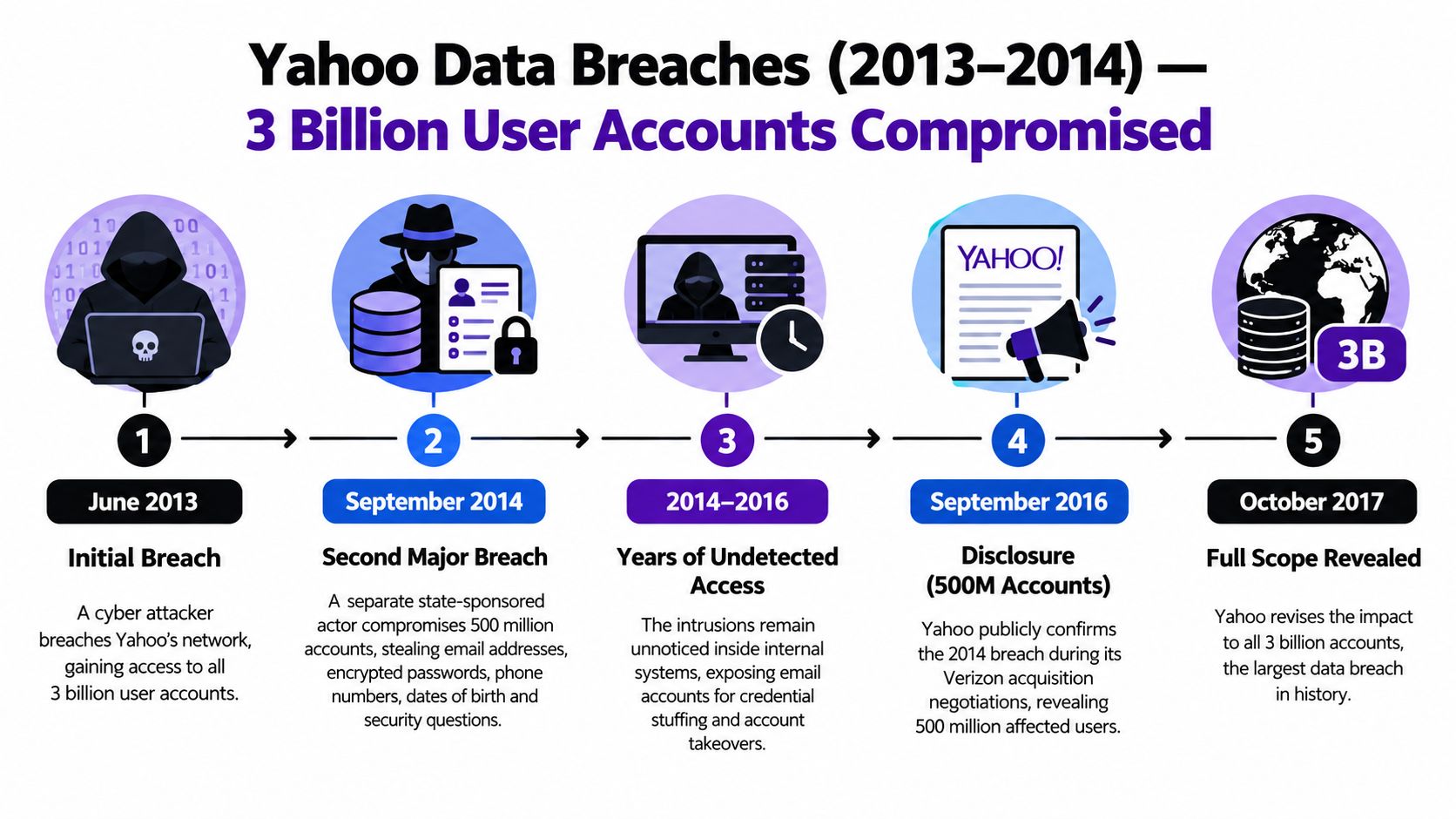
Yahoo illustrates a recurring failure pattern: a breach can remain poorly measured until a later investigation connects separate findings. In December 2016, Yahoo disclosed that information from more than 1 billion accounts likely had been stolen in the 2013 attack. After further investigation, the company announced in October 2017 that approximately 3 billion accounts existing in 2013 had been affected, according to Yahoo’s SEC filing.
The exposed material reportedly included account names, email addresses, telephone numbers, birth dates, and hashed security questions and answers. Yahoo said its investigation found no clear-text passwords, payment-card data, or bank-account information in that material. The total also included accounts that were never used or were active only briefly.
Dormant accounts extend the risk
An inactive Yahoo mailbox may still receive password-reset messages, contain employment records, preserve private conversations, or reveal answers to security questions. An abandoned username can connect a person’s current identity to an older profile, giving attackers useful context for impersonation or targeted scams.
Use a short account-lifecycle check:
- Find old accounts: Search password managers, browser records, and old inboxes for services linked to Yahoo.
- Change reused passwords: Do not use a historic Yahoo password on another service.
- Replace security answers: Choose unique answers that do not appear in public profiles.
- Watch recovery channels: Review phone numbers and recovery email addresses attached to important accounts.
- Check exposure: Use this email breach-checking resource to see whether an address appears in known breach records.
The practical lesson extends beyond Yahoo. Employers and families should close unused accounts, remove obsolete recovery methods, and delete data they no longer need. Personal footprint monitoring can then identify old addresses, usernames, and exposed contact details before they support account takeover or convincing phishing.
5. Marriott and Starwood Hotel Breach from 2014 to 2018
The Marriott-Starwood breach exposed a repeatable failure pattern: an acquisition can carry old systems, permissions, and unreviewed databases into a new organization. Investigators determined that attackers accessed approximately 339 million guest records worldwide, including 5.25 million unencrypted passport numbers, according to the Federal Trade Commission’s analysis.
Acquisition risk begins with inherited access
The FTC identified weak firewall and network segmentation, excessive or poorly governed permissions, outdated software, inadequate logging and monitoring, and missing or insufficient multifactor authentication. Years of access made historical guest data more valuable, even after customers stopped using the hotel brand.
Travel records create practical risks beyond account theft. A name, address, loyalty profile, passport detail, and booking pattern can support a convincing message about a reservation, refund, visa, or account problem. These details may also expose where someone lives, travels, or works, creating personal-safety concerns.
Personal footprint monitoring should focus on traces that remain useful to scammers:
- Review travel accounts: Delete old loyalty profiles and replace reused passwords.
- Protect identity documents: Contact the relevant official authority if a passport identifier may be misused.
- Check payment records: Review hotel confirmations and card statements for unfamiliar activity.
- Reduce future collection: Provide only information required for booking or check-in.
- Secure hotel connectivity: Read whether hotel Wi-Fi is safe before accessing sensitive accounts.
Mergers require a dedicated identity and data review. Organizations should inventory inherited databases, remove unnecessary accounts, replace unsupported software, and test logging, encryption, and access controls before combining systems. Personal users should treat old travel profiles and exposed identity details as monitoring priorities, not forgotten records.
6. LinkedIn Data Breach in 2012
The 2012 incident exposed roughly 6.5 million unsalted SHA-1 password hashes, according to contemporaneous BBC reporting. A much larger sale of stolen credentials followed in 2016, making password reuse the primary risk for affected account holders.
The repeatable failure pattern was weak credential protection. Unsalted hashes made offline cracking easier, while professional profiles supplied context that could make later phishing more convincing. An account record can reveal an employer, role, career history, location, contacts, and public communication style.
Credential reuse turns a login breach into an identity problem
A reused password may open a professional mailbox, recruiting platform, or another account. An attacker could impersonate a candidate, edit a profile, target colleagues, or send credible messages to clients. Altered employment details can also damage a job seeker’s reputation.
Anyone who held an older LinkedIn account should treat every reused password as compromised. Set a unique replacement, store it in a password manager, and enable multifactor authentication. Review old and current accounts for unfamiliar messages, connections, profile edits, contact changes, and active sessions.
- Protect the mailbox first: Secure the email account that controls LinkedIn recovery.
- Review profile changes: Check employment history, location, contact details, and connected sessions.
- Separate identities: Use different passwords for professional, personal, gaming, and dating services.
- Audit public information: Remove unnecessary details that make social engineering easier.
Recruiters and HR teams should also treat public career data as an attack input. Verify unusual payment requests, document requests, and account changes through a separate channel. Personal footprint monitoring should include abandoned professional accounts, reused credentials, and public details that help an attacker sound legitimate.
7. Ashley Madison Hack in 2015
The Ashley Madison incident shows how privacy harm can extend beyond financial loss. Dating and relationship profiles may contain intimate preferences, private messages, payment history, location clues, and identifiers that users never expected to become public.
Sensitive data creates personal and social risk
The repeatable failure pattern is sensitive-data overcollection. The more intimate information a service stores, the more consequences follow when access controls fail or records are exposed. Victims may face blackmail, harassment, relationship conflict, workplace consequences, or physical-safety concerns.
A scammer may claim to possess dating history or private images even without access to private records. Emotional replies and rapid payment can encourage more demands.
People should search old email addresses, phone numbers, usernames, and dating profiles for forgotten accounts. Review current profiles for identifying details, avoid sharing financial information with online contacts, and preserve threatening messages.
- Don’t pay extortion demands automatically: Preserve evidence and report threats to law enforcement or the relevant platform.
- Verify the claim: A threatening email may use public information rather than private records.
- Protect current profiles: Avoid publishing home, workplace, daily routine, or family details.
- Secure payment accounts: Contact the financial institution if payment information may be exposed.
- Separate dating identities: A dedicated email address can limit the effects of a dating-platform incident.
Personal footprint monitoring should include abandoned dating accounts, reused contact details, and public profile information. Removing unnecessary identifiers reduces the material available for impersonation or targeted threats.
Catfishing checks can support that review. Inconsistent names, recycled photographs, unexplained location changes, and pressure to move conversations or send money warrant careful verification. No database result proves dishonesty, but it can identify an account that requires further checking.

8. Uber Data Breach in 2016
Delayed disclosure turns a containable incident into a longer exposure window, and Uber’s 2016 breach is a clear case study in that failure. Unauthorized access starts the problem, but the response determines how long users remain vulnerable. Organizations must preserve evidence, assess affected data, notify people accurately, and explain practical protective steps.
Disclosure affects the victim’s response time
People cannot change passwords, monitor accounts, or recognize targeted scams if they do not know what happened. Delayed or incomplete communication gives attackers more time to test old credentials, contact exposed phone numbers, or imitate customer support.
Uber users should review account activity, check for unfamiliar rides or changes, and secure the email address and phone number connected to the account. Personal footprint monitoring should include those contact points, because exposed details can support impersonation and account-recovery scams.
- Turn on MFA: Use multifactor authentication where the service supports it.
- Check activity: Review rides, saved payment methods, profile details, and logged-in sessions.
- Expect impersonation: A scammer may use a known phone number or email address to appear credible.
- Verify support messages: Open the official app or website instead of following an unexpected link.
- Document suspicious contact: Save sender details, timestamps, screenshots, and transaction information.
For companies, the repeatable lesson is accountability. Paying an attacker or hiding an incident does not remove the underlying privacy duty. A responsible response combines containment, forensic review, accurate communication, and practical remediation for affected users. Disclosure quality directly affects the time people have to protect their accounts, finances, and personal information.
9. Twitter API Breach in 2020
The 2020 Twitter API breach shows how a profile-lookup weakness can expose information at scale, even when the public website appears secure. Attackers used the API to connect Twitter accounts with email addresses and phone numbers, then scraped large volumes of records that later surfaced on a hacking forum. The repeatable failure pattern was weak API access control, not a compromised password database.
Profile data becomes social-engineering material
An email address or phone number can link an anonymous account to a real person. Combined with public posts, interests, employer details, and relationships, that link can support phishing, workplace impersonation, dating scams, gaming-account attacks, and harassment.
Twitter users should review discoverability settings and treat unexpected messages with caution, especially when the sender cites details from an old profile. Personal footprint monitoring should include retired usernames, exposed contact points, and abandoned accounts.
- Audit old handles: Search breach records for retired @handles. Recycled usernames can reconnect strangers to old contact details.
- Review discoverability: Limit whether an email address or phone number can locate your account.
- Separate account identities: Avoid reusing the same recovery address or username across social, financial, and gaming services.
- Check profile-linked scams: Treat messages as suspicious when accurate public details create false credibility.
- Remove abandoned data: Close unused accounts and delete unnecessary phone numbers or email addresses from profiles.
Platform owners should enforce authentication and rate limits consistently, test API responses for unintended data, and monitor unusual lookup patterns. An API requires the same security attention as a database interface. Users can reduce exposure by checking what old handles and contact details still reveal, then changing any reused credentials connected to those accounts.
10. MyFitnessPal Data Breach in 2018
Approximately 150 million accounts were affected, with usernames, email addresses, and hashed passwords exposed, according to Under Armour’s 2018 disclosure. MyFitnessPal shows how a fitness app can create privacy risk without exposing a complete medical record. Combined with phone numbers, dates of birth, workout routines, food preferences, and weight-related information, these fields can form a detailed personal profile across services.
That profile can support a health-themed password-reset request, fake subscription notice, or wellness offer. Public fitness activity may also reveal regular routes, locations, goals, injuries, or periods away from home. Those clues can affect safety and reputation for athletes, coaches, gamers, influencers, and professionals.
The repeatable failure pattern is sensitive-data overcollection paired with broad reuse. A compromised fitness identity can support credential-stuffing attempts and targeted phishing, especially when an email address or old password connects accounts.
Response should focus on the information trail:
- Reduce collection: Disable optional sharing and delete unnecessary profile information.
- Protect location clues: Keep regular routes, home addresses, and predictable schedules private.
- Treat health phishing seriously: Verify messages through the official app instead of an email link.
- Audit the broader footprint: Find old fitness profiles, usernames, and connected social accounts.
- Secure the account: Apply the password and multifactor guidance established earlier.
For companies, the lesson is data minimization. Collect only fields the service needs, protect sensitive data, limit internal access, and make privacy controls clear to ordinary users. Personal footprint monitoring also matters because forgotten fitness details may remain exposed through old profiles and reused identifiers.
Comparison of 10 Major Data Breaches
| Incident | Scale / Records Exposed 📊 | Attack / Failure Complexity 🔄 | Required Resources to Exploit / Respond ⚡ | Expected Real‑World Impact ⭐📊 | Recommended Immediate Actions / Prevention Tips 💡 |
|---|---|---|---|---|---|
| Equifax Data Breach (2017) | ≈147M PII (SSNs, DOBs, IDs) | Moderate, unpatched Apache Struts exploit | Low–moderate attacker effort; org lacked rapid patching | Long‑term identity theft, credit fraud, regulatory reform | Freeze credit, monitor reports, rapid patching & audit logs, credit alerts |
| Facebook Incidents (2018–2019) | ~87M profiles + 200–600M plaintext passwords | Complex, third‑party API abuse + internal access failures | Low for app harvesting; internal misuse possible without strong controls | Political microtargeting, credential misuse, erosion of trust | Revoke apps, change reused passwords, enable 2FA, audit permissions |
| Target Data Breach (2013) | 40M card numbers; 70M personal records | Moderate, vendor credential compromise + POS malware | Moderate attacker resources via supply‑chain access; weak segmentation | Payment fraud, consumer confidence hit, industry PCI focus | Monitor cards daily, use virtual cards, enforce vendor controls, network segmentation |
| Yahoo Data Breaches (2013–2014) | ≈3B accounts (emails, hashed creds, recovery data) | High, long‑dwell persistent intrusions, delayed detection | High attacker persistence; org detection/response failures | Mass account takeover, credential stuffing over years | Change passwords, enable 2FA, review linked accounts, mandate timely disclosure |
| Marriott‑Starwood Breach (2014–2018) | ≈500M guest records incl. passports, PII | High, prolonged breach across M&A systems | High (cross‑border scope, long dwell time) | Passport/ID theft, international identity fraud, notification complexity | Monitor passports, limit stored PII, M&A security audits, data segmentation |
| LinkedIn Data Breach (2012) | ~6.5M password hashes (insufficient salt) | Low–moderate, weak hashing allowed rapid cracking | Low attacker effort to crack poorly salted hashes | Credential reuse, professional account takeover, social engineering | Change passwords, use password manager, enable 2FA, adopt modern hashing |
| Ashley Madison Hack (2015) | ≈37M accounts (personal, sexual, payment data) | Moderate, database theft followed by extortion/public release | Moderate; attackers publicly released full database | Blackmail, relationship/reputation damage, severe personal harm | Monitor for extortion, enable fraud alerts, encrypt sensitive data, limit data collection |
| Uber Data Breach (2016) | ≈57M users/drivers (names, emails, phones) | Moderate, data theft + delayed disclosure and ransom | Low–moderate exploit resources; poor corporate response increased harm | Privacy risk, harassment, regulatory/criminal consequences | Enable 2FA, monitor contacts, report phishing, enforce immediate disclosure policies |
| Twitter API Breach (2020) | ≈250M emails & phone numbers via API | Moderate, API misconfiguration/insufficient access controls | Low effort if API exposed; requires monitoring to detect | Phishing, targeted social engineering, large attack surface | Use separate emails for social media, enable 2FA, audit APIs and rate limits |
| MyFitnessPal Breach (2018) | ≈150M users (usernames, emails, hashed passwords, health data) | Moderate, mobile app/data storage vulnerabilities | Moderate attacker effort; sensitive health data increases impact | Health/privacy exposure, credential stuffing, targeted scams | Change passwords, enable 2FA, encrypt health data, minimize stored sensitive fields |
Turn Breach Lessons Into a Monitoring Routine
The ten examples point to the same conclusion: breach response isn’t a one-time password reset. Equifax shows the cost of unpatched internet-facing software and poor segmentation. Marriott-Starwood shows how old records can remain valuable after an acquisition. Yahoo demonstrates why dormant accounts and changing breach assessments matter. The social, dating, professional, travel, payment, and fitness examples show that context can be as sensitive as the credential itself.
Organizations should patch quickly, restrict third-party and API access, segment sensitive systems, protect credentials with modern hashing and multifactor authentication, minimize stored data, detect anomalies continuously, and disclose incidents promptly. They also need to test whether controls work as intended. A patch that isn’t verified, a certificate that has expired, or an API that isn’t rate-limited can create a false sense of safety.
Individuals need a prioritized routine:
- Identify exposed identifiers: List affected emails, usernames, phone numbers, recovery addresses, and identity documents.
- Change reused passwords: Start with email, financial services, social networks, gaming accounts, and work systems.
- Enable multifactor authentication: Use an authenticator app or security key where possible.
- Review financial accounts: Check cards, bank accounts, payment wallets, credit reports, and unfamiliar inquiries.
- Protect recovery channels: Confirm that phone numbers and backup emails still belong to you.
- Watch for targeted scams: Be cautious with messages that use accurate details about work, travel, dating, health, or purchases.
- Respond to extortion safely: Preserve evidence, don’t assume the sender’s claims are true, and report threats.
- Use alerts or freezes where appropriate: Credit-bureau protections can help when identity data is exposed.
- Document suspicious activity: Keep dates, screenshots, account notifications, and support case numbers.
- Review the footprint periodically: Search for old accounts, public profiles, reused usernames, and breach-linked information.
A useful monitoring routine connects the data type to the response. A password requires rotation and session revocation. A phone number requires stronger carrier and recovery protections. An exposed email address requires phishing awareness and mailbox security. An identity document requires a more serious review of official records and fraud protections. A dating, gaming, or professional profile may require reputation and impersonation monitoring in addition to account security.
Start with the Digital Footprint Check free checker to see whether your personal information appears in breach databases or across the wider digital footprint. Use the results to prioritize account changes, privacy reviews, and professional guidance where needed. Monitoring supports security, but it doesn’t replace strong authentication, careful judgment, credit protections, or advice from qualified professionals.
Digital Footprint Check helps individuals and businesses find exposed emails, usernames, breach records, social profiles, gaming accounts, and professional information across the web. Visit Digital Footprint Check to audit the footprint behind your accounts and turn old exposure into a concrete privacy and security plan.