· Digital Footprint Check · Content Marketing · 14 min read
How Do Data Breaches Happen? Causes, Stages and Fixes
Learn how do data breaches happen, from phishing and reused passwords to misconfigurations and insider mistakes, plus the steps to take next.

Third parties were involved in 30% of breaches, double the previous report's share, according to Verizon's 2025 Data Breach Investigations Report. That reframes a familiar question: your security doesn't end at your own password or front door. A supplier's login, an abandoned integration, or a forgotten service can create a route to your information.
So, how do data breaches happen? Usually through a chain of linked weaknesses: someone gains access, reaches more than they should, and takes information before anyone intervenes. Understanding that chain gives individuals and small businesses something more useful than a list of threats. It shows where to interrupt an attack.
Where Data Breaches Start and How Often
Breach entry points and their share of breaches
| Entry point | Share of breaches | Source and year | What it looks like |
|---|---|---|---|
| Stolen or abused credentials | 22% | Verizon DBIR 2025 | Reused, phished, or purchased logins used to sign in as a real user |
| Vulnerability exploitation | 20% | Verizon DBIR 2025, detailed in the patching discussion below | Attackers exploit an unpatched flaw in a VPN, firewall, or web server |
| Phishing | 16% | IBM Cost of a Data Breach 2025 | Fake login pages, attachments, or messages trick people into sharing access |
| Third-party and supply chain | 15% | IBM Cost of a Data Breach 2025 | A vendor, plug-in, or managed service with customer access is compromised |
| Human error or social engineering | 68% involved, not an entry share | Verizon DBIR 2024, detailed in the human-access discussion below | Someone sends data to the wrong recipient or approves a fraudulent request |
| Misconfiguration | No comparable share established | No comparable measurement in these reports | Public cloud storage, an exposed database, or a forgotten admin panel |
Read each row independently. These figures come from different report populations and include different measures. Human involvement can overlap with credential theft or phishing, so the column isn't a breakdown that should total a whole.
The credential figure matters because a successful login doesn't necessarily look like an intrusion. An attacker using a valid account may enter through the same sign-in page as its owner, without breaking the software.
The historical direction matters, too. Vulnerability exploitation accounted for 14% of breaches in Verizon's 2024 report, nearly triple the previous year, according to Verizon's analysis of the 2024 findings. Password security alone therefore isn't a complete prevention strategy.
Exposure includes forgotten assets
A small business might carefully protect its accounting application while overlooking a demonstration website containing copied customer records. A household might secure its main email account but leave an old recovery address accessible.
Asset management should also include equipment leaving the organization. For businesses reviewing that boundary, Beyond Surplus's resource on secure ITAD for Atlanta cybersecurity provides context for including IT asset disposition in a cybersecurity review.
Practical rule: Don't ask only whether an account or device is protected. Ask what information it can reach and who still controls it.
An entry point is only the beginning. The reachable information determines how serious that opening can become.
How a Breach Unfolds From First Access to Theft
A breach is like a burglary in a building with interconnected rooms. Opening the entrance isn't the same as reaching the records room, but spare keys and open internal doors can make the journey easy.
The progression looks like this.
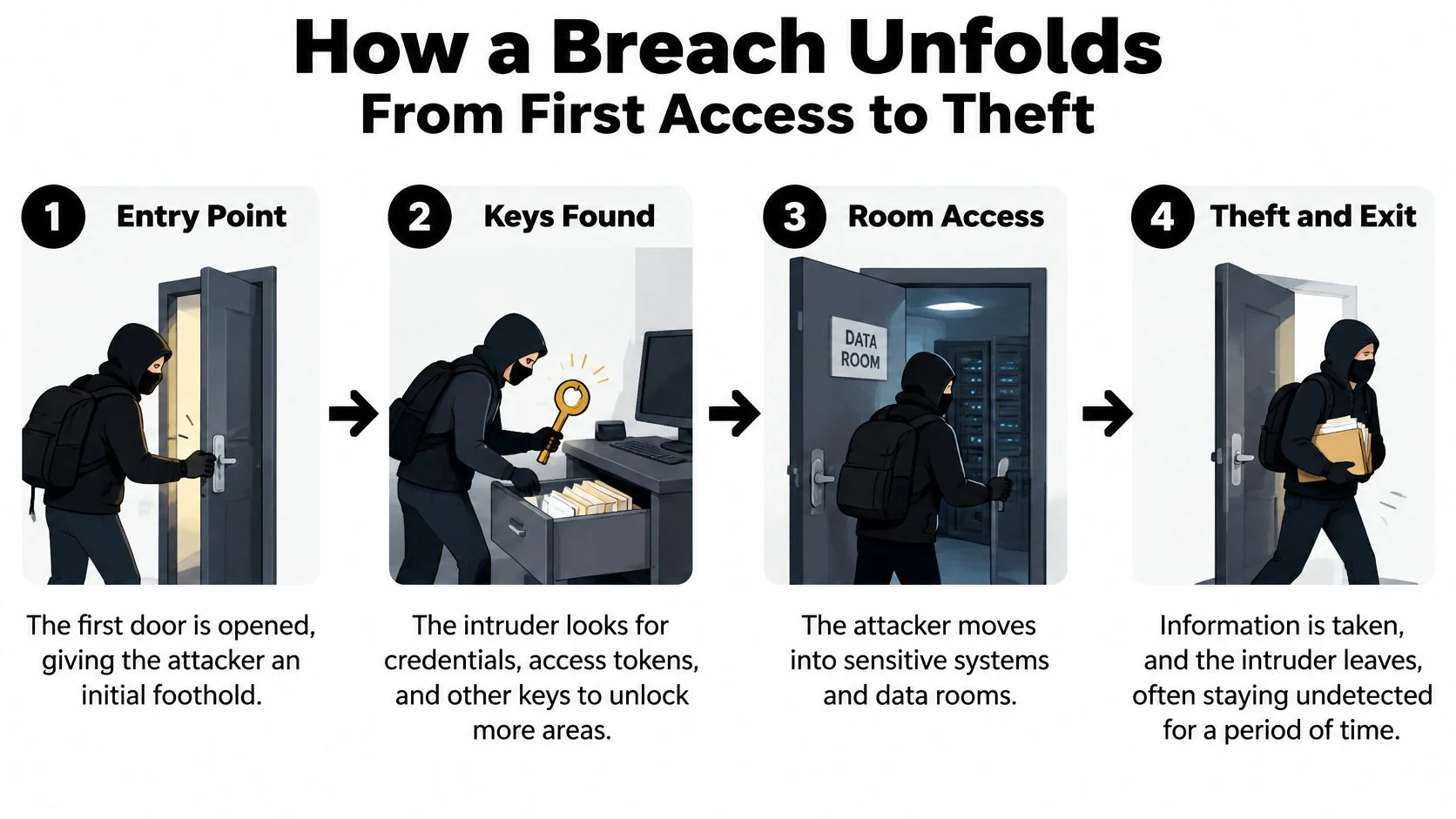
From the entrance to the keys
Say a small recruitment agency gives a contractor access to a shared workspace. An attacker obtains that contractor's login and signs in. This is initial access, not yet proof that every applicant record has been stolen.
A defender could investigate a new device, an unfamiliar location, or activity inconsistent with the contractor's work. Location alone isn't conclusive, since travel and privacy tools can change it, but context can make the event suspicious.
Inside the workspace, the attacker finds a document containing an administrative credential. Using it creates privilege escalation: the intruder now has authority the original account wasn't meant to provide. An unexpected administrator assignment or newly created access token should trigger review.
From internal rooms to the exit
Next comes lateral movement. The attacker uses the expanded access to enter a connected file repository and customer-management application. In this scenario, the weak boundary isn't the original password anymore. It's the ability to move between services without a justified business need.
Finally, the attacker collects applicant documents and exports them. This is collection and exfiltration. Encrypted traffic can protect a transfer from outside observers without making the recipient trustworthy.
| Stage | Warning sign to investigate | Control that can interrupt it |
|---|---|---|
| Initial access | Unrecognized device or unusual sign-in | Phishing-resistant authentication |
| Privilege escalation | Unexpected administrator role | Restricted, approved elevation |
| Lateral movement | Access to unrelated repositories | Separate access boundaries |
| Collection and exfiltration | Unusual bulk downloads or outbound transfers | Export controls and activity alerts |
This worked example follows the progression described in IBM's breach analysis, which explains how phishing-derived access can lead to valid sessions, increased privileges, repository access, and exfiltration.
The useful conclusion is that entry doesn't make theft inevitable. Removing saved administrative credentials, narrowing repository permissions, or stopping an abnormal export can prevent a foothold from becoming a large disclosure.
For a family, the equivalent boundary might separate a child's gaming account from the email account that controls household password resets. For an employer, it might separate a contractor's project folder from personnel records.
How People Open the Door Through Phishing, Passwords and Insiders
A non-malicious human element appeared in 68% of breaches in Verizon's 2024 report, including errors and social engineering, according to Verizon's report announcement. That doesn't mean employees caused every incident through carelessness. It means security needs to account for how people receive messages, approve requests, and share information.
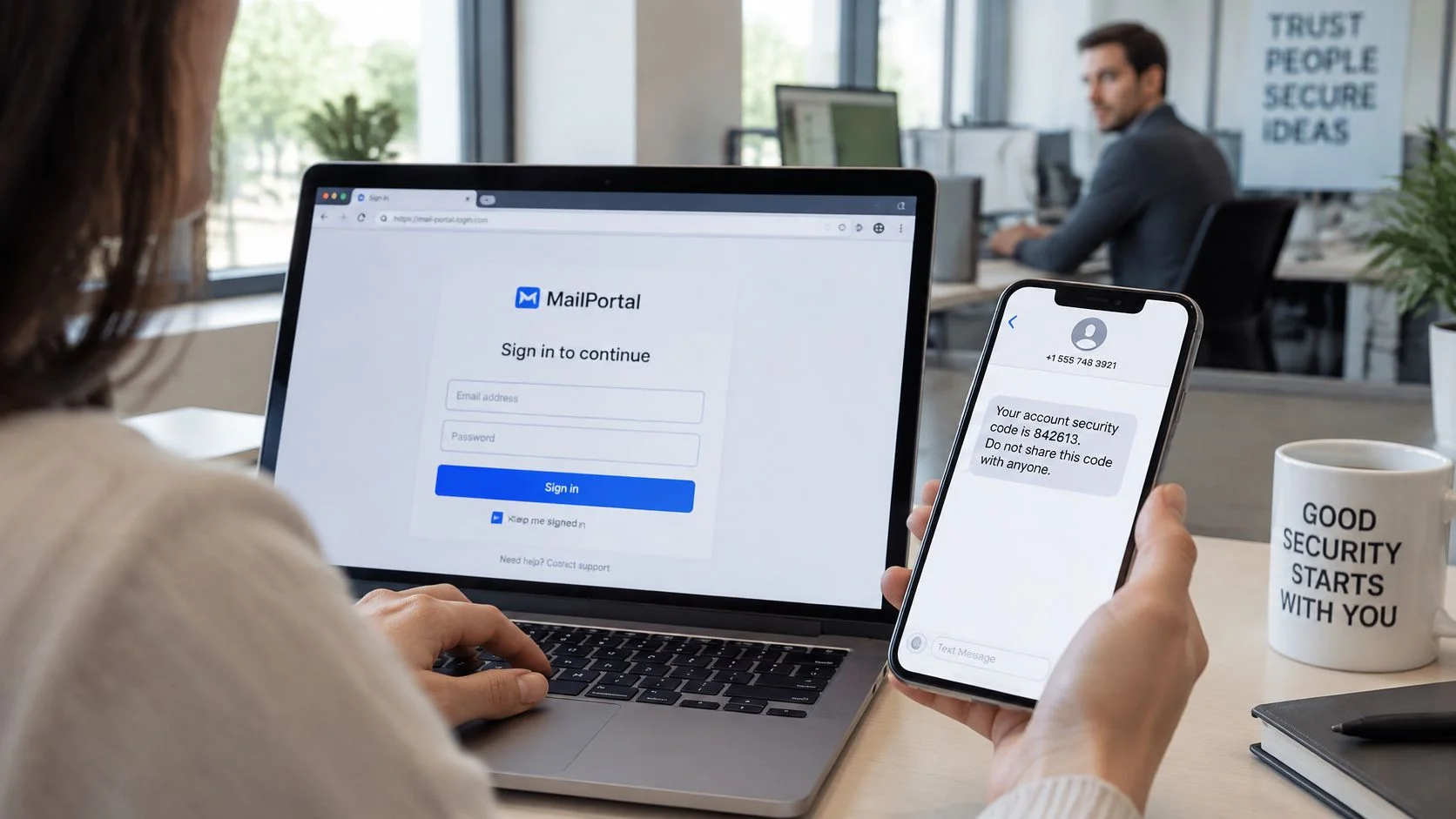
A security code helps only when the person entering it understands what they're authorizing.
Deception and reused access
Phishing can arrive as a fake recruiter's document, a gaming tournament invitation, or a dating-app verification request. A fraudulent page may collect both a password and a temporary code, which an attacker relays before it expires. Open the service through its known app or saved bookmark rather than through the message.
For teams, Computer Daddy's resource to practise recognising phishing with simulations offers a practical training approach. Pair exercises with a reporting process that doesn't punish people for asking whether a message is genuine.
Credential stuffing uses username-password pairs stolen elsewhere. Say someone reuses a gaming password for email. A breach at the gaming service can then provide a candidate login for the more consequential email account.
An infostealer creates a different route by copying saved credentials or session information from an infected device. Changing a password on that same compromised computer isn't a complete remedy. The device also needs investigation and cleanup.
Approval isn't always informed consent
Repeated authentication notifications can pressure someone into approving a request they didn't initiate. Reject the prompt, report it, and verify any supposed support contact through an independent channel.
Use the video alongside a discussion of what a legitimate login request should look like.
An insider can also disclose information deliberately or accidentally. A contractor exporting a customer list without permission is different from an employee choosing the wrong recipient, even if both expose the same records. The human-element statistic doesn't establish how common malicious insiders are, so it shouldn't be used to make that comparison.
Apply these habits:
- Use unique passwords: Store them in a password manager so a stolen login doesn't become a reusable key.
- Choose phishing-resistant login: Prefer passkeys or security keys where supported, rather than assuming every form of multifactor authentication offers equal protection.
- Separate personal and work environments: Avoid mixing workplace access with shared household devices, unofficial downloads, or game modifications.
Our social engineering awareness guide adds context for recognizing manipulation. A public profile or successful dating-app verification isn't proof that a particular message, payment request, or login page is trustworthy.
Misconfigurations, Unpatched Systems and Vendor Access
A cloud folder containing customer documents doesn't need a software exploit to expose information if its owner has made it publicly readable. The configuration itself permits access. Similar problems arise with default database passwords, internet-accessible administration panels, and test environments containing real customer information.
Misconfiguration and exploitation aren't interchangeable. With a misconfiguration, the service may be behaving exactly as configured. With exploitation, an attacker uses a software weakness to do something the service shouldn't permit.
The patching window matters
Verizon's 2025 report found vulnerability exploitation represented 20% of initial access attempts, a 34% increase from the previous year; its small-business snapshot also reports that only about 54% of perimeter-device vulnerabilities were fully remediated, with a median remediation time of 32 days.
That window matters because an internet-facing VPN or firewall is reachable before an attacker has an employee login. Once a fix becomes available, defenders need to identify affected equipment, apply the update, and verify that remediation succeeded. Installing a patch also doesn't establish whether someone exploited the device beforehand.
For a small business without dedicated security staff, ownership is essential. Someone must know which services exist, who maintains them, and what happens when an urgent advisory arrives.
A service without a named owner can remain exposed even when everyone assumes someone else handles updates.
Trusted connections need boundaries
Vendor access creates another operational problem. A contractor's account, a plug-in, or an application integration can retain permissions after its purpose ends.
A vendor compromise doesn't automatically compromise every customer. Its effect depends on what the attacker can reach through each customer relationship. Read-only access to a project folder and administrative access to an entire workspace create very different consequences.
Use a focused maintenance checklist:
- Inventory external services: Include remote access, cloud applications, staging sites, and administrative interfaces.
- Retire unused systems: Remove the service and its associated accounts, credentials, and integrations.
- Set patch deadlines: Prioritize exposed edge devices and actively exploited weaknesses, with an escalation route when updates can't be applied.
- Review vendor access quarterly: Confirm the business owner, necessary permissions, and whether the relationship remains active.
Our supply-chain security guide can help organize that review. The aim isn't to distrust every supplier. It's to make trust specific, limited, and removable.
Real Breaches and the Mistakes Behind Them
The Equifax, Capital One, and Uber incidents illustrate different entry mechanisms, but the analytical question is the same: what did the initial access make reachable? A software flaw, a cloud configuration, and a manipulated approval can all become consequential when internal access is too broad.
Different entrances, related lessons
At Equifax, attackers exploited an unpatched Apache Struts web-framework vulnerability. The important distinction is between the vulnerable web application and the personal information reachable through the compromised environment. Patching the entrance and restricting access behind it address different parts of that problem.
At Capital One, the incident involved a misconfigured web application firewall and access to cloud-stored information. Describing it only as an open cloud folder would miss the role of the web-facing service and its permissions. Cloud reviews need to examine what an application can request, not just whether storage appears private in a dashboard.
At Uber, stolen credentials, repeated authentication prompts, and social engineering were involved in access to internal systems. The lesson isn't to add another approval screen. Staff need a safe way to reject unexpected requests and independently verify anyone claiming to provide IT support.
Three documented breaches and their entry points
| Breach | Entry point | What it exposed | Lesson |
|---|---|---|---|
| Equifax | Unpatched Apache Struts web-framework flaw | Personal information | Patch known vulnerabilities on public systems quickly |
| Capital One | Misconfigured web application firewall | Customer and credit-application information | Review cloud permissions and what web-facing services can reach |
| Uber | Stolen credentials, repeated MFA prompts, and social engineering | Access to internal tools and systems | Treat unexpected approval prompts as a possible attack |
Measure reach, not just entry
These examples shouldn't become a contest over which company made the worst mistake. They support a more useful exercise: trace an ordinary account or public-facing application to the information behind it.
For a job seeker, ask whether a compromised professional profile could support convincing impersonation or expose private correspondence. For a gaming community, ask whether a moderator account can export member information or change recovery settings. For a business, ask whether a web application can access records unrelated to its function.
Our data security breach examples guide provides a place to continue that case-based review.
The practical lesson is containment by design. A defender can't assume every entrance will remain secure forever, but they can reduce what an intruder reaches after entering.
Spotting Exposure Early and Cutting It Down
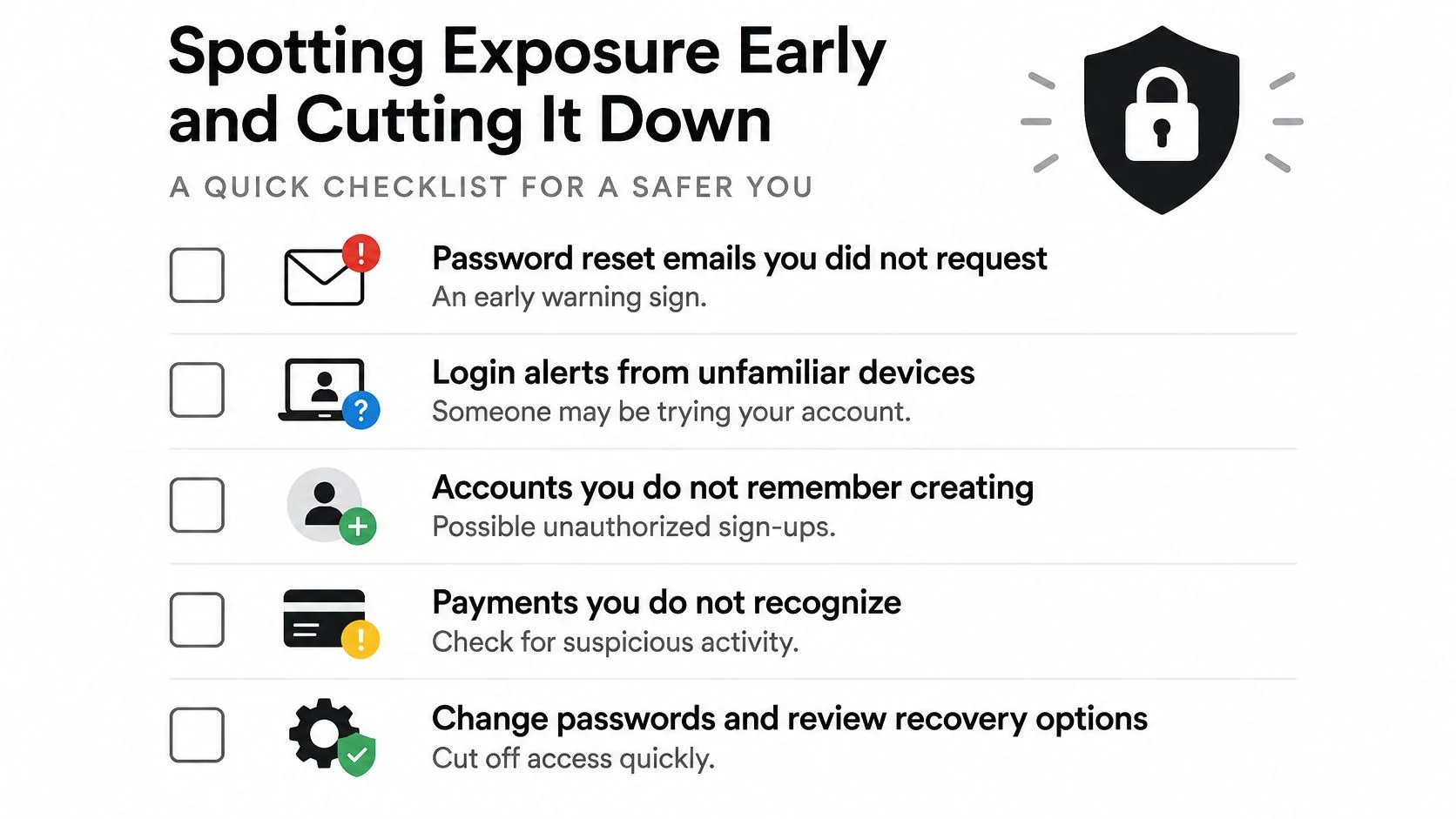
An unexpected password-reset email, an unfamiliar login alert, or a payment you don't recognize deserves investigation. None proves the same thing. A reset message may indicate someone entered your address, while an unknown recovery phone number suggests an unauthorized account change.
Messages apparently sent from your account also need checking. They could reflect mailbox access, a connected application, or impersonation without access to the mailbox itself.
Use this checklist to turn a warning into a specific investigation.
Prioritize the accounts that control other accounts
- Verify recovery settings first: Confirm that recovery addresses and phone numbers belong to you.
- Investigate unfamiliar sessions: Compare devices and activity with your own use rather than relying on location alone.
- Check known breach exposure: Review your email addresses against breach records, recognizing that no match isn't proof of safety.
- Close unnecessary accounts: Save needed records, remove connected applications, and request deletion where appropriate.
- Add ongoing monitoring: Use alerts to identify newly discovered exposure rather than treating a single check as permanent clearance.
We've monitored 1,000+ data breaches at Digital Footprint Check. Continuous monitoring of data breaches and dark web activity alerts users to potential identity theft risks, but an alert still needs account-level investigation.
Match monitoring to the possible harm
For a professional, prioritize email and accounts used to communicate with employers. For a gamer, examine recovery access and linked payment methods. For someone facing romance scams or catfishing, check whether exposed details could help an impersonator sound convincing, but don't treat an online-profile match as definitive identity verification.
Businesses need alerts for unusual downloads, unexpected administrator changes, and activity from dormant vendor accounts. Our cyber-threat detection guide offers a framework for organizing those signals.
Response priority: Protect the account that can reset your other accounts before polishing less consequential profile settings.
Include physical information handling in the review as well. Reworx Recycling's breach prevention guide is a relevant companion when considering equipment and information disposal alongside online exposure.
Your First 72 Hours After a Breach
Treat the first 72 hours as an organizing window, not permission to delay urgent action or a universal legal deadline. Your priorities are to establish scope, stop unauthorized access, and preserve the information needed to investigate.
Take action in order of urgency
-
Confirm what's affected. Use the provider's breach notice and account history to identify the involved services and data, accessing the provider through a trusted route rather than a message link.
-
Replace compromised credentials and end sessions. Change the affected password and any reused versions from a trusted device, then use the service's option to sign out other sessions.
-
Strengthen authentication and remove unauthorized access. Enable phishing-resistant login where available, then inspect registered devices, connected apps, and access tokens for entries you don't recognize.
-
Check recovery and persistence settings. Review recovery addresses, phone numbers, mailbox forwarding, filters, and delegated access so an attacker can't retain control.
-
Protect financial accounts. Examine bank and card activity, report unauthorized transactions through official channels, and consider a credit freeze where your country's credit-reporting system supports one.
-
Notify people who need to act. Contact your bank, employer, or affected contacts when the exposure creates a risk for them, sharing confirmed facts rather than speculative claims.
Businesses need containment and evidence
An organization should also isolate affected systems where appropriate, preserve logs, and involve qualified incident responders. Avoid wiping devices or deleting suspicious accounts before determining what evidence needs preservation.
Assign responsibility for technical containment, customer communication, and legal review. Notification duties depend on the jurisdiction, the information involved, and the incident's circumstances, so the response lead should obtain advice specific to those obligations.
Use our data breach response plan guide to turn those responsibilities into an actionable checklist. Keep a record of what happened, what you changed, and which findings remain uncertain.
Recovery isn't complete merely because you can log in again. Confirm that the unauthorized access route is closed and that connected accounts haven't been affected. Continue reviewing activity while the provider or incident-response team establishes the full scope.
Digital Footprint Check's free Breach Checker checks an email address for known breach exposure, giving you a concrete starting point for reviewing vulnerable accounts. Visit Digital Footprint Check, then use the free breach checker to check your email and prioritize the accounts that need attention today.